Contents 11 sections
- E-Commerce Product Page: What Is It?
- Why Is the Product Page So Important?
- Anatomy of a Product Page That Sells
- How Should a Product Page Look? 15 Key Elements
- How Should a Product Page Look on Mobile?
- Product Page SEO: Being Visible in Search Engines and AI Assistants
- 10 Common Mistakes on Product Pages
- Product Page Checklist
- How Is Product Page Performance Measured?
- Managing Product Pages with Faprika
- Frequently Asked Questions
On an e-commerce site, ads, campaigns, social media posts and search results all lead to the same place: the product page. This is where the visitor decides to buy the product or close the page. That is why the e-commerce product page is the page that actually makes the sale; however beautiful the home page is, if the product page does not answer the customer's questions, the sale does not happen.
This guide explains from start to finish how a product page should look: the anatomy of a product page that sells, the 15 essential elements, what to watch for on mobile, product page SEO, common mistakes and a checklist you can use before publishing the page.
What Is an E-Commerce Product Page?
An e-commerce product page (product detail page) is the page in an online store where a single product's images, name, price, options, description, technical specifications, delivery and return information and customer reviews are shown together, and where the visitor adds the product to the cart.
A category page answers the customer's question "what is there?"; the product page answers "should I buy this?". A good product page gives a convincing answer to four questions:
- What is this product? What is it for, what is it made of, who is it suitable for?
- Will it suit me? Do its size, colour, fit and compatibility meet my needs?
- Can I trust this seller? Is the payment secure, when will the product arrive, what happens if I don't like it?
- Is it worth the price? What do other customers say, what will I pay in total?
Why Is the Product Page So Important?
The product page is both the shop window and the checkout of your e-commerce site. You can see its importance from several angles:
- The purchase decision is made here: Whichever channel the visitor comes from, they press the add-to-cart button on the product page. Every gap on the product page is a direct loss of sales.
- Your ad budget pays off here: Paid ads often send visitors straight to the product page. A weak product page wastes the money you pay for every click.
- Most organic traffic lands here: Customers often search search engines directly by product name, model or feature. The page they see in these searches is a well-prepared product page.
- AI assistants get their information from here: A growing number of users ask AI assistants about products before shopping. These assistants more easily understand pages that state specifications, sizes and usage information clearly, and they can cite them as sources.
- It reduces returns and the customer service load: A product whose size, colour and content are described clearly sets the right expectations. A customer with the right expectations returns less and asks fewer questions.
Anatomy of a Product Page That Sells
Although successful product pages look different from one industry to another, their skeletons are very similar. The customer's eye goes first to the image, then to the product name, rating and price, and then to the options and the add-to-cart button. Delivery and trust information support the decision; the description, specifications, reviews and similar products further down the page wait for the customer who wants to be sure.
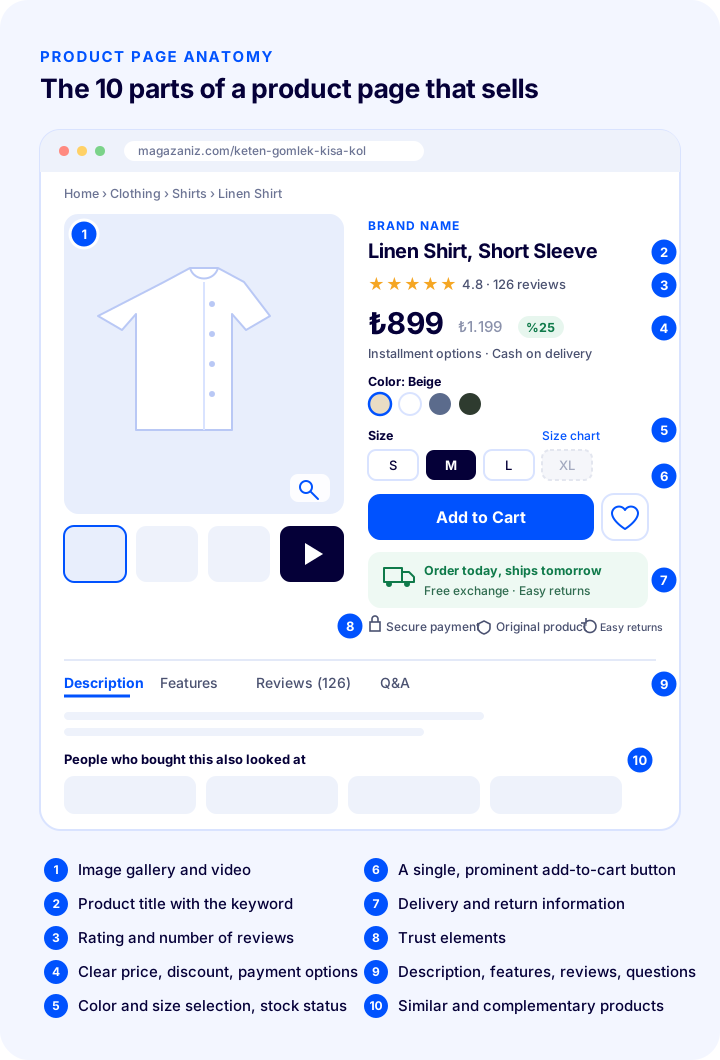
This layout is not a template but a starting point. Below, we explain why each part matters and how to prepare it, one by one.
How Should a Product Page Look? 15 Key Elements
1. A Clear Product Title That Says What You Sell
The product title is the first text that tells both the customer and search engines what the page is about. A good product title includes the product type, its distinguishing feature and, where needed, its brand, model, colour or size. A title close to the words the customer would type into the search box, such as "Linen Shirt, Short Sleeve, Beige" instead of "New Season Amazing Product", is both findable and understandable.
- Put the word that best describes the product (the keyword) at the beginning of the title.
- Do not write the title in capital letters, and avoid unnecessary exclamation marks and symbols.
- Use the same title structure for products in the same category: type, feature, colour, size and so on.
2. An Image Gallery That Almost Lets Customers Hold the Product
In online shopping the customer cannot touch the product; images are their eyes and hands. A single photo leaves most of the questions in the customer's mind unanswered. Prepare a set of images for each product that answers different questions: a main image of the product from the front on a plain background, different angles, a close-up showing texture and material, an image of the product in use, an image that conveys its size and, if possible, a short video.
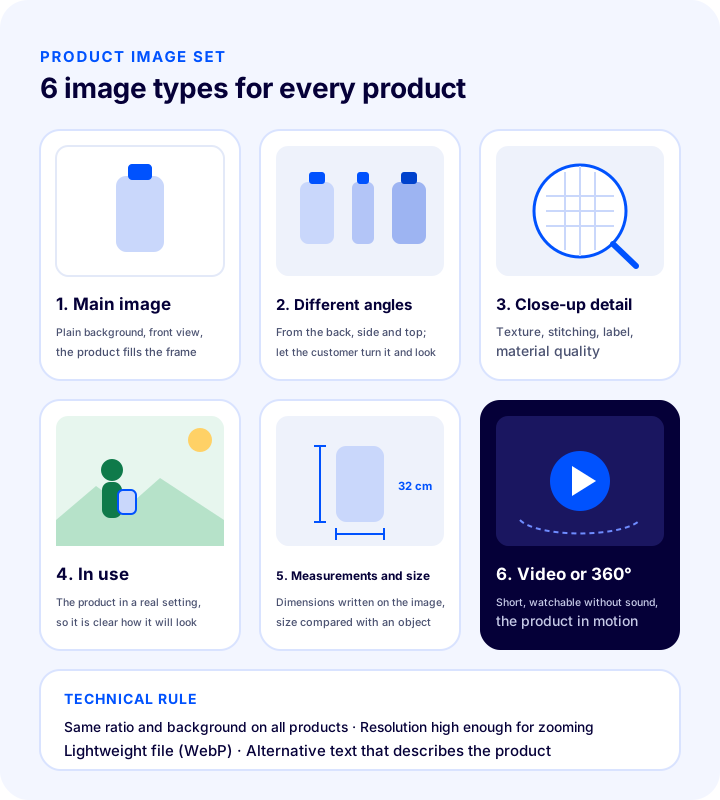
- Consistency: Use the same ratio, the same background and similar lighting across all products; the listing page stays tidy and the shop looks professional.
- Zoom: Images should have a resolution that lets the customer see the texture when they enlarge them.
- Lightness: High resolution should not mean heavy files. Compress the images and serve them in modern formats such as WebP.
- Alternative text: Write a short alt text describing the product for every image; it is needed both for accessibility and for image search.
3. Clear Price, Discount and Payment Options
The price should sit close to the product name and be large enough to read easily. If there is a discount, the old price should be shown crossed out, and the discount rate or amount should be stated clearly. Answer the customer's "what will I pay in total?" question before they reach the cart: instalment options, cash-on-delivery availability and, if any, the free shipping threshold should appear just below the price.
Surprise charges that appear at the cart stage are one of the most common causes of cart abandonment. If there is an extra charge, say so on the product page; do not surprise the customer at the payment step.
Okumanızı öneririzÜcretsiz Kargo Seçeneği Satışlarınızı Artırır mı?4. Easy Variant Selection and Visible Stock Status
For products with options such as colour, size or capacity, the selection step is the most fragile moment of the sale. Show options as buttons or colour swatches that can be selected with a single tap instead of a drop-down list. Showing an out-of-stock option faded instead of hiding it completely lets the customer see that this option of the product exists too.
- If the price, image or delivery time changes according to the selected variant, the page should show this instantly.
- Giving real information such as "Last 3 items" when stock runs low creates urgency; however, counters that do not reflect reality damage trust.
- If the customer tries to add to the cart without selecting an option, show clearly which selection they forgot.
5. Size Chart and Measurement Information
In categories such as clothing, shoes, furniture, home textiles or accessories, the question "will it suit me?" is the biggest obstacle to buying. Place the size chart right next to the selection buttons; write the product's own dimensions (height, width, depth, weight, volume) in units such as centimetres and grams. If possible, state the product's fit ("regular fit", "we recommend sizing up") and the model's measurements. Accurate measurement information is the most effective way to reduce returns caused by size.
6. A Single, Prominent "Add to Cart" Button
The add-to-cart button should be the most prominent action on the page: a colour that stands out from the rest of the page, sufficient size and clear text. Multiple buttons of equal weight (add to cart, buy now, add to favourites, compare) split the customer's attention; show secondary actions more subtly.
- The button should be visible on the first screen without scrolling.
- When a product is added to the cart, tell the customer clearly and offer the options to proceed to payment or continue shopping.
- On mobile, keeping the button in a fixed bar at the bottom of the screen leaves purchase one tap away even on long pages.
7. An Original Product Description That Explains Benefits
The product description should explain what these features give the customer rather than just listing the features. "100% linen" is a feature; "a fabric that breathes in hot weather and keeps you fresh all day" is a benefit. Start the description with a short intro explaining what the product is for, then give the key benefits as bullet points, and finally add usage and care information.
Do not copy the text sent by the manufacturer or supplier as it is. When the same text appears on dozens of sites, search engines cannot find a reason to rank your page higher. A description written in your own sentences, for your own customer, increases both sales and visibility.
Okumanızı öneririzE-Ticaret İçin Ürün Açıklaması Nasıl Yazılır?8. A Scannable Technical Specifications Table
The product description persuades; the specifications table makes comparison easier. Gather information such as material, size, weight, colour, origin, warranty period, compatibility and package contents in a two-column table. Customers scan information in table form quickly, and search engines and AI assistants read it easily. Using the same specification headings for products in the same category also makes filtering and comparison easier.
9. Delivery, Shipping and Return Information
"When will it arrive?" and "What if I don't like it?" are the two questions customers wonder about most after the price. Write the estimated hand-over to the carrier or delivery time, the shipping cost or free shipping condition, and the return and exchange period in short, clear sentences near the add-to-cart button. Link to the relevant page for detailed return conditions.
For pre-order, made-to-order or long-lead-time products, always state the delivery time on the product page. Explaining a delay afterwards is always more expensive than saying it up front.
10. Ratings and Genuine Customer Reviews
Customers trust what other customers say more than what the seller says. Show the average rating and the number of reviews right below the product name, and the full reviews further down the page. Reviews with photos are especially valuable because they show the product in real life.
- Ask customers for a review after orders are delivered; the number of reviews will not grow on its own.
- Do not delete negative reviews; reply politely and with a focus on solutions. A page made up only of five-star reviews does not look credible.
- Have inappropriate or irrelevant reviews approved before they are published.
11. Q&A and Frequently Asked Questions
Questions that customer service receives again and again about the same product are the best indicator of information missing from the product page. Add these questions and their answers to the product page as a short “Frequently Asked Questions” section. Headings written as questions followed by clear answers are the type of content that search engines and AI assistants quote most easily.
12. Trust Elements
A first-time customer hesitates if they do not know the seller, even when they like the product. Secure payment information, a returns and exchange guarantee, an emphasis on original products, accessible customer service and company details reduce this hesitation. Show this information with small icons and short texts near the add-to-cart button; long paragraphs are not needed.
13. “Notify Me When Available” for Out-of-Stock Products
Removing the page when a product runs out of stock costs you both the customer and search visibility. Keep the page live, state the stock status clearly and offer customers a “Notify Me When Available” option. When the product is back in stock, customers who already wanted it are notified automatically, which lets you make the most of one of the warmest sales opportunities. If a product is permanently discontinued, instead of deleting the page, set up a permanent redirect (301) to the closest product or category.
14. Similar, Complementary and Outfit Products
A product page is an opportunity not only to sell that product but also to guide the customer to the right product. If the customer does not like the product, offer alternatives with “similar products”; if they do, grow their cart with “complementary products”: a screen protector next to a phone case, trousers next to a shirt, coffee next to a coffee machine. Letting customers add products that are used together to the cart in one go is the most natural way to raise the average cart value.
15. A Fast-Loading Page
All of these elements only work if the page opens quickly. A customer will close a slow product page before its image has even loaded. Compress images and load those below the screen only when needed, avoid unnecessary add-ons and scripts, and choose an infrastructure that uses a content delivery network (CDN). Page speed is part of both the user experience and search engine ranking.
Okumanızı öneririzE-Ticarette Site Hızı Neden Önemlidir?What Should a Product Page Look Like on Mobile?
Most e-commerce visits now come from phones. The image and information areas that sit side by side on desktop stack on top of each other on a phone, which makes the page longer and pushes important information down. The goal of a mobile product page is for the customer to be able to decide with one hand and on the first screen.
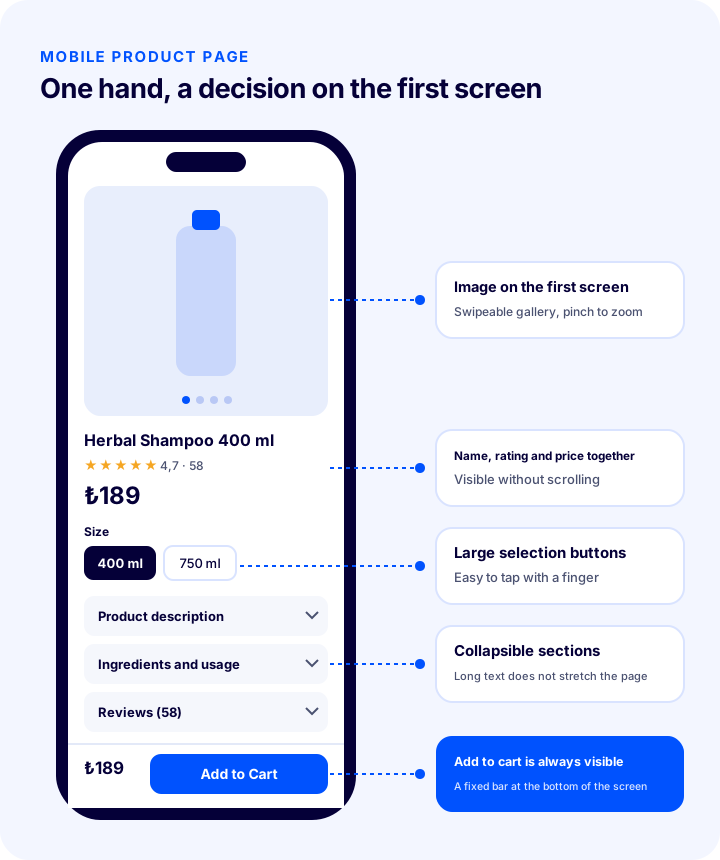
- Image on the first screen: The gallery should be swipeable and zoomable with two fingers.
- Name, rating and price together: The customer should see what the product is, what rating it has and its price without scrolling.
- Finger-friendly buttons: Colour and size options should be large enough that no one accidentally taps another option.
- Collapsible sections: If the description, specifications, reviews and returns information are presented as expandable headings, the page does not grow unnecessarily long.
- Sticky purchase bar: If the price and the add-to-cart button stay fixed at the bottom of the screen, the customer can buy with a single tap wherever they are on the page.
Product Page SEO: Being Visible in Search Engines and AI Assistants
Even the best product page cannot sell if it cannot be found. Product page SEO helps the page rank high for the right searches and look eye-catching in search results. The same care also helps AI assistants understand and recommend your product correctly.
| Field | What should it look like? | Example |
|---|---|---|
| Page address (URL) | Short, free of special characters, made up of words that describe the product | /linen-shirt-short-sleeve-beige |
| Page title (title) | Keyword first, around 60 characters, brand at the end | Linen Shirt Short Sleeve Beige | Store Name |
| Meta description | Around 150–160 characters, the product's benefit and a call to action | Breathable linen fabric, comfortable fit. Ships tomorrow, easy returns. |
| H1 heading | One per page, identical or very close to the product name | Linen Shirt, Short Sleeve, Beige |
| Image alt text | Describes what is in the image; the keyword appears naturally | Front view of a beige linen short-sleeve shirt |
| Structured data | Product name, image, price, currency, stock status, rating and review count are marked up | Product, Offer, AggregateRating, BreadcrumbList |
| Canonical tag | Similar addresses created by colour or filters point to the main product page | All colour addresses point to a single product page |
| Internal links | The product receives links from its category, related blog posts and similar products | Breadcrumb and “similar products” links |
Structured data allows your product to appear in search results with its price, stock status and star rating; this rich appearance increases the likelihood of clicks. Breadcrumbs (the page path) both keep customers from getting lost on the site and explain your site's structure to search engines.
Okumanızı öneririzAnahtar Kelime Nedir ve Nasıl Bulunur? Kapsamlı SEO Rehberi 202610 Common Mistakes on Product Pages
- A single, small photo: When customers cannot see the product, they do not buy it, or they buy it with the wrong expectations and return it.
- Copying the supplier's text: When the same description appears on dozens of sites, your page cannot stand out in search results.
- Leaving out size information: The question “Will it fit?” goes unanswered, and size-related returns increase.
- Hiding the shipping fee and delivery time: A surprise at the payment step turns into an abandoned cart.
- Buttons competing with each other: When everything is emphasised, nothing is emphasised.
- Deleting the page of an out-of-stock product: Both search visibility and the customers waiting for the product are lost.
- Fake urgency: Countdowns that never end and false “last item” warnings damage trust.
- A page with no reviews or only positive reviews: Credibility drops, and the customer goes elsewhere to do their research.
- Not testing the mobile view: A page that looks fine on desktop may overflow on a phone, and buttons may be too small for a finger.
- Heavy images and unnecessary scripts: A slow page is closed before the customer has seen the product.
Product Page Checklist
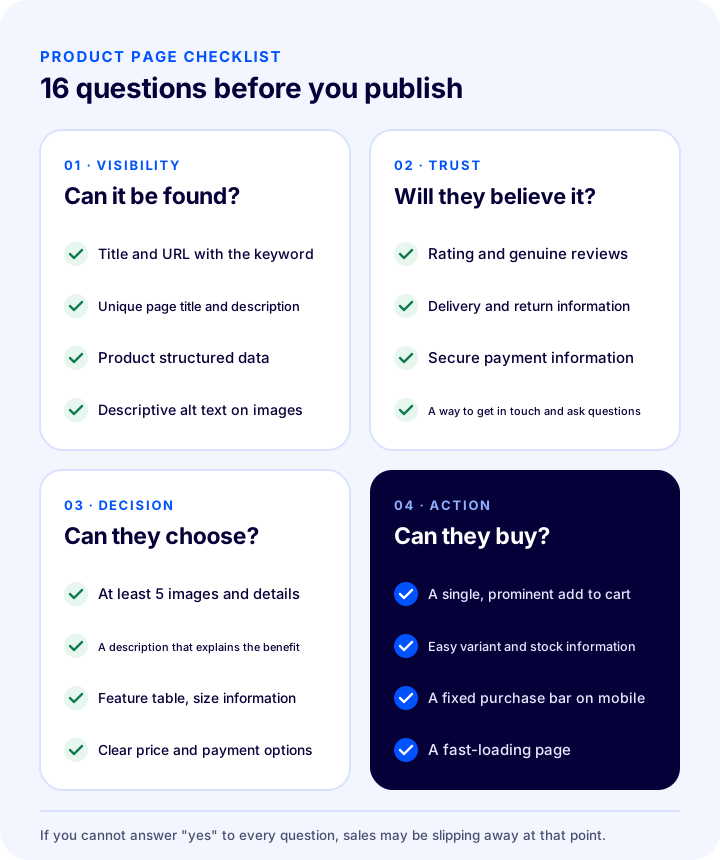
You can use the 16 questions below when publishing a new product or reviewing your existing product pages. The questions are grouped by the four stages a customer goes through on a product page: finding the page, trusting the seller, making a decision and buying.
| Stage | What to check |
|---|---|
| Visibility: Can it be found? | Title and address with a keyword; unique page title and meta description; product structured data; descriptive alt text on images |
| Trust: Will they believe it? | Rating and genuine reviews; delivery and returns information; secure payment information; a way to get in touch and ask questions |
| Decision: Can they choose? | At least five images and close-up details; a description that explains the benefits; a specifications table and size information; clear price and payment options |
| Action: Can they buy? | A single, prominent add-to-cart button; easy variant selection and stock information; sticky purchase bar on mobile; a fast-loading page |
How Is Product Page Performance Measured?
You can only tell whether the changes you make to a product page work by measuring. Make changes one at a time and monitor the indicators below for a while after each one:
| Indicator | What does it tell you? |
|---|---|
| Add-to-cart rate | How many of the people who see the page add the product to the cart; the persuasive power of the product page |
| Product page conversion rate | How many of the people who see the page complete the order |
| Bounce rate | Whether visitors leave without finding what they were looking for on the page |
| Organic impressions and clicks | How often the page is seen and clicked in search results |
| Return reasons | Whether the information on the page sets expectations correctly (“didn't fit”, “not like the image”) |
| Questions received about the product | The information that is missing from the page |
Product Page Management with Faprika
On the Faprika e-commerce infrastructure, you can set up most of the elements described in this guide from the admin panel, without writing code:
- Variant management: You can define options such as colour and size as additional options, enter a separate price and a different delivery date for a variant, and show the product's other colours on the product detail page.
- Images and page layout: You can set the page layout with the product list and detail settings and upload product images in bulk; the content delivery network (CDN) helps images load quickly.
- Review and rating management: You can manage customer reviews and ratings with approved or unapproved publishing options.
- Similar and complementary products: You can define related, cross-sell, complementary and checkout-opportunity products; show recently viewed and similar products; and sell outfit and series products.
- Notify me when available and price tracking: Customers can add a product to their favourites, comparison or price-tracking list, and can leave a notify-when-available request for an out-of-stock product.
- SEO tools: You can manage canonical tags, title tags, robots and sitemaps; use rich snippets and breadcrumb support; bulk-update SEO and meta information automatically; and manage the addresses of discontinued products with the 301, 302 and 410 redirect panel.
- Campaigns: You can set up campaigns such as product-specific discounts, a discount on the second item, buy X pay for Y, and free shipping above a certain amount in the campaign module.
You can see which features are included in each plan on the e-commerce plans page, and explore other tools to strengthen your product pages on the add-ons page.
Frequently Asked Questions
What should an e-commerce product page look like?
A good product page has a clear title that carries the keyword, images shot from different angles, transparent pricing and payment options, easy variant selection, a description that explains benefits, a specifications table, delivery and return information, customer reviews and a prominent add-to-cart button; it also loads quickly and is easy to use on a phone.
How many images should a product page have?
There is no fixed number, but at least five images (a main image, different angles, a close-up detail, an in-use shot and a size image) answer the customer's basic questions. If possible, adding a short product video describes the product even better.
How long should a product description be?
The description should be long enough to explain the product. A short intro paragraph, key benefits in bullet points, usage and care information and a separate specifications table are enough for most products. What matters is not length but answering the customer's questions.
Should the page of an out-of-stock product be deleted?
If the product will be back in stock, the page should not be deleted; state the stock status clearly and offer a "notify me when available" option. If the product is permanently discontinued, the page should be redirected permanently (301) to the closest product or category.
What are the most important steps for product page SEO?
The most important steps are a short URL that contains the keyword, a unique page title and meta description, a single H1 on the page, a unique product description, alt text on images, product structured data (price, stock, rating), a canonical tag for similar URLs and a page that loads fast.
How can the product page conversion rate be increased?
Strengthening the images and description, making price and shipping information clearer, increasing the number of reviews, making the add-to-cart button more prominent, simplifying the mobile layout and improving page speed all raise the conversion rate. Making changes one at a time and tracking the add-to-cart rate shows which step worked.