Contents 21 sections
- What Is Faprika?
- What Is Faprika Used For?
- What Are Faprika's Key Features?
- How Does an Order Move Through Faprika?
- How Are SEO and Search Engine Visibility Managed in Faprika?
- What Does Faprika Offer for Customer Experience?
- How Are Security, Speed and Support Provided in Faprika?
- Who Is Faprika For?
- How Do You Do E-Export with Faprika?
- How Do You Manage Warehouse and Store Sales with Faprika?
- What Are Roket and FaprikAI?
- What Are Faprika's Integrations and Add-ons?
- How Do You Use Faprika for Wholesale (B2B) and Mobile App?
- What Is Faprika Private?
- When Is Faprika the Right Choice?
- How Do You Choose a Faprika Plan?
- How Do You Get Started with Faprika?
- What Mistakes Are Common When Choosing an E-Commerce Infrastructure?
- Quick Checklist for Choosing Faprika
- Conclusion: Why Choose Faprika?
- Frequently Asked Questions
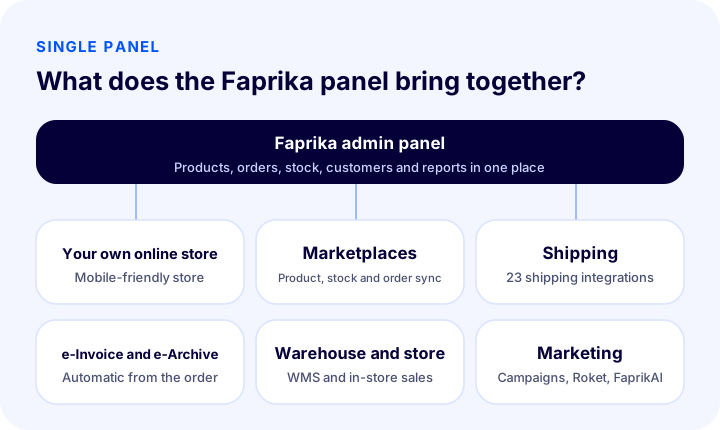
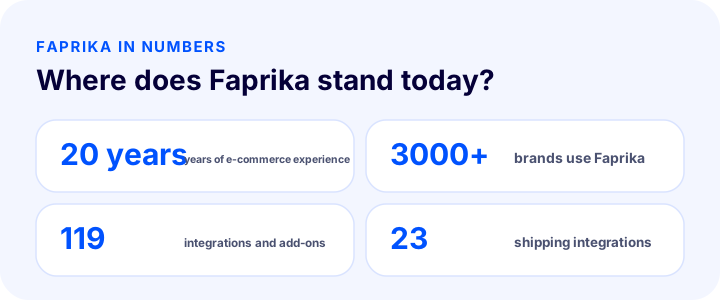
Faprika is a cloud-based e-commerce and e-export infrastructure built for businesses that want to sell products online. It lets a business set up its own e-commerce site, manage its marketplace sales, and run the whole process from order to shipping and e-Invoice from a single panel. Faprika has been developing e-commerce software for 20 years and is used by more than 3000 brands.
This guide explains what Faprika is, what it is used for, which features and integrations it offers, who it suits, how it makes selling abroad easier, and how to get started with Faprika. Our aim is to help a business looking for an e-commerce infrastructure decide clearly whether Faprika is the right solution for it.
What Is Faprika?
Faprika is e-commerce software that offers everything a business needs to sell online under one roof. It brings together the mobile-friendly e-commerce site your customers see and the admin panel you use. Products, stock, orders, payments, shipping, invoices, campaigns and reports are all managed in the same place.
With its user-friendly interface and ready-made integrations, Faprika adapts to different scales, from a small business's first site to the operations of a large brand with several warehouses and channels. Ready-made plans are enough for most businesses; if a very specific workflow is needed, custom software can be developed for the project.
What Is Faprika Used For?
Faprika automates the manual work of e-commerce and reduces errors. The moment an order arrives, stock is synced, the e-Invoice is issued, the shipping barcode is produced and the tracking number is sent to the customer; you only watch the result.
| Task | Without Faprika | With Faprika |
|---|---|---|
| Products and stock | Entered separately for each sales channel | Managed from one panel, reflected on channels |
| Order | Logging in to each channel's panel one by one | Orders from all channels land on one screen |
| Shipping | Barcode and tracking entered by hand | Barcode and tracking are automatic with shipping integration |
| Invoice | A manual invoice for every order | e-Invoice and e-Archive automatic from the panel |
| Warehouse | Paper lists and manual counting | Smartphone picking, shelves and counting |
| Marketing | Campaigns run in scattered places | Coupons, campaigns and automations in the panel |
| Report | Data in different places | Sales, product and profit reports in one place |
Is Faprika e-commerce software, an infrastructure or a plan?
In everyday speech these three terms are mostly used to mean the same thing. Faprika is e-commerce software because it provides the store and the admin panel; it is an e-commerce infrastructure because it brings marketplaces, shipping, payment and invoicing systems together on the same foundation; and a plan is the way of renting this software according to your needs. To learn the concepts in detail, see the article what is e-commerce software.
Faprika's most distinctive difference is that it brings all of these jobs, not just some of them, into the same panel. Because it needs no separate subscription, separate login or separate team knowledge for each system, the complexity of operations does not grow at the same pace as the business.
What Are Faprika's Key Features?
Faprika's features fall into six main groups: store, marketplaces, orders and shipping, payment and invoicing, marketing and reports. Their scope varies by plan; details are on the e-commerce plans page.
1. A ready-made, mobile-friendly e-commerce site
The site you build with Faprika is mobile-friendly, runs over a secure connection (SSL) and is backed up. You can choose from many ready-made concept themes and adapt them to your brand. You can enter products one by one, or upload hundreds of products and their images in bulk within minutes using a spreadsheet (Excel).
2. Marketplace integrations
You keep products, stock, prices and orders in sync with marketplaces. This way, when a product sells on one channel its stock drops on the others too, which reduces the risk of selling the same item twice. Which marketplaces are included in which plan varies by plan; the current scope is on the marketplace integration page.
3. Shipping, orders and e-Invoice
Faprika is integrated with 23 carriers; barcode and tracking become automatic. Features such as choosing the right carrier by region and order verification are in higher plans. e-Invoice and e-Archive are issued automatically from the order, and invoice notification for marketplace orders runs in the same panel.
4. Payment methods
Besides basic methods such as credit card, bank transfer and cash on delivery, virtual POS integrations of many banks and payment providers are ready. Virtual POS setups are explained step by step on the add-on pages.
5. Campaigns and marketing
Unlimited campaign setups are possible: you can build scenarios such as free shipping over a certain amount, a discount on the second item, or buy one get one free. Modules such as coupons, gift cards and point systems, dealer-specific pricing and bundle sales are also available. On the advertising side, the integrations needed for search, social networks and conversion tracking are ready.
6. Reports
Daily, weekly and monthly sales summaries, turnover and net sales, profit and loss, and product and stock movement reports are in the panel. By seeing which product, which channel and which campaign earns you money, you can base your decisions on data.
How Does an Order Move Through Faprika?
When an order arrives in Faprika, the process largely moves on its own: the order lands in the panel, stock is synced across all channels, payment and approval are checked, the e-Invoice is issued, the shipping barcode is produced and the tracking number is sent to the customer. You manage only the exceptions: returns, exchanges or problem orders.
- Order received: Whether it comes from your own site, marketplaces or the in-store sales screen, the order is collected in a single list.
- Stock is synced: The stock of the sold product is updated on the other channels too; stoksuz satış if it is turned on, it works according to these rules.
- Verification and preparation: If needed, the customer's confirmation is obtained through the order verification module; picking and packing start in the warehouse.
- Invoice and shipping: The e-Invoice or e-Archive is issued, a shipment is created with the chosen carrier and the tracking number is recorded on the order.
- The customer is informed and reports are generated: The customer sees the order status; sales, profit and stock reports update automatically.
How Are SEO and Search Engine Visibility Managed in Faprika?
Faprika lets you manage from the panel the technical settings needed to increase search engine visibility. These settings are the foundation of an e-commerce site earning organic traffic, and their scope may vary by plan.
- Canonical, title tags, robots and sitemap: You manage how pages are presented to search engines.
- Bulk meta information updates: You update the titles and descriptions of hundreds of products in bulk rather than one by one.
- Redirect panel: You manage 301, 302 and 410 redirects and URL records; when an address changes you do not lose traffic.
- SEO reports: You monitor how well pages perform.
- Blog: You can publish a blog to turn visitors who reach content on the topic they are searching for into customers.
To learn the basics of search engine optimization in e-commerce, you can reach our e-commerce guides from the blog page.
What Does Faprika Offer for Customer Experience?
Faprika's store includes features that reduce shopping friction to turn visitors into customers. The easier it is for the customer to place an order, the higher conversion goes.
- Guest checkout and quick sign-up: Customers can order without dealing with long forms; signing in with a social account is also possible.
- Product reviews and ratings: You build social proof with approved or unapproved review management.
- Variant management: You define options such as size and color, together with price and delivery date differences.
- Bundle and series product sales: You offer products that make sense to buy together in a single cart.
- Let my friend pay: A customer can create a cart list and ask someone else to pay.
- Cart reminders and back-in-stock alerts: You automatically notify those who left shopping unfinished and those waiting for a sold-out product (in higher plans).
- Smart filtering: Customers filter by stock status and reach the product they are looking for faster.
How Are Security, Speed and Support Provided in Faprika?
In Faprika, security, speed and support are a standard part of the plans. Your store runs over a secure connection (SSL), is backed up regularly and maintenance is carried out by the team; in higher plans, a content delivery network (CDN) makes pages load faster.
- SSL security certificate and backup: Customer data and payment are carried over a secure connection.
- Cookie consent window: The window that asks visitors for cookie consent is included in all plans.
- Phone and ticket support: Technical support is available by phone or ticket; you can also communicate with your customers through the live support module.
- Help and training content: The guides and training videos in the knowledge base help your team get used to the panel quickly.
Who Is Faprika Suitable For?
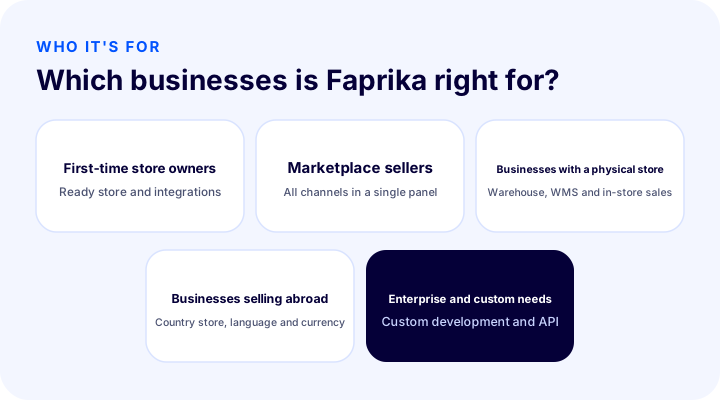
Faprika is designed for businesses of every size that sell online or want to start. Which business benefits most from which solution can be summarized as follows.
- Those launching their first e-commerce site: They can start selling without technical knowledge, thanks to the ready-made store and the payment, shipping and invoicing integrations.
- Those selling on marketplaces: They manage their products, stock and orders in a single panel and do not waste time in each marketplace's separate panel.
- Those with a physical store or warehouse: The store sales module, multi-warehouse and warehouse management (WMS) keep stock accurate at every point.
- Those who want to sell abroad: They start e-export with country stores and language and currency management.
- Corporate businesses and those with special needs: They connect with their own systems through project-specific software and the API.
How to Do E-Export with Faprika
With Faprika, e-export works by offering customers abroad a store in their own language and currency. You can open a separate store for a country or region and apply different prices, shipping and design in each country.
- Unlimited languages and currencies: You can show your store in the customer's language and currency.
- Country-based price multiplier: You set the product price per country as a percentage or an amount.
- Central bank rate: The exchange rate can be updated automatically or kept fixed.
- Country detection: The visitor's country is detected and the suitable store is shown.
- International marketplaces: Integrations are available for sending products to international marketplaces.
On e-export: to learn more about the concept and its steps, see our e-ihracat nedir article, and for Faprika's e-export module, see the e-export page.
How to Manage Warehouse and Store Sales with Faprika
Faprika also connects order preparation and physical store sales to the same stock data. This way, stock in the warehouse, in the store and online never drifts apart.
- Warehouse management (WMS): It offers picking with a smartphone, shelf placement, counting and shelf stock reports; an expensive handheld terminal is not required. For details, see the What is WMS article.
- Multi-warehouse: You track stock separately by warehouse and store (in higher plans).
- Store sales module: In the store, you scan barcodes with a phone, check stock and complete the sale instantly.
What Are Roket and FaprikAI?
Roket is a marketing automation that automatically sends the right message to the right customer; FaprikAI is an AI-powered service that manages ads, designs storefronts and describes products. Both work inside the Faprika panel and are added as extra modules; in a project-specific solution they can be included in the plan.
For more information, see the Roket marketing automation and FaprikAI pages.
What Are Faprika's Integrations and Add-ons?
Faprika's range of add-ons and integrations consists of 119 items, grouped into marketplace, shipping and logistics, payment, accounting and ERP, and custom module groups. A product, stock and order flow can be set up with your accounting and ERP software. You can browse the full list on the add-ons page.
How to Use Faprika for Wholesale (B2B) and Mobile Apps
Besides retail, Faprika lets you run wholesale through the same store. You can define special prices and user groups for your dealers and manage dealership settings from the panel. This way, retail customers and dealers see their own prices on the same site; you do not need to set up a second store.
If you want to offer your store as an app on phones, an iOS and Android mobile app option is also available. The Faprika team handles publishing the app to the stores; your customers can also receive order status notifications through the app. The mobile app is included in higher plans.
What Is Faprika Private?
Faprika Private is e-commerce software developed specifically for your business. It is designed for workflows that ready-made plans do not cover: solutions such as unlimited warehouse and store locations, fully custom developments, omnichannel and store distribution automation, and corporate KPI and profit/loss dashboards fall within its scope. Extra modules such as Roket, FaprikAI and the store sales module can also be included in the project. The price is set by quote according to your needs; for details, see the Faprika Private page.
When Is Faprika the Right Choice?
Faprika creates the most value for businesses that sell on multiple channels, want to automate operations and plan to grow. If several of the situations below apply to you, it makes sense to consider Faprika.
- Your orders are scattered across several panels and you have stock inconsistencies.
- You still manage invoices, shipping and stock by hand.
- You sell on marketplaces and also want to set up your own branded site.
- You have a physical store and a warehouse and want to see stock in one place.
- You are considering selling abroad and need language and currency management.
- You want to set up an automatic data flow with your own systems (ERP, accounting).
Even if your sales are still very small, or you are starting on a single channel with a very limited product range, Faprika's starter plans can grow with you; as your needs increase, you can move up to a higher plan. What matters is to take into account today's needs as they are, as well as next year's.
How to Choose Faprika Plans
Faprika plans are tiered, from small businesses that want to set up their own site to large multi-channel, multi-warehouse brands, and on to project-specific software. A higher plan includes the features of the one below it and usually adds options such as extra marketplaces, a mobile app, multi-warehouse, e-export and custom development.
To choose the right plan, answer these questions:
- On how many marketplaces and in which countries will you sell?
- Do you have more than one warehouse or physical store?
- Do you need features such as a mobile app, order verification or regional shipping?
- Do you need to connect with your own systems (ERP, CRM)?
- How much of marketing automation and ad management do you want to bring into the panel?
You can find the current plans, feature comparisons and prices on the e-commerce plans page. If you are undecided, request a demo; our expert will recommend a plan based on your store.
How to Get Started with Faprika
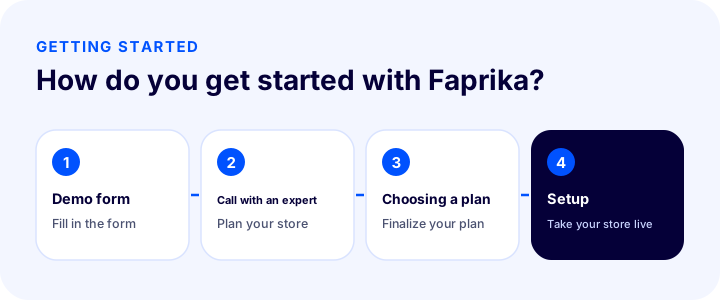
To get started with Faprika, simply fill in the demo form. Our expert calls you and you plan your store together; in the meeting you clarify the suitable plan and terms, then your store is set up and goes live.
What Are Common Mistakes When Choosing an E-Commerce Platform?
- Looking only at the monthly fee: Calculate the total annual cost, including setup, add-ons, commissions and support expenses.
- Choosing for today's needs without considering growth: If you have marketplace, warehouse or international plans, assess them today; changing platforms can affect search engine visibility.
- Thinking about integrations later: Ask from the start whether payment, shipping, e-Invoice and accounting connections are ready.
- Overlooking support and training: Phone support, a help center and training content help your team speed up.
- Skipping the demo: Deciding without using the software makes you notice, too late, the gaps that were not mentioned in the presentation.
Quick Checklist for Choosing Faprika
| Question | Status in Faprika |
|---|---|
| Is there a ready-made, mobile-friendly store? | Yes; it comes with concept themes |
| Is there a marketplace integration? | Yes; the scope varies by plan |
| Is there a shipping integration? | Yes; 23 carriers |
| Are there e-Invoice and e-Archive? | Yes; automatic from the order |
| Are there warehouse management and store sales? | Yes; WMS and the store sales module |
| Can you sell abroad? | Yes; country store, language and currency |
| Can project-specific software be built? | Yes; Faprika Private |
| Is there phone support? | Yes |
Conclusion: Why Choose Faprika?
Faprika is an e-commerce platform that brings together the scattered tasks of e-commerce in a single panel, rests on 20 years of experience and adapts to businesses of every size. Because the ready-made store, marketplace and shipping integrations, e-Invoice, warehouse management, e-export and marketing automation come together, your team focuses on sales and customers instead of repetitive work. You can describe your needs and request a demo to see together how Faprika fits your store.
Frequently Asked Questions
What is Faprika?
Faprika is a cloud-based e-commerce and e-export platform that lets businesses set up their own e-commerce site, manage their marketplace sales and run order, shipping and e-Invoice processes from a single panel. It has been developed for 20 years and is used by more than 3000 brands.
Who is Faprika for?
It suits businesses of every size, from those launching their first e-commerce site to marketplace sellers, businesses with a physical store, businesses selling abroad and corporate brands that want project-specific software.
Can you sell abroad with Faprika?
Yes. Faprika supports setting up an e-export store with unlimited languages and currencies, a country-based price multiplier, central bank rates and country detection.
Which integrations does Faprika have?
There are 119 integrations and add-ons covering marketplaces, shipping and logistics, payment, accounting and ERP, plus special modules; it is integrated with 23 carriers. The current list is on the add-ons page.
How do you choose a Faprika plan?
It depends on the number of channels and countries you will sell in, your warehouse and store setup, and your need for a mobile app and custom integrations. If you are unsure, request a demo; our expert will recommend a plan for your store.
How do you get started with Faprika?
You fill in the demo form, our expert calls you and you plan your store together; once the plan and terms are settled, your store is set up and taken live.