
Contents 9 sections
- What Is an Amazon Seller Account?
- Who Can Sell on Amazon?
- What Do You Need to Open an Amazon Seller Account?
- How to Open an Amazon Seller Account Step by Step?
- Why Is an Amazon Seller Application Rejected or Delayed?
- Checklist Before Your Amazon Application
- What to Do After You Start Selling on Amazon?
- How Do You Manage Your Amazon Store with Faprika?
- Frequently Asked Questions
The first step to selling on Amazon is a seller account; to list products, receive orders and get paid, this account must first be opened and approved by Amazon. The application is done entirely online but consists of many stages, from business information to identity verification, and even a small mismatch can delay approval.
In this guide we explain the Amazon seller account opening process in eleven steps, based on the official seller account creation guide published by Amazon Turkey for sellers: you will find which information and documents to prepare, what to watch for on each screen, how identity and bank verification work, and why an application can be rejected.
What Is an Amazon Seller Account?
An Amazon seller account is the account a business opens to sell products on Amazon's marketplace. The account is managed through the seller panel called Seller Central; product listing, stock, pricing, order and payment operations are done from this panel.
A seller account is different from the customer account used for shopping. A customer account belongs to a person; a seller account is opened on behalf of a business and verified with the business's tax, trade registry and bank details. According to Amazon Turkey's guide, individuals without legal personality cannot sell on Amazon.com.tr; the application is always made on behalf of a business.
Who Can Sell on Amazon?
During registration, one of five business types is selected: tradesmen and craftsmen, sole proprietorship, commercial company, state-owned business and publicly traded business.
| Business type | In brief |
|---|---|
| Tradesmen and craftsmen | Professionals and craftspeople whose economic activity relies on their own labor together with their capital, taxed under the simple procedure |
| Sole proprietorship | A company type that can be established by an individual, where the owners' liability is unlimited |
| Commercial company | A company whose capital belongs entirely or mostly to private persons |
| State-owned business | A business owned by public legal entities |
| Publicly traded business | A company whose shares have been wholly or partly offered to the public |
Merchants registered with a chamber of commerce must enter a MERSİS number in the application; tradesmen registered with a chamber of tradesmen are exempt from this requirement.
If you have not yet decided which company type to start e-commerce with, you need to complete the company formation before the Amazon application; a tax certificate and tax number are required in the application.
Okumanızı öneririzE-Ticaret İçin Hangi Şirket Kurulmalı?What Do You Need to Open an Amazon Seller Account?
To open an Amazon seller account you need the business's official information, the primary contact's ID and address information, a credit or bank card and bank account information. This information is entered in the panel and documents are uploaded digitally; no printed or wet-signed document is sent.
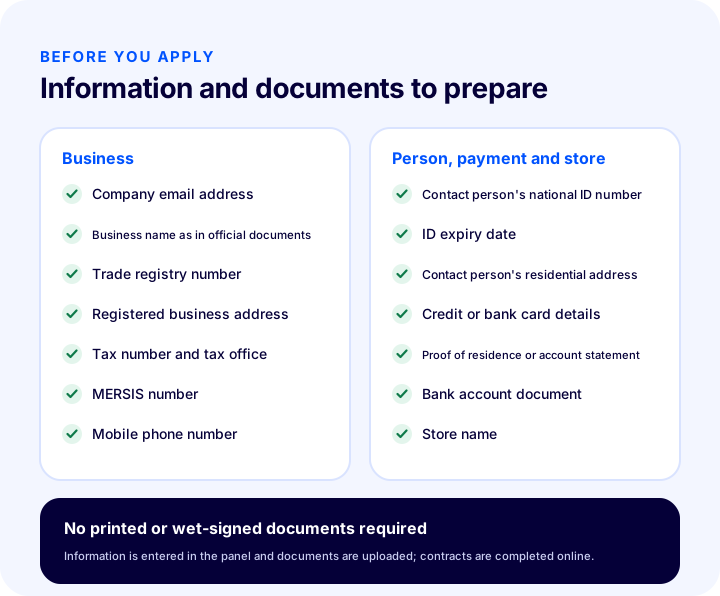
According to the list in Amazon Turkey's guide, the following are requested during the application:
- Company email address: The address you actively monitor, to be used when opening the store and for all notifications.
- Business name: Your company's name as it appears in official documents.
- Trade registry number.
- Registered business address.
- Mobile phone number: Verification is done by SMS.
- Tax number and tax office.
- MERSİS number: Mandatory for merchants registered with a chamber of commerce, not mandatory for tradesmen registered with a chamber of tradesmen.
- The primary contact's Turkish ID number and ID expiry date.
- The primary contact's address.
- The store name you want to use on the marketplace.
- Credit or bank card details: Cardholder name, card number and expiry date.
- Proof of residence or credit card / bank account statement: As proof of address.
- Bank account document.
In addition, a tax certificate is uploaded in the verification step; if the application is made by the company's authorized representative, a signature circular or power of attorney is also requested.
How to Open an Amazon Seller Account Step by Step?
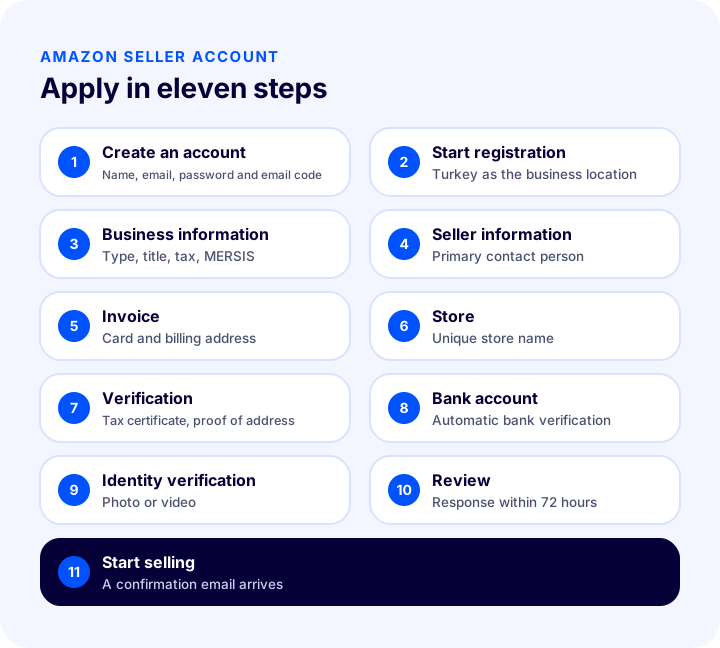
An Amazon seller account is opened in eleven steps: creating the account, starting registration, business information, seller information, billing, store, verification, bank account verification, identity verification, application review and starting to sell.
1. Create the account
The application starts with the “Hesap Aç” (Open Account) button on Amazon Turkey's seller site, satis.amazon.com.tr. The button takes you to the Seller Central sign-in page; here you select “Create your Amazon account”.
- Enter your first name and last name.
- Enter the email address you actively use and that will be used when opening the store.
- Set a password of at least six characters.
- Enter the code sent to your email address and press the “Create your Amazon account” button.
Once the email is verified, a screen opens showing the stages of the registration process and which marketplace you are applying for.
2. Start registration
On this screen, Türkiye is selected as the place where your business is registered and you continue with “Save and Continue”. The screen also shows the list of information and documents that will be requested throughout registration; the list above is the same as the one on this screen.
3. Enter the business information
After Türkiye is selected as the business location, the business type (tradesmen and craftsmen, sole proprietorship, commercial company, state-owned business or publicly traded business) is selected and the trade name is entered. The rules to watch in this step are:
- Do not use special or Turkish characters: Special characters such as periods and commas, and the letters ğ, ç, ş, ü, ö, ı, are not accepted by the system in the trade name.
- Shorten the name so it does not exceed 50 characters: The name does not have to be exactly the same as in your commercial document.
- The agreements are accepted on this screen: When you complete registration, the Terms of Use and Sale, the Privacy Notice and the Cookie Notice are accepted and the Amazon Services Business Solutions Agreement is concluded.
On the second screen that opens with “Accept and continue”, the business details are entered in full: the exact business name as in official documents, trade registry number, registered business address, mobile phone number for verification, tax number, tax office and MERSİS number. The tax certificate is also uploaded on this screen; no special characters are used when writing the tax office name either.
The tax identification number and business name are taken from the tax certificate, but a different field is used depending on the company type:
| Company type | As the tax identification number | As the legal business name |
|---|---|---|
| Sole proprietorship | “TC Kimlik No” (Turkish ID No) on the tax certificate | “Adı Soyadı” (Full name) on the tax certificate |
| Limited or joint-stock company | “Vergi Kimlik No” (Tax ID No) on the tax certificate | “Ticaret Unvanı” (Trade name) on the tax certificate |
Once the details are complete, phone verification is requested: Amazon sends a one-time six-digit code by SMS to the number you entered. When the code is typed into the field on screen and “Verify” is pressed, the process is complete and you continue with “Next”.
4. Enter the seller information
In this step the primary contact is defined. This person may be the business owner or the person who will manage the Amazon account in the business, and after registration is finished they carry out identity verification. The important point the guide stresses: the primary contact cannot be changed once specified. So you should choose a person who meets the conditions and can take part in verification.
Amazon is obliged to verify the identity of the person registering the account; the primary contact must meet at least one of the following three options:
- The beneficial owner of the business: A person who holds rights over the business such as use and income.
- The legal representative of the business: A person authorized to represent the business legally and to carry out its affairs and commitments.
- An employee of the business: A person employed by the business. If the primary contact is an employee, no selection needs to be made in this step.
When entering the ID details, the following rules apply:
- Special characters such as periods and commas, and Turkish letters (ğ, ç, ş, ü, ö, ı), are not used in the name.
- The ID expiry date is a mandatory field. If your ID is not the new type and has no expiry date, 01.01.2050 can be entered in this field.
- The ID must be an official photo document issued by the country of which the holder is a citizen or resident; the date of birth, ID number and expiry date must match the document exactly; and the uploaded copy must be in color.
The residential address must be the primary contact person's address as confirmed by the official authorities. If this address differs from the business address, enter a new one with “Add Another Address”.
Okumanızı öneririzAmazon'da Satış Yapmak İçin Gerekli Bilgiler5. Enter your billing and payment information
This step asks for credit or debit card details and a billing address. Depending on the selected payment method, the card is used at the end of the account settlement period to charge the subscription fee, if any, or any shortfall if the account has a negative balance. You can change the card details later in Seller Central on the “Account Info” page under “Settings”.
6. Choose your store name
The store name is the name customers see when shopping on Amazon.com.tr, and it must not have been used on Amazon before. This name can also be changed later from “Settings” › “Account Info”. The questions on the same screen are survey questions that help Amazon recognize your brand.
7. Upload the verification documents
In the verification step that opens after the store name, documents are checked to verify identity, address, tax information and the company contact person. This is the step that most affects whether the application is approved, because every document uploaded here is compared with the information entered on the earlier screens.
| Uploaded document | What must it match? |
|---|---|
| Tax certificate | The tax and company information entered on the registration screen |
| ID document (passport or ID card) | The information on the ID proof selected in the identity information section |
| Proof of address (bank or credit card statement, preferably an e-Devlet residence certificate) | The name and address of the primary contact person |
| Signature circular or authorization document | Requested if the application is made by an authorized representative of the company |
For sole proprietorships, the company name (the individual's full name) and the contact person's full name must be identical; otherwise the account cannot be verified. The account statement used as proof of address is an official document issued by a bank or another financial institution that usually summarizes one month of account activity.
8. Verify your bank account
In this step, bank account details are entered so that payments are transferred to the correct account. Amazon first tries to verify the account automatically and instantly; if automatic verification fails, a bank account document is requested at a later stage.
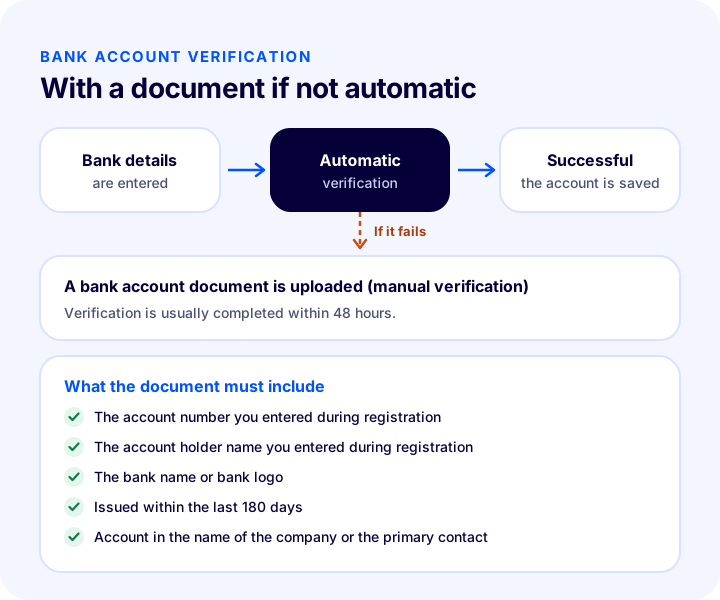
To avoid verification problems, the bank account must meet one of the following conditions:
- The account must be registered in the company's name stated on the business information page, or
- The account must be registered in the name of the primary contact person stated on the seller information page.
If automatic verification fails, the bank account statement you upload must meet these requirements:
- It must show the account number entered during registration.
- It must show the account holder's name entered during registration.
- It must clearly show the bank's name or logo so that authenticity can be verified.
- It must have been issued within the last 180 days (not older than six months).
If a document is requested, the request appears after the identity verification step. Once the document is uploaded, bank account verification is usually completed within 48 hours. If verification fails again, two options are offered: re-upload the bank account document with corrected information, or change the bank account details completely and restart automatic verification.
9. Verify your identity
The last step of registration is identity verification; it is mandatory to protect Amazon's customers, sellers and stores. The primary contact person performs the verification and chooses one of two ways:
- A. Take a photo of your ID and your face: A photo of your face and your official ID document is taken with your device's camera; Amazon compares them.
- B. Record a video of your face: Verification is completed through a video call with the first available Amazon representative.
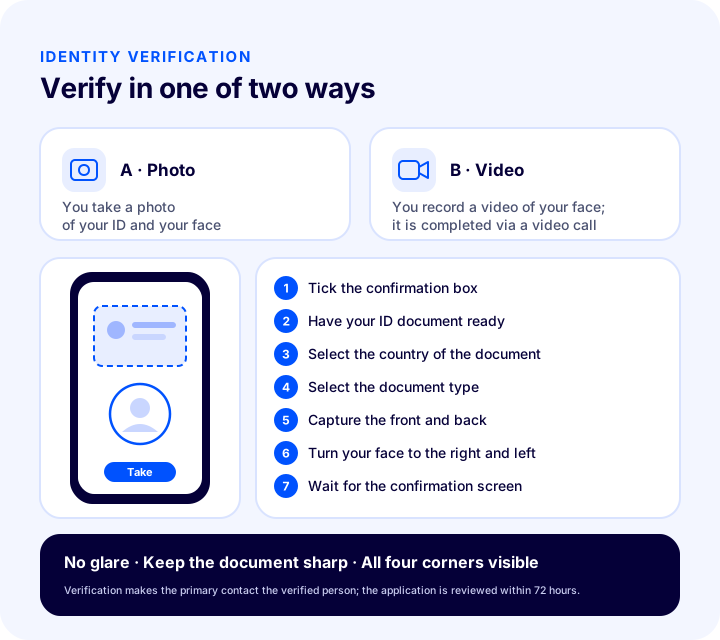
The steps are similar in both ways:
- Tick the box that allows facial data to be processed for verification and press “Next”.
- Keep the official ID document you uploaded during registration with you.
- Select the country in which the ID was issued.
- Select the type of the ID document.
- Allow camera access; take a clear photo of the front of the document first, then the back.
- Align your face in the center of the camera, turn it to the right and left, and take a photo or video of both sides.
- Wait while the images are processed. If the confirmation screen appears, the process has been completed successfully; if it does not, the identity verification step is repeated.
While shooting, avoid light from a window or a bright light source causing glare on the document; if the image is blurry, slowly bring the document closer to the camera until it is in focus, and make sure all four corners of the document stay within the frame.
10. Wait for the application to be reviewed
With identity verification, the application is complete; it is reviewed within 72 hours and you are contacted. During this time you will not have access to Seller Central. If the information and documents are complete and correct, an email notifying you that the account has been activated is sent to the email address you gave during registration.
A point the guide states explicitly: if the review has a negative outcome, no feedback can be given about the reason for rejection. For this reason, checking that everything matches before uploading the documents is the safest way to get the application approved in one go.
11. Start selling on Amazon
When the approval email arrives, registration is complete and you can sign in to Seller Central with your registration details at sellercentral.amazon.com.tr. The next stage is product listing; for this, Amazon offers listing documentation and online training as part of its seller training program.
Okumanızı öneririzAmazon Entegrasyonu ve Ürün Stok TakibiWhy Is an Amazon Seller Application Rejected or Delayed?
The most common reason an Amazon application is rejected or delayed is a mismatch between the information entered on the registration screen and the uploaded documents. The frequent mistakes that follow from the guide's rules are these:
- Using Turkish or special characters: Using ğ, ç, ş, ü, ö, ı, periods or commas in the trade name, tax office and contact person's name.
- Wrong tax number field: Entering the “Tax ID No” from the tax certificate for a sole proprietorship, or the “Turkish ID No” for a limited or joint-stock company.
- Name mismatch in a sole proprietorship: The company name and the contact person's full name being different.
- Unsuitable contact person: Choosing someone who is not the ultimate beneficiary, a legal representative or an employee; this person cannot be changed later.
- Black-and-white or incomplete ID image: The ID not being in color, the information not matching the document exactly, or the expiry date being entered incorrectly.
- Different name on the proof of address: The person and address on the address document not matching the contact person's details.
- Someone else's bank account: The account being in the name of neither the company nor the contact person.
- Outdated bank document: An account statement older than 180 days or one on which the bank name and logo are not visible.
- Forgetting the authorization document: Not uploading the signature circular or authorization document when applying as an authorized representative.
- Poorly taken photo: Glare, blur or corners falling outside the frame.
Checklist Before Applying to Amazon
Checking the table below item by item before submitting the application prevents almost all matching errors.
| Check | What is correct |
|---|---|
| Business type | Same as the type on your tax certificate (tradesman, sole proprietorship, commercial company…) |
| Trade name | No Turkish or special characters, at most 50 characters |
| Tax ID number | Turkish ID number for a sole proprietorship; tax ID number for limited and joint-stock companies |
| MERSIS number | Entered if you are registered with a chamber of commerce |
| Phone | A mobile phone that can receive SMS and that you have with you |
| Primary contact person | The ultimate beneficiary, a legal representative or an employee; a person who can take part in the verification |
| ID document | In color, valid; all information the same as what was entered |
| Proof of address | Same as the contact person's name and address (e-Devlet residence certificate or account statement) |
| Store name | Not used before on Amazon |
| Bank account | In the name of the company or the contact person; account statement for the last 180 days ready |
| Authorization | Signature circular or authorization document ready if an authorized representative is applying |
What to Do After You Start Selling on Amazon
After the account is approved, the job is to list products and manage orders regularly. When selling on a single channel, this work can be handled from the panel; but if you also sell the same products on your own e-commerce website and other marketplaces, updating stock, price and orders separately on each channel takes time and leads to mistakes such as a product that has already been sold continuing to be sold on another channel.
- Keep product data in a single source: Product name, description, images and attributes should be updated in one place and transferred to the channels from there.
- Keep stock in sync: A product sold on one channel should also be deducted from the stock on the other channels.
- Collect orders in one place: Seeing orders from different channels in a single list speeds up shipping and invoicing.
- Automate invoicing: The e-Invoice or e-Archive invoice for marketplace orders should not be issued by hand.
How Do You Manage Your Amazon Store with Faprika?
Faprika's Amazon integration lets you manage the product, stock, price, order and invoice processes of your Amazon store from the same panel as your e-commerce website. Once your seller account is approved, you connect your account to the Faprika panel:
- Transfer your products to Amazon: Send the products on your site to your Amazon store without re-entering them one by one.
- See orders in a single panel: Amazon orders are listed in the Faprika panel together with orders from your site and other marketplaces.
- Keep stock and price under control: Stock changes are reflected across channels, reducing the risk of a sold product being sold on another channel.
- Issue invoices automatically: With Faprika's e-Invoice infrastructure, invoices for site and marketplace orders are issued from the same panel.
The Amazon integration is added as an option to the Ultimate and Elite plans; you can compare the other marketplace integrations included in the plans on the e-commerce plans page, and see the details of the integration on the Amazon Integration page.
Frequently Asked Questions
How do you open an Amazon seller account?
You create a Seller Central account with the “Hesap Aç” (Open Account) button on Amazon Turkey's seller site; then you complete the steps for business information, primary contact, billing, store name, document verification, bank account verification and identity verification. The application is reviewed within 72 hours.
Do you need a company to sell on Amazon?
Yes. According to Amazon Turkey's guide, individuals without legal personality cannot sell on Amazon.com.tr. The application is made on behalf of a tradesman or craftsman, a sole proprietorship, a commercial company, a state-owned or a publicly traded business, and a tax certificate is required.
Which documents are required for an Amazon seller application?
You need a tax certificate, a valid color ID document of the primary contact, proof of address (a proof of residence or a bank or credit card account statement), a bank account document and credit or bank card details. If an authorized representative applies, a signature circular or a power of attorney is also requested.
How long does an Amazon seller application take?
An application completed with identity verification is reviewed within 72 hours. If the bank account is verified by document, this verification is usually completed within 48 hours. Seller Central cannot be accessed during the review.
Is a MERSİS number mandatory for an Amazon application?
A MERSİS number is mandatory for merchants registered with a chamber of commerce. Tradesmen registered with a chamber of tradesmen are not required to enter a MERSİS number.
How is Amazon identity verification done?
The primary contact chooses one of two ways: taking a photo of their ID and face, or recording a video of their face in a video call. The front and back of the document are captured and the face is recorded turning right and left; once the confirmation screen appears, the step is complete.