
Contents 9 sections
- How Much Does It Cost to Set Up an E-Commerce Site? The Short Answer
- The 3 Ways to Set Up an E-Commerce Site and Their Cost Differences
- E-Commerce Site Cost: Expenses Item by Item
- How Is Profit per Order Calculated?
- Hidden Costs of an E-Commerce Site
- The Cost of Setting Up an E-Commerce Site with Faprika
- How Do You Prepare Your First-Year E-Commerce Budget in 6 Steps?
- Is It Possible to Set Up an E-Commerce Site on a Small Budget?
- Frequently Asked Questions
The first question of almost everyone who decides to sell online is the same: how much does it cost to set up an e-commerce site? The answers on the internet range from a few thousand liras to hundreds of thousands. All of them may be right in their own way, because there is no single price. The cost is determined by how you set up the site, how many products you sell, on which channels you will sell and how much you set aside for growth.
In this guide we break down the cost of an e-commerce site item by item: the three ways to set up a site and the cost structure of each, one-time and ongoing expenses, the variable costs that arise with every order, the hidden costs most entrepreneurs fail to take into account, and, step by step, how to calculate your first-year budget.
How Much Does It Cost to Set Up an E-Commerce Site? The Short Answer
The cost of setting up an e-commerce site is the sum of four expense groups: infrastructure (software, server, security), setup (design, product entry, content), per-order expenses (payment commission, shipping, packaging) and growth (advertising, email, SEO). A site built with a ready-made e-commerce platform can go live on day one for a low annual license fee. Custom software written from scratch, on the other hand, requires a high starting budget and a development team.
In short, the right question is not "How much does a website cost?" but "What total budget do I need to start selling in the first year?" You can work out the answer yourself with the formula below:
First-year budget = Platform (annual) + One-time setup costs + Growth budget (advertising, content) + Working capital (stock, packaging)
Per-order costs such as payment commission and shipping are not added to this total; they are covered by the price of each order. That is why you factor them in when setting your product prices. Below, we look at each item one by one.
3 Ways to Set Up an E-Commerce Site and Their Cost Differences
The first and biggest decision that determines the cost is how the site will be built. There are three basic options:
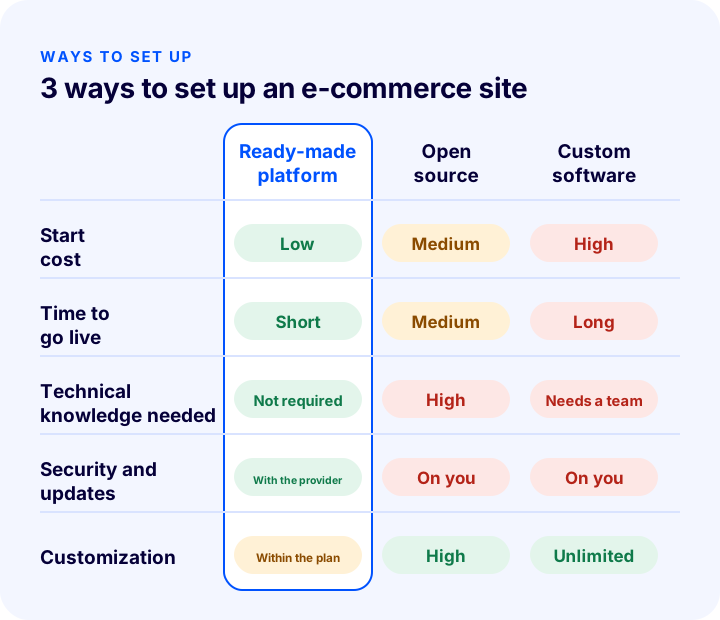
1. Ready-Made E-Commerce Platform (Subscription Plan)
Software, server, security certificate, updates and technical support are all included in a single annual or monthly plan fee. You choose a theme, upload your products, set up payment and shipping, and start selling. It is the path with the lowest starting cost and the shortest time to launch. No technical knowledge is needed; the security of the platform and new features are the provider's responsibility.
The point to watch is what the plan covers. Pazaryeri entegrasyonu, e-Invoice, bulk product upload or a mobile app are included in some plans and cost extra in others. When comparing plans, look not only at the price but at which plan the features you need start in.
2. Open-Source Software and Your Own Server
The software itself is free, but that does not mean a "free site". Renting a server, setup, theme, licenses for payment and shipping add-ons, security updates and a developer to do all this are your responsibility. Flexibility is high; however, any update can break an add-on, and when a security hole appears, responding is up to you. It makes sense for businesses with a technical team, but it is usually an expensive path for those starting e-commerce for the first time.
3. Custom Software (Built from Scratch)
The entire site is designed and written specifically for your business. It offers unlimited flexibility, but requires the highest starting budget and the longest development time. After launch, maintenance, security, server and new-feature development costs continue. It is the right choice for large brands with unique business processes, high volume or multichannel sales.
| Criterion | Ready-made platform | Open source | Custom software |
|---|---|---|---|
| Starting cost | Low | Medium | High |
| Time to launch | Short | Medium | Long |
| Technical knowledge needed | Not required | High | Development team required |
| Security and updates | With the infrastructure provider | On you | With you or your team |
| Customization | Depends on the plan and add-ons | High | Unlimited |
| Who is it suitable for? | Beginners, SMEs, growing brands | Businesses with a technical team | Large brands with unique processes |
E-Commerce Site Costs: Item by Item
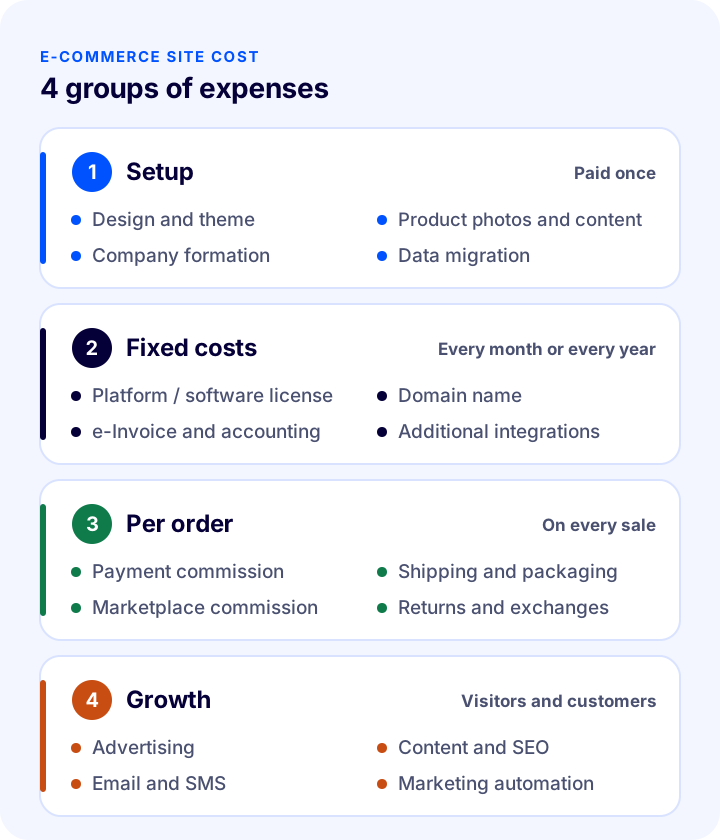
Whichever path you choose, the costs of an e-commerce site fall into four groups. Preparing your budget by these groups prevents "we hadn't accounted for that" surprises.
One-Time Setup Costs
- Design and theme: In ready-made platforms, themes are usually included in the plan and adapted to your logo and colors. If you want a fully custom design, a separate design budget is needed.
- Product photography and content: Product images, descriptions and category texts are the area that affects sales the most. Professional shooting can be a significant item depending on the number of products; if you are starting with few products, phone photos taken in good light on a white background will also do.
- Company formation and documents: Setting up a sole proprietorship or limited company, an accountant agreement and the necessary documents. We explain which company type suits you in a separate guide.
- Data migration: If you are moving from another platform, transferring product, customer and order data and redirecting old URLs to the new ones.
Fixed Costs (Every Month or Every Year)
- Platform or software license: The plan fee for a ready-made platform; server, add-on licenses and maintenance for open source; a maintenance contract and server for custom software.
- Domain name: Your site's address (e.g. yourbrand.com) is renewed annually. It is a small item, but forgetting to renew can take the site offline.
- Server and SSL certificate: Included in the plan on ready-made platforms. If you use your own server, the server cost rises as traffic grows.
- e-Invoice and accounting: e-Invoice / e-Archive credits, accounting software and accountant fees.
- Add-ons and integrations: Marketplace, shipping, accounting or marketing automation integrations are licensed separately if they are not included in your plan.
Variable Costs per Order
- Payment commission: On every credit card payment, the virtual POS or payment institution takes a commission. Rates vary by agreement, number of installments and payment method.
- Shipping and packaging: Shipping fee per parcel, box, filler material and label. If you offer free shipping, this cost is entirely yours.
- Marketplace commission: If you also sell your products on marketplaces, a commission that varies by category is charged on every sale.
- Returns and exchanges: The shipping cost of the returned product and the loss on products that cannot be resold.
Growth Budget
- Advertising: Search engine and social media ads. In the first months of a new site, most sales usually come from here.
- Content and SEO: Blog posts, category texts and technical SEO work. Slow in the short term, but in the long term it brings customers far more cheaply than advertising.
- Email, SMS and marketing automation: The lowest-cost way to invite existing customers to buy again.
How Is Profit per Order Calculated?
A price set without taking variable costs into account is the shortest way to sell a lot and earn little. For each product, calculate the profit left per order with this formula:
Profit per order = Sale price − Product cost − Payment commission − Shipping and packaging − Customer acquisition cost (advertising)
The table below is only an example showing how to do the calculation; fill in the same table using your own product cost, commission and shipping agreements.
| Pens | Example amount |
|---|---|
| Selling price | 1.000 TL |
| Product cost | − 450 TL |
| Payment commission | − 30 TL |
| Shipping and packaging | − 90 TL |
| Advertising cost per order | − 150 TL |
| Profit left per order | 280 TL |
This calculation shows two things. First, there can be a big gap between the profit margin on a product's label and the profit that actually remains. Second, the biggest lever is often the advertising cost: when the same customer buys a second time without advertising (via email, SMS or a direct visit), profit per order rises noticeably. That is why repeat purchase is the most efficient item in an e-commerce budget.
Hidden Costs of an E-Commerce Site
These are the costs that do not appear in a quote or plan comparison but emerge during the first year:
- Security and updates: With software running on your own server, closing security holes and keeping the software and add-ons up to date requires constant effort. An attack or data leak can cause damage far above the cost of setup.
- Downtime cost: Every hour the site is down means lost sales. The most expensive outage is the server being unable to handle traffic on busy campaign days.
- Dependence on a developer: Waiting for a developer even for a small change costs both money and time. Every setting that cannot be managed from the panel is a hidden cost.
- Paid extra features: Adding features that are not in the starter plan one by one later can push the total cost higher than a higher plan.
- Switching platforms: Starting with the wrong platform and moving later means redoing the design, transferring data, and affecting search engine rankings because the URL structure changes. Starting with a platform that can carry your growth means you never pay this cost.
- Time: Invoicing orders by hand, creating shipping records one by one, syncing stock with marketplaces manually. Every task without automation means hours of yours or an employee's time.
The Cost of Setting Up an E-Commerce Site with Faprika
With Faprika, the cost of an e-commerce site consists of the plan fee; server, security and updates are not paid separately. The following are included in all Professional plans:
- SSL security certificate and unlimited web, database and hosting
- Konsept theme options
- Instant virtual POS with bank and payment institution virtual POS integrations
- Campaign management, blog, guest checkout, product review and rating management
- Technical support by phone and support ticket
With current campaign prices, the plans are as follows:
| Package | Monthly | Highlights |
|---|---|---|
| Start | ₺1,650 (annual ₺19,800) | All the features needed to get started, contracted shipping, campaign management, blog |
| Master | ₺2,240 (annual ₺26,880) | Bulk product upload, smart search and filtering, stock reminders, reward points and gift vouchers |
| Ultimate | ₺3,740 (annual ₺44,880) | Automatic e-Invoice / e-Archive, versatile shipping integration, B2B (wholesale) sales, 1 marketplace integration |
| Elite | ₺5,333 (annual ₺64,000) | 5 marketplace integrations, XML integration, mobile app, return management |
| Smart | ₺7.500 | Unlimited domestic marketplace integrations, cart reminders, bulk SMS and email, product personalization |
| Enterprise | ₺12.500 | e-Export module, accounting (ERP) integration, unlimited languages, affiliate program |
| Exclusive | ₺45.000 | Custom design service, omnichannel (store, warehouse and online in a single flow), warehouse management system |
| Private | Custom quote | Software developed specifically for your business |
You can compare all the features of the plans and the current campaign terms on the e-commerce plans and premium e-commerce plans pages. For fully custom software, you can request a quote from the Faprika Private page.
Which Plan Is Right for You?
- If you are starting to sell online for the first time: Launch at low cost with Start and put most of your budget into bringing in visitors.
- If your product count is growing fast: Bulk product upload and updating in Master saves the hours spent entering products one by one.
- If invoicing and shipping are done by hand: Automatic e-Invoice and shipping integration in Ultimate reduce the time spent on every order; if you sell wholesale, the B2B module is also in this plan.
- If you also sell on marketplaces: With 5 marketplace integrations in Elite or unlimited domestic marketplace integrations in Smart, stock and orders are managed from a single panel.
- If you want to sell abroad: The e-Export module and unlimited language support in Enterprise. Details are on the e-Export page.
How to Prepare Your First-Year E-Commerce Budget in 6 Steps
- Decide your sales channels: Only your own site, or marketplaces and social media too? The number of channels determines the integrations and plan you need.
- Write the needs list: List your must-haves such as e-Invoice, bulk product upload, wholesale sales and a mobile app, and check which plan they start in.
- Calculate the platform cost annually: Look at the first-year total, not monthly prices; compare annual and multi-year payment campaigns.
- Add the one-time costs: Product photography, content, company formation and design, if any.
- Set aside the growth budget: Separate the advertising, content and email costs for the first 6–12 months from the total budget right at the start.
- Set your prices by profit per order: After deducting payment commission, shipping and advertising costs, make sure profit remains on every product.
Is It Possible to Set Up an E-Commerce Site on a Small Budget?
Yes. Today the biggest expense of starting e-commerce is no longer software but reaching customers. When starting on a small budget, you can follow this path:
- Start with the entry plan of a ready-made platform; instead of spending a separate budget on design, adapt one of the concept themes to your own brand.
- Open with a small number of well-chosen products; take care over the photo and description of each one.
- To reduce stock costs, consider the direct-shipping-from-supplier model (stoksuz satış) model.
- Alongside advertising, start earning free organic traffic from day one with blog posts and category texts.
- As sales grow, move up to a higher plan; on a good platform, upgrading a plan does not mean changing sites.
Frequently Asked Questions
How much does it cost to set up an e-commerce site?
There is no single price. The cost is the sum of the platform, one-time setup, per-order costs and growth budget. You can start with the annual plan fee of a ready-made e-commerce platform; custom software built from scratch requires a high starting budget. Current prices of Faprika plans are on the e-commerce plans page.
What is the cheapest way to set up an e-commerce site?
A ready-made e-commerce platform in which software, server, security certificate and updates are offered in a single plan. Although open-source software looks free, the total cost is often higher once server, add-on license and developer costs are added.
What are the monthly costs of an e-commerce site?
Platform or software license, domain name, e-Invoice credits and accounting, any additional integration licenses, and the advertising budget. Payment commission, shipping and marketplace commission, on the other hand, are not fixed; they are costs that vary with the number of orders.
Ready-made e-commerce site or custom software?
For businesses that are starting out or growing, a ready-made platform is more suitable because of its low starting cost, fast launch and the fact that security is handled by the provider. Custom software is preferred by large brands with unique business processes, high volumes and multichannel sales.
Is a company required to set up an e-commerce site?
If you will sell regularly and issue invoices, you need to set up a company or open a sole proprietorship. Which type of company is suitable should be determined together with your accountant, based on your sales volume and tax situation.
In how many days can an e-commerce site be set up?
With a ready-made platform, the time depends largely on the number of products and on whether the content is ready; theme, payment and shipping settings are completed quickly. With custom software, design, development and testing make the time much longer.