Table of Contents 24 sections
- What Is a Transfer Between Warehouses?
- When Is a Transfer Between Warehouses Needed?
- How Is a Transfer Between Warehouses Made Step by Step?
- How Is Stock in Transit Tracked?
- How Are Delayed Transfers Tracked?
- How Are Authority and Responsibility Distributed in a Transfer?
- What Are Common Mistakes in Transfers Between Warehouses?
- How Is the Transfer Process Measured?
- What Information Should a Transfer Request Contain?
- Why Is Transfer Between a Store and a Warehouse Different?
- How Is Online Sales Stock Kept Consistent During a Transfer?
- Should You Make the Transfer by Carrier or with Your Own Vehicle?
- How Are Transfers and Stock Counting Managed Together?
- What Are Example Scenarios for Transfers?
- How Should Transfer Records and Documents Be Kept?
- Why Are Barcodes and Mobile Devices Important in Transfers?
- How Do You Set Up a Lean Transfer Process for a Small Business?
- How Can Transfer Cost and Efficiency Be Reduced?
- Short Glossary of Transfer Terms
- Checklist for Transfers Between Warehouses
- How Do You Make a Transfer Between Warehouses in Faprika?
- Summary: Five Rules to Remember in Transfers
- Frequently Asked Questions
- Frequently Asked Questions (FAQ)
How is a transfer between warehouses made? It is done through a four-stage process that takes the product out of the source warehouse, records that it is in transit and confirms its entry into the destination warehouse: request, approval and picking, dispatch, receipt. If stock is recorded in the right place at every stage, your counts match even while the product is in transit.
In this guide we explain what a transfer between warehouses is, when it is needed, its steps, how to track stock in transit, common mistakes and how to measure the transfer process. It applies to every e-commerce business that moves products from a store to a warehouse, from a warehouse to a store or between two warehouses.
What Is a Transfer Between Warehouses?
A transfer between warehouses is the movement of a product from one warehouse or store to another warehouse or store, with the stock record tracking that movement. It is neither a sale nor a return; the owner of the product stays the same, only its location changes.
The critical part of a transfer is the time the product spends between the two points. During this time the product can neither be sold at the source warehouse nor is it ready at the destination warehouse. Businesses that do not track this "in transit" status as a separate stock count the product twice or not at all during counting.
| Concept | Short description |
|---|---|
| Source warehouse | The warehouse or store the product leaves from |
| Destination warehouse | The warehouse or store the product goes to |
| Transfer request | A record stating which product, how many units and from where to where |
| Stock in transit | A product that has left the source but has not yet been received at the destination |
| Receipt | The receiving side counting and confirming the product and taking it into stock |
When Is a Transfer Between Warehouses Needed?
Every business with more than one warehouse or store makes regular transfers. When demand rises in one place and stock piles up in another, moving the product to the right point is how you avoid missing sales.
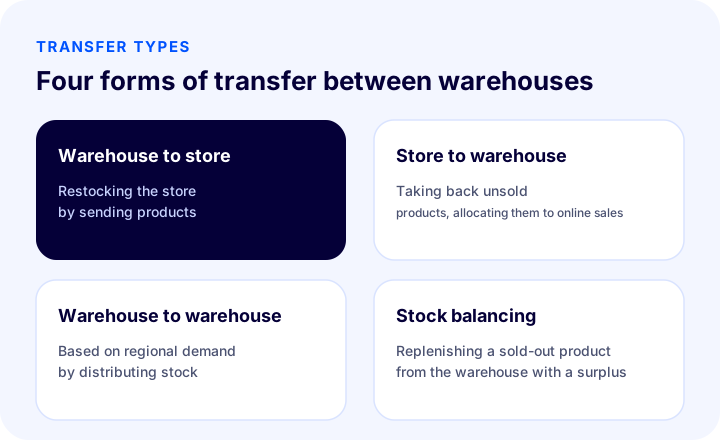
- Warehouse to store: To restock the shelf of a physical store.
- Store to warehouse: To take a product that is not selling in the store back to the warehouse or to allocate it to online sales.
- Warehouse to warehouse: To distribute stock according to regional demand and to move a product to a warehouse closer to the customer for fast delivery.
- Stock balancing: To replenish a product that has run out in one warehouse from a warehouse with a surplus.
- Season and campaign preparation: To gather the product at the warehouse where the sale will take place before a campaign.
How Is a Transfer Between Warehouses Made Step by Step?
A safe transfer consists of five steps: the request is opened, approved, the product is picked, dispatched and the other side receives it. Each step must have its own person responsible and its own record.
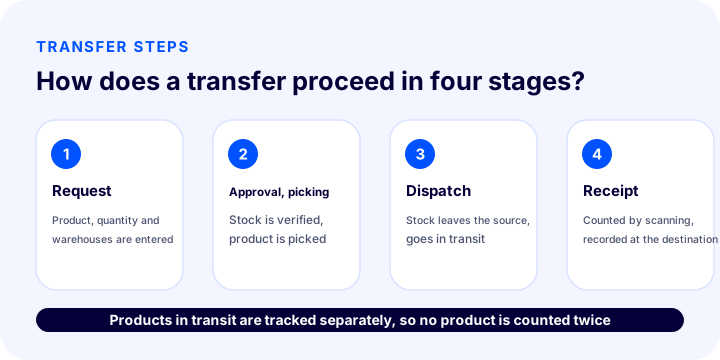
- Open the request. Write which product, how many units, from which warehouse to which warehouse. The request is usually opened by the receiving side ("send me this product") or proposed by the source side.
- Approve. The source warehouse confirms that the product can be sent and that stock is sufficient, and approves the request.
- Pick. The product is picked from the shelves and prepared for dispatch; the picked quantities are compared with those requested.
- Dispatch. When the product sets off, stock is deducted from the source warehouse and tracked separately as "in transit".
- Receive. The receiving side counts the products, scans them with a barcode and confirms; stock is recorded at the destination warehouse.
How Is Stock in Transit Tracked?
Stock in transit is a product that has left the source warehouse but has not entered the destination warehouse, and it must be tracked as a separate status. Holding the product back from being deducted at the source and written at the destination until the moment of receipt, or not separating it at all, produces count differences.
| Stage | Source warehouse stock | Stock in transit | Destination warehouse stock |
|---|---|---|---|
| Request opened | Unchanged | 0 | Unchanged |
| Approved and picked | Reserved | 0 | Unchanged |
| Dispatched | Decreases | Increases | Unchanged |
| Received | Unchanged | Decreases | Increases |
When stock in transit becomes visible, two problems are solved: you do not count the product twice and you notice delayed transfers. If a product has been in transit longer than expected, loss, damage or a forgotten receipt should be suspected.
We recommend readingWhat Is Stock Tracking? How Is It Done?How Are Delayed Transfers Tracked?
Set an expected delivery time for each transfer and highlight the transfer that is past its time in the list. A delay most often shows that a record was forgotten or a package got stuck.
- Define the expected time. Set one time for transfers within the same city and another for transfers between cities.
- Flag the delayed transfer. Show the record that is past its time in an eye-catching color in the list.
- Contact the person responsible. See from the record who is responsible on the dispatching side and on the receiving side.
- Look at the root cause. If the same route is constantly delayed, fix the carrier or process problem.
How Are Authority and Responsibility Distributed in a Transfer?
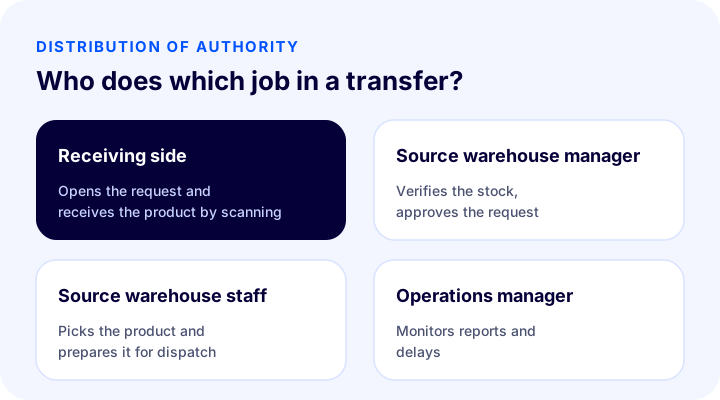
Each staff member should see only the work of their own warehouse, and transfer approval and receipt should be done by different people. The same person both sending and receiving makes it harder to notice a mistake.
| Task | Recommended person responsible | Why? |
|---|---|---|
| Opening the request | Manager of the destination warehouse or store | They know the need best |
| Approval | Source warehouse manager | They verify the stock |
| Picking and dispatch | Source warehouse staff | They carry out the physical movement |
| Receipt | Destination warehouse staff | Counting independent of the sender |
| Reporting and audit | Operations manager | They monitor all movements |
What Are Common Mistakes in Transfers Between Warehouses?
The most common mistakes are writing stock to the destination immediately when dispatching the product and not counting on receipt. Both widen the stock difference.
| Mistake | Consequence | Solution |
|---|---|---|
| Not separating stock in transit | The product is counted twice or not at all | Open the "in transit" status at dispatch |
| Not counting on receipt | A missing product goes unnoticed | Confirm by scanning with a barcode |
| Making a transfer without a record | The cause of a stock difference cannot be found | Record every movement |
| Keeping authority broad | Action from the wrong warehouse | Authorize staff only for their own warehouse |
| Not monitoring delays | A lost transfer is understood late | Highlight the delayed transfer |
| Keep the product open for sale | Products in transit can be sold | Deduct from source stock at dispatch |
How Is the Transfer Process Measured?
The success of a transfer is measured with a few simple indicators: average delivery time, number of delayed transfers and the difference found at receipt. If these three do not improve, the process or the shipping route should be reviewed.
| Indicator | What does it tell you? | Improvement |
|---|---|---|
| Average delivery time | The speed of the transfer | Organize dispatch days and the shipping route |
| Number of delayed transfers | Disruptions in the process | Track delayed ones and find the cause |
| Receiving difference | Quantity difference between sent and received | Do picking and counting by scanning |
| Number of transfers | Which route is used the most? | Keep stock close to that point |
What Information Should a Transfer Request Include?
A good transfer request should be complete enough for the other side to start working without asking questions. An incomplete request comes back, and approval and dispatch are delayed.
| Information | Why is it needed? |
|---|---|
| Source and destination warehouse | Determines where the product goes from and to |
| Product and quantity | The basis of picking and counting |
| Reason for the request | Explains whether it is stock balancing or campaign preparation |
| Requested delivery date | Determines the priority and the delay threshold |
| Requester and approver | Records who is responsible |
| Note | Carries details such as special packaging or product condition |
Why Is a Transfer Between a Store and a Warehouse Different?
A transfer between a store and a warehouse needs extra care because it affects both shelf stock and online sales stock. A product going to the store may be deducted from online sales; a product returning from the store to the warehouse can be reopened for online sales.
- Product going to the store: It must be deducted from stock open to online sales at dispatch; otherwise a customer may order it on the site while it is also sold in the store.
- Product returning to the warehouse: It is reopened for sale after it is received; damaged or used products must be checked separately.
- Store count: Regularly compare the physical count in the store with the system stock.
- Point-of-sale: If a product sold in the store is deducted from the same stock, the warehouse and the store are shown correctly together.
How Do You Keep Online Sales Stock Consistent During a Transfer?
Products in transit should not be included in sellable stock; otherwise a customer buys the product but you do not have it. Sellable stock should be the stock received at the destination warehouse.
If you sell through multiple channels (your own site, marketplaces, store), this rule matters even more. When a transfer is dispatched, the stock in the source warehouse decreases and this decrease must be reflected in all channels; when it is received, the stock in the destination warehouse increases and becomes sellable.
- At dispatch, source stock should decrease and be reflected in the channels.
- Products in transit should not count as sellable stock.
- After receipt, the product should be opened for sale.
- Leave a safety margin for critical products; if stock is running out and products are on the way, limit sales.
Should You Do the Transfer by Carrier or With Your Own Vehicle?
The choice depends on distance, product value and frequency; the record should be the same on both routes. Moving goods with your own vehicle can be fast and cheap within a city; for transfers between cities, a carrier or logistics company is more suitable.
| Method | Advantage | Point to watch |
|---|---|---|
| Your own vehicle or courier | Fast, flexible, you stay in control | Responsibility and record during transport |
| Carrier | Suitable between cities, has a tracking number | Delivery time and risk of damage |
| Logistics company | Suitable for large volumes and regular routes | Clear contract and delivery time |
Whichever method you choose, write the tracking number or transport information in the transfer record; that way, when a delay occurs, you can quickly find where the product is.
How Do You Manage Transfers and Stock Counts Together?
If a transfer is made during a count, a difference is unavoidable; so on count day you need to pause transfers in the relevant warehouse or add the products in transit to the count separately. If counting and transfers proceed at the same time, a product may be counted once and missed once.
- On count day, pause or plan transfers in the source and destination warehouses.
- Show products in transit separately in the count report.
- If a count difference appears, review the latest transfer records.
- Prevent large differences from building up by doing regular partial counts.
What Are Some Example Transfer Scenarios?
Scenario 1: Replenishing a store
The shelf for a fast-selling product in the store is running empty. The store manager opens a request from the central warehouse; the warehouse approves, picks and dispatches it. While the product is in transit, it is deducted from online sales stock; the store scans the product to receive it and the shelf is filled.
Scenario 2: Balancing stock between regions
A product is running out in the warehouse in one city, while another city's warehouse has too much. The operations manager starts a transfer between the two warehouses. Because the delayed transfer stands out in the list, it is noticed early that the product is stuck on the way.
Scenario 3: Consolidation before a campaign
Before a big campaign, products are gathered in the warehouse where the sales will be made. Because every transfer is received by scanning, stock figures are reliable on campaign day and no sales are missed.
How Should Transfer Records and Documents Be Kept?
The request, approval, picking and receipt records of every transfer should be kept in the system; these records are used both to explain stock differences and for audits when needed. A transaction history showing who processed which product and when makes it easier to find where a stock difference came from.
Which document is issued for the physical movement of the product depends on legislation and your business structure. Determine the right practice on this with your accountant; this guide focuses on how to keep the stock record rather than on document types.
Why Are Barcodes and Mobile Devices Important in Transfers?
Most errors in transfers occur in quantities written by hand and counted by eye. Scanning barcodes, and doing it with a phone or handheld device, both increases speed and records which product was scanned in which operation and by whom.
- Scanning during picking: If every product taken from the shelf is scanned, a wrong product or wrong quantity is caught on the spot.
- Scanning at receipt: Incoming products are counted by scanning; missing and extra products are visible immediately.
- Working with a phone: An expensive handheld terminal is not needed; a phone that scans barcodes with its camera is enough for small and medium-sized warehouses.
- Transaction history: Knowing who scanned which product and when makes investigating stock differences easier.
How Do You Build a Lean Transfer Process for a Small Business?
For a small business with two warehouses, or a warehouse and a store, the transfer process does not have to be complicated. A lean process can be built with three rules.
- Every transfer starts from a written request. A phone call or verbal request is not recorded and causes disputes later.
- The sender and the receiver should be different people. Two people are possible even in a small team; one sends, the other counts.
- Review weekly. Look at pending and delayed transfers once a week.
These three rules prevent most stock differences even without separate software or a large team. As the business grows, the same logic becomes automated in the panel with scanning, permissions and reports.
How Can Transfer Cost and Efficiency Be Reduced?
A transfer brings extra cost: transport, labor and time spent on the road. The way to reduce cost is to avoid unnecessary transfers and to make transfers in batches.
- Batch dispatch: Instead of small and frequent transfers, dispatch in batches on set days.
- Stock placement by demand: Placing a fast-selling product in the warehouse where the demand is from the start reduces transfers.
- Safe stock margin: Opening a request before the product runs out in the store prevents urgent, expensive transfers.
- Route analysis: Identify the route with the most transfers and bring stock closer to that point.
A Short Glossary of Transfer Terms
When the same word means the same thing across the team, most transfer errors are prevented. Make sure everyone uses the terms below with the same meaning.
| Term | Meaning |
|---|---|
| Dispatch | Dispatching the product from the source warehouse |
| Receipt | The destination side counts the product and takes it into stock |
| Reserved stock | A product that is approved but not yet dispatched and set aside for another job |
| Stock in transit | A product that has been dispatched but not yet received |
| Transfer difference | The difference between the quantity sent and the quantity received |
| Sellable stock | A product that is ready in the warehouse and can be sold to a customer immediately |
Warehouse-to-Warehouse Transfer Checklist
- Were the source and destination warehouses selected correctly?
- Were the product and quantity clearly written in the request?
- Is the source warehouse stock sufficient and has approval been given?
- Do the picked quantities match what was requested?
- Was the stock set aside as "in transit" at dispatch?
- Was the expected delivery time set?
- Did the destination side receive the products by scanning barcodes?
- If there is a difference, was the reason recorded?
- Are delay alerts turned on?
- Is staff authorized only for their own warehouse?
How Do You Make a Warehouse-to-Warehouse Transfer in Faprika?
In Faprika, transfers from warehouse to store, from store to warehouse and from warehouse to warehouse run end to end in the panel: a transfer request is opened, approved, picked and dispatched; the other side receives the products by scanning them. Stock is automatically written to the right place at every step.
- Products in transit are shown separately: Products that have been dispatched but not received are tracked separately.
- Delayed transfers stand out: A transfer past its deadline is shown in red in the list.
- Authorization: Your staff can be authorized so that they see only their own warehouse.
- Opening with one click: The feature is enabled from Warehouse Settings.
- Receiving by scanning: The other side receives the product by scanning its barcode.
All warehouse operations (goods receipt, shelving, picking, counting and transfer) are described on the Faprika Warehouse Management System page; transfer and removal from the shelf are tied to separate permissions. You can see which warehouse features come with which plan in the comparison on the e-commerce plans page.
We recommend readingWhat Is WMS?Summary: Five Rules to Keep in Mind for Transfers
There are five rules that make warehouse-to-warehouse transfers safe, and all of them serve to keep stock traceable. A business that follows these rules can trust its stock figures even while products are in transit.
- Every transfer starts from a written request and is approved.
- At dispatch, stock is deducted from the source and the product in transit is tracked separately.
- Receipt is done by scanning, by someone independent of the sender.
- A transfer past its deadline is made visible and followed up.
- Permissions are separated by warehouse and by operation.
Start the process small and improve it by measuring: first try it with one route and one team, examine the delayed and mismatched transfers, then extend it to the other warehouses.
Frequently Asked Questions
Frequently Asked Questions (FAQ)
What is a transfer between warehouses?
A transfer between warehouses is moving a product from one warehouse or store to another warehouse or store, with the stock record tracking that movement. The owner of the product stays the same; only its location changes.
How is a transfer between warehouses made?
A request is opened, the source warehouse approves it and picks the product, the product is dispatched, and the receiving side counts and accepts it. Stock is deducted from the source warehouse at dispatch and recorded at the destination warehouse at receipt.
What is stock in transit?
It is a product that has left the source warehouse but has not yet been received at the destination warehouse. If it is not tracked separately, the product is counted twice or not at all during counting.
When is stock deducted in a transfer?
It is usually deducted from the source warehouse at the moment of dispatch and tracked as "in transit"; it is recorded when received at the destination warehouse. The product can be reserved during the approval and picking stage.
How are delayed transfers noticed?
An expected delivery time is set for each transfer, and a transfer past its time is highlighted in the list. In Faprika, delayed transfers are shown in red in the list.
Can staff see only their own warehouse?
Yes. In Faprika, your staff can be authorized so that they see only their own warehouse; actions such as transfer and removal from shelf are separate permissions.
How are counting errors prevented in a transfer?
Scanning products with a barcode on receipt instead of counting by eye immediately reveals missing or surplus products and prevents searching for a "loss" afterwards.
Does a small business need separate software for transfers?
At the start, a written request, different people sending and receiving, and a weekly review are enough. As the business grows, a warehouse management system offering scanning, permissions and reports reduces errors and lost time.
What happens if a product is damaged in a transfer?
On receipt the product is scanned and its condition checked; a damaged product is marked separately without being taken into stock, and the reason is entered in the record. This makes it easier to determine responsibility and, if necessary, to talk to the carrier.