Contents 18 sections
- Why Does an Out-of-Stock Product Page Cause Problems?
- First, the Problem: Why Did the Product Sell Out?
- How Do You Manage a Temporarily Sold-Out Product Page?
- Why Is "Notify Me When Back in Stock" So Valuable?
- What Should Happen to the Page of a Permanently Discontinued Product?
- What Is the Difference Between 301, 404 and 410?
- Sold-Out Product Decision Tool
- Which Message Should Be Used on a Sold-Out Product Page?
- Pre-Order or Waiting List for a Sold-Out Product?
- How Do You Manage a Product with a Single Sold-Out Variant?
- What Should a Seasonal Product's Page Be Outside the Season?
- How Should Sold-Out Products Appear on Category and Listing Pages?
- How Do You Measure the Success of Sold-Out Product Management?
- How Do You Prevent Stockouts in the First Place?
- 8 Common Mistakes on Sold-Out Product Pages
- Sold-Out Product Page Checklist
- Managing Sold-Out Products with Faprika
- Frequently Asked Questions
Every e-commerce store runs into the same question one day: a product has sold out, so what should I do with its page? Deleting the page is the first solution that comes to mind; but that page may have earned rankings in search engines, received links from other sites and been added to customers' favorites. Leaving the page as it is, on the other hand, can send the customer down a dead end with an "out of stock" notice. When an out-of-stock product page is managed correctly, it both protects your traffic and can turn even a customer you would have lost into a sale.
This article is designed like a lesson. Step by step, you will learn what to do with the page depending on why the product sold out, separate solutions for temporary stockouts, permanently discontinued products, variants and seasonal products, the difference between 301 and 410 redirects, customer experience, measurement and the most common mistakes. The decision tool inside the article tells you, with three questions, the right step for your own situation.
Why Does an Out-of-Stock Product Page Cause Problems?
An out-of-stock product page carries two separate risks: if you remove the page the wrong way, you lose ranking and link value; if you leave it the wrong way, you mislead the customer and the search engine. The right decision depends on the state of the product, and no single rule fits every product.
- The risk of deleting the page: When a page that has rankings, receives links or is added to favorites is deleted, these values are lost; a visitor arriving from search results lands on an error page.
- The risk of leaving the page as it is: A page that looks as if it is for sale but cannot be purchased disappoints the customer and increases the bounce rate.
- The risk of wrong redirects: Redirecting a sold-out product to an unrelated page (such as the home page) confuses the customer and sends a weak signal to search engines.
- The risk of wrong information: If the product keeps appearing as "in stock" in search results or AI answers, trust suffers.
First, the Cause: Why Did the Product Sell Out?
What to do with the page depends on why the product sold out. There are five main situations, and each has a different solution: temporary stockout, seasonal product, a single variant out of stock, a product discontinued for good, and a product replaced by a new one.
| Situation | Page | To the customer |
|---|---|---|
| Temporary stockout (will be back) | Stays open (200); stock status marked "out of stock" | Notify me when back, estimated date, similar products |
| Seasonal product | Stays open all year | Season information, notify me when back |
| One variant sold out | Page and other variants stay open | Sold-out variant is disabled; other colors and sizes are suggested |
| Discontinued for good, a similar product exists | 301 redirect to the similar product | The customer reaches the alternative directly |
| Discontinued for good, no alternative | 301 to the related category, or 410 | Other products in the category are shown |
How to Manage a Temporarily Sold-Out Product Page
If the product will be back, the page is neither deleted nor redirected; it stays open, states clearly that the product is out of stock, and turns the customer into an opportunity waiting for the restock. This is the easiest and safest way to preserve value.
- Keep the page open with a 200: The URL and content stay the same; rankings and links are preserved.
- State the stock status clearly: Write "Currently out of stock" and disable the buy button so customers don't try to add it to the cart in vain.
- Update the structured data: The stock status on the page and in the schema (out of stock) must match; otherwise wrong information appears in search results.
- Offer "Notify me when back": The customer leaves their email and is notified when the product returns.
- Give an estimated date: If you know when it will return, say so; if you don't, don't promise.
- Show similar products: Recommend products from the same category or with similar features in the visible part of the page.
Why Is "Notify Me When Back" So Valuable?
"Notify me when back" makes a customer searching for a sold-out product wait instead of giving up, and it gives you direct demand data. Every customer who leaves a notification request is a potential buyer with a high likelihood of purchasing when the product returns.
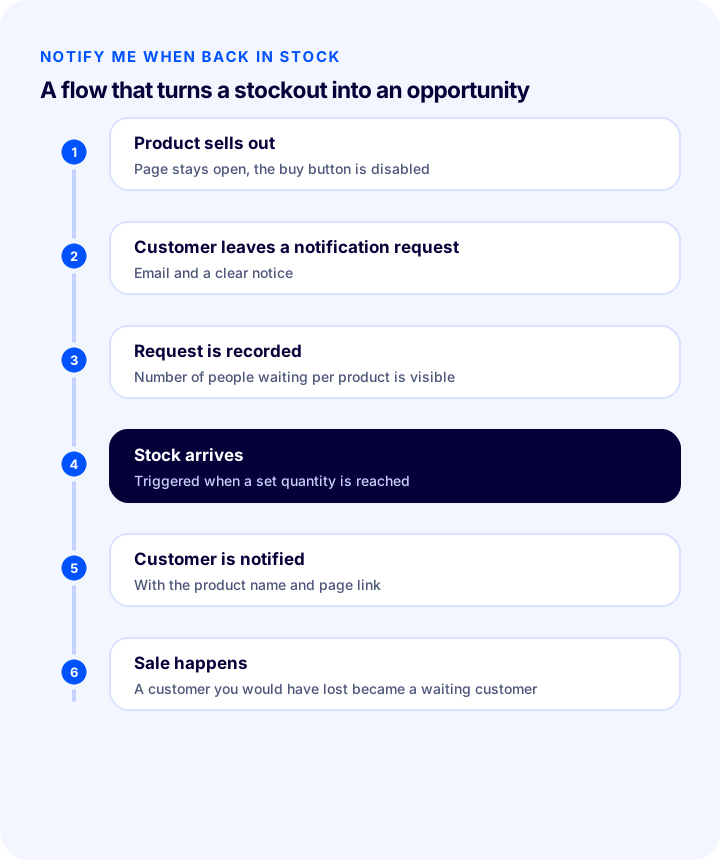
- Turns a loss into an opportunity: Instead of a customer who leaves the page and goes to a competitor, you get a customer who leaves their email and waits.
- Measures demand: The number of people who requested a notification for a product is a concrete signal for deciding your reorder quantity.
- Speeds up the comeback: Because notifications go out when the product returns, sales start quickly in the first days.
- Creates a permission-based channel: The customer leaves their email for this purpose; its use is limited to the notification, and marketing consent must be obtained separately.
What Should the Page of a Permanently Discontinued Product Be?
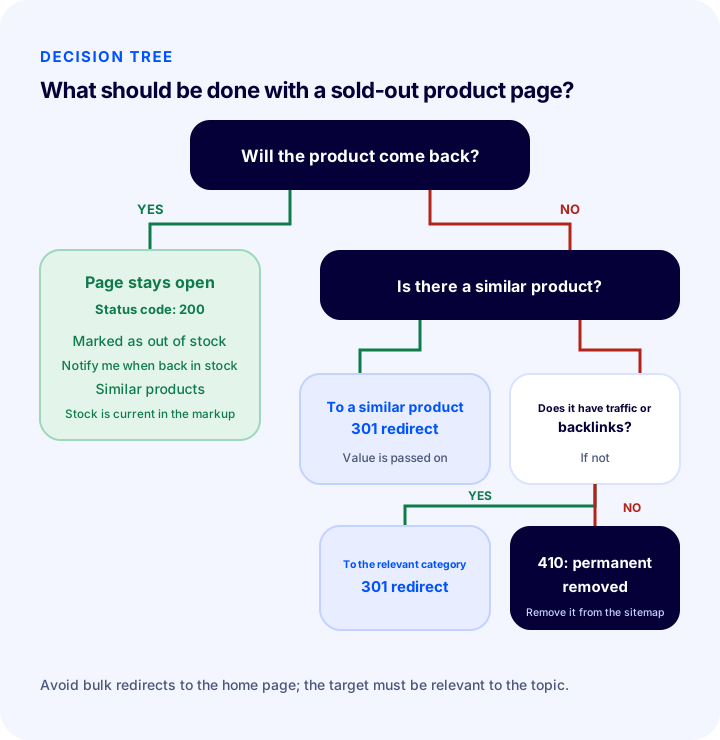
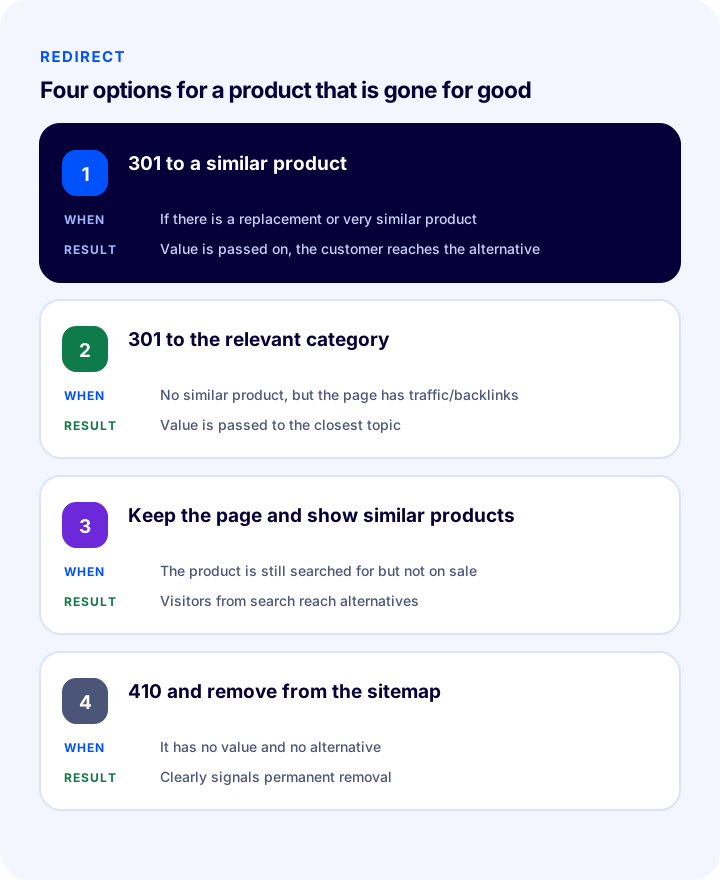
If the product will never be sold again, the page is removed permanently, but this must be done correctly. If a replacement or very similar product exists, the page is redirected to it with a 301; this passes on ranking and link value and takes the customer to the alternative.
| Situation | Solution | Why? |
|---|---|---|
| A replacement or very similar product exists | 301 to a similar product | Value is passed on, the customer reaches the alternative |
| No similar product, but the page has traffic or links | 301 to the relevant category | Value is passed to the closest related page |
| No similar product, but the product is still searched for | Keep the page with a "discontinued" notice and show similar products | Customers arriving from search reach alternatives |
| No value at all (no traffic, links or searches) | 410 and removal from the sitemap | Clearly signals that it has been permanently removed |
The redirect target must be relevant: redirecting a sold-out pair of headphones to the home page can be read by search engines as a weak signal and confuses the customer. The target should be the page closest to what the customer was looking for.
Recommended readingWhat Is a 301 Redirect? (Glossary)What Is the Difference Between 301, 404 and 410?
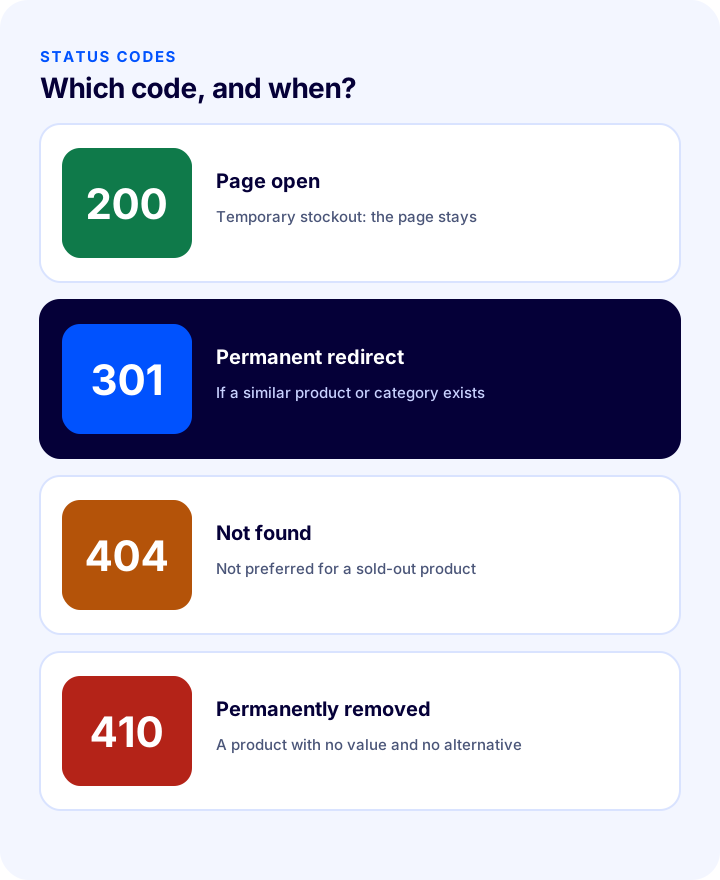
A 301 says the page has permanently moved to another address, a 404 says the page was not found, and a 410 says the page has been permanently removed and will not return. Which one to choose for a sold-out product depends on whether the page has an alternative.
| Code | Meaning | When? |
|---|---|---|
| 200 | The page exists and works | For a temporary stockout; the page stays open |
| 301 | The page has permanently moved to another address | When a similar product or related category exists |
| 404 | The page was not found (reason unknown) | For wrong or never-existing addresses; not preferred for a sold-out product |
| 410 | The page has been permanently removed | For products with no value and no alternative |
Leaving a sold-out product page as a 200 while showing an empty page is a separate problem: pages with no content, or that say "product not found" but return a success code, can be treated by search engines as a "soft error." The page must either stay open with real content or be removed with the correct code.
Recommended readingE-Commerce Site Migration: A Guide to Changing Platforms Without Losing SEOSold-Out Product Decision Tool
Based on your answers to three questions, the tool below tells you the recommended step for your sold-out product page and the relevant status code. The tool is a general guide; evaluate your product's specific situation separately.
Which Message Should a Sold-Out Product Page Use?
The message shown to the customer decides whether the page is a dead end or a helpful stop. A good message says three things: the product cannot be bought right now, how long that may last, and what the customer can do in the meantime.
| Situation | Weak message | Strong message |
|---|---|---|
| Temporary stockout | Out of stock | Currently out of stock. We'll let you know when it's back. |
| Date known | Coming soon | Estimated restock date: [date]. Leave your email and be the first to know. |
| One variant sold out | Option unavailable | This size is sold out. Other sizes are in stock; we can let you know about this one. |
| Permanently discontinued (page kept) | Product not found | This product is no longer on sale. Take a look at similar products. |
There must always be an action next to the message: a notification form, similar products, or a link back to the category. If the message has no action, the customer closes the page.
Pre-Order or Waitlist for a Sold-Out Product?
If the product is certain to return, there are two paths: taking a pre-order with payment from the customer, or building a waitlist by collecting only notification requests. Which one suits you depends on how certain the restock date is.
- Pre-order: Suitable when the date and quantity are certain; the customer pays, and the product is shipped when it arrives. Delivery time and withdrawal conditions must be stated clearly in advance.
- Waitlist (notify me when back): Safe when the date is uncertain; the customer makes no commitment and simply receives news.
- Hybrid approach: First build a waitlist and measure demand, then switch to pre-orders once the date is clear.
- Don't make promises: Writing a firm date when the delivery date is uncertain leads to customer dissatisfaction and return requests.
How to Manage a Product with a Single Sold-Out Variant
If only one size or color of a product has sold out, the page and the other variants stay on sale as they are, and the sold-out variant is shown as disabled in the selector. Marking the whole product "out of stock" just because one variant sold out hides a product that can still be bought from the customer.
- Show the sold-out variant as disabled: Display it struck through or faded in the selector so the customer sees what can be bought.
- Highlight the other variants: Present the available colors and sizes clearly.
- Offer notification for the variant: Let customers who want the sold-out size leave a notification request.
- Mark stock status per variant: The stock information in the schema and on the page must be correct for each variant.
- If all variants sell out, treat it as a sold-out product: At that point the product falls into the temporary or permanent stockout case.
What Should a Seasonal Product's Page Be Outside the Season?
A seasonal product's page should not be deleted when the season ends; its address, reviews, and rankings are valuable accumulation for the next season. The page stays open, states that it is out of season, and the customer is notified at the start of the season.
- Keep the address: A page that stays at the same address all year doesn't have to win its ranking from scratch at the start of the season.
- Write the season information: Add a note such as "This product is seasonal and will be back on sale in [period]."
- Collect notifications: Collect the emails of people who want to buy at the start of the season.
- Keep the reviews and content: Last season's reviews boost the credibility of the new season.
- Update at the start of the season: Refresh the price, stock, and images, and bring the page back into focus.
How Should Sold-Out Products Appear on Category and Listing Pages?
How you display sold-out products on listing pages affects the customer experience and the quality of the category page. In general, in-stock products come first, and sold-out ones are shown last or separated by a filter.
- Move sold-out items to the end: Let the customer see what they can buy first.
- Add a "Sold out" label: Make it clearly visible on the card so customers know before opening the page.
- Offer a stock-status filter: Customers may want to see only what's in stock.
- Don't leave a category page empty: If all products in a category sell out, keep the page and related products visible, supported by "notify me when back."
- Don't hide temporarily sold-out products: A hidden product loses its ranking and customer demand.
How Do You Measure the Success of Sold-Out Product Management?
You track whether your sold-out product strategy is working with a few indicators: traffic to sold-out product pages, the number of "notify me when back" sign-ups, sales after notifications, and similar-product clicks. These show how much of the demand you lost has been won back.
- Traffic to sold-out pages: The number of visitors from search and the exit rate; a very high exit rate shows the page isn't offering alternatives.
- Notification sign-ups: How many customers requested "notify me when back" per product?
- Conversion from notification to sale: Of those who received a notification when the product returned, how many bought?
- Similar-product clicks: The share of visitors who click the products recommended on the sold-out page.
- Error and redirect reports: The "not found" and redirect reports in the search console show pages that were removed by mistake.
How Do You Prevent Stockouts in the First Place?
The best sold-out product management is the product never selling out; preventing stockouts on best-sellers is far more valuable than managing the page afterwards. The way to do it is a stock alert and a reorder plan.
- Set a reorder point: Place the order when stock drops to this level so new stock arrives before it sells out.
- Keep safety stock: Leave a buffer against fluctuations in demand or supply.
- Get low-stock alerts: Let managers receive an automatic notification at critical levels.
- Prepare a backup supplier: If the main supplier has a disruption, source from a second supplier.
- Consider selling from supplier stock: For best-sellers, selling from supplier stock without holding inventory can be a backup source that prevents stockouts.
8 Common Mistakes on Sold-Out Product Pages
- Deleting the page of a temporarily sold-out product: Rankings, links, and customer demand are lost.
- Redirecting all sold-out products to the home page: An irrelevant target confuses the customer and sends a weak signal.
- Showing an out-of-stock product as "in stock": Wrong information on the page or in the schema damages trust.
- Leaving the buy button active: The customer adds the sold-out product to the cart and ends up disappointed.
- Offering no alternative: The customer hits a dead end and leaves the site.
- Leaving an empty page as a 200: A page with no content can be treated as a "soft error."
- Changing a seasonal product's address every season: Rankings start from zero every year.
- Not using notification requests: The collected notifications never feed into stock planning or return communication.
Sold-Out Product Page Checklist
When a product sells out, check the items below in order.
- Have you determined whether the product will return?
- If it will return, is the page open, the buy button disabled, and the stock status clearly "out of stock"?
- Is the stock status the same on the page and in the structured data?
- Is the "notify me when back" option available and working?
- Are similar products recommended in the visible part of the page?
- For a permanently discontinued product, was a 301 set to a similar product or the related category?
- For a page with no value, was a 410 served and was it removed from the sitemap?
- Have internal links and menus been updated?
- For a product with one sold-out variant, are the other variants on sale?
- Are a seasonal product's address and reviews preserved?
- Are sold-out products moved to the end and labeled on listing pages?
Sold-Out Product Management with Faprika
Managing a sold-out product depends on having the data to make the right decision and the tools to apply it. In the Faprika e-commerce platform, the following elements cover this stage (you can see which feature starts in which plan on the e-commerce plans page):
- Back-in-stock alerts: Customers can ask to be notified about a product that has sold out and are informed automatically when it is back in stock. The feature is turned on per product under Stock Information; with the "notify followers above quantity" setting, the notification is sent once stock reaches a set number; it can be enabled for all products through bulk product update. Details are in the Notify Me When Available tutorial; availability varies by plan.
- 301 / 302 / 410 panel: You manage URL redirects for permanently discontinued products from the panel; availability varies by plan.
- Smart filtering by stock status: Lets customers see only products that are in stock; availability varies by plan.
- Recording stock movements: You track when and why stock changed; availability varies by plan.
- Reports: The back-in-stock, favorites and price reports, together with the product sales and remaining stock report, feed your demand and stock planning; reports vary by plan.
- Supplier and XML integration: You can import supplier stock into your site and create a backup source against stock-outs; details are on the dropshipping e-commerce page.
Frequently Asked Questions
Should an out-of-stock product page be deleted?
Not if the product will come back: the page stays open, it states that the product is out of stock and offers "notify me when back in stock", so ranking and link value are preserved. If the product is permanently discontinued, the page is redirected with a 301 to a similar product or the relevant category; if it has no value at all, a 410 is returned.
Should a sold-out product page return 404, 301 or 410?
Use a 301 if there is a similar product or a relevant category; if there is no value and no alternative, a 410, which clearly signals permanent removal, is preferred. A 404 carries a vague "not found" meaning, so it is not preferred for a sold-out product. For a temporary stockout, the page stays open with a 200.
Is it right to redirect an out-of-stock product to the home page?
No. Redirecting to an unrelated destination confuses the customer and sends a weak signal to search engines. The redirect target should be the product or category closest to what the customer was looking for.
What is "notify me when back in stock" and why does it matter?
A feature that lets a customer looking for a sold-out product leave their email and be notified when the product returns. It turns a customer you would lose into a waiting prospect and lets you measure real demand for the product.
What should the page be for a product with one size sold out?
The page and the other variants stay on sale; the sold-out size is shown as inactive in the selector and the option to be notified for that size is offered. If all variants sell out, the product is treated as a temporary or permanent stockout.
What should happen to a seasonal product's page when the season ends?
The page is not deleted; its URL, reviews and ranking are valuable accumulated assets for the next season. The page stays open, it states that it is out of season, and notifications are collected for those who want to buy at the start of the season.