Contents 17 sections
- What Is Profit Margin?
- Why Does Profit Margin Matter?
- How Is Profit Margin Calculated? The Profit Margin Formula
- Profit Margin Calculator
- What Is the Difference Between Gross and Net Profit Margin?
- What Is the Difference Between Profit Margin and Markup?
- How Do You Set a Selling Price from a Target Profit Margin?
- Which Expenses Affect Profit Margin in E-Commerce?
- 7 Ways to Increase Your Profit Margin
- How Do You Protect Your Profit Margin When Offering Discounts?
- How Do You Calculate Profit Margin per Basket?
- How Do You Set a Free Shipping Threshold Based on Profit Margin?
- Common Mistakes When Calculating Profit Margin
- How Often Should Profit Margin Be Checked?
- Profit Margin Checklist
- Track Your Profit Margin with Faprika
- Frequently Asked Questions
What matters most for an e-commerce business is not how much revenue it makes but how much it keeps from each sale. A store whose sales grow while its profit does not often does its profit margin calculation using only the product cost, leaving out expenses such as shipping, payment commission, packaging and advertising.
In this guide we explain what profit margin is, how gross and net profit margin are calculated, how it differs from the often-confused markup, and how to set a selling price based on the margin you are aiming for, all with examples. With the profit margin calculator in the article, you can also instantly calculate the margin of your own product.
What Is Profit Margin?
Profit margin is the ratio that shows what percentage of a product's selling price remains with the business as profit. For example, for a product with a 40% profit margin, out of every 100 lira of the selling price, 40 lira is profit and 60 lira is cost.
Profit margin is always calculated on the selling price and expressed as a percentage. For this reason it cannot exceed 100%: however many times its cost you sell a product for, the profit can never be the whole selling price.
Why Does Profit Margin Matter?
Profit margin is the foundation of almost every commercial decision an e-commerce business makes, from pricing to campaigns, from advertising budget to product selection.
- It shows your discount limit: A business that knows its margin knows the most discount it can offer in a campaign and does not sell at a loss.
- It sets your advertising budget: The amount that can be spent on advertising to win an order is limited by the profit left from that order.
- It guides product selection: Best-selling but low-margin products and slow-selling but high-margin products call for different strategies.
- It shows whether growth is healthy: If margin falls while revenue rises, the business is working harder to earn less.
How Is Profit Margin Calculated? The Profit Margin Formula
Profit margin is calculated by subtracting the cost from the selling price, dividing the result by the selling price and multiplying by 100:
Profit margin (%) = (Selling price − Cost) ÷ Selling price × 100
Calculating Profit Margin Step by Step
- Determine the selling price: Do the calculation with the price the customer pays minus taxes. That way you work from the revenue that actually stays with you.
- Add up the cost: For gross margin, add up only the product's purchase or production cost; for net margin, add up all the expenses of the order.
- Find the profit: Subtract the cost from the selling price.
- Divide by the selling price: Divide the profit by the selling price and multiply by 100; the result is your profit margin.
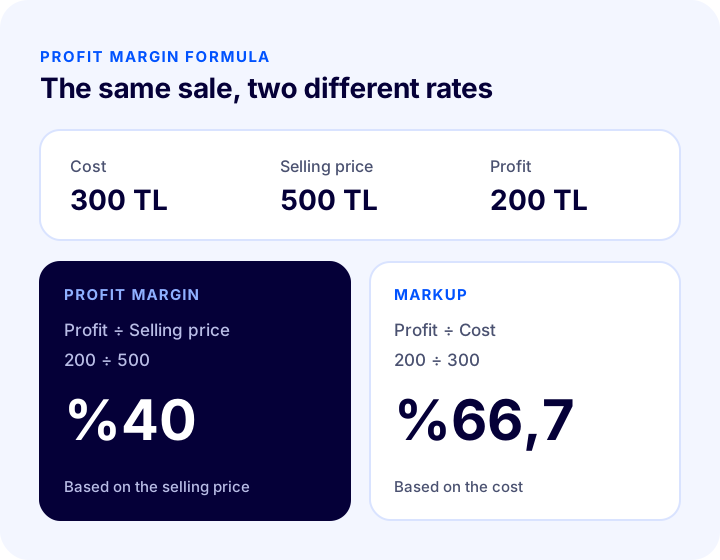
Example: If you sell a product that costs 300 TL for 500 TL, your profit is 200 TL. Profit margin = 200 ÷ 500 × 100 = 40%.
Profit Margin Calculator
Enter your product's selling price and the expenses of the order; the tool calculates your gross and net profit margin, your markup, and the selling price needed to reach your target margin. Enter amounts excluding taxes.
What Is the Difference Between Gross and Net Profit Margin?
Gross profit margin takes into account only the cost of the product, while net profit margin deducts all the expenses an order incurs until it reaches the customer. In e-commerce, the rate you should base decisions on is the net profit margin.
| Metric | Formula | What does it show? |
|---|---|---|
| Gross profit margin | (Selling price − Product cost) ÷ Selling price | The product's own profitability; the balance between sourcing and price |
| Net profit margin (per order) | (Selling price − All order expenses) ÷ Selling price | The profit that actually remains from an order |
| Business net profit margin | Net profit ÷ Total revenue | The business's overall health, including fixed expenses (rent, staff, software) |
Net Profit per Order: An Example
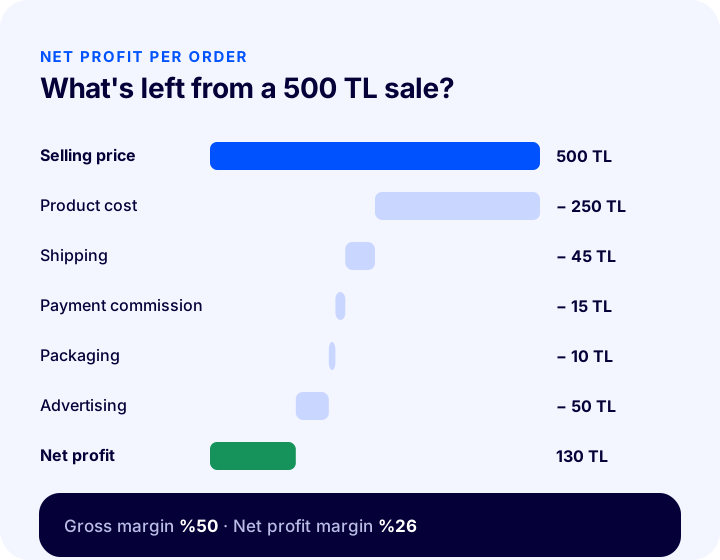
The example below uses hypothetical amounts to show the net profit per order for a product sold for 500 TL, excluding taxes:
| Pens | Amount |
|---|---|
| Selling price (excluding taxes) | 500 TL |
| Product cost | − 250 TL |
| Shipping | − 45 TL |
| Payment commission (3%) | − 15 TL |
| Packaging | − 10 TL |
| Advertising per order | − 50 TL |
| Net profit | 130 TL |
In this product the gross profit margin appears as (500 − 250) ÷ 500 = 50%, but once all the order's expenses are deducted the net profit margin falls to 130 ÷ 500 = 26%. The gap shows what a business that sets prices by looking only at gross margin overlooks on every order.
We recommend readingVolumetric Weight (Desi) Calculation: How Is Shipping Desi Calculated? (Calculator and Examples) We recommend readingHow to Prepare a Profit and Loss Report in E-Commerce?What Is the Difference Between Profit Margin and Markup?
Profit margin divides profit by the selling price, while markup (profit on cost) divides it by the cost. For the same sale the two rates give different results, and the most common pricing mistake is confusing the two.
Markup (%) = (Selling price − Cost) ÷ Cost × 100
For a product bought at 300 TL and sold at 500 TL, the profit is 200 TL. The profit margin is 200 ÷ 500 = 40%, while the markup is 200 ÷ 300 = 66.7%.
| Markup added to cost | Resulting profit margin |
|---|---|
| %25 | %20 |
| %50 | %33,3 |
| %100 | %50 |
| %150 | %60 |
| %200 | %66,7 |
As the table shows, adding 50% on top of cost does not mean a 50% profit margin; the margin stays at 33.3%. A business that thinks "I add 40% to the cost, so I earn 40%" actually works at a 28.6% margin and slips into loss during discounts far sooner than expected.
How Do You Set a Selling Price from a Target Profit Margin?
To reach your target profit margin, the selling price is found by dividing the cost by (1 − target margin):
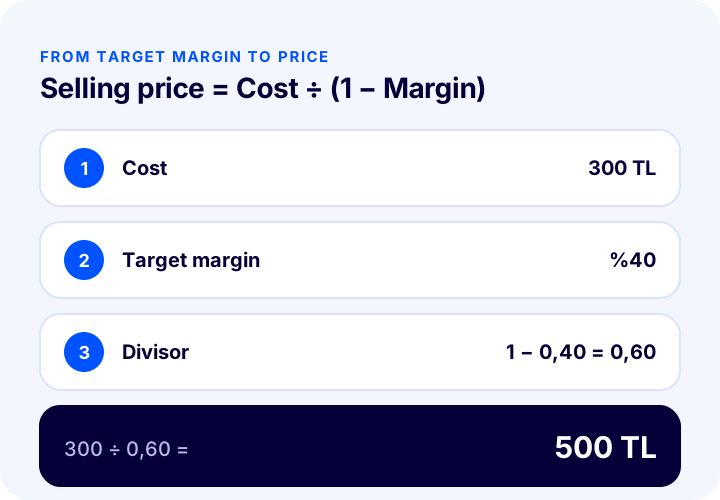
Selling price = Cost ÷ (1 − Target profit margin)
If you aim for a 40% profit margin on a product costing 300 TL, the selling price must be 300 ÷ (1 − 0.40) = 300 ÷ 0.60 = 500 TL.
How Do You Calculate the Price for Sales with Commission?
Because payment or marketplace commission is deducted as a percentage of the selling price, the commission rises as the price rises. In this case the formula expands as follows:
Selling price = Fixed expenses ÷ (1 − Commission rate − Target profit margin)
Here, fixed expenses are the total of product cost, shipping, packaging and advertising per order. With the 355 TL of fixed expenses in our example, a 3% commission and a 25% target net margin, the selling price is 355 ÷ (1 − 0.03 − 0.25) = 355 ÷ 0.72 ≈ 493 TL. The "Selling price for target margin" field in the calculator above uses this formula.
Okumanızı öneririzGüncel Pazaryeri Kategori Komisyon OranlarıWhich Expenses Affect Profit Margin in E-Commerce?
Some expenses that do not exist, or are smaller, in a physical store are added directly to the cost of every order in e-commerce. Do not forget these items when calculating net profit margin:
- Product cost: Purchase or production cost; for imported products, including customs and freight.
- Shipping: For orders you ship for free, the entire shipping fee is your cost. Desi (volumetric weight unit) and weight determine the shipping fee.
- Payment commission: Virtual POS commission and installment differences on card payments.
- Marketplace commission: A commission that varies by category for products sold on marketplaces.
- Packaging: Boxes, filler material, tape and, if applicable, branded packaging.
- Advertising: Advertising cost per order, found by dividing total ad spend by the number of orders.
- Returns: For returned orders, outbound and return shipping, repackaging and the loss on products that can no longer be sold.
- Campaign and coupon discounts: Coupons and discounts lower the selling price while the cost stays the same.
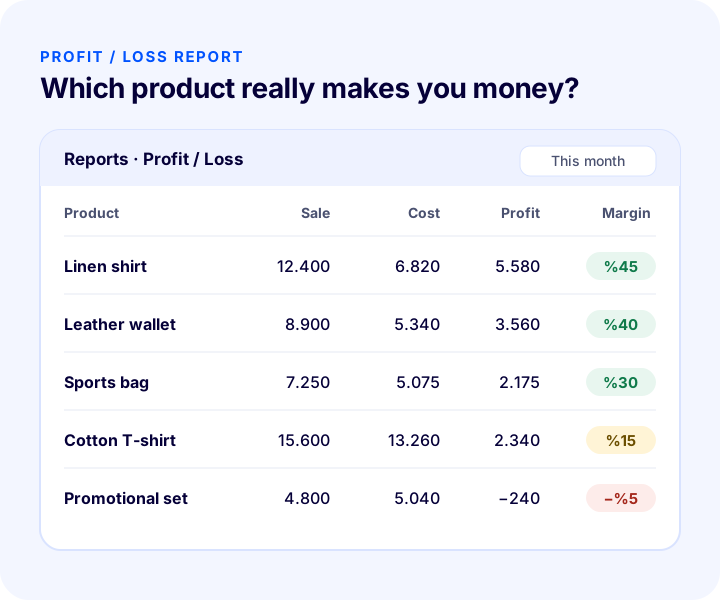
7 Ways to Increase Your Profit Margin
Increasing your profit margin doesn't always mean raising prices. Often, reducing the costs you pay per order is easier than a price increase and affects customers less.
- Increase your average cart value: Per-order costs such as shipping, packaging and payment processing take a smaller share of the total as the cart grows. Complementary product recommendations and campaigns based on cart value are used for this.
- Lower your shipping cost: Choosing a box that fits the product reduces the desi; using different carriers by region can improve cost.
- Set the free shipping threshold correctly: When the threshold is slightly above the average order value, it both grows the cart and spreads the shipping cost across more orders.
- Direct advertising to profitable products: Evaluate your ad budget by net profit, not revenue; aggressive advertising on low-margin products often loses money.
- Review your sourcing costs: For frequently sold products, bulk purchasing, alternative suppliers or bundled product setups improve the gross margin.
- Lower your return rate: An accurate size chart, clear product images and detailed product descriptions reduce returns and the double shipping cost that comes with them.
- Offer value instead of discounts: A percentage discount cuts the margin directly; setups such as a free gift, free shipping or reward points can generate the same interest at a lower cost.
How Do You Protect Your Profit Margin When Discounting?
A discount lowers the selling price but leaves the cost unchanged, so the margin falls faster than the discount rate. For a product sold at a 40% profit margin, a 20% discount works out as follows:
- The 500 TL price drops to 400 TL.
- The 300 TL cost stays the same, and the profit drops from 200 TL to 100 TL.
- The profit margin falls from 40% to 100 ÷ 400 = 25%.
In other words, a 20% discount takes away half of the profit on this product. To keep the same profit, sales volume would have to double during the discount period. When planning a campaign, set the discount rate based on the profit left per order, not on the selling price, and work out in advance the maximum discount you can afford.
Okumanızı öneririzİskonto Nedir ve Nasıl Hesaplanır? İskonto Hesaplama AracıHow Do You Calculate Profit Margin per Cart?
Profit margin per cart is the ratio of the total profit of all products in an order to the cart value. Because costs such as shipping and packaging are paid per order rather than per product, the profitability of low-priced products should be assessed within the cart, not on their own.
Let's look at an example. Suppose the cart has two products: product A, sold for 500 TL with a cost of 300 TL, and product B, sold for 200 TL with a cost of 150 TL. Shipping is 45 TL, packaging 10 TL, and the payment commission 3%:
| Pens | Product B alone | A + B in the same cart |
|---|---|---|
| Cart value | 200 TL | 700 TL |
| Product cost | 150 TL | 450 TL |
| Shipping + packaging | 55 TL | 55 TL |
| Payment commission (3%) | 6 TL | 21 TL |
| Net profit | −11 TL (loss) | 174 TL |
| Net profit margin | −%5,5 | %24,9 |
Product B loses money when ordered on its own, but becomes part of a profitable order when it is in the same cart as another product. That is why two approaches stand out for low-priced products: recommending the product together with complementary items, or not offering free shipping until the cart value reaches a certain level.
How Is the Free Shipping Threshold Set Based on Profit Margin?
The free shipping threshold is the lowest cart value at which your target net profit margin is still protected even when the store absorbs the shipping and packaging cost. It is calculated with this formula:
Free shipping threshold = Fixed cost per order ÷ (Average gross margin − Commission rate − Target net margin)
If your average gross margin is 35%, your payment commission is 3%, your target net margin is 20% and your shipping and packaging cost is 55 TL per order: 55 ÷ (0.35 − 0.03 − 0.20) = 55 ÷ 0.12 ≈ 458 TL. In this case, keeping the free shipping threshold below 458 TL means dropping below your target margin on every free-shipping order. Once you have set the threshold, recommending products that complete the threshold to customers whose cart is close to it raises both the average cart value and the profit per order.
If the sum of the gross margin, commission and target margin gets very close, the denominator of the formula shrinks and the threshold rises sharply. This is a sign that free shipping cannot carry the profit margin in that product group; in such cases, you need to pass the shipping fee on to the customer or reconsider the selling price.
Common Mistakes When Calculating Profit Margin
- Confusing markup with profit margin: A percentage added on top of cost is always higher than the profit margin; treating the two as the same leads to prices that are lower than they should be.
- Calculating with tax-inclusive amounts: The tax in the selling price is not the business's profit; a calculation that includes tax shows a higher margin than the real one.
- Looking only at gross margin: A margin calculated before deducting shipping, commission, packaging and advertising does not reflect reality in e-commerce.
- Ignoring returns: For products with a high return rate, round-trip shipping and repackaging costs cut the net margin significantly.
- Not tracking exchange rate changes: For products bought in foreign currency, the cost moves with the exchange rate; if prices are not updated, the margin erodes unnoticed.
- Using a single margin for all products: Shipping, returns and competitive conditions differ between product groups; the margin of each product group should be tracked separately.
How Often Should You Check Your Profit Margin?
Profit margin is not a one-time calculation; it should be recalculated whenever costs, shipping fees, commissions or advertising spend change. A practical routine can be set up like this:
- Every month: Report gross and net profit margin by product group and identify the groups whose margin is falling.
- Before every campaign: Calculate the highest discount rate at which net profit at the discounted price stays above zero.
- After every campaign: Compare the net profit of campaign orders with the period without a campaign.
- When the supply price, shipping agreement or exchange rate changes: Reset the selling price of the affected products based on your target margin.
This routine prevents the margin from eroding unnoticed and bases pricing decisions on calculation rather than guesswork.
Profit Margin Checklist
| Check | Why does it matter? |
|---|---|
| Are the selling price and cost exclusive of taxes? | Taxes are not profit; including them makes the margin look higher. |
| Have shipping, commission and packaging been added to the cost? | Net margin can only be calculated correctly with all order costs included. |
| Do you know the advertising cost per order? | Advertising is the fastest-growing order cost. |
| Has the return rate been taken into account? | Returns multiply the shipping cost. |
| Is the lowest profitable price known for campaigns? | If the discount limit is not known, you may end up selling at a loss. |
| Are prices updated with the exchange rate for foreign-currency products? | A rise in the exchange rate changes the cost, and therefore the margin. |
Track Your Profit Margin with Faprika
With the Faprika e-commerce infrastructure, you can manage the price, cost and expense items that affect your profit margin from a single panel and follow the results in reports:
- Profit / loss report: You follow the profit and loss of your sales in reports; revenue and net sales, model and product sales reports are in the same panel.
- Campaign discount report: By seeing how much discount and how many sales each campaign brought, you measure the effect of discounts on your margin.
- Product desi price calculation: By defining desi and weight for your products, you calculate the shipping fee correctly at the order stage and avoid shipping-related losses.
- Unlimited campaign setups: Instead of discounts, you can set up options that affect the margin less, such as a free gift, campaigns based on cart value, free shipping above a certain amount, or reward points.
- Automatic price updates with the Central Bank (TCMB) exchange rate: The prices of your foreign-currency products are updated with the rate, so your margin doesn't erode unnoticed when the rate rises.
- Bulk product updates: You apply price changes in bulk rather than product by product.
You can see which reports and campaign features are included in which plan in the comparison table on the e-commerce plans page.
Frequently Asked Questions
How is profit margin calculated?
Profit margin is calculated by subtracting the cost from the selling price, dividing the result by the selling price and multiplying by 100. If a product costing 300 TL is sold for 500 TL, the profit margin is 200 ÷ 500 × 100 = 40%.
What is the difference between profit margin and markup?
Profit margin divides the profit by the selling price, while markup divides it by the cost. For a product bought at 300 TL and sold at 500 TL, the profit margin is 40% and the markup (profit on cost) is 66.7%.
What is net profit margin?
Net profit margin is the ratio of the profit left, after deducting from the selling price the product cost and all order expenses such as shipping, payment and marketplace commissions, packaging and advertising, to the selling price.
How do you find the selling price from a target profit margin?
The selling price is found by dividing the cost by (1 − target profit margin). For a product costing 300 TL, a 40% margin requires a price of 300 ÷ 0.60 = 500 TL.
What should a good profit margin be in e-commerce?
There is no single right rate; it varies with the product group, shipping and return costs, and competition. What matters is that the net profit margin stays positive even after all order expenses and possible discounts are deducted.
Are taxes included in the profit margin calculation?
No. Because taxes included in the selling price are not the business's profit, the calculation is made with the selling price and cost excluding taxes; otherwise the margin appears higher than it really is.
You May Also Like
- E-ticarette Ürün Fiyatlandırması: Rekabet Analizi, Marj Analizi ve Diğer Stratejiler
- E-commerce Metrics: 15 KPIs You Should Track and Their Calculation Formulas
- Ücretsiz Kargo Seçeneği Satışlarınızı Artırır mı?
- E-Commerce Website Cost: How Much Does It Cost to Build One? E-Commerce Website Cost Guide