Contents 14 sections
- Why Do Product Photos Matter in E-Commerce?
- What Equipment Do You Need for Product Photography?
- How to Take Product Photos with a Phone: 10 Steps
- How Do You Set Up Lighting for Product Photos?
- Which Angles Should You Shoot for Product Photos?
- How Do You Photograph Difficult Products?
- How Do You Plan a Product Photo Shoot Day?
- White Backdrop or Lifestyle Photo?
- How Do You Edit Product Photos?
- What Should Product Image Size and Format Be for E-Commerce?
- 8 Common Mistakes When Taking Product Photos
- Product Photo Checklist
- Managing Product Images with Faprika
- Frequently Asked Questions
In online shopping, the customer cannot touch the product, smell it or turn it over in their hands. The only thing they have to decide on is the product photos. A blurry, dark photo or one whose color differs from the real thing makes even the best product unsellable; it is also one of the most common reasons for returns made because "it doesn't look like the photo".
The good news: to take a product photo that sells, you don't need an expensive studio or a professional camera. With the right light, a plain backdrop, a steady phone and a few simple rules, you can take consistent, sharp and trust-inspiring photos at home or in the office. In this guide, we explain step by step the equipment needed for product photography, phone settings, lighting setup, the angles to shoot by product type, editing steps and the right image size for e-commerce.
Why Do Product Photos Matter in E-Commerce?
In e-commerce, the product photo is how the customer sees, examines and trusts the product; it directly affects the purchase decision, the add-to-cart rate and the return rate. The photo takes the place of the store shelf, the fitting-room mirror and the sales assistant.
- It helps customers decide: The customer understands the product's color, texture, size and details from the photos. A missing angle means an unanswered question.
- It builds trust: Consistent, sharp photos shot in the same style make the store feel professional.
- It reduces returns: Photos that show the color and size accurately prevent "not what I expected" returns.
- It earns clicks: On category pages, in marketplaces and in ads, the first thing seen is the main photo; it decides whether it gets clicked.
- It's visible in search engines: Images that are properly named and have descriptive alt text also bring traffic in image searches.
What Equipment Do You Need for Product Photography?
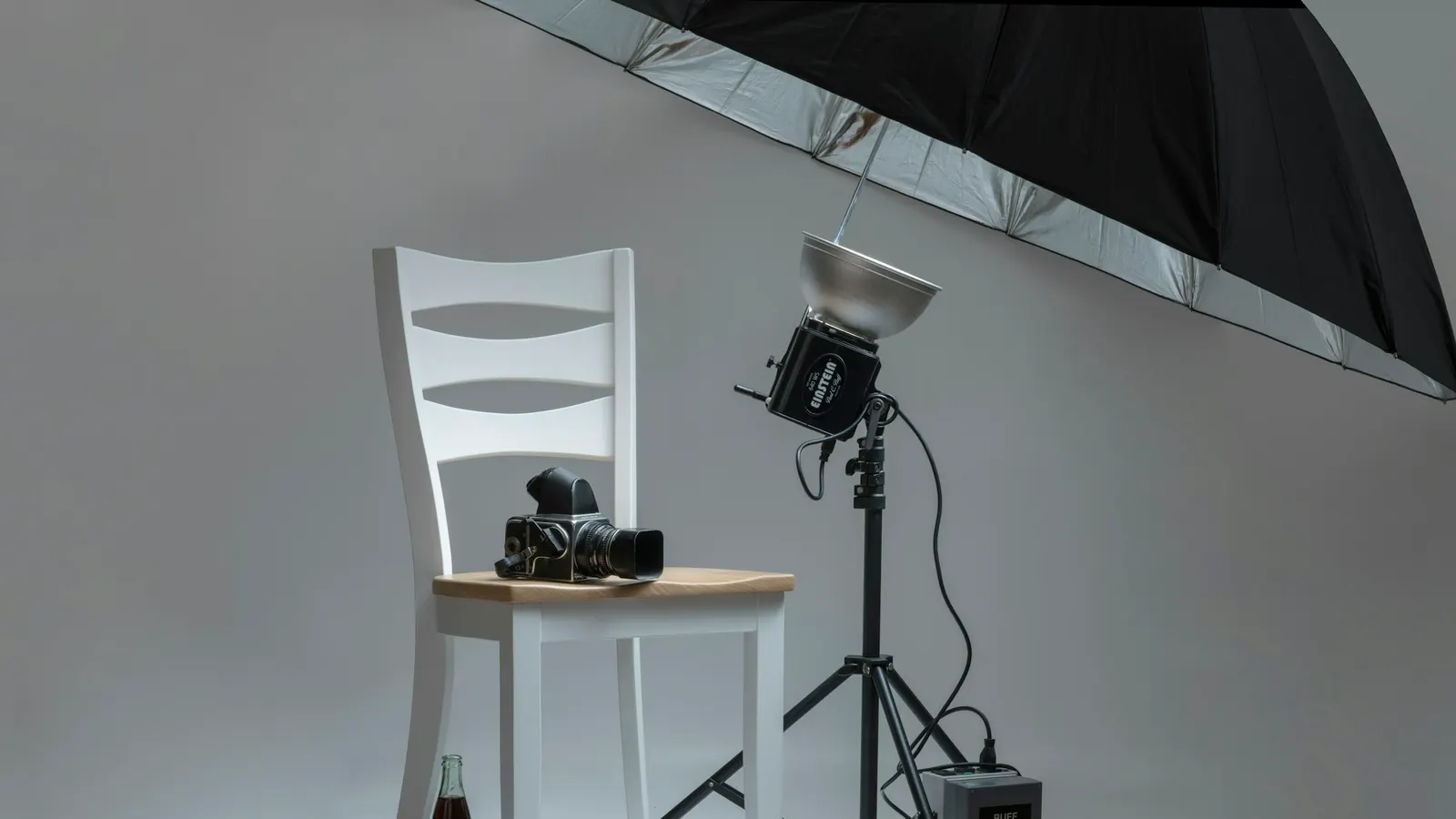
The basic equipment for product photography is a phone with a good camera, a tripod to hold the phone steady, a soft light source, a white or plain backdrop and a white reflector to open up shadows. Most of this setup can be put together with household materials or on a low budget.
| Equipment | What is it for? | Budget-friendly alternative |
|---|---|---|
| Phone or camera | Takes the photo | A current smartphone is enough for most products |
| Tripod | Holds the camera steady and ensures the same angle and sharpness in every photo | A tabletop tripod with a phone holder, or books stacked up |
| Light source | Lights the product | A large window that gets daylight |
| Light softener (diffuser) | Reduces harsh shadows and glare | A thin white sheer curtain or tracing paper stretched across the window |
| Backdrop | Keeps the background plain and clean | White cardboard curved and taped to the wall and table |
| Reflector | Bounces the light back and lights up the shadowed side | A white foam board or white cardboard |
| Cleaning supplies | Removes dust, fingerprints and lint | Microfiber cloth, lint roller |
How to Take Product Photos with a Phone: 10 Steps
To take a good product photo with a phone, clean the lens, mount the phone on a tripod, move closer to the product with the phone instead of using digital zoom, lock focus and exposure on the product, turn on the grid, shoot with the timer and use the same settings for all products. The ten steps below are the way to get consistent results with an ordinary phone.
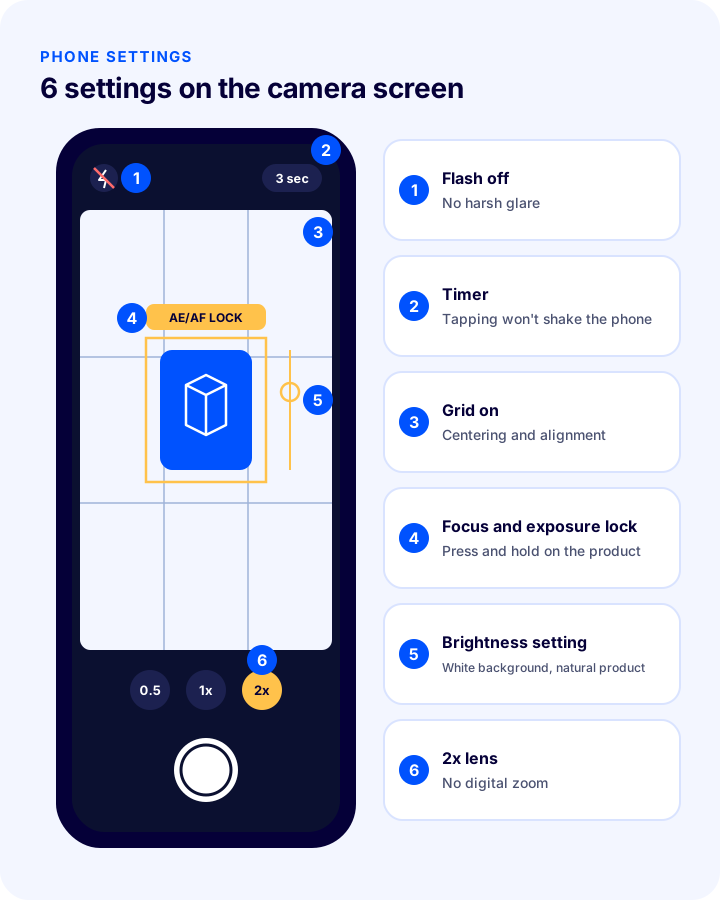
- Clean the lens: A fingerprint on the phone lens makes the photo look hazy and soft. Wipe it with a microfiber cloth before every shoot.
- Stabilize your phone: Use a tripod. Even tiny shakes in handheld shots blur the image; a fixed phone also guarantees the same angle in every photo.
- Turn off the flash: The phone's flash creates harsh, flat light and glare. Use light from a window or another light source instead.
- Don't use digital zoom: Zooming in on the screen lowers quality. If your phone has a separate lens such as 2x, choose it, or simply move the phone closer to the product. A slightly longer lens shows the product's proportions more naturally.
- Turn on the grid: The grid lines in your camera settings help you center the product and keep horizontal lines straight.
- Lock focus and exposure: Press and hold on the product on the screen to lock focus and exposure; then use the brightness slider so the background looks white and the product looks natural.
- Turn off portrait and beautify modes: Modes that blur the background can distort product edges, and beautify filters alter texture and color.
- Shoot with a timer: Use a timer of a few seconds so the phone doesn't shake when you tap the shutter.
- Keep settings constant: Shoot a product group with the same light, the same distance and the same settings. Photos side by side in your store should not differ in color or brightness.
- Shoot a lot, pick few: Take several photos from each angle; zoom in on a computer screen and choose the sharpest ones.
How Do You Set Up Lighting for Product Photos?
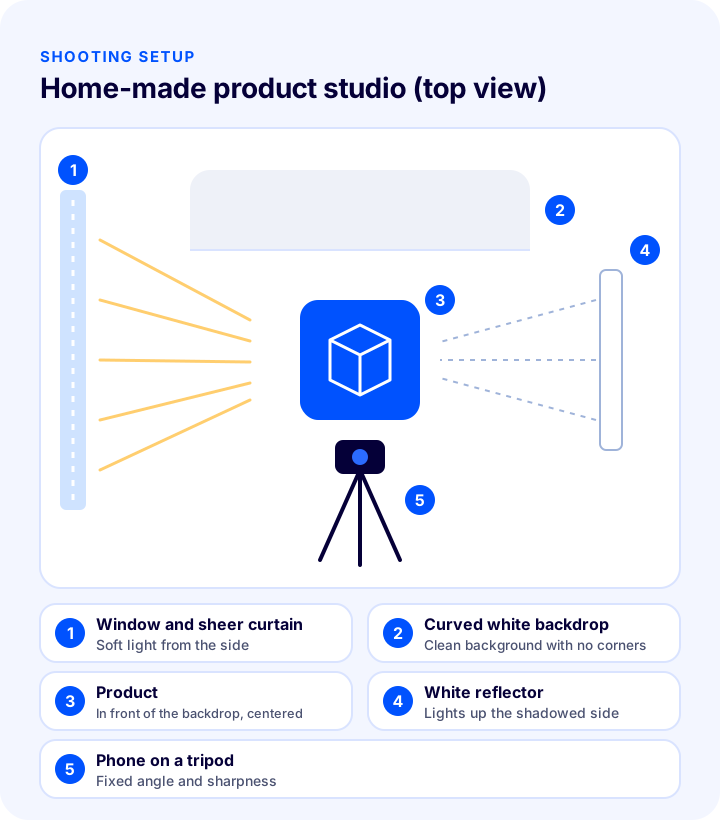
The best light for product photography is a single, wide, soft light source: in front of a window that gets daylight, at an hour without direct sun, light coming from one side of the product and a white reflector on the opposite side to open up the shadows is enough for most products.
- Avoid direct sunlight: Direct sun creates hard shadows and glare. If the light is harsh, hang a thin white curtain over the window.
- Don't mix light sources: Using window light together with a ceiling lamp makes one side of the photo look blue and the other yellow. Turn off the room's lights.
- Open up shadows with a reflector: A white card placed on the opposite side of the light brightens the shaded side and makes details visible.
- Take care with shiny products: On glass, metal and glossy packaging, the reflection of the light source shows. Soften the light, change the product's angle slightly, or control the reflection by surrounding it with white cards on both sides.
- If you will use artificial light: Two lights with diffusers and the same color temperature (one main, one fill) remove the dependence on daylight and give the same result every day.
Which Angles Should Be Shot for Product Photos?
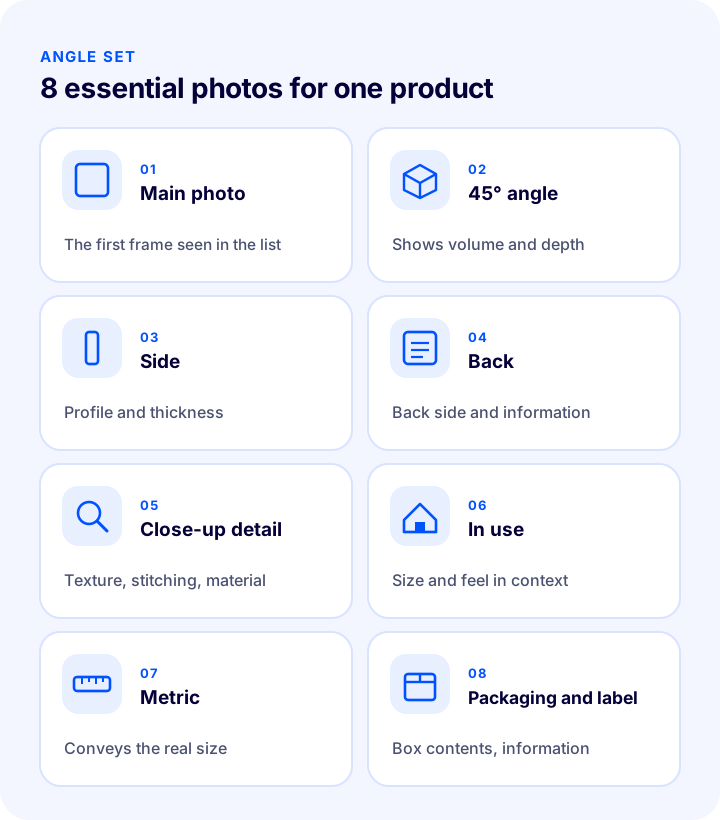
Every product should have at least a main (front) photo, side and back angles, a close-up detail, a photo showing the product in use, and a photo that conveys its size. Which angles come to the fore depends on the product type.
| Product type | Must-have shots |
|---|---|
| Clothing | Front, back, close-up of fabric texture, label and stitching detail, on a mannequin or being worn, color options |
| Shoes | Side profile, top view, sole, back, inner lining, view while standing |
| Jewelry and accessories | Extreme close-up of detail, clasp and stone detail, worn, a hand or ruler comparison to convey size |
| Cosmetics | Front and back of the packaging (ingredients), lid open, product texture, color on skin |
| Electronics | Front, back, ports and buttons, box contents, in use |
| Furniture and home | In use in a setting, dimension drawing, close-up of material and color, assembly detail |
| Food | Front of the packaging, the side with ingredients and expiry information, served, portion |
The main photo is the first photo seen on category pages and marketplaces. It should preferably show the whole product on a white or plain light background, fill most of the frame, and be shot at the same size and angle for all products.
How Do You Photograph Difficult Products?
Shiny, transparent, very small or very large products, and clothing, need a few extra measures on top of the basic setup. The common rule is the same: soften the light, control reflections, and make the product's real size clear.
Shiny and Transparent Products (Glass, Metal, Bottles)
These products reflect everything around them. Surround the product with white cards on both sides, always soften the light, and find an angle where neither the phone nor you is reflected. For transparent bottles, reflecting the light from behind off a white surface brings out the color of the liquid and the bottle's edge lines.
Small Products (Jewelry, Accessories)
Sharpness is the hardest part with small products. If the focus slips as you bring the phone closer, use your phone's close-up (macro) mode, or step back a little and crop afterward. Use clear adhesive putty to hold the product in place; to convey size, be sure to add a photo on a hand or being worn.
Large Products (Furniture, Household Items)
For large products, setting up a white background is often not possible. Shoot the product in a plain, tidy environment that gets daylight; leave no distracting items in the frame. A drawing showing the dimensions or a photo taken with a person reduces questions about size and returns.
Clothing
Three methods are used in clothing: flat lay (the product is laid on the floor and shot from above), on a hanger or mannequin, and on a model. Whichever you choose, the product should be ironed and wrinkle-free, and all products should be shot using the same method. A close-up showing the fabric texture and stitching detail, and a size chart, are the two most important visuals for reducing returns in clothing.
How Do You Plan a Product Photo Shoot Day?
Planning the shoot day lets you shoot photos of the same quality in less time. Shoot products not one by one but in groups, and with a shot list.
- Prepare a shot list: Write down in advance the angles to shoot for each product; tick them off as you go during the shoot.
- Shoot similar products together: Shooting products of the same size and color back to back lets you proceed without changing the light and camera settings often.
- Mark the positions: Mark the positions of the product, tripod and reflector on the table with small pieces of tape; you can set up the same arrangement the next day.
- Name files right away: As soon as the shoot ends, name the photos with the product code and put them in folders; don't get lost among hundreds of photos.
- Account for the hours when light changes: If you shoot with window light, the color and direction of the light change during the day; finish a product group within the same time window.
White Background or Lifestyle Photo?
You need both: a white background shows the product consistently and without distraction and is ideal for the main photo; a lifestyle photo shows how the product looks in use, its size and its feel. A strong product page uses both together.
| White background | Lifestyle (in a setting) | |
|---|---|---|
| Purpose | Showing the product clearly and consistently | Conveying use, size and feel |
| Where is it used? | Main photo, category lists, marketplaces | Rest of the product gallery, social media, campaigns |
| Shooting difficulty | Easy, repeatable | Requires a setting, accessories and sometimes a model |
| Watch out | The background must be truly white and clean | The setting must not overshadow the product |
How Do You Edit Product Photos?
The aim of editing product photos is not to change the product but to show it faithfully and consistently: cropping and alignment, straightening, white balance and brightness adjustment, background cleanup, and removing small flaws such as dust and lint is enough.
- Crop and align: In all main photos, the product should be the same size and centered in the frame.
- Straighten: Fix tilted photos; the table and product edges should be horizontal.
- Adjust the white balance: If the background leans gray or yellow, correct the white balance; compare the product color with the real product.
- Balance brightness and contrast: While making the background white, make sure the light-colored parts of the product don't disappear.
- Clean the background: Remove stains and shadow edges on the background, or make the background completely white.
- Remove flaws: Clean up dust, lint and fingerprints; but don't hide real characteristics of the product such as scratches or color differences.
- Apply the same settings to the whole series: Copy the edits you made on one photo to the other photos of the same shoot; keep the series consistent.
AI-powered tools greatly speed up background removal and cleanup. However, make sure these tools don't change the product's edges, texture or color; the customer expects the product in the photo.
Okumanızı öneririzE-Ticaret Görsellerinizi Bu Programlarla DüzenleyinWhat Should the Image Size and Format Be for E-Commerce?
E-commerce product images should have the same aspect ratio across all products (mostly square or portrait), be high enough in resolution to show detail when zoomed, yet compressed so they don't slow the page. The file name and alt text should also describe the product.
| Topic | Recommendation | Why? |
|---|---|---|
| Aspect ratio | Same ratio for all products (e.g. square 1:1 or portrait 4:5) | Cards align neatly on category pages |
| Resolution | High enough for detail to show when zoomed | Customers zoom in to inspect texture and detail |
| File size | Compressed without visible quality loss, in modern formats (e.g. WebP) | Heavy images slow the page, especially on mobile |
| File name | Descriptive, hyphenated words (e.g. linen-shirt-white-front.jpg) | Helps in image searches and in an organized archive |
| Alternative text | A sentence that briefly describes the image | For accessibility and search engines |
| Marketplace rules | Check the image rules in each marketplace's seller panel | Images that don't comply may be rejected |
Video where photos fall short: For features understood through movement, such as how a fabric drapes, how a tool works, or how roomy the inside of a bag is, a short product video complements the photo gallery. Shooting the video with the same light and background as the photos gives the product page a cohesive look.
Okumanızı öneririzE-Ticarette Site Hızı Neden Önemlidir?8 Common Mistakes When Shooting Product Photos
- Shooting under mixed light: Window light and lamp light together distort colors.
- Using flash: Creates harsh glare and a flat, lifeless image.
- Shooting handheld: Shake ruins sharpness, and every photo comes out at a different angle.
- Zooming in on the screen: Digital zoom lowers photo quality.
- Settling for a single angle: The questions in the customer's mind (the back, the inside, the size) go unanswered.
- An inconsistent series: Products in the same category with different backgrounds, light and sizes make the store look messy.
- Over-editing: Filters that change color and texture widen the gap between expectation and reality and lead to returns.
- Uploading without compressing: Very large files slow the page and lose mobile users.
Product Photo Checklist
Go through the checklist below before shooting a product group and before uploading.
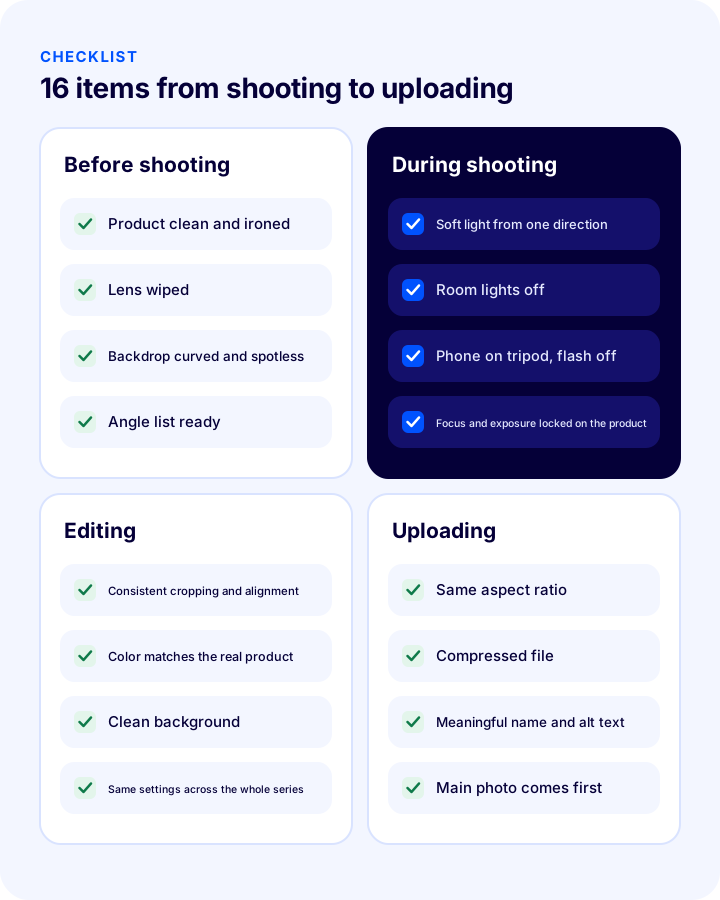
- Before the shoot: Product clean and ironed; lens clean; backdrop uncreased and spotless; angle list ready.
- During the shoot: Soft light from one direction, room lamps off; phone on a tripod; focus and exposure locked on the product; several frames from each angle.
- Editing: Consistent cropping and alignment; color matches the real product; clean background; same settings across the series.
- Uploading: Same aspect ratio; compressed file; meaningful file name and alt text; main photo first.
Managing Product Images with Faprika
These are the features you can use in the Faprika e-commerce platform to upload your product photos and display them correctly in your storefront (you can see which feature starts in which plan on the e-commerce plans page):
- Product list and detail settings, product image canvas feature: You set from the panel how products appear in the list and on the detail page.
- Showing other product images in the list and other colors on the detail page: Customers reach the product's other photos on the category page and the other color options on the product page.
- Bulk product image upload: You upload the photos of a product group in bulk, not one by one.
- Product video module: You can also show a product video alongside the photos.
- Content delivery network (CDN): Active in all plans; images open quickly from servers close to the visitor.
Frequently Asked Questions
How do you take product photos?
Place the product in front of a curved white backdrop, use soft light coming from the side (for example a window with a sheer curtain stretched across it), put a white reflector on the opposite side, mount the phone on a tripod, turn the flash off, lock focus and exposure on the product and shoot with the timer. Shooting all products with the same lighting and settings ensures consistency.
Can you take professional product photos with a phone?
Yes. With a current smartphone, the right light, a steady tripod and a plain background, you can shoot sharp, consistent photos suitable for e-commerce for most products. The result is determined more by light and consistency than by the camera.
What is the best light for product photos?
Wide, soft light coming from one direction is best. For most products, the light from a window with a thin white sheer curtain stretched across it, at a time when it doesn't get direct sun, is enough. Avoid using light sources with different color temperatures together.
How many photos should a product have?
There is no fixed number; there should be enough photos to answer the questions on the customer's mind. A basic set generally consists of a main photo, side and back angles, a close-up detail, a photo in use and a photo showing the size.
Is a white backdrop mandatory for product photos?
It isn't mandatory, but a white or light plain backdrop is recommended for the main photo; it shows the product without distraction and gives a consistent look on the category page. Some marketplaces have their own backdrop rules for the main image; the rules in the seller panel should be checked.
What size should e-commerce product images be?
They should have the same aspect ratio across all products (mostly square or portrait), be high enough in resolution to show detail when zoomed in, and be compressed so that they don't slow down the page. For images uploaded to a marketplace, each marketplace's own rules apply.