Contents 17 sections
- What Is a Pre-Order?
- Why Do Pre-Orders Matter?
- Which Products Suit Pre-Orders?
- How to Do Pre-Orders: Step-by-Step Guide
- What Convinces Customers on a Pre-Order Page?
- How to Manage Lead Time and Delays
- What Should the Pre-Order Cancellation and Refund Process Look Like?
- How to Promote a Pre-Order Campaign
- How to Set Pre-Order Prices
- How to Agree with Suppliers for Pre-Orders
- How Do Invoicing and Accounting Work for Pre-Orders?
- Sample Pre-Order Scenario
- How to Measure Pre-Order Success
- Common Mistakes When Setting Up Pre-Orders
- Pre-Order Checklist
- How to Manage Pre-Orders with Faprika
- Frequently Asked Questions
A pre-order means starting to take orders for a product that is not yet in stock or ready for sale. The business states the product's release date and estimated delivery time upfront; customers get in line by waiting, and the order is shipped when the product arrives. Set up properly, a pre-order is one of the lowest-risk ways both to measure demand before the product is made or imported and to make sales from day one.
In this guide we explain step by step what a pre-order is, how it differs from dropshipping and "out of stock", which products it works for, how to build a pre-order page, payment and cancellation models, how to manage lead time, and common mistakes. Our aim is to help you run pre-orders without damaging customer trust or tangling up operations.
What is a pre-order?
A pre-order is the name given to an order taken before the product is delivered to the customer. The product has not yet been made, has not arrived, or is waiting for its launch date; the store makes the product available to add to the cart and ties delivery to a specific date. The customer places the order and leaves a payment or deposit, and when the product is ready shipments go out in sequence.
A pre-order is often confused with two similar concepts. The table below summarizes the difference.
| Model | Where is the product? | What does the customer see? | Typical use |
|---|---|---|---|
| Pre-order | Not ready yet, release date known | A "pre-order" label and an estimated delivery date | New collection, launch, import, limited production |
| Dropshipping | Ready at the supplier; shipped to the business or the customer when ordered | Regular product, lead time depends on the supplier | Sales from the supplier's stock |
| Out of stock (on hold) | Sold out; may not be restocked | Cannot be bought; a "notify me" request is left | Temporary stockout |
Why Do Pre-Orders Matter?
A pre-order reduces the risk of investing without seeing demand and brings in revenue before the product is out. Basing the production or import decision on real orders lowers the cost of idle stock, and starting launch day with a ready customer base speeds up first-week sales.
- Demand measurement: The number of people who order is real data for deciding production or import quantities.
- Cash flow: A deposit or advance payment covers part of the production and procurement cost upfront.
- Excitement and loyalty: A customer who will be the first to own an eagerly awaited product feels more attached to the brand.
- Lower stock risk: Not buying products that won't sell up front avoids the loss of stock cleared with discounts.
In return, pre-orders carry risks too: if delivery isn't made by the promised date, lost trust, cancellation requests and refund workload increase. That is why a pre-order creates value only when set up with a clear date, open terms and a trackable process.
Which Products Suit Pre-Orders?
Pre-orders work best for products whose release date or production process is known and for which demand comes in advance. It is not the right model for every product; for fast-moving goods with daily delivery expectations, customers do not want to wait.
| Product type | Suitable for pre-order? | Why? |
|---|---|---|
| New season or collection products | Yes | Release date is set; customers wait to be the first to own it |
| Limited-run products | Yes | Production quantity can be set from orders |
| Imported products | Yes | Customs and shipping times are known and can be communicated in advance |
| Made-to-order products | Yes | Already produced after the order; the time is stated upfront |
| Everyday consumer products | Usually not | Customer expects immediate delivery |
| Products with an uncertain release date | No | A date that can't be promised damages trust |
How to Do Pre-Orders: Step-by-Step Guide
Setting up a pre-order comes down to seven steps: product and date decision, payment model, product page, quota, communication, post-order contact and moving to delivery. The flow below shows the steps in order.
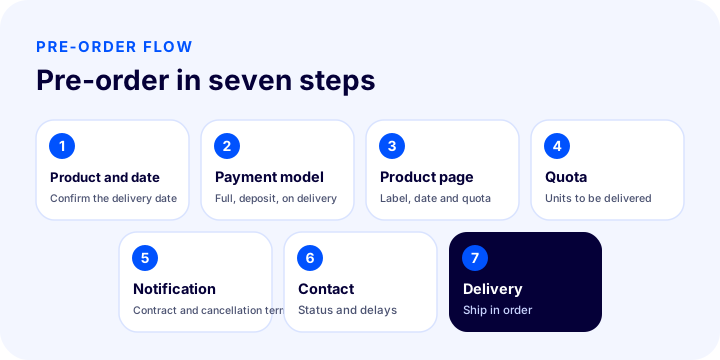
1. Define the product and estimated delivery date
First clarify which product will be opened for pre-order and when it will be in your hands. The date estimate must be confirmed with the supplier or manufacturer; giving a range (such as "the first two weeks of November") instead of an "approximate" date reduces the risk of delay. Always set a realistic date: promising early and delivering late costs far more than promising late and delivering early.
2. Choose a payment model
Three basic payment models are used in pre-orders: full payment, deposit and payment on delivery. Each strikes a different balance of risk and trust.
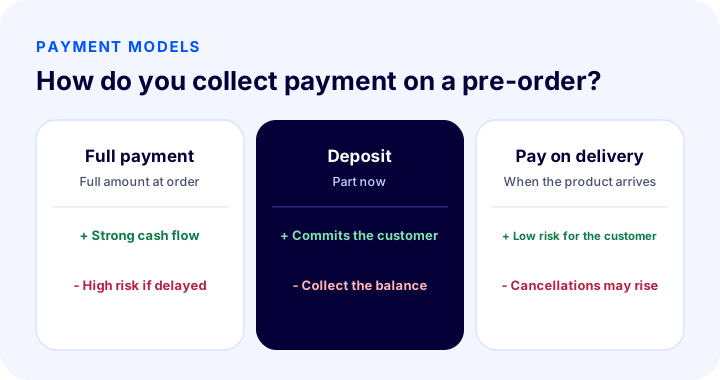
| Model | Advantage | Risk |
|---|---|---|
| Full payment | The model that strengthens cash flow the most | Refunds and loss of trust weigh heavily if delayed |
| Deposit | Commits the customer and splits the payment burden | Collecting the balance requires an extra step |
| Pay on delivery | Low risk for the customer, high participation | No cash-flow contribution; cancellations may rise |
3. Prepare the pre-order product page
The product page is where a pre-order becomes purchasable and trustworthy. At a glance, customers should see that the product is not yet available, when it will arrive and how payment works. In addition to the standard product information, the page should include the following elements:
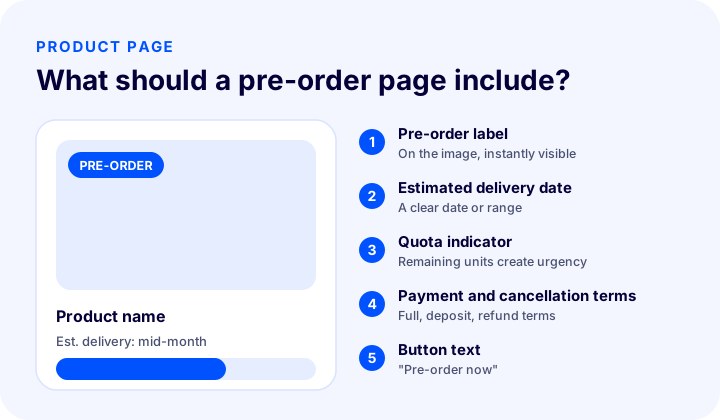
- Prominent "Pre-order" label: Placed near the product image and price, noticed immediately.
- Estimated delivery date or range: A clear date instead of vague phrases such as "shipped when the product is ready."
- Quota or remaining quantity: A limited pre-order both creates urgency and manages expectations.
- Payment terms: State clearly whether it is full payment or a deposit, and when the charge will be made.
- Cancellation and return information: For a pre-order, the cancellation terms should be visible on the page.
- Button text: A label that describes the situation, such as "Pre-order now" instead of "Add to cart."
4. Set Up the Stock Quota and Order Logic
In a pre-order, "stock" is not the quantity currently in your warehouse but the quantity you commit to delivering. Do not accept more orders than the amount you will receive from your supplier or production. Orders are fulfilled in sequence: the first to order is the first to receive, and customers are told this order clearly. For details on inventory management, see the article on what stock tracking is.
5. Inform the Customer and Update the Contract
Because a pre-order carries a different delivery condition from a regular sale, the customer needs to be informed both before and after the order. Make sure the delivery terms in the distance sales contract are also stated correctly for pre-order products, and base the legal delivery time limits on the distance sales regulations. For details, see our article on the distance sales contract.
6. Plan Post-Order Communication
After a pre-order is placed, the customer waits for the product and grows uneasy as uncertainty increases. Status emails and messages such as order confirmation, "product on the way," "production completed" and "handed to the carrier" should be planned in advance. If the date slips, the customer should hear it from you; silence brings cancellations and complaints. You can find how to write an order confirmation email in the article on order confirmation emails.
7. When the Product Arrives, Move Orders to Fulfillment in Sequence
When the product arrives, pre-order records turn into regular orders: stock is allocated in sequence, any remaining balance is collected, the invoice is issued and the shipment is created. Doing this transition by hand is error-prone with hundreds of orders; where possible, the system should automatically queue pre-order records and drop them onto the preparation screen.
What Persuades Customers on a Pre-Order Page?
Three things push a customer toward a pre-order: trust, urgency and exclusivity. Trust is built with a clear date, an open return policy and visible contact details. Urgency is created with a limited quota and a countdown. Exclusivity is conveyed with messages such as "be among the first to receive it" or a pre-order-only benefit (a gift, a discount or free shipping).
Announce the expected product on social channels, in your email list and on your site; use the "notify me when available" and waiting-list features to build interest before the product launches. This list is the most valuable audience, bringing first-day sales when the pre-order opens.
The pre-order page must work with the same clarity on mobile: the label, date and payment terms should be visible on a small screen without scrolling, and the button text should be large enough to tap comfortably. Most customers who place orders come from a phone; a customer who cannot see the date leaves the page. Page speed also directly affects pre-order conversion, so shrink large launch images and be prepared for the sudden traffic spike at announcement time.
How Do You Manage Lead Time and Delays?
The most critical risk of a pre-order is delay; most complaints and cancellations come not from the date slipping but from the customer being told late or not at all. The following rules help manage delays:
- Leave a margin on the date: Make your promise by adding a buffer of a few days to the supplier's date.
- Report delays early: Write to the customer the day you learn the date has slipped and give the new date.
- Offer the right to cancel: If the delay is long, give the customer the option of easy cancellation and a fast refund.
- Suggest compensation: During a prolonged wait, a small discount or free shipping preserves trust.
- Keep records in one place: See in the panel which order depends on which date.
What Should the Pre-Order Cancellation and Return Process Look Like?
In a pre-order, cancellation and return rules should be written in advance and shown to the customer at the time of ordering. A customer may want to cancel before receiving the product; you need to handle this request quickly, keep the refund time for the amount already collected short, and, if a deposit deduction applies, announce it beforehand. Base legal rights on the distance sales regulations; write your rules and time limits on the page in plain language that does not conflict with the law.
Return and cancellation management in general e-ticarette ürün iade ve iptallerin yönetimi is explained in detail in the article.
How Do You Promote a Pre-Order Campaign?
A pre-order campaign is planned like a launch: announcement, waiting list, opening, quota progress and closing. Tying the process to a campaign calendar both aligns the team and gives customers a consistent message.
- Announcement: Let people know the product is coming and when the pre-order starts.
- Waiting list: Collect the email or phone number of interested people.
- Opening: Give those on the list early access on the first day.
- Progress: Share the remaining quota and the quantity sold.
- Closing: Close the pre-order when the quota is full or the time is up, and keep collecting a list for the next batch.
For campaign timing, see the article on the e-commerce campaign calendar.
How Do You Set the Pre-Order Price?
A pre-order price is set in one of three ways: selling at the regular price, offering a discounted pre-order-only price, or building an "early access" bundle that raises the pre-order price. Which you choose depends on the demand for the product and your brand positioning.
- Regular price: Enough for high-demand, strong-brand products; customers want to own it even if they have to wait.
- Discounted pre-order price: For new or little-known products it encourages an early decision; offered together with a limited time and quota, it creates urgency.
- Early access bundle: A gift or extra benefit comes with the product; perceived value rises without the price dropping.
Whichever path you choose, state clearly on the page how the pre-order price differs from the regular sale price and whether the price will change after the product is released. If the customer gets the feeling "I found it cheaper" or "the price dropped" during the pre-order, they cancel.
How Do You Reach an Agreement with the Supplier for Pre-Orders?
The safety of a pre-order depends on the clarity of the agreement with the supplier or manufacturer. The promise you give the customer rests on the promise you get from your supplier; if the supplier misses the date, the burden of the delay falls back on you.
- Written delivery date: Record the date by email or contract.
- Quantity and batch: Limit the pre-order quota to the quantity the supplier has confirmed.
- Delay notice: Make clear when and how the supplier will inform you if the date slips.
- Quality control: Leave time to inspect the product before shipping it when it arrives.
- Backup plan: Prepare compensation or an alternative product you can offer the customer in case of delay.
How Do Invoicing and Accounting Work for Pre-Orders?
Because payment in a pre-order can be taken before the product is delivered, when the invoice and accounting entry will be created must be settled beforehand. Whether the invoice is issued at the time of payment or at delivery, how a deposit collection is recorded and how the document is corrected in case of a refund vary with the structure of the business and the legislation; discuss these with your accountant before going live. In Faprika, e-Invoice and e-Archive the invoice can be issued automatically from the order; set together with your team at which moment it will be issued for a pre-order. For the general logic of the invoicing process, see the article on e-ticarette fatura nasıl kesilir for more.
Sample Pre-Order Scenario
The scenario below is a hypothetical narrative prepared to illustrate the steps of a pre-order; the figures do not represent a real business.
A clothing brand decides to open a 200-unit pre-order before putting its new-season jacket into production. The manufacturer confirms the estimated delivery as the start of the season; the brand adds a few days of buffer to that date and says "mid-November." A "Pre-order" label, a quota indicator and a deposit condition are added to the product page. The announcement goes to the waiting list; list members get early access on the first day. When the quota is full, the pre-order closes and a new list is collected for the next batch. When the production date slips by two weeks, the brand sends the pre-order customers an email the same day, gives the new date and offers an easy cancellation option to anyone who wants it. When the product arrives, orders are prepared in sequence, the remaining balance is collected and shipping is created.
What works in this flow is less the product itself than the management of the promise: a clear date, a limited quota, open communication and an easy exit.
How Do You Measure Pre-Order Success?
The success of a pre-order is measured not only by the quantity sold but by the share of orders delivered on the promised date and the cancellation rate. Track the following indicators:
| Indicator | What does it tell you? |
|---|---|
| Number of pre-orders and quota fill | Strength of demand |
| Conversion from waiting list to order | Quality of the announcement and list |
| On-time delivery rate | Keeping promises, operational strength |
| Cancellation and return rate | Expectation management and trust |
| Average waiting time | Customer experience |
Common Mistakes When Setting Up Pre-Orders
- Vague delivery date: Phrases like "coming soon" or "when stock arrives" reduce trust.
- Not setting a quota: Selling a quantity you cannot deliver is the most expensive mistake.
- Staying silent when the date slips: A customer who gets no delay notice cancels and leaves a negative review.
- Mixing regular sales and pre-orders: Decide the shipping rule in advance for when a ready product and a pre-order product are in the same cart.
- Hiding the cancellation terms: If the terms are not visible on the page, disputes arise later.
- Taking payment too early or too late: Full payment too early damages trust; payment too late does not help cash flow.
Checklist for Pre-Orders
Before publishing the pre-order, go through the following items one by one.
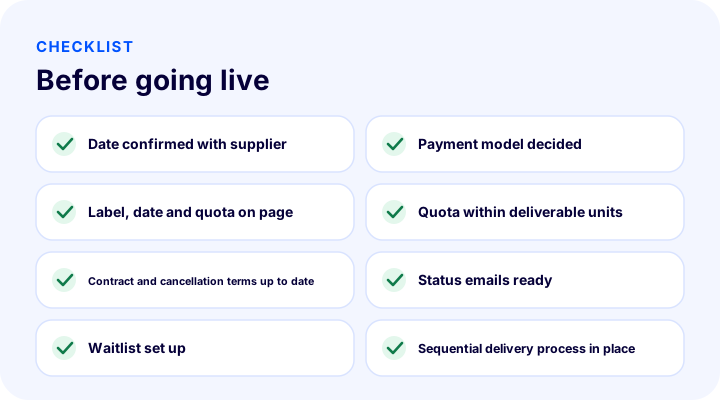
- Has the estimated delivery date or range been confirmed with the supplier?
- Has the payment model (full payment, deposit, payment on delivery) been decided?
- Are the "Pre-order" label, date and quota visible on the product page?
- Has the quota been limited to the quantity you can deliver?
- Are the distance sales contract and cancellation terms up to date?
- Are the order confirmation and status emails ready?
- Have the waiting list and "notify me when available" flow been set up?
- Is there a process to queue orders when the product arrives?
How Do You Manage Pre-Orders with Faprika?
In Faprika, pre-ordering runs in the same panel from the product page to order management. With the pre-order module and lead time management, you can open a product to pre-order, set the estimated delivery time per product or variant, and move orders into fulfillment in sequence when the product arrives. Being able to enter a different delivery date for a variant helps you ship options such as color or size on different dates.
The pre-order module varies by plan and is included in the higher plans (and in Faprika Private projects); you can review the current scope on the e-commerce plans page. For an out-of-stock product, the customer leaving a record and being notified when the product arrives is also handled with the notify me when available feature. To keep stock and orders balanced across multiple warehouses or channels, you can also look at the premium plans.
Frequently Asked Questions
What is a pre-order?
A pre-order means taking an order from a customer while the product is not yet in stock or ready for sale. The estimated delivery date is stated upfront, the customer waits, and when the product arrives the orders are shipped in sequence.
How is a pre-order done?
First the product and estimated delivery date are set, then a payment model is chosen, the pre-order product page is prepared, a quota is set, the customer is informed, and when the product arrives the orders are moved to delivery in sequence.
Is a pre-order the same as dropshipping?
No. In a pre-order the product is not yet ready and depends on a specific release date. In dropshipping the product is ready at the supplier and is shipped from the supplier when an order comes in.
Should you take full payment or a deposit for a pre-order?
Both are used. Full payment strengthens cash flow but requires trust; a deposit commits the customer and splits the risk. Product value, delivery time and customer trust determine which model to choose.
What should you do if a pre-order is delivered late?
As soon as the delay is known, the customer should be told the new date and offered easy cancellation and a fast refund if they wish. A small discount or free shipping as compensation helps preserve trust.
Does Faprika have a pre-order module?
Yes. Faprika includes a pre-order module and lead-time management; a delivery date can be set per product or variant. The module is included in higher plans and in Faprika Private projects; the current scope is on the plans page.