Contents 21 sections
- What Is E-Commerce Software?
- What Is E-Commerce Software Used For?
- What Are the Types of E-Commerce Software?
- What Is Ready-Made E-Commerce Software?
- What Is Custom E-Commerce Software?
- What Is Open-Source E-Commerce Software?
- What Features Should E-Commerce Software Have?
- What Should You Consider When Choosing E-Commerce Software?
- What Are the Software Modules in E-Commerce?
- Which Business Should Choose Which E-Commerce Software?
- How Does E-Commerce Software Affect Search Engine Visibility?
- Why Do Security and Legal Compliance Matter in E-Commerce Software?
- Is a Mobile App Part of E-Commerce Software?
- What Does the Cost of E-Commerce Software Include?
- How Do You Switch E-Commerce Software? How Do You Protect Search Engine Visibility?
- How Do Accounting and ERP Software Work with E-Commerce Software?
- How Does E-Commerce Software Affect Customer Experience and Conversion?
- How Do You Prepare Your Team for a Switch to New E-Commerce Software?
- What Are Common Mistakes When Choosing E-Commerce Software?
- What Is Faprika E-Commerce Software and What Are Its Advantages?
- Frequently Asked Questions
E-commerce software is the software infrastructure that lets a business sell products or services over the internet and manage products, orders, payment, shipping and invoicing. Both the storefront of an e-commerce site that customers see and the panel that manages sales behind the scenes are part of this software.
In this guide we explain what e-commerce software is, what types exist (ready-made, custom and open-source), which features it should have, how to choose it, its cost items and how to protect your search engine visibility when you switch software. Our aim is to help you choose the right software for your budget and goals.
What Is E-Commerce Software?
E-commerce software is software that offers, under one roof, all the core functions an online store needs to operate. Product listing, cart and payment flow, order management, shipping and invoicing processes, customer accounts, campaigns and reports are among its modules. It usually consists of two parts: the storefront used by the customer and the management panel used by the business owner.
The terms e-commerce software, e-commerce infrastructure and e-commerce plan are often used interchangeably in everyday speech. A ready-made plan is a way of renting software; "infrastructure" also refers to the technical foundation the software runs on.
Okumanızı öneririzE-Ticaret Altyapısı Nedir?What Is E-Commerce Software Used For?
E-commerce software automates the manual work in the sales process and reduces errors. Without software, a sale means a series of manually run tasks; with software, these tasks come together in a single panel.
| Task | Without software | With e-commerce software |
|---|---|---|
| Product management | Product information is entered one by one in different places | Products, prices and stock are managed from a single panel |
| Order | Orders are collected by message or email | Orders come in automatically and their status is tracked from the panel |
| Payment | Bank transfer and manual follow-up | Instant card payment via virtual POS |
| Shipping | Barcode and tracking number are entered manually | Barcode and tracking are automatic with shipping integration |
| Invoice | A manual invoice for every order | e-Invoice or e-Archive is issued automatically from the order |
| Marketing | Campaigns are applied manually | Coupons, discounts and cart reminders can be managed |
| Report | Data is scattered, calculations are manual | Sales, product and profit reports are in the panel |
What Are the Types of E-Commerce Software?
E-commerce software is examined under three main types: ready-made (rented) software, custom (built from scratch) software and open-source software. Their cost, speed, flexibility and responsibility differ greatly.
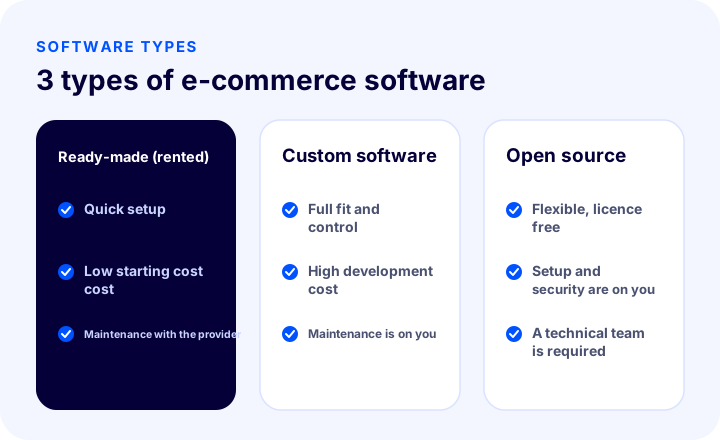
| Criterion | Ready-made (rented) | Custom software | Open source |
|---|---|---|---|
| Setup speed | Fast, within days | Slow, can take months | Medium, technical knowledge required |
| Starting cost | Low, monthly or annual fee | High, development fee | Low license, but setup and maintenance effort |
| Flexibility | As much as the plan offers, expandable with add-ons | Entirely according to your needs | High, but you need to develop it |
| Maintenance and security | Done by the provider | Your or your developer's responsibility | Your responsibility |
| Support | From the provider | From the developer | From the community or paid support |
| Who is it for? | Most businesses | Those with very specific business processes | Those with a technical team |
What Is Ready-Made E-Commerce Software?
Ready-made e-commerce software is e-commerce software that the provider develops and maintains and that you rent for a monthly or annual fee. Servers, security, backups and updates are handled by the provider; you choose a design, upload your products and start selling.
- Advantages: Fast setup, low initial cost, management that needs no technical knowledge, ready-made payment, shipping and e-Invoice integrations, provider support.
- Disadvantages: You may be limited to the functions the provider offers; a very specific business process requires extra development; the monthly fee is ongoing.
What Is Custom E-Commerce Software?
Custom e-commerce software is software built from scratch according to the business's needs. It suits businesses with a very specific ordering, pricing or operations process, but it brings development cost, time and maintenance responsibility.
- Advantages: A one-to-one fit with your business, full control, custom integrations.
- Disadvantages: High initial cost, long development time, responsibility for security and updates, dependence on the developer.
What Is Open-Source E-Commerce Software?
Open-source e-commerce software is software whose source code is publicly available and that is usually offered under a free license. Although it seems free, you will have your own server, setup, security, update, add-on and developer costs. It gives flexibility if you have a technical team; if you do not, hidden costs can rise quickly.
Recommended readingHow Much Does It Cost to Build an E-Commerce Site? Cost GuideWhat Features Should E-Commerce Software Have?
Good e-commerce software should have features that support every step of the sales process. The list below is a checklist you can use when comparing software:
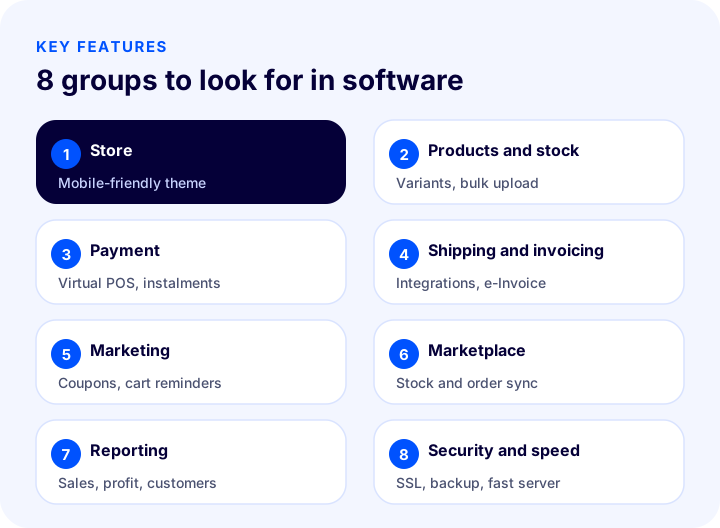
| Group | Features to look for |
|---|---|
| Store and design | Mobile-friendly themes, easy page editing, fast page loading |
| Products and stock | Variants (size, color), bulk product upload, stock alerts, categories and filtering |
| Payment | Virtual POS integration, installments, bank transfer and cash on delivery, secure payment page |
| Shipping and invoicing | Shipping integration, barcode and tracking, e-Invoice and e-Archive integration |
| Marketing | Coupons and discounts, cart reminders, email and SMS, product reviews |
| Multichannel selling | Marketplace integration, stock and price sync, multi-warehouse |
| Reporting | Sales, product, profit and customer reports |
| Security and speed | SSL, backups, fast servers, user authorization |
What Should You Consider When Choosing E-Commerce Software?
To choose the right software, first write down your own needs, then compare software against this list. These ten questions make the choice easier:
- Who are you selling to and what do you sell? Your number of products, variants and stock structure determine the capacity the software must handle.
- What is your budget? Look not only at the monthly fee but also at items such as setup, add-ons, support and commission.
- Is it easy to use? You should be able to manage products, campaigns and orders without technical knowledge.
- Are the integrations ready? Are payment, shipping, e-Invoice, accounting and marketplace integrations offered ready to use?
- Is it suitable for multichannel selling? Can marketplaces and your own site be managed from the same stock?
- How is the search engine fit? Can you manage titles, descriptions, URL structure, redirects and the sitemap?
- Speed and security? Do pages open fast, and are SSL and backups included?
- Is it open to growth? If your orders increase or you want to sell abroad, can you continue with the same software?
- What is the support like? When you have a problem, is there support you can reach by phone or through a fast channel?
- Does the data belong to you? If you want to switch software, can you export your product, customer and order data?
What Are the Software Modules in E-Commerce?
E-commerce software is made up not of a single function but of modules that complement one another. Asking up front which modules are included in the plan and which come with an extra license helps you avoid surprise costs later.
- Catalog and product management: Management of products, categories, brands, variants and images; bulk upload and update.
- Order management: Receiving orders, tracking their status, returns and cancellations, creating orders manually from the panel.
- Payment module: Virtual POS, installments, bank transfer, cash on delivery and payment by link.
- Shipping module: Integration with carriers, barcode, tracking number and status updates.
- Invoicing and accounting module: e-Invoice and e-Archive, data flow with accounting or ERP software.
- Marketing module: Coupons, discounts, campaigns, cart reminders, email and SMS.
- Customer module: Membership, address book, favorites, reviews, support requests.
- Marketplace module: Syncing products, stock, prices and orders on marketplaces.
- Warehouse and stock module: Stock movements, multi-warehouse, shelf and picking processes.
- Reporting module: Sales, product, profit, customer and campaign reports.
- Administration and security module: User permissions, logs, backups and security settings.
Which Business Should Choose Which E-Commerce Software?
The right choice varies with your business's size, product structure and technical strength. The scenarios below offer a starting point:
| Situation | Generally suitable type | Why? |
|---|---|---|
| You are just starting, your budget is limited | Ready-made (rented) | Fast setup, low initial cost, support included |
| You sell both on your site and on marketplaces | Ready-made software with marketplace integration | You manage stock and orders from a single panel |
| You sell wholesale (B2B) and retail | Ready-made software with B2B features | Dealer-specific prices and a sales channel are needed |
| You plan to sell abroad | Ready-made software with an e-export module | Language, currency and country-based shipping are needed |
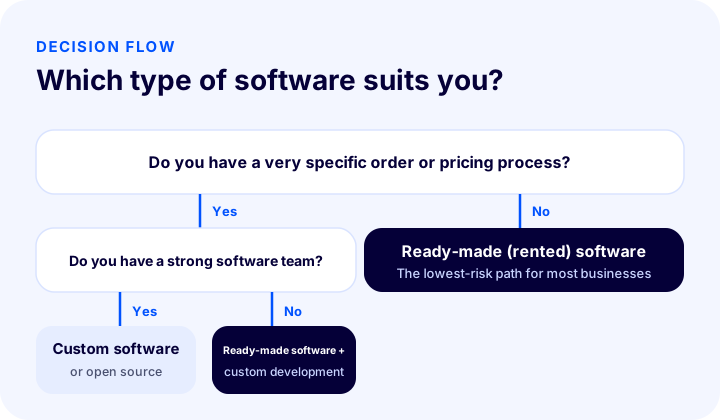
| We have a very specific order or pricing process | Custom software or software that allows custom development | The standard flow does not meet the need |
| We have a strong software team | Open source or custom | Your team takes on maintenance and security |
For most businesses, the lowest-risk start is quickly deployed ready-made software that is open to growth; special needs can be met over time with add-ons or custom development.
How Does E-Commerce Software Affect Search Engine Visibility?
E-commerce software directly affects how your site appears in search engines. Your software should let you manage the following functions:
- Title and description (meta) fields: You should be able to write a separate title and description for each product and category.
- URL structure: Short, clear addresses with no problems with special characters.
- Redirects (301): Permanent redirects for deleted or changed pages.
- Sitemap and robots settings: Being able to control which pages search engines crawl.
- Structured data: Conveying product, price, stock and review information to search engines in an understandable way.
- Page speed and mobile compatibility: Pages that load fast and work smoothly on mobile matter to both users and search engines.
- Blog and content management: Being able to publish non-product content is necessary for content marketing.
Why Do Security and Legal Compliance Matter in E-Commerce Software?
Because e-commerce software handles your customers' personal data and payment transactions, security and legal compliance are priority criteria. Pay attention to the following:
- SSL certificate: Encrypting data traffic between the site and the customer.
- Secure payment: Processing card details on a secure payment infrastructure.
- Regular backups and updates: Protection against data loss and security vulnerabilities.
- User authorization: Everyone in the panel seeing only the area they are authorized for.
- Protection of personal data (KVKK): Being able to meet obligations such as the privacy notice and cookie consent.
- Distance sales and returns support: Being able to manage contract, pre-information and right-of-withdrawal processes in the software.
- e-Invoice and e-Archive compliance: Issuing invoices automatically in the legal format.
Is a Mobile App Part of E-Commerce Software?
A mobile-friendly site and a mobile app are not the same thing. A mobile-friendly site is one that works properly in a phone's browser, and every e-commerce platform should have it. A mobile app is a separate channel that customers download from stores such as the App Store and Google Play, add to their home screen, and to which you can send notifications. Some platforms include a mobile app as part of the plan, others offer it as an extra service. If you are aiming for customer loyalty and repeat sales, ask in advance whether the app is included in the plan and who handles the publishing process.
What Does the Cost of E-Commerce Software Include?
The cost of e-commerce software is not just a monthly or annual fee. When budgeting, take the following items into account:
- Software fee: The plan fee for ready-made software; the development cost for custom software; servers and maintenance for open source.
- Setup and design: Theme, logo, page design and the effort of uploading products.
- Add-ons and integrations: Marketplace, shipping, payment and accounting integrations may cost extra outside the plan.
- Support and maintenance: Technical support, updates and security.
- Payment commission: Virtual POS and payment provider commissions.
- Training and migration: Your team getting used to the new software and transferring data from the old system.
When comparing total cost, calculating the total expense over at least one year gives a far more accurate result than comparing monthly fees.
How Do You Switch E-Commerce Software? How Do You Protect Search Engine Visibility?
Switching software can affect search engine visibility because the URL structure and content change. Follow these steps to protect your visibility:
- Take an inventory of the old site: List all page URLs, titles, descriptions and the pages that bring the most traffic.
- Export your data: Back up your product, category, customer and order data and transfer it to the new software.
- Keep URLs the same where possible: For URLs that cannot stay the same, set up a permanent redirect (301) from the old URL to the new one.
- Keep titles, descriptions and content: Carry over the titles, descriptions and text of the pages that rank to the new site unchanged.
- Try it in a test environment: Before going live, test the order, payment, shipping and invoice flow with a trial order.
- Monitor after launch: Track errors, indexing status and traffic changes in the search console for several weeks.
How Do E-Commerce Software and Accounting or ERP Software Work Together?
As your business grows, your e-commerce software needs to talk to your accounting or ERP software. Once the integration is in place, products, stock information, orders and invoices flow automatically between the two systems; you no longer have to enter the same information twice, and the problem of two systems showing different figures disappears. When choosing software, always ask whether there is a ready-made integration with the accounting or ERP program you use; if not, find out the cost and duration of a custom integration.
How Does E-Commerce Software Affect Customer Experience and Conversion?
Every point of friction a customer meets while using the site reduces sales. Slow-loading pages, a complicated checkout, mandatory registration, unclear shipping information and difficult returns are among the main causes of cart abandonment. A good e-commerce platform reduces this friction with features such as fast pages, guest checkout, single-page payment, clear delivery information and easy returns. When comparing platforms, place an order in the demo and count how many steps it takes to reach payment.
Okumanızı öneririzSepeti Terk Etme Oranlarını Düşürmenin YollarıHow Do You Prepare Your Team for a Move to New E-Commerce Software?
Switching software is not just a technical task; it is a transition that also changes how your team works. To run the transition smoothly, involve the team from the start: get training on using the new panel, put into a written workflow how daily tasks (adding products, preparing orders, returns, campaigns) will be done in the new software, and appoint someone responsible for checking stock and order differences between the old and new systems during the transition. Choosing a period when orders are not heavy for the first weeks reduces the impact of any hiccups.
Prepare a final checklist before the switch: Is the product and image transfer complete? Have the payment and shipping connections been tested? Is the e-Invoice generated correctly? Are the legal pages and cookie consent live? Are the redirects working? Once everything is confirmed, go live.
What Are Common Mistakes When Choosing E-Commerce Software?
- Looking only at the monthly fee: Add-on, commission and support costs change the total.
- Choosing for today's needs: Software that falls short when you grow leads to the cost of a later migration.
- Not asking about integrations: Software without payment, shipping, e-Invoice or marketplace integration means manual work.
- Not asking whether the data belongs to you: Being unable to take your data with you when you leave the software is a major risk.
- Buying without seeing the demo: Usability problems only show up when you try the software.
- Not testing the mobile experience: Most visitors come from their phones.
What Is Faprika E-Commerce Software and What Are Its Advantages?
Faprika is a ready-made e-commerce software that has been developing e-commerce software for 20 years and serves more than 3000 brands. A mobile-friendly store, product and stock management, virtual POS and payment integrations, integration with 23 shipping companies, e-Invoice and e-Archive, campaign tools, marketplace integrations and an e-export module are offered in a single panel. Technical support by phone is also included in the plan. You can review the plan that suits your needs on the e-commerce plans page, and the add-ons and integrations on the add-ons page.
Frequently Asked Questions
What is e-commerce software?
E-commerce software is software that lets a business sell online and manage processes such as products, orders, payments, shipping and invoicing from a single panel. It consists of the storefront that customers see and the management panel that the business uses.
What are the types of e-commerce software?
There are three main types: ready-made (rented) software, custom software and open-source software. Ready-made software starts quickly and at low cost; custom software is developed from scratch for very specific needs; open-source software requires a technical team.
Which e-commerce software should I choose?
For most businesses, a ready-made e-commerce software that offers payment, shipping, e-Invoice and marketplace integrations out of the box, is mobile-friendly and provides support is the best starting point. If you have a very specific business process and a technical team, custom software or open source can be considered.
How much does e-commerce software cost?
The cost varies by type, plan scope, add-ons and support needs. When comparing, look not only at the monthly fee but also at the total cost over at least one year, including setup, add-on, commission and support expenses.
Can free e-commerce software be used?
The licence of open-source software can be free; however, there are server, setup, security, update and developer costs. If you have no technical knowledge, the total cost can end up higher than ready-made software.
Do rankings get lost when you switch e-commerce software?
They can be if it is not planned properly. Permanently redirecting old addresses to the new ones (301), keeping the titles, descriptions and content, and monitoring Search Console after launch minimise the loss.
What is the difference between ready-made e-commerce software and custom software?
Ready-made software is developed and maintained by a provider, and you rent it to start using it quickly; custom software is built from scratch for your business. Ready-made software stands out for speed and low cost, custom software for a perfect fit and full control.
Which integrations should e-commerce software have?
At the very least, payment (virtual POS), shipping and e-Invoice integrations should be ready to use. If you will sell on marketplaces, marketplace integration matters; if you use accounting or ERP software, data flow with it matters too.