
Contents 22 sections
- Who Is an E-Invoice Taxpayer?
- Why Is E-Invoice Taxpayer Lookup Necessary?
- How Is an E-Invoice Taxpayer Looked Up?
- Which Document Is Issued Depending on the Lookup Result?
- What to Do If the Wrong Document Was Issued?
- How to Manage the Difference Between Individual and Corporate Customers?
- How Can High-Order-Volume Businesses Put Taxpayer Checks into a Routine?
- What Is the Difference Between E-Invoice and E-Archive Invoices?
- How Do You Become an E-Invoice Taxpayer?
- How Should Invoice Information Be Collected on the Order Form?
- How Are Invoices Managed for Marketplace Orders?
- Example Scenarios for E-Invoice Taxpayer Lookup
- How to Manage E-Invoice and E-Archive with Faprika
- Common Situations During Lookup and Their Solutions
- How Do You Standardize the E-Invoice Process Within Your Team?
- What to Watch for in Security and Accuracy During the Lookup Process?
- What Are Common Mistakes in E-Invoice Taxpayer Lookup?
- What Are the Benefits of Using E-Invoice for an E-Commerce Business?
- When Does E-Invoice Taxpayer Lookup Become Important?
- E-Invoice Taxpayer Lookup Checklist
- Frequently Asked Questions
- Frequently Asked Questions (FAQ)
E-invoice taxpayer lookup means finding out whether the person or company you will invoice is registered in the e-Invoice system. The result decides which document you issue: if the buyer is an e-Invoice taxpayer, an e-Invoice is issued; if not, an e-Archive invoice. The lookup is done with the tax ID number or Turkish national ID number through the registered users list on the e-Document page of the Revenue Administration (GİB).
In this guide, we explain who an e-Invoice taxpayer is, why they are looked up, the lookup steps, which document to issue depending on the result, what to do when the wrong document is issued, and how e-commerce businesses with many orders can put this check into a routine. Because legislation and amount limits change from time to time, we recommend verifying current conditions with official sources and your accountant.
Who Is an E-Invoice Taxpayer?
An e-Invoice taxpayer is a taxpayer who has applied to the e-Invoice system, been accepted and added to the registered users list. These taxpayers issue, send and store their invoices electronically; parties who will invoice them also send these documents electronically.
Whether a business is an e-Invoice taxpayer may not be a matter of its own choice; taxpayers meeting certain conditions are required to switch to e-Invoice. Because the scope of the obligation and the monetary thresholds are updated from time to time, we do not give figures in this guide; for the current requirement, check the Revenue Administration announcements or ask your financial advisor.
| Concept | Short description |
|---|---|
| e-Invoice taxpayer | A taxpayer registered in the e-Invoice system; receives and sends invoices electronically |
| Registered users list | The published list of taxpayers registered in the e-Invoice system |
| e-Archive invoice | Electronic invoice issued to recipients who are not e-Invoice taxpayers |
| Taxpayer lookup | Checking from the list whether the recipient is registered in e-Invoice |
Why Is E-Invoice Taxpayer Lookup Necessary?
The lookup is necessary because whether the recipient is registered in the e-Invoice system changes the type of document to be issued. Issuing an e-Archive invoice to an e-Invoice taxpayer is not valid; in that case you must cancel the invoice and issue an e-Invoice.
- To issue the right document: If the recipient is a taxpayer, issue an e-Invoice; if not, an e-Archive.
- To avoid cancellation and reissue: A document issued in the wrong type means extra workload and correspondence with the customer.
- To work smoothly with corporate customers: Companies often expect the invoice to arrive as an e-Invoice.
- For accounting order: A document issued in the right type makes recording and reconciliation processes easier.
How to Look Up an E-Invoice Taxpayer
An e-Invoice taxpayer is looked up by entering the tax identification number or Turkish ID number in the "Registered Users List" section of the Revenue Administration's e-Document page. If the recipient appears in the list, they are an e-Invoice taxpayer; if not, they are not an e-Invoice user.
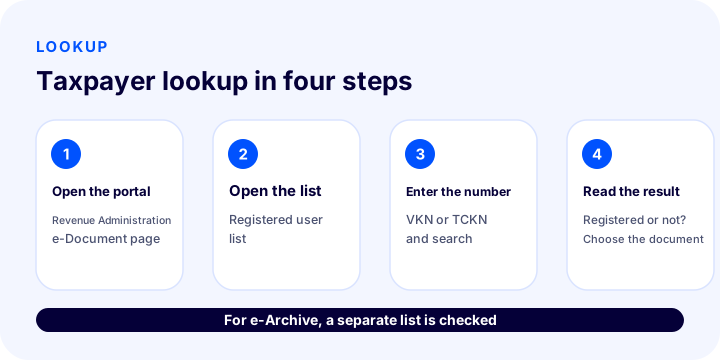
- Open the official e-Document page. For the lookup, use the Revenue Administration's e-Document registered users page. Trust the result of the official page, not third-party sites that appear in search results.
- Open the registered users list. Go to the registered users list for e-Invoice.
- Enter the number. If the recipient is a company, enter the tax identification number; if a sole proprietorship, enter the Turkish ID number, then search.
- Read the result. If a record is found, the recipient is an e-Invoice taxpayer; if not, an e-Archive invoice is issued.
Screen names and layout may change from time to time; the logic stays the same. If you need bulk checking, a downloadable version of the list may be available; you can see the current options on the official page.
Which Document Is Issued Based on the Lookup Result?
The lookup gives one of two outcomes: the recipient is an e-Invoice taxpayer or is not. In the first case an e-Invoice is issued, in the second an e-Archive invoice.
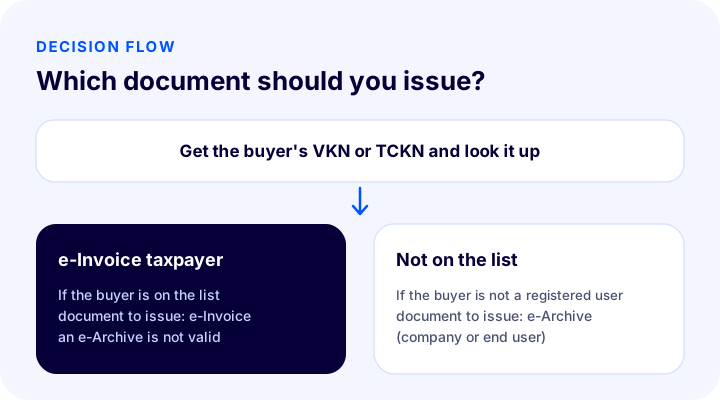
| Lookup result | Document to issue | Point to watch |
|---|---|---|
| Recipient is in the registered users list | e-Invoice | Issuing an e-Archive is not valid |
| Recipient is not in the list (company) | e-Archive invoice | Delivered to the recipient by e-mail |
| Recipient is not in the list (end consumer) | e-Archive invoice | The customer receives the invoice by e-mail or from their account |
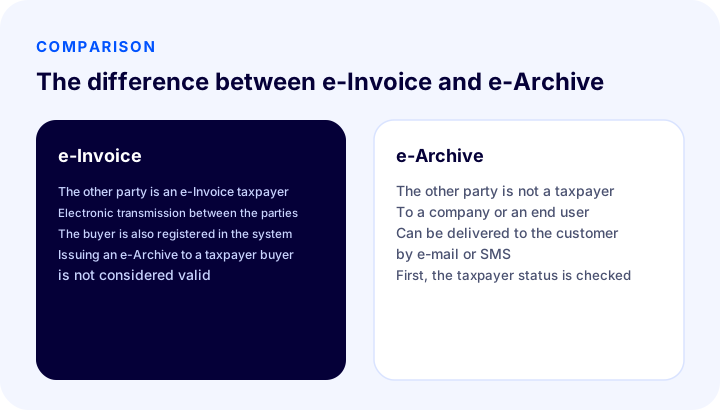
You can also look at our articles that explain the difference more broadly and who can issue each of the two documents.
Okumanızı öneririzİnternetten Satış Yapanlar İçin E-Fatura ZorunluluğuWhat to Do If the Wrong Document Was Issued?
If an e-Archive invoice was issued to a recipient who is an e-Invoice taxpayer, this document is not valid; you need to cancel the e-Archive invoice and issue an e-Invoice. As soon as you notice this, inform your financial advisor and carry out the cancellation and reissue process in accordance with the legislation.
- Identify the faulty document (you may have learned later that the recipient is a registered user).
- Confirm the cancellation process and time limits with your financial advisor.
- Cancel the e-Archive invoice.
- Issue an e-Invoice to the recipient and send it.
- Keep your records and the notification you sent to the recipient.
Cancellation and correction periods depend on the legislation; that is why the first step is always to run the lookup before the invoice.
How to Handle the Difference Between Individual and Corporate Customers?
An individual customer is often not an e-Invoice taxpayer and receives an e-Archive invoice; a corporate customer, on the other hand, may be an e-Invoice taxpayer. On an e-commerce site, making this distinction at order time makes the invoicing process easier.
| Customer | Typically | Information to collect |
|---|---|---|
| Individual | e-Archive invoice | Full name, address, Turkish ID number if required |
| Sole proprietorship | e-Invoice or e-Archive, depending on taxpayer status | Turkish ID number, tax office |
| Company | e-Invoice or e-Archive, depending on taxpayer status | Company name, tax identification number, tax office, address |
Offering a "I want a corporate invoice" option on the order form and making tax details mandatory in that case shortens the time spent waiting for information at the invoicing stage.
How to Put Taxpayer Checks in Order for Businesses with Many Orders?
A business with few invoices per day can do the lookup manually; as order volume grows, the process needs to be put in order. A checking routine reduces errors and delays.
- Separate corporate orders. Run the taxpayer check only for orders with a tax identification number; for individual orders an e-Archive is usually issued.
- Note repeat customers. If you have verified once that a buyer is a taxpayer, record it; since their status may change, re-check at regular intervals.
- Check right before invoicing. Taxpayer status can change over time; a current lookup is the safest.
- Assign responsibility. Make clear who runs the lookup and who issues the invoice.
- Work with a financial advisor. Keep regular contact with the advisor to resolve unclear situations quickly.
What Is the Difference Between E-Invoice and E-Archive Invoices?
Both are invoices issued electronically; the difference is whether the recipient is registered in the e-Invoice system. An e-Invoice is transmitted electronically between two taxpayers; an e-Archive invoice is issued to recipients who are not e-Invoice taxpayers and is usually delivered by e-mail or similar means.
- Parties: In e-Invoice both parties are registered in the system; in e-Archive the recipient does not need to be registered.
- Delivery: e-Invoice goes through the system; e-Archive is delivered to the recipient by e-mail, SMS or through their account.
- Accounting: Both documents are stored electronically; no paper printout is needed.
- Decision point: The recipient's taxpayer status determines which document is issued, not the seller's preference.
How to Become an E-Invoice Taxpayer
To switch to e-Invoice, you can apply directly to the Revenue Administration or make the transition through authorized private integrators. The process consists of the steps of application, approval and system setup; verify the details and current conditions from the official source or your financial advisor.
- Determine the conditions for your business to switch to e-Invoice (mandatory or optional).
- Choose one of the two routes: direct application or a private integrator.
- Submit the application and wait for approval.
- After approval, connect your invoicing software to e-Invoice.
- Try the process with a test invoice and then go live.
With Faprika, the Faprika team can manage the e-Invoice application process on your behalf, so the application and setup process is taken off your shoulders.
How Should Invoice Details Be Collected on the Order Form?
To run the taxpayer lookup quickly, the order form needs to collect the right information from the start. When the customer states whether they are individual or corporate, the required fields should open accordingly.
- Invoice type selection: Offer "Individual" and "Corporate" options separately.
- Corporate fields: Make company name, tax identification number, tax office and invoice address mandatory.
- Individual fields: Full name and address are enough; ask for the Turkish ID number only when needed.
- Validation: Check the number of digits in the number field; catch incorrect entries in the form.
- Explanation: Briefly tell the customer why invoice information is requested; this increases trust.
How to Manage Invoices for Marketplace Orders?
In orders from a marketplace, the buyer is mostly an individual customer and invoicing follows the marketplace's rules. As a seller, you need to know these rules and match the invoice to the order.
- Process invoices for marketplace orders on the same day as the order and with the correct number.
- If you need to report invoice information to the marketplace, automate it; manual notifications are delayed.
- Bulk invoicing saves time for a seller receiving hundreds of orders a day.
- In case of returns and cancellations, plan invoice correction (return invoice or cancellation) together with the relevant process.
In Faprika, marketplace orders are invoiced from the same panel as site orders; notifying the marketplace of invoice status and bulk invoicing are offered depending on the plan.
Sample Scenarios for E-Invoice Taxpayer Lookup
Three short scenarios show how the lookup works in practice.
Scenario 1: Individual customer
A customer buys a product from your site and does not enter a tax identification number. Since the customer is an individual, an e-Archive invoice is usually issued and sent to the customer by e-mail or SMS. You also do not need to run a taxpayer lookup.
Scenario 2: Corporate customer
A company enters its tax identification number and tax office when placing an order. Before invoicing, you look up the number in the registered users list on the official page. If the company is in the list, you issue an e-Invoice; if not, an e-Archive invoice.
Scenario 3: Sole proprietorship
A tradesperson places an order with their Turkish ID number and asks for an invoice. A sole proprietorship can also be an e-Invoice taxpayer; so you look up the number and choose the document based on the result. Do not act on assumptions without running the lookup.
How to Manage E-Invoice and E-Archive with Faprika
In Faprika, e-Invoice and e-Archive invoice processes are managed from the e-commerce panel; invoices generated after an order are delivered to the customer by e-mail and SMS. You can invoice orders from your own site and marketplaces from a single panel, and convert them to invoices in bulk with one click.
- Single panel: Orders from the site and marketplaces are invoiced in the same place.
- Bulk processing: You convert multiple orders to invoices with one click.
- Delivery to the customer: The invoice goes to the customer by e-mail and SMS; the customer can also access their invoice from their own account.
- Application support: The Faprika team manages the e-Invoice application process on your behalf.
Which invoice features come with which plan varies by plan; for details see the comparison on the e-commerce plans page, and for an introduction to e-Invoice solutions see the e-Invoice page. The taxpayer lookup itself is done on the official page; Faprika does not replace this lookup, it organizes the invoicing process that follows.
Okumanızı öneririzİhracatta E-Fatura ve E-Arşiv KullanımıCommon Situations During the Lookup and Their Solutions
In practice, the lookup does not always end with a plain "yes or no". The situations below are the most common; in each, the safe path is to run the official lookup right before invoicing and confirm with your financial advisor.
| Situation | What should be done? |
|---|---|
| The recipient says "I am an e-Invoice taxpayer" but you cannot see them in the list | Re-check the number; they may be newly registered. Ask the recipient for written confirmation and run the lookup again. |
| The recipient asks for an e-Archive invoice but is registered in the list | An e-Archive invoice is not valid for a registered recipient; you must issue an e-Invoice. Explain the situation politely to the customer. |
| The tax identification number is missing or incorrect | Ask the customer for the correct number; hold the invoicing until the information is clear. |
| The lookup page is not responding | Try again after a while; do not rush and issue an invoice based on assumption. |
| The customer wants a corporate invoice after the order | Confirm the conditions for cancelling and reissuing the existing document with your financial advisor. |
How Do You Standardize the E-Invoice Process in the Team?
The lookup should not be left to one person's memory; it should be a written, simple process. A standard process ensures the invoice is issued with the same accuracy even when the team changes.
- Assign responsibility. Let the person who issues the invoice also be the one who runs the taxpayer lookup for corporate orders.
- Write a short flow. Share the flow "Corporate? If yes, look up. If registered, e-Invoice; if not, e-Archive." with the team.
- Record the result. Write the query date and its result in the order note.
- List the exceptions. Refer unusual cases (returns, cancellations, newly registered buyers) to your accountant.
- Review monthly. Check the number of faulty documents and improve the process.
What Should You Watch for to Keep Taxpayer Lookups Secure and Accurate?
Using the official lookup page and taking results only from a source you trust is the first condition of accuracy. Some third-party sites that appear in search results may show outdated lists or ask for personal information.
- Run the lookup on the official institution’s page; check the address bar.
- Do not sign in to pages that ask for a password or card details for the lookup.
- Store customer numbers in a secure environment and do not share them with unnecessary people.
- In bulk lookups, keep downloaded files up to date; an old file may show an outdated registration status.
Common Mistakes in E-Invoice Taxpayer Lookup
The most common mistakes are skipping the lookup and issuing an invoice on an assumption, and looking up once and trusting the result forever. Both come back as the wrong document and a cancellation.
| Mistake | Consequence | Solution |
|---|---|---|
| Issuing an e-Archive invoice without a lookup | If the buyer is registered, the document is considered invalid | Look up the corporate buyer before invoicing |
| Trusting an old lookup | The status may have changed | Re-check at regular intervals |
| Entering the wrong number | Wrong result | Enter the tax ID and national ID number with the correct number of digits |
| Trusting a third-party site | Outdated information | Run the lookup on the official page |
| Asking for the information after the order | The invoice is delayed | Get the tax ID from corporate buyers up front |
What Are the Benefits of Using E-Invoice for an E-Commerce Business?
Using e-Invoice and e-Archive speeds up the invoicing process, eliminates paper costs and keeps records in order. As order volume grows, the difference becomes even clearer.
- Speed: The invoice is issued and delivered to the buyer within seconds; printing, shipping and signature steps disappear.
- Cost: Paper, printing and delivery costs disappear; only an electronic cost such as credits remains.
- Order: Invoices are stored electronically; they are easier to search and to transfer to accounting.
- Customer experience: Customers reach their invoice right away by email, SMS or from their account.
- Fewer errors: Automatic invoicing reduces errors caused by manual entry.
When Does E-Invoice Taxpayer Lookup Become Important?
In small businesses the lookup rarely comes up; its importance grows as order volume and the number of corporate customers increase. Businesses that sell wholesale, serve corporate customers, or take company orders from their own site outside marketplaces should make the lookup a routine.
For example, on a wholesale site (B2B) most customers are taxpayers; checking the buyer’s registration before every invoice ensures both the right document and a tidy accounting record. For such businesses, designing the lookup as a step in the order flow reduces the need for later corrections.
E-Invoice Taxpayer Lookup Checklist
Review these eight items before issuing an invoice:
- Is the buyer a business or an individual?
- Has the tax ID or national ID number been obtained?
- Was the number entered with the correct number of digits?
- Was the lookup done on the official e-Document page?
- If registered, was an e-Invoice issued; if not, an e-Archive?
- Are the tax office and address details complete?
- Has the invoice been delivered to the customer?
- Have the result and document number been recorded?
Frequently Asked Questions
Frequently Asked Questions (FAQ)
What is e-invoice taxpayer lookup?
E-invoice taxpayer lookup means finding out from the list of registered users whether a person or company is registered in the e-Invoice system. The result determines whether an e-Invoice or an e-Archive invoice will be issued.
How is an e-invoice taxpayer looked up?
Enter the tax ID or national ID number in the registered users list on the e-Document page of the Revenue Administration (GİB). If the buyer appears in the list, they are an e-Invoice taxpayer.
Can an e-archive invoice be issued to an e-invoice taxpayer?
No. An e-Archive invoice issued to an e-Invoice taxpayer is not considered valid; if such a document was issued, it must be cancelled and an e-Invoice issued.
What is issued to a buyer who is not an e-invoice taxpayer?
An e-Archive invoice is issued to a buyer who is not an e-Invoice taxpayer, whether a company or an end consumer. For current paper-invoice exceptions and monetary limits, refer to official announcements or your accountant.
Is a taxpayer lookup needed for an individual customer?
Individual customers are mostly not e-Invoice taxpayers and receive e-Archive invoices. Checking registration is more important for corporate buyers and sole proprietorships.
Does Faprika perform the taxpayer lookup?
The taxpayer lookup is done on the official e-Document page. After the lookup, Faprika lets you invoice orders from a single panel as e-Invoice or e-Archive, deliver them to customers by email and SMS, and invoice in bulk.
How often should a taxpayer lookup be done?
For a corporate buyer, it should be done before each invoice or at least at regular intervals, because the buyer's taxpayer status can change over time. A current lookup is the safest.
Is being an e-invoice taxpayer mandatory?
It is mandatory for taxpayers who meet certain conditions and optional for others. Since the scope and limits of the obligation are updated from time to time, you should check official announcements or your accountant.