Contents 6 sections
A great opportunity is opening up for e-exporters and entrepreneurs who want to step into Ozon, Russia's leading online marketplace. However, there are important steps you need to take to secure your place in this exciting market.
This guide explains in detail how to add your brand on Ozon, covering every stage from the required Russian product descriptions to logistics and payment details. If your company documents are ready, let's take the first step in your journey on Ozon. Here is the A-to-Z guide to adding a brand on the Ozon marketplace.
Brand Registration for Your Products on the Ozon Marketplace
If you plan to sell on Ozon, your products' brand information is essential. If your products' brand has not been registered on Ozon before, applying for this process should be your first step. Here is the starting point of this journey:
We recommend you readWhat Is E-Commerce and How Is It Done?Logging In to the Store Management Panel
- Access your store management panel on the Ozon marketplace. This will be the center of your sales process. Here, click the 'Products and Prices' tab in the menu, then find the 'Brands' button. This step is the starting point of the brand registration process and will direct you to the required area.
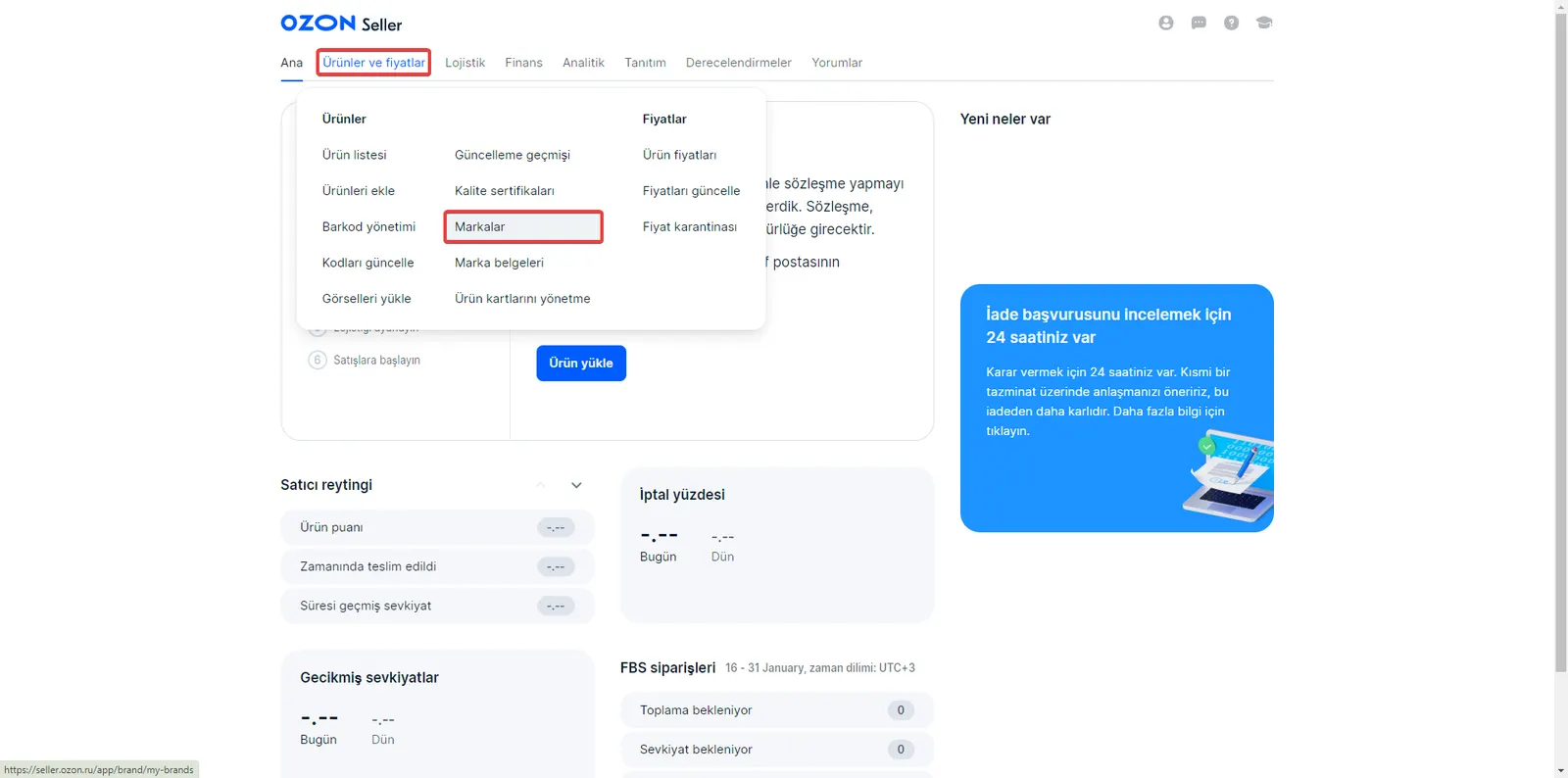
Starting the Brand Addition Process
When you reach the 'Brands' section in the store management panel, click the "Add" button to start the brand addition process. This simple step will take you to the heart of the brand addition process and give you access to the fields needed to present your brand on Ozon.
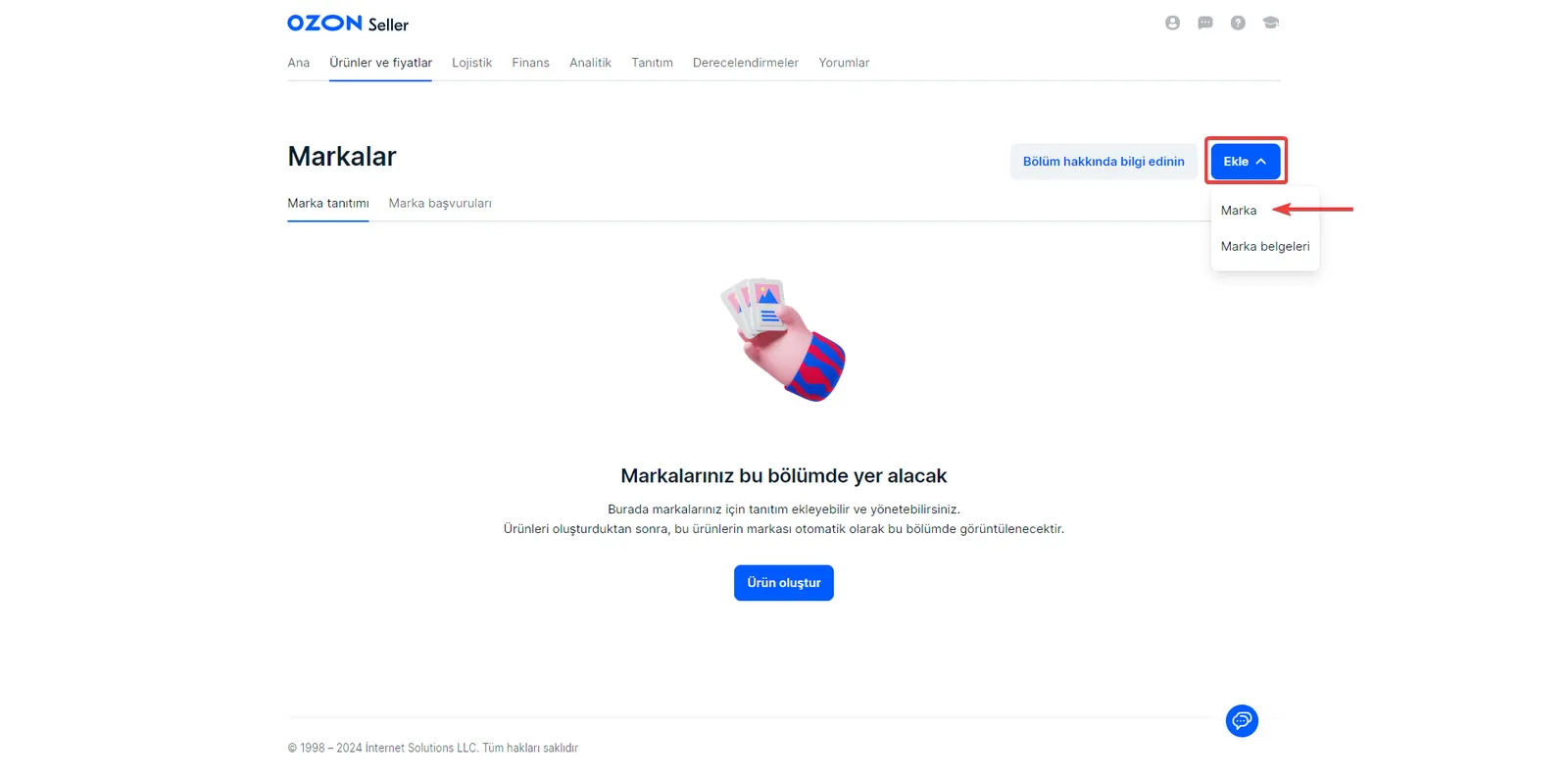
Details of the Brand Addition Process
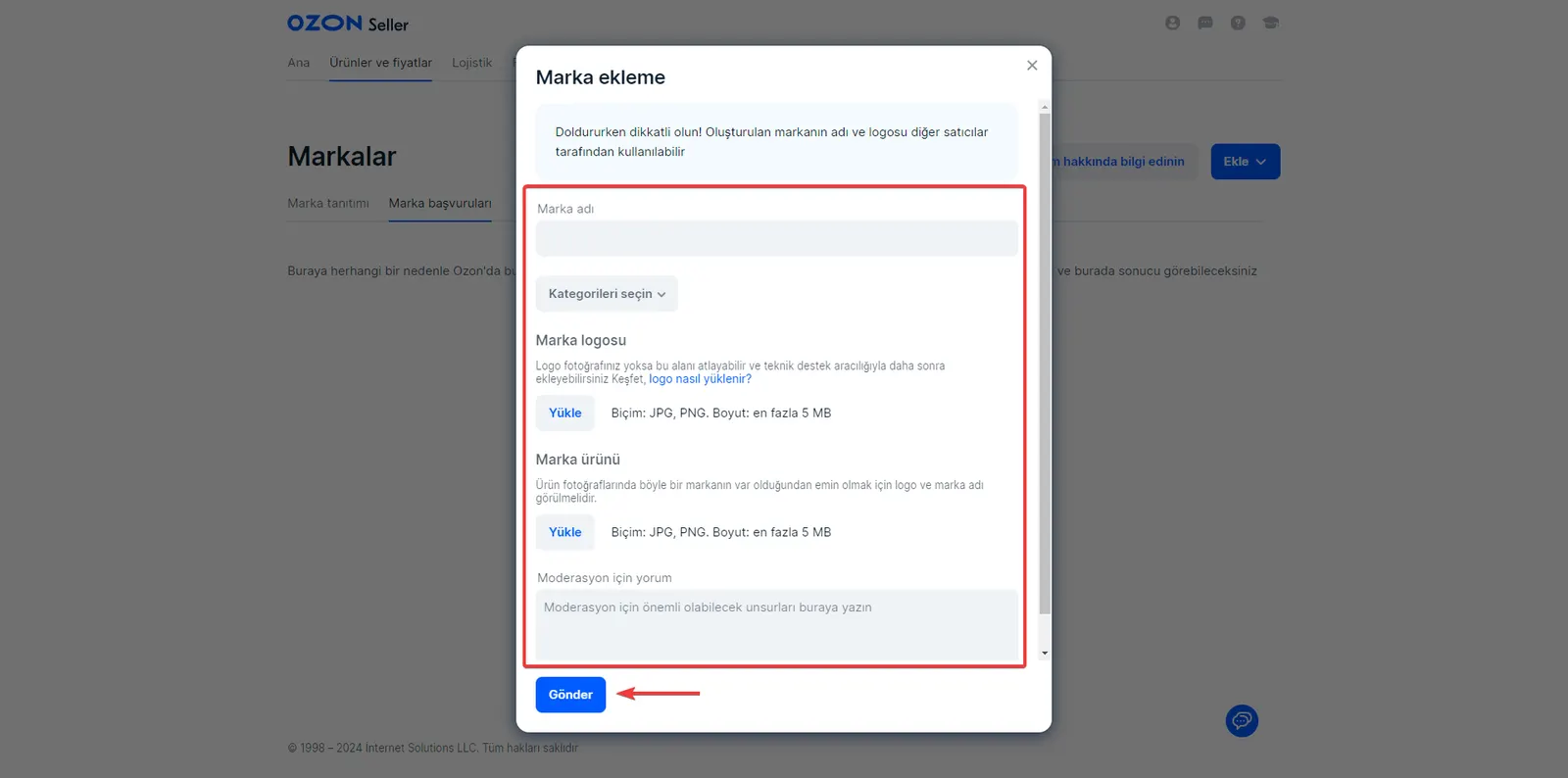
There are a few important steps to pay attention to when adding your brand on Ozon. These steps will ensure that your brand successfully takes its place on the Ozon marketplace.
Entering the Brand Name
- First, type your brand's name in the indicated field. This is a basic step in identifying your brand.
Selecting Categories
- Select the categories your brand will appear in. This choice will ensure your products reach the right customers.
Uploading the Brand Logo
- Upload your brand's logo to increase its recognition. The logo is an important part of your brand's visual identity.
Brand Product Verification
- Your brand's logo and name must be visible in the product photos. This confirms your brand's existence and provides credibility.
Add a Comment for Moderation
- If you want to give the Ozon moderation team additional information about your brand, add your comment in this field.
After filling in this information, complete your application with the "Submit" button. The Ozon moderation team will review your information within three business days, and you can follow the result in the Notifications section.
Faprika and Ozon Integration
Faprika is a powerful platform that lets you easily manage your e-commerce infrastructure. Thanks to Faprika's Ozon integration, you can seamlessly access one of Russia's largest e-commerce platforms and present your products to a wide audience. This integration lets you upload your products to Ozon quickly and efficiently, keep your stock levels up to date and manage orders easily.
This feature offered by Faprika saves time and effort for e-commerce entrepreneurs who want to expand into the Russian market. This smart integration between Faprika and Ozon lets you expand your business's boundaries and discover new horizons in e-commerce.
Frequently Asked Questions (FAQ)
What documents do I need to add a brand on the Ozon marketplace?
To add a brand on Ozon, you need documents showing that your company is registered and operates legally. These usually include papers such as a tax registration and a company registration certificate.
Which categories should I choose when adding a brand on Ozon?
To determine which categories your products fit, consider your product range and your target customer base. Choosing the right category ensures that your products are easily found by your target audience.
What is the cost of adding a brand on Ozon?
There is generally no basic cost for adding a brand on Ozon. However, various fees may apply during the process of listing and selling your products.
How long does it take to add a brand on Ozon?
Adding a brand on Ozon is generally completed within a few business days. However, during busy periods this time may be slightly longer.
What are the common problems encountered when adding a brand on the Ozon marketplace?
Common problems include submitting missing or incorrect documents, choosing the wrong category and logo upload issues. To avoid such problems, follow the application process carefully and provide all the required information completely.
What should I do after adding a brand on Ozon?
Once your brand registration is approved, you can start listing your products and get ready to sell. Plan your product details and pricing carefully.
You May Also Like
- Stoksuz e-Ticaret Nedir? Stoksuz Satış Nasıl Yapılır?
- Vergi Dilimleri Hakkında Mutlaka Bilmeniz Gerekenler (2023)
- Dropbox Nedir, Ne İşe Yarar? Yeni Başlayanlar İçin Dropbox Rehberi
- Google Trends Nedir, Nasıl Kullanılır?
- Hosting nedir? Ne İşe Yarar? (Detaylı Rehber)
- Omnichannel (çok kanallı) pazarlama stratejisi nedir?