
Contents 18 sections
- What Is Marketplace Stock Synchronization?
- Why Does Stock Synchronization Matter?
- How Does Stock Synchronization Work?
- Stock Synchronization Models
- What Is Safety Stock and How Does It Work?
- The Problem of Delay and Simultaneous Orders
- How Are Warehouse and Store Stock Managed in Synchronization?
- How Does Stock Come Back on Returns and Cancellations?
- Product Matching: SKU and Barcode Consistency
- When Should Stock Decrease: When the Order Arrives or When It Is Approved?
- Stock Synchronization Setup Steps
- What to Do When There Is a Synchronization Error
- How Should a Product That Runs Out of Stock Behave on Channels?
- Common Mistakes in Stock Synchronization
- How Do You Audit Your Stock Synchronization Setup?
- How Do You Measure Stock Synchronization?
- How Do You Set Up Marketplace Stock Synchronization with Faprika?
- Frequently Asked Questions
If you sell the same product both on your own site and on more than one marketplace, the stock figure shown on every channel must rest on the same truth. If the last unit is sold on two channels at once, one becomes an out-of-stock order: the order is cancelled, the customer is disappointed, and your seller performance on the marketplace may drop. The short answer to the question of what marketplace stock synchronization is is this: automatically and safely reflecting a single source of real stock to all sales channels, so that when a sale happens on one channel, the stock on the others decreases too.
In this guide we cover what stock synchronization is, why it leads to overselling, which models it can be set up with, how safety stock works and how to calculate it, and what to watch for with warehouses, stores, returns and cancellations. Of the two tools in this post, one helps you calculate the safety stock quantity, and the other helps you audit your current synchronization setup.
What Is Marketplace Stock Synchronization?
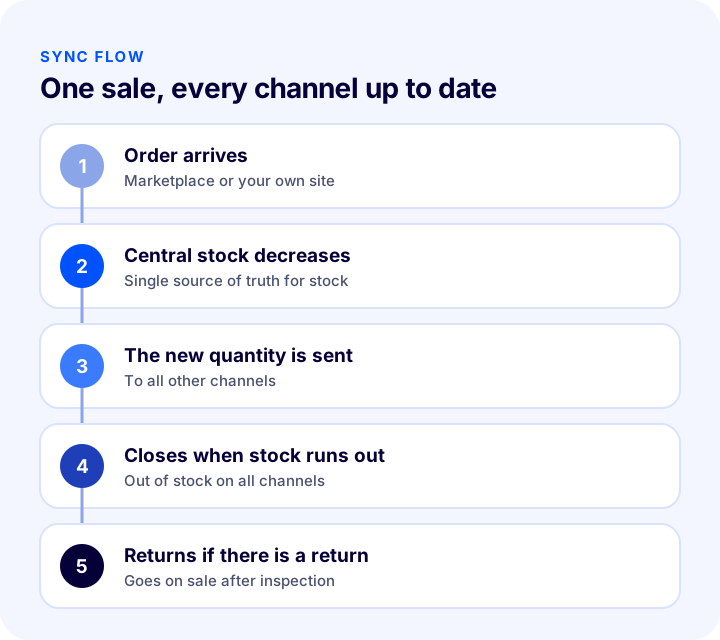
Marketplace stock synchronization is the automatic matching of product stock quantities across your own site, marketplaces and, if needed, stores or warehouses. When an order arrives on one channel, central stock decreases; the new stock quantity is sent to the other channels. This way every channel sells against the same real stock.
Are Stock Synchronization and Stock Tracking the Same Thing?
They complement each other but are not the same thing. Stock tracking is knowing how much of a product you have; stock synchronization is carrying that information accurately and on time to every place you sell. Even if you track stock correctly, if you cannot send it to the channels you will experience overselling.
| Concept | What does it tell you? | What happens if it is missing? |
|---|---|---|
| Stock tracking | Knowing the real quantity of the product and keeping it current | Wrong stock information arises |
| Stock synchronization | Sending this quantity to all sales channels | Differences between channels and overselling |
| Safety stock | Showing channels less than the real stock | Risk of out-of-stock orders at the moment of delay |
Why Does Stock Synchronization Matter?
The biggest operational risk of multichannel selling is selling the same stock in more than one place. This risk grows as sales volume grows, because the number of orders arriving at the same time increases.
- It prevents overselling: A product with no stock is not sold; cancellation and apology processes decrease.
- It protects seller performance: Orders cancelled due to being out of stock can negatively affect seller score and visibility on a marketplace; each marketplace's own rules apply.
- It protects customer trust: A customer whose order is cancelled after ordering mostly does not come back.
- It prevents missed sales: A product that shows "sold out" while stock exists is a sale lost for nothing.
- It lightens operations: Updating stock manually takes time and is error-prone.
How Does Stock Synchronization Work?
In most systems the logic is the same: when a sale happens on one channel, central stock decreases and the new quantity is sent to the other channels. But information does not always flow instantly; transmission time, the channel's own update speed and the time the order reaches the system are what matter.
- 1. An order arrives: An order comes in from a marketplace or from your own site.
- 2. Central stock decreases: The order reduces the quantity in the single stock source.
- 3. The new quantity is sent to channels: The other marketplaces and your site receive the new stock information.
- 4. When stock runs out, the product is taken off sale: When the quantity drops to zero, "out of stock" shows on channels.
- 5. If there is a cancellation or return, stock comes back: The product returned to stock goes on sale again on channels.
There Must Be a Single Source of Stock Truth
The first rule of synchronization is that the stock truth is kept in only one place. In a setup where each channel manages its own stock separately, the difference between channels grows quickly. This source is usually your e-commerce software or the ERP program it is connected to; marketplaces are surfaces that follow this source.
Stock Synchronization Models
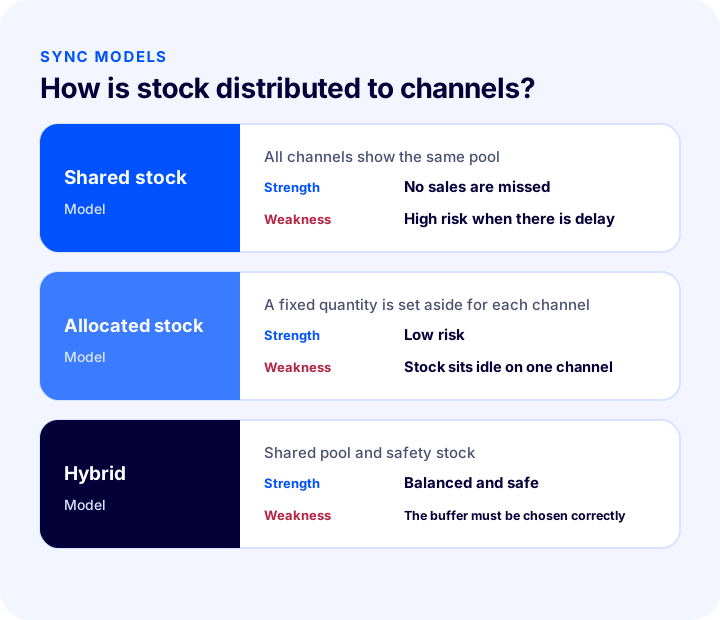
There is more than one way to distribute stock to channels. Which one fits depends on product volume, sales speed and risk tolerance.
| Model | How does it work? | Strength | Weakness |
|---|---|---|---|
| Shared stock | All channels show the same stock pool | No stock sits idle, no sales are missed | High overselling risk when there is delay |
| Channel-allocated stock | A fixed quantity is set aside for each channel | Low overselling risk | Runs out on one channel, sits idle on another |
| Hybrid (shared with safety stock) | A shared pool, but every channel is shown less than the real stock | Sales are not missed and risk is lowered | The safety stock quantity must be chosen correctly |
For most stores the most balanced path is the hybrid approach: stock flows from a shared pool, but channels are shown a bit less as the sell-out limit approaches. This shortfall is called safety stock.
What Is Safety Stock and How Does It Work?
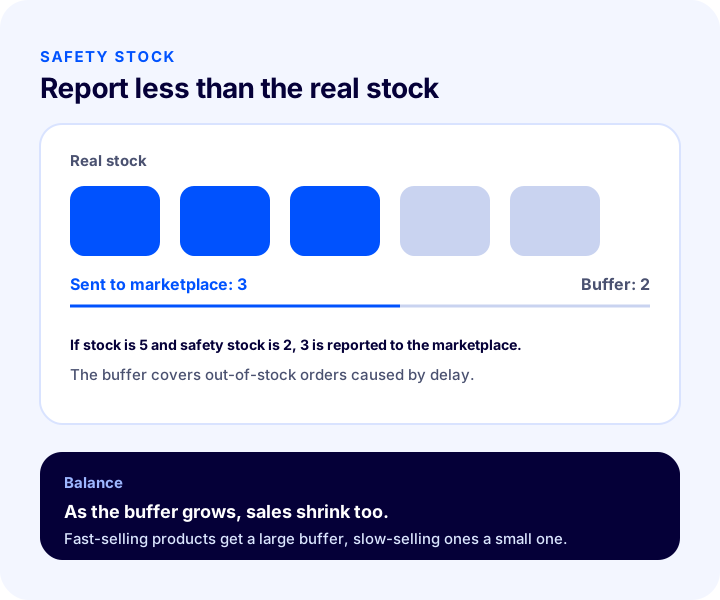
Safety stock means reporting a certain quantity less than the real stock to the marketplace. For example, if real stock is 5 and safety stock is 2, 3 units are reported to the marketplace (5 - 2 = 3). The remaining 2 units act as a buffer against out-of-stock orders that could arise from transmission delay or simultaneous orders.
- Why it is needed: Stock information reaches channels not instantly but with a short lag; orders arriving in that interval can exceed the real stock.
- Where it helps: For low-stock, fast-selling products sold on more than one channel.
- What it costs: The buffer amount of stock is not visible on channels; so if it is kept too high, sales are lost.
How Do You Choose the Safety Stock Quantity?
The quantity is determined by the product's sales speed, the number of channels and the synchronization delay. The buffer should be large for fast-selling products and small for slow-selling ones. The tool below calculates the recommended safety stock quantity from the sales expected during your delay. The values are examples; enter the figures for your own product.
The real lesson of the tool is that the buffer depends not only on sales speed but also on delay: halving the delay roughly halves the safety stock you need. In other words, faster synchronization means fewer lost sales.
Recommended readingHow to Calculate Safety Stock and Reorder Point: Inventory Planning, ABC Analysis and Inventory Turnover in E-Commerce, a Practical GuideThe Problem of Delay and Simultaneous Orders
The main cause of overselling is delay. Orders for the same product arrive from two channels almost at the same time; both see "in stock" and accept the order; the central stock is enough for only one of them.
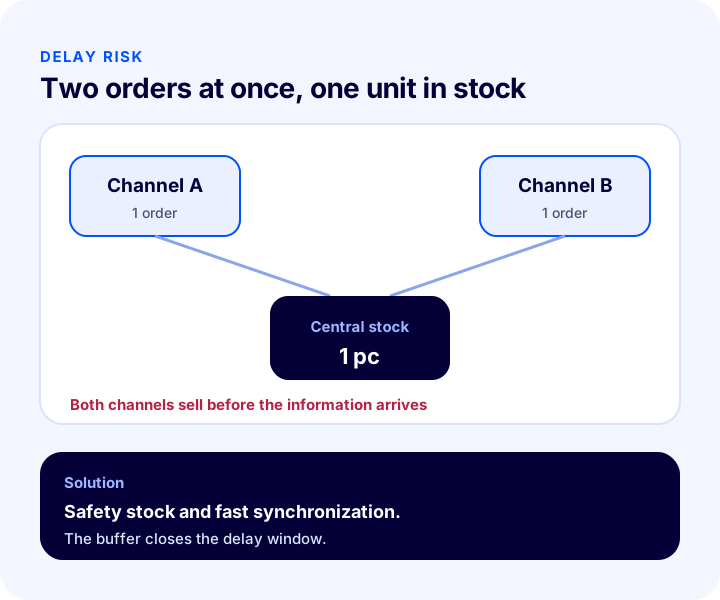
- Shorten the delay: The frequency at which stock changes are sent to channels should be as high as possible.
- Use safety stock: Leave a buffer, especially on low-stock, fast-selling products.
- Protect the last few units: When stock gets very low, closing some channels and selling the last units on a single channel brings the risk close to zero.
- Plan for campaign periods separately: When order volume rises, the effect of delay grows; increase safety stock in this period.
How Are Warehouse and Store Stock Managed in Synchronization?
If you have more than one warehouse or physical store, "stock" is not a single number. Which warehouse's stock you report to the marketplace also determines which location you ship from.
- Definition of sellable stock: Only the total of the warehouses you can ship from should be reported to the marketplace; unreachable or reserved stock is left out.
- Store stock: If you include store stock in e-commerce stock, sales in the store must also decrease from the same pool; otherwise in-store sales and online sales clash.
- Transfers between warehouses: While stock moves from one warehouse to another, the product in transit is the sellable stock of neither; manage this period separately.
- Reserved stock: A product waiting in a cart or being prepared should be deducted from sellable stock.
How Does Stock Come Back on Returns and Cancellations?
When a customer cancels an order or returns a product, the stock needs to come back; but not every return is sellable stock. If a damaged, used or awaiting-inspection product goes on sale, a new complaint arises.
- Cancellation: The stock of an order not yet handed to the carrier comes back directly.
- Return: The product should be added to sellable stock after it reaches the warehouse and is inspected.
- Damaged return: Kept separate from sellable stock and not put on sale.
- Partial return: In an order with several items, stock is updated only for the returned item.
Product Matching: SKU and Barcode Consistency
For synchronization to work correctly, the same product must be matched to the same product on every channel. A matching error causes the stock of one product to be written to another product. Matching is mostly done through SKU or barcode.
- A unique code for each variant: Size and color options are separate stock items; each must be matched with its own code.
- Codes must be consistent across channels: Using different codes for the same product on different channels breaks matching.
- Enter the code from the start when creating a new product: Fixing it later is harder than cleaning up wrongly matched stock.
When Should Stock Decrease: When the Order Arrives or When It Is Approved?
The stage at which stock decreases directly affects the risk of overselling. Stock that decreases the moment the order arrives is the safest approach, because the product is not sold on another channel while it is still waiting for payment or approval. Stock that decreases after approval stays open to double selling in that interval.
- Decreasing at order time: Minimizes risk; you need a rule that releases stock back when an order is not paid.
- Decreasing after payment: With delayed methods such as bank transfer and cash on delivery, stock appears idle for a long time.
- Reserving: Reserving stock while the order is prepared shows sellable stock correctly.
Whichever method you choose, the rule should be the same on all channels; a stock deduction rule that behaves differently by channel creates differences between channels that are hard to understand.
Stock Synchronization Setup Steps
Whether you are starting from scratch or moving from manual management to automatic, going in order reduces the risk of errors. The steps below are a suitable roadmap for most stores.
- 1. Define the stock truth: Decide which system will be the single source; this source can be your e-commerce software or the ERP program it is connected to.
- 2. Clean up product codes: Give every variant a unique SKU or barcode; fix empty, duplicate or channel-inconsistent codes.
- 3. Match products with channels: Match each product's counterpart on each marketplace by code, and list the products that do not match.
- 4. Define sellable stock: Decide which warehouses and which types of stock will be reflected to channels.
- 5. Set the safety stock rule: Set the buffer amount, starting with fast-selling products.
- 6. Try it with a small group of products: Run it first with a few products and verify that stock is updated correctly on channels.
- 7. Roll out to everything and monitor: Check error reports regularly and update settings based on results.
What to Do When There Is a Synchronization Error
Even in the best-built system, a channel may temporarily not accept an update. Error management means noticing the problem quickly and fixing it.
- Make errors visible: Failed stock updates should be collected in a list and checked regularly; a silent error means selling with old stock.
- Identify the affected product: Find which product could not be updated on which channel; most of the time the problem is in the matching code or the product being inactive on the channel.
- Take a temporary measure: While the problem continues, taking the risky product off sale on that channel is cheaper than an out-of-stock order.
- Fix the root cause: If the same error repeats, fix the code, the product status or the channel setting.
How Should a Product That Runs Out of Stock Behave on Channels?
When stock drops to zero, removing the product from sale on channels or leaving stock at zero are two separate approaches. On a marketplace, the product page and ranking history are valuable; so most sellers prefer zeroing stock instead of deleting the product. When stock is replenished, the product goes back on sale with its history. On your own site, offering the customer an alternative or a notification option for a sold-out product saves the sale.
Recommended readingWhat Is Back-in-Stock Notification? How to Set Up Stock Alerts for Sold-Out Products and Win Back Sales: Variant-Based Demand, Notification Channels and Threshold, Recovery Calculator and Setup AuditCommon Mistakes in Stock Synchronization
- Keeping the stock truth in more than one place: If each channel manages its own stock, differences are inevitable.
- Not using safety stock at all: The risk of out-of-stock orders at the moment of delay is ignored.
- Keeping safety stock higher than necessary: Sellable products are not visible on channels and sales are missed.
- Applying the same safety stock to all products: Fast-selling and slow-selling products have different needs.
- Not updating settings before a campaign: During busy periods the number of orders in the delay window rises.
- Adding damaged returns to sellable stock: A defective product put on sale brings new complaints.
- Not auditing matching codes: A wrong match causes stock to be written to the wrong product.
- Not monitoring synchronization errors: If a failed update goes unnoticed, the channel sells with old stock.
How Do You Audit Your Stock Synchronization Setup?
The tool below checks your current setup with eight questions. Tick the items that apply to you; the tool tells you how solidly you have set up synchronization.
How Do You Measure Stock Synchronization?
A few indicators show whether the setup is working. All of them should be tracked by channel; the total figure hides the problem channel.
| Indicator | What does it tell you? |
|---|---|
| Number of orders cancelled due to being out of stock | The size of the overselling problem |
| Stock difference between channels | How current synchronization stays |
| Stock update errors | Products and channels with transmission problems |
| Sales lost because of safety stock | Whether the buffer is higher than necessary |
| Seller performance score (by channel) | The effect of out-of-stock cancellations on the seller score |
How Do You Set Up Marketplace Stock Synchronization with Faprika?
Faprika automatically brings orders from marketplaces into the e-commerce panel; once an order arrives, product stock is updated on the other marketplaces too. Which marketplace is included in which plan varies by plan; see the plans page for details.
- Automatic order and stock flow: Marketplace orders land in the panel and stock is updated on the other marketplaces too; you can invoice orders in bulk and send them to the shipping integration.
- Safety stock: Each marketplace integration's settings have a safety stock field; stock less by the amount you enter is passed to the marketplace (if stock is 5 and safety stock is 2, 3 goes to the marketplace). You can manage this feature in bulk and define it for marketplaces with options suited to your products.
- Stock after cancellations and returns: After order cancellation and return operations, the stock of the relevant product is updated automatically in the panel.
- ERP and store stock: Stock, orders and invoicing can be managed with the ERP programs you are connected to; you can also include store stock in e-commerce stock.
- Bulk operations: You can update settings such as safety stock in bulk for many products.
You can find all marketplace integrations on the marketplace integration page, the bulk update method in our post How to Do Bulk Product Updates: A Guide to Changing Price, Stock, Category and SEO Information at Once, Filters, a Safe Method for Irreversible Operations, Price Change Calculator and Setup Audit, and the management of an out-of-stock product's page in our post What to Do with an Out-of-Stock Product Page: SEO, Customer Experience and Redirects for Sold-Out Products in E-Commerce, a Practical Guide.
Frequently Asked Questions
What is marketplace stock synchronization?
It is the automatic matching of product stock across your own site, marketplaces and, if needed, stores or warehouses. When a sale happens on one channel, central stock decreases and the new quantity is sent to the other channels; this reduces the risk of out-of-stock orders.
What causes overselling?
The most common cause is transmission delay: stock information reaches channels not instantly but with a short lag. In that interval, orders from two channels can exceed the real stock. Safety stock and fast synchronization reduce this risk.
What is safety stock?
It means reporting a certain quantity less than the real stock to the marketplace. If real stock is 5 and safety stock is 2, 3 units are reported to the marketplace. The remaining 2 units act as a buffer against delay or simultaneous orders.
How much safety stock should there be?
It depends on the product's sales speed, the number of channels and the synchronization delay. Keep it large for fast-selling products and small for slow-selling ones. If it is too high, sellable products are not visible on channels and sales are lost.
Can stock synchronization be done manually?
It can be done with few products and few channels, but as products and channels grow it becomes late, forgotten and error-prone. Growing multichannel sales need automatic synchronization.
How does marketplace stock synchronization work in Faprika?
Orders from marketplaces automatically land in the panel, and product stock is updated on the other marketplaces too. Every marketplace integration has a safety stock field; the setting can be managed in bulk. Stock updates after cancellations and returns are made automatically in the panel. Which marketplace is included in which plan varies by plan.
You May Also Like
- What Is Stock Tracking? How Is It Done?
- How to Calculate Safety Stock and Reorder Point: Inventory Planning, ABC Analysis and Inventory Turnover in E-Commerce, a Practical Guide
- What to Do with an Out-of-Stock Product Page: SEO, Customer Experience and Redirects for Sold-Out Products in E-Commerce, a Practical Guide
- What Is Order Splitting? A Guide to Splitting an Order by Lead Time, Desi and Warehouse, Tracking, Returns and Shipping Cost, Cost Comparison Tool and Needs Audit