Contents 9 sections
- Getting Started with Becoming a Seller on Pazarama
- Filling in the Seller Pre-Application Information Form
- Verification Procedures
- Completing the Application and Creating a Password
- Activate Your Account
- Documents Required to Activate a Seller Account on Pazarama
- Required Documents
- Pazarama and Faprika Integration
- Frequently Asked Questions (FAQ)
E-commerce If you want to claim your place in the world of e-commerce and become a seller on the Pazarama platform, you are in the right place! In this comprehensive guide, we share practical and easy ways to become a seller on Pazarama, step by step. We explain every detail, from the tax number to logging in to the seller panel. Whether you are an individual entrepreneur or a company, getting started with selling on Pazarama is now much easier with this guide. If you are ready, let's take the first step toward making the most of the opportunities Pazarama offers!
Getting Started with Becoming a Seller on Pazarama
Your first step to becoming a seller on the Pazarama platform is to know that you must have a valid tax number. At this stage, Joint Stock Companies, Limited Companies and Sole Proprietors (Natural Person Merchants) can apply. If you meet these criteria, you are ready to start your journey as a seller!
First Step: Click the Become a Seller Button
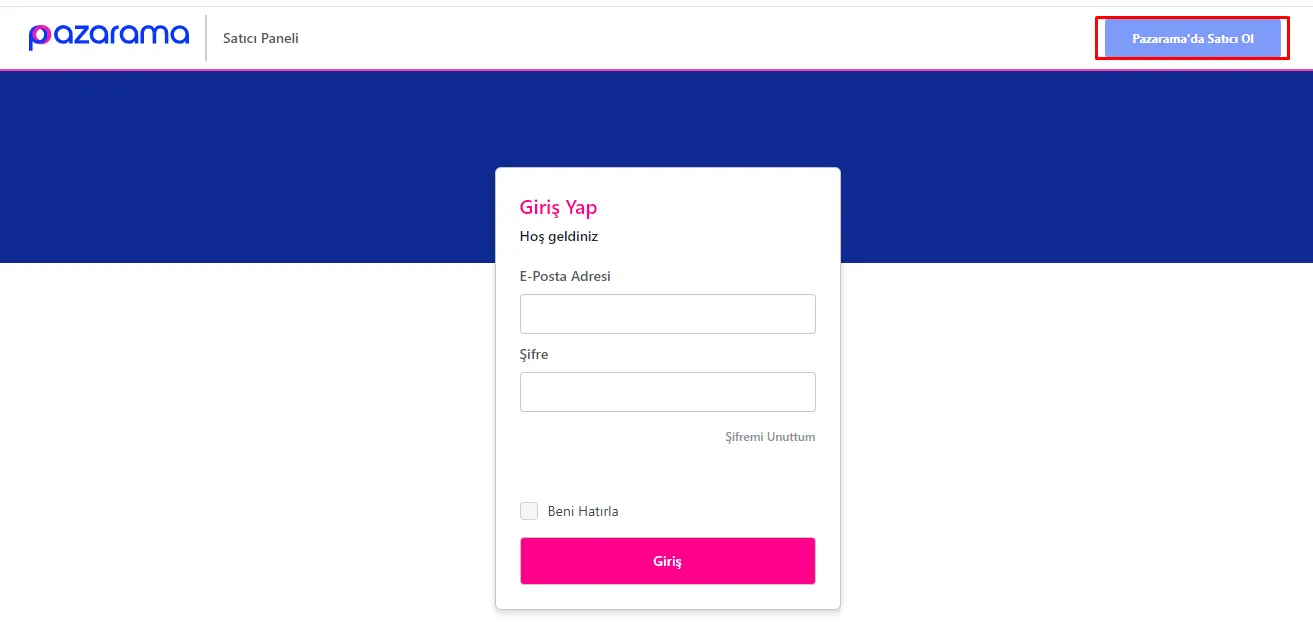
- To start your application, visit the Pazarama İş Ortağım Login page.
- Click the “Become a Seller on Pazarama” button in the top right corner of the page. This step will take you to the first stage of becoming a seller.
Filling in the Seller Pre-Application Information Form
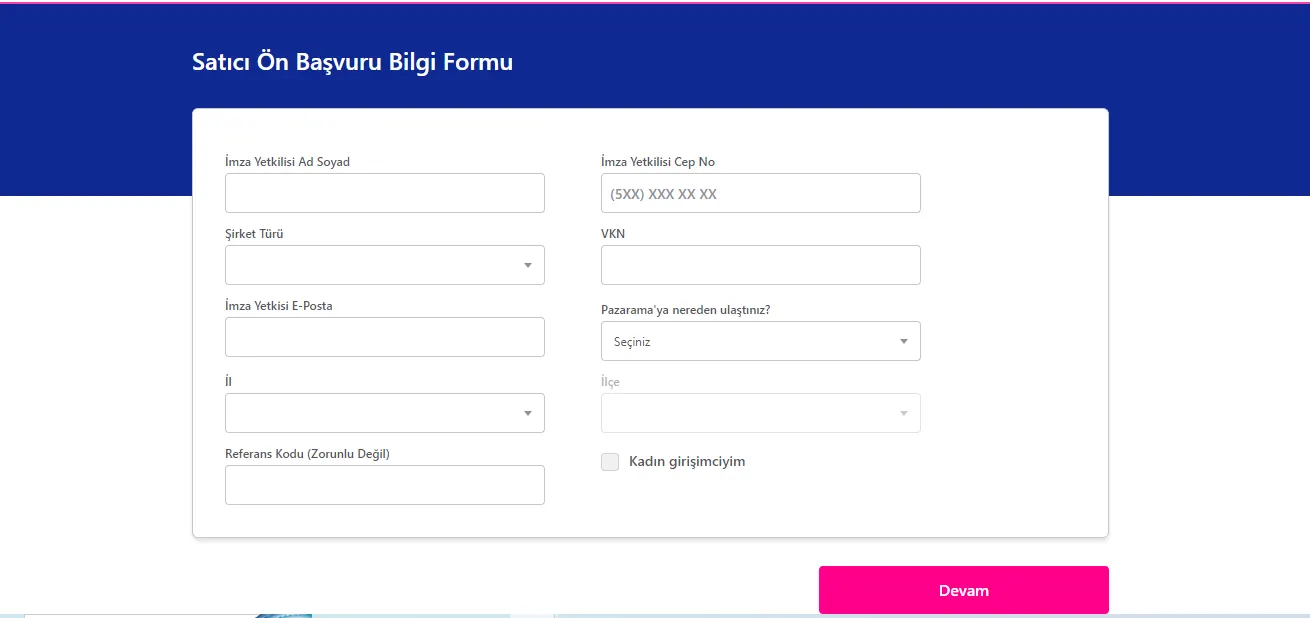
After clicking the "Become a Seller on Pazarama" button, it is important to fill in the "Seller Pre-Application Information Form" that appears completely and correctly. This form is the first official step of joining Pazarama as a seller. Below you can find the information requested in the form:
- Authorized Signatory Full Name: The full name of the person who will sell or of the company representative.
- Company Type: Indicate the legal structure of your company (for example, Joint Stock Company, Limited Company).
- Signatory Email: The email address of the authorized signatory.
- Authorized Signatory Mobile No.: The mobile phone number of the authorized signatory.
- VKN (Tax Identification Number): The tax identification number of the company or individual seller.
- Province / District: The province and district where the company or seller operates.
- How Did You Find Pazarama?: Indicate how you discovered the Pazarama platform.
- Referral Code (Optional): If you have one, enter the referral code.
Verification Procedures
After you fill in the form, a verification code will be sent to the mobile phone number you provided. A verification link will also be sent to the email address you gave during registration. These two steps are important for your security and for confirming your accuracy:
- Phone Verification: Enter the verification code sent to your mobile phone in the relevant field.
- Email Verification: Complete the verification via the link sent to your email address.
Once you complete these verification procedures, you will be automatically redirected to the "Seller Application Information Entry" page.
Entering Seller Application Information
The information you need to fill in at this stage is as follows:
- Company Title: The official name of your company or business.
- Sector/Category: The sector or category you operate in.
- Company Owner: The name of the owner of the company or business.
- Invoice Type: The type of invoice to be used.
- Mersis Number: Your company's Mersis number.
- Trade Registry Number: Your company's trade registry number.
- IBAN: The IBAN of the bank account you will use to receive your payments.
- IBAN Account Holder: The name of the person or company the IBAN belongs to.
- Tax Office: The tax office your company is registered with.
- Contact Person Information: The name of your company's contact person.
- Contact Person Phone Number: The phone number of the contact person.
- KEP Address: The KEP (registered electronic mail) address to be used for electronic notifications.
After filling in this information completely and correctly, click the "Continue" button to move the process forward. Then enter the verification code sent to your email address and click the "Confirm Code" button. This step takes you to the next stage of your application.
We recommend readingHow to Open a Store on the LC Waikiki Marketplace? How to Become a Seller?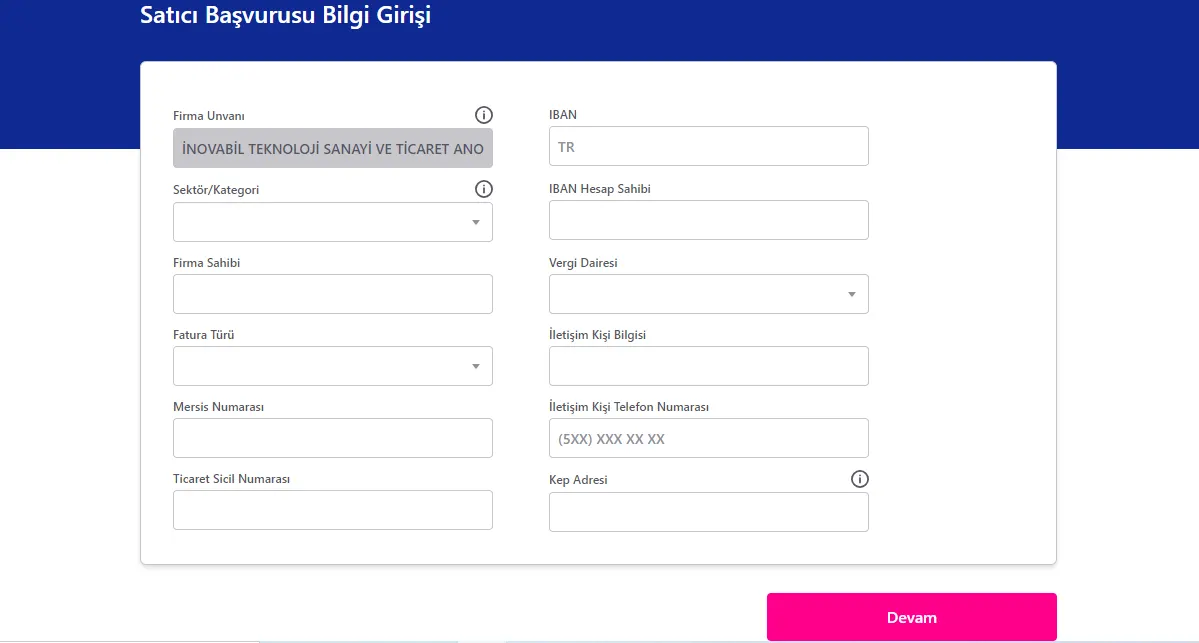
Completing the Application and Creating a Password
At this stage of your application process, you are about to activate your Pazarama seller account. This step is critical for securing your seller account on the platform.
Verification Code and Creating a Password
- Enter the Verification Code: First, enter the verification code sent to your email address in the relevant field.
- Complete the Application and Get a Password: After entering the verification code, click the "Complete Application and Get Password" button. This step is required to complete your application process and activate your account.
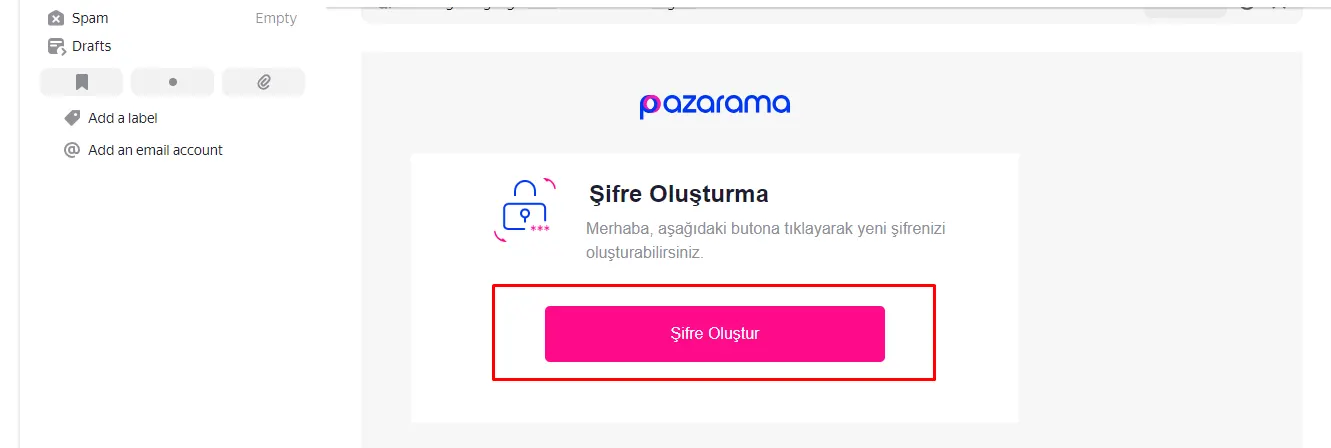
When you click this button, a link for creating a password for your account will be sent to the email address you gave during registration. On the page this link takes you to, you will set a password specific to your Pazarama seller account.
Activate Your Account
- Password Creation Link: Click the password creation link sent to your email address to reach the password-setting page.
- Set a Strong Password: For the security of your account, create a strong and memorable password.
Documents Required to Activate a Seller Account on Pazarama
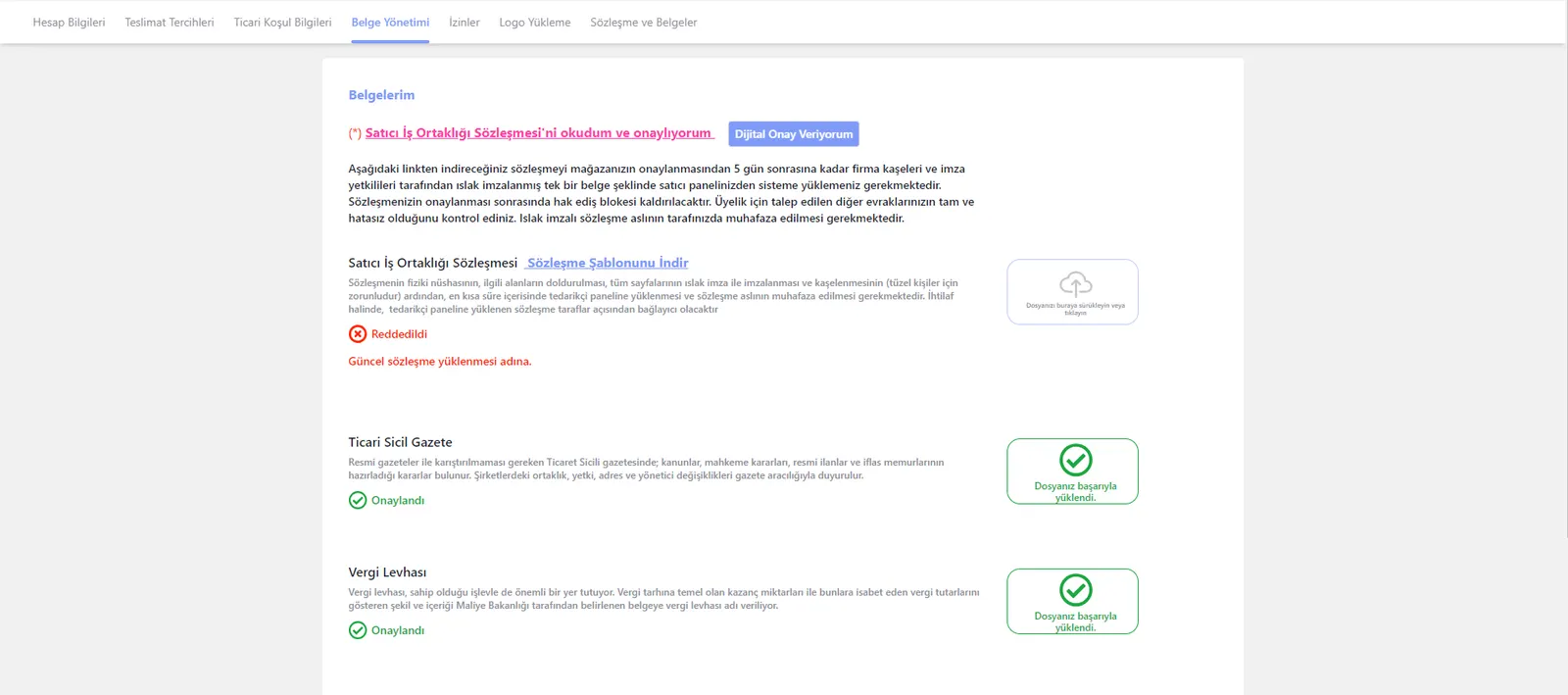
After completing the password creation process, your registration as a seller on Pazarama is almost complete. As the final step, you need to log in to the Pazarama Seller Panel and upload some important documents. These documents are mandatory for your seller account to become fully active.
Logging In to the Pazarama Seller Panel and Uploading Documents
- Logging In to the Seller Panel: Log in to the Pazarama Seller Panel with the password you created.
- Document Upload Screen: Go to the document upload screen in the panel. From here you can upload the documents required to sell.
- Document Upload Process: Carry out the document upload from the "My Account >> Document Management" page.
Required Documents
The documents you need to create a membership on Pazarama are as follows:
For Sole Proprietors (Natural Person Merchants):
- Tax Plate
- Signature Declaration or New ID Card
- Seller Agreement
For Capital Companies:
- Tax Plate
- Signature Circular
- Certificate of Activity
- Trade Registry Gazette
- Seller Agreement
Uploading the Seller Agreement
- Agreement Template: Download the agreement template by clicking the "Download Agreement Template" button.
- Wet Signature: Complete the agreement within 5 days of store approval, with the company stamp and the wet signatures of the authorized signatories.
- Uploading the Agreement: Upload this agreement as a single document to the "Seller Partnership Agreement" field.
When you upload all these documents correctly and completely, you will become an active seller on Pazarama and be able to start selling your products on the platform.
Pazarama and Faprika Integration
Congratulations! As you make progress toward becoming a seller on Pazarama, don't forget to take advantage of the Pazarama integration with Faprika to develop your business further. By automating many processes, from product management to order tracking, Faprika makes your sales on Pazarama more efficient and trouble-free. This integration lets you manage your e-commerce operations more intelligently and effectively, while helping you offer your customers a better shopping experience.
By combining the strengths of Pazarama and Faprika, get ready to write an extraordinary success story in the world of e-commerce. While optimizing your sales and business processes, reach Pazarama's wide customer base and the unlimited opportunities of e-commerce. Now discover the advantages this integration offers and take your business to new heights with the excitement that comes with being a seller on Pazarama!
Take the new step toward success in e-commerce with Pazarama and Faprika.
Frequently Asked Questions (FAQ)
What Are the Requirements for Becoming a Seller on Pazarama?
To become a seller on Pazarama, you must be a Joint Stock Company, a Limited Company or a Sole Proprietor (Natural Person Merchant) and have a valid tax number. You must also fill in the application form completely and upload the required documents.
What Documents Are Required for a Pazarama Seller Application?
The documents required for a Pazarama seller application include the tax plate, a signature declaration or new ID card, the seller agreement and, for companies, additionally a signature circular, a certificate of activity and the trade registry gazette.
How Can I Access the Pazarama Seller Panel?
To access the Pazarama seller panel, you must first submit a seller application. Once this application is approved, you can log in with the username and password that will be provided to you.
Which Products Can I Sell on Pazarama?
On Pazarama, you can sell almost any kind of product in the categories the platform accepts. However, selling products that are illegal, that infringe copyright or that violate the platform's rules is prohibited.
How Are Commission Rates Determined for Pazarama Sellers?
Commission rates on Pazarama vary according to the category of the product sold and its sales price. For detailed commission information, you can visit Pazarama's official seller information pages.
How Do After-Sales Support and Customer Service Work on Pazarama?
Pazarama offers comprehensive support and customer service for sellers. You can contact the Pazarama support team about after-sales issues, customer feedback and other matters.
You May Also Like
- Stoksuz e-Ticaret Nedir? Stoksuz Satış Nasıl Yapılır?
- Vergi Dilimleri Hakkında Mutlaka Bilmeniz Gerekenler (2023)
- Dropbox Nedir, Ne İşe Yarar? Yeni Başlayanlar İçin Dropbox Rehberi
- Google Trends Nedir, Nasıl Kullanılır?
- Hosting nedir? Ne İşe Yarar? (Detaylı Rehber)
- Omnichannel (çok kanallı) pazarlama stratejisi nedir?