Contents 8 sections
N11, one of Turkey's largest online shopping platforms, offers attractive opportunities for both buyers and sellers. Are you thinking of opening a store on N11 to reach a wide customer base, increase your brand awareness, and grow your sales? This guide walks you through the process of opening a store on the N11 marketplace step by step and gives you all the information you need for a successful start on this platform. In this detailed guide, we explain every step, starting with the advantages of opening a store on N11 and covering everything from registration to document management. Keep reading to learn how to set up your store on N11, how to prepare the required documents, and how to get the maximum benefit from the advantages N11 offers!
Membership Details
The first step to opening your own store on N11 is to visit the N11 website and start the registration process. This easy and user-friendly process lets you set up your online business quickly. Here is what you need to do:
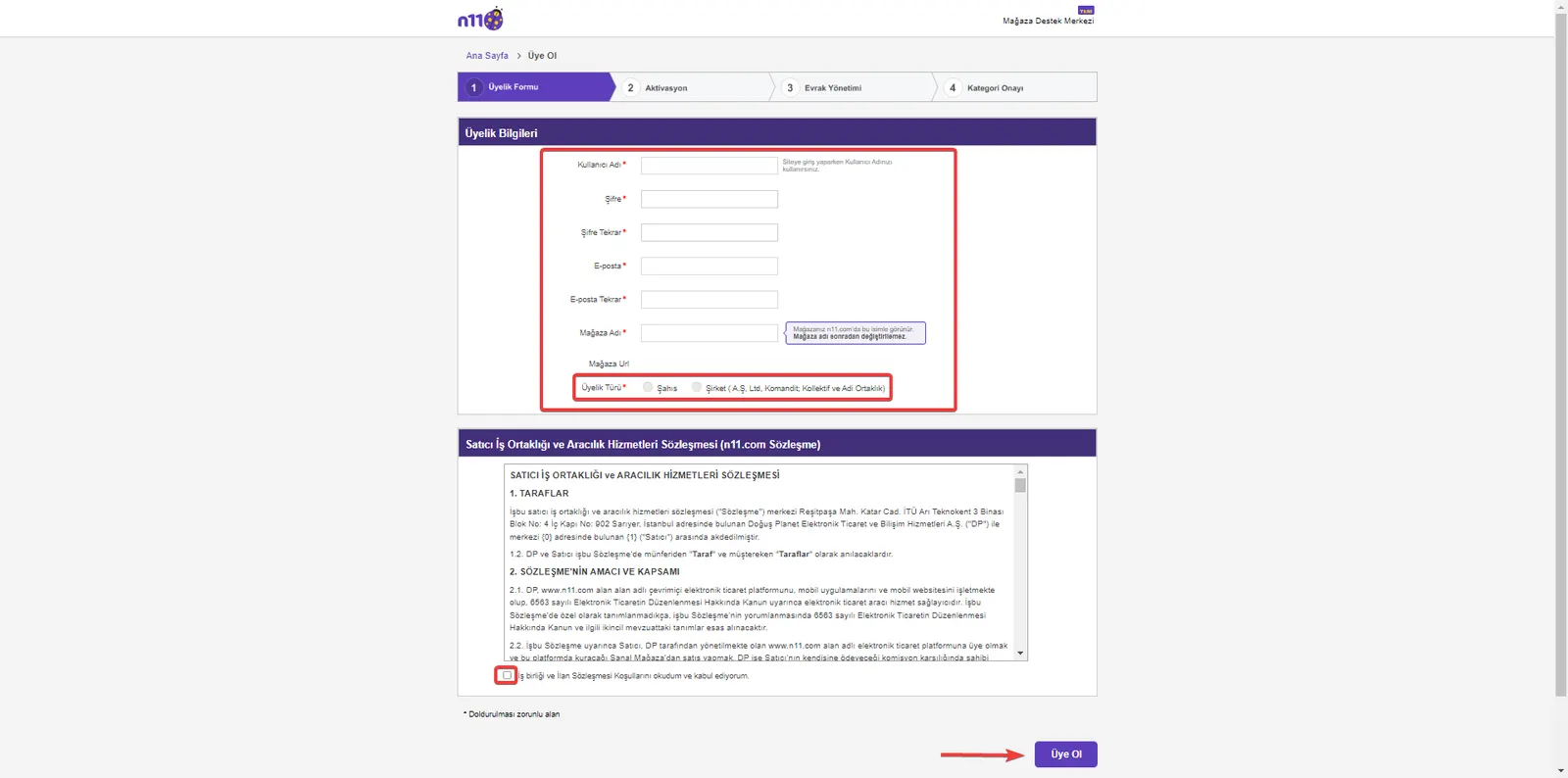
Visit the Website: Go to N11's home page and click the "Open a Free Store" button at the bottom of the page.
Filling In the Registration Form:
- Username: Choose the username you will use to access the N11 Store Management Panel.
- Password: Create a secure password that is easy to remember.
- Email: Enter the email address you actively use and where you will receive notifications about your transactions.
- Store Name: Choose a name that reflects your store and that you will use on the N11 marketplace.
- Membership Type: Choose 'Individual' or 'Company' according to your business's status.
By following these steps, you will have completed the first and most important stage of opening a store on N11. The information you provide in this section will play a critical role both in your store management and in your interactions with your customers.
Business Category and Company Information
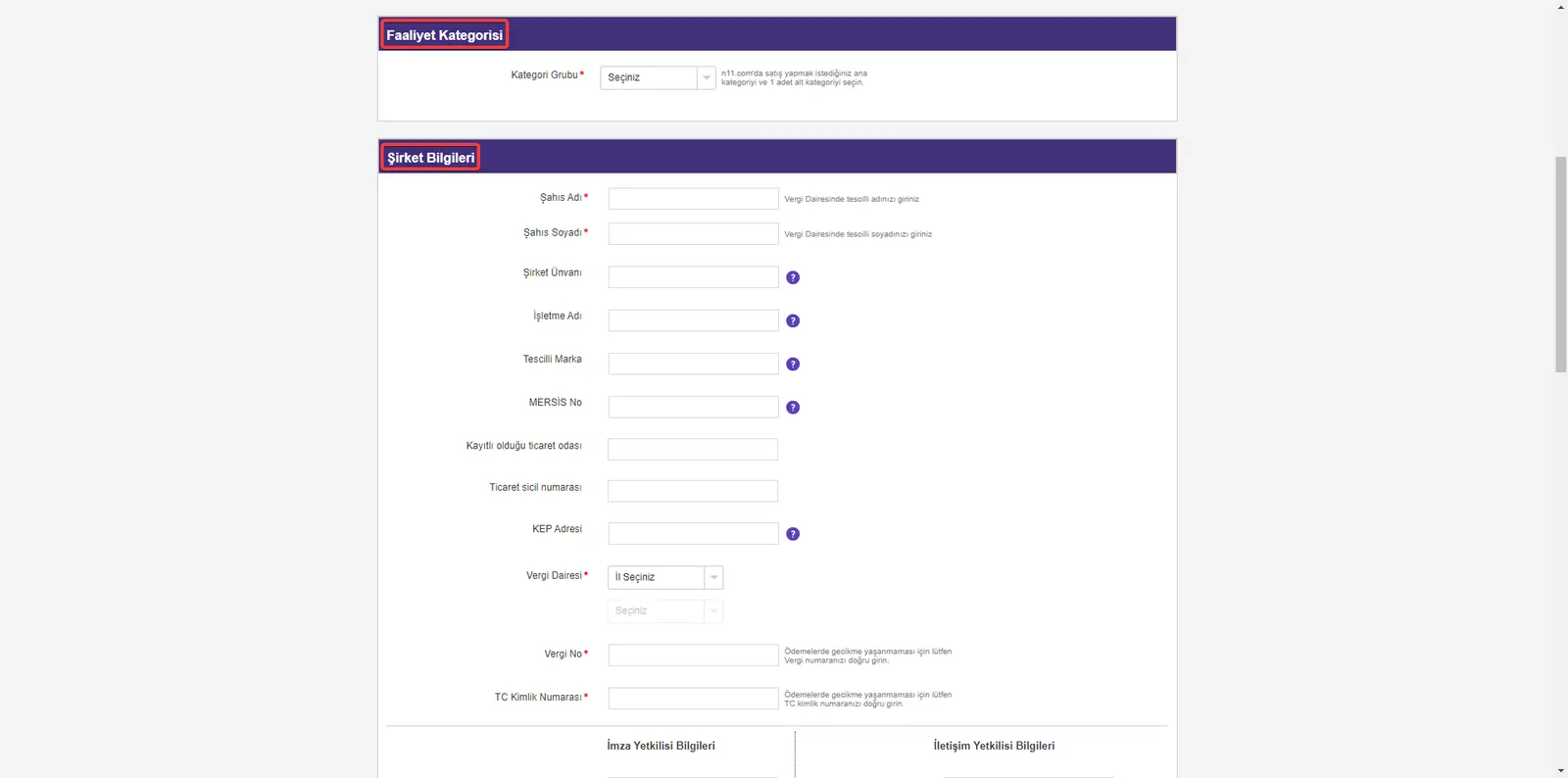
The next important step in opening an N11 store is to determine the category in which your business will operate and to enter your company information. This stage ensures that your store is placed under the right category and equipped with the official information that gives your customers confidence. Here are the details of this process:
Selecting the Business Category:
- After you have set your membership type as 'Individual' or 'Company', choose the main category and subcategory in which you want to operate on N11.com. This choice will ensure that your store reaches the right customer base and that your products appear in relevant searches.
Entering Company Information:
- Enter the information about your company completely and accurately, in line with the category you selected. This information will help your business build an official and trustworthy profile on the N11 platform.
Filling in this section correctly helps your store be positioned effectively and accurately on the N11 platform.
Bank Account Details
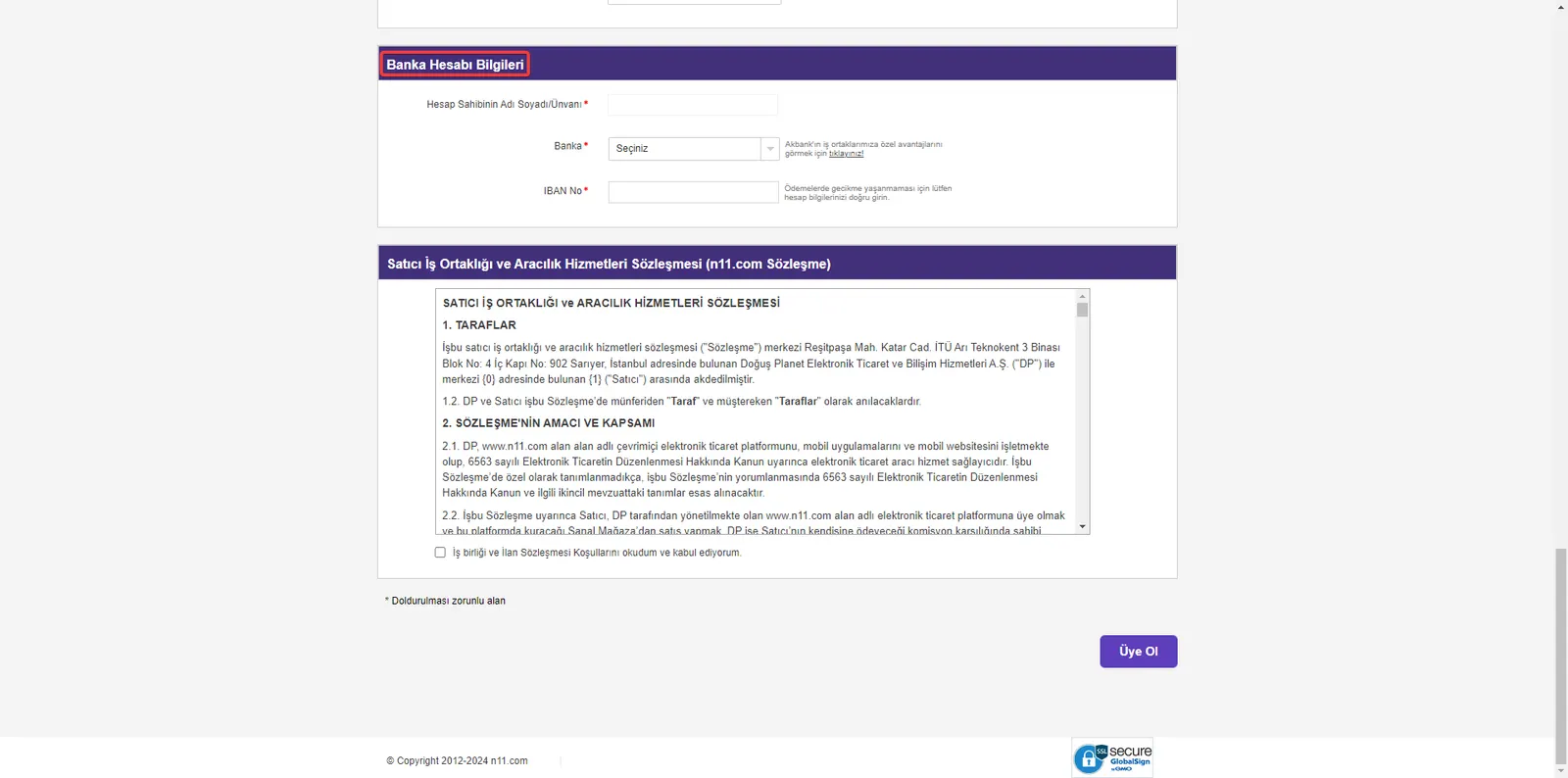
Another important part of your store setup on N11 is adding your bank account details to the system for your financial transactions.
- After you have entered your company information into the system, access the 'Bank Account Details' section on the screen that appears.
- Here, fill in the details of the bank account that will be used for the financial transactions you carry out through N11.
Keeping this information accurate and up to date ensures that the revenue from your sales is transferred to your account without problems. This information is also important for possible return transactions and other financial processes.
Agreement Approval
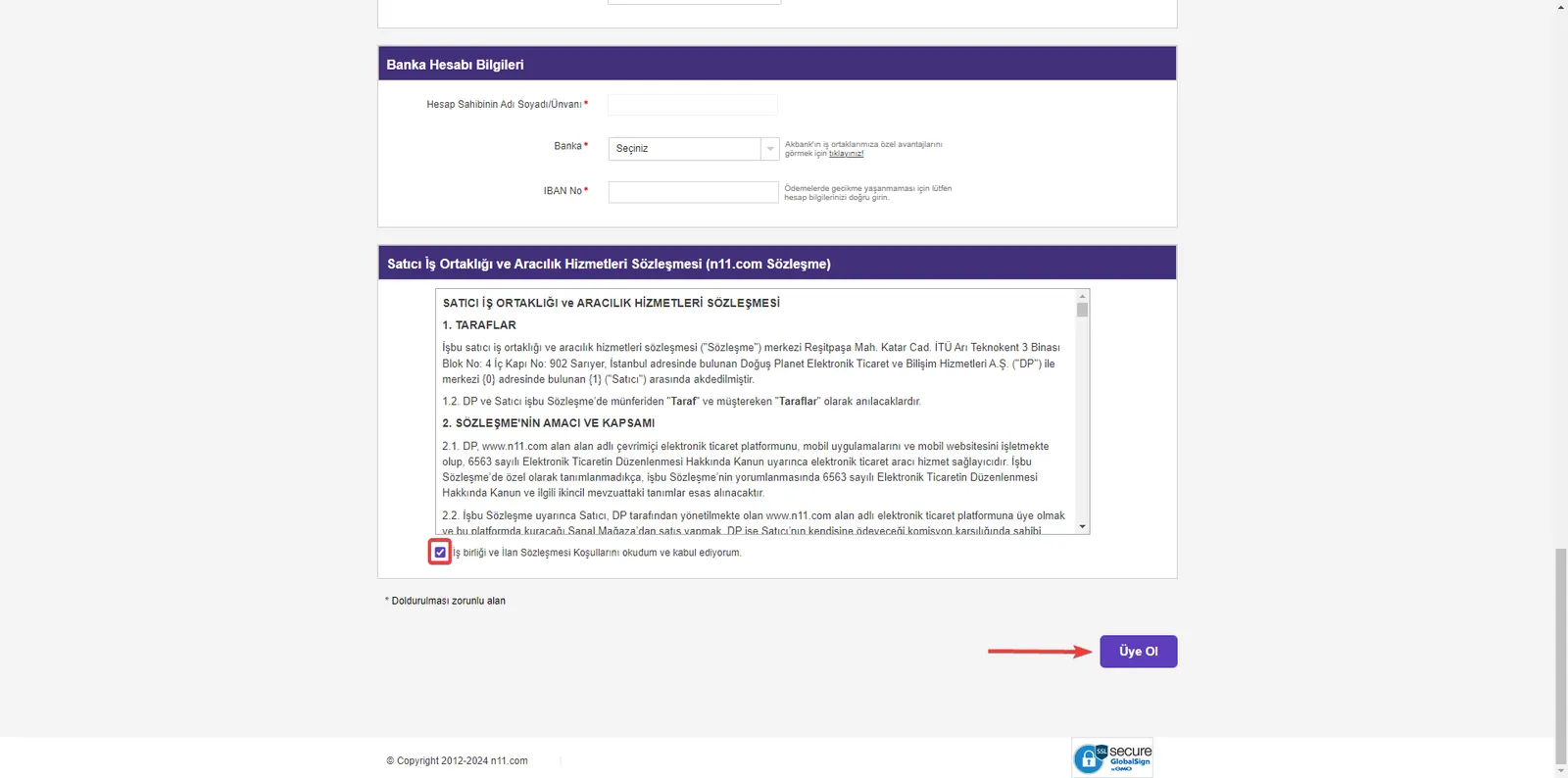
An important part of opening a store on N11 is accepting the Seller Partnership and Intermediary Services Agreement, which includes the platform's terms of use and seller policies. This stage is the foundation of creating a safe and transparent sales environment on N11. Here are the details of this step:
Reviewing the Agreement:
- After you have entered your company information and bank account details, N11's Seller Partnership and Intermediary Services Agreement will appear.
- This agreement covers your rights and responsibilities on the platform and the details of the services N11 provides. Therefore, read every section of the agreement carefully and make sure you understand all the terms.
Accepting the Agreement:
- If you understand and accept the terms of the agreement, complete the process by clicking the 'Sign Up' button.
- At this stage, your application will be taken into review by the N11 team.
Accepting this agreement when opening a store on N11 allows you to carry out your activities on the platform within a legal and orderly framework. Approving the agreement is a critical step for the safety of both you and your customers.
Activation: Activate Your Store on N11
Your store opening process on N11 continues with the activation step. This stage opens the door for your store to go live on the platform. Here are the details of this step:
Activation Email
- After you fill in and submit the registration form, an activation email is sent to the email address you gave during registration.
- Click the activation link in this email to complete this important stage of opening a store on N11.
Accessing the Store Management Panel
- After you complete the activation, you can log in to the N11 Store Management Panel with the username and password you created.
This step is required for your online store to become active on the N11 platform and is a big step toward making sales.
Document Management: Providing the Required Documents
After the activation process is completed, you will need to upload the documents N11 requests to the system. This step is important to ensure your store's legal compliance and credibility.
Preparing and Uploading the Documents
- On the Document Management screen, you can find a list of the required documents requested by N11. You can also review the list of required documents.
- Prepare these documents completely, in the requested format and with the requested information, and upload them to the system.
Submitting the Documents for Approval
- After all documents are uploaded, complete this process by using the “Submit Documents for Approval” button at the bottom right of the page.
- Your documents will be reviewed by the N11 team and your store's activation process will be completed.
These steps are the cornerstones of a successful store opening on N11. The activation and document upload processes ensure that your store operates on the platform safely and legally.
Advantages of the Faprika N11 Integration
Faprika's integration with N11 offers great convenience and advantages for e-commerce businesses. This integration lets you manage your online sales processes more efficiently and effectively. Here are the main advantages of the Faprika N11 integration:
- Effortless Product Management: Through Faprika's user-friendly interface, you can easily manage the products in your N11 store. You can update product information, prices, and stock levels from a single place and save time.
- Automatic Order Synchronization: You can track your orders through Faprika and synchronize them with N11 automatically. This feature speeds up your order management process and reduces the risk of errors.
- Analytics Reporting: Faprika offers comprehensive reporting tools to analyze the performance of your N11 store. By accessing valuable data such as sales trends, customer behavior, and market analyses, you can improve your business strategies.
- Customer Service Management: It gives you better control over customer feedback and questions. Through Faprika, you can manage your customer service processes centrally and increase customer satisfaction.
- Stock Optimization: You can monitor your stock levels in real time and manage stock effectively for your N11 store. This prevents problems such as overstock or shortages.
Faprika's N11 integration is a powerful tool that supports your success in e-commerce. By using this integration to maximize your business's online presence and operational efficiency, you can fully unlock your potential on N11.
We wish you success in your N11 store opening process!
Frequently Asked Questions (FAQ)
Is opening a store on N11 free?
Yes, you do not have to pay any fee to open a store on N11. The platform lets sellers open a store and list their products for free.
How long does the N11 store opening process take?
Opening a store on N11 is usually completed within a few business days, depending on how quickly you provide the required information and documents. Including the document review and approval process, this time may be somewhat longer.
Which products can I sell on N11?
N11 allows you to sell products in a wide variety of categories. You can sell across a broad range, from clothing to electronics, from home decor to personal care products. However, keep in mind that you can only sell products that comply with the law and with N11's terms of use.
Which documents are required for my N11 store?
To open a store on N11, you generally need documents such as your company information, tax certificate, trade registry gazette, and signature circular. These documents are used to prove the accuracy of your business's legal and commercial activities.
How is N11 store management done?
You can manage every aspect of your store through the N11 Store Management Panel. In this panel, you can list your products, track orders, manage customer feedback, and run sales analyses.
What important points should I pay attention to when opening an N11 store?
When opening an N11 store, choosing the right category, clear and effective product descriptions, competitive pricing, reliable customer service, and full compliance with legal requirements are among the keys to running a successful store.
How are commission rates determined when selling on N11?
N11 charges a certain commission on the products sold. These commission rates may vary depending on the category of the product sold and the transaction value. For current commission rates, you can visit N11's official website.
You May Also Like
- How to Apply to Become a Trendyol Partner Marketplace Seller
- Stoksuz e-Ticaret Nedir? Stoksuz Satış Nasıl Yapılır?
- Trendyol’da Satış Yapmanın Avantajları ve İpuçları
- ÇiçekSepetin’de Satış Yapmak ve Avantajları
- Pazarama’da Satış Yapmak ve Avantajları
- Amazon'da Satış Yapmak İçin Gerekli Bilgiler
- Marketplace Category Commission Rates 2023