Contents 14 sections
- What Is an E-Commerce Mobile App?
- Why a Mobile App Matters for E-Commerce
- When Do You Need an E-Commerce Mobile App?
- Mobile App Needs Check
- How to Build a Mobile App Step by Step
- How to Use Notifications in a Mobile App
- What Makes a Good E-Commerce Mobile App?
- How to Get Found in the App Store
- How to Keep Customers Who Download the App
- How to Measure Mobile App Success
- Common Mistakes in an E-Commerce Mobile App
- Mobile App Checklist
- An E-Commerce Mobile App with Faprika
- Frequently Asked Questions
Your customers now shop mostly on their phones, and your store already has a mobile-friendly site. But is that enough, or should you publish your own app too? The short answer to what an e-commerce mobile app is is this: it is your online store's app that customers install on their phones, carrying your own brand name and icon, sitting on their home screen and able to receive your notifications.
In this guide we explain, step by step, how a mobile app differs from a mobile site, when it genuinely pays off, how the preparation and publishing process works, how to use notifications and how to measure the app's success. The tool in the article is designed to help you see, with eight questions, whether a mobile app should be on your agenda now or later.
What Is an E-Commerce Mobile App?
An e-commerce mobile app is a shopping app for an online store that customers install on their phones and tablets, carrying the store's own brand identity. Customers search for your store's name in the app store, download the app, browse products, add them to the cart, pay and track their orders. They do all this without opening a browser, simply by tapping the icon on their phone.
A well-built app is not a separate store. It shows the same product, stock, price and campaign data as your e-commerce site, and orders land in the same order list. That way you do not have to update two separate systems; the app is simply your store's door on the phone.
Is a Mobile-Friendly Site the Same as a Mobile App?
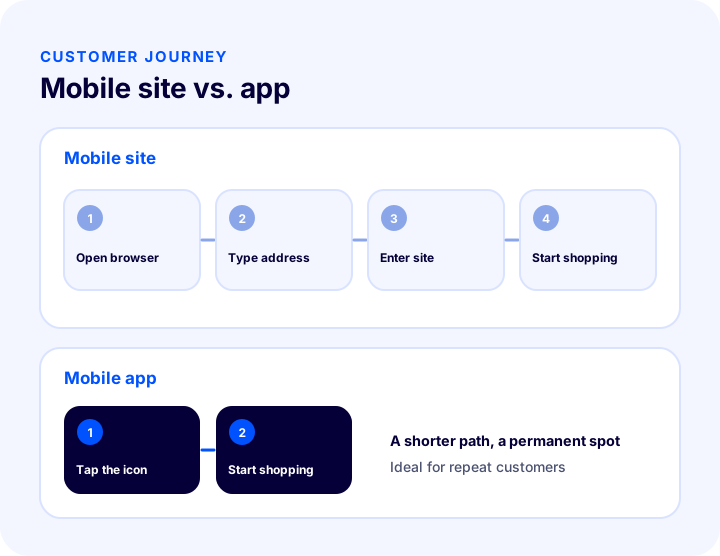
No. A mobile-friendly site is your website opened in a phone browser and adapted to the screen; it is the basic foundation every store must have. A mobile app is a separate channel installed on the phone on top of that. One does not replace the other; they complement each other.
| Criterion | Mobile-friendly site | Mobile app |
|---|---|---|
| How does the customer reach it? | From a search result, an ad, or by typing the address | By tapping the icon on the phone |
| Installation required? | No, it opens right away in the browser | Yes, downloaded from the app store |
| Finding new customers | Strong: search engines and ads bring visitors | Limited: depends on app store search |
| Repeat customers | Good, but through the browser every time | Very good: a permanent spot on the home screen |
| Notifications | Browser notifications, permission-based | App notifications, including order status |
| Management | E-commerce panel | The same e-commerce panel |
Why a Mobile App Matters for E-Commerce
An app's value comes less from bringing in new customers than from retaining existing ones. Once customers download it, they see your brand on their home screen every day and do not have to search for you on their next purchase. This matters most for stores with repeat purchases.
- It gives you a permanent spot: Instead of sitting next to your competitors in search results, you sit on the customer's own home screen.
- It speeds up repeat purchases: With login details, address and payment preferences ready, an order takes just a few taps.
- It opens a direct notification channel: Order status, shipping, stock and campaign updates reach the customer's phone and do not get lost in an email inbox.
- It signals trust: Appearing in the app store with your name and logo presents your store as an established brand.
- It reduces the support load: An order status notification answers "where is my order?" before the customer asks.
- It lays the groundwork for loyalty programs: Points, coupons and special offers find a natural home inside the app.
When Do You Need an E-Commerce Mobile App?
An app does not create the same value for every store. It makes sense for stores where customers come back often, that have a wide catalog, or where notifications trigger sales; for a product bought once a year, a mobile site is usually enough. Look at your own customer behavior before deciding.
| Situation | What does an app give you? |
|---|---|
| Customers shop often and repeatedly | A permanent spot on the home screen, fast ordering with one tap |
| Most traffic comes from phones | A smoother shopping experience on mobile |
| Campaign and stock news trigger sales | A direct notification channel |
| Many order tracking questions | Fewer support requests with order status notifications |
| The brand has a loyal customer base | A dedicated channel for loyalty and campaigns |
| Purchases are rare and one-off | Limited benefit; strengthen the mobile site first |
Mobile App Needs Check
The tool below quizzes your store with eight questions. Tick the statements that apply to your store; the tool tells you whether an app is a priority now, later, or whether other work should come first.
How to Build a Mobile App Step by Step
Preparing an app is less about writing code than about making decisions: what for, for whom and with what data. The sequence below applies to any store, whether it works with its own team or a ready-made platform.
- Write down the goal: Will the app increase repeat purchases, become a notification channel, or build loyalty? The goal decides which features go into the first version.
- Get the mobile site ready: The product page, cart and checkout flow must run smoothly on mobile; the app is built on top of that.
- Use a single data source: Product, stock, price and campaign data should come from the same panel. Keeping two separate catalogs brings errors and extra work.
- Define the brand identity: Prepare the app name, icon, colors and store description. The icon should be recognizable even at a small size.
- Clarify the account and publishing process: Publishing the app in the stores requires a developer account and each store's review process. Decide up front who will handle this.
- Set up the notification infrastructure: Connect the notification infrastructure for order status notifications and write the message templates.
- Arrange privacy and permissions: What data is collected, notification permission and the privacy policy must be clear; the stores review these.
- Publish and announce: Share the app links on your site, in your emails and on your social accounts.
- Measure and update: Track downloads, active users and order data, and update the app regularly.
How to Publish an App in the App Stores
The publishing process has several stages, and each store has its own rules. Once the app is ready, you apply from the developer account, the store reviews the app and, if it approves, publishes it. Later updates may go through a similar review, so updates need to be planned.
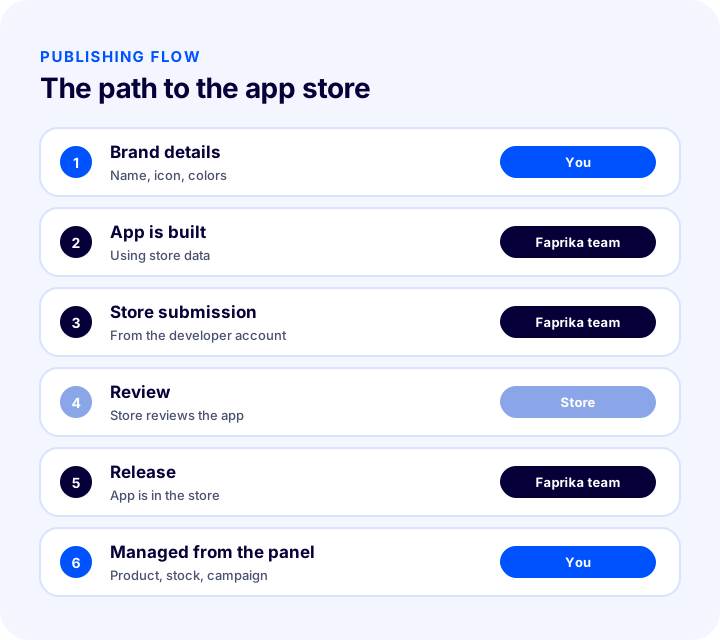
If you run this process yourself, you need to open the developer accounts, submit the applications and respond to review feedback. If you use a ready-made e-ticaret altyapısı to do this, be sure to ask whether the platform provider handles these steps.
Okumanızı öneririzE-Ticarette Site Hızı Neden Önemlidir?How to Use Notifications in a Mobile App
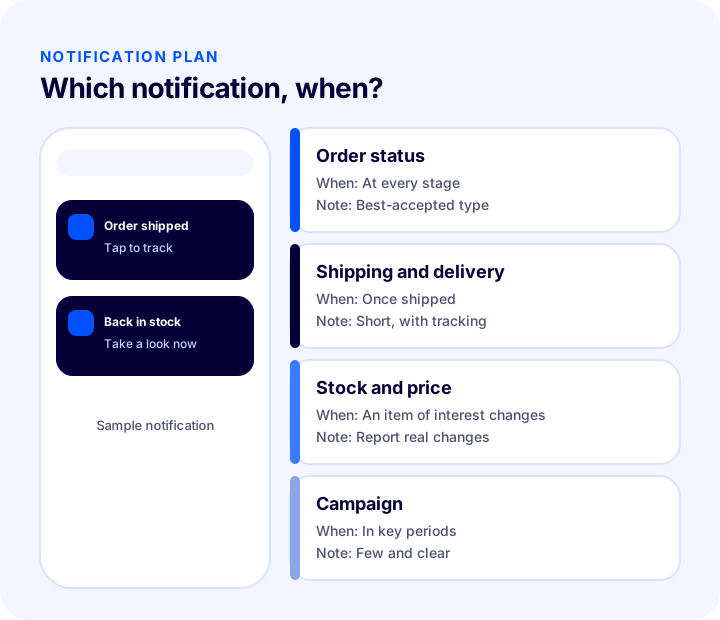
Notifications are an app's most powerful feature and the easiest to misuse. A notification that arrives at the right moment brings the customer back to the app; frequent, irrelevant ones get permission switched off. Tie notifications to events that give the customer value.
1. Order Status Notifications
This is the most natural and most valuable type of notification. Stages such as order received, being prepared, shipped and delivered land on the customer's phone. Customers do not wonder where their order is, and they do not write to your support team.
2. Shipping and Delivery Notifications
Short updates about shipment and delivery day are especially useful for deliveries that require someone to be home. Keep the message short and take the customer straight to the tracking information.
3. Stock and Price Notifications
Telling a customer when a product they were interested in is back in stock or its price has dropped is a relevant and expected notification. These messages generally get more attention than campaign messages because they are based on the customer's own choice.
4. Campaign Notifications
Campaign news should be used sparingly. A discount notification every day gets permission switched off. For important campaigns, send few, clear and timely notifications; segment your audience by interest if needed.
| Notification type | When? | Watch out for |
|---|---|---|
| Order status | Every time an order changes stage | Short and clear; take them to the tracking screen |
| Shipping and delivery | Once shipped and on delivery day | Avoid needless repetition |
| Stock and price | When a product the customer is interested in changes | Report real changes, state the old price accurately |
| Campaign | In key periods, in limited numbers | Keep frequency low, segment your audience |
What Makes a Good E-Commerce Mobile App?
An app should not be a copy of the mobile site; it should highlight what makes use on a phone easier. When customers open the app they should quickly find what they are looking for and reach the purchase step with as few taps as possible.
- Fast launch and smooth navigation: An app that opens slowly or stutters gets deleted. The home screen should load quickly and product lists should scroll smoothly.
- Strong search and filters: Typing on a phone is hard; search suggestions, filters and category navigation must work very well.
- Easy login: Instead of asking for a password every time, use a remembered session and simple sign-in options.
- A short checkout step: Saved addresses and payment preferences cut the ordering step down to a few taps.
- Wishlists and watch lists: Customers should be able to save products and be informed of changes.
- Order history and tracking: Past orders, shipping status and a reorder option should be on one screen.
- The same information as the site: Price, stock and campaigns must match the site; inconsistent information confuses customers.
How to Get Found in the App Store
Publishing the app is not enough; customers need to find it. App stores have their own search systems, and a few factors affect visibility. The strongest channel, however, is the customers who already visit your store.
- Name and description: The app name should be your store's well-known name, and the description should clearly explain what you offer.
- Icon and screenshots: The icon should be recognizable, and the screenshots should show the app's main features.
- Reviews and ratings: Politely asking satisfied customers for a review builds trust among new downloaders.
- Announce on your own channels: A banner on your site, post-order emails, in-package cards and social accounts are the most natural places to announce the app.
- Give a reason to download: Offering an app-only deal or convenience encourages downloads.
How to Keep Customers Who Download the App
The first days are the app's most critical period. It is common for a downloaded app to be forgotten without ever being opened again, so the customer needs to see value the first time they use it. Retention work comes down to three points: first launch, first order and return visits.
First Launch
When customers first open the app, they should not face a complicated registration form; they should see products first, and registration or login should be requested at checkout. Featured categories, current campaigns and the search field should be clear on the home screen.
First Order
The first order is the moment the app proves useful to the customer. Suggesting that they turn on order status notifications after the order is both the right time to get permission and a reason for them to open the app again. A small app-only benefit also supports the decision to download, but that benefit must be clear and consistent with your store's campaign rules.
Return Visits
When customers come back to the app, they should be able to finish quickly: past orders, favorites and a reorder path should be ready. Keep the app alive by sending measured notifications that match their interests over time. If a customer has not opened the app for a while, it is better to write when there is a real development about a product they care about than to send a reminder every day.
How to Measure Mobile App Success
The number of downloads is not a success measure on its own. A customer who downloads the app and never opens it again creates no value for you. What matters is that the app is used and turns into orders.
- Downloads and installs: How many people downloaded the app, and through which channel did they come?
- Active users: How many of those who downloaded it open it regularly?
- Order conversion: Do app users place more orders than mobile site visitors?
- Repeat orders: Is the order frequency of app customers different from others?
- Notification permission and response: How many people gave permission, how many notifications were opened, and how many people turned permission off?
- Uninstall rate: If the share of people deleting the app is high, review your notification frequency and the first-use experience.
You should evaluate this data together with the site, not on its own. Customers who use the app may be the most loyal part of the same store's audience; but that difference only shows up in your own data.
Common Mistakes in an E-Commerce Mobile App
- Trying to cover for a weak mobile site with an app: The basic problems carry over into the app too.
- Showing different data from the site: A different price or stock level in the app erodes trust.
- Sending notifications too often: Permission gets switched off and the app gets deleted.
- Asking for permission at the wrong moment: A notification permission requested right at launch is usually refused.
- Not announcing the app: An app that is published but that nobody knows about does not get downloaded.
- Neglecting updates: An app stuck on an old version causes problems and loses store visibility.
- Underestimating the publishing process: Accounts, submissions and reviews take time; plan your schedule accordingly.
- Looking only at downloads: If usage and orders are not tracked, the app's value stays unknown.
Mobile App Checklist
| Title | To check |
|---|---|
| Purpose | Is the app's goal (repeat orders, notifications, loyalty) written down? |
| Mobile site | Do speed, the product page and checkout work smoothly on mobile? |
| Data | Do product, stock, price and campaign data come from the same source as the site? |
| Brand | Are the name, icon and store description ready? |
| Release | Who owns the developer account and the store submission? |
| Notifications | Are order status notifications and message templates set up? |
| Consent | Is notification permission requested at the right moment and in a clear way? |
| Confidentiality | Are the privacy policy and data disclosure up to date? |
| Announcement | Is there an app link on the site, in emails and on social channels? |
| Measurement | Are downloads, active users and order data being tracked? |
An E-Commerce Mobile App with Faprika
With Faprika Mobile App, your e-commerce site is published in the iOS and Android app stores under your own brand name and logo. Which plan includes it varies; see the e-commerce plans and Premium plans pages for details.
- iOS and Android under your own brand: The app is listed in the iOS and Android app stores with your name, logo and icon; the same products, prices and campaigns appear on both platforms.
- Publishing handled by the Faprika team: The app is published by the Faprika team from Faprika's developer accounts. You do not need to open a developer account or submit to the store.
- One panel: Product, stock, price and campaigns are managed from the same Faprika panel as your e-commerce site; you update once, and the site and app show the same information.
- Orders in one list: Orders from the app land in your panel order list alongside orders from your site and marketplaces; invoicing, shipping and returns work the same way.
- Order status notifications: Your customer sees which stage their order is at on their phone. The notification infrastructure is free; the setup steps are explained in the Push Notifications tutorial, and you can prepare notification texts in advance with message templates.
- Mobile-friendly site in every plan: Every Faprika plan includes a mobile-friendly e-commerce site; the app is an added channel on top that puts your brand on the phone's home screen.
For add-on details, see the Mobile App page.
Frequently Asked Questions
What is an e-commerce mobile app?
An e-commerce mobile app is a shopping app for an online store that customers install on their phones and tablets, carrying the store's own brand name and icon. Customers download it from the app store, browse products, place orders and track them. Product, stock and price information comes from the same source as the e-commerce site.
Do you need an app if you already have a mobile-friendly site?
Not every store needs one. A mobile-friendly site is the foundation of every store; an app is a meaningful extra channel for stores with frequent repeat purchases, sales triggered by notifications, or a loyal customer base. First make sure your mobile site is strong.
Does a mobile app increase sales?
Used well, it can contribute to sales by making repeat purchases easier and opening a direct notification channel. The size of the effect varies by store and audience, so you need to measure it with your own data.
Who publishes the app in the app stores?
If you work with your own team, you open the developer account and submit the application yourself. If you use a ready-made platform, ask whether the provider handles these steps. With Faprika Mobile App, publishing is done by the Faprika team from Faprika's developer accounts.
Is the app managed from a separate panel?
A well-built app does not need separate management. In Faprika, the app is managed from the same panel as your e-commerce site; product, stock, price and campaign changes appear in both the site and the app.
Can you send notifications to customers freely?
Sending notifications requires the customer's permission, and permission must be easy to withdraw. Personal data protection and commercial messaging rules vary by country, so you should check the regulations of every market you serve. Order status notifications are generally the best-accepted type.
You May Also Like
- 2025’te Mobil Öncelikli E-Ticaret Neden Kaçınılmaz?
- What Is a Wishlist? How to Set Up a Wishlist in E-Commerce and Turn Favorites into Sales: ROI Calculator and Health Check
- Sepeti Terk Etme Oranlarını Düşürmenin Yolları
- How to Do SMS Marketing in E-Commerce? Consent, Message Writing, Timing and Measurement Guide