Contents 12 sections
- What Is a Wishlist?
- Why a Wishlist Matters for E-Commerce
- What Makes a Good Wishlist Button and List?
- How to Set Up a Wishlist Step by Step
- How Do Wishlist Items Turn into Sales?
- How Is Wishlist ROI Calculated?
- How to Read Wishlist Data
- Wishlist Health Check
- Common Wishlist Mistakes
- Wishlist Checklist
- Managing Wishlists with Faprika
- Frequently Asked Questions
When a visitor stops on a product page and taps the heart, they are telling you something important: "I like this, but not right now." Most stores either never collect this signal or collect it and never use it. The short answer to what is a wishlist is this: it is the personal list where a customer saves a product to come back to later without buying it, and it is the most valuable intent signal that comes before the cart.
In this guide we explain, step by step, what a wishlist is, how it differs from a cart and a compare list, how to build a good wishlist button, the triggers that turn wishlisted products into sales, and how to read wishlist data. Of the two tools in the article, one helps you calculate the return on your wishlist, and the other shows how mature the wishlist experience in your store is.
What Is a Wishlist?
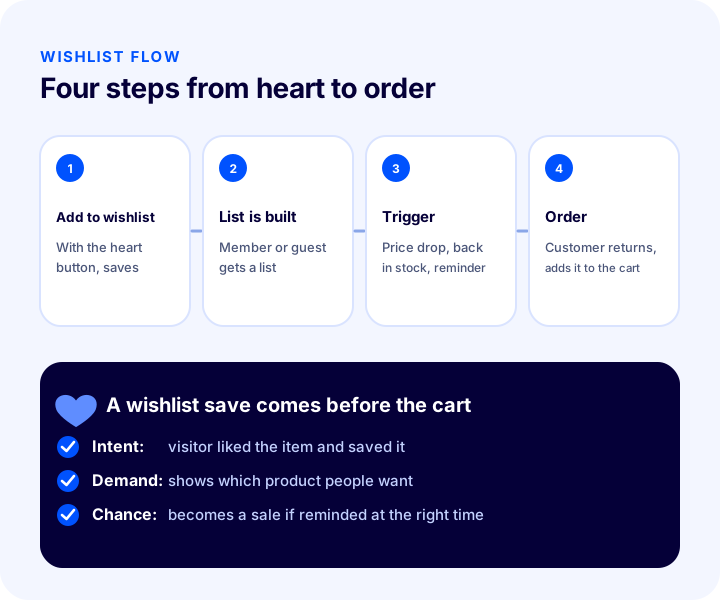
A wishlist is the list where a visitor or member saves products they like without buying them. Tapping the heart icon on a product page or product card adds the product to this list. Later the customer opens the list, reviews the products and moves the ones they want to the cart.
For the customer, a wishlist is like a notebook: it lets them keep a product while comparing prices, waiting for payday, thinking about a gift or simply making up their mind. For the store, it is valuable data showing which products attract interest but have not been bought yet.
Are a Wishlist, a Cart and a Compare List the Same Thing?
No. All three are places where a visitor saves a product, but they represent different intents and different time spans. That is why you should not mix the data from one with the others, and each one needs its own messaging.
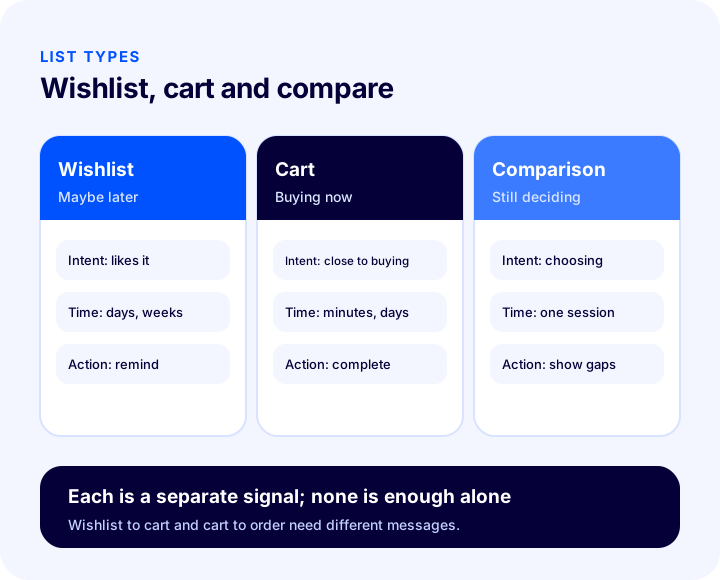
| Criterion | Wishlist | Cart | Compare list |
|---|---|---|---|
| Customer's intent | Likes it, will look later | Close to buying | Choosing between options |
| How long does it last? | Days, weeks | Minutes, days | Usually a single session |
| The store's action | Notify on price or stock changes | Remind about the cart, ease checkout | Show the differences clearly |
| What does it tell you? | Which product is in demand | At which step people give up | Which products compete with each other |
Why a Wishlist Matters for E-Commerce
A wishlist is one of the few tools that keeps you connected with the customer at the stage when the buying decision has not been made yet. If the cart is full, the customer is close to buying; with a wishlist, they are still exploring. Managing this stage stops visitors from leaving the site and forgetting about it.
- It signals intent: A visitor who taps the heart has clearly said they are interested in the product. That is a clearer signal than time on page or a click.
- It creates a reason to return: When the price of a wishlisted product drops or a sold-out variant is back in stock, you have a natural, relevant reason to write to the customer.
- It provides demand data: The most wishlisted products are the ones to feature in the showcase and to keep well stocked.
- It shortens the path to a decision instead of losing it: When the customer is ready to decide, they do not have to search for the product again; the list takes them straight to it.
- It especially helps on mobile: Visitors browsing on a phone often leave the purchase for the desktop or for later; a wishlist carries that handover.
- It can reduce cart abandonment: An undecided customer saves the product to the wishlist instead of leaving it in the cart, so cart data gets cleaner and wishlist data gets richer.
What Makes a Good Wishlist Button and List?
A good wishlist experience delivers two things: adding is as easy as a single tap, and getting back to the saved product later is just as easy. If the button is hidden, nobody adds anything; if the list cannot be found, the saved products go to waste.
Wishlist Button Rules
- It must be visible: The heart icon should sit on the product card and the product page, in the corner of the photo or next to the buy button. It should not be hidden inside a menu.
- It must work with one tap: When the button is pressed, the product should be added right away, the heart should fill in and a short confirmation should appear. The page should not reload.
- The tap target must be large enough: A tiny heart on a phone causes mistaps; the button should be wide enough to press comfortably with a finger.
- It must be accessible: Give the button a name that screen readers understand (e.g. "Add to wishlist") and expose its on or off state.
- It must show its state: The heart of a wishlisted product should look filled, and pressing the same button again should remove the product from the list.
- It must respect variants: For products with color or size options, it must be clear which option the customer saved; otherwise the back-in-stock alert for a sold-out variant will not reach the right person.
Should Guest Visitors Be Able to Add to a Wishlist?
Yes, if possible. Requiring an account makes many visitors who want to save a product give up. A guest's list can be kept in the browser and moved to their account when they later register or log in. This reduces friction and keeps the list across devices.
How to Set Up a Wishlist Step by Step
Whether you are setting up the wishlist for the first time or tidying up an existing setup, follow this order. Each step builds on the previous one; the button and the list must work well before you add notifications.
- Add the button and the list: Put the heart button on the product card and the product page, and add a "My Wishlist" link to the menu.
- Set up the guest flow: Let visitors who are not members add products too, and move their list to their account when they log in.
- Make the list page useful: Show the current price, stock status and an add-to-cart or "notify me when available" button next to every product.
- Define the triggers: Turn on back-in-stock and price-drop notifications first; add reminders last and limit how often they are sent.
- Handle consent and opt-out: Let the customer choose which channel they get notifications on, and include an unsubscribe link in every message.
- Measure and improve: Track the add rate, the return rate from notifications and the wishlist-to-order rate every month.
How Do Wishlist Items Turn into Sales?
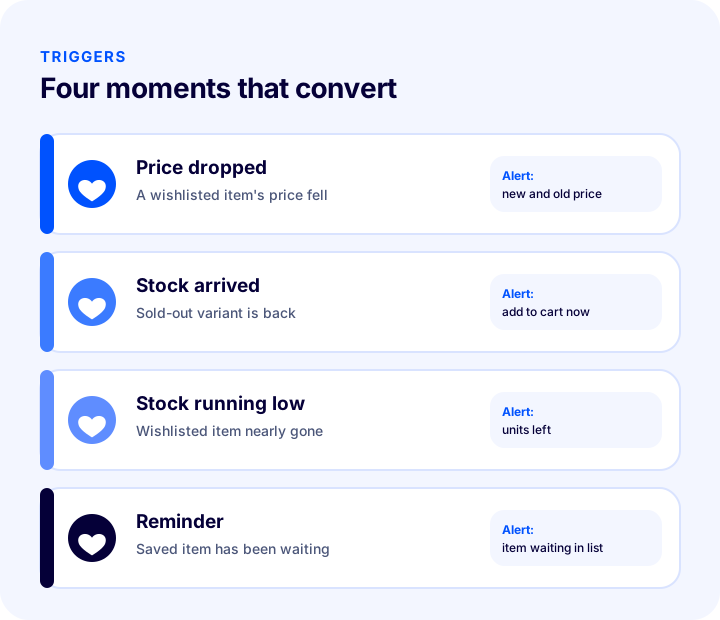
If a wishlist stays a passive storage space, it earns you nothing. Its value appears when you activate the list with a trigger. A trigger is an event that gives the customer a real reason to come back.
1. Notify When the Price Drops
Sending a notification that shows both the new and the old price when a wishlisted product gets cheaper is one of the strongest triggers. The customer already likes the product; once the price barrier is gone, the decision gets easier. What matters is that the discount is real and the old price in the notification is accurate.
2. Notify When Stock Returns
A customer waiting for a sold-out product or variant should be told when it is back in stock. This is the most natural way to win back a lost sale. For products with variants, the notification should be tied not to the product but to the option the customer is waiting for: when size 38 returns, the person waiting for size 40 should not be notified.
3. Warn When Stock Runs Low
When a wishlisted product is down to its last units, a short and honest message can be sent. The point is not to create scarcity pressure but to share the real stock status; a made-up "only 2 left" message damages trust.
4. Send a Reminder
A gentle reminder can be sent for products that have been sitting on the list for a while. Keep the frequency balanced: if a customer gets the same message every day, they turn off notifications and withdraw consent. One or two reminders are enough; after that, leave the list to the customer's own decision.
We recommend readingHow to Set Up a Loyalty Program? A Practical Guide to Points Systems, Tier Design and Cost Calculation in E-CommerceWhich Channel Should You Use for Reminders?
The right channel depends on the consent the customer gave and the urgency of the product. Each channel has its pros and cons:
| Channel | Pros | Watch out for |
|---|---|---|
| Fits product images and details, low cost | Open rates can lag, may land in the spam folder | |
| Text message (SMS) | Read quickly, suits urgent news such as stock and price | Consent and content rules are stricter, with a character limit |
| Browser or app notification | Appears instantly, takes the customer to the product in one tap | Cannot be sent without permission, gets turned off if sent too often |
| On-site reminder | Visible while the customer is on the site, no consent needed | Does not reach customers who do not come back to the site |
Which Product Categories Use Wishlists the Most?
Wishlist use is not the same for every product. For products with a long decision time, a high price or a gift purpose, customers often say "I'll look later"; the wishlist creates more value in these groups. The table below shows a general tendency; your own store's data is what counts.
| Product group | Why do customers add to a wishlist? | Trigger that works |
|---|---|---|
| Clothing and shoes | Uncertainty about size or color, waiting for the season | When the size is back in stock, when the price drops |
| Electronics and home products | Researching and comparing an expensive product | Price drop, campaign-period reminder |
| Gifts and special-occasion products | Saving ideas until the date | A short reminder as the date approaches |
| Cosmetics and personal care | Collecting products they want to try | Back-in-stock alert, bundle offer |
During campaign periods, a wishlist is also a preparation tool: customers add the products they want before the sale days and go straight to them when the campaign starts. A store that supports this behavior shortens the time customers spend searching on busy days.
How Is Wishlist ROI Calculated?
To see the value of a wishlist you only need four rates: how many product page visitors add to the wishlist, how many of those customers come back through a reminder, how many of the returners buy, and the average order value. The tool below uses these four values to calculate the extra orders and extra revenue your wishlist would bring. The values are examples; enter your own figures.
What the tool shows is that even small rates multiply into a meaningful number of orders. The real leverage is usually in two places: raising the add rate by making the button visible, and raising the return rate with a well-timed notification.
How to Read Wishlist Data
The number of saves alone is not a measure of success. A product being saved a lot shows it attracts interest; being sold a lot shows the interest turns into orders. Put the two side by side and what to do for each product becomes clear.
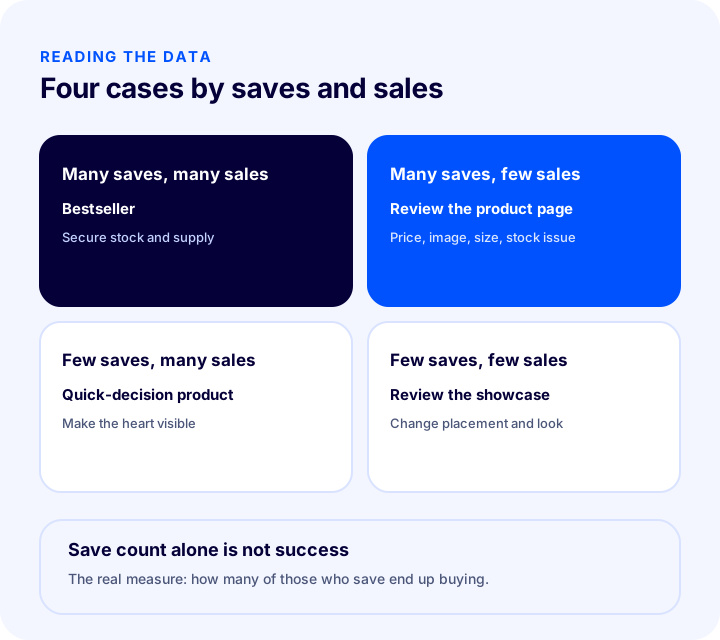
- Many saves, many sales: Your true star product. Secure its stock and supply, and keep it in the showcase.
- Many saves, few sales: The customer wants it but does not buy. Check the price, product images, size chart, shipping cost or stock status; the barrier is usually one of these.
- Few saves, many sales: Customers buy this product without waiting. If the wishlist button is not visible, it may simply not be getting added; either way, it means the decision on this product is made quickly.
- Few saves, few sales: Its showcase placement, photo or description should be reviewed; if needed, change the price or the position.
Wishlist Health Check
The tool below checks the wishlist experience in your store with eight items. Tick what you already do; the tool tells you how many items you meet and where to focus.
Common Wishlist Mistakes
- Hiding the button: A small, faint heart under the photo catches nobody's attention; a product that is not added produces no data.
- Forcing registration: Not letting guests save a product loses you your most interested visitors.
- Leaving the list silent: A list that does not announce price or stock changes is just a notebook.
- Not separating variants: If news that a size is back reaches a customer who is not waiting for that size, trust is lost.
- Creating fake urgency: A made-up "only a few left" message brings clicks in the short term and takes trust away in the long term.
- Notifying too often: Reminders every day make people withdraw consent; stop after one or two messages.
- Sending messages without consent or an opt-out: It carries legal risk and also turns the customer away from the brand.
- Looking only at the number of saves: A product that is saved a lot but does not sell is a warning; the number must be read together with sales.
Wishlist Checklist
| Title | To check |
|---|---|
| Button | Is the heart visible on the product card and page, and does it work with one tap? |
| Access | Can guests add too, and is the list kept after login? |
| Variant | Is the color or size the customer saved clear? |
| List page | Is there an add-to-cart or "notify me when available" option next to every product? |
| Price notification | Are customers notified with the correct old and new price when a wishlisted product drops? |
| Stock notification | Is the person waiting told when a sold-out variant is back? |
| Frequency | Are the number and spacing of reminders limited? |
| Consent | Is explicit consent collected for notifications, and is an opt-out shown? |
| Report | Are the most wishlisted products tracked together with sales? |
Managing Wishlists with Faprika
Faprika includes the following tools to set up and track the wishlist experience; which feature is in which plan varies, and you can see the details on the e-commerce plans page.
- Wishlist / compare / price-tracking list: Customers can add a product to a wishlist, a compare list or a price-tracking list; this feature varies by plan.
- Wishlist in the admin panel: Products that members and guests add to their wishlist but do not buy are listed in the panel; you can see how many products they added and which products are liked. The steps are described in the Wishlist Management tutorial.
- Back-in-stock notification: For sold-out products, customers turn on a notification and are informed automatically when the product is back in stock. With the "notify followers above quantity" setting you can decide at what stock level the notification goes out, and you can turn the feature on for many products at once with bulk actions; see the Back-in-Stock Notification tutorial for details.
- Variant-based notifications: Back-in-stock and price-drop alerts work per variant, not per product; if only size 38 is out of stock, the customer can turn on a notification for that variant.
- Reports: With back-in-stock, wishlist and price reports you can see which products are in demand; the scope varies by plan.
The glossary entry What Is Back-in-Stock Notification? briefly summarizes the concept.
Frequently Asked Questions
What is a wishlist?
A wishlist is a personal list where a customer saves products they like to come back to later, without buying them yet. Items are added with the heart icon on a product page or product card, and it helps both sides: the customer does not lose the product, and the store sees which items attract interest.
What is the difference between a wishlist and a cart?
A cart holds products the customer is close to buying; a wishlist keeps products they like but are not ready to buy yet. A cart is short-term and checkout-oriented, while a wishlist is long-term and discovery-oriented.
Does a wishlist increase sales?
It can when used well. Telling a customer when a wishlisted item drops in price, or when a sold-out variant is back in stock, can bring back a postponed sale. The size of the effect varies by store and product, so measure it with your own data.
Should guest visitors be able to add to a wishlist?
If possible, yes. Requiring an account makes many visitors give up on saving the product. A guest's list can be kept in the browser and moved to their account when they register or log in.
Can I send notifications about wishlisted products?
You need the customer's explicit consent to send notifications, and every message must show a way to unsubscribe. Data protection and commercial messaging rules differ by country, so check the regulations of every market you serve.
How should wishlist data be interpreted?
The number of saves alone is not a measure of success. Read saves and sales together: for products that are saved a lot but sell little, look into price, images, size chart or stock issues; for products that are both saved and sold a lot, secure the stock.
You May Also Like
- What to Do with an Out-of-Stock Product Page? A Practical Guide to SEO, Customer Experience and Redirects for Sold-Out Products in E-Commerce
- How to Set Up a Loyalty Program? A Practical Guide to Points Systems, Tier Design and Cost Calculation in E-Commerce
- What Is Guest Checkout? Mandatory Registration in E-Commerce, Guest Payment and Encouraging Registration: A Practical Guide
- How to Do SMS Marketing in E-Commerce? Consent, Message Writing, Timing and Measurement Guide