
Table of Contents 16 sections
- What Is Price Updating by Exchange Rate?
- How Does Currency Fluctuation Affect Profit Margin?
- Which Prices Are Set in Foreign Currency?
- How Should You Choose a Rate Source?
- How Often Should the Rate Be Updated?
- How Do You Set Up Price Tiers and Rounding?
- How Should You Think About the Price Card?
- How Do You Manage Exchange Rate Risk During Campaigns?
- How Do Frequent Price Changes Affect Customer Trust?
- How Do You Keep Prices Consistent Across Channels When the Rate Changes?
- Setup Steps for Price Updating by Exchange Rate
- Common Mistakes in Price Updating by Exchange Rate
- How Do You Audit Your Exchange Rate Management Setup?
- How Do You Measure Price Updating by Exchange Rate?
- How Do You Update Prices by Exchange Rate with Faprika?
- Frequently Asked Questions
If you buy your products in foreign currency and write your selling price in local currency, every move in the exchange rate quietly changes your profit margin. Cost rises overnight while the price in your storefront stays the same; orders keep coming in, but each sale earns less than the one before. The opposite happens too: the rate falls, your price stays higher than it should be, and your competitors look more attractive next to you. The short answer to the question what is price updating by exchange rate is this: keep the product cost or selling price in foreign currency, convert it into local currency at the current rate, and do this calculation with rules and automation instead of by hand.
In this guide we explain how currency fluctuation erodes margin, how to choose a rate source and update frequency, how to set up price tiers and rounding, how to reconcile psychological pricing with rate calculation, how to manage exchange rate risk during campaigns, and how frequent price changes affect customer trust. Of the two tools in the article, one calculates the effect of a rate increase on your margin and the selling price needed to protect it; the other audits your current rate management setup with eight questions.
What Is Price Updating by Exchange Rate?
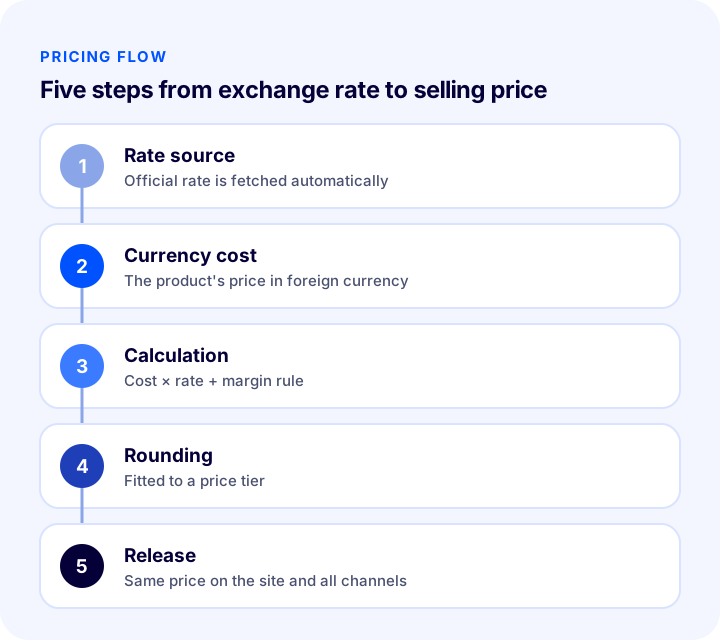
Price updating by exchange rate means linking a product's price to a value in foreign currency and refreshing the selling price by converting that value into local currency at the current rate. The system takes the rate from a source, multiplies it by the product's currency cost, applies the margin rule, rounds the result and publishes the new price. This chain runs with the same logic and at the same time for every product.
What Is the Difference Between a Fixed Price and an Exchange-Rate-Linked Price?
A fixed price stays the same until you change it; an exchange-rate-linked price keeps the foreign-currency value constant while the local-currency equivalent moves with the rate. The first is simple and predictable but unprotected against rate moves; the second protects the margin but requires accepting that the price will change.
| Approach | How does it work? | Strength | Weakness |
|---|---|---|---|
| Fixed price | Price is written and changed by hand | Predictable for the customer | When the rate rises the margin erodes; when it falls the price stays higher than it should be |
| Rate-linked price | Foreign-currency value is fixed, local price is calculated by the rate | Margin is protected, prices are updated consistently | Customer trust can suffer if the price changes often |
| Threshold-based update | Price is refreshed when the rate exceeds a certain percentage | Price stays fixed on small fluctuations | The threshold must be chosen carefully |
| Fixed-rate period | The rate is locked for a set period | Gives stability during campaign and catalog periods | If the rate moves a lot, the margin stays at risk for that period |
How Does Currency Fluctuation Affect Profit Margin?
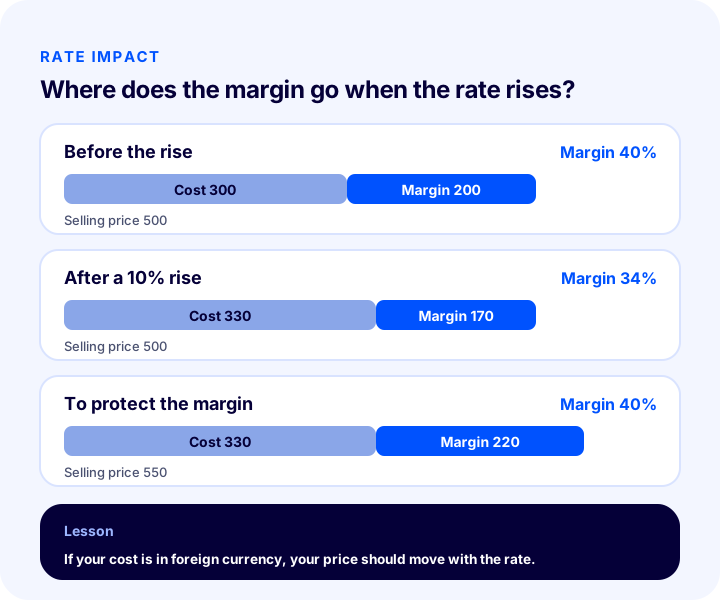
If your cost is in foreign currency, cost rises by the same proportion when the rate rises, and because the selling price stays the same, the margin shrinks. Profit and margin are not the same thing: as the rate rises, both the unit profit amount and the margin percentage fall, and the drop happens even if the number of orders does not change. That is why profit falling while sales volume rises is a typical sign of rate-driven margin loss.
A simple example is enough to see the effect. A product with a unit cost of 10 in foreign currency, a rate of 30 and a selling price of 500 has a cost of 300 and a margin of 40 percent. If the rate rises 10 percent to 33, cost goes up to 330 and the margin falls to 34 percent. To keep the margin at its old level, the selling price must go up to 550. These figures are only an example; you can enter your own values in the tool below and run the same calculation.
How Do You Calculate the Impact of a Rate Change on Your Margin?
The tool below takes your unit cost in foreign currency, the current rate, your selling price and the rate increase you expect; it shows the new cost, the new margin and the selling price needed to protect the margin. It assumes the whole cost of the product is set in foreign currency; if you have fixed expenses in local currency, account for them separately. To see a rate decrease, you can enter a negative value instead of an increase.
The real lesson of the tool is that the same rate increase does not affect every margin equally: on thin-margin products a small rate increase pushes the margin toward zero, while on a wide-margin product the same increase is felt less. That is why starting rate monitoring with thin-margin, high-selling products gives the fastest payoff.
We recommend readingProfit Margin Calculation: How to Calculate Profit Margin in E-Commerce (Calculator and Examples)Which Prices Are Set in Foreign Currency?
Foreign currency comes into play in a different place in every store; knowing which one you are determines which rule you should set up. There are three basic cases, and most stores fit one of them or a mix of two.
- Cost in foreign currency, sales in local currency: You import the product or source it in foreign currency but sell to the customer in local currency. The risk lies directly in the margin; as the rate rises, the margin erodes.
- Selling price in foreign currency: The catalog price is in foreign currency and its local-currency equivalent is calculated at the current rate. The customer's price changes with the rate; the margin is protected but the price can look unstable.
- Selling abroad: You show prices in each country's own currency. The challenge here is less about tracking the rate than about managing the right price difference per country and rounding.
The first case creates the most margin pressure, and the second raises the most customer-trust questions. In the third, conversion usually happens between local currency and the foreign-currency price, which is just another face of the same rate calculation.
We recommend readingWhat Is E-Export?How Should You Choose a Rate Source?
The rate source is the single real value your price calculation rests on, so it should be a source everyone accepts, published regularly and traceable. Changing the source often or using different sources for different product groups leads to price inconsistency. The criterion fits in two sentences: one source and a documented publishing schedule.
Official Rate or Market Rate?
Official rates are published at set times and are a reference anyone can verify; the market rate moves instantly during the day. For price calculation the official rate is often more suitable: the frequency of change is manageable, the figure is verifiable and intraday noise does not reach the price. Unless tracking the market rate in real time is a genuine need, moving prices many times a day brings no benefit, only customer confusion.
Buying Rate or Selling Rate?
If you source the product by buying foreign currency, it is safer to base the cost calculation on the selling rate, that is, the price at which you would buy the currency, because your real cost will come out close to it. Whichever you choose, use the same one for all products and note it in the footnote of the price calculation; the question “which rate did we calculate with” should never come up inside the company.
How Often Should the Rate Be Updated?
Update frequency is the balance between the need to protect margin and price stability. Changing the price on every rate move protects the margin but surprises the customer; updating once a month loses margin in volatile periods. The right frequency depends on the product's margin, how volatile the rate is and how visible the price is to the customer.
| Frequency | When is it suitable? | Point to watch |
|---|---|---|
| Several times a day | Very thin margins and periods when the rate is very volatile | Customers may see a price difference on the same day; keep its use narrow |
| Once a day, at a set time | A balanced choice for most stores | The update time must be fixed |
| Weekly | Wide-margin products whose prices are not compared often | If the rate moves sharply, the margin erodes within the week |
| Threshold-based | Stores that want to update once the rate exceeds a certain percentage | Setting the threshold too small turns it into a daily update |
In practice, combining a daily update with a threshold approach works well for most stores: the rate is read every day, but the price is refreshed only when the change exceeds the set percentage. That way small fluctuations do not reach the price, while serious moves are handled without delay.
How Do You Set Up Price Tiers and Rounding?
A price calculated from the rate often comes out as a meaningless number like 548.37; a rounding rule is needed so that the price you publish is readable and consistent. If you do not write the rule, every product ends differently and the storefront looks messy.
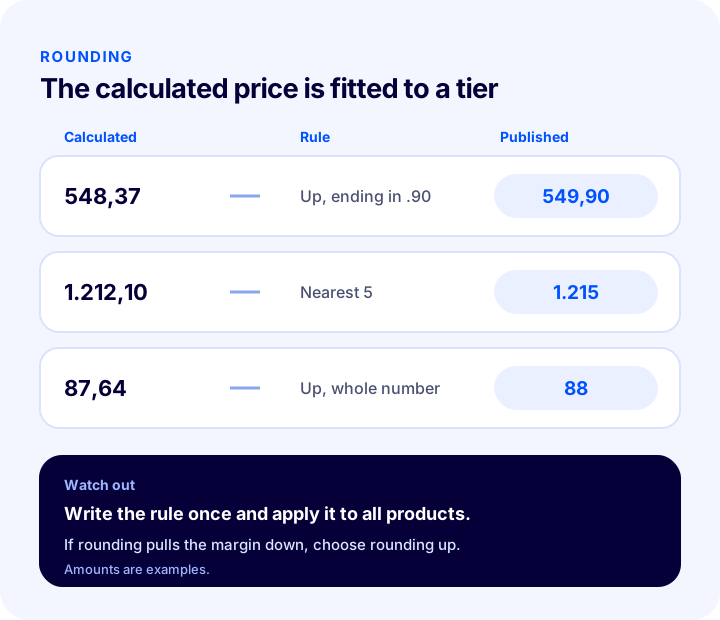
- Choose the direction: Rounding up protects the margin, while rounding down erodes it a little. If there is rate-driven pressure, rounding up is the safer choice.
- Set the tier: The price can be fitted to the nearest whole number, a multiple of 5 or 10, or a specific ending (for example ending in 90).
- Separate by price band: Use a small tier for low-priced products and a larger tier for high-priced ones; otherwise the rounding ratio affects the margin more than it should on small items.
- Apply a single rule: All products in the same price band should follow the same rule; trying to manage exceptions by hand breaks the system.
How Does Psychological Pricing Fit with Exchange Rate Calculation?
Psychological pricing rests on the idea that a price ending in 99 or 90 is perceived as lower by the customer. With rate-linked prices, the way to keep this is to round the calculated amount to the nearest psychological price; that is, the rounding rule is written as “up, ending in 90”. That way, on every update the price both protects the margin and looks familiar in the storefront.
The point to watch here is that rounding must not damage the margin by itself. A rounding step that is too large can raise the rate-calculated price more than expected, while one that is too small loses the psychological effect. The tier should be tried in a table and chosen after checking the margin impact on a few products.
We recommend readingWhat Is Price Management in E-Commerce?How Should You Think About the Price Card?
To manage a rate-linked price, it helps to think of each product's price as the sum of five components: currency cost, current rate, margin rule, rounding and the published selling price. A price change happens when one of these components changes; the rate is the one component that changes on its own and that you do not control.
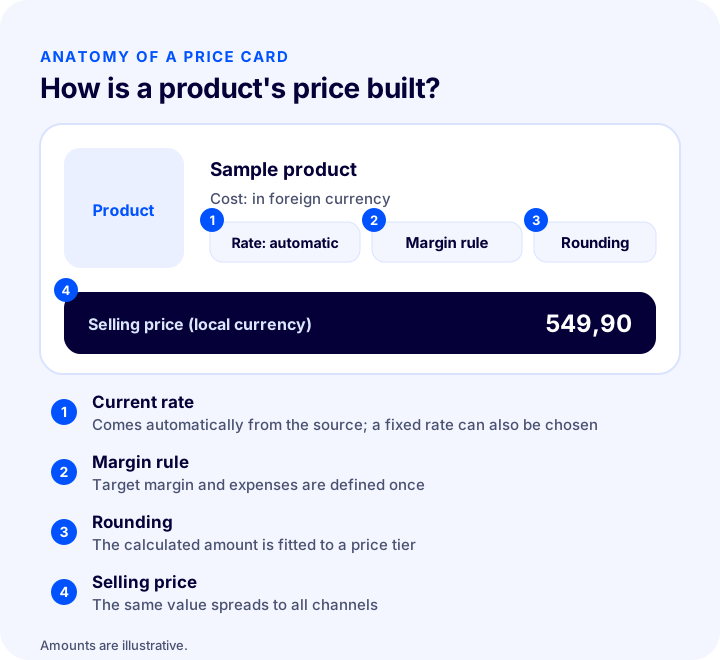
- Currency cost: The supplier price, or the value the product is tied to in foreign currency; it stays constant unless you change it by hand.
- Current rate: The value coming from the chosen source; the only continuously changing input of the price.
- Margin rule: The target margin and the way expenses such as commission and shipping are factored in.
- Rounding: The rule that turns the calculated amount into the published price.
- Selling price: The result the customer sees, which must be the same on all channels.
How Do You Manage Exchange Rate Risk During Campaigns?
A campaign price is the price that struggles most when the rate rises, because the discount has already narrowed the margin and a rate increase can turn it into a loss. Monitoring the rate throughout the campaign and linking the campaign price to the rate calculation, or keeping the campaign short, reduces the risk.
- Calculate the margin before the campaign: Use the tool to test whether the margin at the discounted price stays positive even if the rate rises by a certain percentage.
- Keep the campaign short: A long campaign stays exposed to rate moves for longer.
- Define a fixed-rate period: Locking the rate during the campaign gives customers stability, but you must knowingly take on the margin risk of that period.
- Refresh prices when the campaign ends: Forgetting to return prices to the current rate at the end of the period is a silent margin loss.
- Account for stock status: Stock bought earlier at the old rate and stock to be bought at the new rate do not have the same cost; know which stock cost you enter the campaign with.
How Do Frequent Price Changes Affect Customer Trust?
Customers react not to a price changing but to not understanding why. A customer who sees the same product at a different price a day later either thinks the price is arbitrary or that they missed an opportunity; both weaken trust. Every store that links price to the rate has to manage this risk deliberately.
- Protect the price in the cart: A customer who adds a product to the cart should find the price they saw until checkout is complete; if the price changes during payment, the cart is abandoned.
- Make changes infrequent and predictable: Refreshing the price at the same time every day, in small steps, bothers customers far less than intraday fluctuation.
- Do not pass small fluctuations on to the price: A threshold rule prevents showing the customer the same product at different prices one after another.
- State the reason transparently: Noting on the page that prices are updated according to the exchange rate helps customers see the price change as reasonable.
- Keep price history in an organized way: When a customer complains, you should be able to show which price applied on which date.
How Do You Keep Prices Consistent Across Channels When the Rate Changes?
If the same product is sold on several channels, the price must be updated with the same rate and at the same time on all channels. If your site sells at the current rate while a marketplace sells at the previous day's price, selling the product at a loss on one channel becomes inevitable.
- Set a single price source: Let one system calculate the price; channels should take this price and not change it on their own.
- Know the update order: The price is calculated first and then sent to the channels; transmission delay must be taken into account.
- Separate channel rules: The margin target may differ on a high-commission channel; set a separate margin rule per channel but keep the rate common.
- Monitor transmission errors: A price that could not be sent to a channel means selling at the old rate on that channel.
Setup Steps for Price Updating by Exchange Rate
Moving step by step when switching from manual management to automatic rates reduces both the risk of mistakes and customer surprise. The steps below are a suitable roadmap for most stores.
- 1. Separate products set in foreign currency: List which products have their cost or price set in foreign currency; you do not have to link the whole catalog to the rate.
- 2. Choose the rate source: Pick a single, verifiable source; write down the rate type (buying or selling) once.
- 3. Define the margin rule: Set the target margin and expense items; test different rate scenarios with the tool.
- 4. Write the rounding rule: Choose the direction and tier; separate by price band.
- 5. Choose the update frequency and threshold: Define daily reading, a set time and a change threshold.
- 6. Test with a small product group: Run it first with a few products and confirm prices come out as expected.
- 7. Connect all channels and monitor: Confirm that prices are sent to the channels; measure the margin regularly.
Common Mistakes in Price Updating by Exchange Rate
- Tracking the rate by hand: The longer a manual update is delayed, the more the margin quietly erodes, and it can take weeks to notice.
- Changing the rate source often: Prices become inconsistent across channels and periods.
- Changing the price on every small fluctuation: The customer sees the same product at different prices one after another and trust weakens.
- Updating too rarely: Margin loss grows in volatile periods.
- Choosing downward rounding: A small margin loss accumulates with every update.
- Leaving the campaign price independent of the rate: A discounted product can be sold at a loss when the rate rises.
- Forgetting one of the channels: One channel keeps selling at the old rate.
- Tracking margin only as a percentage: Unit profit amount and total profit are overlooked.
How Do You Audit Your Exchange Rate Management Setup?
The tool below questions your current setup with eight questions. Check the items that apply to you; the tool tells you how solidly your rate management is built.
How Do You Measure Price Updating by Exchange Rate?
A few indicators tell you whether the setup is working. All of them should be tracked by product group and channel; a total figure hides the problem product group.
| Indicator | What does it tell you? |
|---|---|
| Unit profit amount and margin percentage | The real effect of rate moves on profit |
| Number of price updates | How often the price changes; if very high, a threshold is needed |
| Price difference between channels | Whether the update reaches all channels at the same time |
| Cart abandonment rate after a price change | Customer reaction to the price change |
| Number of products sold at a loss | Products the update could not keep up with |
How Do You Update Prices by Exchange Rate with Faprika?
Faprika offers automatic rate-based price updating for stores that want product prices calculated from the exchange rate. With this module, which takes exchange rates from the Central Bank of the Republic of Türkiye (TCMB), prices are refreshed at the current rate. Coverage varies by plan; see the plans page for details.
- Automatic updates with the Central Bank rate: Rates are taken from TCMB and transferred to the site, so your prices stay current without being affected by currency fluctuations.
- Scheduled or one-click updates: You can have the rate update run automatically within a time range you set or start it with one click whenever you want; all defined currencies are refreshed together.
- Automatic or fixed rate: You can follow rates with Central Bank data, and when you want to hold prices steady for a set period you can also define a fixed rate.
- Unlimited currencies: You can define a separate currency for each country you plan to sell in and offer products in different currencies; selling abroad must be supported by your payment infrastructure.
- Country-based price multiplier: By adjusting product prices and taxes by country as a percentage or amount, you avoid the hassle of keeping a separate price list for each market.
These features are part of Faprika's e-Export solution; you can find the details of the exchange rate integration on the TCMB Exchange Rate integration page. Our article on automatic calculation of pricing rules, What Is Automatic Pricing? How to Calculate the Selling Price by Marketplace Commission, Shipping and Profit Margin? Category and Channel Rules, Selling Price Calculator and Audit, and our article on the pricing side of selling abroad, What Is E-Export?, complete this guide.
Frequently Asked Questions
What is price updating by exchange rate?
It means keeping a product's cost or selling price in foreign currency, converting it into local currency at the current rate, and automatically refreshing the selling price based on that calculation. The aim is to protect your profit margin even when the rate fluctuates.
How does a rising exchange rate affect profit margin?
If your cost is in foreign currency, cost rises by the same proportion when the rate rises; because the selling price stays the same, the margin shrinks. Unit profit falls even if the number of sales does not change. To protect the margin, the price must be recalculated for the cost increase.
How often should the rate be updated?
For most stores, updating once a day at a set time is a balanced choice. If the rate is very volatile and the margin is thin, update more often; if prices are not compared frequently, update less often. It helps to define a threshold so that the price does not change on small fluctuations.
Do frequent price changes drive customers away?
Prices that change often and without explanation can weaken trust. Holding the price in the cart until checkout is complete, keeping changes infrequent and predictable, and not passing small rate fluctuations on to the price reduce this risk.
Is the margin protected when you round the price?
Rounding up protects the margin, while rounding down erodes it a little with every update. Rounding the calculated price up to a chosen tier, for example a price ending in 90, protects both the margin and the perception of a psychological price.
How does price updating by exchange rate work in Faprika?
Faprika takes exchange rates from the Central Bank (TCMB) and can update product prices with that rate. You can have the update run automatically within a time range you set or start it with one click; you can choose an automatic or a fixed rate. Coverage varies by plan and is included in the e-Export solution.
You May Also Like
- What Is Automatic Pricing? How to Calculate the Selling Price from Marketplace Commission, Shipping and Profit Margin, Category and Channel Rules, Selling Price Calculator and Audit
- E-Commerce Price Management: What Is It?
- Profit Margin Calculation: How to Calculate Profit Margin in E-Commerce (Calculator and Examples)
- What Is E-Export?