
Table of Contents 16 sections
- What Is Automated Pricing?
- Why Do You Need Automated Pricing?
- What Components Make Up a Selling Price?
- Why Does the Calculation Order Matter?
- How Do You Set Up Rules by Category and Price Range?
- How Do You Manage Price Types for Different Sales Channels?
- How Is the Selling Price Calculated? Calculator
- Pricing Setup Audit
- How Do You Set Up Automated Pricing Rules Step by Step?
- How Are Prices Updated When Costs and Commission Change?
- How Does Automated Pricing Fit with Competition?
- How Do You Measure the Success of Automated Pricing?
- Common Mistakes in Automated Pricing
- Automated Pricing Checklist
- Automated Pricing with Faprika
- Frequently Asked Questions
You have thousands of products and you work out the marketplace commission, shipping cost, extra costs and target profit margin for each one by hand. Whenever a commission rate or shipping fee changes, every price has to be recalculated. One wrong cell somewhere means a product sold at a loss. The short answer to what is automated pricing is this: the system calculates product prices on its own, based on rules you define in advance, such as purchase cost, commission, shipping, extra costs and profit margin.
In this guide we explain step by step what automated pricing is, what components make up a selling price, why the calculation order matters, how to set up category-based and channel-based rules, and how to audit the results. Of the two tools in this article, one is for calculating a product's selling price and the other is for auditing your pricing setup.
What Is Automated Pricing?
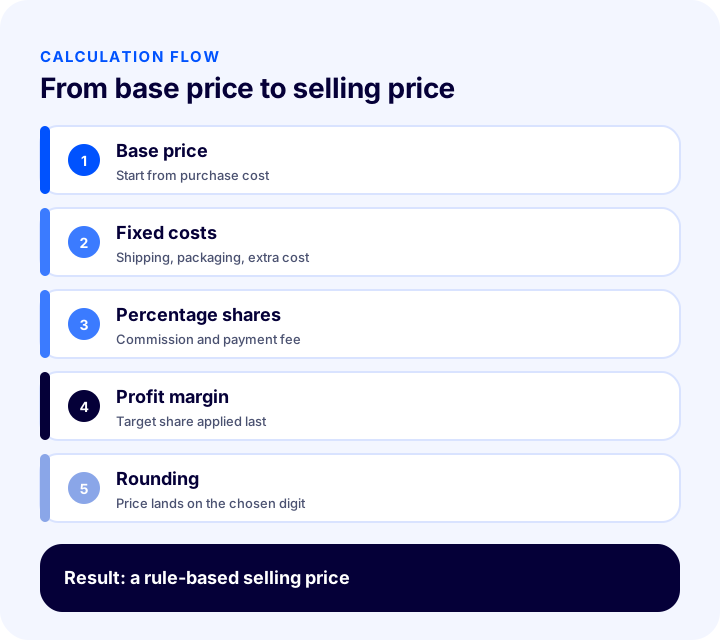
Automated pricing is a system that calculates a product's price according to the rules you define. The system takes a base price (usually the purchase cost), applies commission, shipping, extra costs and the profit margin in order, rounds the result the way you want and produces the new selling price. This can be done for hundreds or even thousands of products at once, not just one.
Here, “automated” does not mean changing prices at random; it means writing the rule once and applying it consistently to every product. The rule is yours; the system does the calculation and shows the result.
Manual Pricing vs. Automated Pricing
| Topic | Manual pricing | Automated pricing |
|---|---|---|
| Calculation | Product by product or with a spreadsheet | The rule is written once and applied to all products |
| When commission changes | Prices are recalculated | Only the rule is updated |
| Risk of error | A formula or cell error can cause losses | Consistent calculation, result checked in advance |
| Different channels | A separate sheet for each channel | A separate rule per price type |
| Time | Grows with the number of products | Almost independent of the number of products |
| Audit | Hard to trace how a result came about | You can see which rules produced the price |
Why Do You Need Automated Pricing?
Setting a selling price is not just adding profit to the purchase cost. Marketplace commission, shipping cost, category-specific costs and the target profit margin all directly affect a product's real selling price. In a store with many products, doing this by hand wastes time and invites pricing mistakes.
- Prevents selling at a loss: A price set without commission and shipping may leave no profit.
- Saves time: When a rule changes, the prices of thousands of products are recalculated together.
- Adapts to channels: The price on your own website and the price on a marketplace are calculated with the same rule but different costs.
- Ensures consistency: Products in the same category are priced with the same logic, with no differences between individuals.
- Responds quickly to change: When commission, shipping or exchange rates change, you update the rule and get new results.
- Makes decisions easier: You can see clearly which costs and profit components make up the price.
What Components Make Up a Selling Price?
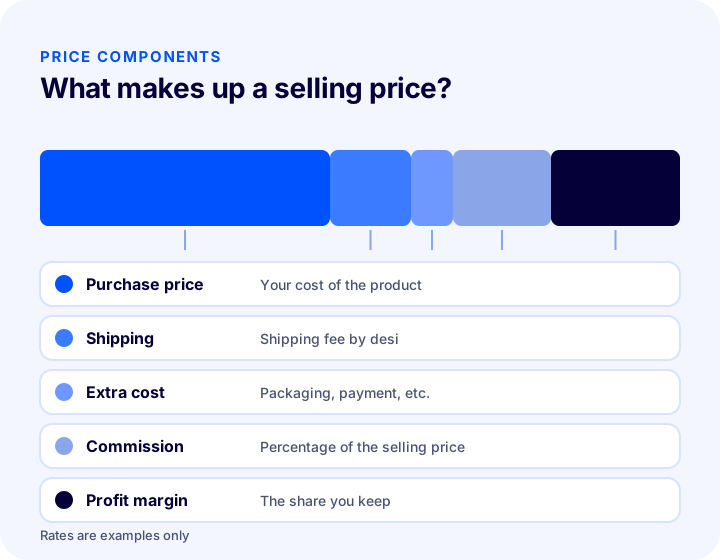
A product's selling price is the sum of several components. Defining each component separately lets you see how much each cost affects the price.
| Pens | What does it tell you? | How is it calculated? |
|---|---|---|
| Purchase price | Your cost of the product | Taken as the base price |
| Shipping | Shipping fee | Fixed amount or by desi range |
| Extra costs | Items such as packaging, tax and payment fees | Fixed amount or percentage |
| Marketplace commission | The share the sales channel takes | Percentage of the selling price |
| Profit margin | The share you want to keep | As a percentage, may vary by category |
| Rounding | Price format | To the cent or to the target digit |
Why Does the Calculation Order Matter?
Applying the same components in a different order gives a different result. If commission is calculated before fixed-amount costs (such as shipping) are added to the price, the commission comes out too low; the amount on which percentage costs are calculated also changes the result. That is why a good automated pricing system lets you define an order for each cost.
- Fixed costs first: Fixed amounts such as shipping and packaging are added to the purchase cost.
- Percentage costs next: Percentage shares such as commission and payment fees are converted into the price on top of the accumulated cost.
- Profit margin last: The target profit is applied after all other costs are calculated.
- Rounding at the very end: The price is rounded to the chosen digit once the whole calculation is done.
How Do You Set Up Rules by Category and Price Range?
Not every product sells at the same profit rate. Some categories have high commission, others have low margins because of competition; if a low-priced and a high-priced product are priced with the same percentage, one loses money and the other leaves money on the table. That is why a good rule set should differ by category and price range.
Category-Based Rules
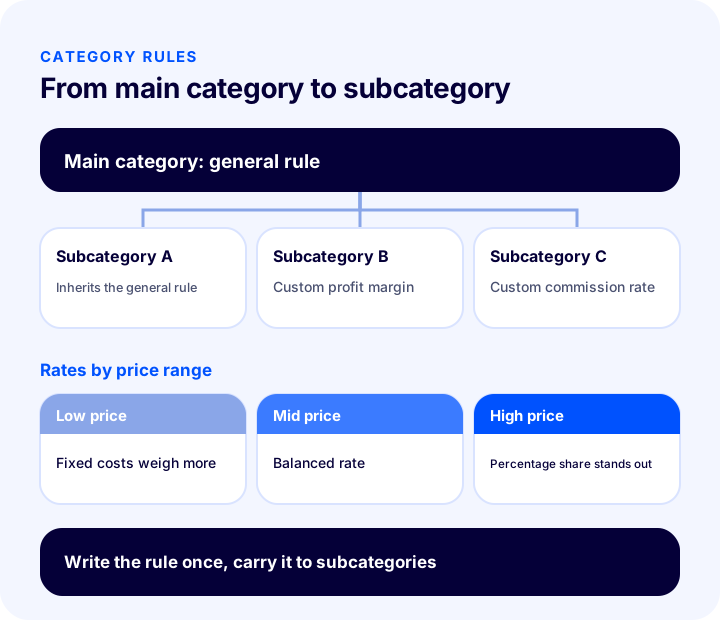
You can set a general profit margin and define a custom margin or commission rate for a specific category. For example, while the general margin has one value, a lower margin can be used in a highly competitive category and a higher margin for a rare, specialized product group. Category-based commission is defined the same way.
Rules by Price Range
In low-priced products, fixed costs (shipping, packaging) take a larger share of the price; in high-priced products the percentage share stands out. That is why defining separate rates by price range gives balanced results at both ends: one rule for cheap products, one for mid-priced and one for expensive.
Carrying a Rule Down to Subcategories
Instead of entering rules one by one for hundreds of subcategories, writing a rule for the main category and applying it to all subcategories at once saves a great deal of time. It should still be possible to change the rule later in a subcategory for special cases.
How Do You Manage Price Types for Different Sales Channels?
The same product can be sold at different prices in different channels. Your own website has no marketplace commission; a marketplace does, and shipping is often included in the price. Defining a separate price type for each channel lets you manage this difference from a single product.
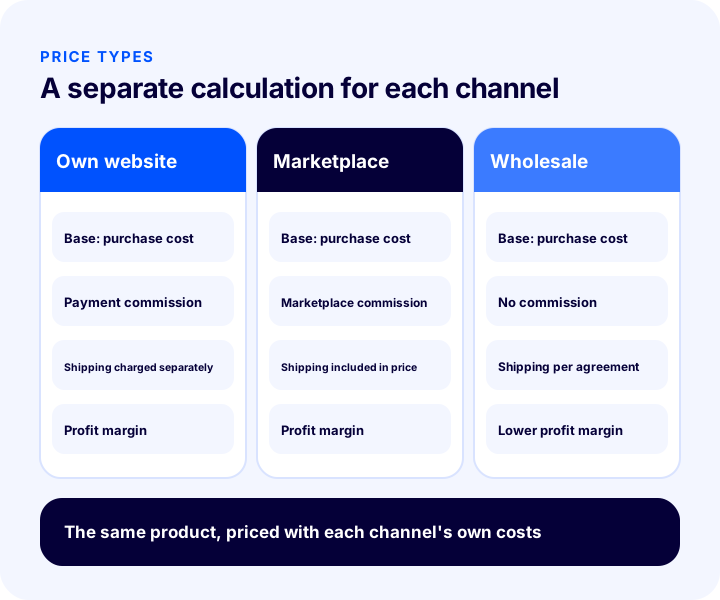
- Base price: For each price type you can choose which price the calculation starts from (for example, purchase cost).
- Channel-specific costs: In a marketplace price, commission and shipping are counted, while on your own website there may be only the payment fee and margin.
- Shipping included or excluded: In channels where shipping is included in the price or charged to the customer separately, the price type is set up accordingly.
- Channel-specific desi table: If different channels have different carrier agreements, the desi table can also be kept separately per price type.
How Is Shipping Cost Calculated by Desi?
Shipping fees vary with a product's desi (volumetric weight unit). If the system lets you define fees by desi range, each product is calculated with the shipping amount for its own desi range. A low shipping cost is used for small products and a high one for products with a large desi, which prevents shipping-related losses on bulky items. For the desi logic, see our article Desi Calculation: How Is Shipping Desi Calculated? (Calculator and Examples).
How Is the Selling Price Calculated? Calculator
The tool below calculates the selling price from the purchase cost, shipping, extra costs, commission rate and target profit rate you enter. Commission and profit are taken as a percentage of the selling price; fixed amounts are added up first. The values are examples; enter your own figures.
The key point of the tool is that commission and profit rates are treated as shares taken out of the selling price. Adding the same rates to the purchase cost as a percentage gives a lower price, and the expected profit is not realized.
Pricing Setup Audit
The tool below checks your current pricing setup with eight items. Tick what you already do; the tool tells you where to focus.
How Do You Set Up Automated Pricing Rules Step by Step?
Doing some desk work before setting up the rules reduces the amount of fixing later. The sequence below works for both small and large catalogs.
- List your costs: Write down commission, shipping, packaging, payment fees and other cost items.
- Choose the base price: Decide which price the calculation starts from (usually the purchase cost).
- Define the costs: For each cost, enter the amount, the type (fixed or percentage) and the calculation type.
- Set the order: Give the costs a calculation order; the profit margin should come last.
- Set the profit margin: Define a general margin and, if needed, category-based exceptions.
- Prepare the desi table: Enter shipping fees by desi range.
- Create the price types: Set up a separate price type for each sales channel.
- See the result with a trial first: Calculate on a few products and examine which rules the price is made of.
- Apply in bulk and monitor: If the result makes sense, apply the rule to the products in the catalog; then track sales and margin data.
How Are Prices Updated When Costs and Commission Change?
Pricing is not a job you set up once and leave. When the purchase cost, exchange rate, commission rate or carrier agreement changes, the price produced by the old rule no longer reflects reality. The real benefit of automated pricing is that in these changes you touch a single rule instead of each product.
- If commission changes: The rate in the relevant cost definition is updated; all price types that use that cost are recalculated.
- If the carrier agreement changes: The fees in the desi table are renewed; large and small products are priced with the new amount for their own range.
- If the purchase cost changes: When the base price is updated, the calculation produces the new selling price automatically.
- If the profit target changes: The general margin or a category exception is changed; the results are refreshed in bulk.
- If a campaign period arrives: Defining a separate rule that temporarily lowers the profit margin during the discount period, then returning to the old rule when it ends, is safer than disturbing prices by hand.
How Does Automated Pricing Fit with Competition?
A price calculated by rule reflects your store's real cost and target profit, but customers look not only at your calculation but also at the other prices in the market. If the calculated price is clearly above the market, sales may stall; if it is far below, you lose profit. That is why automated pricing should be used together with competitor monitoring.
- Compare the calculated price with the market: Especially for best-selling products, put the price produced by the rule next to other prices in the market.
- Set a minimum margin: When lowering the price to compete, set a floor below which you will not go.
- Manage exceptions by category: Define a lower margin in highly competitive categories and a higher margin for distinctive products.
- Do not limit value to price: Product title, images, delivery and reviews also affect the buying decision; competing on price alone is not sustainable.
How Do You Measure the Success of Automated Pricing?
After setting up automated pricing, track its impact with a few indicators. All of them can be drawn from existing sales and cost data.
- Realized profit margin: Is there a gap between the target margin and the actual margin?
- Number of products sold at a loss: Have products with negative profit decreased since the rule?
- Profitability by channel: In which channel is profit lower than expected?
- Price update time: Has the time to refresh prices when commission or shipping changes become shorter?
- Category margin: In which category does the margin fall below target?
- Sales volume: What effect did the price change have on sales?
Common Mistakes in Automated Pricing
- Adding commission to cost as a percentage: Commission is a percentage of the selling price; this method produces a price that is too low.
- Ignoring shipping: Especially in products with a large desi, the profit goes to shipping.
- Not setting an order: Applying costs in the wrong order changes the result.
- Pricing every product with a single rate: Low-priced and high-priced products do not give balanced results with the same rate.
- Not separating channels: Using the same price type for your own website and a marketplace erodes profit in one of them.
- Applying in bulk without checking the result: A faulty rule misprices hundreds of products.
- Never monitoring competition: If the calculated price is far above the market, sales stop; the rule should be considered together with competition.
- Not updating the rule: When commission and shipping change, the old rule leads to losses.
Automated Pricing Checklist
| Title | To check |
|---|---|
| Costs | Are commission, shipping and extra costs defined? |
| Base price | Is the price the calculation starts from correct? |
| Order | Has the calculation order of costs been set? |
| Margin | Are the general margin and category exceptions defined? |
| Desi | Is shipping calculated by desi range? |
| Channel | Is there a separate price type for each sales channel? |
| December | Is there a separate rule for low-priced and high-priced products? |
| Check | Can you see how the price is formed before applying it? |
| Rounding | Is the price rounded to the chosen digit? |
| Report | Are profit margin and loss-making products monitored regularly? |
Automated Pricing with Faprika
In Faprika, this is done with the Automated Pricing add-on. Which plan includes it varies by plan; for details, see the e-commerce plans and Automatic Pricing pages.
- Rule-based calculation: The price is calculated by applying marketplace commission, shipping cost, extra costs and profit margin on top of a base price you choose (for example, purchase cost).
- General settings: Using rules in automated pricing is enabled; how the calculated price is rounded and how many decimal places are used are set.
- Costs screen: The costs included in the price calculation are defined with an amount, cost type, calculation type and order; “Add to price” and commission calculation types are separate.
- Calculation order: Costs with a lower order value are processed first and those with a higher value later, so you stay in control of the steps the price goes through.
- Category-based rules: A separate pricing model can be set up for each product category; by entering category-based amounts, a custom margin and commission are applied in specific categories.
- Price types: List price, selling price, purchase price and channel-specific price types are managed separately; the base price and costs are chosen separately for each price type.
- Shipping and desi: Each price type has a shipping-included option; shipping fees are defined by desi range, and a desi table specific to a price type can also be prepared.
- Price range rules: Different pricing rates can be created based on the product's current price.
- Applying to subcategories: With the “Save and apply to subcategories” option, the rule in the main category is carried over in bulk.
- Checking in the product list: Prices are shown in the product list, “Calculate” tries out the result of the rules, and “Detail” shows which rules and costs the price is made of.
To keep track of marketplace commission rates Güncel Pazaryeri Kategori Komisyon Oranları as well.
Frequently Asked Questions
What is automated pricing?
Automated pricing means the system calculates product prices according to predefined rules such as purchase cost, marketplace commission, shipping, extra costs and profit margin. You write a rule once and it is applied consistently to every product.
How is the selling price calculated?
Fixed costs (purchase cost, shipping, extra costs) are added up, and commission and profit rates are treated as shares taken out of the selling price, using this formula: selling price = total cost ÷ (1 − commission rate − profit rate). Adding the rates to the cost as a percentage gives a lower price.
Why does the calculation order matter?
Applying costs in a different order gives a different result. Fixed amounts should come first, percentage shares next and the profit margin last. Being able to define an order for each cost keeps you in control of the steps the price goes through.
Can you set different prices for different sales channels?
Yes. Your own website has no commission while a marketplace does, and shipping can be handled differently. Defining a separate price type for each channel and choosing that channel's costs lets you calculate different prices for the same product.
Can a different profit margin be applied by category?
Yes. Alongside a general margin, you can set a custom margin and commission rate for specific categories. You can also use separate rates by price range for low-priced and high-priced products.
How are prices updated when a rule changes?
When commission or shipping changes, you update only the relevant cost and the system recalculates prices under the new rule. Before bulk application, check the result on a few products and see which rules make up the price.
You May Also Like
- Profit Margin Calculation: How to Calculate Profit Margin in E-Commerce? (Calculator and Examples)
- Güncel Pazaryeri Kategori Komisyon Oranları
- E-ticarette Ürün Fiyatlandırması: Rekabet Analizi, Marj Analizi ve Diğer Stratejiler
- How to Prepare a Profit and Loss Report in E-Commerce? A Guide to Net Profit by Product