Table of Contents 16 sections
- What Is a Multilingual E-Commerce Site?
- Why Does a Multilingual Site Matter?
- Which Language and Which Country Should You Start With?
- What Should the URL Structure of a Multilingual Site Be?
- How Should You Translate: Manually or Automatically?
- How Do You Calculate Translation Workload and Cost?
- How Do You Explain Language Versions to Search Engines?
- Which Areas of a Multilingual Site Must Be Translated?
- Price, Currency and Tax on a Multilingual Site
- Is Detecting Language and Country Automatically a Good Idea?
- Right-to-Left Languages
- Common Mistakes on Multilingual Sites
- How Do You Audit Multilingual Site Readiness?
- How Do You Measure a Multilingual Site?
- How Do You Set Up a Multilingual Store with Faprika?
- Frequently Asked Questions
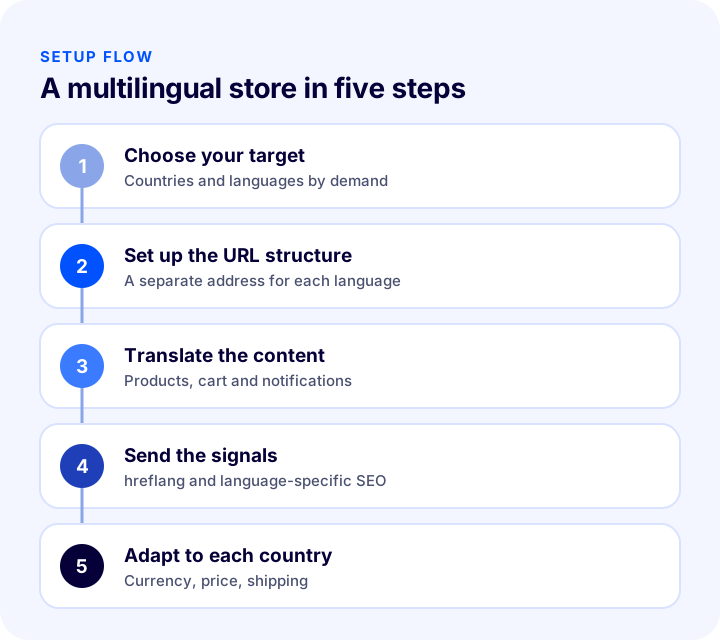
As long as you publish your e-commerce site only in Turkish, you sell only to Turkish-speaking customers. A visitor from abroad may like your product, but if they cannot understand the page, cannot see the price in their own currency, or cannot tell whether shipping reaches their country, they leave. Opening your site to other languages is the most direct way into a new market; but if it is set up badly, you end up with a second site that never appears in search engines, is poorly translated and is hard to maintain. The short answer to the question of how to set up a multilingual e-commerce site is this: first choose your target countries and languages, decide on the URL structure and the translation method, give each language version its own SEO information, and configure currency, shipping and payment by country.
In this guide we cover what a multilingual site is, which languages to start with, URL structure options, translation methods, how to explain the relationship between language versions to search engines, what to watch for in pricing, shipping and payment, and common mistakes. Of the two tools in this post, one helps you calculate translation workload and cost, and the other helps you audit your multilingual site readiness.
What Is a Multilingual E-Commerce Site?
A multilingual e-commerce site is a site where the same store is offered in more than one language. Product names, descriptions, category pages, the cart, checkout steps, notifications and legal texts appear in the language the visitor selects or that is detected automatically. The same product and stock structure is kept; each language version has its own URL, its own title and its own search information.
Are a Multilingual Site, a Multi-Currency Site and a Multi-Country Site the Same Thing?
These three concepts are often confused. They do not require one another; but real sales abroad usually call for all three together.
| Concept | What does it tell you? | Example |
|---|---|---|
| Multilingual | Offering the same store in more than one language | Turkish, German and French versions |
| Multi-currency | Showing and collecting the price in the customer's currency | Euro for Germany, Dollar for Iraq |
| Multi-country | Differences in price, shipping, tax and content by country | Country-specific carrier and home page |
Why Does a Multilingual Site Matter?
People are generally more inclined to shop at stores where they can search and read in their own language. A page written in a foreign language damages trust; a badly translated page damages it even more.
- It opens the door to new markets: With the same product you reach customers in new countries, while stock and order management stay in one place.
- It opens new search areas in search engines: Each language version gives you a chance to appear in searches in that language.
- It builds trust and conversion: When customers can read about the product, return terms and delivery time in their own language, deciding becomes easier.
- It takes you out of local competition: A product facing intense competition in Türkiye may face less competition in another country.
Which Language and Which Country Should You Start With?
Choosing a language is not a preference but an analysis. You do not choose the language; you choose the customer who speaks it and could buy from you. The questions below sharpen the choice.
- Where is the demand? Which countries do visitors to your current site come from, and which countries do you get orders or questions from? If there is ready demand, start there.
- Is your product suitable for that market? Measurement systems, electrical standards, climate, cultural preferences or legal restrictions can make a product unsellable in some countries.
- Can you handle shipping and returns? If you cannot deliver the product in a reasonable time and at a reasonable cost, translation alone is of no use.
- Can you accept payments? The payment infrastructure you work with must support sales abroad and the relevant currency.
- Can you provide customer support? You need a setup that can answer questions in that language within a reasonable time.
Language or Country?
The same language is spoken in more than one country, and more than one language is used in the same country. Shipping, tax and payment habits are not the same in every German-speaking country. That is why language versions and country settings need to be thought of separately: language determines the text; country determines the price, shipping, tax and campaign.
Okumanızı öneririzAlmanya’ya e-İhracat Yapmak Hakkında Bilmeniz GerekenlerWhat Should the URL Structure of a Multilingual Site Be?
Each language version should live at its own address. A page that changes language on the same address through a cookie or automatic detection stops search engines from seeing each language as a separate page. There are three common structures.
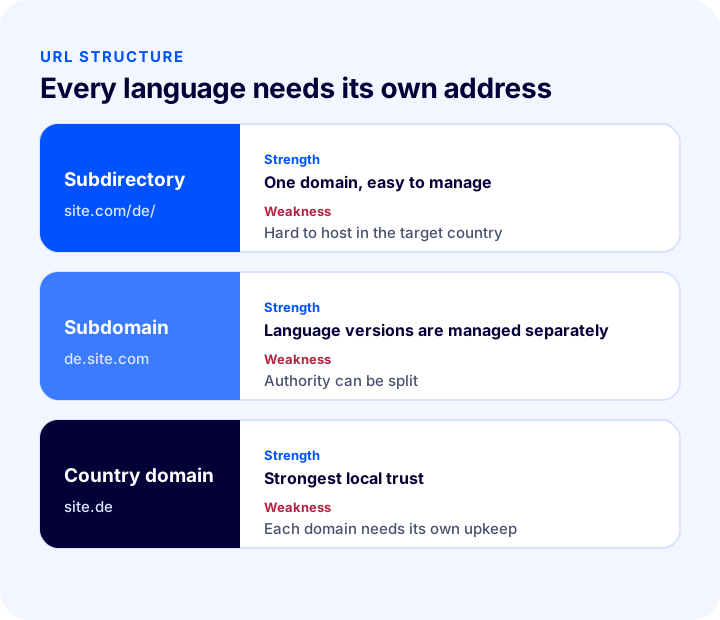
| Structure | Example | Strength | Weakness |
|---|---|---|---|
| Subdirectory | site.com/de/ | Single domain, accumulated authority, easy to set up and manage | Hard to host in the target country |
| Subdomain | de.site.com | Language versions can be managed separately | Authority may build up separately on each subdomain |
| Country domain | site.de | Highest local trust, clearest country signal | Separate investment and upkeep for each domain |
For most stores, the subdirectory structure is the most balanced choice: one domain, one authority, low maintenance. If you want to be a local brand in every country and have the budget, country domains can be considered. Whichever structure you choose, changing it later means redirects and lost rankings; decide up front.
How Should You Translate: Manually or Automatically?
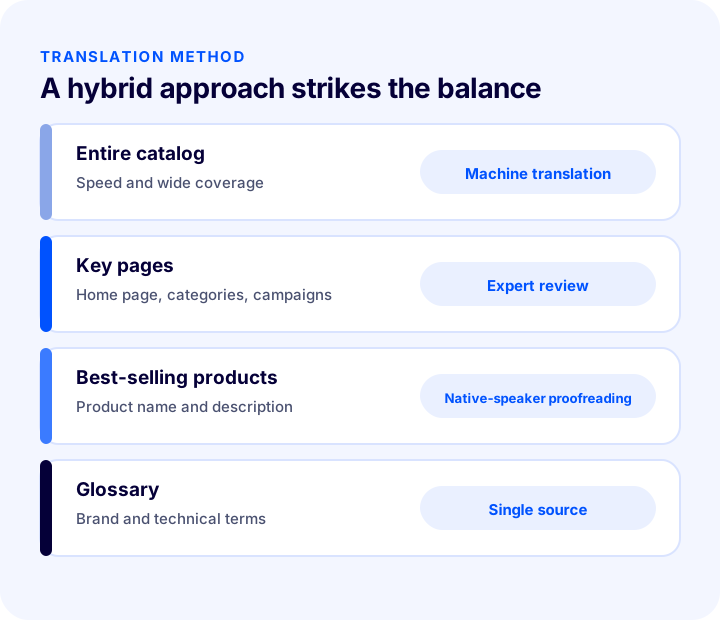
The translation method determines both cost and quality. There are three approaches, and for most stores the best is a deliberate mix of them.
| Method | Strength | Weakness | Where it fits |
|---|---|---|---|
| Manual (expert translator) | Highest quality, brand voice is preserved | Slow and expensive, hard to update | Home page, campaigns, best-selling products |
| Machine translation | Fast, low cost, covers the whole catalog | Meaning may drift and phrases may sound odd | Long-tail products, first phase |
| Hybrid | Balance of speed and quality | Needs process management | The recommended path for most stores |
How Do You Set Up a Hybrid Approach?
- 1. Machine-translate the entire catalog: This way every product has a page in the target language.
- 2. Review best-selling products and key pages: A native speaker of that language proofreads the home page, category titles, campaign pages and the descriptions of best-selling products.
- 3. Check product names and units of measure: A product name can become meaningless when translated directly; choose the phrase people actually search for in the target language.
- 4. Create a glossary: Decide how brand names, product line names and technical terms are written in each language, so they stay consistent across all pages.
- 5. Tie updates to the process: When a new product is added, translation should start automatically, and corrections should be made in order of priority.
How Do You Calculate Translation Workload and Cost?
Before starting a multilingual site, you need a rough idea of how many words must be translated and what it will cost. From the number of products, the average words per product and the number of languages, the tool below calculates the total translation volume, the total cost based on the price per 1,000 words, and the cost of starting with best-selling products only. The values are examples; enter your own catalog.
The real takeaway from the tool is that translation workload grows as the product of the number of products and the number of languages: adding one more language means translating the whole catalog again. That is why starting with best-selling products and prioritizing among languages keeps costs under control.
How Do You Explain Language Versions to Search Engines?
Setting up language versions is not enough; search engines must understand them as separate but related pages. Otherwise the pages of the same product in two languages may be treated as duplicate content or shown to users in the wrong country.
The hreflang Relationship Between Language Versions
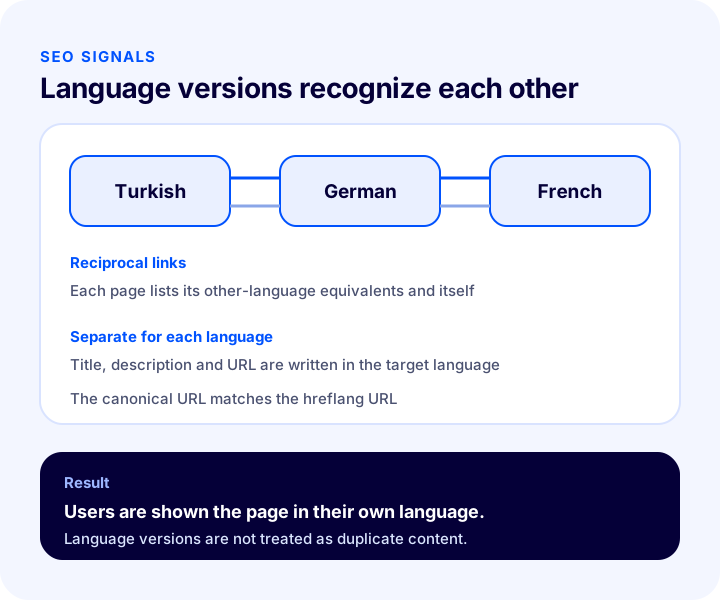
The hreflang tag states which language and country a page is for and where its equivalents in other languages are located. When set up correctly, a user searching in German is shown the German page and a user searching in Turkish is shown the Turkish page.
- It must be reciprocal: The Turkish page must link to the German page, and the German page must link back to the Turkish page; a one-way link may be treated as invalid.
- It must also link to itself: Each page also lists its own language version.
- Specify a default version: The general version to show users who match no language is marked separately.
- It must match the URL: The page's canonical URL and the URL in hreflang must be the same.
Each Language Version Needs Its Own SEO Information
The page title, description, main heading, product name and URL segment must be written separately in each language. Instead of leaving the Turkish title as it is or translating it word for word, use the phrase people actually search for in the target language. URL segments should also be translated and readable.
The search success of language versions depends largely on page structure. To optimize category pages and product pages, see our posts How to Do Category Page SEO: 12 Steps to Move E-Commerce Category Pages Up the Rankings and What Is Structured Data (Schema)? How to Add, Test and Validate Product Schema in E-Commerce, a Practical Guide.
Which Areas of a Multilingual Site Must Be Translated?
Translation is not limited to product descriptions. Every text and every image a customer encounters should be in the same language. The table below shows the areas that are often skipped and the problem that results when they are.
| Field | What happens if it is skipped? |
|---|---|
| Product Name and Description | The page is unclear and does not appear in search engines |
| Category names and filters | The customer cannot reach the product |
| Cart, checkout and error messages | The customer gets stuck at the purchase step |
| Email and SMS notifications | Trust is damaged after the order |
| Return, shipping and privacy texts | Legal risk arises and trust decreases |
| Text on images | Untranslated posters and banners look unprofessional |
| Size and measurement charts | The wrong size is chosen and returns increase |
| Meta titles and descriptions | Appear in the wrong language in search results |
Price, Currency and Tax on a Multilingual Site
Translating the price is not enough; you need to show it to the customer in their own currency, in a form they understand and at its real amount. If the price changes at the cart or an extra charge appears, the customer loses trust.
- Currency: A country-specific currency is defined; the exchange rate is updated daily or at set intervals. Your payment infrastructure must support that currency and sales abroad.
- Price by country: Tax, shipping and competition differ from country to country. Selling a product at the same price in every country can hurt profitability; being able to set prices by country is important.
- Tax and customs: A product may carry tax and customs obligations in the target country. If you do not want the customer to face extra charges, clarify this in advance.
- Price display: The decimal separator, the position of the currency symbol and the thousands separator vary by country; a wrong format causes confusion.
Country-Specific Shipping and Payment
The carrier and shipping price may differ by country; a flat shipping fee applied to a small order makes sales unprofitable in some countries. On the payment side too, common methods differ by country; when the method a customer is used to is not offered, the cart may be abandoned.
Recommended readingHow to Get a Virtual POS: A Guide to Bank Virtual POS, Payment Institutions, Commissions and Application Steps for an E-Commerce SiteIs Detecting Language and Country Automatically a Good Idea?
Automatically redirecting the visitor to the appropriate language version based on location, browser language setting or operating system language is convenient; but if it is not set up carefully, it causes problems.
- Do not force redirects: Instead of redirecting the user the moment the page opens, it is safer to show a language suggestion and leave the choice to them. A customer who is traveling abroad or uses a browser in another language may land on the wrong version.
- Do not redirect search engines: Redirecting search engine bots by location can prevent pages from being crawled at all. Every language version must be reachable directly from its own URL.
- Remember the choice: When a customer chooses a language, that preference should be saved and not asked again on the next visit.
- Keep the language selector visible: The selector should be at the top of the page where it is easy to find, and should write each language in its own language (Deutsch, Français).
Right-to-Left Languages
If you will open languages written right to left, such as Arabic, the design needs to be mirrored: the menu, scroll direction, icons, form fields and page layout must be adapted right to left. Designs that do not account for this from the start break; so if any of your target languages is written right to left, it should be tested at the design stage.
Common Mistakes on Multilingual Sites
- Switching language with a cookie: When each language does not have its own URL, search engines see only one language version.
- Translating only the product description: Skipping the cart, checkout, notifications and legal texts damages trust.
- Word-for-word translation: Product names and titles may not sound natural in the target language; choose the phrase people actually search for.
- Setting up hreflang one-way: A relationship that is not reciprocal may be treated as invalid.
- Using the same price in every language: Tax, shipping and competition differ.
- Not updating language versions: A price, stock level or campaign changed in the Turkish version stays outdated in the other languages.
- Not preparing customer support: If questions arriving in the target language cannot be answered, a multilingual site will not convert.
- Starting with too many languages: The maintenance burden lowers quality.
How Do You Audit Multilingual Site Readiness?
The tool below checks your readiness with eight questions. Tick the items that apply to you; the tool tells you how solidly you have set up your multilingual site.
How Do You Measure a Multilingual Site?
A few indicators show whether language versions are working. All of them should be tracked by language and country; the total figure hides which version is working.
| Indicator | What does it tell you? |
|---|---|
| Search traffic to the language version | Whether you appear in search engines in the new language |
| Conversion rate by language version | Whether translation and localization are reflected in sales |
| Cart abandonment rate (by country) | Whether there are price, shipping or payment surprises |
| Return rate (by country) | A size, description or expectation problem |
| Number of customer support questions | Which area is unclear in which language |
How Do You Set Up a Multilingual Store with Faprika?
Faprika offers the features needed for e-export in the same panel. Which feature is included in which plan varies by plan; see the plans page for details.
- Unlimited language options: You can open your site in different languages in different countries and publish in each country's own language.
- Unlimited currencies: You can define a country-specific currency for each country and offer and sell your products in different currencies. Your payment infrastructure must support sales abroad.
- Automatic translation: Content from product details to category descriptions can be translated automatically into the target language; you can also customize every field manually.
- Language-based SEO management: You can make search settings specific to each language and manage your visibility in search engines through country-based customization.
- Automatic language and country detection: The site can open for visitors in the language and currency of the country they enter from; this detection works on several criteria (location, browser language, operating system language).
- Country-based price and shipping: You can set prices with country-specific rates and work with different carriers by country or region.
- Different design for each country: You can show the home page and banner images differently by country.
- Language resources: You can edit the fixed texts on the site (such as menus, forms and buttons) from one place, in the Language Resources screen under the Language section in Configuration.
For all the steps of selling abroad, see the e-export page, and for general setup, see our What is e-Export? post. For stock and order management across multiple sales channels, our Omnichannel (çok kanallı) pazarlama stratejisi nedir? post will help.
Frequently Asked Questions
How to set up a multilingual e-commerce site?
First choose target countries and languages based on demand, give each language version its own URL (a subdirectory is the most balanced structure for most stores), translate product and page texts, set up reciprocal hreflang relationships between language versions, and configure currency, shipping and payment by country.
Does a multilingual site need a separate URL for each language?
Yes. Switching the language on the same URL with a cookie stops search engines from seeing each language version as a separate page. You can use a subdirectory (site.com/de/), a subdomain (de.site.com) or a country domain (site.de).
What is the hreflang tag and why is it needed?
hreflang is a tag that tells search engines which language and country a page is for, and the addresses of its equivalents in other languages. When set up correctly, users are shown the page in their own language and language versions are not treated as duplicate content.
Is machine translation enough?
It is a good starting point for covering the whole catalog quickly, but meaning can drift. We recommend having a native speaker review the home page, category titles, campaigns and best-selling products.
How do you set prices on a multilingual site?
Price is not set by exchange rate alone; taxes, shipping and competition differ from country to country. Being able to define a country-specific currency and country-based prices protects your profitability. Your payment infrastructure must support the relevant currency and sales abroad.
How do you set up a multilingual store in Faprika?
In Faprika, features such as unlimited languages and currencies, automatic translation, language-based SEO management, automatic language and country detection, country-based pricing and shipping, and country-specific design are managed from the panel. Which feature is included in which plan varies by plan.