Contents 10 sections
- Steps to Create Successful Campaigns on N11: Increase Your Sales and Revenue
- 1. Log In to the Store Management Panel
- 2. Marketing Management
- 3. Creating a Campaign
- 4. Campaign Details
- 5. Adding Products
- 6. Searching Campaigns
- Maximize Your Campaign Success on N11
- Succeed in E-Commerce with Faprika!
- Frequently Asked Questions (FAQ)
Every seller who wants to succeed in the world of e-commerce wants to know one secret: how do you create an effective campaign on the N11 marketplace? This guide will walk you step by step through increasing your sales by creating campaigns on N11, optimizing your advertising revenue, and making your campaign management process more efficient. Whether you are a new seller or an experienced e-commerce professional, this guide will teach you how to manage your N11 campaigns successfully.
Steps to Create Successful Campaigns on N11: Increase Your Sales and Revenue
Creating campaigns on the N11 marketplace offers sellers great opportunities. This process is the key to increasing your sales, maximizing the return on your advertising spend, and saving time in campaign management.
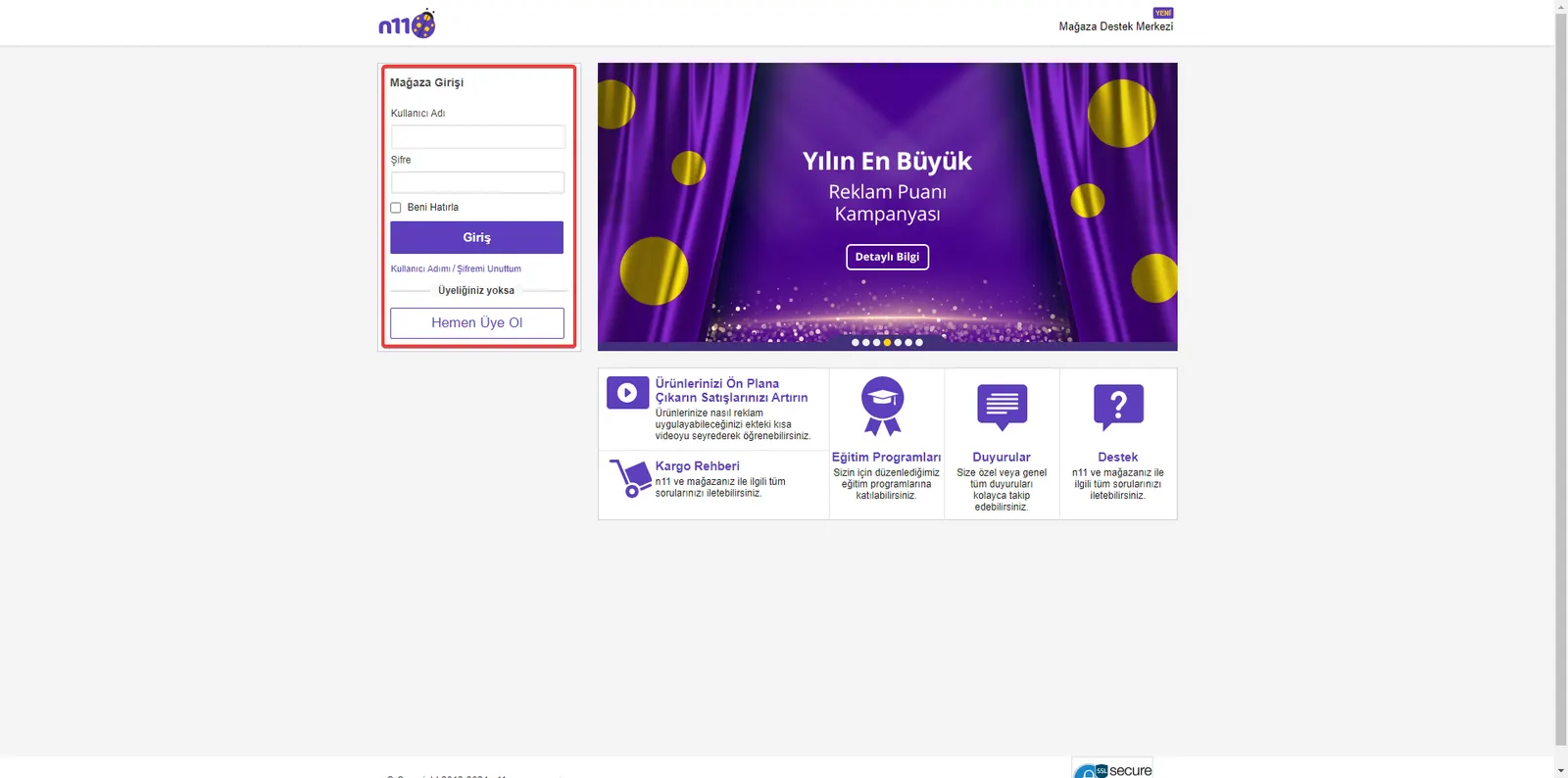
1. Log In to the Store Management Panel
To get started, log in to the N11 store management panel with your username and password.
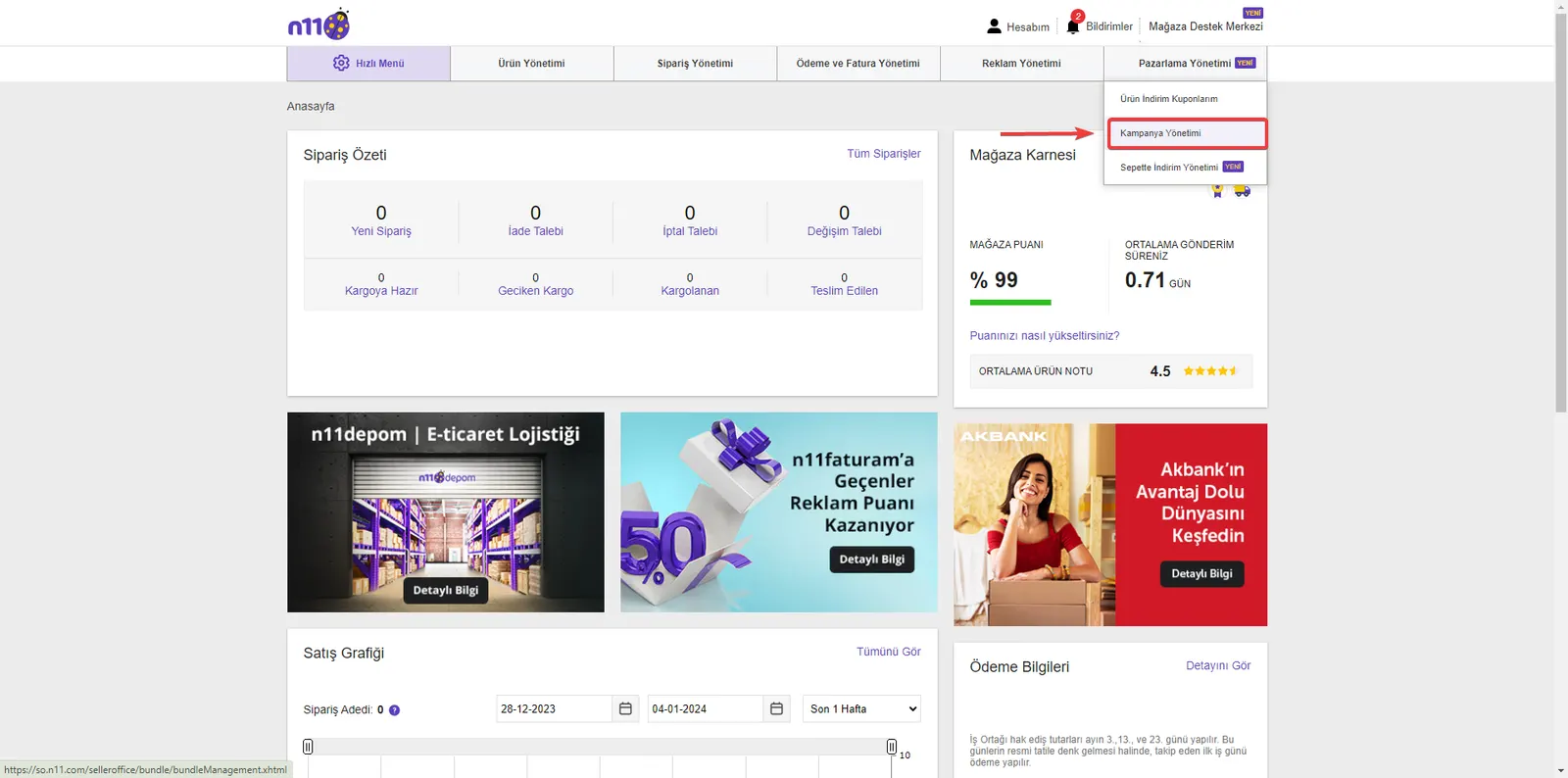
2. Marketing Management
Go to the 'Marketing Management' menu in the panel and open the 'Campaign Management' page. Here you can also access various marketing tools.
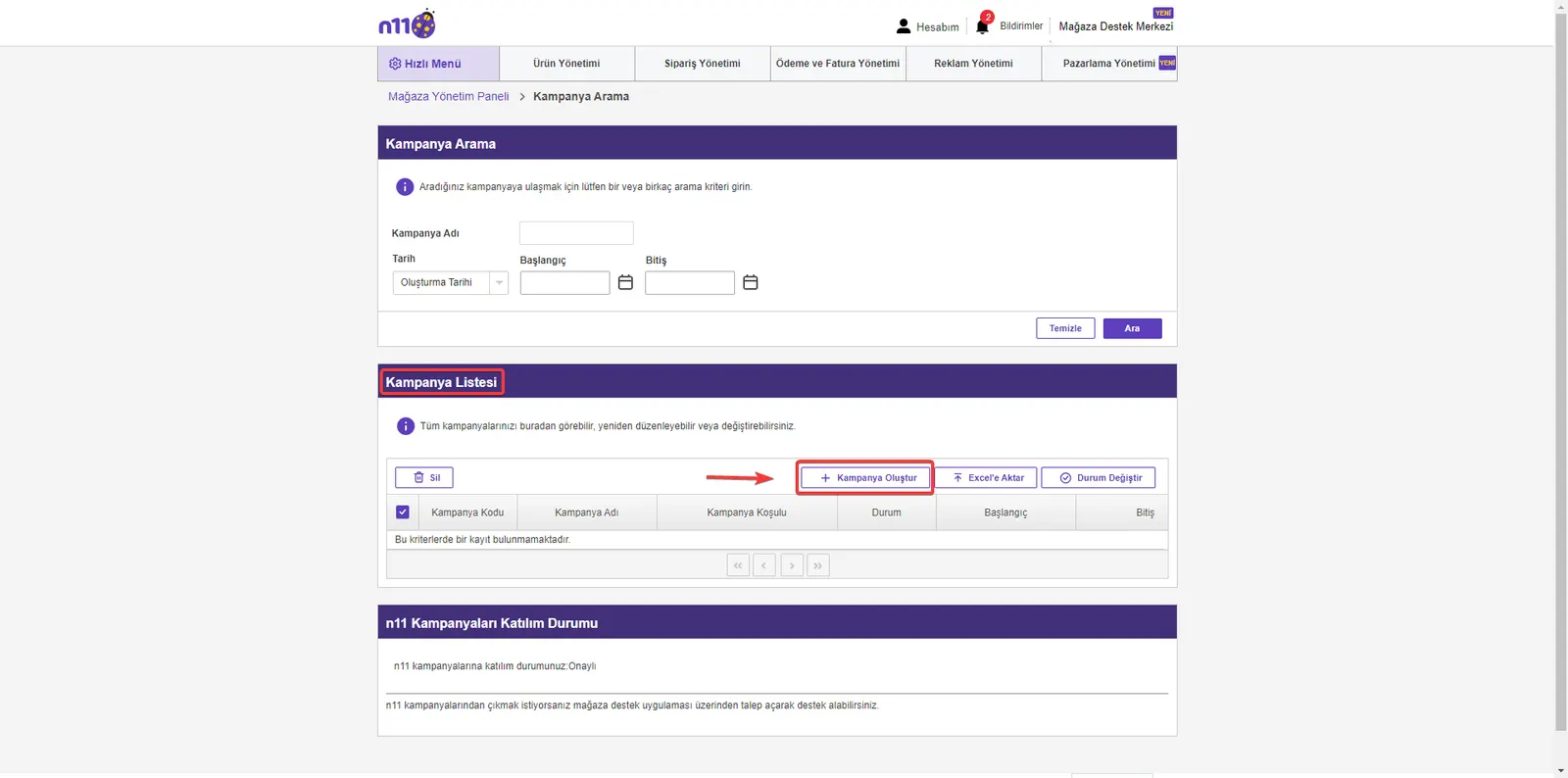
3. Creating a Campaign
Once you reach the 'Campaign Management' page, switch to the campaign creation area with the 'Create Campaign' button.
4. Campaign Details
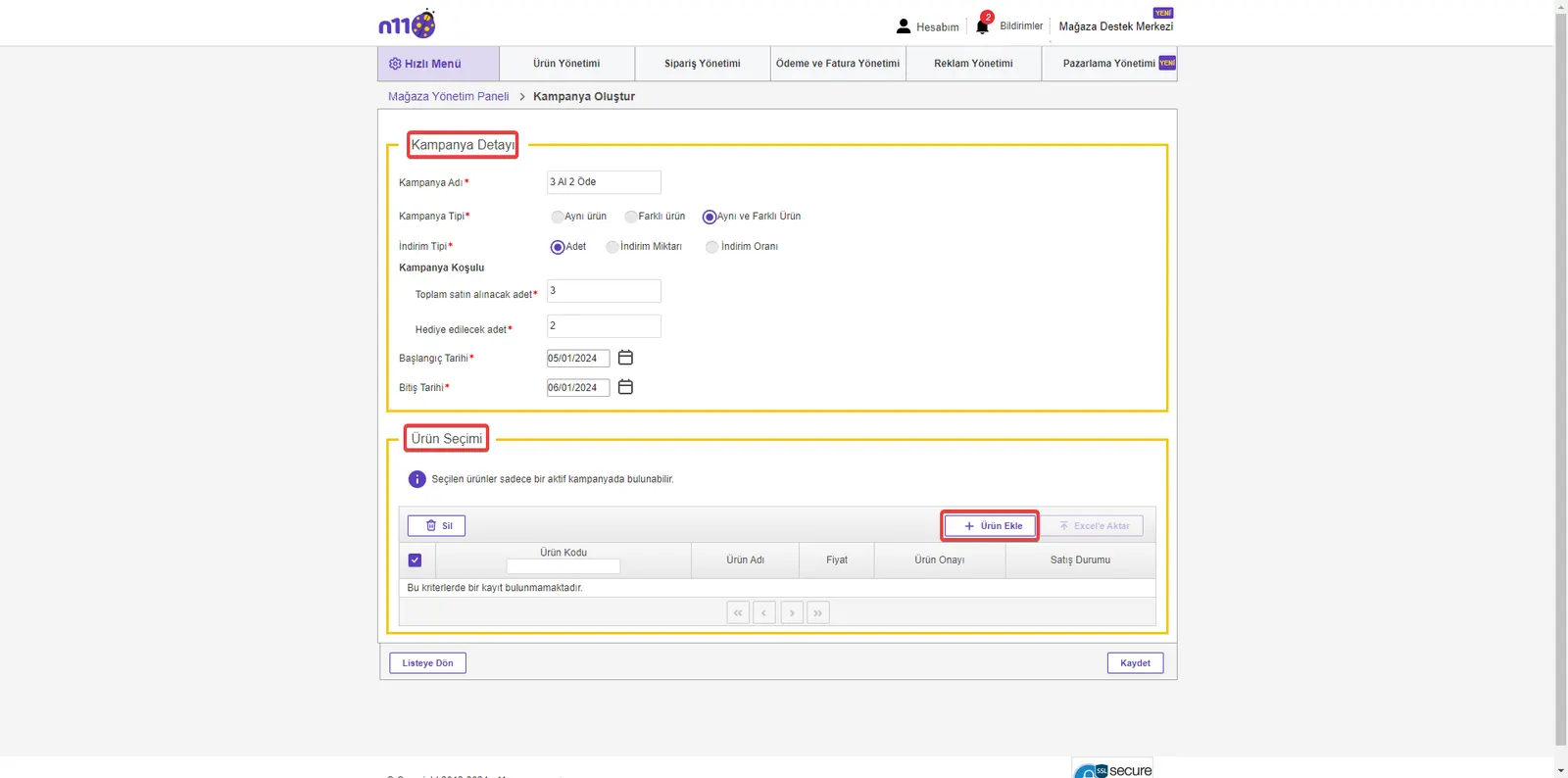
On the campaign creation screen, fill in your campaign's details. For example, for a 'Buy 3 Pay for 2' campaign, set the Campaign Name, Type, Discount Type, Conditions, and Start and End Dates. Then select the products to include in the campaign with the 'Product Selection >> Add Product' button.
5. Adding Products
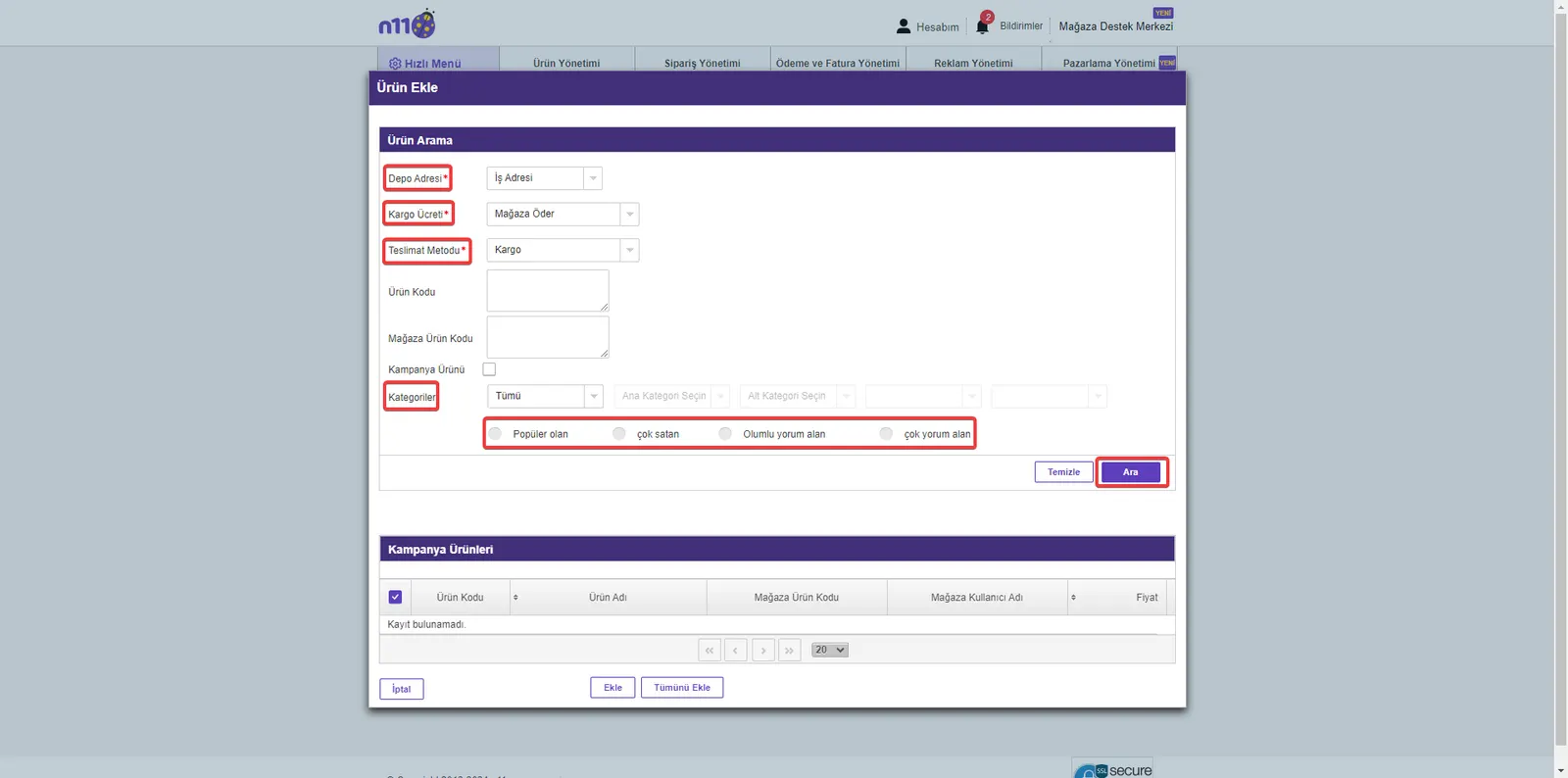
Filter and find the products you will add to the campaign. With the 'Search' button, you can select the products you want one by one or in bulk and include them in your campaign. After selecting products, complete the process with the 'Save' button.
6. Searching Campaigns
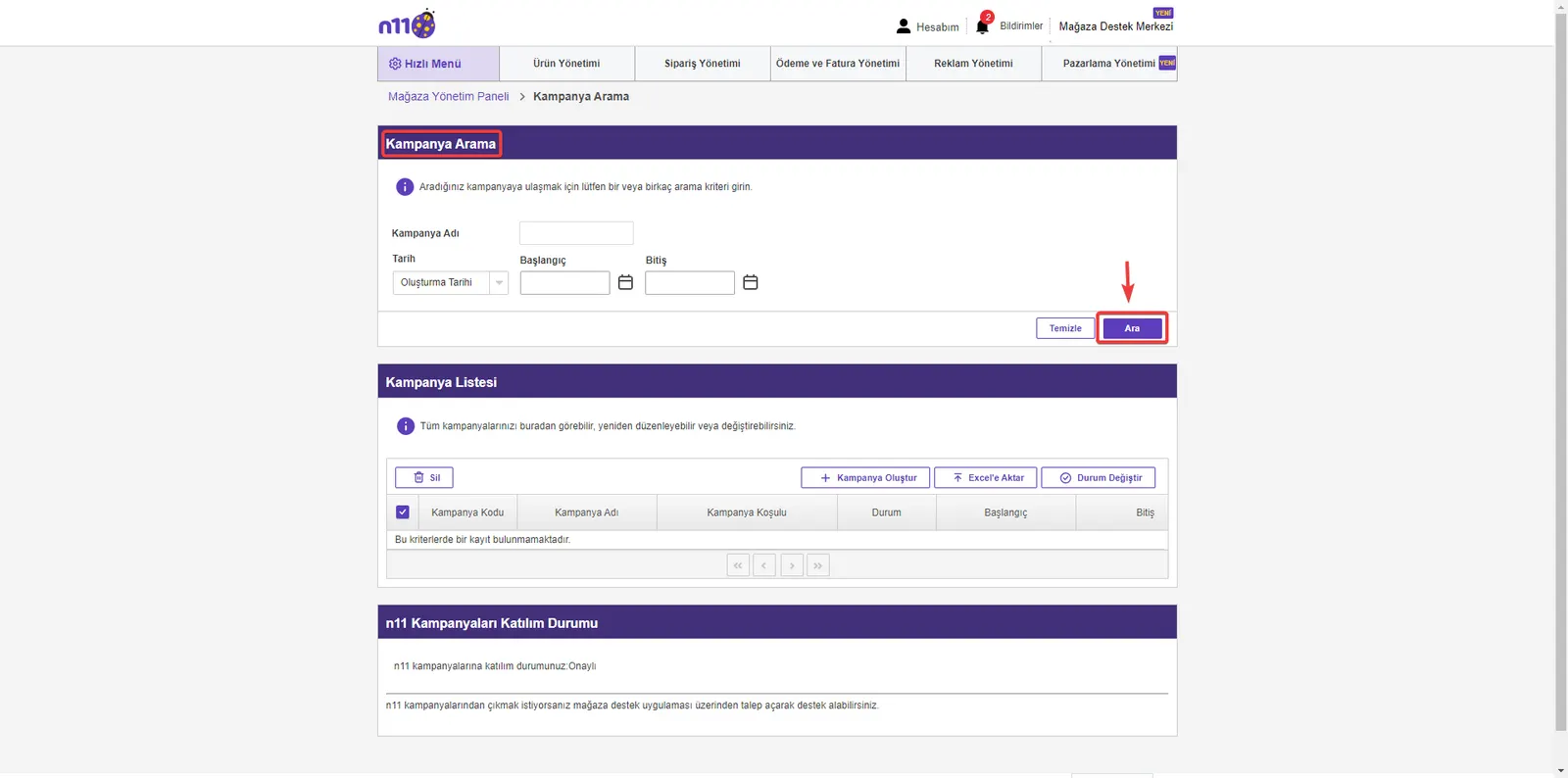
To manage multiple campaigns you have created with ease, you can filter and find your campaigns in the 'Campaign Search' section of the 'Campaign Management' area.
These steps will guide you on how to increase your success in e-commerce by creating effective campaigns on N11.
We Recommend Reading; Selling Globally on Ozon
Maximize Your Campaign Success on N11
Creating campaigns on the N11 marketplace can greatly increase your success in e-commerce. The methods explained step by step in this guide will help you create effective campaigns on N11 and increase your sales. Remember, with the right campaign management strategies, you can expand your customer base and strengthen your brand's online presence.
In an era when competition in the world of e-commerce grows every day, take a step today to stand out with N11 campaigns and increase your sales. To better understand the campaign creation process, develop effective strategies, and increase your success in e-commerce, explore the other resources and guides Faprika offers.
Succeed in E-Commerce with Faprika!
Beyond creating successful campaigns on N11, you can increase your sales even further with the various e-commerce solutions and professional support Faprika offers. We are here to support you at every step of your e-commerce journey. For more information and support, Contact Us through our contact page and maximize your potential in e-commerce!
Frequently Asked Questions (FAQ)
What Steps Should I Follow to Create a Campaign on N11?
To create a campaign on N11, first log in to your store management panel, go to ‘Campaign Management’ from the ‘Marketing Management’ menu and fill in the details using the ‘Create Campaign’ button.
What Types of Discounts Can I Use in N11 Campaigns?
Various types of discounts are available on N11, for example options such as percentage-based discounts, ‘Buy X, Pay Y’ style promotions and special price discounts.
How Can I Track the Effectiveness of My N11 Campaigns?
To track campaign effectiveness, you can use the analytics and reporting tools in your N11 store management panel. These tools help you evaluate your campaign performance.
How Do I Select Products for N11 Campaigns?
When selecting products for a campaign, you can choose your popular products, your high-margin products or your overstocked products. Your product selection strategy depends on your target audience's preferences and your campaign goals.
What Are Important Tips for Success in N11 Campaigns?
For a successful campaign, get to know your target audience well, set competitive prices, create attractive campaign messages and launch your campaign at the right time.
What Are Common Mistakes in N11 Campaign Management?
Common mistakes include choosing the wrong target audience, promoting the campaign insufficiently, and leaving the campaign details unclear. Avoiding these mistakes can improve your campaign's success.