Contents 8 sections
- Set Up Your Company and Start Selling on Trendyol
- Information Required for the Application
- Verification and Creating a Password
- Editing Store Profile Information
- Managing Logistics and Address Information
- Verification Processes and the Product Upload Stage
- Grow Your Business on Trendyol with Faprika
- Frequently Asked Questions (FAQ)
If you want to claim your place in the world of e-commerce and become a seller on Trendyol, you are in the right place! As one of Türkiye's leading e-commerce platforms, Trendyol is home to thousands of sellers across various product categories. Beyond being the owner of a joint stock company, a limited company or a sole proprietorship, this guide covers every step of the application process to Trendyol Marketplace in detail. From filling in the application form to preparing the required documents, from using the seller panel to product upload processes, we explain all the details of selling on Trendyol for you. All the information you need for a successful application process is here!
Set Up Your Company and Start Selling on Trendyol
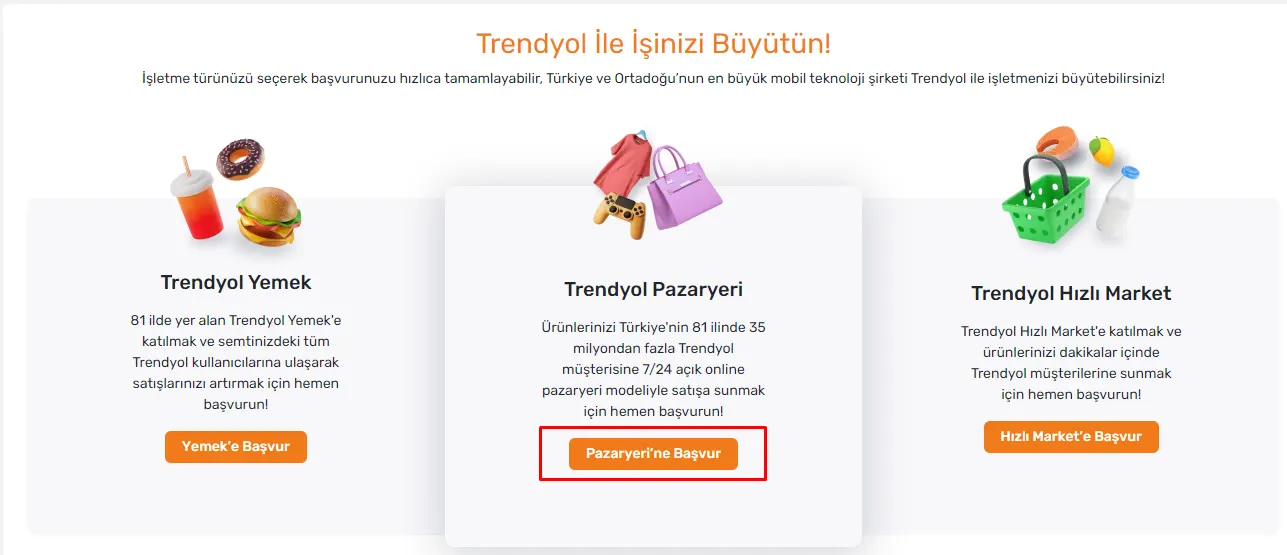
If you want to be part of the world of e-commerce and open a store on Trendyol Marketplace, your first step should be to set up a company. To be able to sell on Trendyol, you need to have one of the company types such as a joint stock company, a limited company or a sole proprietorship. Once you have completed this step, you can move on to Trendyol's user-friendly Trendyol Application Page. Here, select the marketplace category you want to sell in and click the "Apply to Marketplace" tab to start your application process. Trendyol is home to thousands of sellers from different sectors and lets you reach a wide customer base with your products.
Information Required for the Application
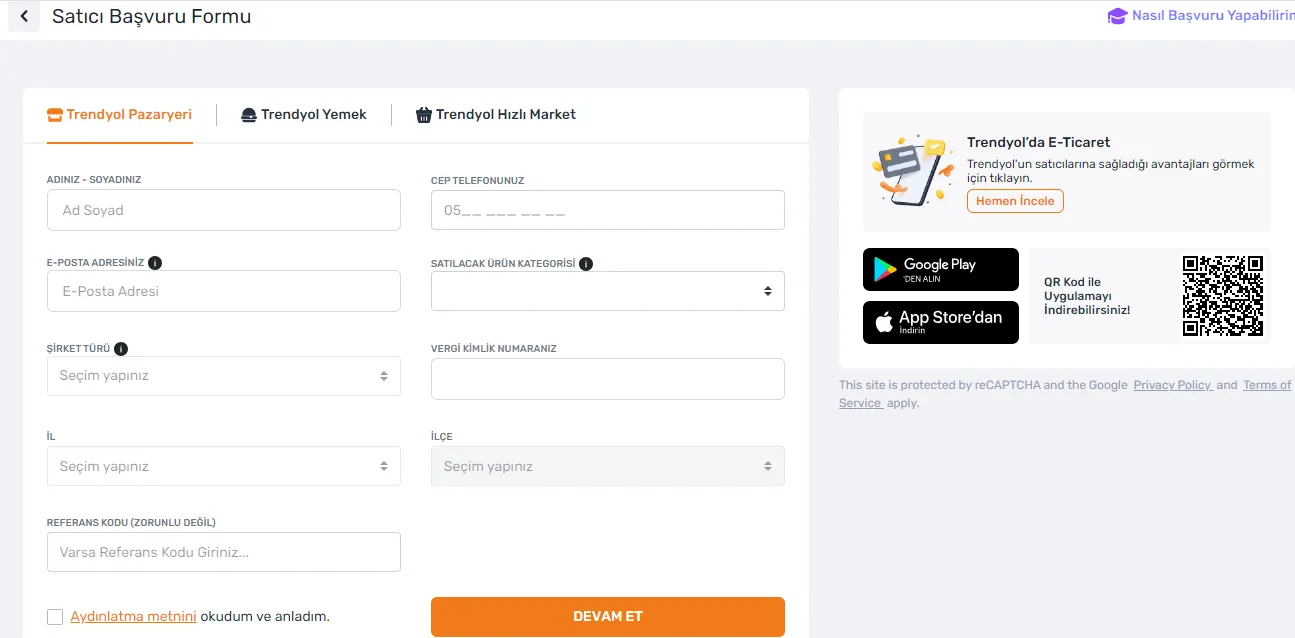
In the Trendyol seller application process, it is vital to fill in the application form correctly and completely. Here is the basic information you need in this process:
- Your First and Last Name: The full name of the company representative who will make the application must be entered here.
- Your Email Address: Enter the email address you will use to follow your transactions. A verification code will be sent to this address.
- Your Mobile Phone: A current phone number must be entered for verification and contact. A verification code will also be sent to this number.
- Product Category to Be Sold: Select the category in which you plan to sell products.
- Company Type: Indicate your company's type (joint stock, limited, sole proprietorship, etc.).
- TCKN / VKN: Enter your TCKN (Turkish ID number) if you are a sole proprietorship, or your VKN (tax identification number) if you are a joint stock or limited company.
- Province and District: Add the province and district where your company operates.
- Referral Code (Optional): If you have a referral code, you can enter it in this field.
Make sure you fill in this information completely and correctly. Each step is an important stage on the way to becoming a successful seller on Trendyol.
Verification and Creating a Password
After you fill in your application form and click the "Continue" button, the next stage of the process begins. Here are the details of these stages:
- SMS Verification: An SMS verification code will be sent to the mobile phone number you gave in the form. You must confirm this code in the system as soon as you receive it.
- Trendyol Seller Application Page: After the SMS code is verified, you will be redirected to the "Trendyol Seller Application" page. Here, the necessary agreements will need to be approved before you start selling.
- Creating a Password: After approving the agreements, you will move on to creating a password by clicking the "Complete Application and Get Password" option.
- Logging In to the Seller Panel: After completing all these steps, you can now log in to the Trendyol Seller Panel. In the panel, you are expected to fill in your company and contact information completely and correctly.
These stages will open the doors to becoming a successful seller on Trendyol Marketplace. Be careful at every step and enter the required information correctly.
Editing Store Profile Information
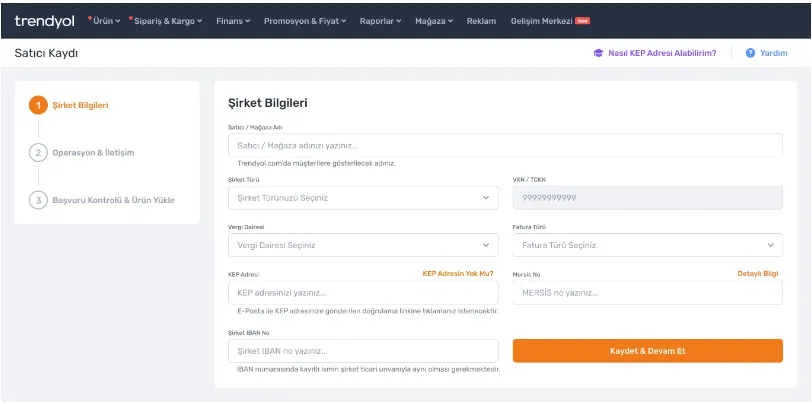
When setting up your store on Trendyol, it is important that your profile information is correct and complete. Here are the details you should pay attention to:
- Store Name: Set your store name that will be visible to Trendyol customers. This name will form your store's online identity and let your customers recognize you.
- Company Type: Indicate your company's type (joint stock, limited, sole proprietorship, etc.). This information will reflect your business's legal structure and your transactions will be shaped accordingly.
- VKN / TCKN: Enter your Tax Identification Number (VKN) or Republic of Türkiye ID Number (TCKN) according to your company type. This is critical for your tax transactions.
- Tax Office: Add the tax office your company is registered with. This is necessary for your tax obligations to be managed correctly.
- Invoice Type: Select the type of invoice to be issued. This choice may affect both your tax transactions and your customer experience.
- KEP Address: You must have a legally valid and technically secure Registered Electronic Mail (KEP) address. This is a mandatory requirement for selling on Trendyol.
- Mersis No: All companies other than sole proprietorships must have a MERSİS number under the legislation.
- IBAN Number: Enter the IBAN of the company to which payments will be made. This is important for your financial transactions to be directed to the correct account.
After entering the required information, click the "Save and Continue" button to continue the process.
Managing Logistics and Address Information
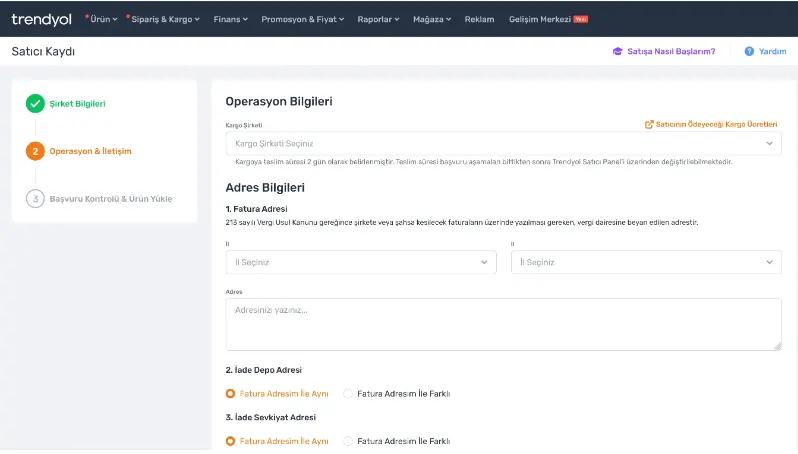
For your Trendyol store to run successfully, it is vital that your logistics and address information is entered correctly. Here are the steps you need to complete at this stage:
Selecting the Shipping Company
- Shipping Company: Select the contracted shipping company that will deliver your sales to customers. This choice is critical for customer satisfaction and your logistics efficiency.
Setting the Billing Address
- Billing Address (Province, District, Address): Enter the address information that will appear on your invoices. This will be the address used in your company's official transactions.
Setting the Return Warehouse Address
- Return Warehouse Address: Specify the address to which your customers will send their returns. This address will ensure that your return processes run in an orderly and efficient way.
Editing the Shipping Warehouse Address
- Shipping Warehouse Address: Enter the address from which your orders will be sent to customers. This address guarantees that orders are delivered on time and correctly.
After filling in this information completely and correctly, you can move on to the application review stage. Once you are sure everything is correct, you can start the product upload process.
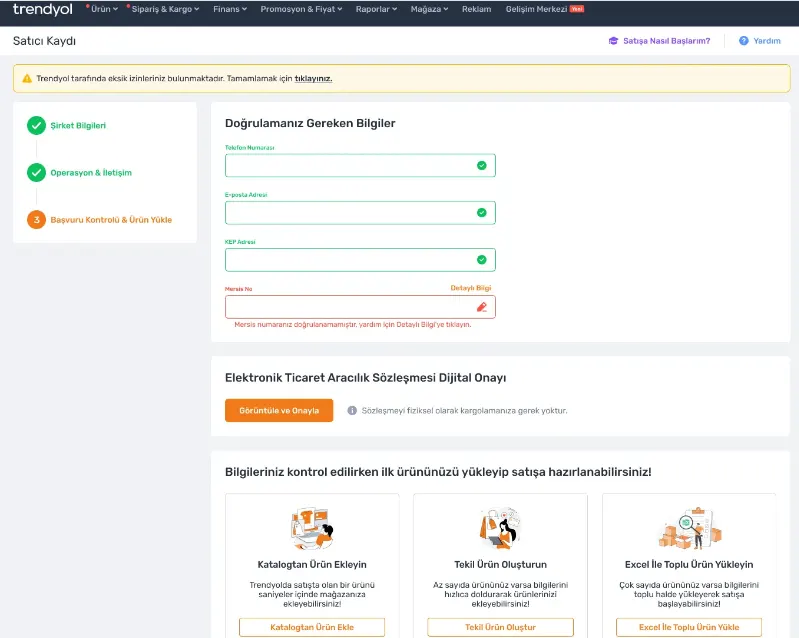
Verification Processes and the Product Upload Stage
The final steps to activate your Trendyol store go through various verification processes. Completing these steps is critical for ensuring the security of your store and the accuracy of your transactions. Here is what you need to do:
Verifying Your Phone Number
- Phone Number: The verification made during the application will apply at this stage. If verification has not been done, you need to complete this step now.
Email Address Verification
- Email Address: Verification must be done via the link sent to your registered email address. This step ensures the security of your email communication.
Mersis No Check
- Mersis No: The Mersis number you enter will be checked and approved by the Trendyol teams. This verifies your company's legal status.
KEP Address Verification
- KEP Address: Verification made through the message sent to your KEP (Registered Electronic Mail) address ensures the validity of your legal communication.
After completing these verification procedures, you can start the product upload operations for your store. This stage will form the foundation of your sales activities on Trendyol.
Grow Your Business on Trendyol with Faprika
After successfully setting up your store on Trendyol, it is time to grow your business further and automate your management processes. Thanks to Faprika's advanced integration solutions, you can easily manage stock and price control in your Trendyol store. This integration saves time, increases your business efficiency and helps you gain a competitive advantage in e-commerce.
By focusing on the needs of e-commerce entrepreneurs like you, Faprika makes it easier to sell on major marketplaces such as Trendyol. With features like automatic stock updates, price adjustments and order management, it lightens your workload and increases customer satisfaction. By strengthening your Trendyol store with the Faprika integration, take a big step on your journey to success in e-commerce.
Now maximize the potential of the store you opened on Trendyol and take your business to the next level with the integration solutions Faprika offers. In e-commerce, the road to success becomes more accessible with the right tools and strong partnerships.
Frequently Asked Questions (FAQ)
What Are the Requirements for Becoming a Seller on Trendyol?
To become a seller on Trendyol, you need to be the owner of a joint stock company, a limited company or a sole proprietorship. You are also expected to meet certain criteria and quality standards set by Trendyol.
How to Apply to Become a Seller on Trendyol?
The Trendyol seller application is made through Trendyol's official website. You can start your application process by filling in the application form and attaching the required documents.
In Which Product Categories Can I Sell on Trendyol?
Trendyol offers the opportunity to sell in a very wide range of product categories. You can list your products across a broad spectrum, from clothing to electronics, from home living to personal care.
What Documents Are Required for My Trendyol Store?
For your Trendyol store, you need official documents such as your company's trade registry gazette and tax plate, as well as your contact information.
What Is the Trendyol Seller Panel and How Is It Used?
The Trendyol Seller Panel is an online interface where sellers can manage their products, track orders and access sales reports. Through this panel, you can carry out important operations such as price adjustments, stock management and customer service.
What Should I Pay Attention to When Selling on Trendyol?
Factors such as the quality of your products, pricing, customer service and fast shipping are among the keys to success on Trendyol. It is also important to comply with Trendyol's seller rules and quality standards.
How Are After-Sales Returns and Exchanges Managed on Trendyol?
After-sales return and exchange processes on Trendyol are managed through the Seller Panel. To ensure customer satisfaction, it is recommended that you state your return and exchange policies clearly.
How Can I Increase My Sales on Trendyol?
To increase your sales, expanding your product range, offering competitive prices, and using quality product photos and descriptive product descriptions are effective methods. You can also attract customer interest by running campaigns and discounts regularly.
You May Also Like
- How to Open a Store on the N11 Marketplace?
- Stoksuz e-Ticaret Nedir? Stoksuz Satış Nasıl Yapılır?
- Trendyol’da Satış Yapmanın Avantajları ve İpuçları
- ÇiçekSepetin’de Satış Yapmak ve Avantajları
- Pazarama’da Satış Yapmak ve Avantajları
- Amazon'da Satış Yapmak İçin Gerekli Bilgiler
- Marketplace Category Commission Rates 2023