Contents 9 sections
- First Steps of Creating a Brand in the LC Waikiki Panel
- Brand Creation Process in the LC Waikiki Panel
- Step One: Decide Your Brand's Name
- Step Two: Document Upload Process
- Step Three: Submit for Approval
- Tracking the Brand Approval Process and Managing Documents
- Tracking via the Brand List Page
- Faprika and LC Waikiki Integration
- Frequently Asked Questions (FAQ)
If you want to consolidate your place in the e-commerce world and offer your products to a wide audience, the LC Waikiki Marketplace can be a perfect platform for you. However, to stand out in this competitive market, defining your brand correctly is extremely important. In this guide, we explain every step of the brand definition process in the LC Waikiki panel in detail, supported with visuals.
Follow these steps to list your products successfully on LC Waikiki and strengthen your sales strategy. With this comprehensive and easy-to-follow guide, learn how to define your brand on the LC Waikiki Marketplace and take your presence in e-commerce one step further.
First Steps of Creating a Brand in the LC Waikiki Panel
If you want to showcase your products on LC Waikiki's online sales platform, your first step should be to create your own brand. This process starts by accessing LC Waikiki's seller portal.
Here are the initial steps of the brand creation process:
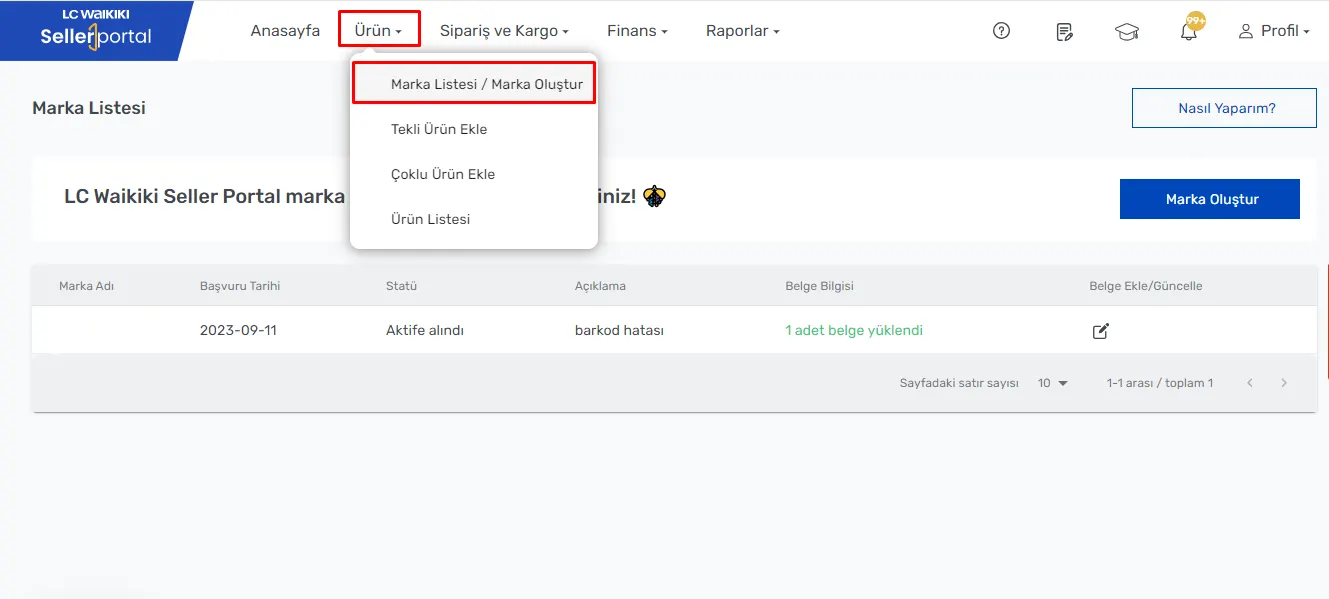
- Accessing the Brand List/Create Brand Page: In the LC Waikiki seller portal, go to the 'Product' tab in the main menu and find the 'Brand List / Create Brand' option.
- Reviewing Existing Brands: On this page, any brands created earlier will be listed. If you do not have a brand yet or want to add a new one, you need to click the 'Create Brand' option at this stage.
Brand Creation Process in the LC Waikiki Panel
When you start the brand creation process, you will encounter LC Waikiki's user-friendly interface. This process consists of three main steps:
- Create Brand
- Upload Documents
- Submit for Approval
Step One: Decide Your Brand's Name
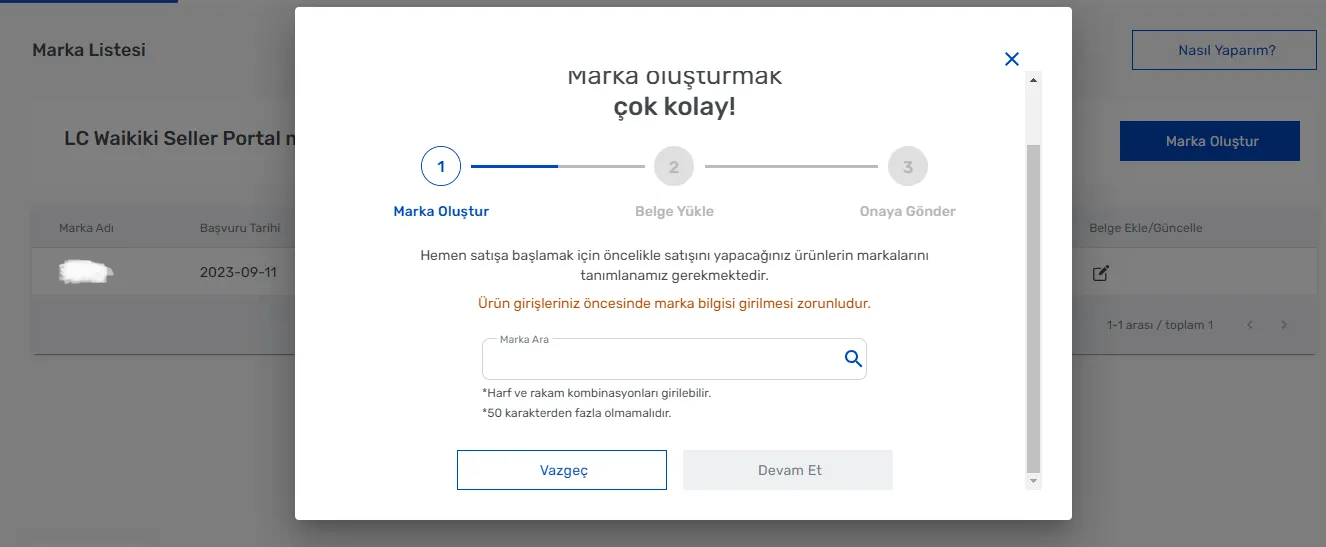
When you click the 'Create Brand' tab, the first thing you need to do is enter your brand's name. This step forms the foundation of the product listing process and reflects your brand's identity. Here are the points to pay attention to at this stage:
- Structure of the Brand Name: Your name can consist of combinations of letters and numbers. Let your creativity speak, but take care to make your brand name recognizable and memorable.
- Character Limit: Your brand name must be at most 50 characters long. This ensures that your brand's name is both eye-catching and concise.
After entering your brand name, you can move on to the second stage of the process by pressing the 'Continue' button.
Step Two: Document Upload Process
After completing the 'Create Brand' step, you move on to the second stage of the process: document upload. At this stage, documents proving your brand's registration must be uploaded. Here is the process to follow in this step:
- Uploading the Brand Registration Certificate: If your brand registration documents are ready, upload them to the LC Waikiki panel. These documents show that your brand is legally protected and registered.
- If the Documents Are Not Ready: If your documents are not ready yet, you can skip this step temporarily by clicking the 'Later' button. In this case, you can upload your documents later from the 'brand listing' screen.
Points to Watch During Document Upload
- File Formats: The documents you upload must be in PDF, JPEG or PNG format.
- File Size: Each document must not exceed 10 MB.
- Document Limit: The system allows you to upload at most 5 documents.
After successfully uploading your documents, you can press the 'Continue' button to move on to the 'Submit for Approval' page, the final step of the brand creation process.
We recommend readingHow Do You Register a Brand on Trendyol?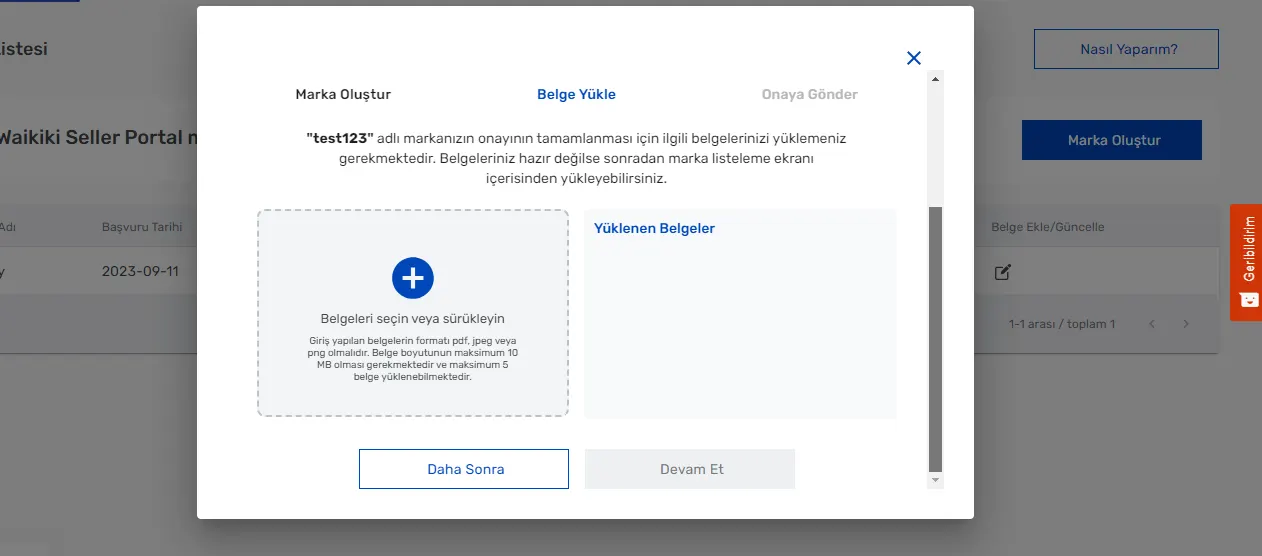
Step Three: Submit for Approval
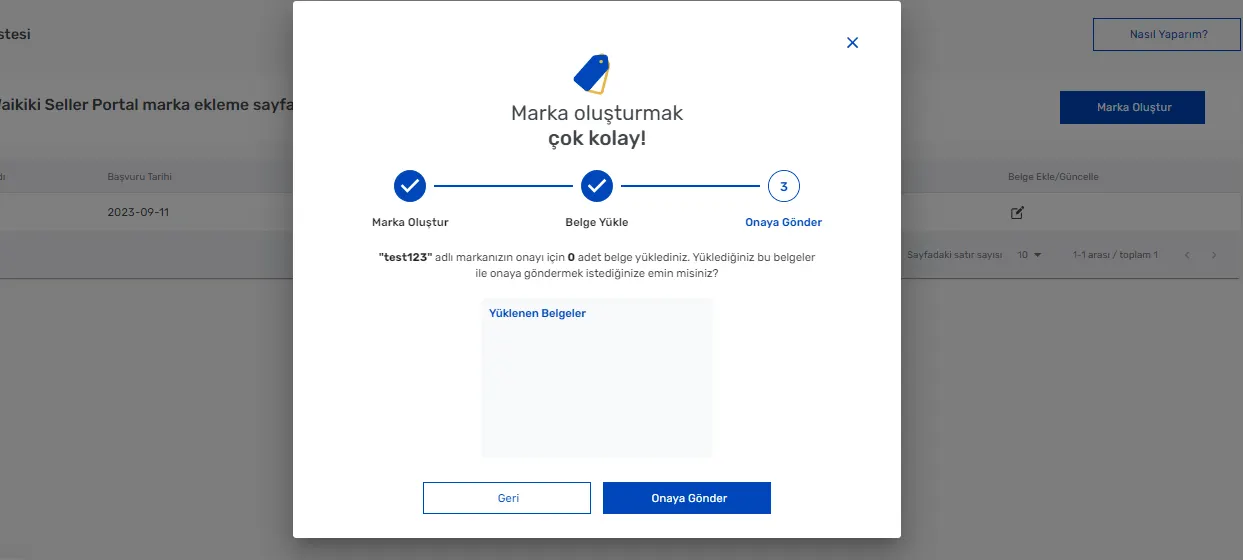
In this final stage of the brand creation process, you will complete your operation by reviewing all the details one last time.
- Checking the Brand Name and Documents: On the 'Submit for Approval' page, you can see the brand name you entered earlier and the documents you uploaded. At this stage, check that all information is correct and complete. This is a critical step for your brand to be listed correctly on the LC Waikiki platform.
- Clicking the Submit for Approval Button: After checking all your information and making sure everything is correct, complete the process by clicking the 'Submit for Approval' button. This step is the final one required for your brand to be reviewed and approved by LC Waikiki.
Tracking the Brand Approval Process and Managing Documents
After you have 'Submitted' your brand for approval, you can easily track the progress of the process in the LC Waikiki panel.
We recommend readingHow to Add a Brand on Ozon?Tracking via the Brand List Page
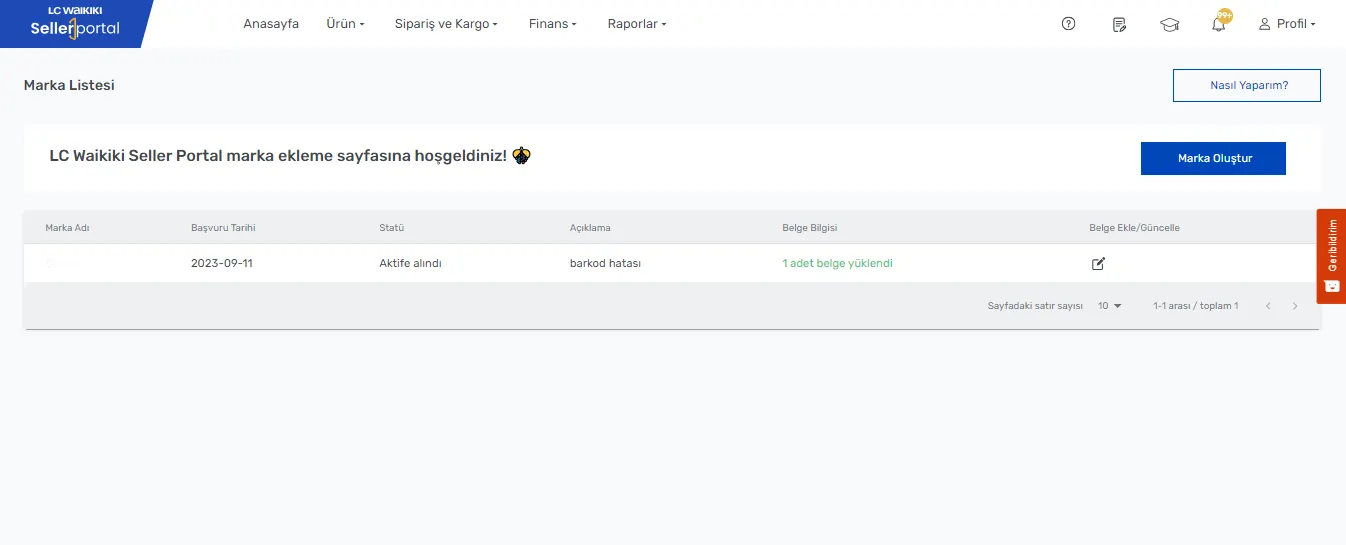
- Checking the Approval Process: You can track your brand's approval process on the 'Product >> Brand List' page. This page lists your brand's application status, start date and other relevant information. This helps you understand the current status of your brand in the approval process.
- Viewing and Updating Document Information: On this page you can also see the information about the documents you uploaded earlier and, when necessary, add new documents or update existing ones. This feature lets you keep your brand's registration and legal information up to date.
Faprika and LC Waikiki Integration
You have successfully completed your brand definition process on the LC Waikiki Marketplace, and now you have taken a big step toward offering your products to a wide audience. With the LC Waikiki integration provided by Faprika, this process becomes even easier. By integrating your e-commerce infrastructure seamlessly with leading marketplaces like LC Waikiki, Faprika helps you optimize your product management and sales.
This integration lets you list your products on LC Waikiki quickly and effectively, simplify stock management and make your sales processes more efficient. Thanks to Faprika's powerful infrastructure, you can enjoy end-to-end services, from e-commerce warehouse operations to shipping processes.
Discover Faprika's LC Waikiki integration to gain a competitive advantage in e-commerce and expand your customer base. This integration supports your business's growth and puts you one step ahead in e-commerce. After defining your brand on the LC Waikiki Marketplace, maximize your e-commerce potential with this integration offered by Faprika.
Frequently Asked Questions (FAQ)
1. How Do You Create a Brand on the LC Waikiki Marketplace?
Log in to the LC Waikiki seller portal and go to the 'Product >> Brand List / Create Brand' tab. Here, you can start the brand creation process by entering your brand's name and uploading the required documents.
2. What Documents Are Required for Brand Definition?
During the brand definition process, official documents such as your brand's registration certificate must be uploaded. Documents must be in PDF, JPEG or PNG format and no larger than 10 MB.
3. How Can I Track My Brand's Approval Process on LC Waikiki?
After submitting your brand for approval, you can track the approval process on the 'Product >> Brand List' page. On this page, you can find information about your brand's status, start date and the uploaded documents.
4. Is Creating a Brand Mandatory to List Products on the LC Waikiki Marketplace?
Yes, to list products on the LC Waikiki Marketplace, you must first create a brand. This ensures that your products are classified correctly and presented to customers.
5. Where Can You Get Support for Problems Encountered While Creating a Brand in the LC Waikiki Panel?
If you encounter any problem, you can contact the LC Waikiki seller support team or use the help section in the seller portal.
You May Also Like
- E-Commerce: What Is It? Types, Advantages and Disadvantages of E-Commerce
- ÇiçekSepetin’de Satış Yapmak ve Avantajları
- Pazarama’da Satış Yapmak ve Avantajları
- Amazon'da Satış Yapmak İçin Gerekli Bilgiler
- Pinterest Nedir? E-ticaret Siteleri İçin Pinterest’tin Faydaları
- Instagram Hikaye (Story) Paylaşma Rehberi