Contents 6 sections
The first step to securing your place in the world of e-commerce is defining your brand correctly. As one of Turkey's leading e-commerce platforms, Trendyol makes defining your brand easy and accessible.
This guide explains step by step how to define a brand on Trendyol, making the process simple and clear. If you also want to define your brand correctly on Trendyol and showcase your products effectively, this guide is for you. Here are the basic steps of the brand definition process on Trendyol and the important points to watch out for.
Brand Definition Steps
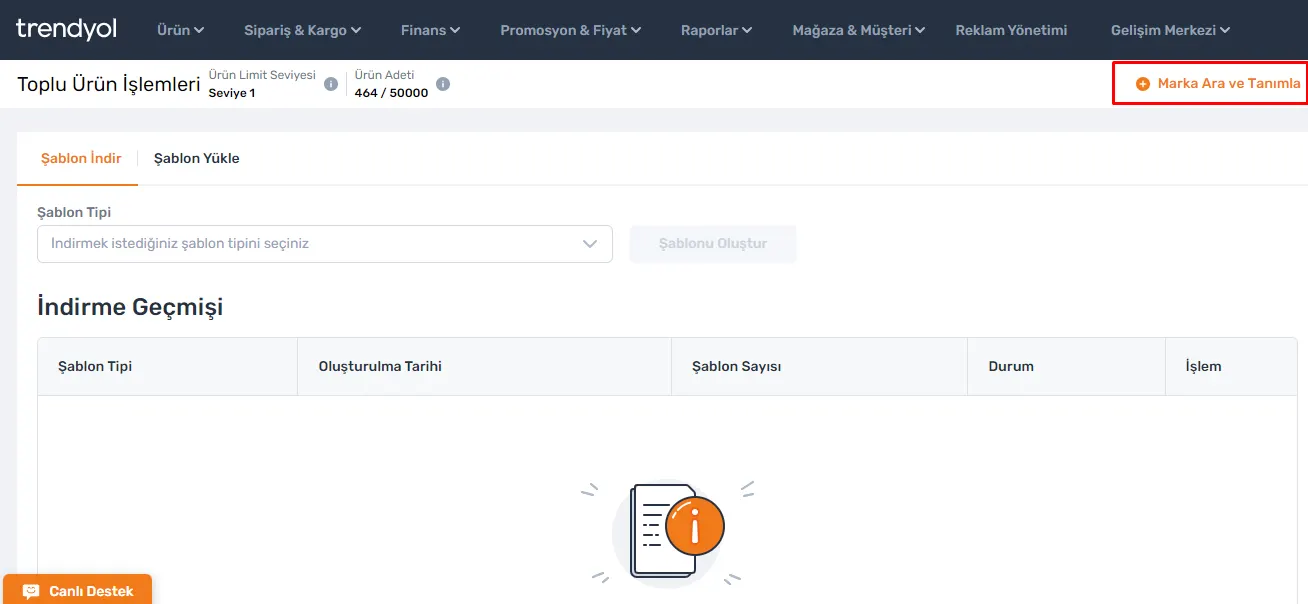
Brand Check
To find out whether your brand is defined on the Trendyol platform, your first step should be to go to the 'Products >> Bulk Product Operations' section. There you will find the 'Search and Define Brand' option. When you click this button, you can search by entering the name of the brand you want to define in the system. If the brand you are looking for is already registered in the Trendyol system, it will appear in the results. If it is not registered, the 'Define Brand' button will become active. At this stage, make sure the brand you want to define is spelled correctly. This simple step is the first and most important stage of your brand definition process.
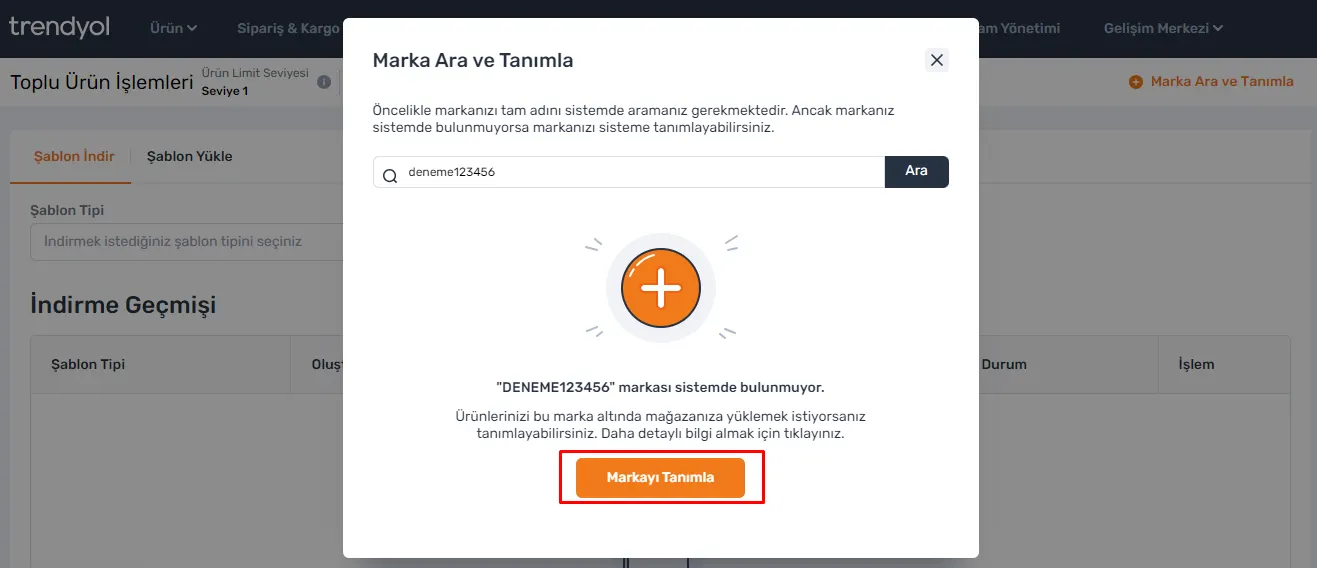
Brand Definition and Approval Process
- Brand Definition: When you click the 'Define Brand' button, the brand you added will be automatically added to Trendyol's product upload pages. This step is the first step toward listing your products under your brand.
- Brand Approval: After you define your brand, a review and approval process is carried out by the Trendyol team. During this process, the products you added for your brand will appear among those not on sale with the message "Your Brand Request Has Been Received" and will wait for approval. This approval process is usually completed within 3 business days.
- Approved Brands: When your brand is approved by the Trendyol team, your products will be ready for listing.
- Rejected Brands: If your brand is rejected, your products are moved to the "Needs Revision" status and you receive an error warning about the brand. In this case, you may need to review your brand again.
Product Review and Listing Process
After your brand is approved by the Trendyol teams, your products will be reviewed. This stage is one of the final steps toward listing your products on Trendyol.
- Listing Products Without Issues: If no problems are detected with your products, they are accepted as suitable for listing and put on sale on Trendyol.
- Revising Problematic Products: If your brand is rejected or any problem is found with your products, these products are moved to the "Needs Revision" status. In this case, your products or your brand definition may need to be revised. When you receive an error warning about the brand, we recommend reviewing your brand's eligibility criteria again.
Points to Consider When Adding a Brand on Trendyol
There are some important rules to follow during the brand definition process. These rules are required for your brand to be listed successfully on the Trendyol platform.
- Character Limits: Brands must be at least 3 and at most 40 characters long.
- Brands Containing Redirects: Brands that redirect to a website, such as .com or .net, are not accepted.
- Generic Terms: Brands that contain generic terms such as 'Trend', 'Brand' or 'Marka', or that consist only of digits, are not included in the system.
- Brands Containing a Category or Product Name: Brands that contain a subcategory or product name are not accepted.
- Inappropriate Content: Brands containing 18+ sexual content or profanity are not included in the system.
- Duplicate and Multiplied Brands: Brands that are repeated or defined in multiple copies are not accepted.
- Book and Author Names: Book titles and authors are not accepted as brands.
- Company Suffixes: Brands with company suffixes such as A.Ş. or SAN. are not accepted.
- Automobile and Motorcycle Brands: Brands defined by adding terms after an automobile or motorcycle brand are not accepted.
- Brands Containing Alcohol: Alcohol brands and brands containing an alcohol reference are not accepted.
- Brands with Barcode Numbers: Brands identified as barcode numbers are not accepted.
- Brands Containing Special Characters: Brands containing special characters are not accepted.
- Brands Containing the Word 'Other' ('Diğer'): Brands that contain, end with or start with the word 'Diğer' (Other) are not accepted.
- Unregistered Publishers or Brands Without a Brand Mark: Brands such as publishers that are not registered, or whose brand mark does not appear on the product, are not accepted.
The Importance and Outcomes of Brand Definition on Trendyol
The brand definition process on Trendyol is an important step you must take in order to list your products. By following the steps described in this guide, you can define your brand correctly on Trendyol and showcase your products effectively. Remember, the brand definition process is only a beginning. Having your brand defined on Trendyol will help your products reach a wider audience and strengthen your presence in e-commerce.
The rules and steps to follow in the brand definition process are designed to ensure your brand takes its place on the platform successfully. Completing this process correctly will speed up your brand's acceptance on Trendyol and the listing of your products for sale. By following every step carefully, you can maximize your success in e-commerce on Trendyol.
This guide offers open and clear information to anyone who wants to understand and apply the brand definition process on Trendyol. Take your place in the world of e-commerce by defining your brand on Trendyol and watch your products succeed.
Frequently Asked Questions (FAQ)
How Is a Brand Defined on Trendyol?
Brand definition on Trendyol is done using the 'Search and Define Brand' button under the 'Products - Bulk Product Operations' menu. You search for your brand and, if it is not defined, start the process with the 'Define Brand' option.
How Long Does the Trendyol Brand Definition Process Take?
Brand definition is generally a quick process, but the review and approval carried out by Trendyol can take an average of 3 business days.
What Types of Brands Are Not Accepted on Trendyol?
Trendyol does not accept certain types of brands, such as those that redirect to a website (.com, .net, etc.), contain 18+ content, include special characters, or consist of generic terms.
What Should I Do If My Brand Is Rejected on Trendyol?
If your brand is rejected by Trendyol, it is moved to the 'Needs Revision' status and you may need to make corrections depending on the reason. Reasons are usually unsuitable naming or non-compliance with brand rules.
What Happens After My Brand Is Approved on Trendyol?
Once your brand is approved, your products can be listed on Trendyol. If no issues are found, your products are put on sale on the platform.
Is There a Character Limit for Trendyol Brand Definition?
Yes, brands must be at least 3 and at most 40 characters long.