Contents 17 sections
- What Is a Virtual POS?
- How Does a Virtual POS Payment Work Behind the Scenes?
- How to Get a Virtual POS? Two Main Ways
- What Documents Are Requested for a Virtual POS Application?
- How to Apply for a Virtual POS Step by Step
- What Does the Cost of a Virtual POS Consist Of?
- How to Compare Two Virtual POS Quotes
- How Do You Connect a Virtual POS to an E-Commerce Site? Integration and Testing
- Which Payment Options Should Be Offered Besides Card Payment?
- How Are Card Details Protected with a Virtual POS?
- How Are Installment Options Managed?
- How Do You Reconcile Payments with Orders?
- What Should You Do If a Virtual POS Application Is Rejected?
- 8 Common Mistakes in a Virtual POS Application
- Virtual POS Application Checklist
- Virtual POS and Payment Management with Faprika
- Frequently Asked Questions
On an e-commerce site, you have prepared the products, photos and prices; but if the customer cannot pay by card, your store cannot sell. The way to accept card payments is a virtual POS, and most new sellers run into the same questions at this point: how do you get a virtual POS, should you get it from a bank or a payment institution, which documents are needed, how is the commission calculated and how do you connect it to the site?
This article is structured like a lesson. You will learn what a virtual POS is, how a payment works behind the scenes, the difference between the two main ways, the application steps and documents, commission and extra cost items, how to compare quotes, integration and testing steps, and the most common mistakes. With the tool in the article, you can instantly compare the monthly cost of two quotes.
What Is Virtual POS?
A virtual POS is a payment system that lets a customer pay with a credit or debit card on an e-commerce site, without needing a physical device. It is the online equivalent of the POS device in a store: the card details are sent to the payment system over a secure connection, the bank approves the transaction and the amount is transferred to the seller's account.
A virtual POS on its own has nothing to do with the site; it is based on an agreement the seller makes with a bank or a payment institution. Your site connects to the virtual POS only with the details this agreement provides (merchant number, key, address).
Okumanızı öneririzSanal POS Hakkında Merak EdilenlerHow Does a Virtual POS Payment Work Behind the Scenes?
When the customer presses the "Pay" button, the card details are sent to the virtual POS, the issuing bank verifies the customer with 3D Secure and approves the transaction; then the order is marked as "paid" and the amount, minus the commission, reaches the seller's account within a set period.
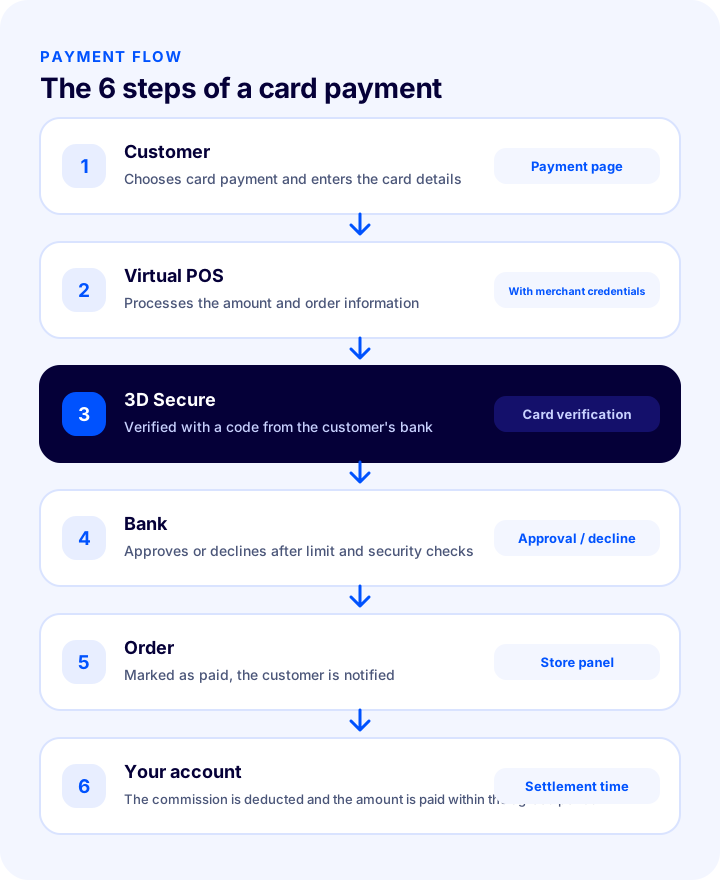
- The customer chooses card payment: They enter their card details on the payment page.
- The virtual POS receives the transaction: The amount and order information are sent to the payment system together with the card details.
- 3D Secure verification is performed: The customer verifies themselves with a one-time code from their bank or an app approval.
- The bank approves or declines the transaction: The limit, the card status and security checks determine the outcome.
- The order status is updated: An approved payment marks the order as "paid"; if there is an error, the customer is notified.
- The amount is transferred to the seller: After the commission is deducted, the amount reaches the seller's account at the end of the period set in the agreement.
How to Get a Virtual POS? Two Main Ways
There are two main ways to get a virtual POS: making a merchant agreement directly with a bank, or using the virtual POS offered by a payment institution (a payment service provider). Which one is suitable depends on turnover, ease of application and payment options.
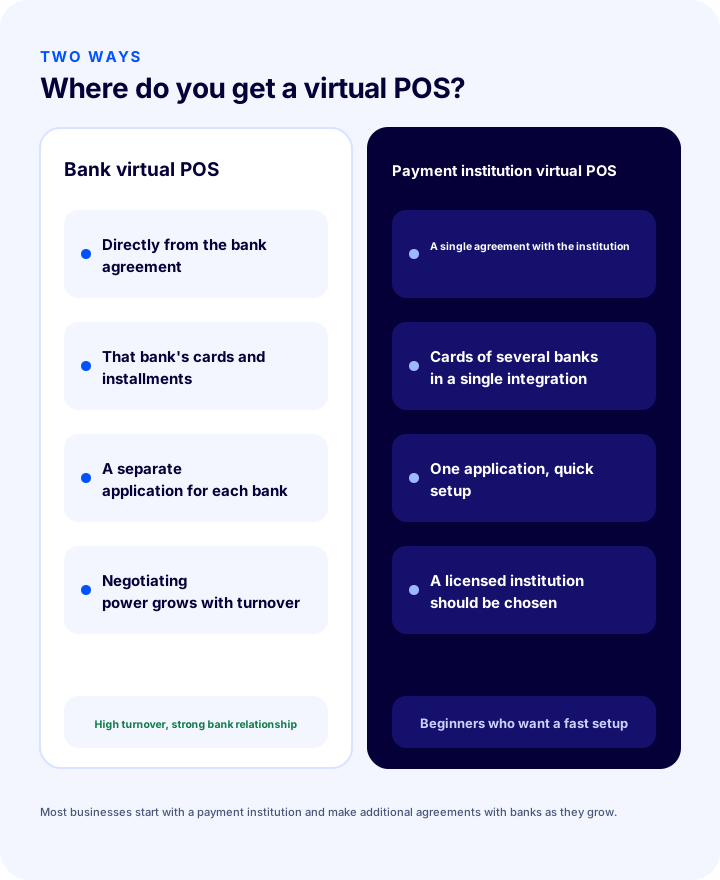
| Bank virtual POS | Payment institution virtual POS | |
|---|---|---|
| Agreement | Merchant agreement directly with the bank | A single agreement with the payment institution |
| Scope | That bank's cards and installment options | Cards and installments of several banks through a single integration |
| Apply | A separate application and documents for each bank | One application, one integration |
| Commission | Negotiated according to the bank, turnover and sector | The institution's tariff; negotiable as turnover grows |
| Transfer of the money | Directly to your bank account | According to the institution's rules and the agreement |
| Best suited for | High turnover, strong bank relationship | Beginners, fast setup, several banks |
Most businesses proceed in stages: at first they start with a payment institution that offers the installment options of several banks with a single application, and as turnover grows they make additional virtual POS agreements directly with banks and strengthen their commission negotiations. Whichever way you choose, check that the payment institution is authorized and licensed.
What Documents Are Requested for a Virtual POS Application?
A virtual POS application usually requires the company's identity and tax documents, authorized signatory documents, bank account details and information about the e-commerce site. Because the list varies by bank and payment institution, get the current document list from the institution before applying.
| Document group | What usually? |
|---|---|
| Company documents | Tax certificate, activity certificate or trade registry records (depending on whether it is a sole proprietorship, limited or joint-stock company) |
| Authorized signatory documents | Identity details of the authorized person, signature circular or signature declaration |
| Account details | IBAN details of the company bank account into which payments will be deposited |
| Site details | Domain name, the site being live and working, types of products sold |
| Site content | Contact details, privacy and return policies, distance sales agreement |
Site content is also reviewed separately in most applications: your store's contact details, return policy and distance sales agreement are expected to be visible on the site. So get the site ready to go live before you apply.
Okumanızı öneririzE-Ticaret Sitesi Açmak İçin Gerekli Belgeler We recommend readingWhat Is a Distance Sales Contract?How to Apply for a Virtual POS, Step by Step
The application starts with preparing your company and site, continues with comparing offers, and ends with integration and a test payment. If you follow the seven steps below in order, the process gets shorter and the chance of being turned down for missing documents drops.
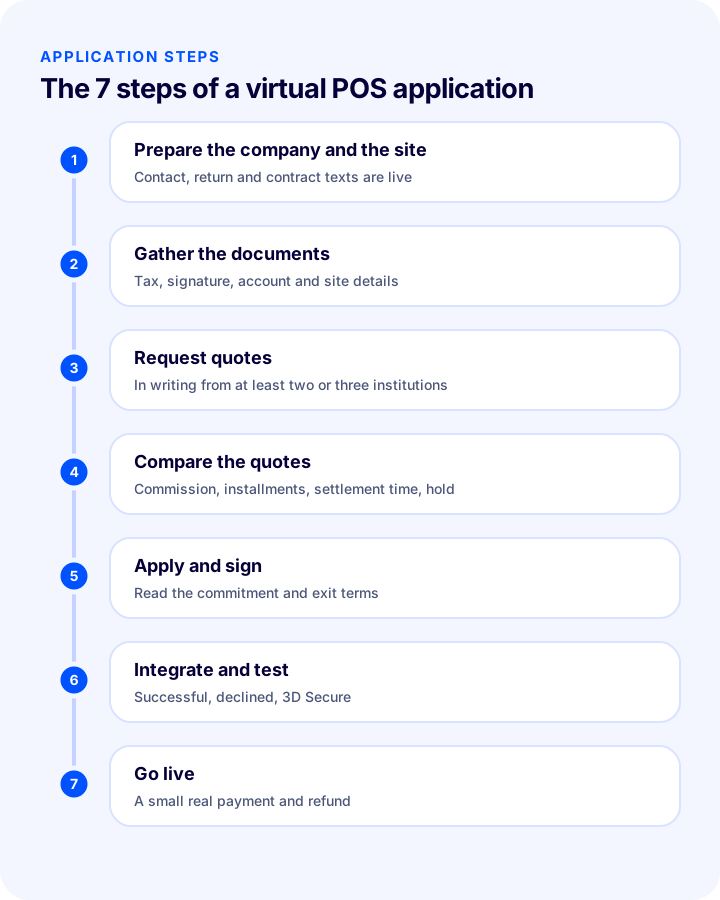
- Prepare your company and site: Complete your company or sole proprietorship records; publish the contact, return and agreement texts on the site.
- Gather the documents: Keep the documents on the document list ready in digital form.
- Request offers: Get written offers from at least two or three banks or payment institutions.
- Compare the offers: Look not only at the commission but also at the installment commission, the settlement time, fixed fees and reserve terms (see the tool and table below).
- Apply and sign the agreement: Read the commission, term and cancellation conditions in the agreement carefully.
- Integrate and test: Enter the merchant details you were given into your platform; try a successful and a failed payment with test cards.
- Go live: Enter the details for moving from the test environment to production and verify with a real payment of a small amount.
What Does a Virtual POS Cost?
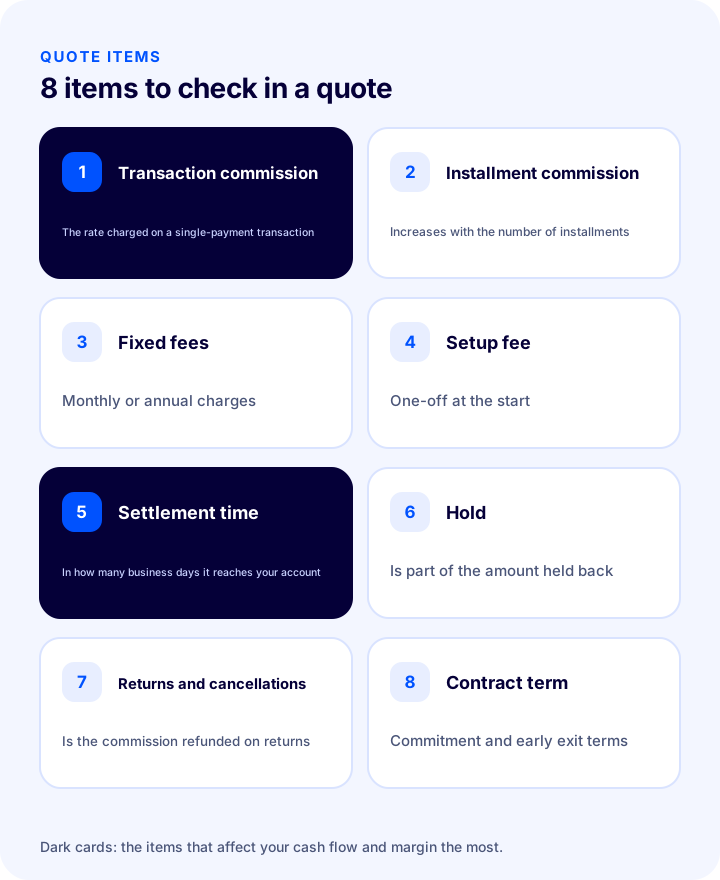
The cost of a virtual POS is not a single commission rate: the transaction commission, installment commission, any fixed fees, setup fee and the holding of funds all determine the total cost. When comparing offers, you need to put all of them side by side.
| Pens | What does it mean? | Question to ask |
|---|---|---|
| Transaction commission | Rate deducted from every transaction | What is the rate for a single payment? |
| Installment commission | Rate that rises with the number of installments | What is the rate for each installment option, and who bears it? |
| Fixed fees | Monthly or annual fixed fees | Is there a monthly or annual fee? |
| Setup fee | One-time fee charged at the start | Is there a setup or integration fee? |
| Settlement time | Time for the money to reach your account after the transaction | In how many business days is the amount paid into my account? |
| Hold | Holding back part of the amount for a set period | Is there a reserve, and what are its rate and duration? |
| Refund and cancellation terms | What happens to the commission on refunds and cancellations | Is the commission returned on a refund? |
| Contract term | Commitment and withdrawal terms | Is there a commitment period, is there an early exit penalty? |
How Do You Compare Two Virtual POS Offers?
The most reliable way to compare offers is to calculate the total cost on the same monthly turnover: multiply the turnover by the commission rate and add the monthly fixed fee. The tool below does this calculation for two offers; enter the commission rates and fees from your own offers.
The tool calculates only the transaction commission and the fixed fee; assess the installment commission, setup fee and refund terms separately. The amount held back shows how the settlement time affects your cash flow.
How Do You Connect a Virtual POS to Your E-Commerce Site? Integration and Testing
Connecting a virtual POS to your site comes down to entering the merchant details you received from the payment institution or bank into the payment settings of your e-commerce platform; if your platform offers a ready-made integration for the bank or institution you chose, you do not need to write any code. The most important part is testing before you go live.
- Get the details: Get the merchant number, username, key and similar details from the institution; there may be separate details for the test and live environments.
- Enable the payment method on your platform: In the admin panel, select the relevant bank or institution and enter the details.
- Try it with test cards: Try successful payments, declined payments and payments that require 3D Secure verification with test cards.
- Check the order flow: See that the order status, the email and the stock are updated correctly after payment.
- Verify the installment table: Make sure the installment options on the payment page match your agreement.
- Go live and make a small real payment: Then try the refund process as well.
Which Payment Options Should You Offer Besides Card Payment?
Not all customers prefer to pay by card; options such as bank transfer, cash on delivery or digital wallets reduce abandonment at the payment step. Which ones to offer depends on your target audience and product.
| Option | Advantage | Point to watch |
|---|---|---|
| Credit and debit card | Instant approval, installment option, common habit | Commission cost |
| Bank transfer / EFT | No commission | Manual matching of payments, delay in order confirmation |
| Cash on delivery | Wins over customers who lack trust | Return cost and collection commission on undelivered orders |
| Digital wallet and balance | Fast payment makes repeat purchases easier | A separate integration for each wallet |
| Balance and gift voucher | Loyalty and campaign tool | Accounting and stock tracking |
How Are Card Details Protected with a Virtual POS?
With a correctly set up virtual POS integration, the customer's card details are not stored on your site; they are sent to the payment system in encrypted form and are not kept in your store's database after the transaction is completed. Storing and processing card data is subject to the card industry's security standard (PCI DSS), and most of that obligation lies with the payment institution or the bank.
- Do not store card details yourself: Order records and emails must not contain card numbers.
- Keep 3D Secure verification on: Cardholder verification protects against fraudulent card use and chargeback risks.
- Use a secure connection: The payment page must open over a secure connection with SSL.
- Protect your access details: The merchant key and passwords should be held only by authorized people; change them if they have been shared.
How Do You Manage Installment Options?
Installments are a tool that raises the basket value and reduces abandonment at the payment step; however, each installment option has a different commission, and this cost is passed on to the seller. So decide deliberately above what amount, with which cards and how many installments you will offer.
- See the installment table in the offer: Get the commission rate for each number of installments in writing.
- Limit the number of installments by amount: Offering many installments on low-value orders can push the commission cost above your margin.
- Calculate product margin together with the installment commission: On low-margin products, long installments can wipe out the profit.
- Show it clearly to the customer: Showing the total amount and the installment amount clearly on the payment page builds trust.
How Do You Reconcile Payments with Orders?
Reconciliation is matching the amounts paid into your account against your order records, and it is a check that every business using a virtual POS should perform regularly. Otherwise, a missing payment, a double charge or a refund difference is noticed only months later.
- Get a report: Get the transaction report from the bank or payment institution at regular intervals (daily or weekly).
- Match with orders: Compare the transaction amounts in the report with the orders marked as paid in your panel.
- Separate the commission: Verify that the difference between the net amount paid into your account and gross sales matches the commission.
- Track refunds: Make sure the card refunds for refunded orders have been completed.
- Share with your accountant: Send the invoice the institution issues for the commission, along with the reports, to your accountant.
What Should You Do If a Virtual POS Application Is Rejected?
A rejected or pending application is common among new sellers and usually comes down to a cause that can be fixed. Finding out the reason for the rejection from the institution determines the outcome of your next application.
| Common reason | What is done? |
|---|---|
| Missing or incorrect documents | Recheck the document list and complete what is missing |
| Site judged insufficient (missing contact, return or agreement texts) | Publish the required texts and update the site |
| Product or activity group not suitable | Ask which product groups the institution accepts; if necessary, apply to another institution |
| Newly founded company, limited history | Start with a payment institution first and build a transaction history |
| Application details do not match site details | Write the company name, address and tax details identically on the site and in the documents |
Do not let sales stop in the meantime: until card payment is approved, you can keep taking orders with bank transfer or cash on delivery.
8 Common Mistakes in a Virtual POS Application
- Applying before preparing the site: A site without contact, return and agreement texts is usually turned down or the application drags on.
- Looking only at the commission rate: Installment commission, fixed fees and settlement time change the total cost.
- Deciding on a single offer: Without a comparison, you lose your negotiating power.
- Not reading the agreement: Reserve, commitment and early exit terms turn into surprises later.
- Working with an unlicensed intermediary: It creates settlement and security risks.
- Skipping the test: A faulty installment table or a wrong order status in production loses you customers.
- Relying on a single payment method: If the virtual POS goes down, sales stop; set up a backup method.
- Not defining the refund process: A card payment is refunded to the same card; being able to refund from the panel saves time.
Virtual POS Application Checklist
Before you start the application and the go-live, you should be able to say “yes” to all of the items below.
- Are your company records and tax documents complete?
- Are the signature authority documents and bank account details ready?
- Is the site live, with contact, privacy, return and distance sales agreement visible?
- Have you received at least two or three written offers?
- Have you compared the offers by commission, installments, fixed fees, settlement time and reserve?
- Have you read the commitment and early exit terms in the agreement?
- Have you checked that the payment institution is authorized and licensed?
- Have you tried the integration with test cards (successful, declined, 3D Secure)?
- Does the installment table match your agreement?
- Have you tried a small real payment and a refund in production?
- Besides card payment, is a backup method such as bank transfer or cash on delivery set up?
Virtual POS and Payment Management with Faprika
Getting the virtual POS is only half of the job; the other half is connecting it to your site without errors and managing the post-payment process. In the Faprika e-commerce platform, the following elements cover this stage (you can see which feature starts in which plan on the e-commerce plans page):
- Ready-made virtual POS integrations: More than twenty bank virtual POS and payment institution integrations are included in all plans; details are on the payment add-ons page.
- Bank transfer and cash on delivery: Bank transfer and cash on delivery options are available alongside cards in all plans.
- Cash on delivery order confirmation: You manage cash on delivery orders with a confirmation step; this feature varies by plan.
- Automatically cancel unpaid orders: Orders whose payment is not completed are cancelled automatically; this varies by plan.
- Process credit card refunds from the panel: You manage the card refunds of refunded orders from the panel; this varies by plan.
- Collect payment by link: You collect payment for orders taken by phone by sending the customer a payment link; this varies by plan.
Frequently Asked Questions
What Is Virtual POS?
A virtual POS is a payment system that lets a customer pay with a credit or debit card on an e-commerce site, without needing a physical device. It is based on an agreement the seller makes with a bank or a payment institution, and connects to the site with merchant credentials.
How do you get a virtual POS?
You prepare the company and the site, gather the documents, get quotes from banks or payment institutions, compare the quotes by commission, installments, settlement time and hold, apply and sign the contract; then you integrate, test and go live.
What documents are needed for a virtual POS?
Usually a tax certificate, an activity certificate or trade registry records, authorized signatory documents, the company's bank account details and information about the e-commerce site are requested. Because the list varies by bank and payment institution, you should get the current document list from the institution.
Is a bank virtual POS or a payment institution better?
Both can be right. A bank virtual POS is strong for negotiating commission at high turnover; a payment institution is practical for beginners because it offers the cards and installments of several banks with a single application. Most businesses start with a payment institution and make additional agreements with banks as they grow.
How is virtual POS commission calculated?
The monthly card sales amount is multiplied by the commission rate, and the monthly fixed fee is added if there is one. Installment commission, setup fee and refund terms are assessed separately. When comparing quotes, write the total cost side by side for the same turnover.
How long does a virtual POS application take?
The time varies depending on the institution, how complete the documents are and whether the site is ready. If the documents are complete and the site is ready to go live, the process is shorter; missing documents or missing site content prolong the application. Ask the institution you apply to for the current timeline.