Contents 19 sections
- What Is Guest Checkout?
- Why Does Mandatory Registration Reduce Conversion?
- What Are the Pros and Cons of Guest Checkout?
- What Information Should Be Collected in Guest Checkout?
- How Much Does Guest Checkout Increase Conversion? Scenario Tool
- How Do You Win the Customer Over to Registration After the Order?
- Which Benefits Encourage Registration?
- How Can Registration and Login Friction Be Reduced?
- How Do You Manage Guest Orders?
- In Which Stores Should Registration Be Mandatory?
- What Should the Registration and Payment Flow on Mobile Look Like?
- How Do You Build Customer Trust in Guest Payment?
- How Does Registration Data Contribute to Customer Segmentation?
- How Is the Effect of Guest Checkout Tested?
- Which Messages Should Be Used to Encourage Registration?
- 8 Common Mistakes in Registration and Guest Checkout
- Guest Checkout Checklist
- Managing Registration and Guest Checkout with Faprika
- Frequently Asked Questions
The customer has filled their cart, reached the payment step, and a form appears in front of them: "Register to continue." Many customers give up at that point. For someone who only wants to buy a single product, creating an account, setting a password and verifying their email looks more troublesome than the purchase itself. Guest checkout is the method that removes this obstacle and lets the customer place an order without opening an account.
However, membership is also valuable for a business: getting to know the customer, making repeat orders easier and building loyalty all happen through membership. This article is structured like a lesson. Step by step, you will learn what guest checkout is, its effect on conversion, its pros and cons, what data to collect on a guest order, how to win the customer over to membership after the order, how to reduce login friction and which stores should require membership. With the tool in the article, you can calculate a scenario using your own figures.
What Is Guest Checkout?
Guest checkout lets a customer place an order by entering only delivery and contact details, without creating an account or signing in. The customer completes the order, the order confirmation arrives by email and the process ends; no permanent account is created.
Its opposite is mandatory membership: the customer must create an account or sign in before placing an order. There is also a third option between the two, and for most stores it is the most balanced: allow ordering without an account and invite the customer to become a member after the order.
Recommended readingWhat Is Buying Without Registration? (Glossary)Why Does Mandatory Membership Reduce Conversion?
Mandatory membership puts an extra barrier in the checkout step: the customer arrives with the intention to buy, but is first forced to do something else. This extra step can put off first-time shoppers, customers in a hurry and those on mobile devices in particular.
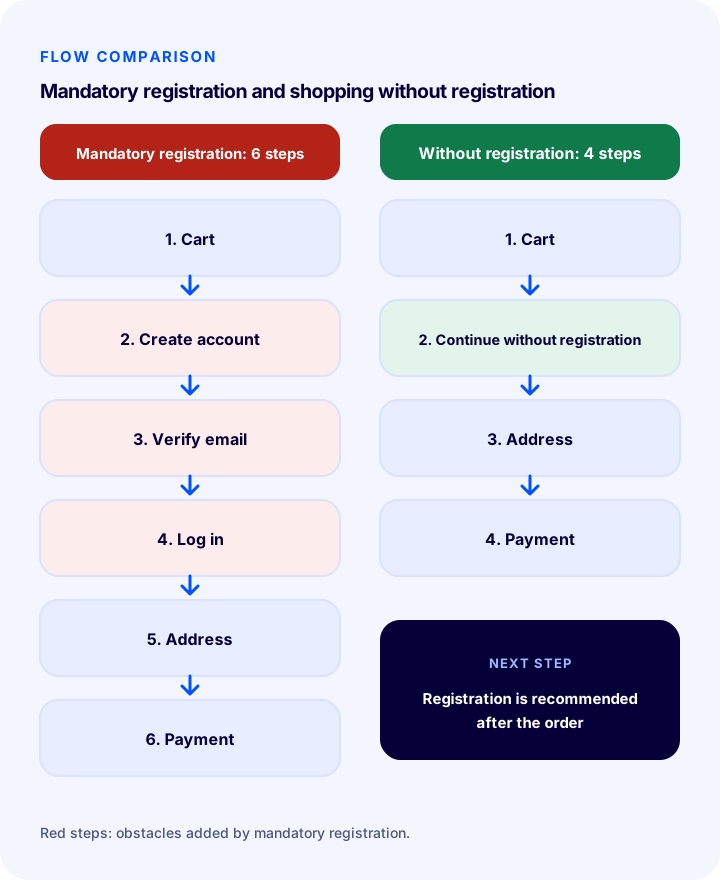
- Time: Creating an account delays payment; the customer sees this time as “lost”.
- Trust: A first-time customer does not want to give personal information and a password before getting to know the site.
- Password burden: Setting and remembering a new password is a hassle, especially on mobile.
- Privacy concern: The customer may worry that their email will be used for marketing.
- One-off purchase: Opening an account makes no sense for a customer who will not come back.
For this reason, mandatory membership is a frequently seen factor among the causes of cart abandonment. Because its impact varies from store to store, you need to measure it on your own site; the tool and test section below explain how.
Okumanızı öneririzE-Ticaret Ortamında Alışveriş Sepetinin Terk Edilme NedenleriWhat Are the Pros and Cons of Guest Checkout?
Guest checkout increases conversion and shortens the payment step; on the other hand, it can weaken customer data and the opportunity for repeat sales. The right approach is to consider both together and convert guests into members after the order.
| Pros | Cons | |
|---|---|---|
| From the customer’s side | Fast checkout, no password, privacy comfort | No order history, saved address or quick reorder |
| From the seller’s side | Fewer drop-offs, higher checkout completion | Getting to know the customer and building loyalty become harder |
| Data | Only necessary information is collected (in line with the KVKK principle) | Orders from the same customer may be scattered across different records |
| Marketing | Email can be collected from consenting customers | Without consent, the customer cannot be contacted again |
| Support | Fewer “forgot my password” requests | Order lookup and return identity verification must be done more carefully |
What Information Should Be Collected in Guest Checkout?
Collecting only the information needed to deliver and communicate about a guest order both protects conversion and complies with KVKK's “data minimisation” principle. First name, last name, email, phone and delivery address are enough for most stores.
- First and last name: Required for delivery and invoicing.
- Email: Required for the order confirmation and tracking information.
- Phone: Required so the carrier can reach the customer.
- Delivery address: Required for shipping.
- Invoice information: Ask for additional details (such as a tax number) only from customers who want a corporate invoice.
- Avoid unnecessary fields: Fields such as date of birth, gender or interests lengthen the order; remove them from the form if they are not needed.
The privacy notice must also be visible for guest orders; permission for marketing communication should be obtained with a separate, unticked checkbox. We have covered this topic separately.
Recommended readingHow to Achieve KVKK Compliance for an E-Commerce Site?How Much Does Guest Checkout Increase Conversion? Scenario Tool
The effect of the guest option on conversion differs in every store, so promising an exact rate would not be right. The tool below calculates a scenario with your own figures and your own estimate: if the checkout completion rate rises by a certain percentage, how many extra orders, how much revenue and how much contribution margin does it bring? You set the estimated increase, and you should verify the real value with an A/B test.
The tool only calculates the change in the completion rate at the payment step; it does not take into account the long-term effect of collecting fewer memberships (repeat orders, customer lifetime value). So evaluate the result together with the post-order membership conversion.
How Do You Win the Customer Over to Membership After the Order?
The most effective method is to offer membership not before the order but after it is completed, with one click and a concrete benefit. You already have the customer's name, email and address; they only need to set a password.
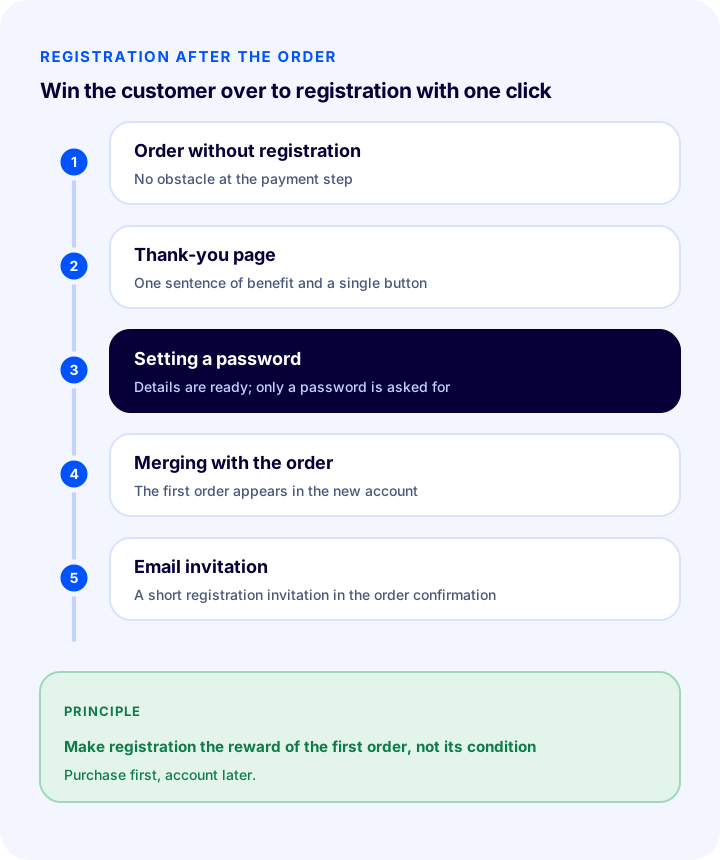
- The customer completes the guest order: There is no barrier at the payment step.
- An offer is shown on the thank-you page: A one-sentence benefit such as “Save your details and pay quickly on your next purchase” and a single button.
- The account opens in a single step: The details carry over from the form; the customer only sets a password.
- The order merges with the account: The first order is immediately visible in the new account.
- Invite in the order confirmation email too: Add a short membership invitation below the email.
Which Benefits Encourage Membership?
When the customer sees that membership gives them a concrete benefit, they open an account. The clearer and more immediately usable the benefit, the higher the membership rate.
- Order tracking and history: They see their orders in one place and track their shipments.
- Saved address and fast checkout: They do not retype their details on the next purchase.
- Easy returns: They create a return request from their account in a few clicks.
- Favourite and watch lists: They save products they like and get notified when the price drops.
- Points and gift vouchers: Membership, purchases and reviews earn points or vouchers.
- Special prices and campaigns: Member-only campaigns are offered (with consent).
How to Reduce Membership and Login Friction?
Whether membership is mandatory or optional, the form itself should be simple; every unnecessary field increases the chance of drop-off. For customers who sign in, speed and ease are decisive too.
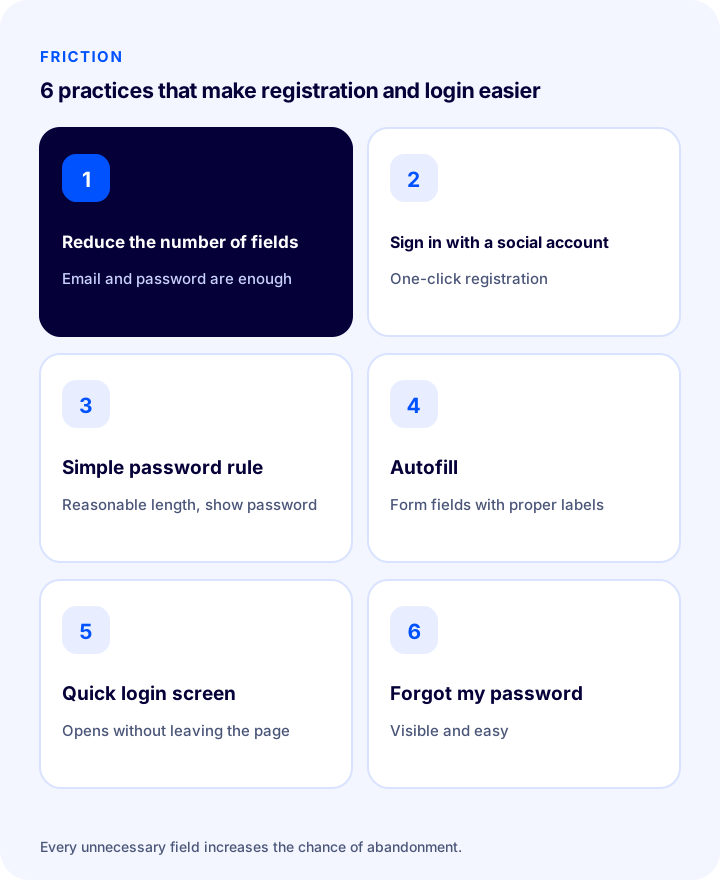
- Reduce the number of fields: Allow sign-up with only email and password; the other details are collected during the order anyway.
- Offer social sign-in: The customer signs up and logs in with one click using an existing account.
- Keep password rules simple: Overly complex password rules increase drop-off; a reasonable minimum length and a show-password option are enough.
- Support autofill: Form fields should be labelled so that they work with browser and password manager autofill.
- Use a quick sign-up and login screen: A short login screen that opens at the payment step without leaving the page does not disrupt the flow.
- Make “Forgot my password” visible: The customer should be able to reset their password easily.
How Do You Manage Guest Orders?
Guest orders are managed like normal orders; however, a few extra measures are needed to recognise the customer and to verify identity in lookup and return processes. The aim is not to leave the customer without an account out of the service.
- Offer order lookup: The customer should be able to see the status of their order with the order number and email.
- Provide tracking information by email: Email is the only channel for a customer without an account; send shipping and delivery notifications in full.
- Verify identity on returns: Ask for a match of the order number and email or phone in a return request.
- Match orders from the same customer: Merging orders that come with the same email into one customer record shows the full picture of the customer.
- Recognise the returning customer: Invite the guest customer who places a second or third order to become a member.
In Which Stores Should Membership Be Mandatory?
Guest checkout is not right for every store: membership is a sensible requirement in cases such as dealer and wholesale sales (B2B), subscriptions and digital products, and sales that require identity or age verification. In general consumer stores, however, the guest option is more often the better choice.
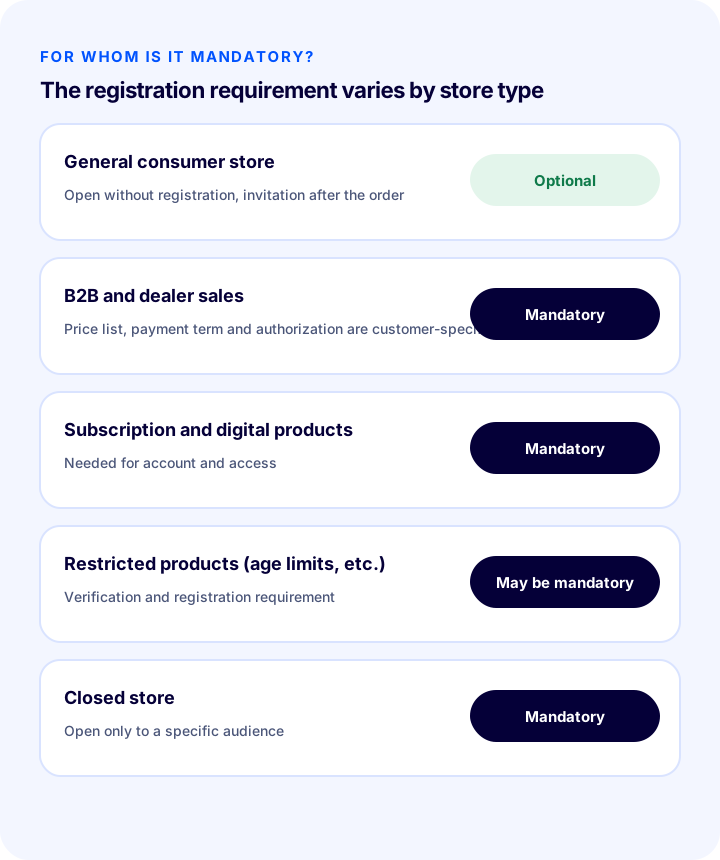
| Store type | Membership | Reason |
|---|---|---|
| General consumer store | Optional (guest option open) | Protects conversion; the customer is invited to become a member after the order |
| B2B and dealer sales | Mandatory | Price lists, payment terms and authorisation are specific to the customer |
| Subscription and digital products | Mandatory | An account is needed for access to the product and for renewal |
| Restricted products (age limits, etc.) | May be mandatory | Requirement for verification and record keeping |
| Closed store (members only) | Mandatory | The store is open only to a specific audience |
What Should the Membership and Payment Flow Look Like on Mobile?
Because most customers shop from their phones, the membership and payment form needs separate consideration on mobile. Typing on a small screen is a hassle, so every extra field and step increases the chance of drop-off even more.
- Open the right keyboard: The email field should bring up the email keyboard and the phone field the numeric keyboard.
- Use a single-column form: Side-by-side fields get cramped on a phone.
- Add large, clear buttons: The “Continue as guest” and “Sign in” buttons should be easy to tap with a finger.
- Show errors instantly: Give a warning while the field is being filled in, not after the form is submitted.
- Consider fast payment methods: A saved account and one-click payment are the elements that make the biggest difference on mobile.
How Do You Build Customer Trust in Guest Checkout?
A customer who orders without opening an account gives you personal and payment information without any account tie to you; this is why trust signals matter even more. The customer should feel what their information will be used for and that their order is safe.
- Show the secure connection: A secure connection (https) and familiar payment indicators should be visible on the payment page.
- Briefly explain how data is used: Add a sentence such as “Your details are used only for delivery of your order” and a link to the privacy notice.
- Keep return and contact information visible: The customer should know whom to reach if there is a problem.
- Do not spring unexpected extra charges: Shipping and extra fees should be visible in the order summary from the start.
How Does Membership Data Contribute to Customer Segmentation?
Membership gathers a customer's orders in a single record, and this forms the basis of segmentation: you see who spends how often, how much, and which products they show interest in. For guest customers the same data is fragmented, which is why matching orders by email is important.
- Separate frequent shoppers: Recognise those who place repeat orders as a separate group.
- Offer special service to high spenders: Such as a shipping advantage or priority support.
- Remind those who haven't ordered for a long time: Run a win-back campaign through consented communication.
- Move repeat guest customers to membership: A guest customer who has placed more than one order is the most suitable candidate for membership.
How Do You Test the Effect of Guest Checkout?
The most reliable way to find out whether the guest option works in your store is an A/B test: you show mandatory membership to part of the traffic and the guest option to the rest, and compare the checkout completion rate. Keep everything else constant throughout the test.
- Write the hypothesis: “The guest option increases the checkout completion rate.”
- Split the traffic: Randomly divide visitors into two groups; one group sees the current flow, the other the guest flow.
- Define the primary metric: The rate at which those who reach the payment step complete the order.
- Track secondary metrics: Post-order membership rate, repeat order rate and support calls.
- Wait for enough time and sample: Run the test long enough to cover weekly cycles and do not decide on very little data.
- Evaluate the result and implement: Roll the winning flow out to all traffic.
Which Messages Should Be Used to Encourage Membership?
The placement and language of the message that encourages membership determine the result: a short, benefit-focused message shown at the right moment raises the membership rate, while a long message that interrupts at the payment moment spoils the payment. Position the message according to the question in the customer's mind: “What should I do now?”
| Where? | What should be written? | Watch out |
|---|---|---|
| Payment step | “You can continue without an account” and a small “Sign in” link | Do not highlight membership and hide the guest option |
| Thank-you page | “Save your details and pay quickly on your next purchase” and a single button | The button should ask only for a password |
| Order confirmation email | A short membership invitation and the ease of order tracking | Should not overshadow the information |
| Shipped email | “Track your shipment easily with your account” | The tracking link should still work without an account |
| After the second order | Remind the returning customer of the membership benefits (points, fast checkout) | Do not show the same message over and over |
8 Common Mistakes in Membership and Guest Checkout
- Making registration mandatory before payment: It drives away first-time customers.
- Making the registration form longer: Every unnecessary field increases the abandonment rate.
- Asking for too much data in a guest order: It lowers conversion and also contradicts the KVKK principle.
- Never offering registration after the order: You miss out on customer data and the chance of repeat sales.
- Writing generic benefits: Show a concrete benefit instead of “Don’t miss out on opportunities.”
- Making marketing consent a condition of registration: Explicit consent must be given freely; use a separate, unticked checkbox.
- Not offering order tracking for guest orders: Customers cannot see their order and support requests increase.
- Making decisions without measuring the impact: The effect of the guest option on your store cannot be understood without testing it.
Guest Checkout Checklist
Review your checkout flow and membership setup with the items below.
- Is the guest order option enabled in your consumer store?
- Is registration mandatory and justified for B2B, subscriptions and restricted products?
- Does a guest order ask only for the necessary information?
- Is the privacy notice visible, and is marketing consent separate and unticked?
- Is there a membership invitation with a concrete benefit on the thank-you page and in the order confirmation?
- Can an account be created after the order in one click (just by setting a password)?
- Is the registration form short, and is there social sign-in and a quick login screen?
- Can a guest customer look up their order by order number and email?
- Is identity verified for return requests?
- Are orders placed with the same email matched to a single customer record?
- Is the impact of the guest option measured with an A/B test?
Managing Membership and Guest Checkout with Faprika
Managing guest and member flows together depends on the right tools. In the Faprika e-commerce platform, this stage includes the following elements (you can see which feature starts in which plan on the e-commerce plans page):
- Guest checkout: Customers can place orders without creating an account; included in all plans.
- Quick registration and login screen: Customers sign up or log in without leaving the checkout flow; included in all plans.
- Registration and login with a social media account: Customers sign up quickly with their existing accounts; varies by plan. Setting up Google sign-in is explained in the Sign in with Google tutorial.
- Reward points and gift vouchers: A points and voucher system that encourages registration and shopping is included in all plans; details on the What Are Reward Points? page.
- Favorites, comparison and price-tracking list: Lets members save products and follow price changes; varies by plan.
- User groups: You divide customers into groups and define conditions for each group, such as special shipping benefits or tax exemption; steps are in the User Groups tutorial.
- Member list and management: You manage members from the panel; details in the User Management tutorial.
- Store hiding (non-members cannot enter): Used when you want to open the store to members only; varies by plan.
- Blacklist: Restrictions are applied to problematic customers; varies by plan.
Frequently Asked Questions
What is guest checkout?
Guest checkout is a feature that lets customers place an order by entering only their delivery and contact details, without creating an account or logging in. The order confirmation arrives by email and no permanent account is created.
Should membership be mandatory in e-commerce?
In general consumer stores, most of the time no: mandatory registration adds an extra obstacle at the payment step and can increase abandonment. It is more balanced to enable the guest order option and invite the customer to register after the order. In B2B, subscription and restricted-product sales, however, registration is a sensible requirement.
Does guest checkout increase conversion?
It can generally increase the completion rate because it reduces abandonment at the payment step; however, the effect differs from store to store. You should measure the real effect with an A/B test, by comparing the order completion rate of those who reach the payment step.
How do I win the customer over to registration?
Offer membership not before but after the order, with one click on the thank-you page and in the order confirmation email. Since the customer’s details are already available, they only need to set a password. State concrete benefits such as order tracking, a saved address, easy returns and points in a single sentence.
What information should be requested in a guest order?
Only what is needed for delivery and contact: first name, last name, email, phone and delivery address. Tax details are collected from customers who request a corporate invoice. Avoiding unnecessary fields both protects conversion and complies with the KVKK principle of not collecting unnecessary data.
How is marketing consent obtained in guest checkout?
Consent to marketing communications must be obtained through a checkbox that is separate from the privacy notice, not pre-ticked and not a condition of the order. If the customer does not consent, only order-related and transactional emails are sent.