
Contents 3 sections
Using Excel spreadsheets to manage your products on Trendyol is a very effective method. With these spreadsheets, you can update your product information in bulk and speed up your operations. First, if you want to update your products, you need to download the Excel template provided by Trendyol. This template easily contains the current information of your products and the new information you want to edit.
After downloading the Excel spreadsheet, you can see the current information of your products and make the changes you want. For example, you can update information such as product name, price and stock status. This is a time-saving method, especially for sellers with a large product portfolio.
There are also points you need to pay attention to when making updates. For example, it is important to enter correct information and avoid missing or incorrect data. In addition, by making your updates carefully, you can increase customer satisfaction and your sales performance.
After editing the Excel spreadsheet, you can upload it to your Trendyol panel to apply your updates. Then you can complete the process by waiting for the changes to be approved.
This method is a practical tool that helps you easily manage and update your products on Trendyol. With the time it saves and the ease of managing bulk operations, you can make your business processes more efficient.
Bulk Product Information Update
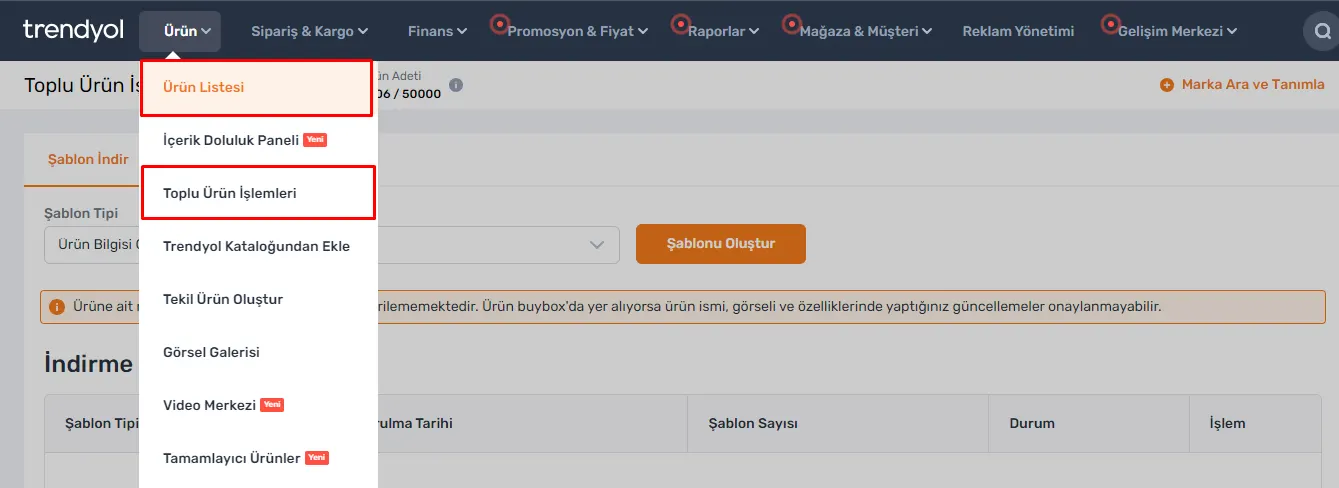
There are different methods in the Trendyol panel for updating your products. To access the product list, you can directly follow the "Product > Product List" path. In addition, you can perform the same operation by following the "Product > Bulk Product Operations" path and clicking the "Update Product Information" button. You can easily update your product information using either of these options.
Creating a Template
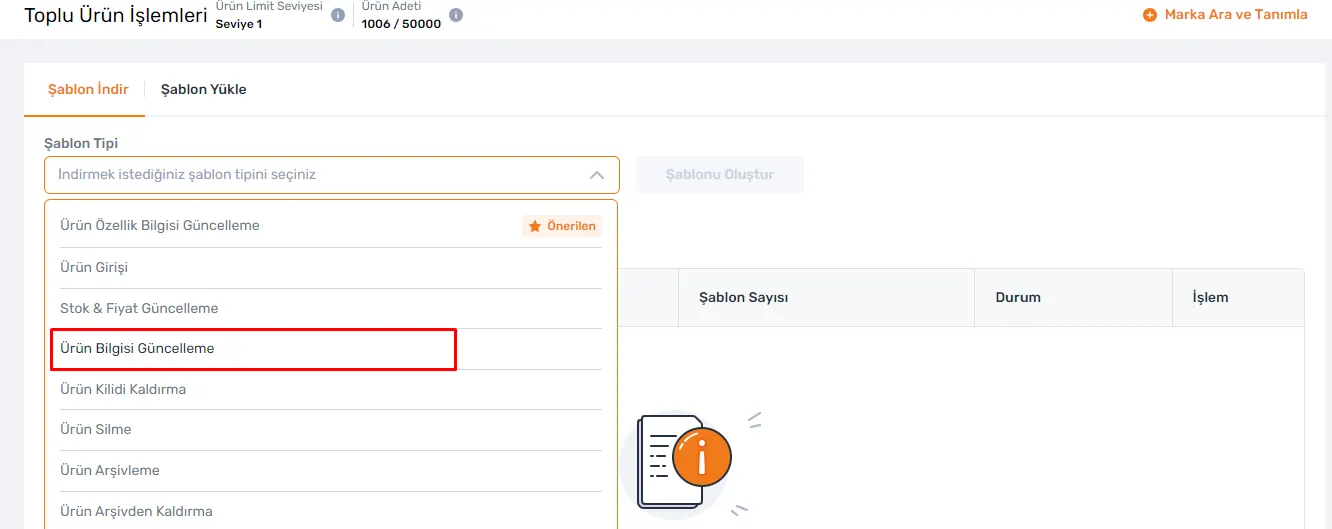
As the first step to update your product information, after choosing the "Update Product Information" option, you need to click the "Create Template" button. This step will create an update template for you and let you edit it. After creating the template, you will be redirected to the product list page. Here, you can filter by selecting the products you want. If you want to update all your products, you can download all your data in Excel format, which is a very useful option for large-scale updates. These steps allow you to easily update your product information in the Trendyol panel, so you can offer customers more accurate and up-to-date information.
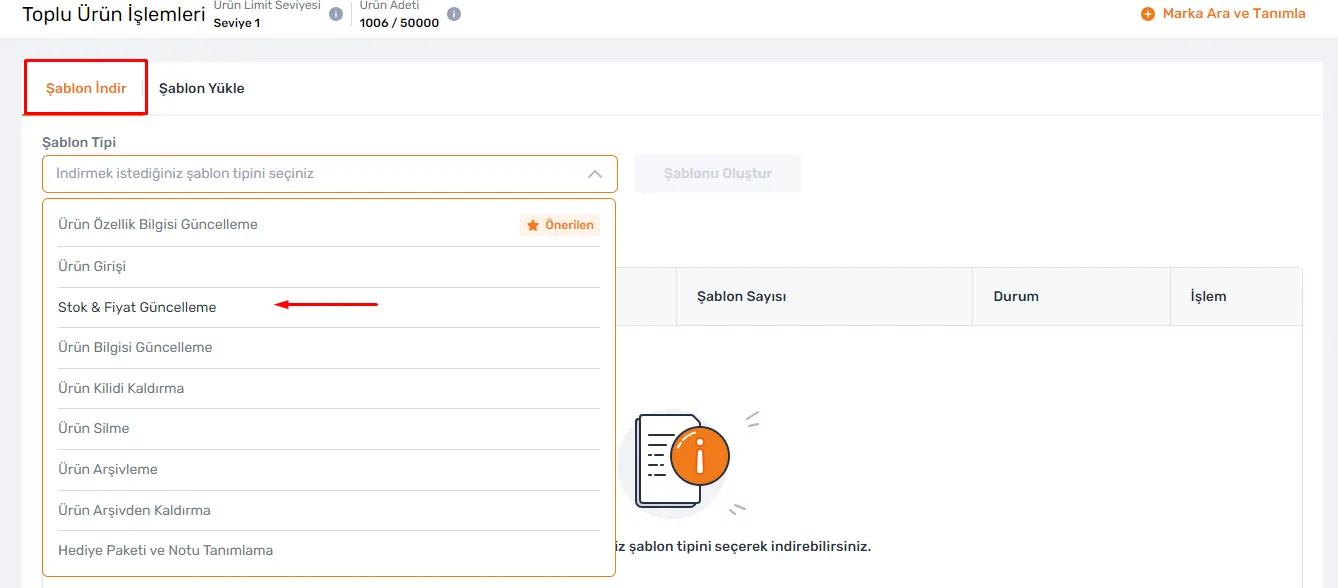
With the Excel file you download, you cannot update the color, size, stock and price information of products. However, to update stock and prices, you need to download the "Stock & Price Update" template. This template contains only stock and price information and makes your work easier without needing to update other fields. After making all other updates, it is important to save the file without changing the file format. This way, your updates are transferred to the system easily and the process becomes more efficient.
Uploading the Template
When you go to the Bulk Product Operations screen, to start the operations you should first go to the "Upload Template" tab. Here, you should choose the "Update Product Information" option to specify the operation you will perform. After preparing your template, you should click the "Choose File" section and select the relevant file from your computer. Then, you should press the "Upload" button to start the update. By following these steps, you can update your product information on Trendyol quickly and easily. This method offers a time-saving and efficient solution for large product portfolios.
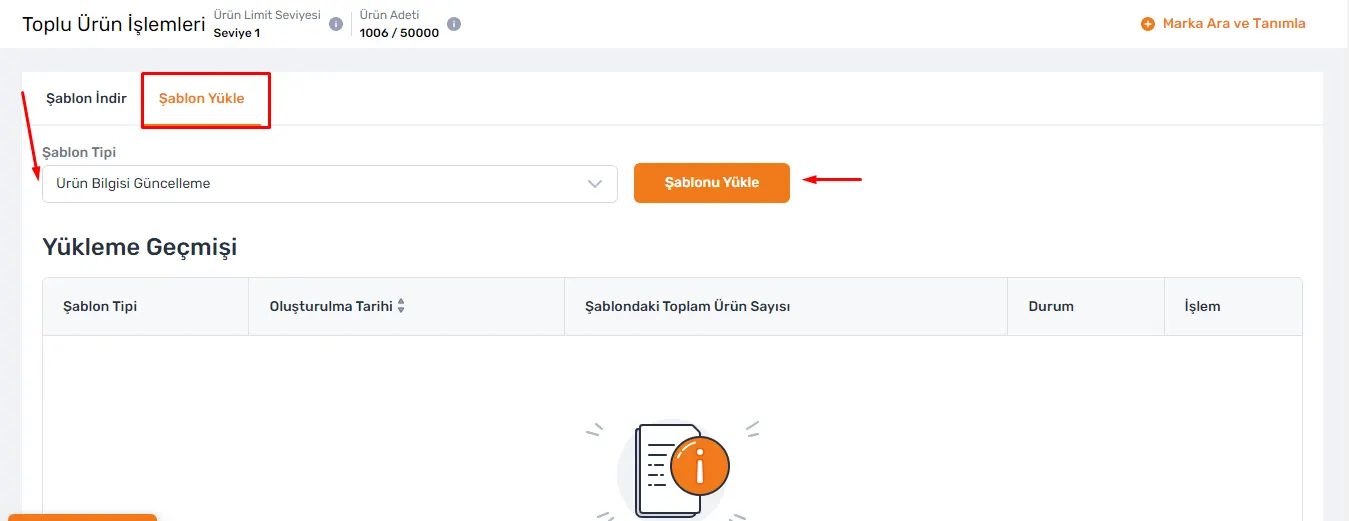
The Bulk Product Operations screen is a useful tool for tracking the operations you perform and making corrections when necessary. After uploading the Excel file, if there is an error, you can download the barcode-based error report to see where the error is and make corrections. This way, you can update your product information efficiently and manage your products on Trendyol with correct information. Following these steps when doing bulk operations can make your work more organized and error-free.
Products in the Approval Process
To easily track the status of your products in the approval process, you can use the "Products in the Approval Process" tab in the Product List. This feature is very useful for clearly seeing which stage of the approval process the products you uploaded are at. After your products are successfully approved, they will start to be displayed on the Trendyol platform with the information you updated. This process is very important for offering customers the most up-to-date and accurate information.
Bulk Stock & Price Update
Creating a Template
If you want to update stock and prices in bulk, you should go to the Bulk Product Operations option in the Product List section. This step is a useful feature that lets you update multiple products at the same time. Then, you should click the "Download Template" option and download the "Stock & Price Update" template to your computer. This template lets you easily update stock and price information. Thanks to the update operations, the stock status and prices of your products always stay up to date, so you can offer customers correct information.
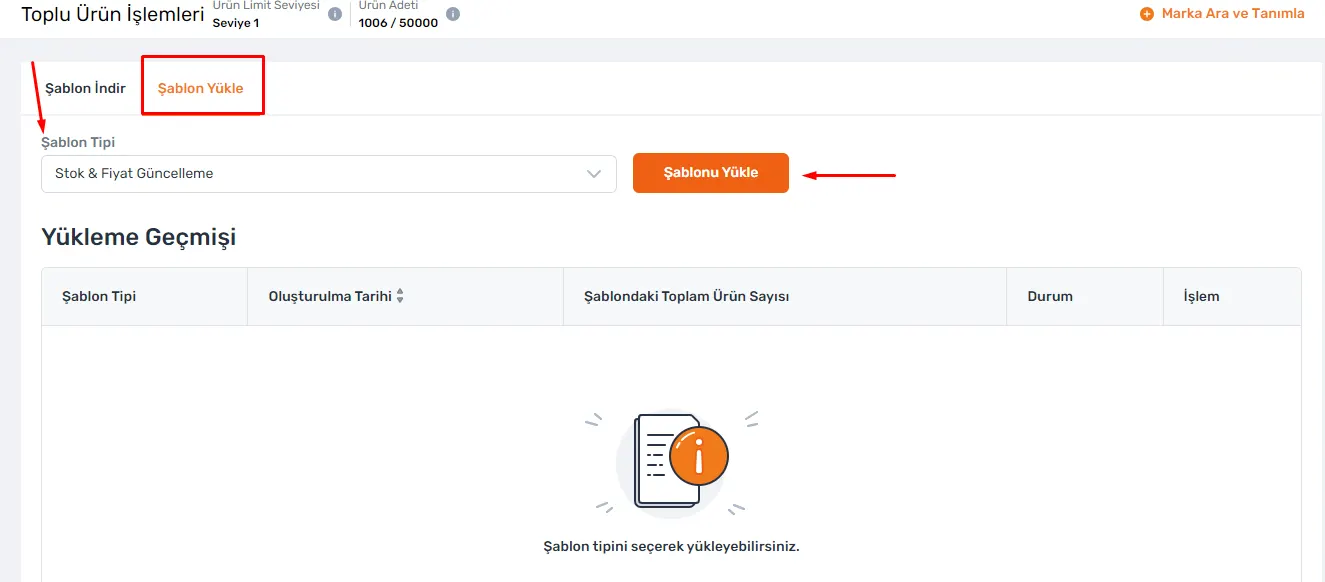
Uploading the Template
After downloading the Excel template, you should correctly enter information such as Market Sale Price, Price to Be Sold on Trendyol and Product Stock Quantity that you want to update, together with your products' barcodes, in the relevant fields. These steps are important factors that affect the sales performance of your products. Entering current and accurate information plays an important role in managing your sales and in customer satisfaction. Being careful when editing the file helps you prevent mistakes or omissions and makes the process more efficient.
If you only want to update certain information on your products, it is enough to fill in only the relevant fields when editing the Excel template. For example, if you want to change a product's stock quantity, it is enough to fill in only the barcode and stock quantity fields; you can leave the other fields blank. This flexibility makes update operations faster and more practical. After completing the editing, you can upload the file to the system using the "Stock & Price Update" template. These steps allow you to keep your products' stock and price information up to date and manage your sales more effectively.
Frequently Asked Questions (FAQ)
What Is the Most Effective Way to Update Product Information on Trendyol?
The most effective method is to use the Excel templates provided by Trendyol. With these templates, you can update your product information in bulk and speed up your operations.
What Should I Pay Attention to When Updating Product Information?
It is important to enter correct information and avoid missing or incorrect data. In addition, by making your updates carefully, you can increase customer satisfaction and your sales performance.
What Should I Pay Attention to When Editing the Excel Template?
You should be careful when editing the file and avoid mistakes or omissions. For example, if you only want to update certain information, it is enough to fill in the relevant fields.
What Steps Should I Follow to Make Bulk Stock and Price Updates?
To update stock and prices in bulk, you must first click the "Download Template" option and download the "Stock & Price Update" template to your computer. Then, enter the relevant information correctly and upload the file to your Trendyol panel.