Contents 17 sections
- What Is Bulk Invoicing?
- Why Is Bulk Invoicing Important for E-Commerce?
- Which Orders Are Invoiced in Bulk?
- How to Handle the e-Invoice vs. e-Archive Difference in Bulk Processing
- What Should Be Checked Before Bulk Invoicing?
- How to Handle Invoices for Returns and Cancellations
- How to Plan Bulk Invoicing Daily, Weekly and Monthly
- How Do You Share the Invoice with the Customer?
- What to Watch for When Bulk Invoicing Marketplace Orders
- Which Metrics Measure Bulk Invoicing Success?
- How Much Time Does Bulk Invoicing Save?
- What Data Should Be Ready Before You Start Bulk Invoicing?
- Common Mistakes in Bulk Invoicing
- How to Audit Your Invoicing Setup
- Bulk Invoicing Checklist
- How to Do Bulk Invoicing with Faprika
- Frequently Asked Questions
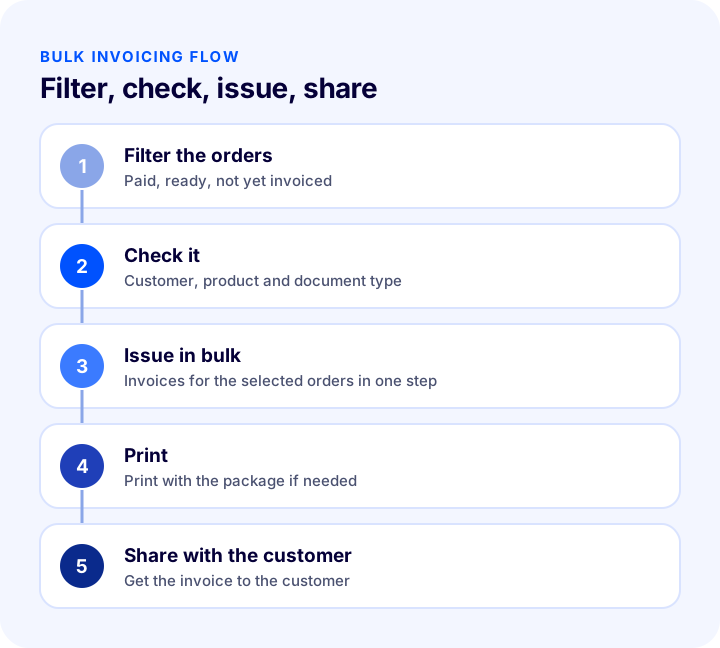
By the end of the day, hundreds of orders have piled up, and you need to issue an invoice for each one separately. Even if each invoice takes just a few minutes, the total eats up a whole working day, and skipping an invoice or issuing one incorrectly is always a risk. The short answer to what is bulk invoicing is this: issuing, printing and sharing with the customer the invoices of orders that meet certain criteria in sequence with a single process, without opening them one by one.
In this guide we explain what bulk invoicing is, which orders can be invoiced in bulk, how the e-Invoice vs. e-Archive distinction works, the checks to run before processing, what happens in case of returns and cancellations, and common mistakes. Of the two tools in this article, one calculates the time bulk invoicing saves, and the other audits your current invoicing setup with eight questions. For a definitive decision on tax and accounting matters, consult your financial advisor; this article gives general information and is not a substitute for financial advice.
What Is Bulk Invoicing?
Bulk invoicing means issuing invoices for multiple orders in one go for the selected orders, instead of opening each one by one. Each order gets its own invoice; the difference is that the process is done in bulk rather than one by one. After the invoices are issued, they can be printed and shared with customers.
For e-commerce businesses with high order volumes, bulk invoicing reduces the operational load. Orders can come from your site or from marketplaces; what matters most is correctly identifying which orders are ready to be invoiced.
Is a Bulk Invoice the Same as a Consolidated Invoice?
No. In bulk invoicing, each order's invoice is issued separately; only the process is done in bulk. A consolidated invoice, on the other hand, combines multiple orders from the same customer on a single invoice. The latter is a separate practice, and you should consult your accountant on how to do it.
| Concept | Number of invoices | What does it mean? |
|---|---|---|
| Single invoicing | One invoice per process | Orders are opened and invoiced one by one |
| Bulk invoicing | Many invoices per process | Each order gets a separate invoice, the process is in bulk |
| Consolidated invoice | One invoice for many orders | The same customer's orders are combined in one document |
Why Is Bulk Invoicing Important for E-Commerce?
Invoicing is one of the most repeated tasks after an order. Done by hand, it takes time and carries a risk of errors. Bulk processing gathers this load into a single process.
- Saves time: Instead of opening hundreds of invoices one by one, you issue them in a single process.
- Reduces the risk of errors: Orders filtered with the same criterion are processed with the same rule; fewer orders get skipped.
- Speeds up operations: The invoice is ready with the shipment and the package; dispatch does not wait.
- Eases accounting: Invoices are produced in an orderly and complete way; searching for missing invoices at month end decreases.
- Improves customer satisfaction: The invoice is ready on time and can be shared with the customer right away.
Which Orders Are Invoiced in Bulk?
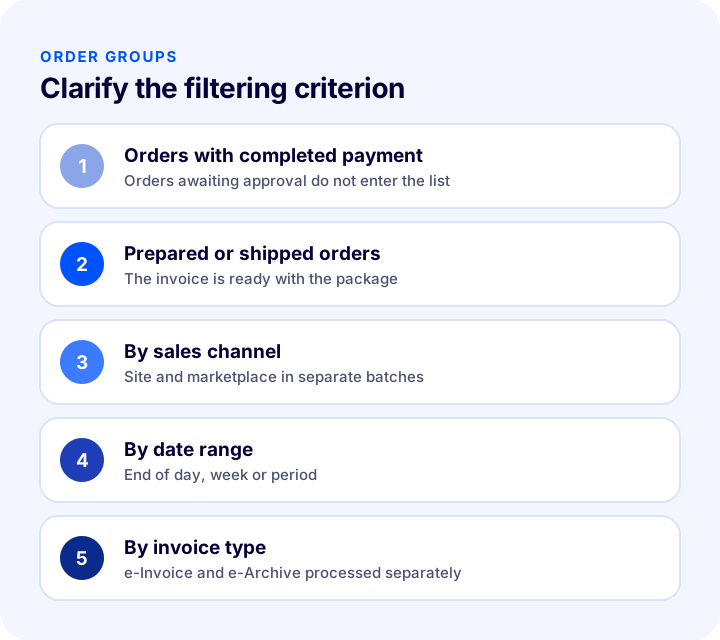
Bulk invoicing is applied to orders that meet certain criteria. The clearer the criterion, the more reliable the filtering. The groups below are commonly used distinctions in bulk processing.
1. Orders with Completed Payment
Only orders whose payment is approved or that are finalized, such as cash on delivery, should be included in invoicing. Issuing an invoice for an order awaiting approval requires a cancellation document if it is later canceled.
2. Shipped or Prepared Orders
Many businesses issue the invoice when the order is ready. That way the invoice goes out with the package or is ready on the same day as shipment. Define at which stage you will issue it as a process and apply the same rule to every order.
3. Orders by Sales Channel
Orders from your site and orders from marketplaces can be filtered separately. If the invoicing rule differs by channel, processing them in separate batches prevents confusion.
4. Orders by Date Range
Filtering orders within a specific date range for the end of day, week or period makes it easier to build a regular invoicing habit.
5. Orders by Invoice Type
Some orders go to a business that is an e-Invoice taxpayer, others to an individual customer. The document type changes with the customer type; make sure this distinction is made correctly before bulk processing.
How to Handle the e-Invoice vs. e-Archive Difference in Bulk Processing
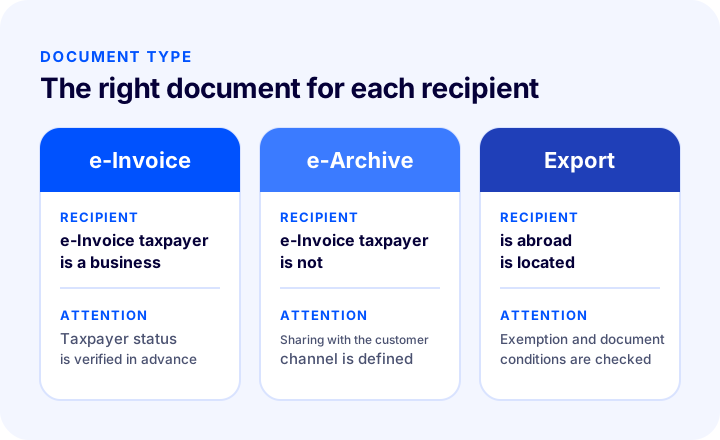
The document type to issue changes with the customer's status: an e-Invoice is issued to a business that is an e-Invoice taxpayer, and an e-Archive invoice is issued to a customer who is not an e-Invoice taxpayer. Before bulk processing, you need to make sure orders are correctly separated by customer type.
- e-Invoice: Issued if the buyer is a business registered in the e-Invoice system; the document is delivered to the buyer electronically.
- e-Archive invoice: Issued if the buyer is not an e-Invoice taxpayer, for example an individual customer; the document is archived electronically and can be shared with the customer.
- Taxpayer lookup: Whether the buyer is an e-Invoice taxpayer is checked before the invoice is issued.
For taxpayer lookup and document type selection, you can check our article E-Invoice Taxpayer Lookup: A Step-by-Step Guide with the Tax ID Number. Choosing the correct code is also important for export invoices and exemption cases; for that, see our article What Is an Exemption Invoice? Complete List of Exemption Codes.
| Buyer | Document type | Point to watch in bulk processing |
|---|---|---|
| Business that is an e-Invoice taxpayer | e-Invoice | Taxpayer status must be verified in advance |
| Individual customer | e-Archive invoice | The sharing channel must be defined |
| International customer | Export invoice | Exemption and document conditions must be checked separately |
What Should Be Checked Before Bulk Invoicing?
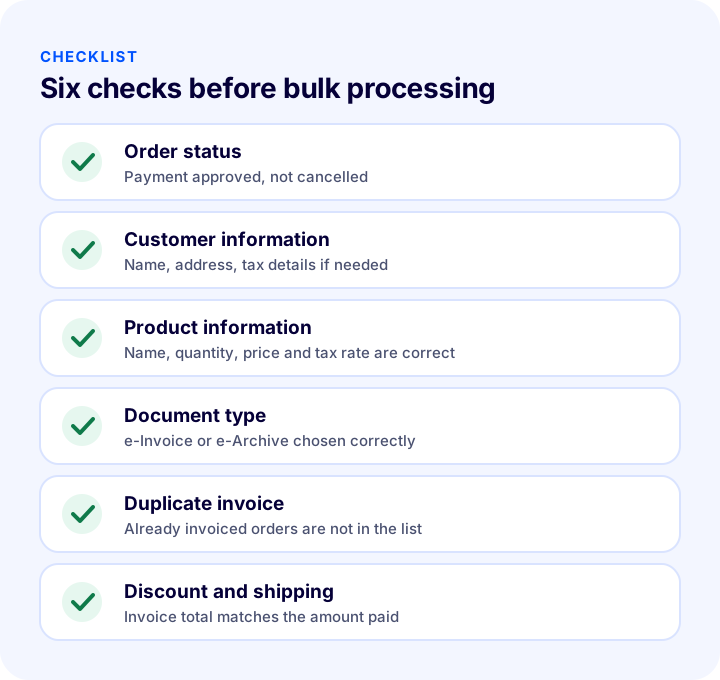
Bulk processing is fast; if it starts wrong, the errors multiply just as fast. That is why applying a short checklist before issuing reduces the burden of later corrections and cancellations.
- Is the order status correct? Orders whose payment is not approved or that will be canceled should not enter the list.
- Is the customer information complete? If the name, address or required tax details are missing, the invoice comes out wrong.
- Is the product information correct? Product name, quantity, unit price and tax rate must match the invoice.
- Is the document type correct? The e-Invoice or e-Archive distinction must be made according to customer type.
- Has it been issued before? To avoid issuing a second invoice for the same order, already issued ones must be removed from the list.
- Are the discount and shipping charge correct? Coupons, discounts and shipping fees must be reflected correctly in the invoice total.
- Try it with a small group. If you are doing it for the first time, try a few orders first and check the output.
How to Handle Invoices for Returns and Cancellations
If an order is returned or canceled after the invoice is issued, the accounting record of the issued invoice must be corrected. How this is done varies by return timing and document type; for the exact method, you need to consult your financial advisor.
- Cancellation: If noticed before the invoice reaches the buyer or is entered into the records, cancellation can be the route.
- Return: If the product comes back from the customer, a return document is issued and the stock and accounting records are corrected together.
- Record tracking: The invoice of a returned order and the return document must be matchable.
For the operational side of return management, you can read our E-Ticarette Etkili İade Süreci Yönetimi Nasıl Olmalıdır? article. Setting up the process solidly also reduces the number of corrections after returns.
Okumanızı öneririzE-ticarette Ürün İade ve İptallerin YönetimiHow to Plan Bulk Invoicing Daily, Weekly and Monthly
The value of bulk processing shows when it is done regularly. Bulk invoicing done without a plan turns into a pile of orders at month end. Set a rhythm according to your business's order volume and keep to the same rhythm.
- Daily: High-volume businesses issue invoices every day, before shipment. That way the invoice is ready with the package.
- Weekly: At lower volumes, issuing that week's orders in bulk on a set day of the week may be enough; however, to meet the issuance deadlines set by regulation, determine the frequency with your accountant.
- Monthly close: At month end, check whether any invoices are missing; do not leave any order without an invoice.
| Rhythm | Who is it for? | Point to watch |
|---|---|---|
| Daily | High order volume | Issue before shipment |
| Weekly | Medium and low volume | Meet the issuance deadline |
| Monthly close | All businesses | Missing invoice check |
Setting the rhythm once and announcing it to the team in writing keeps the process from stalling even when people change. Also make clear who owns the process: who issues the invoice, who checks it and who matches it with accounting.
How Do You Share the Invoice with the Customer?
Issuing the invoice is only half the job; making it easy for the customer to access the invoice is part of the experience. A customer who cannot see their invoice often opens a support request, which adds to the team's workload.
- Electronic sharing: Delivering the e-Archive invoice to the customer electronically removes printing and sending costs.
- Printout with the order: For businesses that want to send the invoice printout with the package, the invoice needs to be ready before shipment.
- Access from the customer account: If the customer can reach their invoice from their order history, there is no need for them to request it again.
- Clear communication: Briefly stating in the order confirmation how and when the invoice will be shared manages expectations.
The accuracy of invoice details comes before sharing; sharing an invoice with wrong details means correction and resending. So keep the order of checking first, sharing second.
What to Watch for When Bulk Invoicing Marketplace Orders
Orders from marketplaces can also be collected in the same panel and invoiced; however, the channel may have its own rules. Check the following points before moving to bulk processing.
- Channel separation: Filtering marketplace orders separately from site orders lets you manage channel-specific rules separately.
- Customer information: Verify that the customer details in marketplace orders arrive complete and suitable for the invoice.
- Return and cancellation flow: The cancellation and return process may work differently on a marketplace; make sure the issued invoice is managed consistently with them.
- Document conditions: Each channel has its own invoice delivery and upload conditions; follow the channel's current conditions.
Which Metrics Measure Bulk Invoicing Success?
To tell whether bulk processing is working, it is enough to track a few simple metrics regularly.
- Number of uninvoiced orders: The number of orders that should have been invoiced but were not should be close to zero.
- Number of corrections and cancellations: The number of invoices issued incorrectly and corrected later shows the quality of the control routine.
- Duplicate invoices: The number of invoices issued twice for the same order should be zero.
- Invoicing time: The time from order to invoice shows the speed of the process.
- Customer requests: Support requests such as the invoice did not arrive show whether the sharing routine is adequate.
Review these metrics at least monthly. If the number of corrections is high, the problem is often not speed but the filtering criterion or data quality; look there first.
How Much Time Does Bulk Invoicing Save?
The easiest way to see the time savings is to compare the time it takes to issue a single invoice by hand with the time in bulk processing. The tool below shows how many hours per month bulk processing saves based on your daily order count.
The main lesson of the tool is that the benefit grows with order volume: for a business with few orders, bulk processing is a small convenience, while at high volume it is real operational savings. The time saved delivers the real benefit when devoted to value-adding work such as checking and customer communication.
We recommend readingE-Commerce Metrics: 15 KPIs You Need to Track and Their Calculation FormulasWhat Data Should Be Ready Before You Start Bulk Invoicing?
Bulk processing is only as good as the quality of the data you have. Missing or incorrect data means missing and incorrect invoices in bulk as well. Before starting, make sure the following data is in order.
- Your company details: Legal name, tax office, tax number and address must be correct and up to date.
- Product cards: Product name, unit and tax rate must be entered correctly; a wrong tax rate carries over to all invoices.
- Customer records: Name, address and, for corporate customers, tax details must be complete.
- Order statuses: It must be clearly defined which order statuses count as ready for invoicing.
- Invoice design: The logo, legal name and description fields that will appear on the invoice must be set up beforehand.
Doing this preparation once saves time in every bulk process. If the preparation is skipped, the speed of bulk processing turns into errors multiplying just as fast.
Common Mistakes in Bulk Invoicing
- Leaving the filtering criterion vague: If it is unclear which orders will be invoiced, skipped or duplicate invoices result.
- Invoicing an order whose payment is not approved: If the order is canceled later, a correction burden arises.
- Mixing up the document type: Issuing an e-Archive to an e-Invoice taxpayer, or an e-Invoice to an individual customer, is an error.
- Issuing duplicate invoices: A second invoice for the same order confuses accounting and the customer.
- Issuing with missing customer information: An invoice with a missing name, address or tax detail needs correction.
- Not checking discounts and shipping charges: The invoice total may not match the amount the customer paid.
- Skipping the small trial: Running the first bulk process with hundreds of orders multiplies the error hundreds of times too.
- Not sharing the invoice with the customer: If the customer does not see their invoice, they open a support request.
How to Audit Your Invoicing Setup
The tool below checks your current invoicing setup with eight questions. Tick the items that apply to you; the tool tells you how solid your bulk invoicing practice is.
Bulk Invoicing Checklist
Before starting a bulk process, look at the summary table below; the same items also appear in the audit tool above.
| Title | Check |
|---|---|
| Filtering | Clear criterion: paid, prepared, not yet invoiced orders |
| Document type | e-Invoice and e-Archive separated by customer type |
| Information | Customer, product, discount and shipping charge are correct |
| Duplicates | Already invoiced orders are not in the list |
| Test | Tried with a small group the first time |
| Returns | Correction path is clear for returns and cancellations |
| Sharing and archive | Shared with the customer, archived regularly |
How to Do Bulk Invoicing with Faprika
In Faprika, bulk invoicing is a feature that lets you invoice orders that meet certain criteria in one step, print them and share the invoices with your customers. It also includes the following:
- Bulk or single invoicing: With the E-Invoice, E-Waybill and E-Archive module, you can invoice orders from your e-commerce site and marketplaces one by one or in bulk.
- Single panel: You can manage e-Invoice, e-Waybill and e-Archive operations from the same panel without needing an extra program.
- Automatic invoicing: The invoicing process can be started when orders are created, and documents are archived within the system.
- Marketplace orders: Sales from marketplaces can also be collected in the same panel and invoiced.
- Invoice design: With the Invoice Printing and Design feature, you can design printed invoices and order form printouts to match your brand.
- Affordable credits: e-Invoice credits are offered at affordable prices; see the relevant page for current terms.
Which feature is in which plan varies by plan. For details, see the plans page; for the e-document solution, the e-Invoice page; and for an introduction to the module, the e-Invoice, e-Waybill, e-Archive add-on page.
Frequently Asked Questions
What is bulk invoicing?
It means issuing invoices for multiple orders that meet certain criteria in a single step, instead of opening each invoice one by one. Each order gets its own invoice; the difference is that the process is done in bulk.
Is a bulk invoice the same as a consolidated invoice?
No. In bulk invoicing, each order's invoice is issued separately. A consolidated invoice, on the other hand, combines multiple orders from the same customer on a single invoice and is a separate practice; consult your accountant about it.
What should be checked before bulk invoicing?
Check the order status, customer and product information, document type, duplicate invoices, and discount and shipping charges. If you are doing it for the first time, try it with a small group first.
What is the difference between an e-Invoice and an e-Archive invoice?
If the buyer is a business registered in the e-Invoice system, an e-Invoice is issued; otherwise, an e-Archive invoice is issued. Before bulk processing, make sure orders are correctly separated by customer type.
What happens if there is a return after the invoice is issued?
In case of a return or cancellation, the accounting record of the issued invoice must be corrected. The method varies by return timing and document type; for the exact procedure, you should consult your financial advisor.
Can bulk invoicing be done in Faprika?
Yes. In Faprika, orders that meet certain criteria can be invoiced in bulk, printed and shared with customers. Which feature is in which plan varies by plan.