Table of Contents 16 sections
- What Are E-Commerce Payment Methods?
- Why Does the Choice of Payment Method Affect Sales?
- How Does Payment by Credit and Debit Card Work?
- When Do Bank Transfer and EFT Make Sense?
- Which Customers Does Cash on Delivery Reassure?
- What Are Wallet, Balance and Pay by Link?
- How Do You Choose Alternative Payment Methods by Country?
- Which Method Suits Which Customer?
- How Do You Balance Conversion, Cost and Risk?
- How Do You Calculate the Cost of Payment Methods?
- How Do You Keep the Payment Page Simple and Trustworthy?
- How Do You Manage Payment Status and Operations?
- Common Mistakes with Payment Methods
- Payment Page Checklist
- How Do You Manage Payment Methods with Faprika?
- Frequently Asked Questions
The customer filled their cart, reached the payment step and could not see the method they like. Their next move is often to close the tab. No matter how right the product, price and shipping are, the payment step is the last gate to the sale, and the wrong set of methods closes that gate. On the other hand, enabling every method is not the solution either: each method has a cost, an operational burden and a share of risk.
This guide treats e-commerce payment methods as a map: how each method works, which customer and which country it suits, how to balance conversion, cost and risk, and how to keep the payment page simple. It also includes a calculator that compares the cost per method and a payment page check. Since virtual POS applications, cash on delivery and bank transfer management are covered in detail in separate guides, only the selection framework and bridges to the related guides appear here.
What Are E-Commerce Payment Methods?
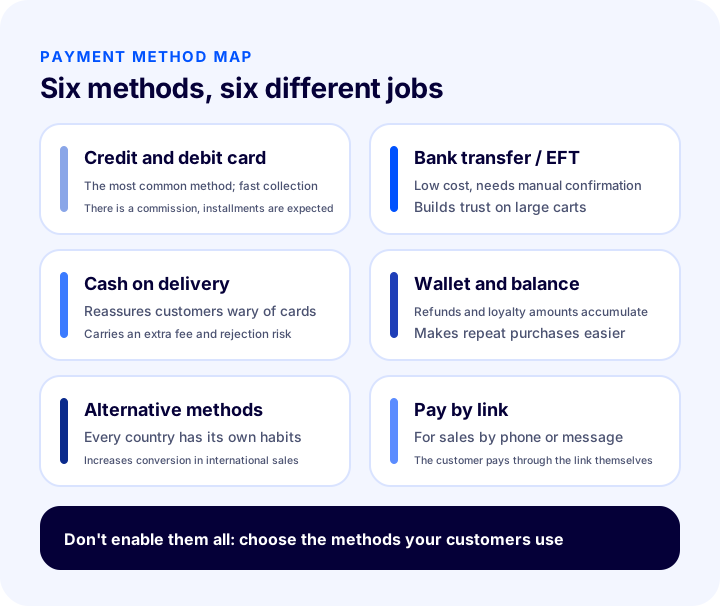
E-commerce payment methods are the ways a customer gets the price of an online order to the store: credit and debit card, bank transfer and EFT, cash on delivery, wallet or balance, country-specific alternative methods and payment through a link are the main ones.
Methods differ in three things: who collects the money and when, the friction the customer experiences at the moment of payment, and the cost and risk the store bears. The table below summarizes the six methods in the same framework.
| Method | How does it work? | Advantage for the customer | What the store should watch |
|---|---|---|---|
| Credit and debit card | Card details are verified through a virtual POS or payment institution, collection happens at the moment of payment | Fast, installments possible | Transaction commission, chargeback and fraud risk |
| Bank transfer / EFT | The customer sends the money from their own bank to the store's account | Does not enter card details | Payment is checked manually, confirmation may be delayed |
| Cash on delivery | The amount is paid to the courier on delivery | Confidence of seeing the product first | Extra service fee, risk of orders not accepted on delivery |
| Wallet and balance | A refund or bonus amount in the customer's account is deducted from the payment | One-click payment, accumulated value | Balance accounting and usage rules |
| Alternative methods | A local method common in the customer's country is offered | A familiar and trusted route | Each method needs its own integration and rules |
| Pay by link | The seller generates a payment link, the customer pays through the link | Easy by phone or messaging | Link expiry and tracking the matching order |
Why Does the Choice of Payment Method Affect Sales?
The choice of payment method directly affects abandonment at the payment step, because the customer treats not only the product but also the way of paying as part of the purchase decision. If their preferred route is missing or does not inspire trust, they leave the cart.
The effect shows up in three places:
- Conversion: When the method the customer is used to is offered, the payment step gets shorter and the likelihood of completion rises.
- Cart size: Options such as installments or balance make higher-value carts possible.
- Trust: In a new store, familiar methods that offer a way back make the first purchase easier.
Some of those who abandon their carts give up at the payment stage; the reasons and solutions are covered in What Is an Abandoned Cart? How to Reduce the Cart Abandonment Rate in E-Commerce. This guide focuses on the payment side of that problem.
How Does Payment by Credit and Debit Card Work?
In card payment, the customer enters their card details, the information is sent to the bank through a virtual POS or payment institution, and the amount is collected after verification. For most stores, this method carries the main body of payments.
For the store, card payment has two parts: an infrastructure to accept the card (a virtual POS or payment institution) and the commission deducted from every transaction. How to choose the infrastructure and the application are explained in the How to Get a Virtual POS? A Guide to Bank Virtual POS, Payment Institutions, Commission and Application Steps for an E-Commerce Site guide; for short answers to infrastructure questions, see Sanal POS Hakkında Merak Edilenler for more.
Why Are Installment Options Important?
On high-value carts, installments split the customer's payment burden across months and lower the decision threshold. That is why offering installments is often one of the factors that determine conversion for stores selling expensive products.
Installments have a price: as the number of installments grows, the transaction cost and the time it takes for the payment to reach the store may change. So adjusting installments by product group and cart value is more balanced than applying the same installment rule to every product. Installment terms differ depending on the infrastructure you work with; learn the exact rule from your infrastructure provider.
What Does 3D Secure Do?
3D Secure is a security layer that makes the customer go through an additional verification step with their own bank during card payment. It usually works with a one-time code sent to the phone and protects both the customer and the store against the card being used by someone else.
Extra verification also creates friction: if the code is delayed or the customer cannot enter it, the payment may be left unfinished. Even so, in terms of security and chargeback management, this step is indispensable for most businesses. For details, see 3D Secure Nedir? Ne İşe Yarar ? article.
When Do Bank Transfer and EFT Make Sense?
Bank transfer and EFT make sense for large orders and for customers who keep their distance from card payment, because the transaction commission is low and the customer does not enter card details. In return, whether the payment has appeared in the account is checked manually or semi-automatically.
The real difficulty of this method is operational: a customer who places an order and does not pay holds the stock, and if the payment description gets mixed up, matching becomes hard. How to display the account details, how to set the payment deadline and how to set up the confirmation process are explained in detail in the How to Manage Payment by Bank Transfer and EFT? Difference Between Bank Transfer and EFT, Order-Payment Matching, Pending Payment and Time Limit, Stock Hold Risk, Bank Account Details, Fraud and Mismatches, Refunds, Stock Hold Calculator and Setup Check guide.
Which Customers Does Cash on Delivery Reassure?
Cash on delivery reassures customers who hesitate to pay before holding the product or who do not use cards. In return, the store takes on the extra service fee, the risk of orders not accepted on delivery and the return shipping risk.
The real decision is not whether to enable or disable this method but for whom and under what conditions to enable it. How to pass on the extra fee, how to confirm risky orders and how to calculate the cost are explained in the What Is Cash on Delivery? How to Manage Cash on Delivery in E-Commerce, How to Calculate Its Cost and How to Reduce Undelivered Orders: A Practical Guide guide. Let's remind you of just one point here: the real cost of cash on delivery is not only the extra fee but the shipping loss on rejected orders; that is why the calculator takes these two items together.
What Are Wallet, Balance and Pay by Link?
A wallet or balance means using a refund, bonus or loaded amount accumulated in the customer's account at the store as payment on the next purchase. Pay by link means the seller sends the customer a payment link for the amount they have prepared.
Neither replaces the main methods; they complement them:
- Wallet: Instead of turning a refund into a cash outflow, it keeps the amount in the customer's account and makes repeat purchases easier. It is one of the practical ways to build a loyal customer base.
- Pay by link: If you sell by phone or through messaging, you collect the amount through a link instead of sending the customer to the site to build a cart.
- Mobile payment: A payment route reflected on the bill or the line balance is a way to reach audiences without cards.
For how digital wallets work, see Dijital Cüzdan Nedir?, and for the logic of mobile payment integration, see Mobil Ödeme Nedir? Entegrasyonu Nasıl Yapılır? articles.
How Do You Choose Alternative Payment Methods by Country?
Customers in each country shop with their own payment habits; if a store selling abroad settles for cards alone, it cannot reach a significant share of customers in that market. That is why choosing methods by country is one of the key decisions affecting conversion in e-export.
The table below groups countries' payment habits by general trends. It is not a statistic but a map of the questions to ask when choosing methods; verify the exact preference from customer behavior in the target country and from your own data.
| Market type | Prevailing habit | What the store should do |
|---|---|---|
| Card-dominant markets | Credit and debit card, installments or single payment | Strong card infrastructure, verification and a clear error message |
| Bank-transfer-dominant markets | Direct bank payment, account-to-account transfer | Add the local bank transfer method to the payment list |
| Wallet-dominant markets | Wallet payment through a phone app | Offer the relevant wallet method and make it visible in the cart |
| Cash and cash-on-delivery-dominant markets | Cash on delivery, wariness of cards | State the cash on delivery terms clearly, limit the risk |
At this point Faprika does two things. With country-based payment infrastructure, you can offer a different payment method in each country and appeal to the habits of that country's customers; if you will work with a payment infrastructure you do not currently use or that is not integrated, the Faprika team can carry out the integration. In addition, access to more than 50 foreign alternative payment methods is provided. For the risks on the payment side of international sales, the E-ihracatta Ödeme Risklerine Karşı Nasıl Korunursunuz?article, and for an overview of the methods, the E-Ticarette Hangi Alternatif Ödeme Sistemleri Kullanılıyor? article will be useful.
We recommend readingWhat Is E-Export?Which Method Suits Which Customer?
The suitable method changes with the customer type: a customer who decides fast and wants installments leans toward card, a corporate buyer making large purchases toward bank transfer, a customer wary of sharing card details toward cash on delivery, and a loyal repeat customer toward balance.
| Customer type | Suitable method | Why? |
|---|---|---|
| First-time buyer | Card, cash on delivery | Looks for a familiar method and a guarantee of return |
| High-value cart | Installment card, bank transfer | Wants to split the payment burden or lower the commission |
| Corporate buyer | Bank transfer / EFT | Payment goes through the accounting process and is matched with the invoice |
| Card-wary customer | Cash on delivery, bank transfer | Does not want to share card details online |
| Repeat buyer | Wallet balance, saved method | Wants speed and to benefit from accumulated value |
| International customer | The country's own alternative method | Trusts local habit |
This table also shows why the “enable every method for everyone” approach is inefficient: a single customer is usually interested in one or two methods. The store's job is to order the methods its customers use correctly and keep the rest simple.
How Do You Balance Conversion, Cost and Risk?
Each method is evaluated on three axes: its contribution to conversion, its cost to the store and the risk it carries. A good set of methods is one in which these three axes balance each other; choosing only the cheapest or only the most popular method is unbalanced.
| Method | Contribution to conversion | Cost | Risk | Operational burden |
|---|---|---|---|---|
| Card | High | Medium (commission) | Chargeback and fraud | Low |
| Bank transfer / EFT | Medium | Low | Unpaid order | High (manual check) |
| Cash on delivery | High depending on the segment | Medium to high (extra fee, rejection loss) | Order not accepted on delivery | Medium |
| Wallet / balance | High on repeat purchases | Low | Balance misuse | Medium |
| Alternative method | High in the target country | Varies by method | The method's own rules | Medium |
| Pay by link | Narrow usage | Low | The link going to the wrong person | Low |
Keep two rules in mind when reading the table. First, the cheapest method is not the most profitable method: cash on delivery looks cheap but can become expensive once the rejection loss is added. Second, the balance between contribution to conversion and cost changes by product group: the commission share is small on a low-value cart but becomes significant on a high-value cart.
How Do You Calculate the Cost of Payment Methods?
You calculate the cost per method as the amount the store loses on one order: commission for card, bank charge for bank transfer, extra service fee for cash on delivery and the shipping loss on rejected orders. The tool below compares these three methods at the same order value.
Enter into the tool the order value, the card commission rate, the bank transfer charge rate, the cash on delivery extra fee, the share of orders not accepted on delivery and the shipping amount lost on a rejected order. “Currency” is written instead of a currency symbol; read it in your own currency. The numbers in the example are only to show how to use the tool and do not reflect your agreement terms.
When reading the result, evaluate the methods together, not one by one. Bank transfer often gives the lowest direct cost, but most customers want to pay by card; making bank transfer the only method can cost you more in lost conversion than you save in commission. Instead of turning off a method to cut costs, it is more efficient to show the right method to the right customer.
How Do You Keep the Payment Page Simple and Trustworthy?
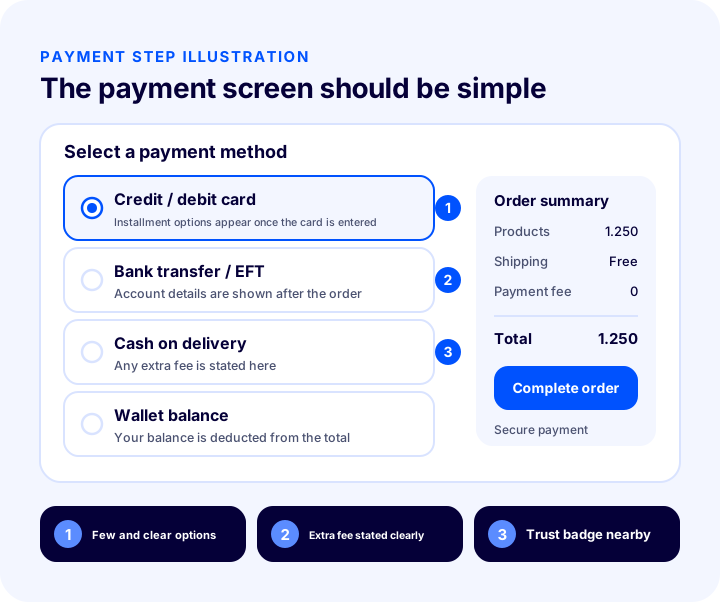
A good payment page shows a few clear methods, states extra fees upfront and keeps trust badges next to the payment area. Simplicity is not about reducing the number of methods but about making the customer's decision easier.
The practical rules are:
- Order the methods: Put the most used one at the top; let the customer find what they are looking for at first glance.
- Show the extra fee upfront: The fee of a method such as cash on delivery should be visible at the moment of choice; there should be no surprise at the last step.
- Give a short description per method: In one sentence, say when to pay for bank transfer and what applies to cash on delivery.
- Keep trust badges close: Secure payment information and the refund condition should be near the payment button.
- Keep installment information clear: The customer should see the installment option, if possible, while entering the card, not after they have entered it.
- Manage the error state: When the payment cannot be completed, the reason and the way to fix it should be stated clearly.
For how to use trust badges, see the E-Ticarette Güven Damgası Nedir ve Nasıl Alınır? article. You can also use the decision flow below to evaluate your payment page.
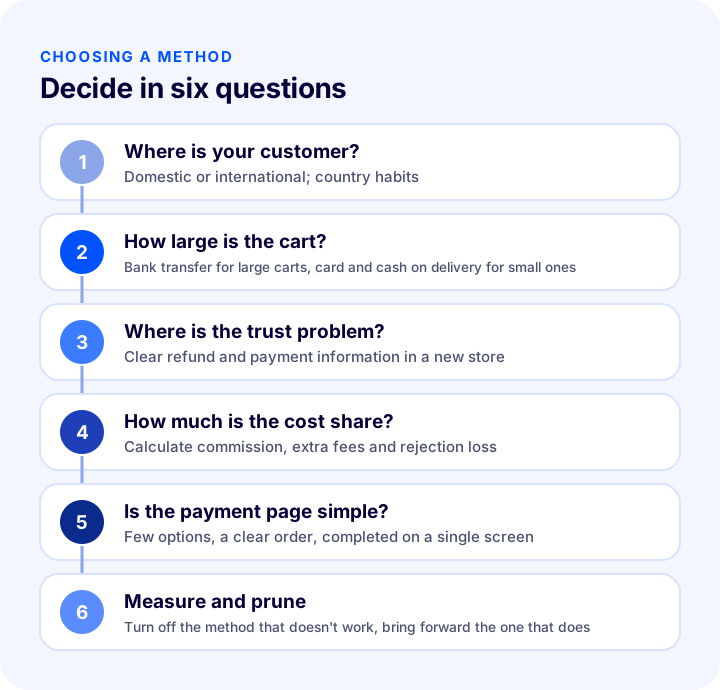
| Question | What does the answer change? |
|---|---|
| Where is your customer? | Whether it is domestic or international determines the set of methods |
| How large is the cart? | Bank transfer and installments stand out on large carts, card and cash on delivery on small ones |
| Where is the trust problem? | In a new store, clear refund and payment information and a cash on delivery option increase trust |
| How much is the cost share? | Commission, extra fee and rejection loss are calculated together |
| Is the payment page simple? | The aim is few options, a clear order and a flow completed on a single screen |
| Are you measuring? | The method that doesn't work is turned off, the one that does is brought forward |
How Do You Manage Payment Status and Operations?
Choosing a payment method is half the job; the other half is correctly tracking the payment status each method produces. In orders paid by bank transfer or cash on delivery, payment is not completed at the time of the order; these orders stay in the “pending” status and someone must check and confirm them.
In Faprika, payment statuses are generally tracked under three headings: Payment Pending, Payment Completed and Payment Failed. When the customer chooses bank transfer or cash on delivery, the order automatically becomes “Payment Pending”; after the business checks the payment, it can manually change the status to “Payment Completed”. For methods that work in sync with payment systems, the status is assigned automatically. For the steps, see the Payment Status Operations training page.
| Situation | When does it occur? | What does the business do? |
|---|---|---|
| Awaiting Payment | When bank transfer or cash on delivery is selected | Checks the payment and confirms it when it arrives |
| Payment Completed | When collection takes place or it is confirmed manually | Moves the order to preparation |
| Payment Failed | When the payment system does not approve the transaction | Informs the customer and suggests an alternative method |
If orders whose payment has not arrived keep holding stock, another customer cannot buy that product. Faprika's feature to automatically cancel orders whose payment has not been received prevents this problem; this feature, which varies by plan, can be checked in the e-commerce plans comparison.
Common Mistakes with Payment Methods
Payment mistakes usually work silently: the customer leaves without complaining and the loss is noticed only in conversion data. The most common mistakes are:
- Settling for a single method: Some customers give up on the sale when they cannot find the method they are used to.
- Enabling every method: Too many options tire the customer, burden operations and increase the chance of errors.
- Hiding the extra fee: A surprise fee at the last step is a classic cause of cart abandonment.
- Not managing the failed payment: Not giving guidance on the error page loses the customer.
- Selling abroad only with the local method: A set of methods that does not match the target country's habits lowers conversion.
- Not measuring method data: Leaving the decision to guesswork without knowing which method works.
- Not tracking payment statuses: Pending orders are forgotten and stock is held for nothing.
Payment Page Checklist
Go through the list below before launching or reviewing your payment page. When every item is “yes”, your payment flow has reached a structure that builds customer trust and makes the sale easier.
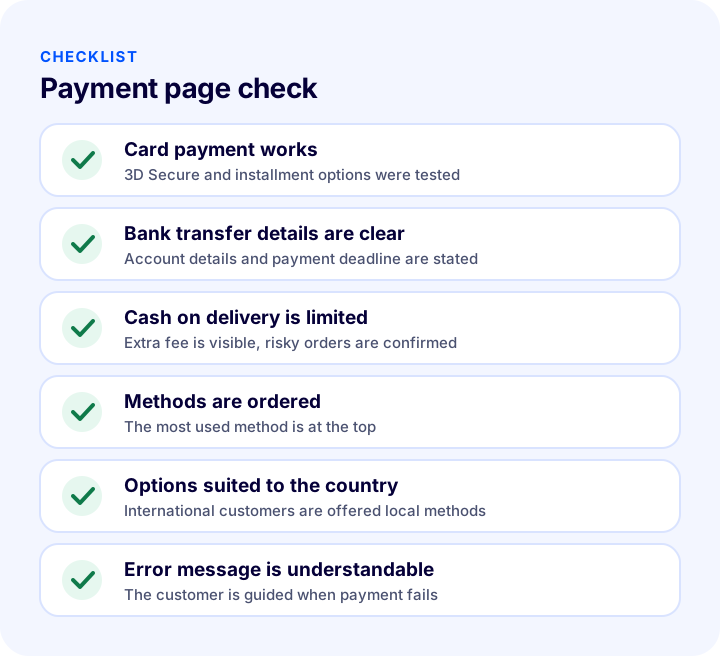
| Field | Check | Done? |
|---|---|---|
| Card | Card payment and verification work in a test order | Yes / No |
| Bank Transfer | Account details and payment deadline are clear | Yes / No |
| Cash on delivery | Extra fee is visible at the moment of choice | Yes / No |
| Order | Methods start with the most used | Yes / No |
| Installment | Options are clear while the card is being entered | Yes / No |
| Country | Local methods are offered for the target countries | Yes / No |
| Mistake | A guiding message appears when payment cannot be completed | Yes / No |
| Measurement | Method usage is tracked regularly | Yes / No |
How Do You Manage Payment Methods with Faprika?
In Faprika, you manage payment methods from the panel through the “Configuration, Payment Settings, Payment Types” steps. For each payment type, the name, title, order in the list and active or passive status are set; the description field is used to write information for the customer; price and restriction definitions are made on the payment type's edit screen.
The main capabilities are:
- Payment systems: You work integrated with many payment infrastructures and bank virtual POS; Faprika-specific commission rates apply to partner payment systems.
- Bank virtual POS: You can work with bank virtual POS in Turkey.
- Management from one screen: A solution that lets you manage virtual POS from separate banks and payment systems on a single screen is offered together with card storage and foreign alternative payment methods.
- Alternative and country-based methods: With more than 50 foreign alternative payment methods and country-based payment infrastructure, you offer options that suit the habits of international customers.
- Bank transfer and cash on delivery: You define the two methods as payment types and carry out the steps of confirming cash on delivery orders and updating payment status from the panel; a cash on delivery surcharge can also be defined.
- Faprika Wallet: Lets customers use the amount they earn from their purchases on the next purchase; transferring the amount to the wallet on returns and exchanges is a common option.
- Pay by link: In sales made by phone or message, you collect payment with a payment link.
- Restrictions and campaigns: You apply payment system restrictions by order, shipping and user, and define campaigns by payment type.
- Reporting: You track how much each method is used with the order status and payment type report.
Some of these features vary by plan; for details, see the e-commerce plans comparison and the payment add-ons page: payment add-ons. A step-by-step walkthrough of cash on delivery settings is in the Cash on Delivery Management training, and the bank transfer side is in the Bank Transfer and EFT Management training.
We recommend readingWhat Is Cash on Delivery? How to Manage Cash on Delivery in E-Commerce, Calculate Its Cost and Reduce Undelivered Orders: A Practical GuideFrequently Asked Questions
What are e-commerce payment methods?
The main methods are credit and debit card, bank transfer, cash on delivery, wallet or balance, country-specific alternative methods and pay by link. Each appeals to a different customer and a different balance of cost and risk.
How many payment methods should I add to my store?
There is no fixed number; it is enough to enable the methods your customers actually use. The general approach is to start with the main methods and add or remove based on order data. Too many options tire the customer and burden operations.
Is cash on delivery or card payment more profitable?
Card payment has a commission; cash on delivery has an extra service fee and the loss from orders that are not accepted on delivery. Which is more profitable depends on your own rates; with the calculator in this guide, you can compare the two methods at the same order value.
Which payment method should I offer international customers?
You should offer methods according to the common habit in the customer's country; settling for cards alone means failing to reach part of the customers in that market. Faprika provides country-based payment infrastructure and more than 50 foreign alternative payment methods.
Why do customers abandon the payment page?
Common reasons include the preferred method being missing, an extra fee appearing at the last step, a lack of trust badges, no guidance after a failed payment and a complicated page. Ordering the methods, showing the extra fee upfront and making the error message clear reduce this loss.
How do I manage payment methods in Faprika?
Under Configuration, Payment Settings, Payment Types, you set the name, order, active status and description of each payment type. You can update the status of bank transfer and cash on delivery orders from the panel, and define campaigns and restrictions by payment type.
You May Also Like
- How to Get a Virtual POS? A Guide to Bank Virtual POS, Payment Institutions, Commissions and Application Steps for an E-Commerce Site
- What Is Cash on Delivery? How to Manage Cash on Delivery in E-Commerce, Calculate Its Cost and Reduce Undelivered Orders: A Practical Guide
- How to Manage Payment by Bank Transfer and EFT? Difference Between Bank Transfer and EFT, Order-Payment Matching, Pending Payment and Time Limit, Stock Hold Risk, Bank Account Details, Fraud and Mismatches, Refunds, Stock Hold Calculator and Setup Check
- 3D Secure Nedir? Ne İşe Yarar ?