
Contents 12 sections
- What Is an About Us Page?
- Why Is an About Us Page Important?
- What Should a Good About Us Page Contain?
- What Tone Should an About Us Page Be Written In?
- How to Fill In the SEO Fields of an About Us Page?
- How to Create an About Us Page in Faprika?
- How to Prepare an About Us Page in a Multilingual Store?
- How Often Should the About Us Page Be Updated?
- What Are Common Mistakes on an About Us Page?
- About Us Page Checklist
- How to Manage Information Pages with Faprika?
- Frequently Asked Questions
The customer liked the product and found the price fair, but stopped before entering card details: “Who is behind this store? Does it really exist?” They usually find the answer in a small link in the footer, on the “About Us” page. If this page is empty, generic or unconvincing, the purchase is left half-finished; if it tells a clear and genuine story, it earns trust.
This guide explains how to write an about us page, which sections the page should contain, what tone to write in, how to fill in the SEO fields, and how to create the page in Faprika and place it in the footer or on the product page. It also includes a tool that checks title and description length and a checklist.
What Is an About Us Page?
An about us page is the information page that explains who the store is, what it sells, how it operates and why it is trustworthy. It is usually in the footer and sometimes in the top menu; it is one of the first pages visitors look at when they want to get to know the store.
The page does two jobs. It builds trust by showing the customer the people and values behind the store; and it gives search engines clear information about who the store is and what it does. For first-time customers in particular, this page is part of the purchase decision.
What Is the Difference Between an About Us Page and Other Information Pages?
A store has several information pages, and each has a different job. About us introduces the store; the contact page gives ways to reach you; the delivery and returns page explains processes; and legal pages set out terms of use and privacy.
| Page | Its job | Customer's question |
|---|---|---|
| About Us | Introduces the store and the team | Who is this store? |
| Contact | Gives ways to reach you | How do I reach you? |
| Delivery and returns | Explains the process and terms | How does the product arrive, and how do I return it? |
| Legal pages | Sets out the legal terms | What are my rights and obligations? |
| Frequently asked questions | Answers common questions | Is my question answered? |
Why Is an About Us Page Important?
An about us page is especially important for winning the trust of new customers. In online shopping, the customer cannot touch the product or see the seller; information that reduces this uncertainty builds trust. It matters for three reasons.
- Trust: Shows that the store is a real business, with its address and identity, and reassures customers who hesitate to enter card details.
- Differentiation: Creates a difference in story, values and expertise among stores selling similar products.
- SEO and brand: Ensures that a correct and clear page is found in searches by store name; gives search engines and AI assistants clear information about the store.
What Should a Good About Us Page Contain?
A good about us page consists of six sections: a short introduction, story, values, team, trust information and a pointer to the next step. They do not all need to be long; each should be clear in a few sentences.
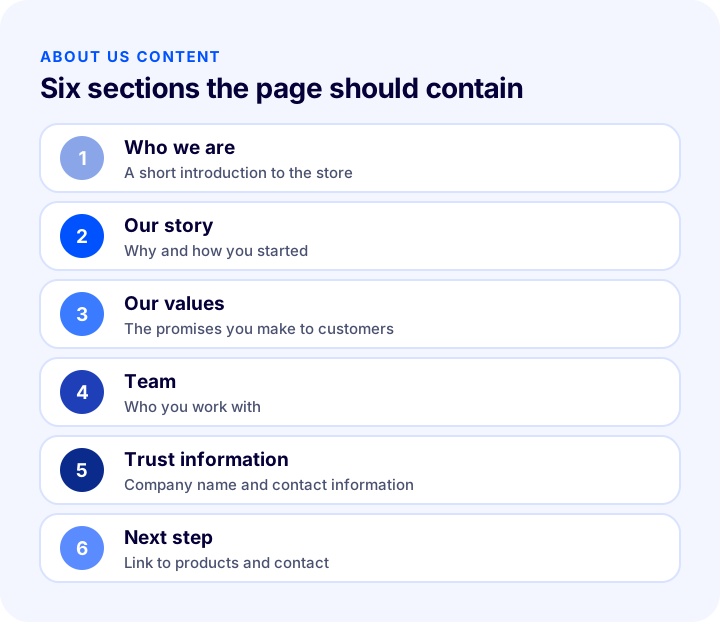
| Section | Content | Why is it needed? |
|---|---|---|
| Who we are | What the store sells and who it addresses | The visitor understands the store from the first sentence |
| Our story | How and why the store was founded | Creates a human connection and authenticity |
| Our values | Promises made to customers: quality, service, honesty | The customer knows what to expect |
| Team | Who the store works with | Shows that there are real people behind it |
| Trust information | Company name, address, contact | Confirms that the store is real |
| Next step | Link to products and contact | The reader does not get stuck on the page |
How Should the Story Be Told?
The story explains why the store exists and must be true. Exaggerated claims, figures with no clear source and generic praise reduce trust. Telling a real experience the founder had with the product, how they noticed a need, or how they started the business is far more convincing than clichés that could fit any store. Keep the narrative short and connect it to the benefit for the customer.
How Should Values Be Written?
Values are the promises the store makes to customers and must be verifiable. Instead of sentences any store could write, such as “Customer satisfaction is important to us”, describe concretely how you behave: how an order is prepared, the return condition, how you answer customer questions. Write something you already practice on the site; do not write a promise you do not keep.
Why Should Trust Information Be Visible?
The company name, address and contact information are concrete details the customer can use to verify the store. This information also appears on the legal pages; on the about us page it is enough to mention it briefly and link to the relevant page. This detail, which builds customer trust, reduces the last hesitations before entering card details.
What Tone Should an About Us Page Be Written In?
An about us page should be written in a warm, simple and direct way. Long, cold sentences full of corporate clichés push the reader away. Short paragraphs written in the store's own voice, in the “we” form and addressing the customer directly are more effective.
- Use short sentences: Let each sentence carry a single idea.
- Avoid exaggeration: Unproven claims such as “the best” or “number one” reduce trust.
- Be concrete: Instead of general praise, describe something you actually do.
- Turn to the customer: Let the text highlight the benefit to the customer, not the store itself.
- Use images: A photo of the real team, workshop or warehouse is far more convincing than a stock image.
How Long Should an About Us Page Be?
The content determines the length of the page, but generally short and scannable is enough. The reader should understand the store from a few paragraphs and clear headings. A very long story is often not read to the end; it is better to leave the details to a separate blog article and link to it from the page.
How to Fill In the SEO Fields of an About Us Page?
The about us page also appears in search results like other pages; especially when people search by the store name, it is often one of the first pages to appear. That is why the page title and meta description should be written with care. In Faprika, 65 characters are recommended for the page title and 155 for the meta description; if these limits are exceeded, the text may be truncated in search results.
The tool below shows the character count as you type your page title and meta description and tells you whether you exceed the recommended length.
The title should include the store name and the page's topic, and the description should say what the store sells and what it promises. Write a separate, original title and description for each page; using the same text on many pages makes it harder for search engines to tell the pages apart. For the general framework on page title and description length, see the guide How to Do Category Page SEO? 12 Steps to Move Category Pages to the Top in E-Commerce.
| Field | What should be written? | Recommended length |
|---|---|---|
| Page title | Page name and store name | At most 65 characters |
| Meta description | A short, appealing summary of the page | At most 155 characters |
| Meta keywords | The core words describing the page's topic | A few related words |
| Page content | Headed, short and genuine narrative | As needed |
How to Create an About Us Page in Faprika?
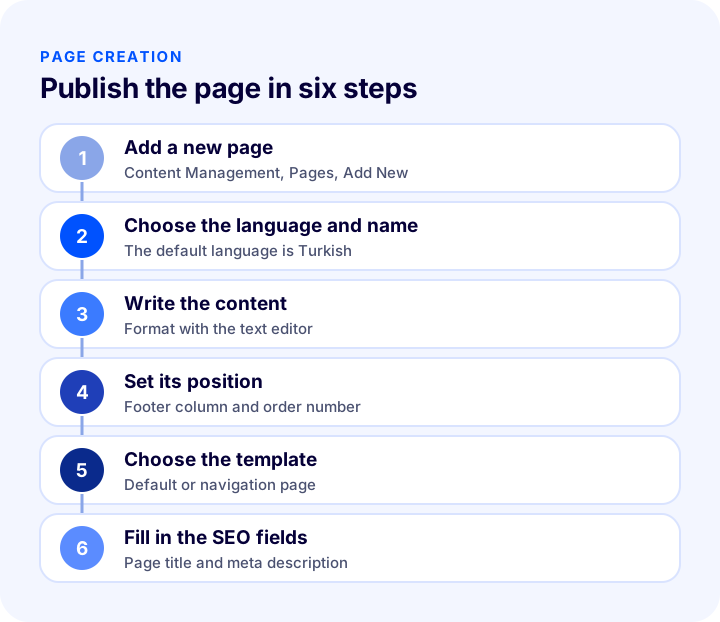
In Faprika you manage information pages from the Pages panel under Content Management. The panel shows the list of pages already added and a page search; you click a page to edit it, and use the “Add New” button for a new page. The editing screen has two areas: Page Information and SEO Information.
How to Fill In the Page Information?
The following choices are made in the Page Information area:
- Language selection: The Standard and Turkish options serve the same function; you can add English content to the English field. For other languages, contact the support team.
- Page name: The name of the page; for example “About Us” or “Delivery and Returns”.
- Description: The content of the page. You can make text bold, underline it, add links and images, and set the font.
- Active: When ticked, the page can be displayed in the footer area; if cleared, the page is not visible.
- Show in navigation menu: Makes the page appear in the navigation menu, which keeps visitors from getting lost on the site.
- Footer column 1, 2, 3, 4, 5: You choose which footer column the page will appear in.
- Product detail tab: If ticked, the page is included among the information tabs on product pages.
- Order: Determines the page's place in the column; a zero or negative number moves the page to the top.
- Page template: You choose the default template or the navigation page with a menu on the left side.
How Is the Page Positioned in the Footer?
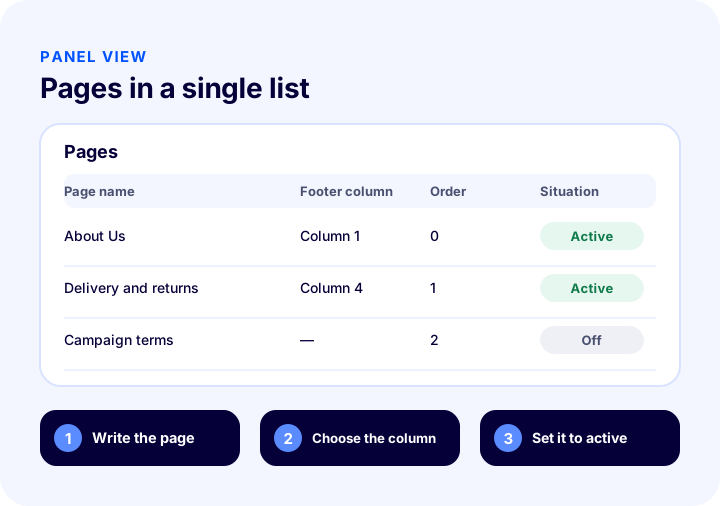
The footer column and order field determine where the page appears in the footer. For example, when you move a page to column 3 and the first position, a page that previously appeared under the “Help” heading in column 4 moves to the top of column 3. To change column headings (for example “Help”), you can search for the relevant phrase in the Language Resources area under Configuration and rename it. It is good practice to place trust pages such as About Us where everyone will see them in the footer.
What Is the Product Detail Tab For?
Product detail tabs are areas on the product page where the customer gets more information about the product. Adding product-related information pages such as delivery and returns to these tabs lets the customer find an answer to their question without leaving the product page. However, only product-related pages should appear in this area; making a general page such as About Us a product tab looks inconsistent.
How to Deactivate or Delete a Page?
To deactivate a page you want to hide temporarily, clear the Active option in the editing area and save. To remove it permanently, use the “Delete” button at the top right. If other places link to the deleted page, those links open an error page; update the links before deleting or set up a redirect if needed. For redirects, see the guide What Is a 301 Redirect? How to Set Up a 301 Redirect in E-Commerce, the Difference Between 302 and 410, Chain and Loop Checks.
For step-by-step usage with screenshots, see the Pages training page.
How to Prepare an About Us Page in a Multilingual Store?
If you sell in more than one language, write the about us page separately in each language. Since a language can be selected for a page in Faprika, the same page is prepared with different content in different languages. Instead of translating word for word, adapt it to the trust criteria of customers in that country: in some markets company information and contact matter more, in others product quality and story. Also write the title and meta description of the page in each language in that language.
After publishing the page, having customers and the team read it and give feedback is also a good method: sentences that are unclear or sound too bold are quickly noticed by an outside reader.
How Often Should the About Us Page Be Updated?
An about us page should not be written once and forgotten. When the store's address, team, product range or service terms change, the page should be updated too; a page with outdated information leaves a sense of inconsistency instead of building trust. Once a year, reading the page from start to finish and correcting every outdated sentence is enough. When the store reaches a new milestone (a new warehouse, a new product group, a new service), adding it to the story also keeps the page alive.
What Are Common Mistakes on an About Us Page?
- Writing generic clichés: Sentences any store could write do not set the store apart.
- Using unproven claims: Statements that cannot be verified, such as “the biggest in Turkey”, reduce trust.
- Inventing the story: When an untrue or exaggerated story is noticed, reputation suffers.
- Hiding trust information: Without the company name and contact information, the page loses credibility.
- Burying the page: A page that cannot be found in the footer or menu is useless.
- Leaving SEO fields empty: A page with no title and description looks weak in a store-name search.
- Not updating the page: If a changed address, team or process stays with old information, inconsistency arises.
About Page Checklist
The list below summarizes the building blocks of your about page.
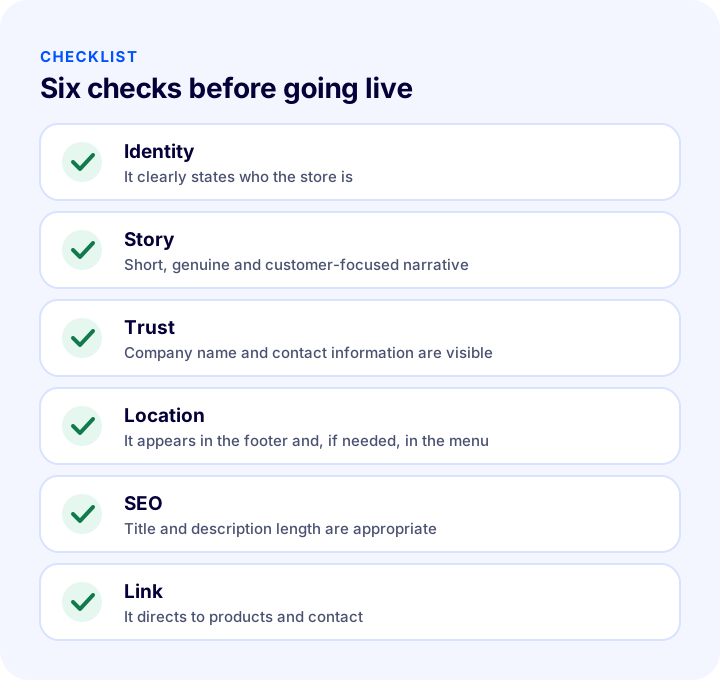
| Stage | Check | Done? |
|---|---|---|
| Identity | It is clearly stated who the store is and what it sells | Yes / No |
| Story | Short, genuine and customer-focused narrative | Yes / No |
| Trust | Company name and contact information are visible | Yes / No |
| Location | It appears in the footer and, if needed, in the menu | Yes / No |
| SEO | Page title and meta description are the right length | Yes / No |
| Image | Real team or workplace photos are used | Yes / No |
| Link | There are links to products and contact | Yes / No |
How to Manage Information Pages with Faprika
Faprika lets you create and manage information pages from the panel without writing code. The main options are:
- Pages panel: You add new pages, edit existing ones, deactivate them, or delete them.
- Text editor: You format the page with bold and underlined text, links, and images.
- Footer column and order: You decide in which footer column and in which position the page appears.
- Navigation menu: If you wish, you can also show the page in the navigation menu.
- Two page templates: You choose between the default template and a page with a left-hand navigation menu.
- Product detail tab: You can show pages such as delivery and returns as a tab on the product page.
- SEO information: You enter meta keywords, a meta description, and a page title for each page.
You can see which features are included in which plan in the e-commerce plans comparison.
We recommend readingWhat Is a Distance Sales Agreement? A Guide to Pre-Contract Information, Right of Withdrawal and Returns for E-Commerce Sites (2026)Frequently Asked Questions
What is an about us page?
An about us page is the information page that explains who the store is, what it sells, how it operates and why it is trustworthy. It usually sits in the footer and is especially important for winning the trust of first-time customers.
What should an about us page contain?
A short introduction, the store's story, the promises made to customers (values), team information, trust information such as the company name and contact details, and a next step that directs to products or contact. All of it should be short and genuine.
How to write an about us page?
Warm, simple and direct; with short sentences, avoiding exaggeration and using concrete information. Tell the story truthfully, connect it to the benefit for the customer and stay away from claims you cannot prove. Photos of the real team or premises increase trust.
What should the SEO title and description of an about us page look like?
The title should include the page name and the store name; in Faprika, at most 65 characters are recommended. The description should say what the store sells and what it promises; at most 155 characters are recommended. Write original text for every page.
How to add a new page in Faprika?
In the control panel, with Add New under Pages in Content Management. You enter the language, page name and content, choose the footer column, order and template, fill in the SEO information and save. If the Active option is ticked, the page appears in the footer.
How is the page positioned in the footer?
On the page editing screen, you choose the footer column (1 to 5) and enter a number in the order field. A zero or negative number moves the page to the top of the column. You can rename the column headings from the Language Resources area.
You May Also Like
- E-Commerce Site Legal Pages: Which Agreements and Disclosure Pages Should You Have? Distance Sales, Privacy, Membership, Payment and Delivery, Warranty and Returns, Page Placement, Common Mistakes, Update Workload Calculator and Setup Audit
- E-commerce FAQ Page: How to Prepare One? What Questions to Include, Where to Collect Them, Grouping, Writing Answers, Page Placement, SEO and Structured Data, Updates, Measurement, Common Mistakes, Support Load Calculator and Page Audit
- How Do You Ensure KVKK Compliance for an E-Commerce Site? A Practical Guide to the Privacy Notice, Explicit Consent, Cookies, IYS and Data Subject Requests
- How to Do Category Page SEO: 12 Steps to Move E-Commerce Category Pages Up the Rankings