Contents 14 sections
- What Is a Product Variation?
- Why Are Product Variations Important?
- Which Products Use Variations?
- How Do You Design a Variation?
- How Do You Set Variation Price and Desi?
- How Do You Manage Combinations and Stock Tracking?
- How Many Combinations Will There Be? Calculator
- Which Choices Other Than Size and Shoe Size Are Made with a Cart Variation?
- How Should a Product Page with Variations Be Presented to Customers?
- Common Mistakes with Product Variations
- Product Variation Checklist
- How Do You Define a Product Variation in Faprika?
- How Do You Manage Catalog and Stock with Faprika?
- Frequently Asked Questions
You sell the same shirt in sizes S, M, L and XL, and the same shoe in sizes 36 to 42. Customers should be able to choose their own size on a single product page, and you should know how many units are left in each size. A product variation solves this. Without variations, you would have to open a separate product page for every size, track stock by hand and lose customers in cluttered lists.
This guide explains what a product variation is, how variations differ from product attributes and cart variations, how to set up size and shoe size variations, how to manage combinations and stock tracking, how to set variation price and desi, and how to define variations step by step in Faprika. It also includes a tool that calculates the number of combinations and a checklist.
What Is a Product Variation?
A product variation is a different form of the same product that the customer chooses: size, shoe size, dimension and the like. A shirt's S and M sizes, or a shoe's sizes 38 and 39, are variations of the same product; all are offered on a single product page.
The purpose of a variation is to offer many options on a single page and manage each option separately. The customer picks a size and adds it to the cart; you see which size has run out and which has excess stock.
What Is the Difference Between a Variation, a Product Attribute and a Cart Variation?
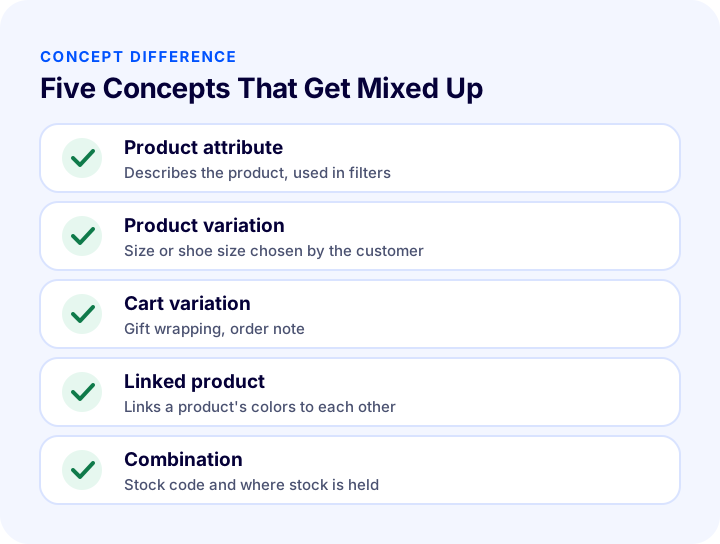
Three concepts are often confused. A product attribute describes the product and is used in filters; a product variation is the option the customer selects when buying; a cart variation is not about the product itself but an extra preference related to the order (such as gift wrapping or an order note).
| Concept | What does it do? | Example | Does it hold stock? |
|---|---|---|---|
| Product attribute | Describes the product, used in filters | Material, mold | No |
| Product variation | Option chosen by the customer | Size, shoe size | Yes, through the combination |
| Cart variation | Extra preference added to the order | Gift wrapping, order note | No |
In Faprika, color is a separate matter: a product's colors are defined not with a variation but in the “Linked Products” area; that is, each color is linked to the other colors as its own product record. We will cover this topic separately below. For product attributes, see What Are Product Attributes? How to Set Up Product Attributes and Filters in E-Commerce, and How They Differ from Variations.
We recommend readingWhat Are Product Attributes? In E-Commerce How to Set Up Product Attributes and Filters, and How They Differ from Variations Recommended readingWhat Is a Product Variant? How to Create and Manage Variants in E-commerce? A Guide to Size, Color, Stock Code and Barcode, Variant Count Calculator and Health AuditWhy Are Product Variations Important?
If variations are not set up correctly, both customers and operations struggle. They matter for four reasons.
- Simplifies the customer experience: All sizes are presented on a single page without confusion.
- Manages stock accurately: Size-level stock tracking removes a sold-out size from sale.
- Prevents lost sales: You can be sure the selected size is in stock, which reduces cancellations.
- Gives price and shipping flexibility: Different prices or desi can be defined for some variations.
For the basics of stock management, you can read What Is Stock Tracking? How to Do It?.
Which Products Use Variations?
Variations are used for every product where the customer must make a choice before buying. In clothing and footwear, size and shoe size; in furniture and textiles, dimensions; and for some products, volume or package size form this choice. If there is no choice, no variation is needed; adding a variation to a product with a single form only creates complexity.
| Product type | Variation example | Note |
|---|---|---|
| Clothing | S, M, L, XL or age range | Letter sizes and age ranges can be separate variations |
| Shoes | Sizes 36, 37, 38, 39 | Stock by size is important |
| Textiles and home | Dimensions (such as 100×200, 160×230) | Price and desi may change by dimension |
| Cosmetics and food | Volume or weight | Each size can have its own stock code |
How Do You Design a Variation?
A good variation covers the differences that customers actually choose and for which you keep stock separately. An unnecessary variation clutters the product page and adds management work. Ask three questions when designing.
- Does the customer choose this? If not, it is an attribute, not a variation.
- Do I keep stock separately? If yes, it is a variation; if not, it may be an attribute.
- Is the value list shared? If the same values are used across several products, define them once and reuse them.
Why Is a Shared Value List Advantageous?
In Faprika, you define a variation's values (for example, all ages from 1 to 8 years) once as a “predefined value.” When adding a new product, you do not retype the values; you simply select the variation. This saves time and prevents confusion from spelling differences (such as “M” versus “m”).
How Do You Set Variation Price and Desi?
For each variation value, you can optionally define an additional fee or additional desi. When the additional fee is positive, the variation costs more; when it is negative, it costs less. This lets you sell a specific option of the same product at a different price.
In Faprika, the “Additional Variation Fee” field is used for this. For example, you can use it when you want to sell the white color of a phone at a higher price than the others, or to discount size 40 of a shoe with excess stock. The “Additional Variation Desi” field lets you define additional or negative desi for shipping calculation.
| Field | What is it for? | Example use |
|---|---|---|
| Value name | Name of the option | Age 1, M, size 40 |
| Additional variation fee | Adds a surcharge to or reduces the price of the option (negative value) | Discount on a size with excess stock |
| Additional variation desi | Increases or decreases desi for shipping calculation | Extra desi for a large-size option |
| Purchase price | Holds the variation's purchase cost information | For profit calculation |
| Preselected | Makes the option preselected on the product page | Best-selling size |
| Order | Order of values in the list | Arranging sizes from small to large |
How Do You Manage Combinations and Stock Tracking?
A combination is a specific mix of a product's selectable variation values, and stock is tracked through the combination. In a product with a single variation, each size is a combination; with more than one variation, each mix becomes a separate combination.
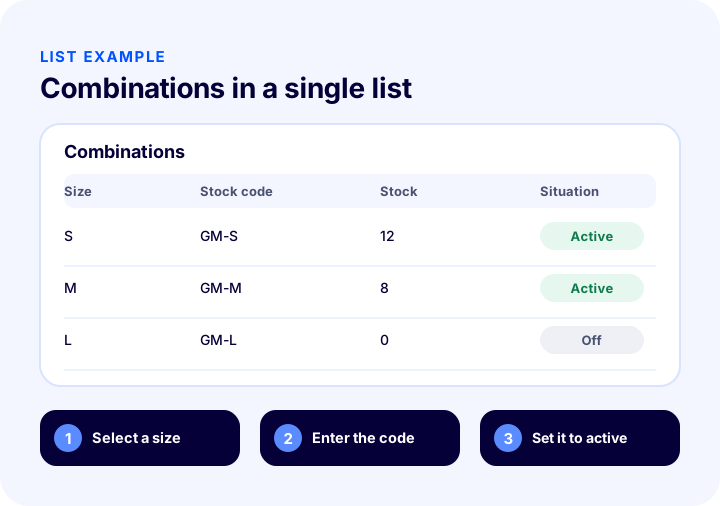
In Faprika, you define a stock code, barcode, combination price and a “notify admin below this quantity” threshold for the combination. When you mark the combination active, the customer can buy that option. For stock tracking to work, the product's stock management method must be set to “Track Stock.”
Should You Create Combinations One by One or in Bulk?
If the values fully match your product, the “Generate All Combinations” option saves time. The system creates every value combination, and you delete the ones your product does not have. If you sell only some sizes or shoe sizes, adding combinations one by one gives a cleaner result.
| Method | Advantage | Point to watch |
|---|---|---|
| Adding combinations one by one | Only the options you sell are created | Takes time with many options |
| Generate all combinations | Fast, everything is created at once | Unsold ones must be deleted, stock codes must be added |
How Many Combinations Will You Get? Calculator
As the number of variations and colors grows, the number of combinations to manage grows quickly. Because colors are separate product records in Faprika, the total number of records is the product of the number of products, colors and sizes. The tool below calculates, from these three values, the total product records and the number of combinations for which stock must be tracked.
The result shows why variation setup needs planning in large catalogs. Assign stock codes by a rule rather than at random (such as a combination of model, color and size); this keeps both stock and marketplace matching from getting mixed up. For bulk operations, see the guide How to Update Products in Bulk? A Guide to Changing Price, Stock, Category and SEO Information at Once, Filters, a Safe Method for Irreversible Actions, Price Change Calculator and Layout Check.
Besides Size and Shoe Size, Which Choices Are Made with Cart Variations?
Cart variations are used to collect additional order preferences, not the product itself. A gift wrap, an order note or a custom request field are examples. The customer makes these choices in the cart just before completing the order.
In Faprika, you create a cart variation under Catalog, Definitions, Cart Variations. You give the variation a name and a title, decide whether a selection is required, choose whether it is tax-exempt or select the tax rate, and set the selection type (for example a dropdown list). You can define an extra fee and extra desi for the values; if you mark one as “preselected,” that option applies even if the customer makes no selection.
| Example | Required? | Extra fee | Why? |
|---|---|---|---|
| Gift wrap | No | Possible | Optional extra service |
| Order note | No | No | The customer’s special request |
| Personalization details | Yes | Possible | Information is needed for production |
How Should a Product Page with Variations Be Presented to the Customer?
Customers should be able to pick their size easily and see the result of their choice right away. When adding a variation to a product in Faprika, you set the selection type: dropdown list or radio list. For fields with few options such as size, a radio list that shows all options at a glance works best; for fields with many options such as measurements, a dropdown list stays more organized.
If you mark the variation as required, customers cannot add the product to the cart without making a selection; this prevents orders arriving without a size. Providing a size chart or measurement guide in the product description reduces wrong size choices and therefore returns. For the overall layout of the product page, see the article What Should an E-Commerce Product Page Look Like? 15 Elements of a Product Page That Drives Sales.
How Are Variation Values Sorted?
The order of the values affects how quickly customers find an option. Arranging sizes from smallest to largest and shoe sizes in ascending order is the most natural layout. In Faprika, you can give each value a sort number; if the sort number is left at zero, the first value entered appears at the top. If you want to move a value you added later to the very top, simply enter a negative number as its sort number.
| Situation | Sort value | Result |
|---|---|---|
| I don’t want to sort | 0 | First entered appears at the top |
| I want to arrange in a specific order | 1, 2, 3 … | Values are arranged by number |
| I want to move a later-added value to the top | Negative number | The value moves to the top of the list |
Common Mistakes in Product Variations
Variation mistakes are mostly made during the initial setup and grow as the catalog grows. The most common ones are as follows:
- Not turning on stock tracking: If the stock management method is not “Track Stock,” combination stock does not work.
- Turning an attribute into a variation: Making a difference the customer does not choose into a variation clutters the product page.
- Retyping the same value on every product: Typing it again and again when a shared value list exists leads to typos.
- Not assigning a stock code: Combinations without codes get mixed up in marketplace and warehouse matching.
- Leaving non-existent combinations open: A size that is never produced showing up for sale leads to cancellations.
- Using “preselected” carelessly: The customer adds the wrong size to the cart without noticing.
Product Variation Checklist
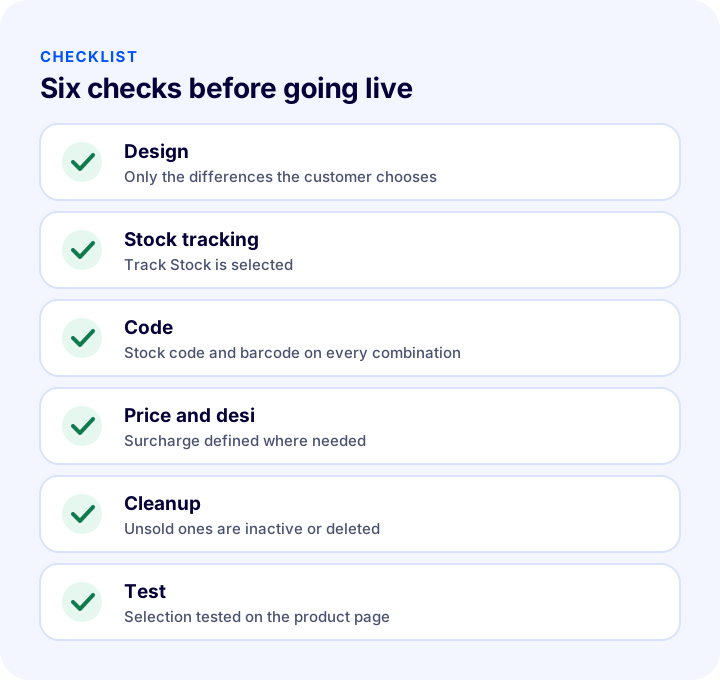
After setting up variations for a new product, go through the list below. When every item is “yes,” the variation is ready for both customers and stock management.
| Stage | Check | Done? |
|---|---|---|
| Design | Variations are used only for differences the customer chooses | Yes / No |
| Stock | Stock management method is “Track Stock,” low stock threshold is defined | Yes / No |
| Code | Every combination has a stock code and barcode | Yes / No |
| Price | Extra fee and extra desi are defined where needed | Yes / No |
| Cleanup | Unsold combinations are deleted or inactive | Yes / No |
| Test | Selection was tested on the product page on desktop and phone | Yes / No |
How Do You Define a Product Variation in Faprika?
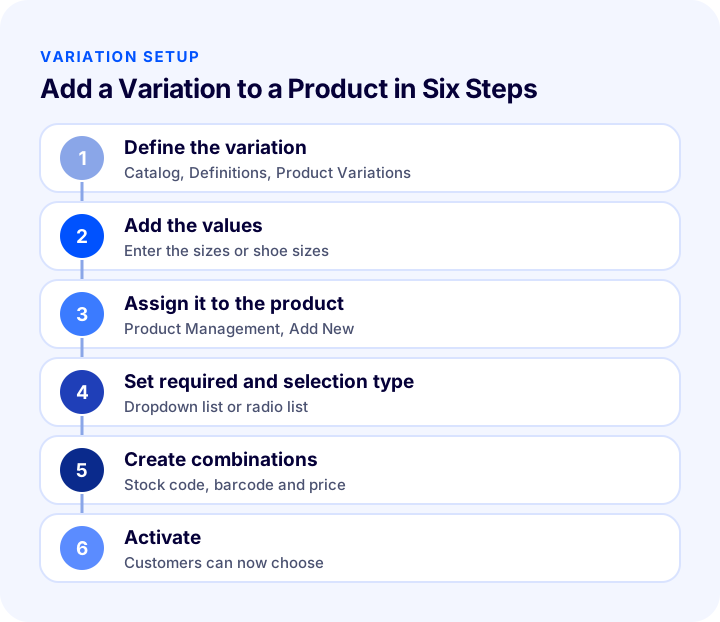
In Faprika, you first create a variation as a shared definition, then assign it to products. The definition is made under Catalog, Definitions, Product Variations; assignment to a product happens under Product Management, Add New, Product Variations.
- Variation details: You enter the variation language, name, title and an optional description; name and title are required.
- Mapped attribute: Lets the variation be transferred automatically to product attributes and kept updated.
- Predefined values: You define all possibilities of the variation (sizes, shoe sizes) once.
- Assigning to a product: In the product’s variation field, you select one of the defined variations and set whether it is required and the selection type (for example dropdown list or radio list).
- Combination: You add combinations with a stock code, barcode, price and admin alert quantity, or generate them all at once.
- Products using the variation: You see from the list which products a variation is used in.
For every detail of the panel, see the Product Variations and Cart Variations training pages, and for the product’s other settings, the Adding a New Product training.
How Do You Manage Catalog and Stock with Faprika?
Faprika makes variations part of catalog and stock management. The main options are as follows:
- Product variations: You manage options such as size, shoe size and measurements through a shared definition.
- Combination-based stock: You give each combination a stock code, barcode and price, and track stock per combination.
- Cart variations: You offer additional preferences such as gift wrap and order notes in the cart.
- Linked products: You link a product’s colors to one another.
- Bulk product update: You edit many products at once.
- Automatic SKU and barcode generation: You generate stock codes and barcodes by a rule.
You can see which features are included in which plan in the e-commerce plans comparison.
We recommend readingHow Should an E-Commerce Product Page Look? 15 Elements of a Product Page That SellsFrequently Asked Questions
What is a product variation?
A product variation is a different form of the same product that the customer chooses: size, shoe size, dimension and the like. All are offered on a single product page, and the stock of each option can be managed separately.
What is the difference between a variation and a product attribute?
A product attribute describes the product and is used in filters; it does not hold stock. A variation is the option the customer selects when buying, and stock is tracked through the combination.
How do you define color variations in Faprika?
In Faprika, a product's colors are defined not with a variation but through the New Product, Product Links, Linked Products area. Options such as size and shoe size are managed with product variations.
How is stock tracked for a product with variations?
Select “Track Stock” as the product's stock management method and create a combination for each variation value. Enter a stock code, barcode, price and admin notification quantity for the combination; with “Create All Combinations,” you can add them all at once.
Can I set a different price for one size?
Yes. By entering a positive or negative amount in the “Additional Variation Fee” field of the variation value, you can add a surcharge to the size or apply a discount. A combination-specific price can also be defined.
What is a cart variation?
A cart variation is an extra preference related to the order, such as gift wrapping or an order note. The customer makes these choices in the cart right before completing the order; an additional fee and additional desi can be defined for the option.
You May Also Like
- What Are Product Attributes? In E-Commerce How to Set Up Product Attributes and Filters, and How They Differ from Variations
- What Is an SKU? How to Create a Stock Keeping Unit (SKU) Code: Examples, Coding Rules and an SKU Generator Tool
- What Is Stock Tracking? How Is It Done?
- E-Commerce Product Page: How Should It Look? The 15 Elements of a Product Page That Drives Sales