
Contents 18 sections
- What Is Structured Data?
- Why Does Structured Data Matter in E-Commerce?
- Which Schema Types Are Used in E-Commerce?
- What Is the Difference Between JSON-LD, Microdata and RDFa?
- How to Write Product Schema Field by Field (Hands-On Lesson)
- Product JSON-LD Generator
- How to Test and Validate Structured Data
- How Do You Add Schema to a Page? Three Ways
- How Does Structured Data Contribute to AI Visibility (GEO)?
- How Do You Write Breadcrumb (BreadcrumbList) Schema?
- How Should Review and Rating Schema Be Used?
- How Do You Write Schema for Products with Variants?
- When Should Structured Data Be Reviewed?
- 8 Common Mistakes in Structured Data
- The Shortest Path for Beginners: 3 Steps
- Structured Data Checklist
- Managing Product and SEO Data with Faprika
- Frequently Asked Questions
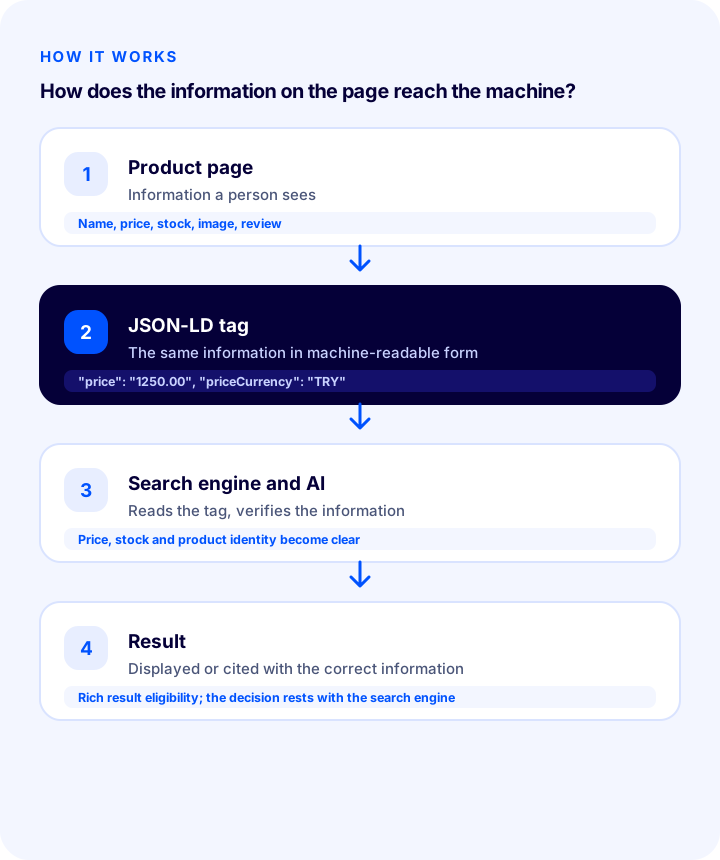
A person understands a product page at a glance: the photo, name, price, the "in stock" label and the starred reviews. Search engines and AI systems cannot read the page as easily; they have to guess which number is the price, or whether 4.8 is a rating or a model number. Structured data removes that guesswork: it describes the information on the page again, separately, in a label a machine can read without error.
This article is structured like a lesson. You will learn what structured data is, which schema types work in e-commerce, how to write product schema field by field, how to generate schema for your own product with the tool in the article, the testing and validation steps, and the most common mistakes. At the end there is a checklist you can use to review your own product pages.
What Is Structured Data?
Structured data is a method of marking up information on a page (such as product name, price, stock status and rating) with a standard vocabulary and format that search engines and AI systems can understand with certainty. The information is already on the page; structured data adds a machine-readable label to it, such as "this is a price, and the currency is TRY".
The vocabulary most commonly used in e-commerce is the schema.org standard, supported jointly by search engines; this is why structured data is often called simply "schema". The labels are most often written in JSON-LD format.
Why Does Structured Data Matter in E-Commerce?
Structured data increases the likelihood that your product's price, stock status, rating and similar information is shown correctly in search results and AI answers. It is not a ranking guarantee, and whether a rich result is shown is the search engine's decision; but without it, the information is left to guesswork.
- Correct understanding: Price, currency, stock status and product identity (SKU, barcode) are communicated without ambiguity.
- Rich result eligibility: Markup is needed for information such as price, stock status and rating to be shown in search results; whether it is shown is decided by the search engine.
- Freshness: If the schema changes whenever the price or stock changes, an outdated price is less likely to remain in search results.
- AI visibility: AI assistants try to extract product information from the page text; marked-up data makes that extraction reliable.
- Consistency with product catalogs: When the product data submitted to catalogs matches the information on the page, inconsistency warnings decrease.
Which Schema Types Are Used in E-Commerce?
The schema types most used in e-commerce are product (Product), offer (Offer), rating and review (AggregateRating, Review), breadcrumb (BreadcrumbList), organization (Organization) and frequently asked questions (FAQPage). Each describes a different part of the page.
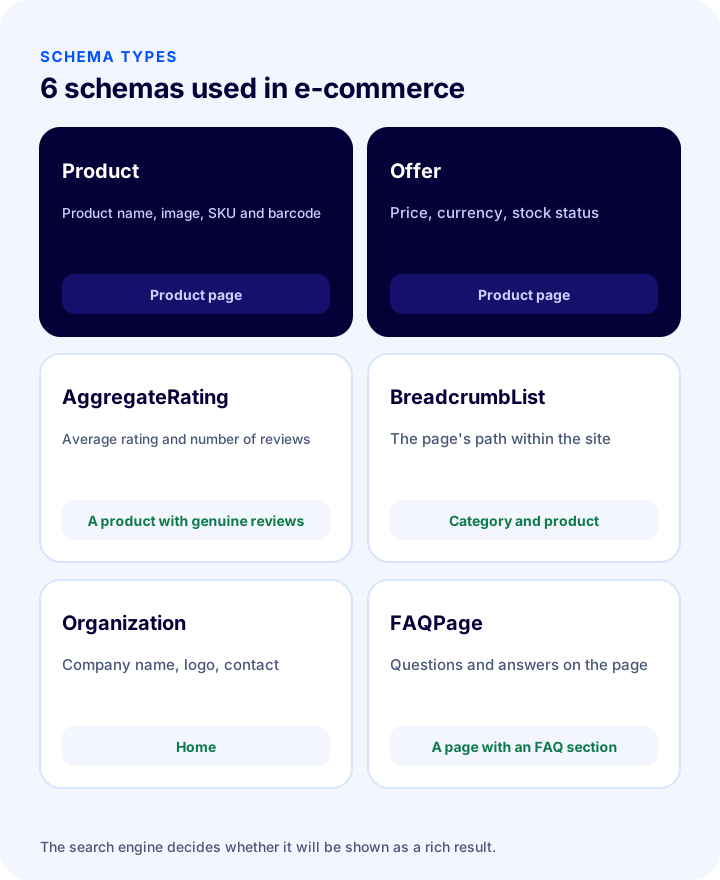
| Schema type | What does it tell you? | On which page? |
|---|---|---|
| Product | The product's name, image, description, brand, SKU and barcode | Product page |
| Offer | Price, currency, stock status, product condition | Product page (inside Product) |
| AggregateRating / Review | Average rating and number of reviews; individual reviews | Product pages with genuine reviews |
| BreadcrumbList | The page's path within the site (Home › Category › Product) | Category and product pages |
| Organization | The company's name, logo and contact information | Home |
| FAQPage | Questions and answers on the page | Pages that genuinely have an FAQ section |
Showing FAQ schema as a rich result is now limited in some search engines; but the data still helps describe the question-and-answer structure of the page to machines in an open form.
What Is the Difference Between JSON-LD, Microdata and RDFa?
All three formats use the same vocabulary; the difference is how the label is written into the page. JSON-LD is written as a single block, separate from the page content; Microdata and RDFa scatter the labels inside the visible HTML. For e-commerce, JSON-LD is the most practical and most widely recommended format.
| Format | How is it written? | Advantage | Drawback |
|---|---|---|---|
| JSON-LD | As JSON in a separate script block on the page | Independent of the HTML, easy to maintain and change | Keeping the data in sync with the visible text on the page is up to you |
| Microdata | As attributes on HTML elements | The data is tied to the visible text | Complicates the template, and changes are hard to make |
| RDFa | As attributes on HTML elements | Very flexible | Less common, complex |
How to Write Product Schema Field by Field (Hands-On Lesson)
A product schema is a nested JSON block that describes the product's identity (name, image, SKU, barcode, brand) and its offer (price, currency, stock). Below you can see a full example for a sample product and the role of each field.
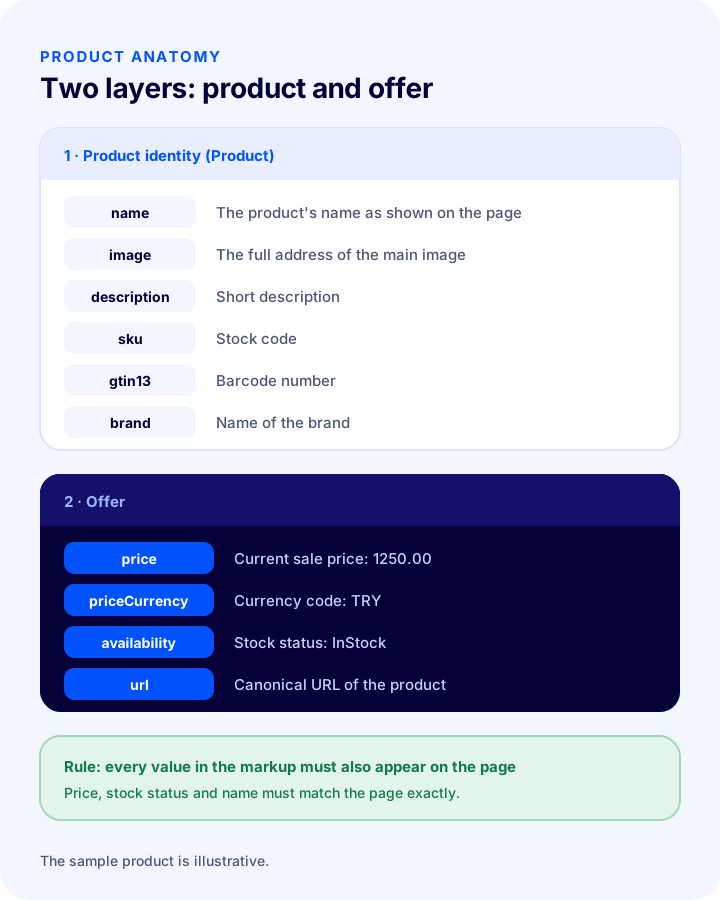
The example below is a sample product; replace the values with the information visible on your own product's page. The block is placed inside a script tag of type application/ld+json on the page.
{
  "@context": "https://schema.org",
  "@type": "Product",
  "name": "Örnek Keten Gömlek",
  "image": ["https://www.ornekmagaza.com/img/gomlek-1.jpg"],
  "description": "Nefes alan, yıkandıkça yumuşayan %100 keten gömlek.",
  "sku": "GML-KTN-M-BEYAZ",
  "gtin13": "8691234567883",
  "brand": { "@type": "Brand", "name": "Örnek Marka" },
  "offers": {
    "@type": "Offer",
    "url": "https://www.ornekmagaza.com/keten-gomlek",
    "price": "1250.00",
    "priceCurrency": "TRY",
    "availability": "https://schema.org/InStock",
    "itemCondition": "https://schema.org/NewCondition"
  }
}| Field | What to write? | Watch out |
|---|---|---|
| name | The product's name as shown on the page | Must match the heading on the page |
| image | Full URL of the product's main image (more than one if possible) | Its absence is the most common error; the image must be accessible and show the product |
| description | A short description of the product | Should be copied from the page description |
| sku | Stock code | Separate for each variant |
| gtin13 (gtin8, gtin12, gtin14) | Barcode number | A registered and correct number; do not make one up |
| brand | Brand name | The product's real brand |
| offers.price | Current sale price (period as the decimal separator, no thousands separator) | Must be the same as the price shown on the page |
| offers.priceCurrency | Currency code (TRY for Turkish lira) | Write the code, not the symbol |
| offers.availability | Stock status (InStock, OutOfStock, PreOrder, etc.) | Must reflect the actual status |
| offers.url | Canonical URL of the product | A single, consistent URL |
Product JSON-LD Generator
The tool below generates a valid product schema block from the product details you enter. It covers only the basic fields; always compare the block you generate with the information visible on the page, and validate it with the testing tools described below.
How to Test and Validate Structured Data
Always test the schema after publishing: even a block with no syntax errors may contradict the information on the page or lack the required fields. Two separate checks are needed: one for format correctness, the other for consistency with the page content.
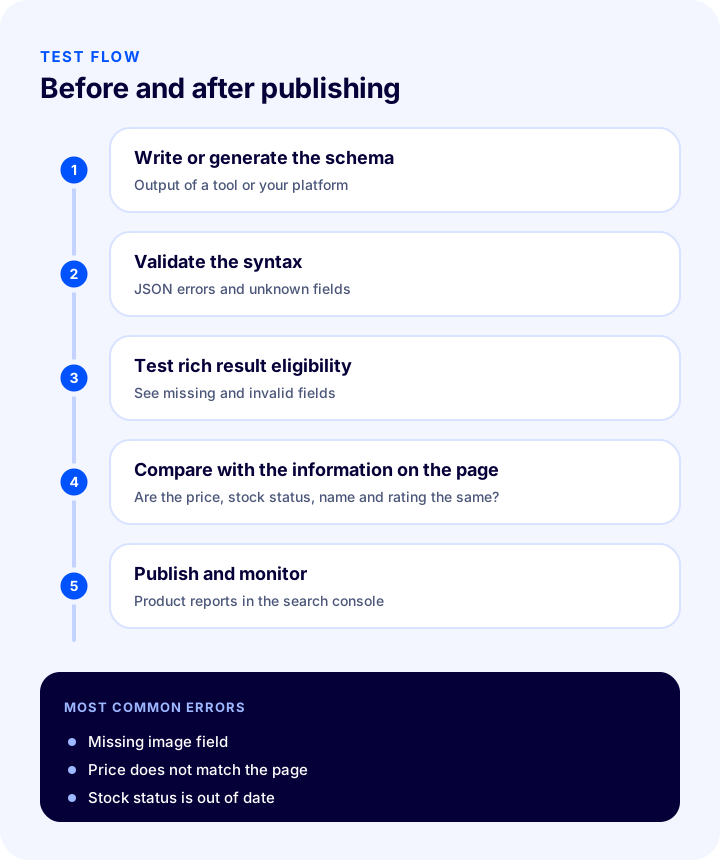
- Write or generate the schema: The tool above, or the output produced by your platform.
- Validate the syntax: Schema validation tools show JSON errors (a missing comma, quotation marks) and unknown fields.
- Test rich result eligibility: The rich result testing tools offered by search engines tell you which rich result types your product is eligible for, and which fields are missing or invalid.
- Compare with the information on the page: The price, stock status, rating and name must be exactly the same in the markup and on the page.
- Publish and monitor: The search console's product and merchant listings reports list errors and warnings across the whole site; check them regularly for new errors.
How Do You Add Schema to a Page? Three Ways
There are three ways to add structured data to a page: having the e-commerce platform generate it automatically, adding it with an add-on or a tag management tool, and writing it into the template by hand. The healthiest is the method that generates it automatically from product data and updates the schema when the price or stock changes.
| Route | How does it work? | Advantage | Risk |
|---|---|---|---|
| Schema generated by the platform | Automatically from product data (name, price, stock, image) through a template | Stays in sync with price and stock, needs no maintenance | You must complete the missing fields yourself; test the output |
| Add-on or tag tool | A separate tool injects the schema into the page | Can be added even if the platform does not support it | May generate the same information twice and create a conflict |
| Writing it by hand into the template | The JSON block is written into the page template | Full control | Does not stay current as price and stock change; high maintenance burden |
Whichever way you choose, the rule is the same: for the same information on a page, only one source should generate a single, consistent schema. If the same product generates schema from both the platform and an add-on, one of them should be turned off.
How Does Structured Data Contribute to AI Visibility (GEO)?
When AI assistants recommend a product, they try to extract details such as price, stock, rating and product identity from the page text; structured data makes this extraction reliable because the information is labeled and free of ambiguity. This reduces the chance of your product being mentioned with the wrong price or mixed up with another product.
- Clear product identity: With SKU, barcode and brand, pages of the same product across different stores are matched correctly.
- Up-to-date information: When the price and stock in the schema are updated together with the page, outdated information is less likely to be quoted.
- Consistency with the text: When the schema and the page text give the same information, confidence in its accuracy increases.
Structured data alone does not deliver AI visibility; it works together with clear definitions, question-style headings and a well-organized FAQ. This approach forms the common ground between SEO and GEO.
How to Write BreadcrumbList Schema
Breadcrumb schema tells search engines, in order, where a product sits within the site (Home › Category › Product). This allows a readable path to be shown in search results instead of the URL, and makes your site structure clear.
{
  "@context": "https://schema.org",
  "@type": "BreadcrumbList",
  "itemListElement": [
    { "@type": "ListItem", "position": 1, "name": "Ana Sayfa", "item": "https://www.ornekmagaza.com/" },
    { "@type": "ListItem", "position": 2, "name": "Gömlekler", "item": "https://www.ornekmagaza.com/gomlekler" },
    { "@type": "ListItem", "position": 3, "name": "Keten Gömlek" }
  ]
}- Position number: The position field sets the order of the path and starts at 1.
- Last item: The URL of the last item, which is the current page, may be left out.
- Match the visible path: The breadcrumb you show on the page and the path in the schema must be the same.
How Should Review and Rating Schema Be Used?
Rating and review schema (AggregateRating, Review) should be used only for reviews that are actually visible on the page and come from real customers. Writing ratings into the schema that are not on the page, are made up, or are copied from another site's reviews goes against search engine guidelines and can cause your site to lose its eligibility for rich results.
- Reviews must be real: The average rating should be calculated from the reviews you show on the page.
- The review count must be correct: The number of reviews in the schema must match the number visible on the page.
- It must be specific to the product: Do not write the store's overall rating on every product.
- If there are no reviews, leave it out: Instead of filling the rating field with an empty value or zero, do not write it at all.
How to Write Schema for Products with Variants
For products with variants such as size and color, the schema should carry the price, stock and SKU of the variant that is selected or visible on the product page; to describe the price range of all variants, a price range or a product group structure is used in the offer field. Which one you use depends on how your page displays its variants.
- If variants are selected on the same page: The information of the default selected variant is written to the schema; when the user changes the variant, the schema should be updated as well.
- If each variant has its own URL: Each page carries the schema of its own variant, and each points to its own canonical URL.
- If a price range is shown: The same information as the "lowest – highest" display on the page should also be given in the schema.
When Should Structured Data Be Reviewed?
Structured data is not a setting that you add once and forget; it should be reviewed as product data, the page template and search engine expectations change. A regular check schedule lets you catch errors before customers and search results notice them.
- When the template or design changes: A new product page template can silently break the schema; test a sample product right after going live.
- When you add a new product type: Products with variants, bundles or pre-orders may require different fields.
- In campaigns and price changes: Make sure the discounted price is reflected correctly in the schema.
- When a new warning appears in the search console: Warnings most often point to a gap at the template level.
- Every three months: Sample a few different product and category pages and check them again with the testing tools.
8 Common Mistakes in Structured Data
- Writing information into the markup that is not visible on the page: If the price or rating is not on the page, it should not be in the schema either.
- Not updating the price: The page price changes but the schema stays old; a wrong price appears in search results.
- Leaving the stock status fixed: A sold-out product still appears as "in stock".
- Writing the currency or decimal separator incorrectly: "1250.00" is written instead of "1.250,00"; the currency is given as a code (TRY), not as a symbol.
- Leaving the image field empty: It is one of the most frequently missing fields.
- Writing made-up or copied ratings: It violates the guidelines and costs you your eligibility for rich results.
- Providing the same information twice, in different formats: When schema is generated by both a plugin and the template, conflicting and inconsistent blocks are created.
- Not testing after going live: A syntax error can cause the schema not to be read for all products.
The Shortest Path for Beginners: 3 Steps
If you are just starting with structured data, you do not need to do everything at once. Start with the product pages that get the most traffic or sell the most, and follow these three steps:
- Test one of your product pages: Your platform may already be generating schema; use the testing tool to see which fields are filled and which are missing.
- Complete the missing fields in the product data: Gaps such as image, brand, SKU and barcode are most often a product data problem, not a template problem.
- Monitor the result in the search console: After the fix, check that the number of errors in the report drops within a few days.
Structured Data Checklist
Check your product pages against the items below; you should be able to answer "yes" to all of them.
- Is there a valid Product schema (JSON-LD) on the product page?
- Are the name, price, currency and stock status exactly the same as on the page?
- Is the image field filled in, and is the image accessible?
- Are the SKU and (if any) the barcode correct, registered numbers?
- Is the currency written as a code (TRY), and is the price written with a period as the decimal separator?
- Are ratings and reviews generated only from real reviews that are visible on the page?
- Is there breadcrumb (BreadcrumbList) schema on category and product pages?
- Is the organization (Organization) information defined on the home page?
- Are there no multiple conflicting schema blocks for the same information?
- Does it pass the syntax and rich results tests without errors?
- Are the product and merchant listings reports in the search console monitored regularly?
Managing Product and SEO Data with Faprika
The accuracy of the schema depends on the accuracy of your product data: when the name, price, image, stock code and description are kept complete and tidy in the panel, both the page and the data describing it are correct. The Faprika e-commerce platform includes the following elements for this stage (you can see which feature starts in which plan on the e-commerce plans page):
- SEO settings: In the SEO section under Configuration > Settings > General Settings, you manage the page title template, default meta description, canonical URL and social sharing tags (Open Graph); a step-by-step guide is in the SEO Settings tutorial.
- SEO information per product: In Catalog > Product Management, the title, meta description and URL are edited for each product; SEO tags that fill in the product name, stock code and price automatically can be used. Product meta descriptions can also be generated automatically.
- Category and brand SEO information: Category and brand pages have their own title and description fields.
- Bulk SEO and meta updates: You can update the meta information of many products at once; this feature varies by plan.
- Bulk product update: The Bulk Product Update tutorial explains how to edit fields such as price, stock code and image in bulk.
You can see for yourself which structured data is generated on your store's product pages with the testing tools described above; if you see a missing or incorrect field, first complete the product data in the panel.
Frequently Asked Questions
What is structured data?
Structured data is a method of marking up information on a page (such as product name, price, stock status and rating) with a standard vocabulary and format that search engines and AI systems can understand with certainty. The information is already on the page; structured data adds a machine-readable label to it.
Are schema and structured data the same thing?
They are generally used interchangeably. Schema is the name of the shared vocabulary used for structured data markup; structured data is the work of labeling the information on a page with that vocabulary.
What is JSON-LD and why is it preferred?
JSON-LD is a method of writing structured data as a separate block on the page, in JSON format. Because it is independent of the HTML, it is easy to maintain and change; it is the most common and most practical format in e-commerce.
Which fields are required in product schema?
The product name is the basic field; an offer containing the price, currency and stock status, plus a product image, is expected for rich result eligibility. Barcode, brand, SKU and rating are recommended fields that strengthen the information. Because field requirements can vary between search engines, follow the suggestions of the testing tools.
Does structured data improve my rankings?
Structured data does not directly guarantee a ranking. It helps ensure that information such as your product's price, stock status and rating is understood correctly and can be shown as a rich result; this can support click-through rate and accurate visibility.
How do I test the schema?
Check the syntax with a schema validation tool and eligibility with the search engines' rich result testing tool; then confirm that the price, stock status and rating match the page. After publishing, regularly monitor the search console's product and merchant listings reports.