Configuration
SEO Settings
Learn step by step how to configure SEO settings in the Faprika e-commerce infrastructure. Improve your site's search engine rankings, increase your organic traffic and maximize your e-commerce success with effective SEO strategies for your product, category, brand and blog content.
E-commerce SEO on platforms is a critical element for getting your site ranked higher in search engines and thus increasing its reach to potential customers. This process helps customers easily find the products and services they are looking for, directly affecting traffic and conversion rates. E-commerce SEO includes various strategies such as keyword optimization, on-site and off-site optimization, mobile compatibility, loading speed and user experience. Each of these factors can affect how your site is indexed and ranked by search engines. These settings help make your products, categories and brands more visible in search engines.
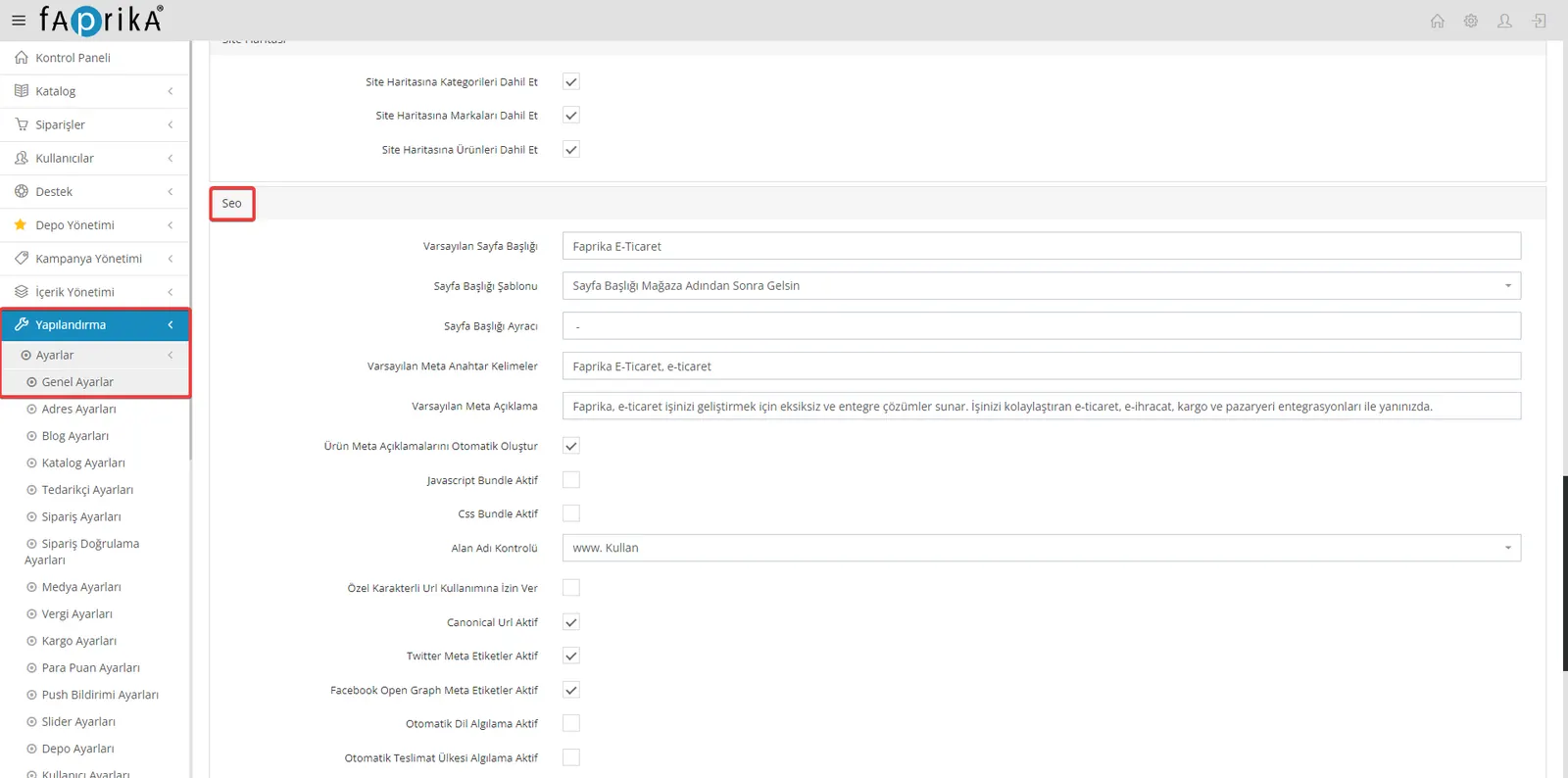
In your website's control panel, you can make edits in the fields listed under Configuration >> Settings >> General Settings >> SEO.
- Default Page Title: You can enter here the default page title to be used across your website. This provides a general identification for certain pages, such as your site's home page.
- Page Title Template: You can define a template for your page titles. This ensures that the titles of all pages on your site use a consistent format.
- Page Title Separator: Define the separator that goes between the page title and your site's name. This is usually a hyphen (-) or a similar character.
- Default Meta Keywords: Enter the keywords that best describe your site. This helps search engines better understand your site's content.
- Default Meta Description: Add a meta description containing a general summary of your site. This description is the text users see in search results when they find your site.
- Automatically Generate Product Meta Descriptions: You can enable a feature that automatically generates meta descriptions for your products. This saves time for each product page.
- Domain Check: Consider the effect on SEO of URLs that start with the “www” prefix and those that do not. This ensures that your site is consistently accessible.
- Canonical URL Active: Used to specify unique and original page URLs. This preserves SEO value by preventing content from being duplicated under different URLs.
- Twitter Meta Tags Active: By activating Twitter-specific meta tags, you can optimize how your shares will look on Twitter.
- Facebook Open Graph Meta Tags Active: Use Open Graph meta tags to control how your site appears on Facebook and other social media platforms. This makes your social media shares more attractive.
Catalog >> Product Management
The product pages of your e-commerce site are vital for potential customers to find your products through search engines. Therefore, filling in the SEO information for each product carefully and strategically helps your products rank higher in search results and increases your organic traffic.
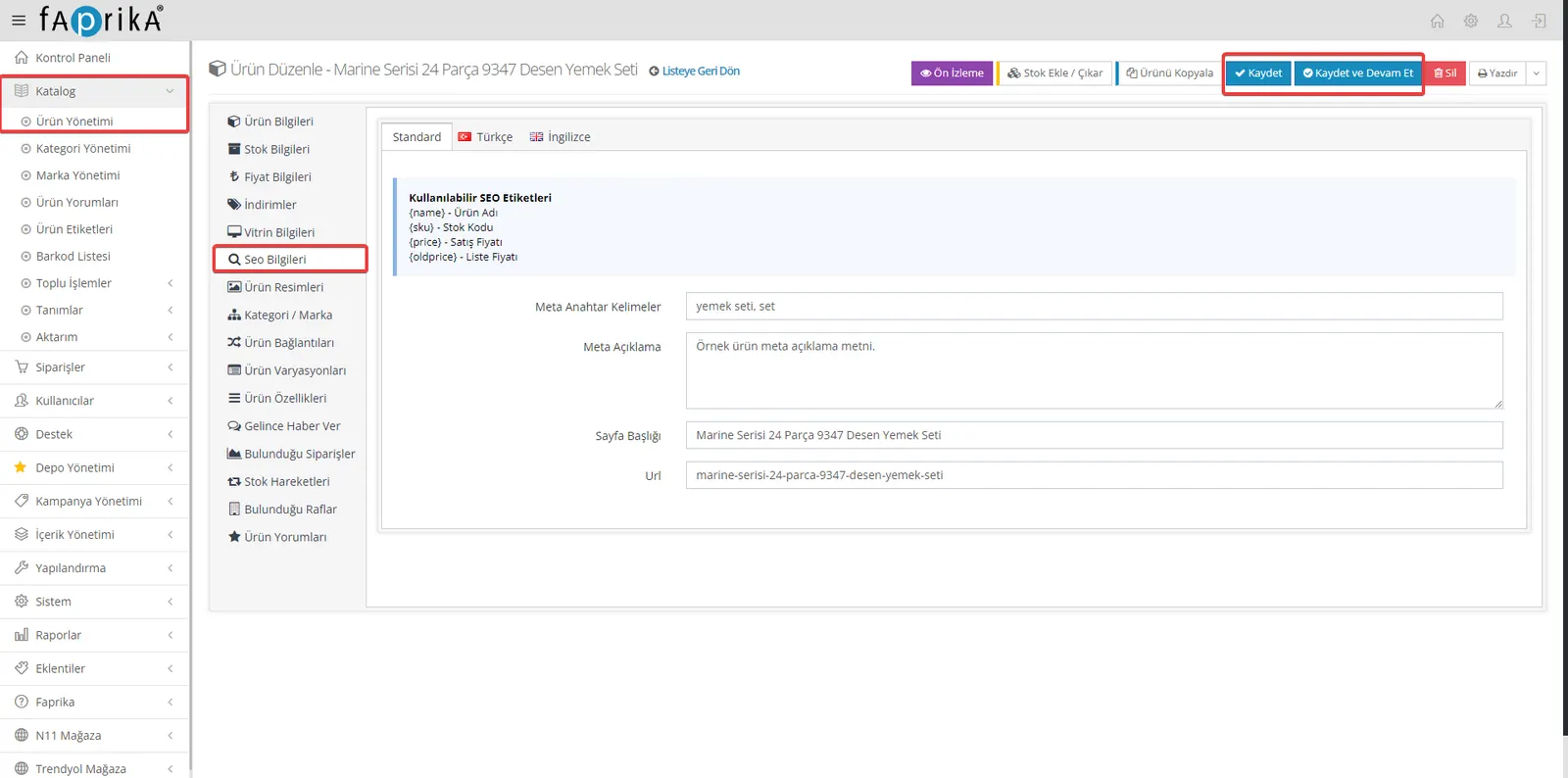
- Accessing the Product Management Panel: In your control panel, go to the “SEO Information” area of the product you want from the “Catalog >> Product Management” section.
- Using SEO Tags: When entering SEO information for your product, you can use the listed tags ({name - Product Name}, {sku - Stock Code}, {price - Price}, {oldprice - Price Before Discount}). These tags automatically pull information such as the product name, stock code, sale price and list price, and help you create SEO-friendly content.
- Meta Keywords: Enter the keywords that best describe your product and make it easy for search engines to find.
- Meta Description: Write a short and attractive summary of your product that potential customers can see in search results. This description should capture users' interest and encourage them to click.
- Page Title: Set an effective page title for your product page. This title will appear in search results and in the browser tab, and should catch users' attention.
- Optimizing the URL Structure: Your product page's URL is generated automatically, but you can change it for a more SEO-friendly structure. A readable and meaningful URL helps search engines understand it better.
- Save Changes: After making all your edits, apply the changes by clicking the “Save” button.
Catalog >> Category Management
Category management is important for your e-commerce site to have a user-friendly structure optimized for search engines. Your product categories must be optimized correctly so that users can easily reach the products they are looking for and so that you also achieve a good ranking in search engines.
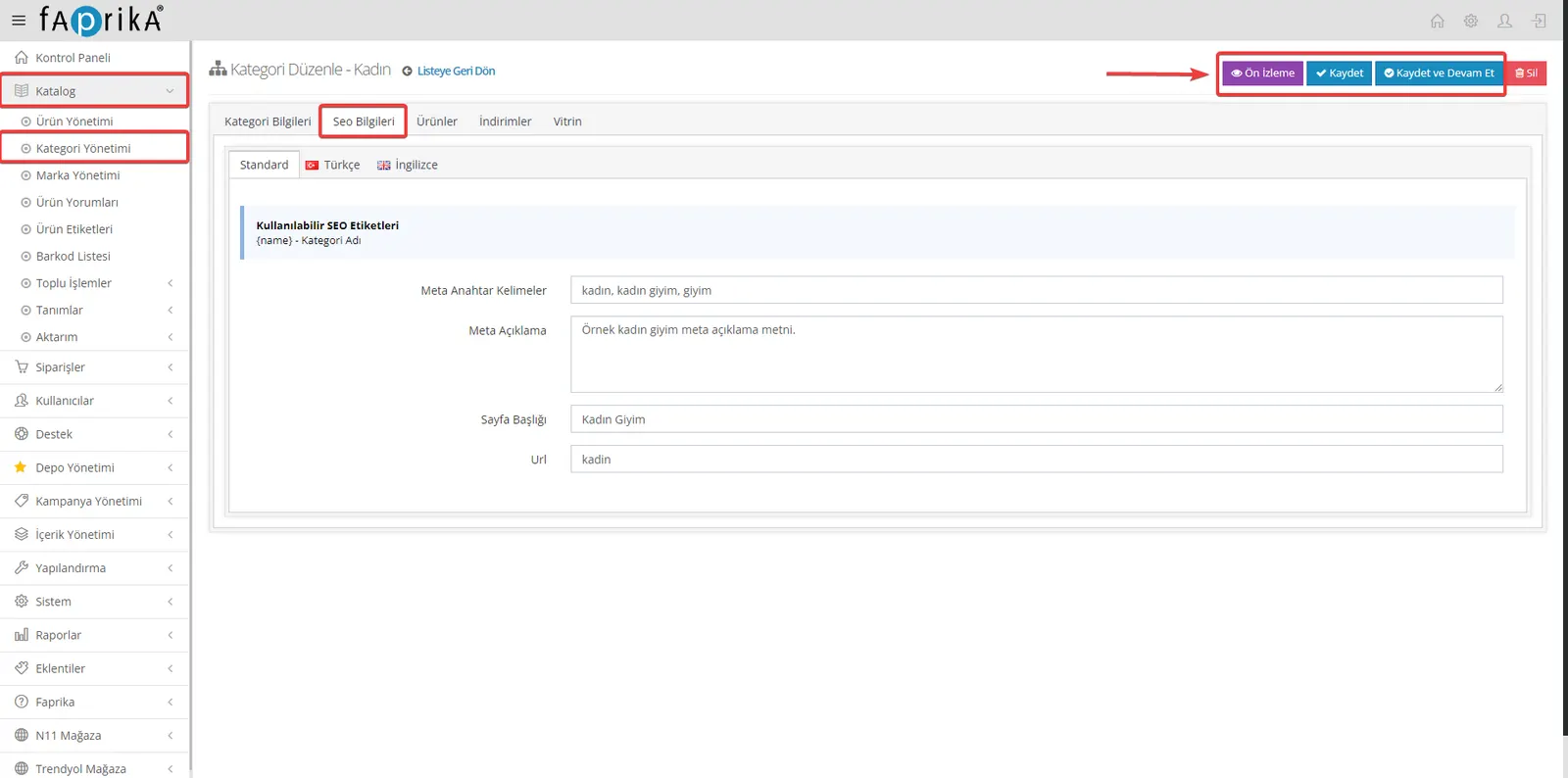
- Accessing the Category Management Panel: In your control panel, follow the path “Catalog >> Category Management” and select the category whose SEO information you want to edit.
- Making Use of SEO Tags: When entering SEO information for your category, you can use the listed tags such as {name - Category Name}. This tag automatically pulls your category's name and enriches your SEO content.
- Meta Keywords: Define the keywords that best describe your category and make it easy to find in search engines.
- Meta Description: Write a short, effective meta description explaining what your category is about. It should be a summary that users will see in search results and that will catch their interest.
- Page Title: Choose a compelling, descriptive page title for your category. This title will appear in search results and the browser tab and should catch users' attention.
- URL Optimization: Although your category's URL is generated automatically, you can modify it for a more SEO-friendly structure. It is important that the URL is meaningful and easy for search engines to index.
- Save Changes: After entering your SEO information, click the "Save" button in the top right corner of the page to save your changes.
Catalog >> Brand Management
Brand management is important for optimizing the brands of the products on your e-commerce site for search engines, making your brands more visible in search results. This allows potential customers to easily find your site when searching for your brand's products.
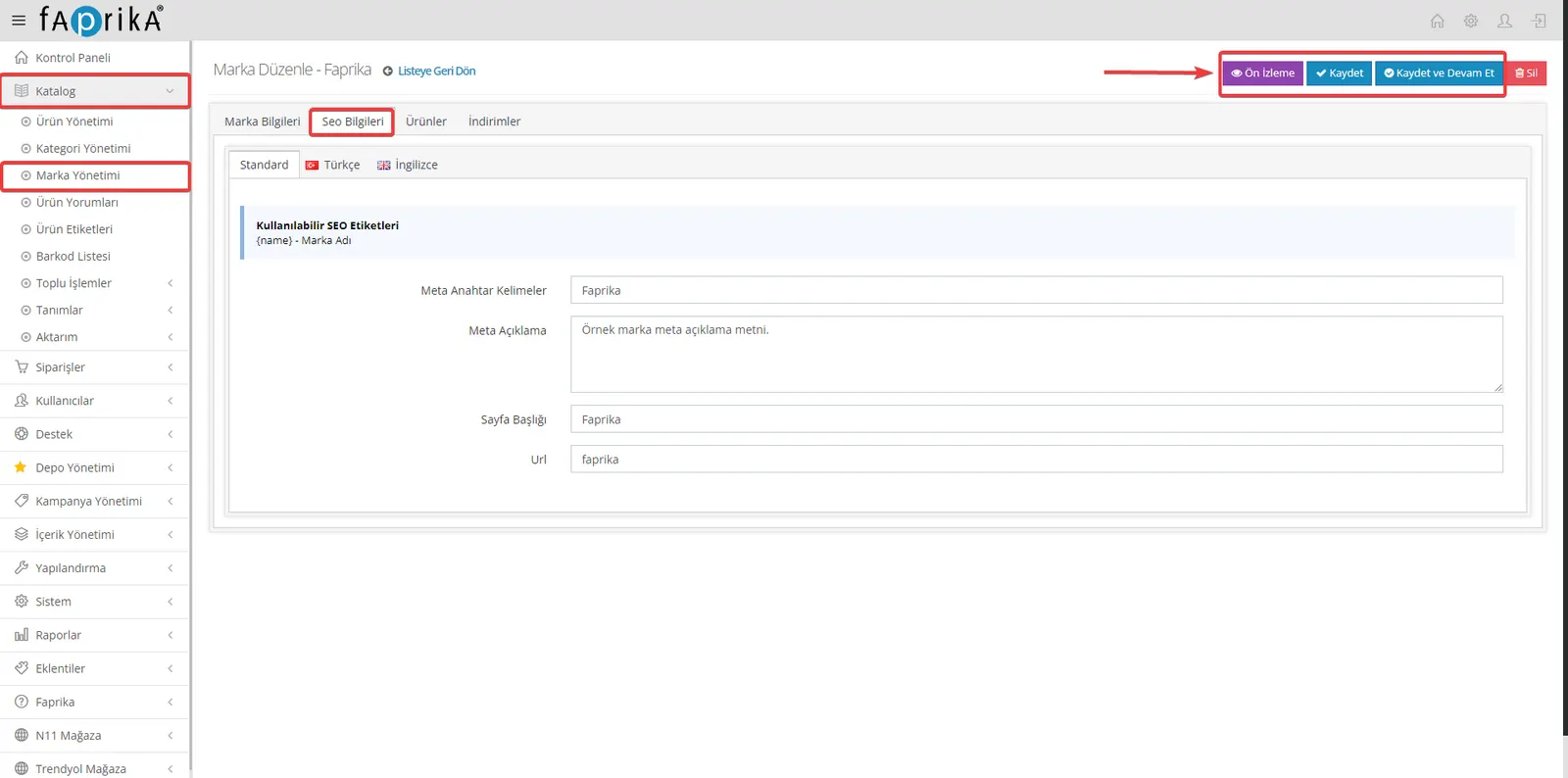
- Access Brand Management: From your control panel, go to "Catalog >> Brand Management" and select the brand whose SEO information you want to edit.
- Using SEO Tags: When entering SEO information for your brand pages, you can use tags such as {name}. This tag automatically inserts the name of the selected brand and enriches your content from an SEO perspective.
- Meta Keywords: Define unique keywords that describe your brand and make it easy to find in search engines.
- Meta Description: Write a short, appealing and descriptive meta description about your brand and the products it offers. This text will be shown in search results and helps attract users' interest.
- Page Title: Create an effective page title for your brand. This title will appear on search engine results pages (SERP) and in the browser tab, so it should catch users' attention.
- Optimizing the URL Structure: The URL generated for your brand's page should be SEO-friendly. Although the URL is created automatically, you can edit it to make it clearer and easier to understand.
- Save Changes: After entering the SEO information, press the "Save" button in the top right of the page to save all changes.
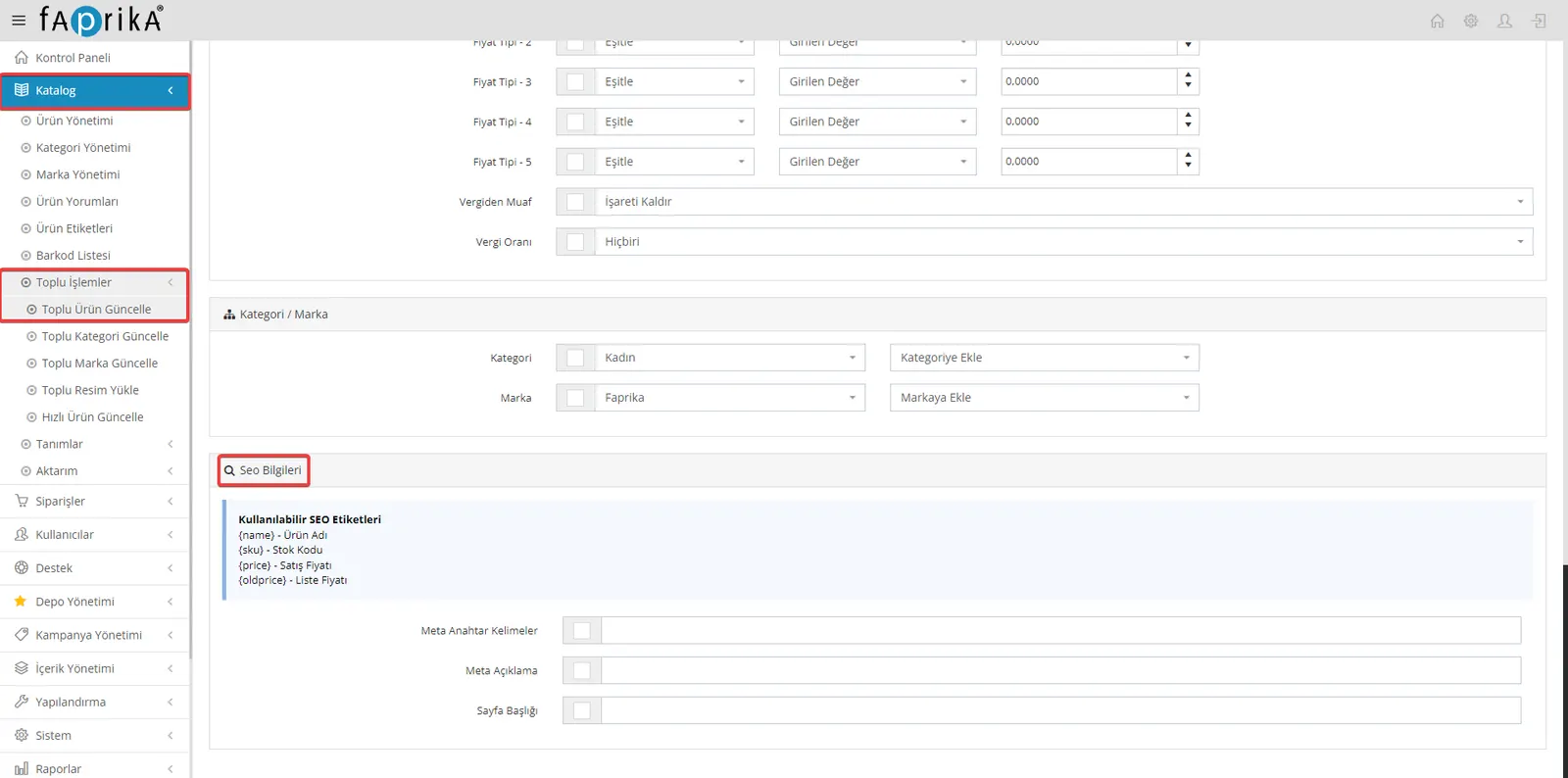
Catalog >> Bulk Operations >> Bulk Product Update
The bulk operations module is a feature that saves time and simplifies product management for businesses using the Faprika e-commerce infrastructure. With this module, you can update the SEO information of multiple products at once, significantly reducing your workload. Here are the steps to follow when performing a bulk product update:
- Access Bulk Operations: In your control panel, go to "Catalog >> Bulk Operations >> Bulk Product Update".
- Filter Products: Set the filter criteria for the products you want to update. You can filter by properties such as product name, stock code (SKU), sale price or list price. Then click the "Search" button to list the products you want.
- Enter SEO Information: Enter the SEO information for the listed products. With the available SEO tags ({name}, {sku}, {price}, {oldprice}), you can dynamically integrate your product information into your SEO content.
- Meta Keywords: Enter keywords related to your product. These keywords make it easier for your product to be found in search engines.
- Meta Description: Write an appealing and descriptive meta description for your product. This description will be shown in search results and will attract potential customers' interest.
- Page Title: Set an effective page title for each product. This title will appear in search results and the browser tab.
- Save Changes: After making all the necessary edits, click the "Save" button in the top right of the page to save your work. Remember, changes made in bulk operations cannot be undone. It is therefore important to carry out your operations carefully.
Catalog >> Bulk Operations >> Bulk Category Update
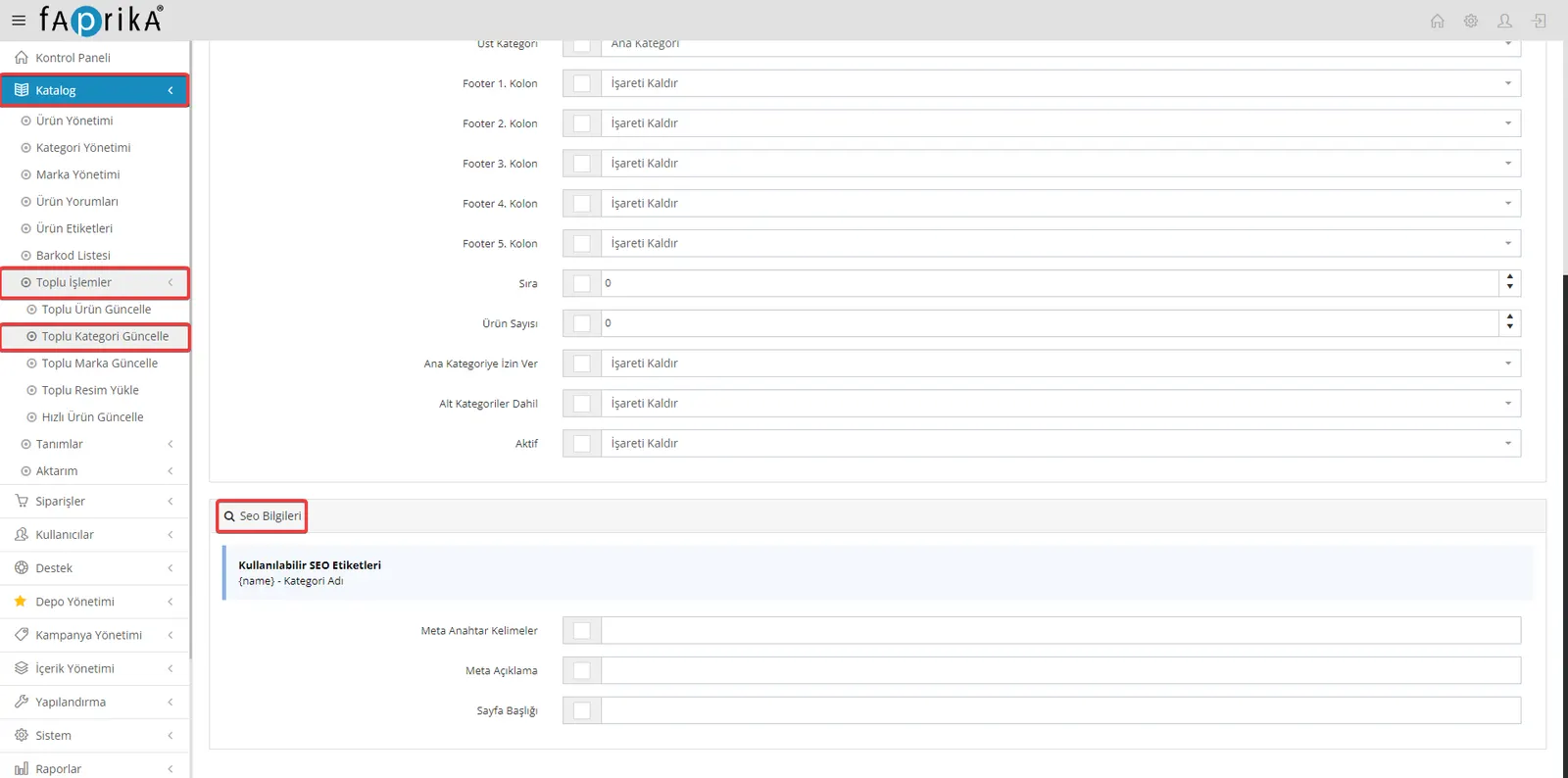
Bulk category update is part of the bulk operations module offered by the Faprika e-commerce platform and lets you carry out category-based SEO optimization quickly and effectively. This feature saves a great deal of time and reduces workload, especially for e-commerce sites that manage many categories. Here are the steps to follow for a bulk category update:
- Access the Bulk Category Update Area: From your control panel, go to "Catalog >> Bulk Operations >> Bulk Category Update".
- Filter Categories: Use the filter section at the top to filter the categories you want to update. After setting the filter criteria, click the "Search" button to list the relevant categories.
- Edit SEO Information:
- Available SEO Tags: When entering SEO information for your categories, you can use tags such as {name}. These tags help you create dynamic content.
- Meta Keywords: Enter keywords that best describe each category. These keywords help your category perform better in search engines.
- Meta Description: Write a short, compelling and descriptive meta description for your category. This description should attract users' interest in search results.
- Page Title: Create an effective page title for your category. This title will appear on search engine results pages and in the browser tab.
- Save Changes: After entering all the necessary SEO information, click the "Save" button in the top right corner of the page to save your changes. Remember that changes made during bulk operations cannot be undone, so carry out your operations carefully.
Catalog >> Bulk Operations >> Bulk Brand Update
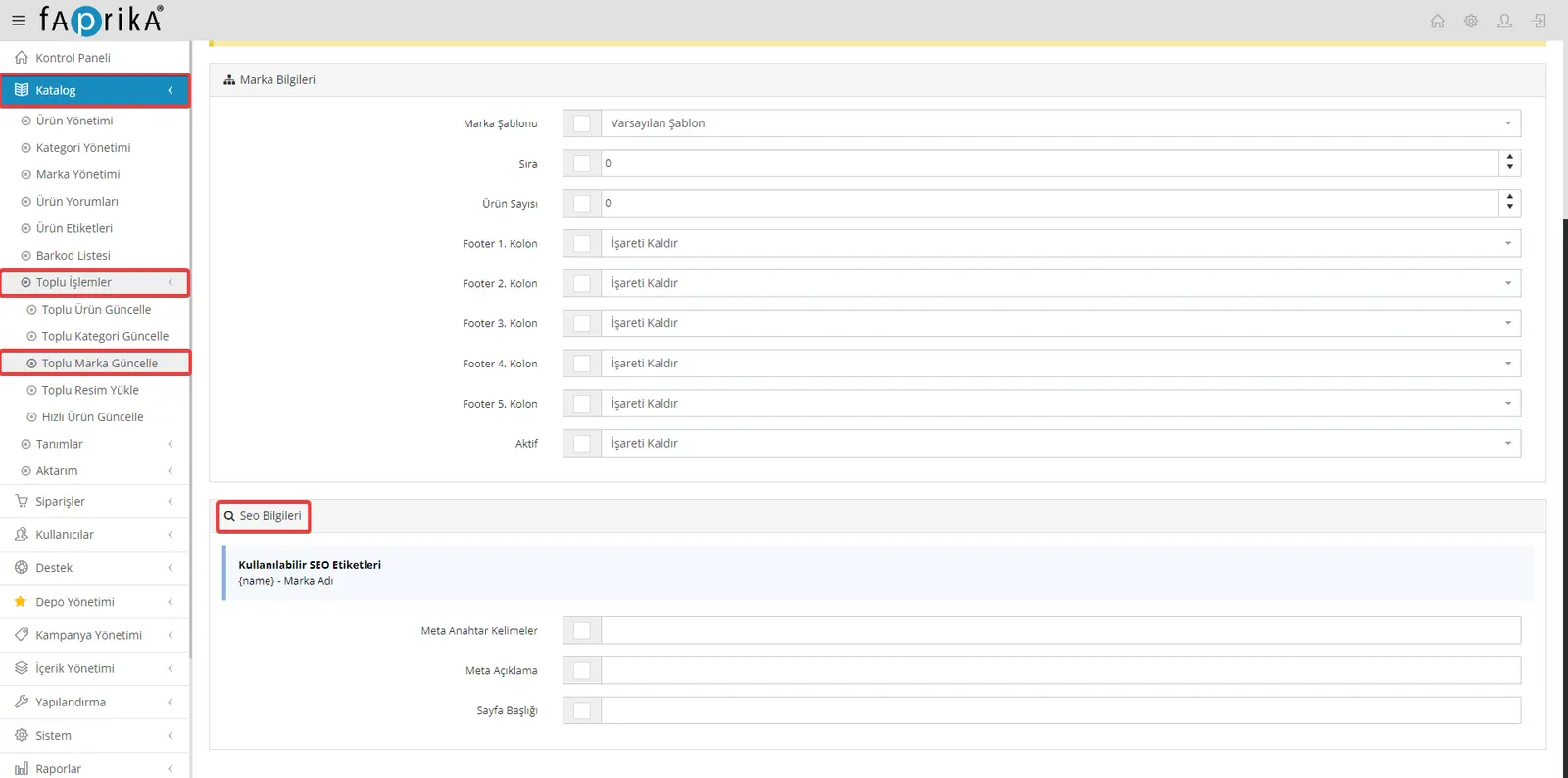
Bulk brand update gives users of the Faprika e-commerce infrastructure the opportunity to improve their brands' SEO performance easily and effectively. With this module, you can update the SEO information of multiple brands at once and help your site achieve better rankings in search engines. Here are the steps to perform this operation:
- Access the Bulk Brand Update Area: In your control panel, go to "Catalog >> Bulk Operations >> Bulk Brand Update".
- Filter Brands: Use the filter section at the top to select the brands you want to update. Filter specific brands to list the ones to be updated, then click the "Search" button.
- Edit SEO Information:
- Available SEO Tags: By using tags such as {name}, you can create dynamic SEO content for your brands. These tags automatically add the brand name to your SEO information.
- Meta Keywords: Enter the keywords that best describe your brand and make it easier to find in search engines.
- Meta Description: Write a short, appealing and descriptive meta description about your brand. This description should be text that users will see in search results and that will make them interested in your brand.
- Page Title: Set an effective page title for your brand. This title will appear in search results and the browser tab, so it should be eye-catching.
- Save Changes: After entering and editing the SEO information, click the "Save" button in the top right corner of the page to save your work. Remember that changes made during bulk operations cannot be undone, so carry out your operations carefully.
Content Management >> Pages
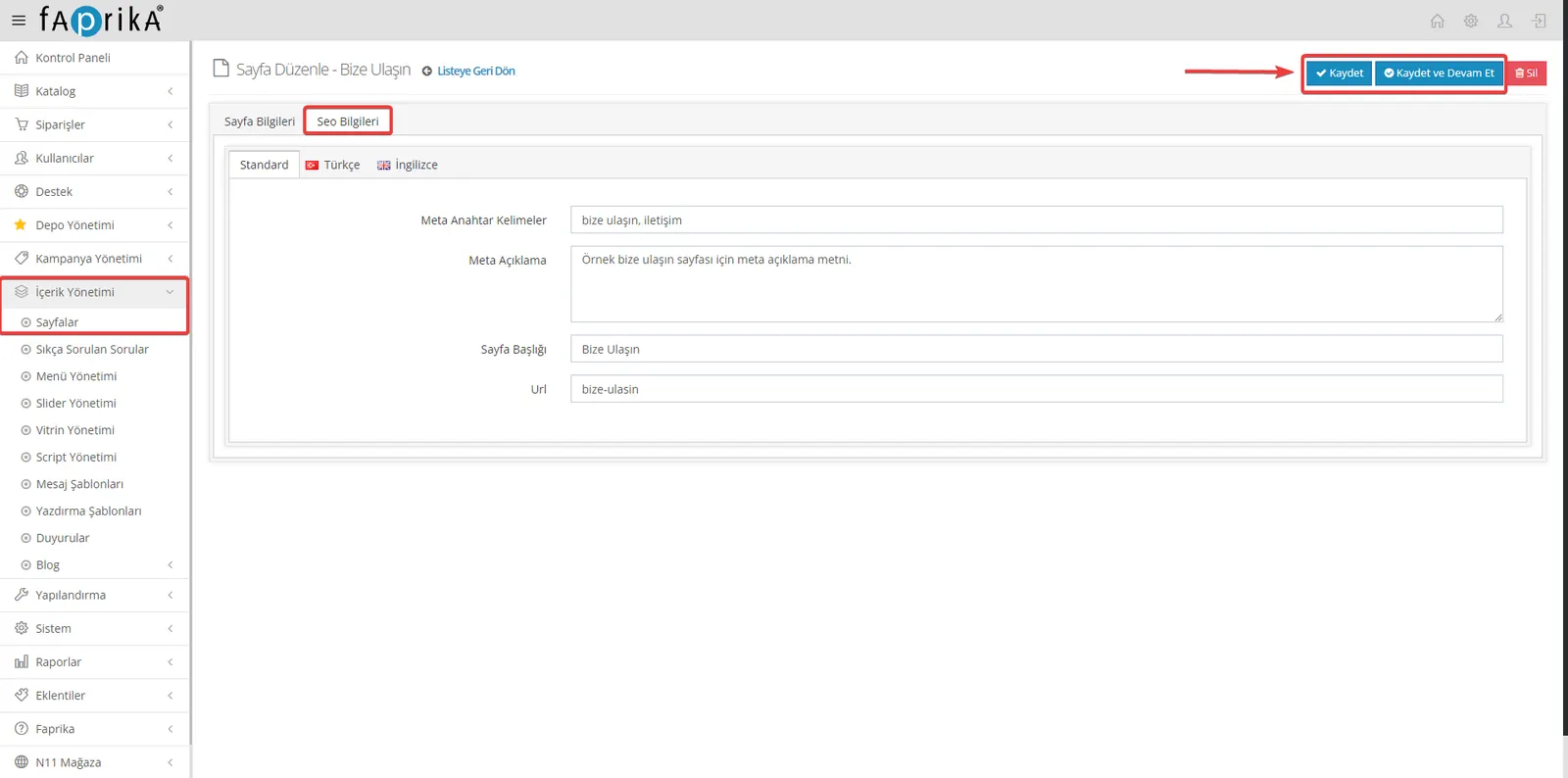
Entering customized SEO information for each web page helps search engines understand your pages better and therefore helps them rank higher in search results. Here are the steps for editing the SEO information of your pages:
- Access Page SEO Information: In your control panel, follow the path "Content Management >> Pages" and select the page whose SEO information you want to edit.
- Edit SEO Information:
- Meta Keywords: Enter keywords that best describe your page's content and match the searches of the users you are targeting in search engines. These keywords help your page perform better for relevant queries in search results.
- Meta Description: Write a description that summarizes your page's content briefly and concisely. This description informs users about your page in search results and encourages them to visit it.
- Page Title: Set an effective and descriptive title for your page. This title will be displayed on search engine results pages and in the browser tab and will help attract users' attention.
- Edit the URL: You can edit the automatically generated URL of your page to make it more meaningful and SEO-friendly. Optimizing the URL to reflect your page's content can help you achieve a better ranking in search engines.
- Save Changes: After entering your SEO information and completing your edits, click the "Save" button in the top right corner of the page to apply and save the changes.
Content Management >> Frequently Asked Questions
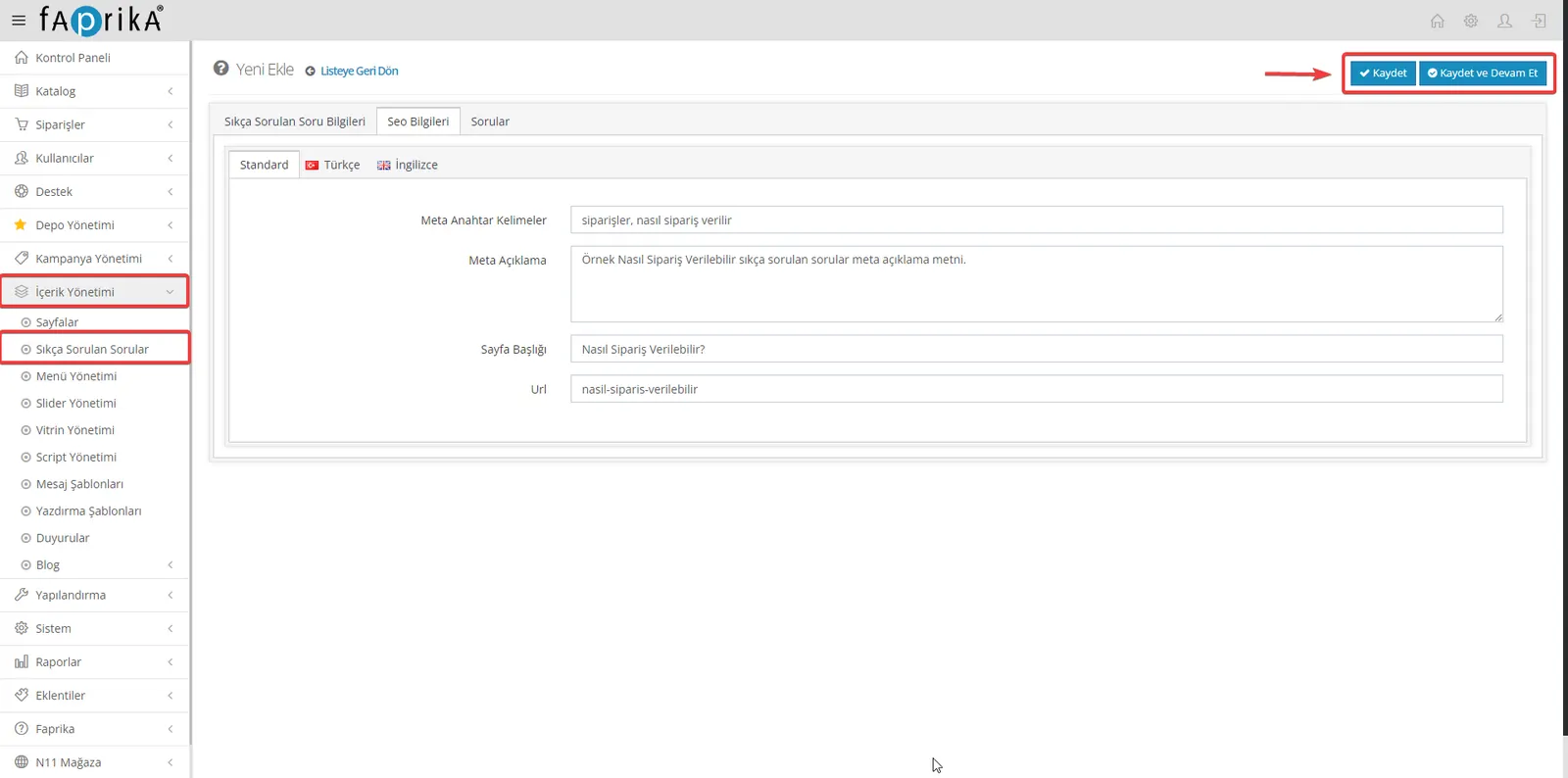
Your "Frequently Asked Questions" (FAQ) section lets users quickly find the information they are looking for on your site and also gives you an opportunity to improve your site's SEO performance. Because this section is full of answers to questions users often ask, search engines see it as valuable content. Here is a guide on how to edit the SEO information for your FAQ pages:
- Access FAQ SEO Information: In your control panel, follow the path "Content Management >> Frequently Asked Questions" and select the question whose SEO information you want to edit.
- Edit SEO Information:
- Meta Keywords: Define keywords related to your question. These keywords should make it easier for users to reach your question through search engines.
- Meta Description: Write a short and concise meta description about your question. This description should be a summary that users will see in search results and that encourages them to click on your question.
- Page Title: Set a descriptive and engaging page title for your question. This title will be displayed on search engine results pages (SERP) and in the browser tab.
- Edit the URL: You can edit the automatically generated URL of your question to make it more SEO-friendly and meaningful. The URL should accurately reflect your content and be easy for search engines to index.
- Save Changes: After entering and editing the SEO information, click the "Save" button to apply and save the changes.
Optimizing your FAQ section for SEO not only increases your visibility in search engines but also improves the user experience.
Content Management >> Blog
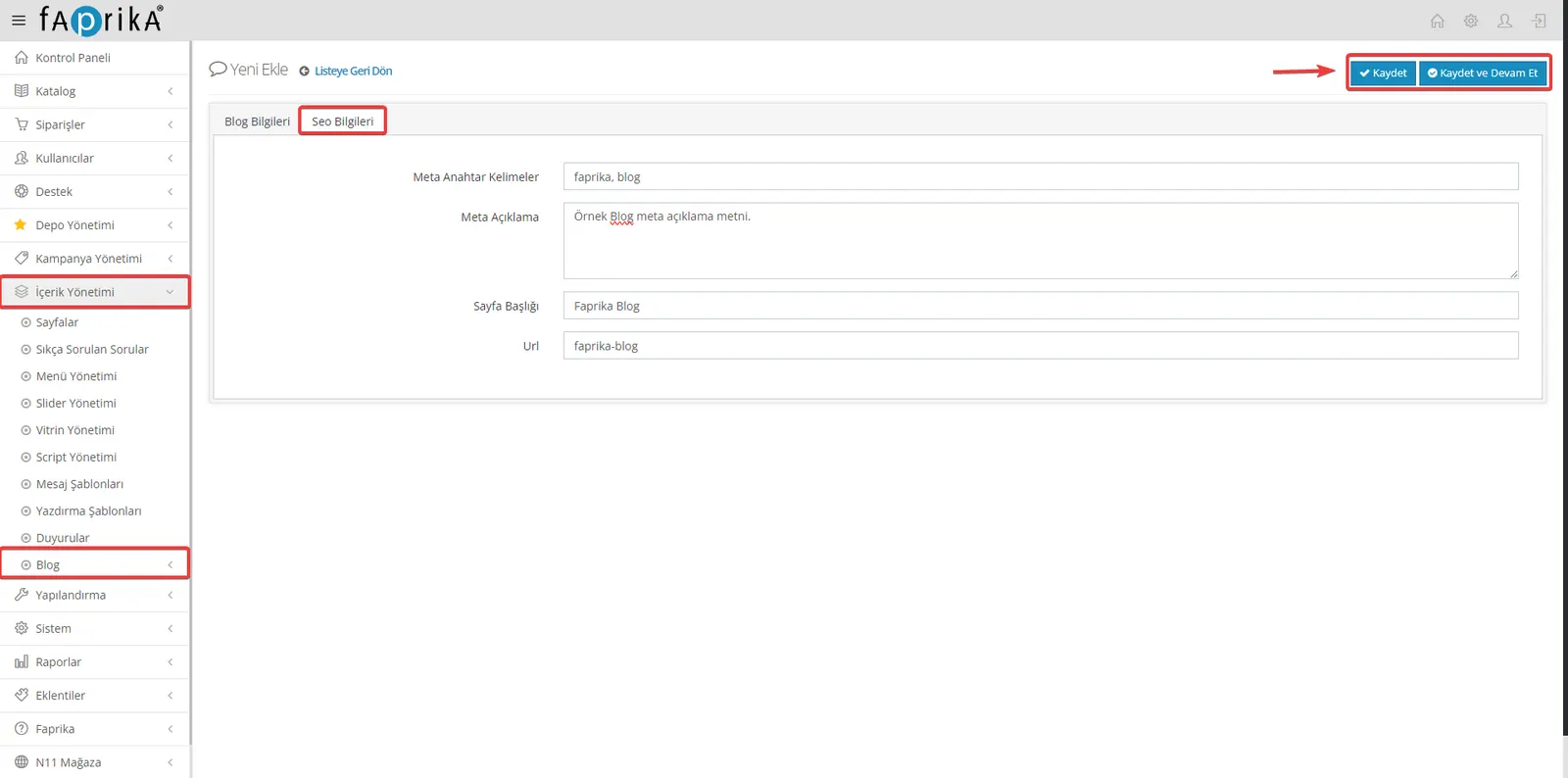
Optimizing the SEO of your blog content helps search engines understand your content better and helps it reach your target audience. The Faprika e-commerce platform lets you easily enter and edit SEO information for your blog questions or posts. Here are the steps for editing this information:
- Access Blog SEO Information: In your control panel, go to the "Content Management >> Blog Questions" section and select the blog post or question whose SEO information you want to edit.
- Edit SEO Information:
- Meta Keywords: Enter keywords that best describe your blog post or question. These keywords help search engines associate your content with the right topics and make it appear in your target audience's searches.
- Meta Description: Write a short, appealing summary of your blog post or question. This meta description should be engaging enough to increase the likelihood that users click on your content in search results.
- Page Title: Set a page title that clearly reflects the topic of your blog post or question and will catch users' attention. This title will be displayed on search engine results pages and in the browser tab.
- Edit the URL: You can edit the automatically generated URL of your blog post or question to make it more meaningful and SEO-friendly. A well-structured URL helps search engines index your content better and helps users reach it.
- Save Changes: After entering the SEO information and completing your edits, click the "Save" button to apply and save the changes.
Optimizing the SEO performance of your e-commerce platform is a critical step toward success in the digital world. This guide, prepared for users of the Faprika e-commerce infrastructure, explains in detail how to configure the SEO settings needed to make your site more visible in search engines. You have learned step by step how to enter and optimize SEO information for every part of your site, from your products and categories to your brands and blog posts.
Remember, SEO is a process that requires patience, consistency and continuous improvement. Applying the information in this guide will significantly improve your site's performance in search engines and make it easier to reach your target audience. Updating your content regularly, continuously improving your keyword strategy and prioritizing user experience matter not only for SEO but also for your overall brand image and customer satisfaction.