
Contents 12 sections
- E-Commerce Site Migration: What Is It?
- When Should You Change Your E-Commerce Infrastructure?
- Why Does Site Migration Affect SEO?
- How to Migrate an E-Commerce Site: A 4-Stage Migration Plan
- Which Data Should Be Migrated?
- How to Prepare a 301 Redirect Map
- How to Transfer SEO Fields to the New Site
- Migration Day Checklist
- What Should You Monitor After Migration?
- 8 Common Mistakes in Site Migration
- How Do You Switch to Faprika?
- Frequently Asked Questions
As an e-commerce site grows, the platform it was built on starts to feel too small: marketplace stock is synced by hand, invoices are issued one by one, the site slows down on busy days, or every small change means waiting for a developer. The decision to change platforms is usually made at this point. But right after it comes the biggest fear: during an e-commerce site migration, will the search engine rankings built up over the years, the customer records and the order history be lost?
The answer depends on how the migration is planned. In an unplanned switch, old URLs go nowhere, visitors hit error pages and organic traffic melts away within weeks. In a planned one, search engines follow the change without trouble and customers notice only a faster, more usable site. In this guide we walk through, step by step, how to move an e-commerce site to a new platform without losing SEO: how to transfer each type of data, how to prepare the redirect map, and what to check on migration day and afterwards.
E-Commerce Site Migration: What Is It?
E-commerce site migration is the process of moving an online store's products, categories, customers, orders, content and search engine value from its current platform to a new e-commerce platform without interrupting sales or rankings. The domain usually stays the same; what changes is the software and server the site runs on.
Migration has three layers, and all three need the same care:
- Data migration: Products, variants, images, categories, brands, customers, orders and content pages are transferred to the new system.
- URL migration: Every page URL on the old site is connected to its counterpart on the new site with a permanent (301) redirect.
- Connection migration: Payment, shipping, e-Invoice, marketplace, analytics and advertising connections are rebuilt and tested on the new platform.
When Should You Change Your E-Commerce Infrastructure?
Changing platforms is the right decision when the current system starts to slow your growth and the cost of the problems exceeds the cost of migrating. If you are experiencing several of the signs below at once, it is time to plan a migration:
- Manual work keeps growing: Marketplace stock, invoicing, shipping records or product updates are all done one by one.
- The site is slow or crashes on campaign days: Pages open late under heavy traffic and errors appear at the cart step.
- Every change waits for a developer: A banner, a campaign or a menu change means days in the queue.
- The feature you need is missing: Wholesale (B2B) sales, a multilingual store, a mobile app or marketplace integration is either not there at all or each costs extra separately.
- You cannot reach your SEO settings: Page titles, descriptions, URL structure or redirects cannot be managed from the panel.
- Security and update load falls on you: Updates to the software and plugins on your own server keep causing problems.
Why Does Site Migration Affect SEO?
Search engines tie rankings to page URLs. The links, clicks and trust a product page has earned over the years belong to that URL. When the URL changes during migration and the old one is not redirected, the search engine treats the page as "gone", and the ranking goes with it.
The most common causes of ranking loss are:
- Old URLs that are not redirected: Visitors and search engines run into a 404 (page not found) error.
- Redirecting everything to the home page: Sending thousands of product URLs to a single page is often read by search engines as "page does not exist".
- Lost SEO fields: Page titles, meta descriptions and category texts are not carried over to the new site, and template titles are used instead.
- Lost content: Category descriptions, blog posts or frequently asked questions do not appear on the new site.
- Wrong technical settings: The "do not index" block from the test environment is forgotten on the live site, canonical tags point to the wrong URL, or the sitemap is not updated.
All of these mistakes can be prevented by planning ahead. The process below is built for exactly that.
E-Commerce Site Migration: A 4-Stage Migration Plan
A successful e-commerce site migration has four stages: preparation, setting up the new site, migration day and post-migration monitoring. Each stage safeguards the next; a step skipped during preparation comes back as a problem on migration day.
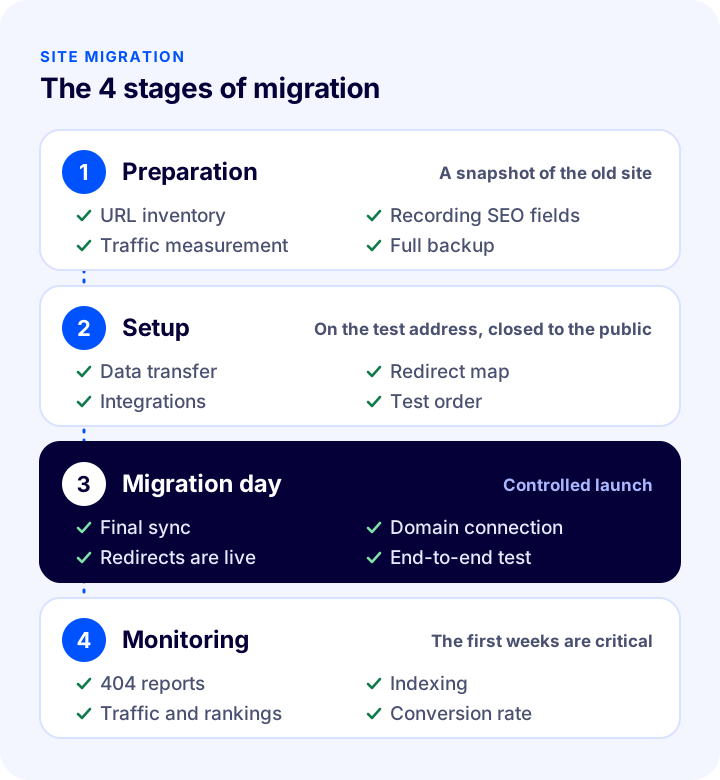
| Stage | Main tasks | Output |
|---|---|---|
| 1. Preparation | URL inventory, recording of SEO fields, traffic and ranking measurement, data backup | A complete map of the old site |
| 2. Setup | Data transfer, design, SEO fields, redirect map, integrations, test orders | A new site ready to go live |
| 3. Migration day | Final data sync, connecting the domain to the new site, turning on redirects, checks | The new site is live |
| 4. Monitoring | Tracking error pages, indexing, traffic, rankings and conversions | Problems caught early |
1. Preparation: Take a Snapshot of the Old Site
Before migrating, record the old site as it is today, completely. After the switch, only this record can answer the question "what was there before?".
- URL inventory: List every URL on the site: products, categories, brands, content pages, blog posts, campaign pages. The list is complete when you use the sitemap, the site's own export and a crawling tool together.
- Most valuable pages: Using your search engine management tools and your analytics tool, separately mark the pages that bring the most organic traffic, the most links and the most sales. These are the first pages to check after the switch.
- SEO fields: Record each page's title, description (meta description), H1 heading and canonical URL.
- Measurement baseline: Note the organic traffic of the weeks before the switch, your rankings for important keywords and your conversion rate. This is the only reference you will have for comparing the period after the switch.
- Full backup: Export your product, customer and order data; download the images separately.
2. Setup: Prepare the New Site Behind Closed Doors
The new site is built on a separate test address while the old site stays live. This address must be kept closed to search engines; otherwise the same content shows up at two URLs.
- Transfer the data and check one by one, on sample products, that variants, prices, stock and images arrive correctly.
- Fill in the SEO fields with the values from the old site; do not settle for titles generated from a template.
- Prepare the redirect map (we cover it in detail below).
- Set up the payment, shipping, e-Invoice and marketplace connections; place small test orders with a real card and test the order, invoice and shipping flow end to end.
- Add the analytics and advertising tracking codes; confirm with a test order that conversions are being counted.
3. Migration Day: A Controlled Launch
Migration day is when the final data sync, connecting the domain to the new site and turning on the redirects all happen together. We give the detailed checklist for this day below.
4. Monitoring: The First Weeks Are Critical
After the new site goes live, search engines recrawl the URLs. If pages returning errors, wrong redirects and missing content are caught early during this period, rankings are preserved. In the monitoring section we explain what to look at.
Which Data Should Be Migrated?
The data that needs to be migrated includes product and catalog data, customer data, order history, content and SEO fields. How each one is moved depends on the export and import options of the old and new systems.
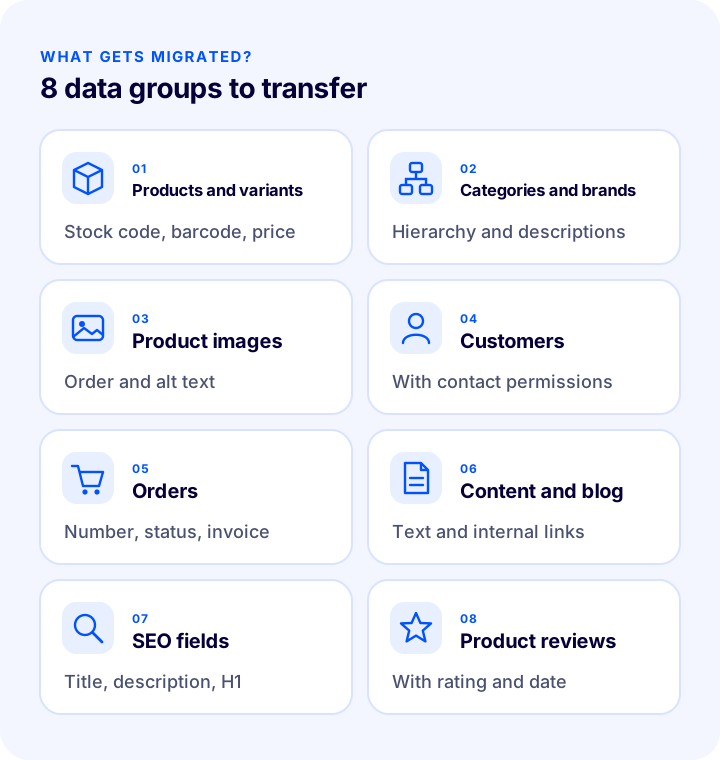
| Data | Why does it matter? | Point to watch |
|---|---|---|
| Products and variants | The sale itself | Stock code (SKU), barcode, color and size variants, price and stock must all come across completely |
| Categories and brands | Browsing and category page rankings | The hierarchy and category description texts must be preserved |
| Product images | Conversions and image searches | The main image and its order must be correct, and alternative texts (alt) must be carried over |
| Customers | Repeat sales, email and SMS marketing | Communication permissions must be migrated together; passwords often cannot be transferred |
| Orders | Customer service, returns and reporting | Order numbers, statuses and invoice details |
| Content pages and blog | Organic traffic and trust | Text, images and internal links must come across together |
| SEO fields | Preserving rankings | Title, description, H1 and URL, page by page |
| Product reviews | Trust and conversion | Reviews, ratings and dates must match the product |
Customer Passwords and Communication Permissions
For security reasons, customer passwords are stored in encrypted form, so they often cannot be transferred between different platforms. This is not a problem but a communication opportunity: after the migration, send your customers an email that introduces the new site and includes a link to reset their passwords easily. Remember to migrate commercial electronic message permissions (email, SMS) together with customer data, and not to send messages to people who have not given permission.
We recommend readingE-Commerce Product Page: What Should It Look Like?How to Prepare a 301 Redirect Map?
A 301 redirect map is a mapping list that shows which new URL each old site URL will be permanently redirected to. It is the most important document for protecting SEO in a site migration. The 301 code tells the search engine "this page has moved permanently" and ensures that the value of the old URL is passed on to the new one.
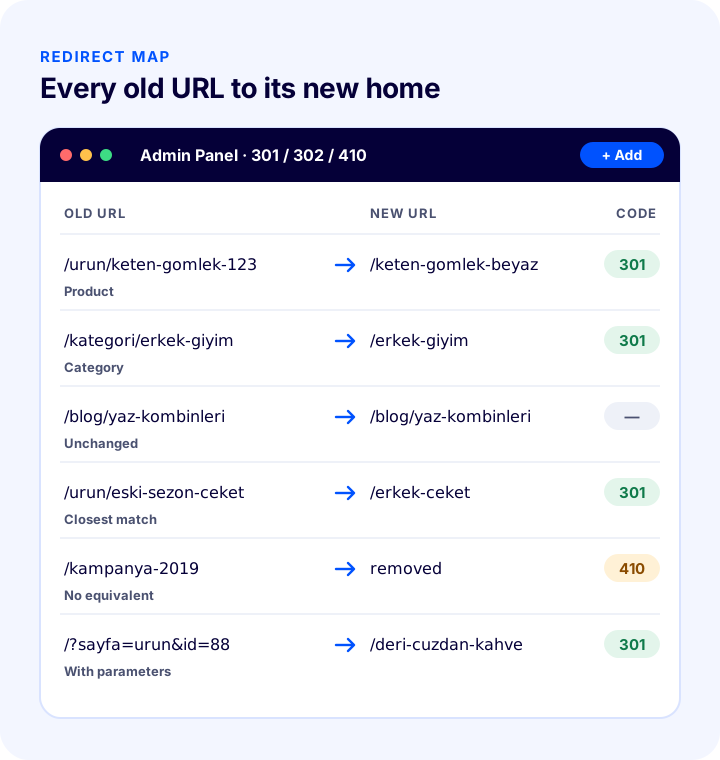
Prepare the map with these rules:
- Match one to one: Each product redirects to its own new product URL, and each category to its own new category URL. Do not redirect everything to the home page in bulk.
- If possible, do not change URLs at all: If the new platform allows it, the safest way is to keep the URL structure exactly as it is. A URL that does not change needs no redirect.
- Send removed pages to the closest equivalent: Redirect a product that is no longer sold to a similar product or to its own category. For pages with no equivalent at all, the 410 code (permanently removed) can be used.
- Do not build chains: If URL A redirects to B and B redirects to C, redirect A directly to C. Include your old redirects in the new map as well.
- Do not forget URLs with parameters: URLs containing filters, sorting and page numbers, as well as old campaign URLs, should also be on the list.
- Test the map: Test it in the staging environment before the migration and on the live site after the migration, using a bulk check rather than testing each URL one by one; every URL should reach a page that returns 200 in a single step.
| Code | Meaning | When is it used in a migration? |
|---|---|---|
| 301 | Moved permanently | When the old URL has a new equivalent; the core code of a site migration |
| 302 | Moved temporarily | Only in temporary situations (a short-term campaign, maintenance); not used in a migration |
| 404 | Page not found | The goal is that it never occurs; after the migration it is monitored and closed with a redirect |
| 410 | Removed permanently | For pages that have no equivalent and were removed on purpose |
How Are SEO Fields Transferred to the New Site?
SEO fields are each page's title, meta description, H1 heading, URL and canonical tag, and on the new site they must be exactly the same as the old values. Trying to "improve" the titles at the same time as the migration makes it harder to find the cause when a problem appears. Transfer everything as it is first, and do the improvements after the migration has settled.
- Page titles and descriptions: The old values should be preserved on all product, category and content pages.
- A single H1: Each page should have one H1, and it should carry the same keyword as the H1 on the old site.
- Canonical tag: Each page should point to its own permanent URL; it should not point to the staging URL or the old URL.
- Structured data: Structured data such as product, frequently asked questions and breadcrumb should also be present on the new site.
- Sitemap and robots.txt: The new sitemap should contain only published URLs that you want indexed; robots.txt should not block important pages.
- Internal links: Links in blog posts and content pages should be updated to the new URLs; no internal links that work through a redirect should be left.
Migration Day Checklist
Migration day is the day when everything you have prepared goes live at the same time. Follow the list below in order and tick off each item.
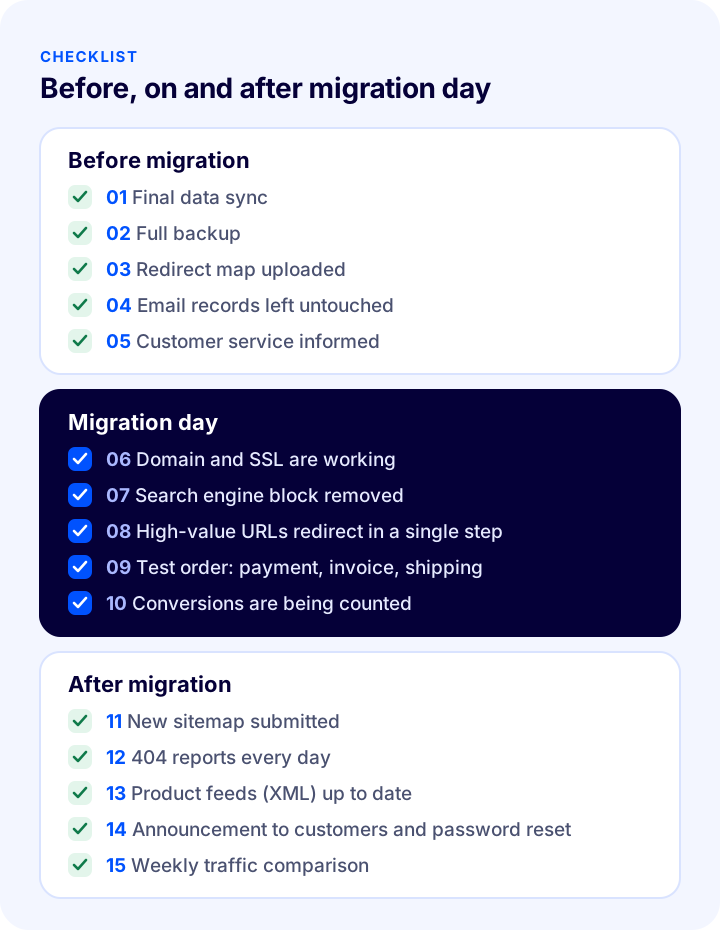
Right before the migration:
- Do the final synchronization of products, stock, customers and orders.
- Take one more full backup of the old site.
- Upload the final version of the redirect map to the new system.
- Agree with your team and the support team on when the domain records will be updated; do not touch the email records (MX and similar).
- Let customer service know about the migration.
On migration day:
- Connect the domain to the new site and verify that the security certificate (SSL) is working.
- Remove the search engine block (noindex, robots.txt disallow) from the staging environment.
- Open the old URLs of your most valuable pages and check that they redirect to the right page in a single step.
- Place a real test order: do payment, order notification, e-Invoice and shipping record work?
- Verify that analytics and advertising conversions are being counted.
In the days after the migration:
- Submit the new sitemap to the search engine webmaster tools.
- Check the error (404) reports every day and add any missing redirects.
- Check that the product feeds (XML) on marketplaces, comparison sites and advertising platforms use the new URLs.
- Announce the new site to your customers and send them the password reset link.
- Compare organic traffic, rankings and conversion rate with the pre-migration figures every week.
What Should Be Monitored After the Migration?
After the migration, you should monitor error pages, the number of indexed pages, organic traffic, rankings for key terms and the conversion rate. Small fluctuations in the first weeks are normal; search engines re-crawl and re-evaluate the new URLs. A lasting drop, however, almost always points to a technical error.
| What to monitor? | Where? | Warning sign |
|---|---|---|
| Error pages (404) | Search engine webmaster tools, server logs | An increase in the number of errors on old URLs |
| Indexed pages | Search engine webmaster tools | New URLs not entering the index or showing as "excluded" |
| Organic traffic | Analytics tool | A lasting and large drop compared with before the migration |
| Rankings | Rank tracking tool | Your most valuable pages dropping back for key terms |
| Conversion rate | Analytics tool and order reports | Orders falling while traffic holds steady (a payment or cart error) |
| Site speed | Speed measurement tools | Slowdowns, especially on mobile |
8 Common Mistakes in Site Migration
- Migrating without a redirect map: This is the most expensive mistake; the value of the old URLs is lost overnight.
- Redirecting all old URLs to the home page: Visitors cannot find what they were looking for, and the search engine ignores the page.
- Leaving the staging site open to search engines: Before the new site goes live, the same content gets indexed at two URLs.
- Forgetting the indexing block on the live site: If the block in the staging environment is not removed, the new site disappears from search results entirely.
- Leaving SEO fields to the template: Generic titles such as "Product Name | Store" are used instead of the titles that have been ranking for years.
- Not migrating category and blog content: The texts that bring traffic get forgotten with "we'll add them later".
- Not running an end-to-end order test: An error in the payment, invoice or shipping connection shows up on the first real order.
- Stopping monitoring after the migration: If error reports are not checked, small problems grow within weeks.
How Do You Migrate to Faprika?
When you migrate to Faprika, tools for every stage of the migration process are ready in the panel. You can compare which feature starts in which plan on the e-commerce plans page:
- Product upload and update with Excel: You upload the product list you took from your old site in bulk with Excel, and later update it with Excel as well.
- Bulk product, category and image operations: You update products and categories in bulk and upload product images in bulk.
- Bulk automatic SEO / meta information update: You manage page titles and descriptions in bulk instead of one by one.
- 301 / 302 / 410 panel: You manage your redirect map and URL records directly from the panel; old URLs are linked to their new pages, and removed pages are marked with the right code.
- XML integration (import): You import products from a supplier's or your old system's XML.
- Product, order and member export: You get an instant XML / Excel export of your product and order data and an Excel export of your member list; your data is always yours.
- Speed and security included in the plan: The content delivery network (CDN) is active on all plans, and the SSL security certificate and hosting are included in your plan.
If you sell only on marketplaces without a website, or want to migrate your marketplace operations first, product and customer transfer is free in the Marketplace Integration Plan when migrating from another platform, and the Faprika team does the setup. When you later open your own e-commerce site from the same panel, your products are already ready.
Recommended readingHow Much Does It Cost to Build an E-Commerce Site?Frequently Asked Questions
Does migrating an e-commerce site lower SEO?
A well-planned migration does not cause lasting SEO loss. If every old URL is redirected to its new counterpart with a 301, page titles, descriptions and content are preserved, and error reports are monitored after the move, rankings hold. In the first weeks, small fluctuations may appear while search engines recrawl the URLs.
Does the domain name change when you switch platforms?
No. The domain is yours and is connected to the new platform; only the software and server the site runs on change. During the migration, only the site's domain records are updated, and the email records are not touched.
Are customer passwords transferred to the new site?
For security reasons, passwords are stored in encrypted form, so they often cannot be transferred between different platforms. Customer information is migrated; an email is sent to customers announcing the new site and containing a password reset link.
What is a 301 redirect and why is it necessary?
301 is the redirect code that tells browsers and search engines a page has permanently moved to a new URL. It takes visitors and search engines from the old URL to the new one and passes the old URL's search engine value on to the new URL. It is the core tool for protecting SEO in a site migration.
How long does migrating an e-commerce site take?
It depends on the number of products, how easily the data can be exported, the scope of the design change and the integrations to be set up. Because the new site is prepared in a test environment, the old site keeps selling during that time; the switch itself is completed in a single day.
Do sales stop during the migration?
Not in a properly planned migration. The new site is prepared while the old one is live, the latest data is synced on migration day and the domain is connected to the new site. Scheduling the switch for an hour when sales are quiet reduces the risk even further.