What Is Marketplace Question Management?
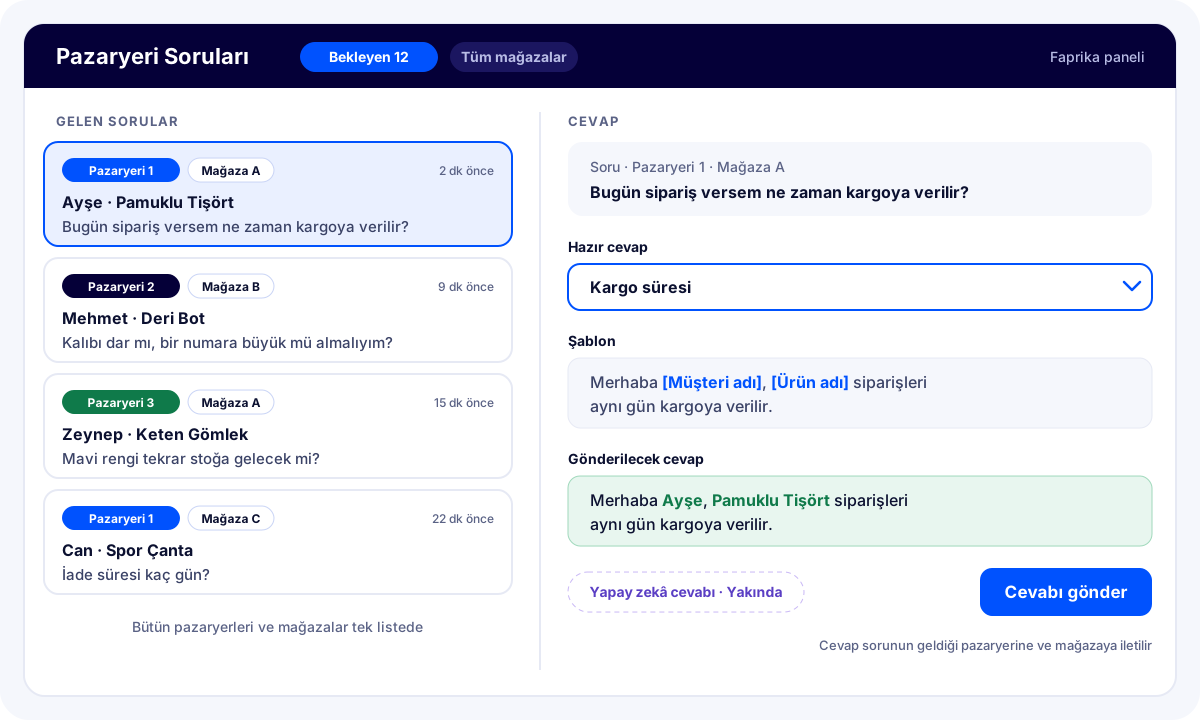
Marketplace Question Management is a module that lets you see and answer customer questions about your products on marketplaces from the Faprika panel. The questions from all the marketplaces you sell on, and from each store if you have more than one, are gathered on a single screen. You add ready-made replies for frequent questions; details such as the product name and customer name in the reply fill in automatically for each question.
In short, you no longer have to log in to each marketplace's panel separately or type the same reply over and over. Questions in one list, replies ready in one click.
Why Does a Fast Reply to Marketplace Questions Matter?
A customer who asks about a product on a marketplace is usually making their final decision before buying: will the size fit, when will it ship, is the color like the photo? If the reply is late, the customer may move on to another seller offering the same product. On most marketplaces, answered questions are also visible on the product page to other buyers; a good answer also answers the question of the next customer looking at that product in advance.
For businesses selling on multiple marketplaces with multiple stores, the real problem is that questions are scattered. Logging in to the panel of each marketplace and each store separately, and keeping track of which question has been answered, takes time and some questions get missed. Marketplace Question Management reduces this scatter to a single screen.
How Does Marketplace Question Management Work?
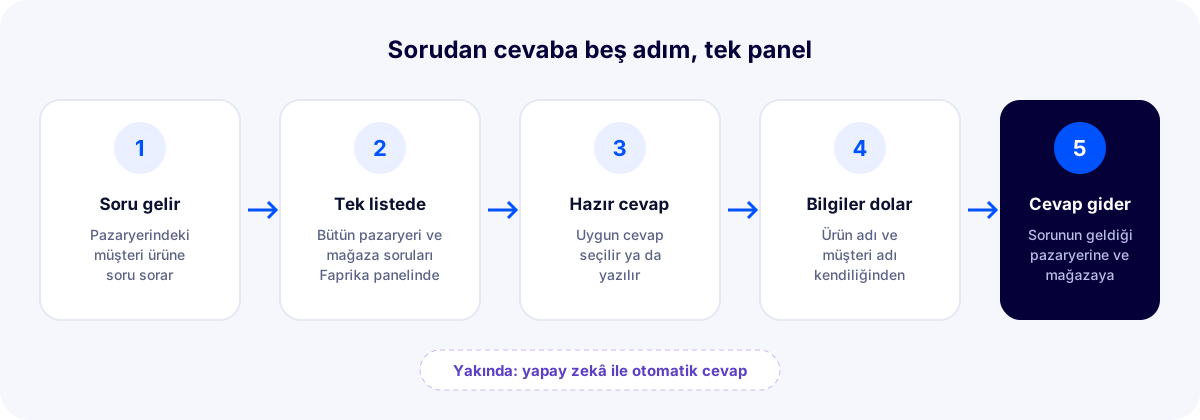
- Questions arrive in the panel: Customer questions sent to your marketplace stores connected to Faprika land on the question screen in the Faprika panel.
- You see them in one list: All questions sit in the same list; next to each question it shows which marketplace and which store it came from.
- You choose or write the reply: You open the question and either write the reply yourself or pick one of the ready-made replies you added earlier.
- Details fill in automatically: Parameters in the ready-made reply, such as the product name and customer name, are filled in automatically according to that question.
- The reply goes to the marketplace: The reply you send is delivered to the marketplace and store the question came from; you don't need to log in to the marketplace's own panel.
All Marketplaces and All Stores on One Screen
Even if you have multiple stores on the same marketplace, the questions of all of them are gathered on the same screen. You don't search separate panels for which question came to which store; one list, one follow-up. Every morning your team sees the pending questions of all stores at a glance and answers them in turn.
Marketplace questions live in the same Faprika panel where orders, stock and products are managed. When a customer asks about a product's stock or shipping status, you don't need to switch to another system to answer. To connect your marketplace stores to Faprika, see the Marketplace Integration page.
Ready-Made Replies: Write the Same Answer Once
Most marketplace questions are similar: "When will it be shipped?", "Does it run narrow?", "How do I make a return?", "Does this product come in another color?" Instead of writing a reply from scratch every time, you add the reply once as a ready-made reply. For the next similar question, you just pick the ready-made reply.
Ready-made replies also ensure that your whole team answers in the same voice, with the same information. When the shipping time or return condition changes, you update the ready-made reply once, and all following replies go out with the new information.
Parameters: Product Name and Customer Name Fill In Automatically
You can use parameters in ready-made replies. While writing the reply, you add a field such as the product name or customer name as a parameter; when the reply is sent, these fields are filled in automatically with that question's details. This way the ready-made reply doesn't look like a template; it goes to each customer with their own name and the product they asked about.
For example, if your ready-made reply is “Hello [Customer name], orders for [Product name] are shipped the same day.”, the reply to customer Ayşe's question about a cotton T-shirt becomes “Hello Ayşe, orders for Cotton T-Shirt are shipped the same day.” (The square brackets in the example are for illustration; parameters are added by selecting them in the panel.)
Coming Soon: Automatic Replies with AI
The automatic reply feature with AI is coming very soon to Marketplace Question Management. With this feature, AI will start answering incoming questions; your team will spend time only on the questions that truly need attention. When the feature goes live, it will be described in detail on this page.
Answering with Separate Panels vs. Faprika Question Management
| Topic | With each marketplace's own panel | With Faprika Marketplace Question Management |
|---|---|---|
| Where the questions are | Separately in each marketplace's panel | All on one screen in the Faprika panel |
| Multiple stores | Separate login for each store | Questions of all stores in the same list |
| Repeated questions | Rewritten every time | A ready-made reply is selected |
| Product name and customer name | Typed by hand | Filled in automatically with parameters |
| Stock and order information | Checked by switching to another system | In the same panel |
| Reply with AI | No | Coming soon |
What Do You Gain with Marketplace Question Management?
- Questions from all marketplaces and stores on one screen, no question missed
- Reply from the Faprika panel without going back and forth between marketplace panels
- Reply to frequent questions in seconds with ready-made replies
- Replies that look personal, with the product name and customer name filled in automatically
- The same voice and up-to-date information across the whole team
- Automatic replies with AI coming very soon
Who Is It For?
It delivers the biggest gain for businesses that sell on multiple marketplaces, manage multiple stores on the same marketplace, or receive many customer questions every day. Businesses selling on a single marketplace also shorten their reply time with ready-made replies and parameters.
Frequently Asked Questions
What is Marketplace Question Management?
It is a module that lets you see and answer customer questions about your products on marketplaces from the Faprika panel. Questions from all marketplaces and stores are gathered on a single screen; replies are given quickly with ready-made replies and parameters.
Can I see the questions of my multiple stores on the same screen?
Yes. Even if you have multiple marketplaces, or multiple stores on the same marketplace, all questions are listed on a single screen in the Faprika panel; where each question came from, which marketplace and store, is visible.
What is a ready-made reply and how is it used?
A ready-made reply is a reply you write once and save for frequent questions. When a similar question arrives, you select the ready-made reply and send it; you don't have to write the reply from scratch every time.
What information fills in automatically in ready-made replies?
Parameters can be used in ready-made replies. For example, the product name and customer name parameters are filled in automatically with that question's details when the reply is sent.
Do I need to send the reply separately from the marketplace's panel?
No. The reply you send from the Faprika panel is delivered to the marketplace and store the question came from.
Will AI answer the questions?
Yes, the automatic reply feature with AI is coming very soon to Marketplace Question Management. When it goes live, AI will start answering incoming questions.
To see Marketplace Question Management in your own store, request a demo; our expert will go through the module with you in your panel.