Contents 7 sections
- Basic Requirements and Application Process for Becoming a Seller on ÇiçekSepeti
- Step 1: Entering Company Information
- Step 2: Filling In Seller Store Information
- Step 3: Uploading the Required Documents
- Step 4: Tracking the Application Status and Finalization Process
- Advantages of the Faprika ÇiçekSepeti Integration
- Frequently Asked Questions (FAQ)
If you want to claim your place in the world of e-commerce and become a successful seller on ÇiçekSepeti, you are in the right place! We have explained the roadmap to becoming a seller on ÇiçekSepeti step by step for you. Whatever your company type (joint-stock, limited, sole proprietorship), this guide provides all the information you need, from preparing your tax certificate to every stage of the application process. Learn in detail how to list your products on ÇiçekSepeti, which documents are required, and how the application process works. Now take the key to becoming a seller on ÇiçekSepeti and take your first step toward success in e-commerce!
Basic Requirements and Application Process for Becoming a Seller on ÇiçekSepeti
Your first step to becoming a seller on ÇiçekSepeti is the structure of your company. To sell successfully, you must have an entity such as a joint-stock company, limited company, or sole proprietorship. This also implies having a tax certificate and being obliged to be a taxpayer. The ability to issue invoices for your products is also an integral part of this process.
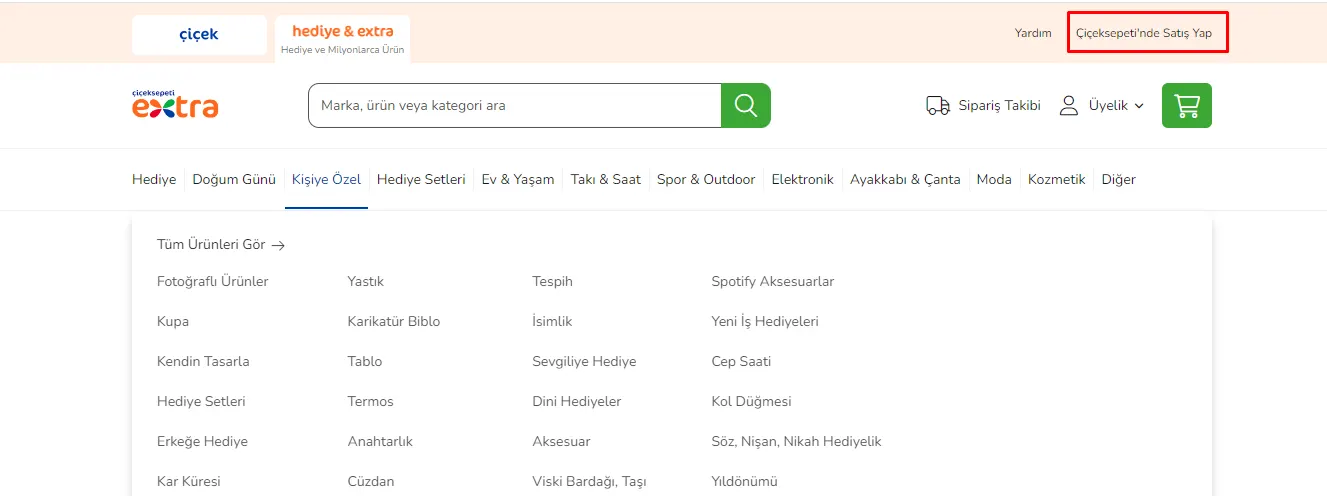
You can start your selling process by logging in to Çiçeksepeti.com. Get started by clicking the “Sell on ÇiçekSepeti” link in the upper right corner of the site. Then, on the page that opens, click the “Apply Now” option to reach the application page.
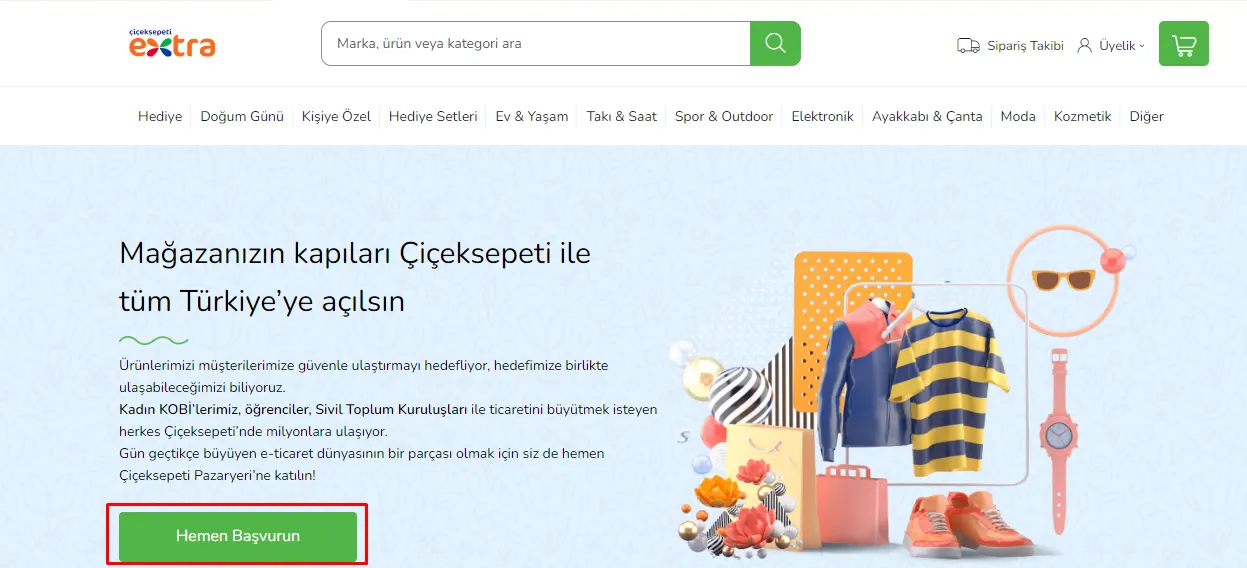
The application to become a seller on ÇiçekSepeti consists of four main stages: Company Information, Company Detail Information, Document Upload, and Application Status.
- Company Information: Contains your company's basic information.
- Company Detail Information: Contains more detailed information about your company.
- Document Upload: The stage where the required documents are uploaded.
- Application Status: The section where you can track the current status of your application process.
Step 1: Entering Company Information
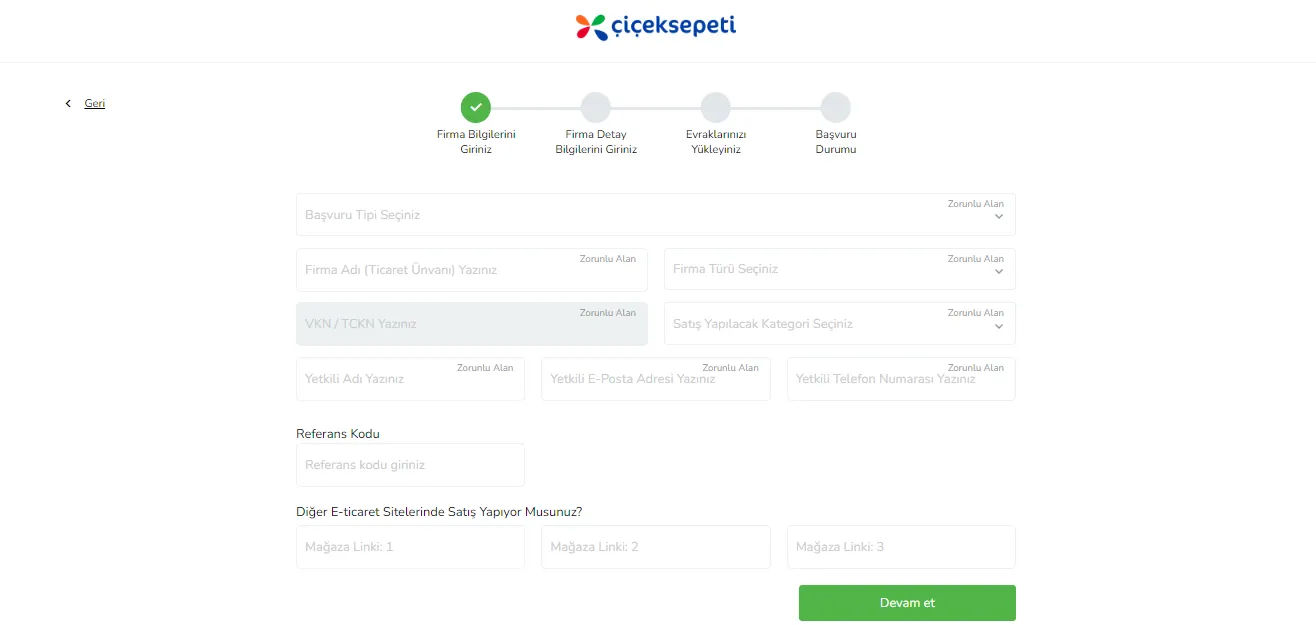
The first stage of the ÇiçekSepeti seller application begins with filling in your basic company information. This step ensures your application is categorized correctly and that the process runs smoothly.
- Application Type: Choose the most suitable application type according to the type of product or service you will sell.
- Company Name: Enter your trade name as it appears on the tax certificate.
- Company Type: Specify the legal structure of your company (sole proprietorship, joint-stock, or limited company).
- VKN / TCKN: Enter your Tax Identification Number or Turkish Republic ID Number.
- Category to Sell In: Select the categories suitable for your products.
- Authorized Person's Name: Enter the name of the company's authorized person.
- Authorized Person's Email Address: Enter the authorized person's email address for contact.
- Authorized Person's Phone Number: Add the authorized person's phone number.
- Referral Code: If you have one, enter the referral code.
After filling in your information completely and correctly, click the "Continue" button to move on to the next stage of your application process.
After this step, you will need to fill in your company detail information. This will include more specific details of your application.
Step 2: Filling In Seller Store Information
The second step of your journey to becoming a seller on ÇiçekSepeti continues with entering your store's detailed information. This step lets you create the store profile you will sell through and lays the foundations needed to be a successful seller.
- Seller Store Name: Add your store's name.
- Email Address: Enter the email address associated with the store.
- Address and Delivery Type: Specify the address details of your physical or virtual store and your delivery options. This information will also be used for customer returns.
- Seller Type: Choose the seller type that suits your company type.
- Mersis No: Add your Central Registry System (MERSIS) number.
- KEP Address: Enter your Registered Electronic Mail (KEP) address, which is required for official procedures.
- Tax Office and Province: Add the tax office and province where your company is registered.
- Full Address: Fill in the address details to be used for invoicing and delivery. If you use a different warehouse address, add that information as well.
- Company Phone Number: Enter the phone number to be used for contact and SMS notifications.
- Company Email Address: Add the email address to be used for operations and notifications.
- Virtual Store Name: Enter your store name that will be shown to customers on Çiçeksepeti.com.
- Delivery Option: Determine how you will deliver your products to customers.
After filling in this information correctly and completely, click the "Continue" button to move on to the next stage of the process.
Recommended readingHow to Apply as a Seller on Hepsiburada? A Detailed Guide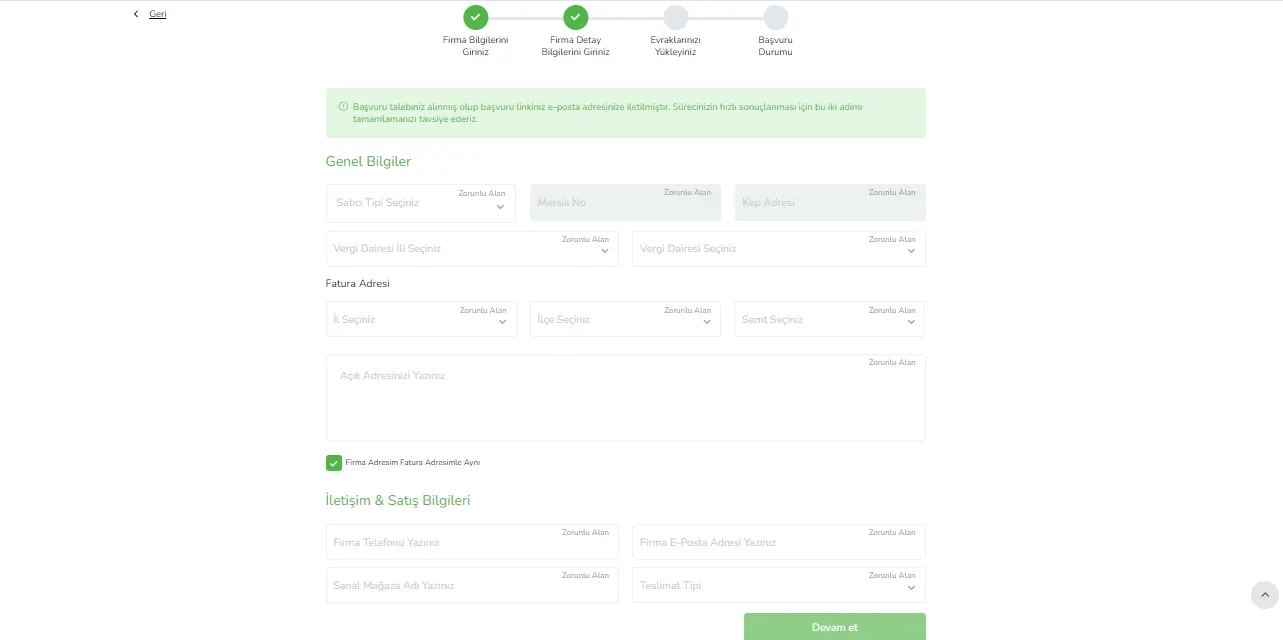
Step 3: Uploading the Required Documents
The final step of your journey to becoming a seller on ÇiçekSepeti is uploading the required documents to the system. This step is critical for completing your application and starting the approval process.
- Tax Certificate: Upload your current tax certificate covering the last year.
- Photocopy of ID Card: (Mandatory for sole proprietorships) Add a photocopy of the front of your ID card.
- Signature Circular / Declaration: Upload your signed and stamped signature circular or declaration.
- Bank Information Document or Account Book: Upload a document containing your bank account details.
- Information Form: Fill in the information form that you can download from Çiçeksepeti, sign and stamp every page, and upload it to the system.
- Seller Partnership and Listing Agreement: Download this document from Çiçeksepeti as well, fill it in, and upload it. Make sure every page carries a signature and stamp.
- Partnership Agreement: If your company type is a partnership, you may need to upload this document. This is not a mandatory document.
- Platform Rules: Download, fill in, and upload the document containing the platform's rules.
- Other: If there are other documents you want to add, you can add them in this step.
After uploading all these documents completely and correctly, finish your application process by clicking the “Complete Application” button.
Recommended readingHow to Open a Store on the N11 Marketplace?Step 4: Tracking the Application Status and Finalization Process
The final stage of your application is tracking your application status and waiting for the finalization process.
- Tracking the Application Status: You can track the current status of your application on the relevant Çiçeksepeti page. You can also follow your application process through the link sent to your email address.
- Document Review and Finalization: The documents you uploaded during the application are reviewed and evaluated by Çiçeksepeti. Once this evaluation process is complete, the result of your application is determined.
- Store Opening and Panel Information: If the evaluation process ends positively, your store opens and your seller panel details will be sent to you. With this information, you can start selling on Çiçeksepeti.
By following these steps, you can claim your place as a seller on Çiçeksepeti and begin a successful journey in the world of e-commerce.
Advantages of the Faprika ÇiçekSepeti Integration
If you want to gain a competitive advantage in the world of e-commerce, Faprika's Çiçeksepeti integration is made for you! This integration moves your business a step ahead by offering significant advantages in both time and cost.
- Easy Product Management: Through Faprika, you can easily add and manage your products on Çiçeksepeti. This simplifies updating your product data and tracking stock.
- Automatic Order Synchronization: Your orders are automatically transferred to the Faprika system, speeding up your order management process and reducing the risk of errors.
- Efficient Stock Management: Your stock is kept constantly up to date, which increases customer satisfaction and prevents problems such as overstock or shortages.
- Analytical Reporting: Thanks to the detailed reports Faprika provides, you can track the performance of sales made on Çiçeksepeti and make strategic decisions.
- Customer Satisfaction: Fast and accurate order processing increases customer satisfaction and helps you build a loyal customer base.
With Faprika's Çiçeksepeti integration, secure your success in e-commerce. Take advantage of this unique opportunity now and take your business to new heights!
Frequently Asked Questions (FAQ)
Requirements to Become a Seller on ÇiçekSepeti
To become a seller on ÇiçekSepeti, you must own a commercial entity and be a taxpayer.
How to Apply to ÇiçekSepeti?
You can submit your seller application to ÇiçekSepeti from the "Apply Now" tab on the official website.
Required Documents
During the application, documents such as a tax certificate, a photocopy of your ID card, and a signature circular or declaration are required.
Application Review Time
The time to complete your application depends on the review of the documents and usually takes a few business days.
Seller Panel and Access
Once you are approved, login details for the seller panel are sent by email, and you can manage your operations from there.
Advantages of Selling on ÇiçekSepeti
The advantages of selling on ÇiçekSepeti include access to a broad customer base, easy order management, and advertising options.
You May Also Like
- How to Open a Store on the N11 Marketplace?
- Stoksuz e-Ticaret Nedir? Stoksuz Satış Nasıl Yapılır?
- Trendyol’da Satış Yapmanın Avantajları ve İpuçları
- ÇiçekSepetin’de Satış Yapmak ve Avantajları
- Pazarama’da Satış Yapmak ve Avantajları
- Amazon'da Satış Yapmak İçin Gerekli Bilgiler
- Marketplace Category Commission Rates 2023