
Contents 14 sections
- What Are Bot Traffic and Fake Sign-ups?
- What Are the Signs of Fake Sign-ups and a Bot Attack?
- How Much Does Bot Traffic Cost You?
- Which Pages Do Bots Target?
- How Do You Block Bot Traffic?
- How Do You Protect Without Bothering Real Customers?
- In What Order Is Bot Protection Set Up?
- How Are Data and Privacy Handled in Bot Protection?
- What Do You Do During a Bot Attack?
- How Do You Monitor Bot Protection?
- Common Mistakes in Bot Protection
- How Solid Is Your Bot Protection Setup?
- How Do You Block Bot Traffic with Faprika?
- Frequently Asked Questions
Your member count balloons overnight, but the number of orders stands still. Meaningless messages pour into your contact form, your campaign emails go to addresses that don't exist, and the visitor count in your reports doesn't reflect reality. What these have in common is often automated software: the question of how to block bot traffic looks for ways to stop the fake sign-ups, form spam and needless requests this software creates without bothering real customers. The short answer: build not a single lock but several complementary quiet layers, and monitor the result.
This guide explains the signs of bots and fake sign-ups, the damage they do, measures such as invisible bot protection, verification, rate limiting and campaign rules, the balance of not tiring real customers, monitoring indicators, the steps to take during an attack and common mistakes. Of the two tools in the article, one helps you calculate what bots cost you, and the other audits your current protection setup.
What Are Bot Traffic and Fake Sign-ups?
Bot traffic is visits and requests made to your site by automated, non-human software; fake sign-ups are accounts opened by this software or by malicious people with false information. Not every bot is harmful: search engine crawlers are bots too, and your site needs them. The problem is bots working for purposes you haven't allowed.
What Do Bots Do on Your Site?
Their goals differ, but they all come in through the same door: forms and member pages. The table below summarizes the most common behaviors.
| Bot type | What does it do? | The trace you see |
|---|---|---|
| Fake sign-up bot | Opens accounts with random information | A wave of sign-ups with meaningless names and emails |
| Form spam bot | Fills the contact form with junk messages | Messages full of links or meaningless text |
| Campaign abuse bot | Uses the welcome benefit with many accounts | Coupon use on accounts opened in the same pattern |
| Scraper bot | Reads product and price pages in bulk | Many page requests in a short time |
| Credential-guessing bot | Tries many passwords on the login page | A surge of failed logins |
What Are the Signs of Fake Sign-ups and a Bot Attack?
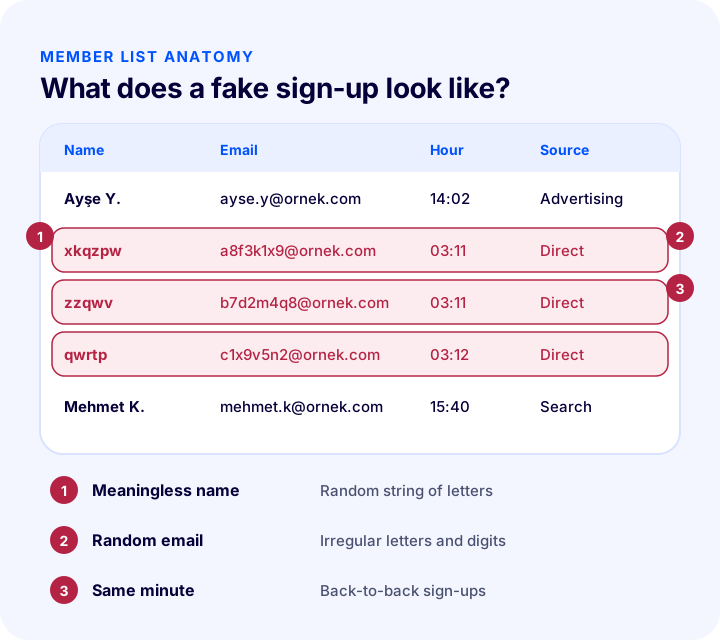
The strongest sign is sudden activity unrelated to real sales: sign-ups, forms or visits rise, but orders and the verified email rate do not. A single sign is not conclusive proof; seeing several at the same time points to an attack.
- Abnormal sign-up growth: Waves of sign-ups arriving without a campaign or ad, at night or at short intervals.
- Meaningless information: First and last names made of random letters, and email addresses made of irregular strings of letters and digits.
- Empty or meaningless forms: Contact form submissions with an empty message field, only links, or text unrelated to the topic.
- Sudden traffic: Visits piling up on a single page or from a single source, with very short time on page.
- Bouncing emails: A high rate of welcome emails bouncing shows that the addresses do not exist.
- Unverified accounts: Many accounts that never verify their email or never place an order.
How Much Does Bot Traffic Cost You?
The damage from bot traffic is often not visible in a single line item; small losses add up. The tool below calculates, from your monthly sign-up and form counts, how many hours and how much cost fake records cause you, and how much you could recover after protection. The values are examples; enter your own figures.
The real lesson of the tool is that the cost is not just the email or SMS bill: even a few minutes of internal handling per fake record turns into team days by month end. Hidden items are often bigger than the visible ones.
Why Do Fake Sign-ups Distort Reports?
Fake accounts raise the member count but bring no orders; so the sign-up to order conversion rate looks lower than it really is. The team may think a campaign or page is not working and make needless changes. On top of that, fake addresses in the email list pull down open and click rates. The first condition for trusting a report is that the audience you measure is made of real people.
What Damage Does Bot Traffic Cause?
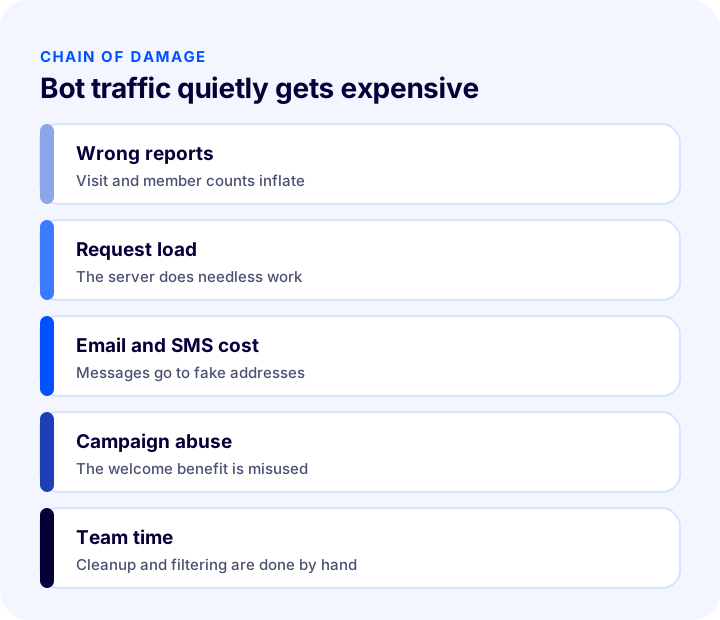
- Wrong reports: Sign-ups, conversion rate and visitor counts inflate; with wrong data, ad budget and campaign decisions go wrong.
- Request and email load: Every fake record means a process on the server and often a welcome message; sending to addresses that don't exist can damage your email sender reputation.
- Campaign abuse: A welcome coupon or first-order benefit can be used with many fake accounts.
- Team time: Sorting through incoming messages, cleaning fake accounts and correcting reports take time and pull people away from the real work.
- Trust and reputation: Unwanted messages going to customers or a degraded site speed affect brand perception negatively.
Which Pages Do Bots Target?
Bots don't wander at random; they pick pages that give easy results, require no login and take in data. Listing these pages first determines where you start protection.
| Page | The bot's goal | Priority |
|---|---|---|
| Sign Up | Opening fake accounts, getting campaign benefits | High |
| Member Login | Trying many passwords | High |
| Contact form | Sending junk messages and links | High |
| Password reset | Triggering emails repeatedly to someone else's address | Medium |
| Newsletter sign-up | Filling the list with fake addresses | Medium |
| Coupon field | Trying to guess coupon codes | Medium |
The logic of the list is simple: any form that has money, data or the power to trigger an email is a target. That is why protection should be considered not only on the sign-up page but at every door in this table.
What Should You Watch So You Don't Block Harmless Bots?
Permitted bots, such as search engine crawlers, are needed for your site. A rule that blindly blocks all bots can break your pages' discoverability. So set up measures to target actions like form submission and account creation, not the bot's browsing; reading pages is free, while submitting a form depends on verification.
How Do You Block Bot Traffic?
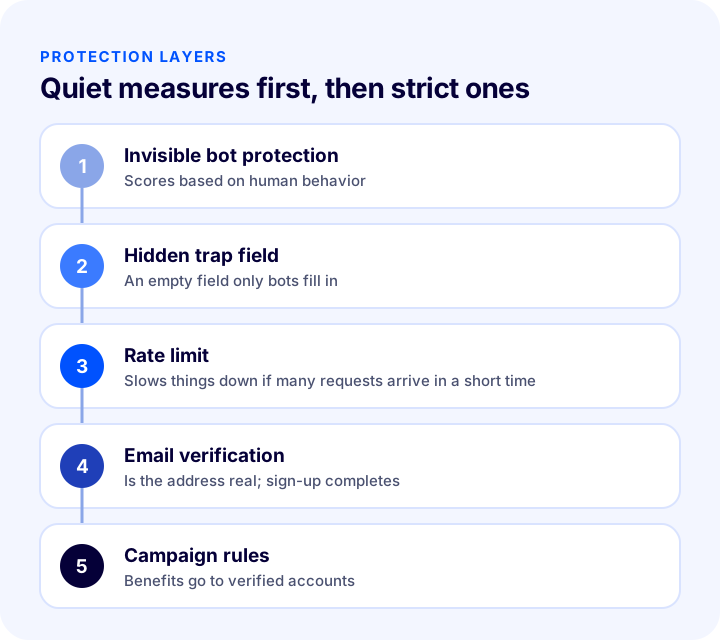
The way to block bot traffic is not a single measure but complementary layers: invisible bot protection, a hidden trap field, rate limiting, email verification and campaign rules. Each layer catches a different type of bot; used together, real customers hardly notice them.
| Measure | What does it do? | Effect on the customer |
|---|---|---|
| Invisible bot protection | Produces a probability-of-being-human score from visitor behavior | Almost none |
| Hidden trap field | Catches the bot that fills in a field real users don't see | No |
| Rate limit | Slows or stops whoever makes many requests in a short time | Very low |
| Email verification | Proves the address really belongs to the user | One extra step |
| Campaign rules | Grants the benefit only to a verified account | A small wait |
1. Invisible Bot Protection
Instead of making visitors solve puzzles, invisible bot protection examines their behavior in the background (such as mouse and touch movements and time on page) and gives a trust score. A request with a low score is rejected or sent to extra verification. Its biggest advantage is that it never bothers real customers.
- Where it is used: On the pages bots target most, such as sign-up, member login and the contact form.
- How it is set up: A key pair obtained from the service provider (a public site key and a secret key known only to you) is entered in the relevant fields of the e-commerce panel, and the protection is turned on.
- How the secret key is stored: The secret key is shared with no one; it is used only on the server side for verification.
2. Hidden Trap Field
A hidden trap field (the honeypot method) means adding an empty field to the form that a real user cannot see. A human leaves this field empty because they don't see it; a bot programmed to fill in forms fills in every field. A form that arrives with it filled in is quietly rejected. It asks no extra effort from the customer; but it is not enough on its own, because advanced bots may recognize the hidden field too.
3. Rate Limit
A rate limit restricts the number of requests that come from the same source in a short time. A human doesn't submit dozens of sign-up forms in a minute; a bot does. When the limit is exceeded, the request is slowed or temporarily rejected. If you set the limit too tight, real customers on a shared network can be affected as well; so the value should be set by measurement.
4. Email Verification
Activating an account only for a user who verifies their email makes fake accounts opened with nonexistent addresses worthless. An unverified account cannot receive campaign benefits, is not added to the list and can be cleaned out after a set time. It adds a step; but if it is asked for without breaking the shopping flow, at the stage where the account becomes permanent, customers accept it easily.
Okumanızı öneririz2FA (İki Faktörlü Doğrulama) Nasıl Kullanılır?5. Campaign Rules
The bots' real payoff is often the campaign. Tying the welcome benefit to a verified email, a verified phone or a first real order removes the return on opening fake accounts. Rules such as a coupon usage limit, one use per person and a minimum cart amount also reduce abuse.
How Do You Protect Without Bothering Real Customers?
There is a balance between protection and convenience: every measure adds some friction. The goal is to stop the bot without slowing the human at all. That is why measures are ordered from quiet to strict and tightened only when needed.
- Turn on quiet measures first: Invisible bot protection and a hidden trap field are not felt by the customer.
- Ask for extra verification only on suspicious requests: Showing an extra step to a low-score request bothers far fewer people than showing it to everyone.
- Ask for verification at the right moment: Ask for email verification not during checkout but when the account becomes permanent; don't disrupt the payment flow.
- Show the error clearly: Give a real user who is blocked by mistake a message that says what to do and also shows a phone or contact route.
- Consider guest checkout: If membership is not mandatory, the target for fake sign-ups shrinks too; for details see What Is Guest Checkout? In E-Commerce Mandatory Sign-up, Guest Payment and Encouraging Sign-up: A Practical Guide.
In What Order Is Bot Protection Set Up?
Going in order rather than turning everything on the same day lets you see what each measure does and avoid blocking real customers by mistake.
- 1. Measure the current situation: Look at recent sign-up, form and bounced email counts; this becomes your comparison point after protection.
- 2. Turn on quiet measures: Enable invisible bot protection on the sign-up, login and contact pages.
- 3. Tighten campaign rules: Tie the welcome benefit to a verified account.
- 4. Add email verification: Ask for verification at the moment the account becomes permanent.
- 5. Monitor for a week: Look at the number of blocked requests and of real users wrongly blocked; adjust sensitivity if needed.
- 6. Write the incident plan: Decide in advance who does what at the moment of an attack.
What Should Change After Protection Is Turned On?
With protection set up correctly, the member count may drop somewhat; this is not a loss but a sign that fake records are being filtered out. The values to watch are the number of members who order and the conversion from sign-up to order. If these two indicators are steady or up, the protection is not blocking real customers.
How Are Data and Privacy Handled in Bot Protection?
Because bot protection processes visitor behavior, it should be considered together with personal data rules. You need to explain what data the service you use collects in your privacy notice and your cookie information. The purpose of information you collect for verification, such as an email address, should be clear and its retention limited.
Recommended readingHow to Ensure KVKK Compliance for an E-commerce Site? A Practical Guide to Privacy Notices, Explicit Consent, Cookies, IYS and Data Subject RequestsWhat Do You Do During a Bot Attack?
Going step by step instead of panicking during an attack limits the damage. First verify the situation, then close the new attack entry point, find the source, clean up the records and add a permanent rule so the same route does not open again.
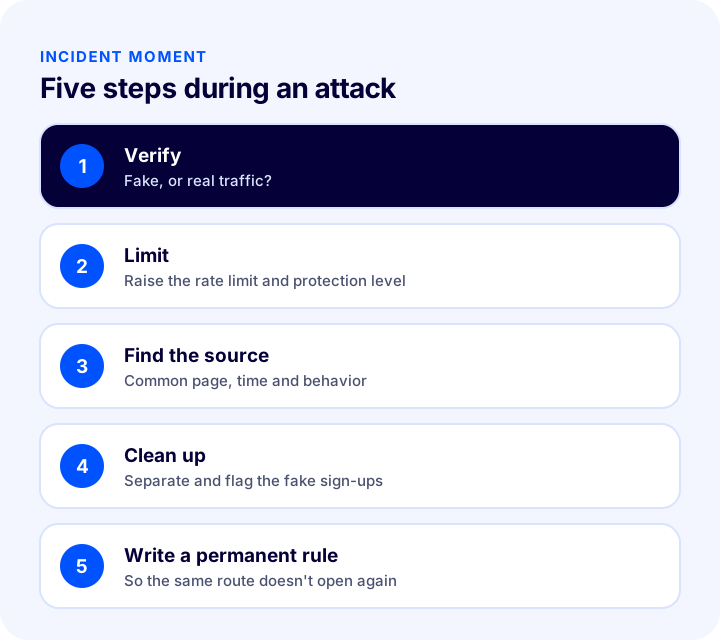
- 1. Verify: Work out whether the surge comes from a real campaign or an attack by looking at sign-ups, orders and page browsing together.
- 2. Limit: Tighten the rate limit, raise the bot protection level and temporarily place the form under attack in stricter protection.
- 3. Find the source: Find which page, which hour and which behavior pattern the attack concentrates on; the common trait is the key to writing a rule.
- 4. Clean up: Separate and flag the fake records; keeping them in a separate list first, instead of deleting at once, reduces the risk of deleting a real customer by mistake.
- 5. Write a permanent rule: Add the missing layer so the same route does not open again, and keep a short incident note within the team.
How Do You Monitor Bot Protection?
Protection is not set up once and left; bots change methods. Regularly tracking a few indicators shows whether the protection is working and whether a new wave is starting.
| Indicator | What does it tell you? |
|---|---|
| Daily new sign-up count | A sudden spike can be a warning of an attack |
| Email verification rate | If low, the share of fake records is high |
| Welcome email bounce rate | Shows the share of nonexistent addresses |
| Sign-up to order conversion | If it falls while sign-ups rise, suspect fake accounts |
| Number of blocked requests | Shows how much work the protection is doing |
| Real users blocked by mistake | Shows whether the protection is harsher than it should be |
Common Mistakes in Bot Protection
- Relying on a single measure: A single layer leaves no protection once it is bypassed.
- Asking everyone a hard verification: Real customers abandon the cart; the protection ends up blocking sales too.
- Sharing the secret key: Exposing the key makes the protection worthless; it should stay only with authorized people.
- Setting the rate limit without measuring: A limit that is too tight catches real customers; one that is too loose misses the bot.
- Leaving campaign rules loose: Even with technical protection, if the payoff from abuse remains, the attack continues.
- Deleting fake records blindly: Separating and flagging first is necessary so as not to lose a real customer.
- Not monitoring: While the protection is assumed to be working, bots that change methods can slip through quietly.
- Protecting only the sign-up page: The contact form, login and password reset are targets too.
How Solid Is Your Bot Protection Setup?
The tool below checks your current protection setup with eight questions. Tick the items that apply to you; the tool tells you how well established your protection is.
How Do You Block Bot Traffic with Faprika?
Faprika lets you protect your forms and member pages with an invisible bot protection service. Setup is done by entering the site key and secret key obtained from the service provider in the general settings section of the configuration settings in the e-commerce panel and enabling the protection. Which feature is in which plan varies by plan; see the plans page for details.
- Invisible bot protection: After the key pair is entered in the panel and enabled, the protection can be turned on separately for the member login, sign-up and contact pages; a protection indicator also appears on the relevant page.
- Security infrastructure: An SSL security certificate and advanced security and quality review are included in all plans in the plan comparison; all data is automatically backed up every day at different locations.
- Member and login reports: Member and login reports are in all plans; you can follow sign-up growth from the reports.
- Record and activity monitoring: System log, user activity (activity log) and active user tracking features are available only in the top plan; they are not in the other plans.
- Guest checkout: The flow that does not require membership is managed in the panel; when membership isn't required, there is no payoff left for opening fake accounts.
Faprika's sources do not list rate limiting, a hidden trap field and automatic fake account cleanup as separate features; for these measures you can apply the principles in the general guide and plan your needs together with Faprika experts. For the general security approach, you can also take a look at our E-Ticaret Sitesi Güvenlik Sistemleri post.
Frequently Asked Questions
How do you block bot traffic?
Not with a single measure but with layers that complement each other: invisible bot protection, a hidden trap field, rate limiting, email verification and strict campaign rules. Quiet measures the customer doesn't feel are turned on first, and stricter rules are added if needed.
How can you tell a fake sign-up?
Meaningless names and random email addresses, back-to-back sign-ups in the same minute, unverified accounts and bounced welcome emails are signs of fake sign-ups. If sign-ups rise while orders don't, suspicion grows.
Does invisible bot protection bother customers?
No, it usually goes unnoticed. Instead of making people solve puzzles, it examines visitor behavior in the background and shows extra verification only for suspicious requests; so it doesn't slow down sales.
Why is form spam harmful?
It fills the inbox with unnecessary messages, causes real customer requests to be overlooked, wastes team time and creates request load. In extreme cases it can slow the site down.
How do you prevent campaign abuse?
By tying the welcome benefit to a verified email or a first real order, and setting a one-use-per-person rule and a usage limit. An attack with no payoff is usually abandoned.
How do you set up bot protection in Faprika?
The site key and secret key obtained from the invisible bot protection service are entered in the general settings section of the configuration settings in the panel, and the protection is enabled. It is then turned on separately for the member login, sign-up and contact pages. Which feature is in which plan varies by plan.