
Contents 15 sections
- What Is Payment by Bank Transfer (Havale/EFT)?
- Why Offer Havale/EFT as a Payment Option?
- How Does an Order Paid by Havale/EFT Progress?
- How Do You Match an Order to a Payment?
- How Do You Set the Pending Payment Time Limit?
- How Does a Pending Havale Order Tie Up Stock?
- How Do You Show Bank Account Details to the Customer?
- Fraud and Mismatch Risk in Havale Payments
- How Is Payment Status Managed in Faprika?
- How Do You Refund an Order Paid by Havale?
- How Do You Measure Havale and EFT Payments?
- Common Mistakes with Havale/EFT Payments
- How Do You Audit Your Havale/EFT Setup?
- How Do You Manage Havale and EFT with Faprika?
- Frequently Asked Questions
For customers who do not use cards or want to make high-value purchases, havale and EFT are the payment route that looks most trustworthy on an e-commerce site. But for the store they work very differently from card payments: money is not confirmed instantly, the order and the payment are not linked automatically, and until the payment arrives the order's product sits on the shelf. The short answer to how to manage payment by havale/EFT is this: keep the order in "awaiting payment" status, match the money to the order number, put a limit on the waiting time, and move the order to preparation only after verifying the payment.
In this guide we explain the difference between havale and EFT, why they should be offered, how to match an order with its payment, how to set a time limit for pending payments, how pending orders tie up stock, how to show bank account details, fraud and mismatch risks, the refund process and common mistakes. Of the two tools in the article, one helps you calculate the stock and revenue cost of pending havale orders, and the other audits your current havale setup.
What Is Payment by Bank Transfer (Havale/EFT)?
Havale and EFT is a payment method in which the customer pays from their own bank by sending money to the store's bank account. The customer completes the order, sees the store's account details, goes to their bank or opens its mobile app and sends the amount; the store confirms the order when it sees the money in its account.
What Is the Difference Between Havale and EFT?
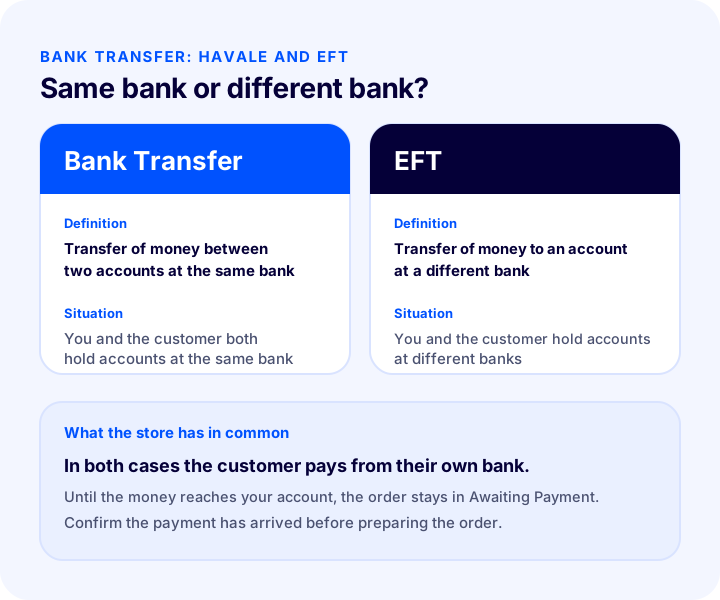
A transfer of money from one account to another account at the same bank is called havale; a transfer to an account at a different bank is called EFT. For the store the difference is which bank the customer sends from; for order management, the two are handled the same way.
| Feature | Bank Transfer | EFT |
|---|---|---|
| Definition | Transfer between two accounts at the same bank | Transfer to an account at a different bank |
| Customer and store | Both hold accounts at the same bank | Hold accounts at different banks |
| The store's job | See the money in the account and match it to the order | See the money in the account and match it to the order |
| Order status | Awaiting payment until the money arrives | Awaiting payment until the money arrives |
Customers often don't tell the two apart; they see the "pay by havale" or "havale / EFT" option, and their bank tells them which one to do. That is why offering the payment option under a single heading saves the customer the question.
How Do Havale and EFT Differ from a Virtual POS?
With card payments the outcome is known at the moment of ordering: the payment either succeeds or it doesn't. With havale and EFT, the order is taken first and the payment comes later. This time gap creates uncertainty for both customer and store, and it is the main thing to manage.
| Topic | Card payment | Bank transfer / EFT |
|---|---|---|
| Payment confirmation | The system gives it at order time | The store verifies when the money arrives |
| Order status | Starts as payment completed | Starts as awaiting payment |
| Matching | Automatic | Done with the order number and amount |
| Stock | Finalized immediately | Can stay tied up until the money arrives |
Why Offer Havale/EFT as a Payment Option?
Offering havale and EFT means not losing customers at the checkout page who have no card, do not want to use their card online, or prefer their bank's own route for a high-value purchase.
- Customers without a card: Not every customer shops online with a credit or debit card; the havale option brings these customers into the sale.
- High-value orders: A customer whose card limit is not enough, or who does not want to load a large amount onto a card, finds havale more comfortable.
- Trust: Some customers feel safer paying on their own bank's screen than entering card details.
- Corporate buyers: Companies mostly pay by havale against an invoice; for this customer type the option is almost essential.
- Cart abandonment: A customer who cannot find their preferred method on the checkout page usually abandons the cart.
How Does an Order Paid by Havale/EFT Progress?
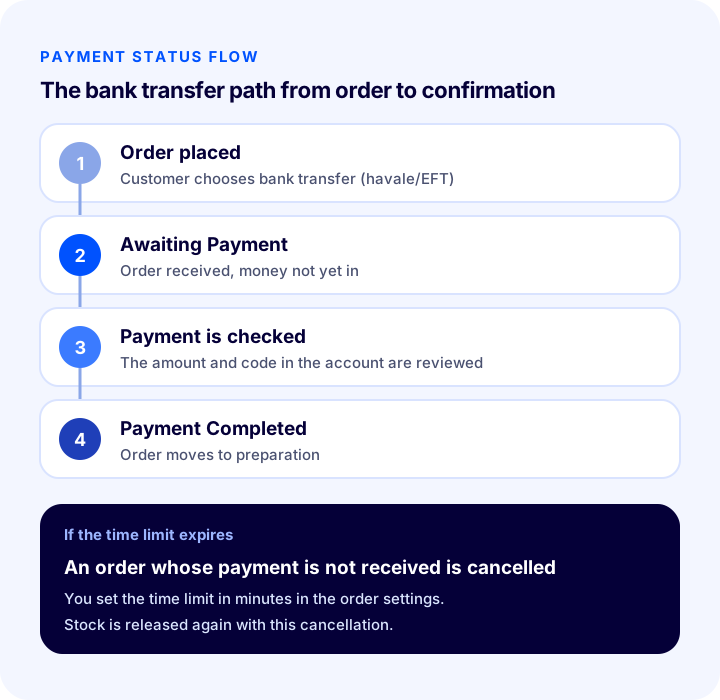
Unlike a card order, a havale order includes a waiting step. Knowing which status you are in at each step prevents waiting orders from getting lost.
- 1. The customer chooses havale / EFT: The order is received and drops to awaiting payment status.
- 2. Account details are shown: The customer sees the store's bank details on the checkout page or the confirmation screen.
- 3. The customer makes the payment: They send the amount from their own bank; they are expected to write the order number in the description.
- 4. The store verifies the payment: The amount arriving in the account is matched to the order total.
- 5. The order is confirmed: It moves to payment completed and the order goes to preparation.
- 6. If the money doesn't arrive, the order is cancelled: When the set time runs out, the order closes and the stock is released.
How Do You Match an Order to a Payment?
Matching means linking the money arriving in the account to the order it belongs to. With havale and EFT, what creates this link is the information the customer writes in the description field when sending; if the description is empty, matching rests on amount and sender name.
Description Code and Order Number
The most reliable method is to ask the customer to write the order number in the transfer description. This needs to be stated clearly on the checkout page and the order confirmation screen; customers often leave the description field empty or write their own sentence.
- Make the number visible: Show the order number on the confirmation page and in the email in large, copyable form.
- Keep the instruction short: A single sentence such as "Write your order number in the description field" is enough.
- Use a single code: Asking for both an order number and another code confuses the customer.
- Don't forget payments without a description: For a payment that arrives with an empty description, match by amount and sender name.
Which Four Things Do You Check When Matching?
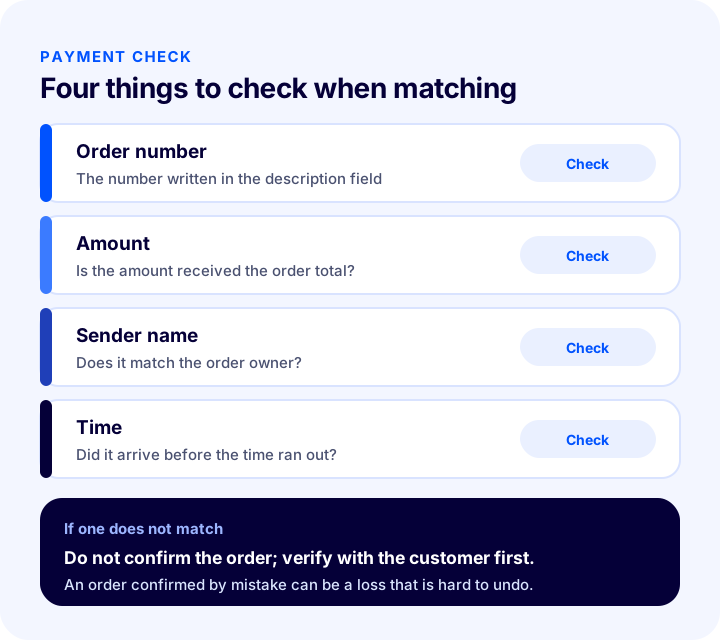
Before linking a payment to an order, you check the order number, amount, sender name and time; if any of the four does not match, you verify with the customer before confirming the order.
| Check | What is asked? | What to do if it doesn't match? |
|---|---|---|
| Order number | Is the number in the description the same as the order's? | Check the amount and sender name |
| Amount | Does the amount received equal the order total? | Contact the customer about a short or excess amount |
| Sender name | Does the sender match the order owner? | If a third party paid, get confirmation from the customer |
| Time | Did the payment arrive before the time ran out? | For a late payment, check the order and stock status |
How Do You Set the Pending Payment Time Limit?
Putting a time limit on a pending payment keeps an order whose payment never arrives from staying open forever. When the time runs out, the order is cancelled, the tied-up stock is released and the list you need to follow stays clean.
- Choose the time according to your own process: Balance a reasonable time for the customer to make the payment against how long the product can wait on the shelf.
- Tell the customer about the time limit: State the time clearly on the checkout page and in the confirmation message; a surprise cancellation brings complaints.
- Think about the effect on fast-selling products: If a low-stock product is held for a long time, another customer cannot buy it.
- Send a reminder: A payment reminder before the time runs out is the natural way to reduce cancellations.
The time limit also protects the customer who really wants to pay: it helps you tell who has paid and who has given up, and prevents needless waiting.
How Does a Pending Havale Order Tie Up Stock?
A pending havale order reserves stock until the payment arrives, so it keeps on the shelf a product another customer could have bought. As the share of unpaid orders and the waiting time grow, so do the stock and revenue tied up.
The cost comes from two places: the order of a customer who doesn't pay is eventually cancelled, but the product cannot be sold in the meantime; and a customer whose payment does arrive shares the same stock with other orders while waiting. The tool below calculates, from your monthly havale order count and waiting time, how many orders and how much stock are waiting at the same time. The values are examples; enter your own figures.
The lesson of the tool is that waiting time translates directly into stock lock: halving the time halves the number of orders waiting at the same time. The unpaid order rate also ties up revenue potential separately; that is why reminder and verification steps reduce both problems at once.
We recommend readingHow to Synchronize Marketplace Stock? Preventing Overselling, Safety Stock, Warehouse and Store Stock, Stock on Returns and Cancellations, Safety Stock Calculator and Setup AuditReserve the Stock or Deduct It When Payment Arrives?
Reserving stock the moment a havale order is received keeps the product from being sold to someone else while it waits for payment, but the longer the wait, the greater the risk of lost sales. Deducting stock when payment arrives frees the product but can lead to two customers buying the same item.
- Low-stock, fast-selling product: Reserving and keeping the time short is safer.
- Well-stocked product: The cost of reserving is low; the time limit can be more flexible.
- Campaign period: Order volume goes up, so the waiting time needs to be shorter.
- Multichannel selling: If the same product is sold on other channels too, reserved stock should be reflected there as well.
How Do You Show Bank Account Details to the Customer?
Bank account details should be shown in full and in copyable form at the moment the customer needs them to pay, that is, on the post-order screen and in the confirmation email.
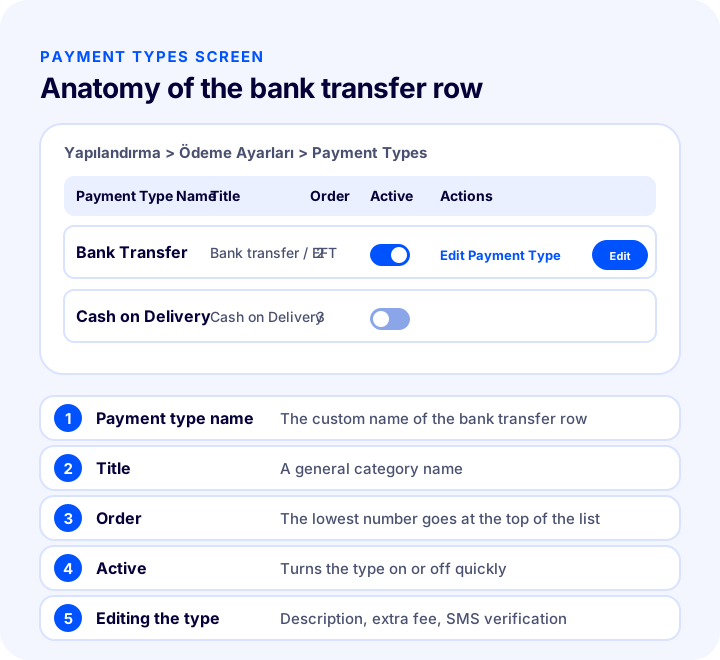
In Faprika, havale and EFT are managed from the payment types screen in payment settings. Each payment type has a name, a general title, a position in the list and an active or inactive status; on the screen where you edit the type in detail, you write your bank account details in the description field and, if you wish, define an extra fee to be added to the order.
What Should the Account Details Include?
- Account holder name: The customer should be able to verify the name of the person they are sending to.
- IBAN: It should be written on a single line, without spaces or in a clear format, so it can be copied without errors.
- Description instruction: State that the order number must be written in the description.
- Time information: State how long the payment is expected to take.
- Clear information if there is an extra fee: If you apply an extra fee to the havale option, show it clearly at payment selection; a difference that appears later damages trust.
Order and Visibility of the Payment Type
Payment types are listed by the order number you set; the lowest number appears at the top. Placing the havale option according to the method your customers use most simplifies the checkout page. If you want to turn a method off temporarily, you can set the type to inactive; the settings are not deleted.
We recommend readingWhat Is Cash on Delivery? How to Manage Cash on Delivery in E-Commerce, Calculate Its Cost and Reduce Undelivered Orders: A Practical GuideFraud and Mismatch Risk in Havale Payments
There are two separate risks with havale and EFT: trying to place an order with a payment notice that isn't real, and linking a real payment to the wrong order. Both are reduced by matching discipline and a verification step.
- Forged receipt: A customer can send an image showing they have paid; always verify the payment by seeing it in your own account, and don't trust the receipt.
- Shipping before the money arrives: Handing the order to the carrier before payment is completed is the costliest mistake.
- Third-party payment: If the sender name differs from the order owner, confirm the reason.
- Linking to the wrong order: With two orders of similar amounts, linking the money to the wrong order leaves the other customer's order unpaid.
- Overpayment: Before linking money that exceeds the amount to the order, plan the refund of the difference.
Who Should Confirm Payment?
Having a clear person who verifies payment and confirms the order makes errors easier to trace. Even in small teams, if this task is tied to one person or an orderly rotation, the "nobody checked" situation disappears.
How Is Payment Status Managed in Faprika?
In the Faprika control panel, payment status has three states: Awaiting Payment, Payment Completed and Payment Failed. An order placed by havale automatically drops into Awaiting Payment; when the money arrives, you update the order's payment status to Payment Completed from the order details.
| Situation | What does it mean for havale? | What is done? |
|---|---|---|
| Awaiting Payment | Order received, payment not yet verified | Check the account, watch the time |
| Payment Completed | Payment verified | The order goes to preparation |
| Payment Failed | Time ran out or payment did not happen | The order is cancelled and stock is released |
To automatically cancel orders whose payment is not received, a time is set in the order settings; the time is entered in minutes, and when it runs out, the order is cancelled automatically. This reduces the manual follow-up workload.
How Do You Refund an Order Paid by Havale?
Refunding an order paid by havale is not automatic as it is with card payments; the money is sent by you to the customer's bank account. That is why the correct account details and the refund method need to be clear from the start.
- Verify the refund account: Send the money to the account of the person who made the payment; get written confirmation from a customer who asks for a different account.
- State the refund method in advance: On the returns terms page, say how and when the money will be returned.
- Calculate the amount correctly: If there is an extra fee or a shipping charge, state clearly which part will be refunded.
- Consider the wallet option: Transferring refund amounts to the customer's wallet with Faprika Wallet is a widely used option; the customer can shop again with this amount.
- Keep a record: Match the refund made with the order record; otherwise, months later you won't be able to find which payment was refunded.
How Do You Measure Havale and EFT Payments?
A few indicators show whether the havale setup is working well. Tracking them regularly tells you when to change the time limit or the reminder.
| Indicator | What does it tell you? |
|---|---|
| Share of orders choosing havale | The method's share of sales |
| Share of havale orders that get paid | How much waiting orders actually turn into sales |
| Average time to pay | Whether the time limit is appropriate |
| Number of orders cancelled when time ran out | Stock and effort tied up for nothing |
| Number of matching errors | Whether the description instruction is working |
If the paid share of orders placed by havale is low, look first at the length of the time limit, then at whether there is a reminder, and finally at how clear the instruction on the checkout page is. Examining the indicators by channel and product shows which product the problem is concentrated in.
We recommend readingE-Commerce Metrics: 15 KPIs You Need to Track and Their Calculation FormulasCommon Mistakes with Havale/EFT Payments
- Not setting a time limit: Orders whose payment never arrives stay open indefinitely and tie up stock.
- Not giving a description instruction: The customer doesn't write the order number, and matching gets harder.
- Preparing the order before the money arrives: Effort and shipping cost are wasted on an unpaid order.
- Trusting the receipt: A visual document is not proof that money entered the account.
- Showing incomplete account details: The customer can't find the IBAN or copies it wrongly.
- Confirming a short amount: Payment is marked completed before the order total is complete.
- Not sending a reminder: A customer who forgets to pay costs you the order.
- Not verifying the refund account: The money goes to the wrong account and is hard to recover.
How Do You Audit Your Havale/EFT Setup?
The tool below checks your current setup with eight questions. Tick the items that apply to you; the tool tells you how solid your havale and EFT management is.
How Do You Manage Havale and EFT with Faprika?
In Faprika, the Cash on Delivery / Havale Payment System is included in all plans. Havale and EFT are configured from the payment types screen in payment settings. Payment systems and card infrastructures vary by plan; see the plans page for details.
- Payment type settings: In the Configuration, Payment Settings and Payment Types steps, you manage each payment type's name, title, position in the list and active or inactive status.
- Description and extra fee: When editing the havale type, you write your bank account details in the description field and, if you wish, define an extra fee that will be reflected in the order.
- SMS verification: From the same panel you can turn on sending an SMS order confirmation link to the customer who completes a purchase by havale; the curly-bracket parameters in the message content must not be changed, otherwise the customer details and the verification link will go out wrong.
- Payment status: A havale order starts as Awaiting Payment; when the payment arrives, it is set to Payment Completed from the order details.
- Automatic cancellation: With the "Cancel Orders Whose Payment Is Not Received" option in the order settings, a time in minutes is set; when it runs out, the order is cancelled.
- Cash on delivery: Cash on delivery and card on delivery are managed from the same payment types screen; limits by cart amount and carrier restrictions can be defined.
Matching havale payments to orders is done manually with the checking steps in this guide. You can find how to manage cash on delivery in our post What Is Cash on Delivery? How to Manage Cash on Delivery in E-Commerce, Calculate Its Cost and Reduce Undelivered Orders: A Practical Guide, how to choose a payment infrastructure in How to Get a Virtual POS? A Guide to Bank Virtual POS, Payment Institutions, Commissions and Application Steps for an E-Commerce Site, and the payment options on the payment add-ons page.
Frequently Asked Questions
What is the difference between havale and EFT?
A transfer between two accounts at the same bank is called havale; a transfer to an account at a different bank is called EFT. For the store, the two are managed the same way: the order waits until the payment reaches the account and is confirmed once the money is seen.
Why is payment by havale offered?
It is offered so as not to lose customers who have no card, do not want to use their card online, or are making a high-value purchase. Corporate buyers also mostly pay by havale, so the option matters for this type of customer.
How do you match a havale order to its payment?
The customer is asked to write the order number in the transfer description. When the payment arrives, the description, amount, sender name and time are checked; if all match, the order is confirmed, and if one does not, it is verified with the customer first.
What should happen to a havale order whose payment never arrives?
When the set time runs out, the order should be cancelled and the stock it holds should be released. The time limit should be stated clearly to the customer from the start, and a reminder should be sent before it expires.
Can an order be confirmed by looking at a receipt?
No. A receipt is a visual document and can be forged. Payment should always be verified by seeing it in your own bank account, and the order should not go to preparation until the money is in the account.
How are havale and EFT managed in Faprika?
In the configuration, the name, title, order and active status of the havale type are managed from the Payment Settings and Payment Types screen; bank account details are written in the description field, and an extra fee and SMS verification can be defined if wanted. A havale order starts as Awaiting Payment, is set to Payment Completed once the payment arrives, and an automatic cancellation time can be set for orders whose time runs out.
You May Also Like
- What Is Cash on Delivery? How to Manage Cash on Delivery in E-Commerce, Calculate Its Cost and Reduce Undelivered Orders: A Practical Guide
- How to Get a Virtual POS? A Guide to Bank Virtual POS, Payment Institutions, Commissions and Application Steps for an E-Commerce Site
- E-Commerce Order Management: A Step-by-Step Guide from Order to Delivery
- How to Synchronize Marketplace Stock? Preventing Overselling, Safety Stock, Warehouse and Store Stock, Stock on Returns and Cancellations, Safety Stock Calculator and Setup Audit