Contents 18 sections
- What Is Selling Serial-Numbered Products?
- Which Products Need Serial Tracking?
- Why Is the Serial Number Tracked?
- What Stages Does Serial Tracking Go Through?
- How Do You Keep Serial Records in Stock?
- How Is a Serial Number Assigned in an Order?
- How Do You Manage Serial Tracking in Marketplace and Multichannel Sales?
- How Do You Check the Serial Number on Returns and Exchanges?
- How Do You Use Serial Records in a Recall Notice?
- How Do You Give the Serial Number to the Customer?
- How Do You Set Up Serial Tracking Step by Step?
- What Are the Serial Tracking Methods?
- How Do You Calculate the Workload and Error Cost of Serial Tracking?
- What Are Common Mistakes in Serial Tracking?
- How Do You Audit Your Serial Tracking Setup?
- How Do You Measure Serial Tracking?
- How Do You Manage Serial-Numbered Product Sales with Faprika?
- Frequently Asked Questions
With products such as phones, computers, white goods or small home appliances, the customer buys not just the product but also its warranty and a possible right to service. Each of these products has its own number, and every after-sales conversation relies on it: a warranty query, a return, an exchange, a suspicion of theft or a manufacturer's recall notice. The short answer to how to sell serial-numbered products is this: record the serial number of every unit at goods receipt, assign it to that unit in the order, verify it before packing, and match it with the same number when a return arrives.
In this guide we explain what a serial number, an IMEI and a lot (batch) number are, which products need tracking, how to keep serial records in stock and in orders, what to watch for in returns and exchanges, and the most common mistakes. Of the two tools in the article, one is for calculating your serial record workload and the cost of disputes caused by wrong serials, and the other is for auditing your current serial tracking setup. At the end of the guide we also state clearly what Faprika offers on this topic and what the term "Serialized Product" means in Faprika.
What Is Selling Serial-Numbered Products?
Selling serial-numbered products means selling products whose every unit is tracked with a unique number, and keeping that number on record from sale through to return. Even if there are a hundred units of the same model, each unit has a different number; the store knows from this number which unit went to which customer. This approach is also called serialized product tracking or serial number tracking.
An ordinary product is managed with a stock code (SKU) and a quantity: the information "there are 40 of this product" is enough. For a serial-tracked product you need "there are 40 of this product and here is the number of each one." In other words, what is tracked is not the product type but the individual units.
What Is the Difference Between a Serial Number, IMEI and Lot?
A serial number belongs to a single device, an IMEI to the unique identity of a mobile device, and a lot to the group of products made in the same batch. All three provide traceability but answer different questions.
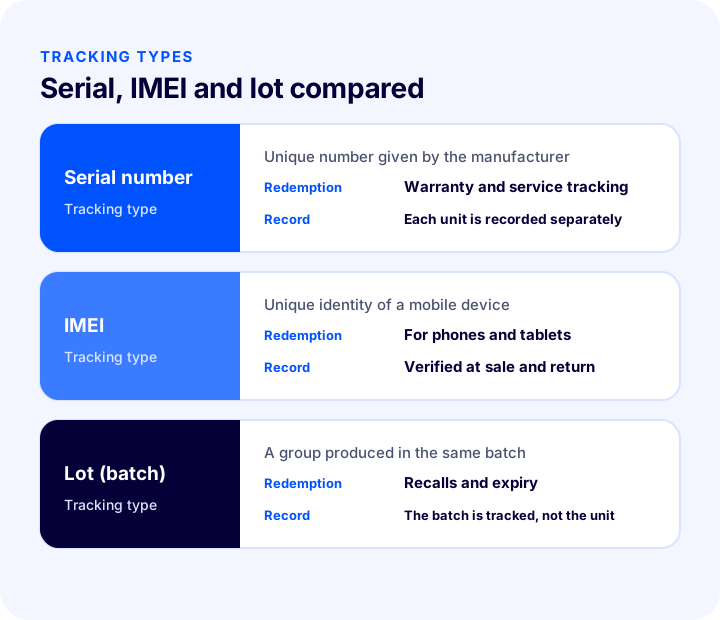
| Tracking type | What does it identify? | Where is it used most? | Which question does it answer? |
|---|---|---|---|
| Serial number | A single device | Electronics and white goods | Which order did this device go with, and is it under warranty? |
| IMEI | The unique identity of a mobile device | Phones and tablets | Is this the device that was sold to the customer? |
| Lot (batch) | The product group that arrived in the same batch | Cosmetics, food, supplements, some chemicals | Which customers did this batch go to, and when does it expire? |
The focus of this guide is unit-level tracking such as serial numbers and IMEI. The logic of lot tracking is similar; the record is just kept at batch level instead of unit level.
Which Products Need Serial Tracking?
Serial tracking is needed for products where each unit carries its own warranty, service or safety significance. Tracking every product by serial number is unnecessary workload; the need is determined by value and after-sales risk.
- Electronic devices: Products that need warranty and service, such as phones, tablets, laptops, headphones and cameras.
- White goods and large home appliances: The warranty period and service record depend on the serial number.
- Small home appliances: Products that are under warranty and may be recalled.
- High-value products: Products with a risk of counterfeiting and theft, such as watches, jewelry or valuable accessories.
- Equipment and machinery: Products whose maintenance record and spare part matching rely on the serial number.
Serial tracking is generally not needed for products such as clothing, accessories and consumables; there it is enough to manage options like size and color correctly. We covered tracking options as separate stock items in our article What Is a Product Variant? How to Create and Manage Variants in E-Commerce: Size, Color, Stock Code and Barcode Guide, Variant Count Calculator and Health Audit.
Why Is the Serial Number Tracked?
The serial number is the single point of verification in all after-sales situations such as warranty, returns, recalls and counterfeiting. If the number is not recorded, every conversation comes down to verbal claims and disputes cost more.
- Warranty and service: When the device was sold can be found from the serial number; arguments over the warranty period get shorter.
- Returns and exchanges: You confirm that the device the customer sent back is really the one you sold.
- Recalls: If the manufacturer announces that products in a certain serial range are being recalled, you can find which customers received a device with those numbers.
- Counterfeiting and abuse: Attempts to return a device bought elsewhere or to swap a damaged device for a sound one are caught by the number.
- Stock accuracy: Serial-based records show which unit is missing when a count comes out different.
What Stages Does Serial Tracking Go Through?
Serial tracking is a chain of five stages: goods receipt, stock record, order assignment, package verification and after-sales. If any link in the chain is skipped, the number does not match the order and the record is useless.
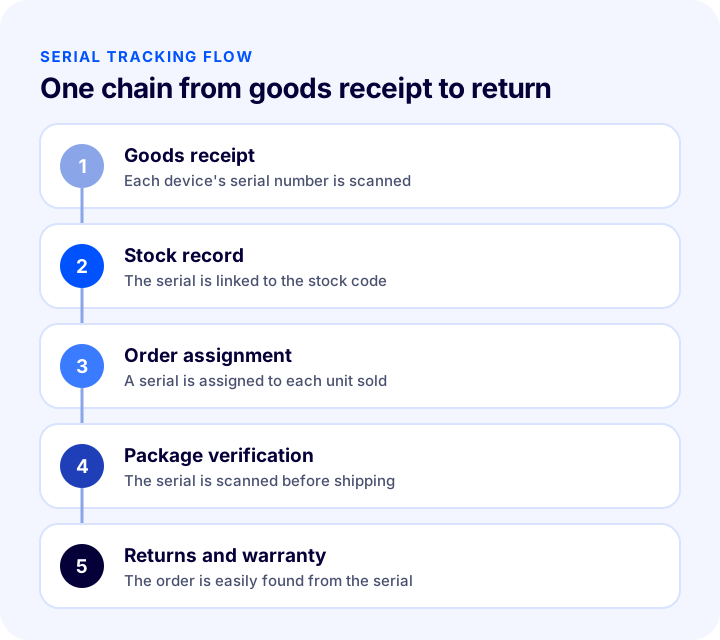
- 1. Goods receipt: The serial number of each incoming device is scanned or entered.
- 2. Stock record: The number is linked to the product's stock code and its status becomes "in stock."
- 3. Order assignment: While the order is prepared, a serial number is assigned to each unit sold.
- 4. Package verification: Before the box is closed, the assigned numbers are scanned again.
- 5. After-sales: In a warranty, return or exchange, the number is searched and the order is reached.
How Do You Keep Serial Records in Stock?
Keeping serial records in stock means storing each unit's number uniquely, linked to the product's stock code. A setup in which the same number can be recorded twice is not reliable; the record system should reject a duplicate number.
- Scan the number, do not type it: A hand-typed number contains errors; scanning a barcode or QR code eliminates typos.
- Enforce uniqueness: The same serial number should not be enterable a second time; a duplicate record is the worst case in a dispute.
- Use the status field: Each number's status should be clear: in stock, sold, returned, in service or damaged.
- Link the stock code correctly: If a number is linked to the wrong product, the order is verified with the number of the wrong model.
- Do not tie entry to one person: The record should live in a shared system everyone can access, not in one person's spreadsheet.
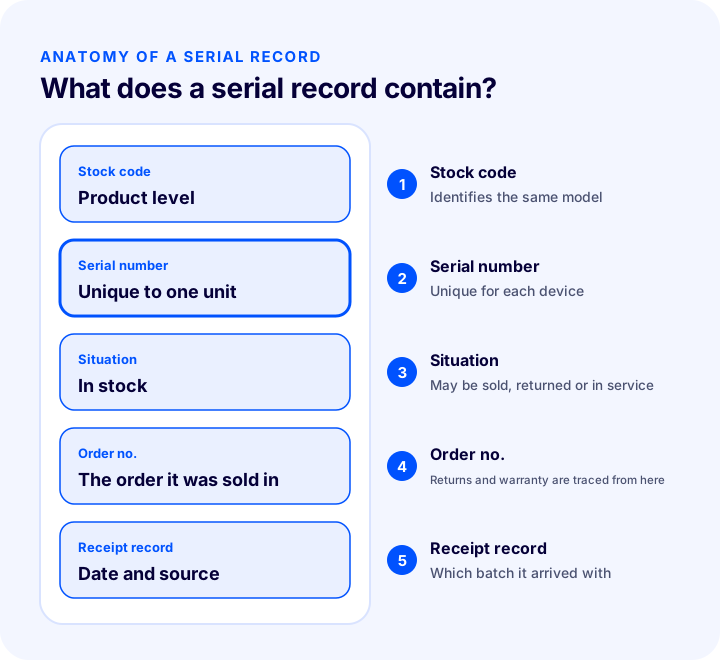
What Information Should a Serial Number Record Hold?
Alongside the serial number, keep at least the product's stock code, its status, the date it arrived and, if sold, the order number. These four pieces of information answer most warranty and return questions.
| Field | What is it needed for? |
|---|---|
| Serial number | Identifies the unit individually |
| Stock code | Shows which product it belongs to |
| Situation | Distinguishes in stock, sold, returned and in service |
| Receipt date and source | Shows which batch and supplier it came with |
| Order number | If sold, finds which customer it went to |
How Is a Serial Number Assigned in an Order?
Serial assignment in an order means linking the serial number of each unit sold to the order line. The assignment is made while the order is being prepared, so the number stays on record together with the order, the customer and the invoice.
- As many numbers as units: If three units were sold, three separate numbers are assigned; a single number cannot represent three units.
- Assign during picking: If the person taking the product from the shelf scans the number at that moment, there is no need to guess later.
- Verify after assignment: If the numbers are scanned again before the package is closed, a wrong assignment is caught before shipping.
- Refresh the assignment if the order changes: If the order is cancelled or the product is changed, the related numbers return to "in stock."
How Do You Manage Serial Tracking in Marketplace and Multichannel Sales?
In multichannel sales, serial tracking is managed by linking orders from all channels to the same serial record. In a setup where each channel keeps its own stock separately, the same number can be sold on two channels; for this reason the status of the number must be managed from a single source.
- Single source of truth: The status of the number is kept in one place only; channels follow this source.
- Record the channel: Which channel the number was sold through gives direction in a return and warranty conversation.
- Return rules vary by channel: Each sales channel has its own return period and conditions; the serial record provides the evidence needed to apply these rules.
- Code consistency: In setups where products are matched by stock code and barcode, codes must be consistent.
We explained in detail how to set up a multichannel stock flow in our article How to Synchronize Marketplace Stock? Preventing Overselling, Safety Stock, Warehouse and Store Stock, Stock on Returns and Cancellations, Safety Stock Calculator and Setup Audit.
How Do You Check the Serial Number on Returns and Exchanges?
A serial check on returns and exchanges means verifying that the number of the returned device is the same as the device that was sold. Without this check, a different device can be returned or a damaged device can be swapped for a sound one.
- Scan the number: Look up the returned device's number in the system; the order and customer match become visible.
- Set it aside if it does not match: If the number does not match the order, do not put the product into sellable stock; inspect it separately.
- Update the status: Keep the device in "returned, awaiting inspection" status until it is checked.
- Link the new number on an exchange: If a new device goes to the customer, the new number is linked to the order and the old number to the return record.
- Keep the damaged device separate: A damaged device or one awaiting service must not enter sellable stock.
How Do You Use Serial Records in a Recall Notice?
If the manufacturer announces that products in a certain serial range are being recalled, the serial record lets you quickly find which customers received a device from that range. Without a record, you have to scan all buyers or send a general announcement to everyone; this is both slow and damaging to trust.
- Query the range: Look up the numbers in the announced serial range in the system and check their status.
- Set aside what is in stock: Close the affected units still in stock to sale.
- Find what was sold: Identify customers from the orders of the units sold and inform them.
- Record the process: Who was given what information and when; this record becomes evidence later.
How Do You Give the Serial Number to the Customer?
The serial number can be communicated to the customer on the invoice, the order summary or the label on the box; what matters is that the number on the device in the customer's hands is the same as the number in the sales record. When the customer makes a warranty or service request, they should be able to provide the number themselves as well.
- Invoice and order record: Having the number in the order record lets you answer quickly when the customer calls.
- Box and device label: The number on the device's own label and the number on record must be the same.
- Warranty certificate: If the product's serial number is written on the certificate, the link between the certificate and the device becomes visible.
How Do You Set Up Serial Tracking Step by Step?
To set up serial tracking, first decide which products to track, then add the recording and verification steps one by one. Starting with a small product group instead of changing everything at once reduces the risk of errors.
- 1. Define the scope: Choose which products need serial tracking based on warranty and value.
- 2. Write the recording rule: Define where, by whom and in what format the number will be recorded.
- 3. Set up scanning: Make sure the number is entered by scanning at goods receipt and at packing.
- 4. Define the return rule: Write down how the number of a returned device will be checked and in which cases it goes back into stock.
- 5. Try it with a small group: Run it with a few products and confirm the records are kept correctly.
- 6. Expand and measure: Measure the results and roll the process out to other products.
What Are the Serial Tracking Methods?
Serial tracking can be done with different methods such as hand-kept spreadsheets, serial fields in e-commerce software and warehouse management systems. Which one is suitable depends on sales volume, product value and warehouse workload.
| Method | How does it work? | Strength | Weakness |
|---|---|---|---|
| Hand-kept spreadsheet | Numbers are written into a spreadsheet | Needs no setup | Errors, duplicate records and access problems are common |
| Serial field in software | The number is kept in the order and product record | The record stays with the order | The scanning process must be set up separately |
| Warehouse management system | The number is scanned from goods receipt to dispatch | The whole chain is on record | Requires setup and training |
You can start with a spreadsheet at low volume, but as volume and product value grow, the record should move into the system. You can find the logic of systems that manage warehouse operations end to end in our article What Is WMS? How Does a Warehouse Management System Work? (A Guide for E-Commerce).
How Do You Calculate the Workload and Error Cost of Serial Tracking?
The cost of serial tracking has two components: the workload of recording each unit's number, and the disputes that arise from wrong or missing serial records. Seeing the two side by side shows how much value there is in improving the record. The tool below calculates both items monthly. The values are examples; enter your own figures.
The lesson of the tool is that disputes alone can cost as much as the recording workload. Even a small dispute rate determines the total if the cost per dispute is high; so serial recording should be seen not only as workload but as a risk safeguard.
What Are Common Mistakes in Serial Tracking?
Most serial tracking mistakes come from small oversights in the recording process. The mistakes below make the number useless even when a record is kept.
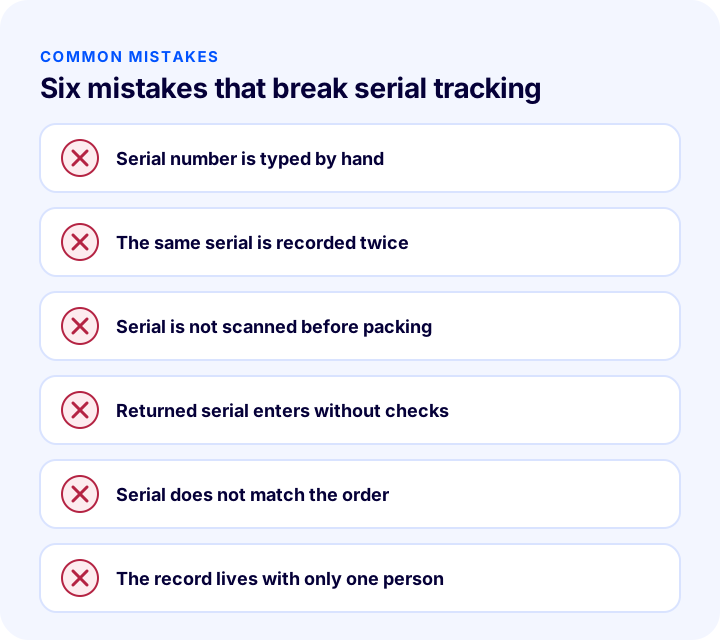
- Typing the serial number by hand: A single wrong character makes the number impossible to find.
- Recording the same serial twice: A duplicate record leaves it unclear which device is the right one in a return and warranty conversation.
- Not scanning before packing: A device with the wrong number is noticed only after it has gone to the customer.
- Putting a returned device into stock unchecked: A damaged or different device can be sold again.
- Not linking the serial to the order: The number is on record but it is not known who it went to; the record is useless.
- Keeping the record tied to one person: When that person is away the record cannot be reached and the process stops.
- Selling a product that should be serialized without a serial: If the number of a product under warranty was never kept, it cannot be made up for later.
- Putting all products under serial tracking: It creates unnecessary workload; tracking should be limited to valuable and warranted products.
How Do You Audit Your Serial Tracking Setup?
The tool below questions your current serial tracking setup with eight questions. Tick the items that apply to you; the tool tells you how solid your setup is.
How Do You Measure Serial Tracking?
A few indicators show whether the setup is working. Results should be tracked by product group; the overall figure hides the problem product.
| Indicator | What does it tell you? |
|---|---|
| Share of sales without a serial record | How completely tracking is carried out |
| Number of serial-related disputes | Problems caused by wrong or missing records |
| Recording time per serial | Speed of the scanning process |
| Number of mismatched returns | Risk of abuse and recording errors |
| Response time to a warranty query | Whether the record can be found |
How Do You Manage Serial-Numbered Product Sales with Faprika?
First, an important distinction: the "Serialized Product" type you choose when adding a product in Faprika does not mean serial number tracking; it means a series (set) in which all sizes of a product are sold together. With a serialized product, when the customer adds one unit to the cart, one unit of every size option is added and the series is not broken. A tracking feature based on serial number or IMEI that records each unit separately is not among the Faprika sources this article is based on. If you need it, you can talk to our experts and plan the solution together.
Faprika has the following features that are close to this topic and support your serial tracking setup:
- Unique stock code and barcode: When adding a product, the stock code is mandatory and specific to the product; the barcode must also be unique and is mandatory for marketplaces. Repeating stock codes causes stock to get mixed up.
- Warehouse location code: Lets you record where a product is in the warehouse; it makes it easier to reach products quickly and to manage a large warehouse with few staff.
- Recording stock movements: You can record stock entries and exits through the system; there are "Track Stock" and "Record Stock Movement" options for a product.
- Order Verification: The products of every order are confirmed by scanning barcodes; shipping the wrong product is caught before it goes to the carrier. Whether the feature is included in your plan varies by plan; for details, see the plans page.
- Warehouse management: If you want to manage warehouse operations end to end, you can take a look at the Faprika Depo add-on.
You can find the product adding steps in the Adding a New Product, Adding a Normal Product and Adding a Serialized Product training pages, and order management on the Orders training page.
Frequently Asked Questions
What is selling serial-numbered products?
It means selling products whose every unit is tracked with a unique number, and keeping that number on record from sale through to return. This record shows which device went to whom in warranty, return and recall cases.
What is the difference between a serial number, IMEI and lot?
A serial number identifies a single device, an IMEI is the unique identity of a mobile device, and a lot is the group of products made in the same batch. The first two are tracked at unit level, the lot at batch level.
Which products need serial tracking?
It is needed for electronic devices, white goods, high-value products and equipment that carry warranty, service or safety significance. It is generally not needed for products such as clothing and consumables.
When should the serial number be assigned to an order?
It should be assigned while the order is being prepared, by scanning the product as it is taken from the shelf. If the numbers are scanned once more before the package is closed, a wrong assignment is caught before shipping.
Why is the serial number checked on a return?
To confirm that the returned device is the same one that was sold. If the number does not match the order, the device is not put back into sellable stock; this prevents abuse such as returning a different device or swapping a damaged device.
Is the "Serialized Product" in Faprika serial number tracking?
No. The Serialized Product type in Faprika refers to a series in which all sizes of a product are sold together; when the customer adds it to the cart, one unit of every size is added. Tracking by serial number or IMEI is not the function of this type. A unique stock code, barcode, stock movement record and Order Verification do support a serial tracking setup; for plan differences, see the plans page.
You May Also Like
- What Is a Barcode? How Do You Get, Read and Use a Product Barcode (GTIN/EAN) in E-Commerce? A Practical Guide
- What Is an SKU? How to Create a Stock Keeping Unit (SKU) Code: Examples, Coding Rules and an SKU Generator Tool
- What Is WMS? How Does a Warehouse Management System Work? (A Guide for E-Commerce)
- What Is Order Verification? Guide to Verifying Orders with Barcodes Before Shipping, Cost of Wrong Shipments and Returns, Verification Methods, Cost Calculator and Setup Audit