

Contents 14 sections
- What Is a .tr Domain Name?
- What Is com.tr and Why Is It Preferred in E-Commerce?
- Which .tr Extensions Require No Documents?
- Which .tr Extensions Require Documents and Who Are They For?
- Where Can You Find the Forms for Domain Names That Require Documents?
- Which Extension Should You Choose for an E-Commerce Site?
- What Should You Consider When Choosing a Domain Name?
- How to Get a com.tr Domain Name: Step by Step
- How to Connect the Site After Getting the Domain Name
- What Happens to Email Records When Nameservers Change?
- What Are Common Mistakes When Getting a Domain Name?
- com.tr Domain Name Checklist
- Connecting a Domain Name with Faprika
- Frequently Asked Questions
You have decided to set up an e-commerce site and chosen your brand; now it's time for its address: the domain name your customers will type into the address bar. If you sell in Türkiye, .com.tr is one of the first extensions that comes to mind; but there are dozens more .tr extensions such as net.tr, org.tr and gen.tr, and some of them require documents. A decision made without knowing what each is for, who can get it and how to connect it to your site afterwards can prove costly later.
In this guide we answer the question how to get a com.tr domain name from start to finish: what the .tr extension is, why com.tr is one of the most preferred extensions in e-commerce, the full list of extensions that require or do not require documents, where to find the document forms, what to look at when choosing an extension for an e-commerce site, how to point the domain to your site after registration by changing the nameservers, common mistakes and a checklist. The nameserver addresses needed for the Faprika infrastructure are also in the article.
What Is a .tr Domain Name?
A .tr domain name is a domain name registered under Türkiye's official top-level domain. It gives businesses, organizations and individuals operating in or originating from Türkiye an identity specific to Türkiye.
A domain name consists of parts separated by dots. The rightmost part is the top-level domain; for example, .tr. The part immediately to its left shows the type of the domain name: com, net, org and so on. Together these two are called the “extension”: .com.tr, .net.tr, .org.tr. On the far left is the name you choose; so an address like markaniz.com.tr has three parts: your brand name, the type and the country.
Some of the extensions under .tr are open to everyone and require no documents; others are reserved for specific institutions and professional groups and ask for documents at application. For a business doing e-commerce, the interesting ones are mostly in the no-documents group. The rest of this guide covers both groups one by one.
We recommend readingHow to Choose a Domain Name?What Is com.tr and Why Is It Preferred in E-Commerce?
com.tr is the .tr extension reserved mainly for commercial use and available to all natural and legal persons. Documents used to be requested at application; according to Faprika's domain name training, they are no longer required.
An e-commerce site is by nature a commercial activity, so the com.tr extension matches the site's purpose exactly. When customers look at the address, they see a commercial address belonging to Türkiye. For a business selling in Türkiye, this familiarity builds trust. The following reasons make com.tr a common choice in e-commerce:
- It suits commercial purposes. The extension is defined as commercial use to begin with; your domain name and the type of your business look consistent.
- Anyone can get it. Individual entrepreneurs and companies alike can obtain a com.tr domain name as natural or legal persons.
- No waiting for documents. Since no documents are requested at application, the process is much simpler than with extensions that require them.
- It shows you belong to Türkiye. It tells local customers “this business is here.”
- It suits branding. It carries your brand name as it is; you don't need to add an extra word.
An important detail: com.tr's strength is its belonging to Türkiye; if you will sell heavily abroad, you need to think about the extension separately. We return to this topic in the “E-Commerce Site: Which Extension to Choose?” section.
Which .tr Extensions Require No Documents?
Extensions without documents are .tr extensions that require no documents at application and are reserved for a specific purpose. There are eleven of them, and the best known is com.tr.
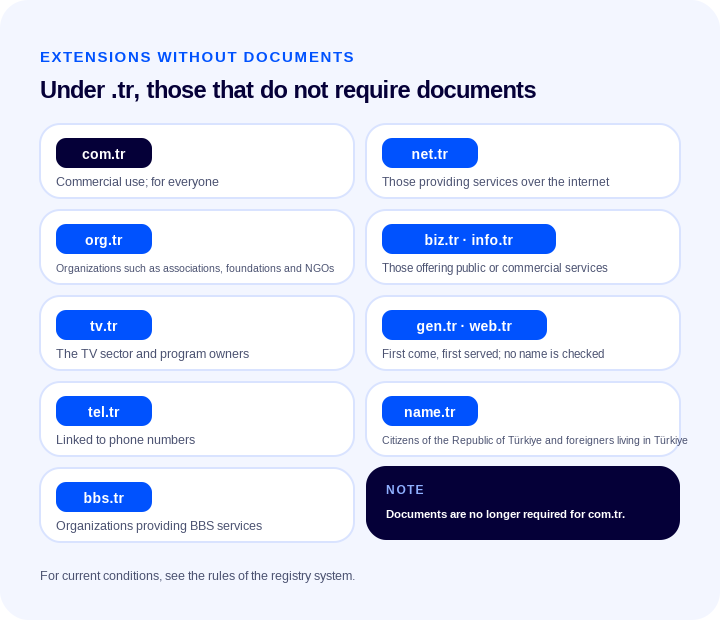
Let's also summarize the information in the illustration as a table, so you can see at a glance which extension suits whom and what.
| Extension | Who and for what? | Document status |
|---|---|---|
| com.tr | Mainly for commercial purposes; all natural and legal persons | No documents required (they used to be) |
| net.tr | Structures providing services over the internet | No documents required |
| org.tr | Organizations such as associations, foundations and non-governmental organizations | No documents required |
| biz.tr, info.tr | Natural and legal persons who will provide public or commercial services | No documents required |
| tv.tr | Individuals in the television sector and international program owners | No documents required |
| gen.tr, web.tr | Allocated on a “first come, first served” basis; no person or organization name is required | No documents required |
| tel.tr | Organizations operating in Türkiye and people living in Türkiye; linked to telephone numbers | No documents required |
| name.tr | Turkish citizens and foreign nationals living in Türkiye | No documents required |
| bbs.tr | Organizations providing BBS services | No documents required |
When reading this table, pay attention to the concept of purpose: each extension describes a specific purpose of use. com.tr is the natural choice for a store; an association site shows its identity more clearly with org.tr, and a structure providing services over the internet with net.tr. gen.tr and web.tr are extensions allocated to the first applicant, without requiring a particular identity.
Recommended readingDocuments Required for .tr Domain Names (Faprika training)Which .tr Extensions Require Documents and Who Are They For?
Extensions that require documents are reserved only for specific institutions and professional groups; the relevant document must be submitted at application. Seven extensions are in this group.
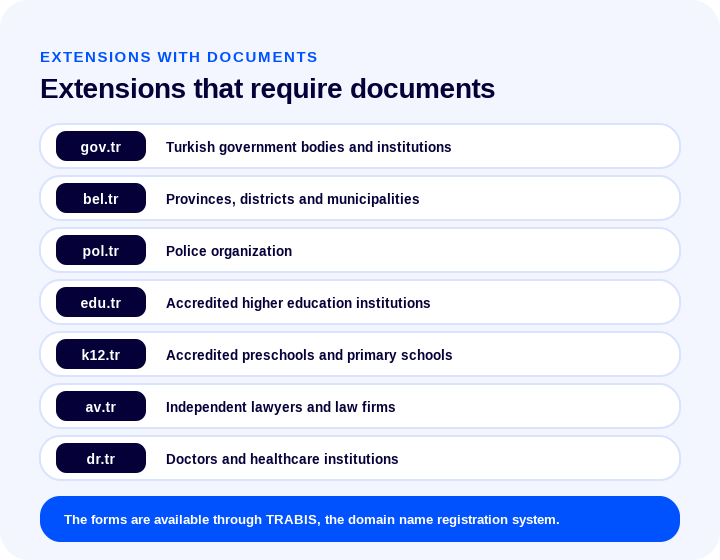
| Extension | Who are they for? |
|---|---|
| gov.tr | Turkish government bodies and institutions |
| bel.tr | Provinces, districts and municipalities |
| pol.tr | Turkish Republic Police Organization |
| edu.tr | Higher education institutions approved by the Council of Higher Education |
| k12.tr | Preschools and primary schools approved by the Ministry of National Education |
| av.tr | Independent lawyers, law firms and registered lawyer partnerships |
| dr.tr | Doctors and healthcare institutions |
These extensions work as a kind of “verified identity”: the owner of the address has proven with a document that they belong to that institution or profession. This is why an ordinary e-commerce store cannot use any of these extensions; av.tr and dr.tr are the suitable extensions for a lawyer's or a doctor's own professional address.
Where Can You Find the Forms for Domain Names That Require Documents?
The forms required for domain names that need documents are available through TRABIS, the domain name registration system. If you plan to get an extension that requires documents, you need to download this form and fill it in completely before applying.
The registration system shows which document and which form are required for which extension. The current version and content of the forms are the ones in the system; so instead of applying with an old copy, always use the form you download from the system. This step does not exist for extensions without documents: for extensions like com.tr, you do not need to prepare any documents.
Which Extension Should You Choose for an E-Commerce Site?
For an e-commerce site selling in Türkiye, the most suitable .tr extension is often com.tr, because it is commercial, open to everyone and requires no documents. Other extensions come into play depending on the type and purpose of the organization.
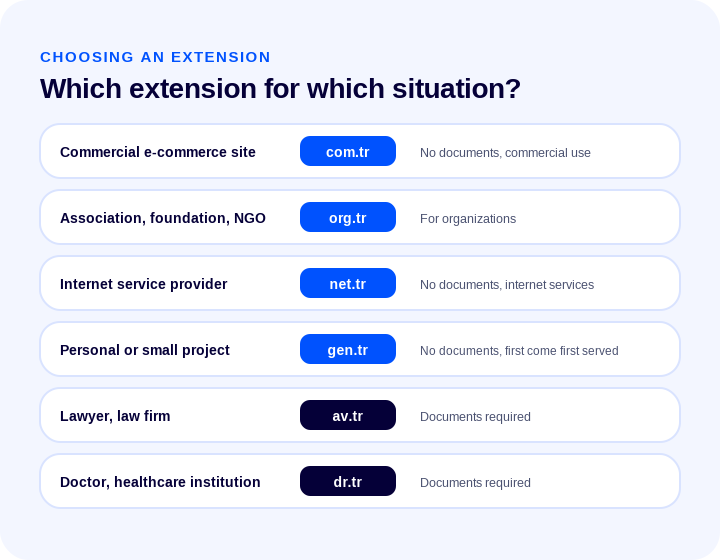
| Situation | Suitable extension | Note |
|---|---|---|
| Commercial e-commerce site | com.tr | No documents, commercial purpose; anyone can get it |
| Association, foundation, non-governmental organization | org.tr | Shows organizational identity |
| Structure providing services over the internet | net.tr | No documents |
| Personal or small project | gen.tr, web.tr, name.tr | No documents; limited identity requirements |
| Lawyer or law firm | av.tr | Documents required |
| Doctor or healthcare institution | dr.tr | Documents required |
If you sell only or mainly in Türkiye, com.tr is a right start. If you also plan to sell abroad, it is wise to consider an extension that international users remember more easily, and even to register your brand name under several extensions and redirect them all to the main site. Don't forget to redirect the additional domain names to the main site; otherwise they look like two separate sites and compete with each other in search engines.
Recommended readingHow to Do E-CommerceWhat Should You Consider When Choosing a Domain Name?
A good domain name is short, easy to say and type, suits your brand and does not clash with anyone else's trademark. The name is chosen before the extension; the extension adds value only if the name is right.
- Keep it short and memorable. Customers should be able to type the address correctly after hearing it once.
- Make pronunciation and spelling clear. If you have to spell it letter by letter on the phone, the name is complicated.
- Avoid hyphens and digits. Hyphens and digits make the name harder both to remember and to say.
- Carry your brand. Instead of stuffing in keywords, choose a name that can grow into a brand.
- Don't clash with someone else's brand. A name that resembles a registered trademark can cause legal problems.
- Let it grow with you. Even if you sell a single product today, the name shouldn't lock you into one product category.
- Protect yourself against typos. Registering common misspellings as additional domains and redirecting them to your main site prevents lost customers.
Choosing the name in detail, the criteria to check and common mistakes are covered in a separate guide; if you get stuck at the naming stage, its 8-criteria evaluation will help.
We recommend readingHow to Choose a Domain Name? (8 criteria and checklist)How to Get a com.tr Domain Name: Step by Step
Getting a com.tr domain name is a six-step process: choosing the extension, checking whether the name is available, completing the application in your company's name and connecting the domain to your site. You don't need to prepare any documents for com.tr.
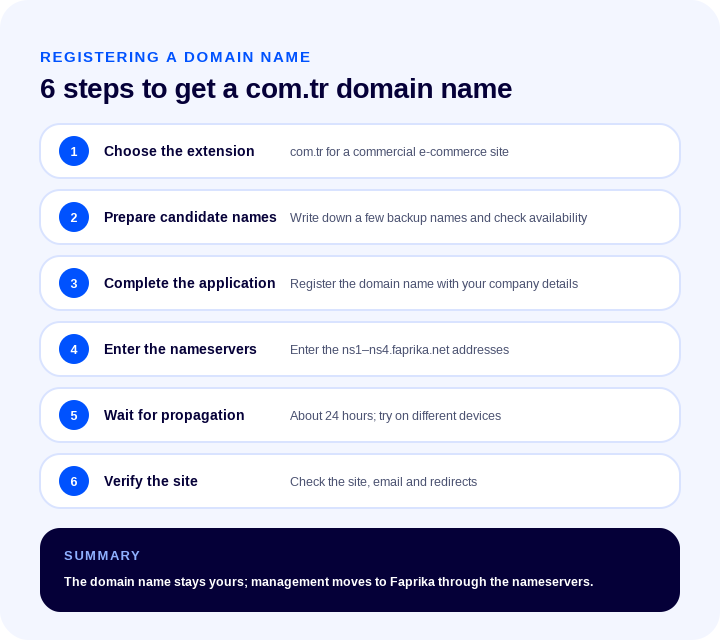
1. Choose the extension
For a commercial e-commerce site, choose com.tr. Extensions that require documents belong to specific institutions and professions; they aren't needed for your store.
2. Prepare candidates and check availability
Write down several candidates based on your brand name, because someone else may already have taken your first choice. Try each candidate with the com.tr extension in the domain registrar's search tool. At the same time, check that the candidate name doesn't clash with someone else's brand.
3. Complete the application in your company's name
Register the domain through a domain registrar with accurate, up-to-date information. It matters that your own company or your own name appears as the domain owner: a domain is one of your business's most valuable digital assets, and holding ownership yourself prevents disputes later on. Enter the contact details requested on the registration screen using an email address you use constantly and can access; notifications about the domain will be sent there.
4. Enter the nameservers in the domain panel
Once your domain is registered, log in to the registrar's management panel and open the “Change Nameserver” section. Four nameservers are entered for the Faprika e-commerce infrastructure; details are in the next section.
5. Wait for propagation
It can take about 24 hours for a nameserver change to propagate worldwide. During this time some visitors may see the old address and others the new one.
6. Verify the site and email
Open and test the site on different devices and on a mobile connection; if you use email tied to the domain, also check incoming and outgoing messages.
| Step | Where is it done? | Output |
|---|---|---|
| Choosing the extension | Decision stage | com.tr |
| Availability check | The registrar's search tool | List of available names |
| Apply | Registrar | Registered domain name |
| Nameserver entry | Domain management panel | Four nameservers |
| Propagation | DNS servers worldwide | About 24 hours |
| Verification | Browser and email | A working site |
How Do You Connect a Domain to Your Site After Getting It?
Connecting a domain to your site after getting it means replacing the nameserver values in the domain's management panel with Faprika's nameservers. This way the domain stays with you while the site's management moves to Faprika's servers.
A nameserver is the server that holds the records stating which IP address a domain name corresponds to. When a visitor types the address, the browser first asks the nameserver and learns the address of the server where the site is located. The domain's registration can be in one place and the site itself in another; the nameserver is the setting that connects the two. To use the Faprika infrastructure, the domain must be pointed to the following four nameservers:
- ns1.faprika.net
- ns2.faprika.net
- ns3.faprika.net
- ns4.faprika.net
How do you change the nameserver?
Log in to the management panel of the registrar where you got the domain, find the “Change Nameserver” section and enter the four addresses above in place of the current nameservers. Copying and pasting the addresses, without leaving spaces or extra characters at the start or end, prevents typos. Save the change; it can take about 24 hours for the new information to spread to DNS servers worldwide. During this period you can check the status from time to time with a DNS lookup tool.
| What is done? | Where? | What to enter? |
|---|---|---|
| Panel login | The registrar where you got the domain | Your own credentials |
| Section selection | Domain management screen | “Change Nameserver” |
| Name servers | Nameserver fields | ns1, ns2, ns3 and ns4.faprika.net |
| Save and wait | Save button | About 24 hours of propagation time |
We explained the concept of a nameserver, DNS record types (A, CNAME, MX, TXT), why caching causes waiting and how to clear the cache in detail in a separate guide. If something doesn't work as expected after you redirect your domain, make that guide your first stop.
We recommend readingWhat Is DNS? Changing Nameservers and Clearing the Cache We recommend readingHow Can I Change a Domain's NS? (Faprika tutorial)What Happens to Email Records When the Nameserver Changes?
When the nameserver changes, all DNS records are read from the list on the new nameserver; if the email (MX) records aren't there, emails may not arrive. So if you use email tied to the domain, note down the records before making the change.
For businesses that use a corporate email address, the MX record states which server the email goes to. When the nameserver changes, the MX record in the old list loses its validity; if the same record isn't in the new list, incoming mail goes to the wrong place or bounces. The same applies to TXT records added for verification and email security, and to A and CNAME records that point to subdomains.
| Record | Risk when the nameserver changes | Check to make |
|---|---|---|
| MX | Emails may not be delivered | Are the MX lines in the new record list? |
| TXT | Verification and email security may break | Have the old TXT lines been added again? |
| A and CNAME | Subdomains may not open | Is every subdomain you use in the list? |
The rule is simple: before changing, save the current records as a screenshot or as text; after changing, test email and subdomains one by one. If you aren't using email on the new domain yet, this section only concerns you later on.
What Are Common Mistakes When Getting a Domain Name?
Most domain mistakes come from rushing and not paying enough attention to registration details. The mistakes below are the most common, and all of them can be prevented in advance.
- Choosing the wrong extension. Wasting time looking for a document-bound extension for your store, or settling for the first extension without thinking about the name.
- Having the domain registered in someone else's name. If ownership isn't with the company or you, management and transfer problems arise.
- Entering an email address you can't access. Notifications about the domain won't reach you.
- Choosing the name quickly and without research. A name that clashes with someone else's brand can cause legal problems.
- Entering the nameservers incompletely or incorrectly. Writing only some of the four addresses, or making a typo in an address, makes the site unreachable. Copy and paste all four.
- Forgetting the email records. When the nameserver changes, you need to make sure the MX and TXT records are in the new list.
- Changing settings repeatedly without waiting for propagation. Changing settings again and again because the site doesn't open in the first hours prolongs the process.
- Checking only your own device. It's misleading to assume the change wasn't made because the old address shows on your own computer; also try another device and a mobile connection.
The common solution is an ordered checklist: choose the extension by purpose, decide the name through research, make ownership yours, enter the nameservers completely, wait and test on different devices. In the next section we'll turn this order into a checklist.
We recommend readingWhich Legal Pages Should an E-Commerce Site Have?com.tr Domain Checklist
The ten items below summarize the points to tick off before getting a domain and connecting it to your site.
- If your sales are mainly in Türkiye, the com.tr extension was chosen.
- The name is short, easy to type and fits your brand; it contains no hyphens or digits.
- It was checked that the name doesn't clash with someone else's brand.
- A few backup names were prepared and their availability checked.
- The domain was registered in your company's name or your own.
- The contact email address is accessible and up to date.
- The management panel login details are stored in a safe place.
- ns1, ns2, ns3 and ns4.faprika.net were entered in full as nameservers.
- About 24 hours of propagation time was planned for.
- The site, email and subdomains were tested on different devices.
When all ten items are ticked, your domain has been connected to your e-commerce infrastructure in a healthy way. You can go back to the section for any item you got stuck on, and also take a look at the relevant guide for redirects after an address change.
We recommend readingWhat Is a 301 Redirect?Connecting a Domain with Faprika
On the Faprika e-commerce infrastructure, your domain is connected to the site by pointing it to four nameservers; the domain stays with you, and the site's management is brought together in Faprika. You don't need to set up a separate technical infrastructure for domain management.
You aren't left alone during the process: Faprika's domain nameserver change tutorial explains the steps with screenshots, and the DNS cache tutorial gives the solution if the old address still shows on your own device. The Faprika support team is with you wherever you get stuck. Once the domain is connected, the site's management, including products, orders, campaigns and content, is run from a single management panel. For what the plans include, see the e-commerce plans page; to understand the total cost of setting up your site, see the How much does it cost to set up an e-commerce site? guide.
Recommended readingHow Much Does It Cost to Build an E-Commerce Site?Frequently Asked Questions
How to get a com.tr domain name?
First choose the extension (com.tr for a commercial site), then check the name's availability in a domain registrar's search tool and complete the application in your company's name or your own. Documents are no longer required for com.tr. Once registered, the domain is connected to your site by changing the nameservers.
Are documents required for a com.tr domain name?
No. com.tr is an extension open to all natural and legal persons, mainly for commercial purposes; documents used to be requested, but they no longer are. It is still wise to verify the current conditions in the registration system at the time of application.
Which .tr extensions do not require documents?
com.tr, net.tr, org.tr, biz.tr, info.tr, tv.tr, gen.tr, web.tr, tel.tr, name.tr and bbs.tr do not require documents. Each is reserved for a different purpose; for example, org.tr is for organizations such as associations and foundations, while name.tr is for Turkish citizens and foreign nationals living in Türkiye.
Which .tr extensions require documents?
gov.tr (government bodies), bel.tr (municipalities), pol.tr (police organization), edu.tr (accredited higher education institutions), k12.tr (accredited preschools and primary schools), av.tr (lawyers and law firms) and dr.tr (doctors and healthcare institutions) require documents. The forms are available through TRABIS, the domain name registration system.
Which domain extension should be chosen for an e-commerce site?
For an e-commerce site selling to Türkiye, com.tr is usually suitable: it is commercial, open to everyone and requires no documents. If you plan heavy sales abroad, it makes sense to also consider the international extension and redirect all domains to the main site.
How do I connect the domain name to Faprika after getting it?
In the panel of the registrar where you got the domain, go to the “Change Nameserver” section, enter ns1, ns2, ns3 and ns4.faprika.net in place of the current nameservers and save. The change can take about 24 hours to propagate worldwide; don't forget to also check your email records (MX and TXT) under the new management.