
Contents 12 sections
- What Is a 301 Redirect?
- When Is a 301 Redirect Needed in E-Commerce?
- How Do You Set Up a 301 Redirect?
- What Are Redirect Chains and Loops?
- What Is the Difference Between a 301 Redirect and a Canonical Tag?
- How Long Should a 301 Redirect Be Kept?
- How Do You Catch Redirect Errors?
- How Do You Manage 301, 302 and 410 Redirects in Faprika?
- What Are Common Mistakes with 301 Redirects?
- 301 Redirect Checklist
- How Do You Manage Redirects and SEO with Faprika?
- Frequently Asked Questions
You changed a product's URL, merged a category or removed a campaign page. Hundreds of links to that old URL still sit in search engines and on other sites. When a customer clicks, they see "page not found," and the search engine loses that page's value. The tool that solves this problem is the 301 redirect.
This guide explains what a 301 redirect is, how it differs from 302 and 410, when ecommerce needs one, how to plan and implement it, how to find chain and loop errors, and how redirect records are managed in Faprika. It also includes a tool that audits your redirect list and a checklist.
What Is a 301 Redirect?
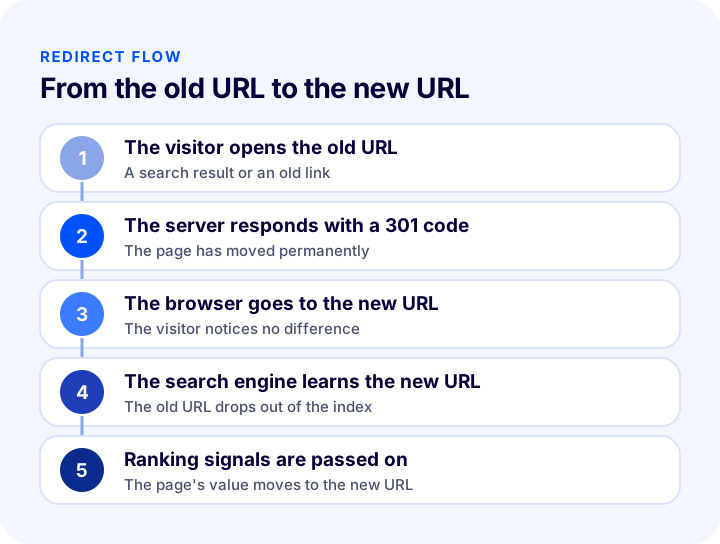
A 301 redirect is a server response that tells browsers and search engines that a page's URL has changed permanently. A visitor who opens the old URL is taken to the new one automatically, and the search engine indexes the new URL in place of the old one.
The redirect works at the server level. Customers usually notice nothing; the new URL appears in the address bar and the page opens. The search engine reads the 301 code as "this move is permanent" and passes the old page's ranking signals to the new page.
What Is the Difference Between 301, 302, 410 and 404?
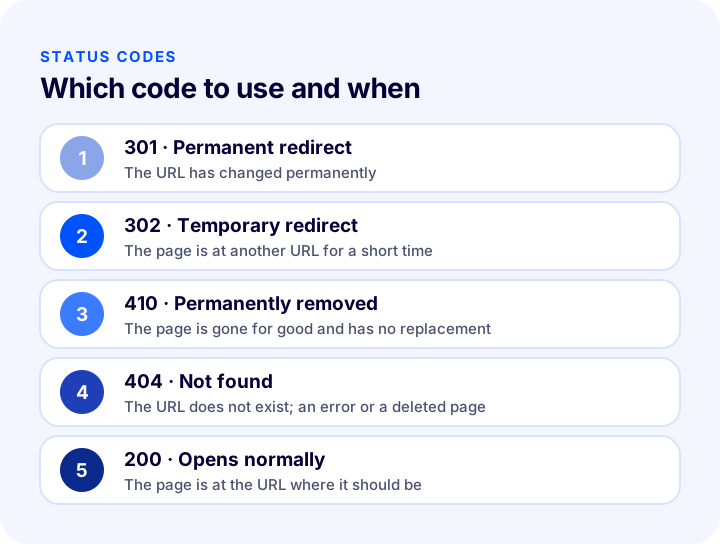
Each status code tells the search engine something different. Choosing the right code decides the fate of a page. The table below compares the four codes.
| Code | Meaning | When to use it? | What does the search engine do? |
|---|---|---|---|
| 301 | Permanent redirect | The URL has changed permanently | Indexes the new URL and passes the value on |
| 302 | Temporary redirect | The page is at another URL for a short time | May keep the old URL in the index |
| 410 | Removed permanently | The page is gone for good and has no replacement | Speeds up removal of the page from the index |
| 404 | Not found | The URL does not exist; an error or a deleted page | Gradually removes the page from the index |
Does a 301 Redirect Affect SEO?
Yes. A correctly done 301 redirect passes most of the old page's ranking signals to the new page and prevents a loss of search traffic. A badly done redirect does the opposite: redirecting to an unrelated page, chains and loops wear out both the customer and the search engine. That is why a redirect is not a "moving chore" but a planned SEO task.
When Is a 301 Redirect Needed in E-Commerce?
On e-commerce sites, URLs change constantly: products are removed, categories merge and campaign pages end. In each of the cases below, you need to decide what to do with the old URL.
| Situation | Recommended action | Why? |
|---|---|---|
| Product URL (slug) changed | 301 from the old URL to the new one | Existing links and rankings are preserved |
| Product permanently removed, a similar one exists | 301 to the similar product or its category | The customer reaches a relevant page |
| Product permanently removed, no similar one exists | 301 to the category, or 410 | Irrelevant redirects are avoided |
| Two categories merged | 301 from the old category to the new one | Category value is consolidated on one page |
| Domain or https changed | 301 for every URL to its counterpart | The whole site's value is carried over |
| Campaign page ended | 301 to the campaign list if permanent; keep it if it recurs | The URL's value is saved for the next season |
| Product temporarily out of stock | Do not redirect; keep the page | The page sells again when stock returns |
Should You Use a 301 Redirect for an Out-of-Stock Product?
If a product is only temporarily out of stock, do not redirect; keep the page and offer the customer a "notify me when available" option. If the product has been permanently withdrawn and has a close equivalent, a 301 is appropriate. You can find this distinction in detail in the post What Should You Do with an Out-of-Stock Product Page? E-Commerce SEO, Customer Experience and Redirect Guide for Sold-Out Products.
Why Are Redirects Critical When Migrating a Site?
When you change platforms or domains, redirects are the most important step in preserving the site's rankings. Every important URL on the old site must have a counterpart on the new one, and this mapping must be ready before going live. For the whole migration process, see the guide E-Commerce Site Migration: How to Change Infrastructure Without Losing SEO.
How Do You Set Up a 301 Redirect?
A 301 redirect is planned in six steps: list the URLs, choose a match for each, determine the right code, implement the record, test and monitor. A server or panel setting is only the fourth step of this process.
1. List the Changed and Deleted URLs
First work out which URLs have changed or been removed. Lists from product management, category updates and the campaign calendar are the source for this. If many URLs will change, collecting them in one table makes the next steps easier.
2. Choose the Closest Match for Each URL
The redirect's target should be the page closest in topic to the old one. Choose the new product page for the old product page and the merged category for the old category. The shortcut of "I'll just redirect everything to the home page" causes problems: search engines usually treat these bulk redirects as soft 404s, and customers do not find what they were looking for.
3. Choose the Right Status Code
Use a 301 if the change is permanent, a 302 if it is temporary, and a 410 if the page is gone entirely and has no equivalent. Most redirects in e-commerce are 301s; a 302 is preferred only in time-limited situations.
4. Implement the Redirect
Records are entered through the panel, the server configuration or the platform's redirect tool. Whichever you use, the rule is simple: old URL, new URL and status code. Keeping the records in one place makes it easier to find later which URL goes where.
5. Test After Launch
Once the redirects are live, open sample URLs one by one and check that each goes to the right place, responds with the right status code and completes in a single step. An untested redirect list means faulty URLs can go unnoticed for weeks.
6. Monitor Regularly
The coverage and crawl reports in search engines' webmaster tools show missing pages and redirect problems. Reviewing these reports regularly and adding newly missing URLs to the redirect list keeps the site healthy.
How Do You Prepare a Redirect Table?
A redirect table is a simple list containing the old URL, new URL, status code and a note. The format below makes both team communication and implementation easier.
| Old URL | New URL | Code | Note |
|---|---|---|---|
| /product/old-name | /product/new-name | 301 | URL simplified |
| /category/discount | /category/deals | 301 | Category merged |
| /campaign/summer | /campaigns | 302 | Temporary, will end in autumn |
| /product/discontinued-model | — | 410 | No equivalent, will not return |
What Are Redirect Chains and Loops?
A redirect chain happens when a URL is redirected to a URL that itself redirects elsewhere. A loop happens when redirects point back to each other. Both waste crawl budget, slow page loading and can cause ranking signals to be lost.
Chains usually build up over time. A product's URL changes twice, the first redirect stays and the second is added on top: the old URL goes to the intermediate URL, and the intermediate URL goes to the final URL. The fix is simple: point every old URL directly to the final URL.
| Problem | Example | Solution |
|---|---|---|
| Chain | A redirects to B, B redirects to C | Point A directly to C |
| Loop | A redirects to B, B redirects to A | Break the loop and leave a single target |
| Self-redirect | A redirects to A | Delete the rule |
| Duplicate old URL | A is redirected to two different targets | Keep the correct target |
| Redirect to the home page | The old product page goes to the home page | Link it to the closest category or product |
The tool examines the list you enter locally; no data is sent to a server. Running a large redirect table through this kind of check before going live catches most chain and loop problems that would otherwise show up in production.
What Is the Difference Between a 301 Redirect and a Canonical Tag?
A 301 redirect moves the visitor and the search engine to another URL; a canonical tag tells the search engine which page is the main one when the same content sits at several URLs. Both are used to solve duplicate content, but they do different jobs.
| Feature | 301 redirect | Canonical tag |
|---|---|---|
| What does the visitor see? | Goes to the new URL | Stays on the page they opened |
| Old URL | No longer opens, redirects | Can still be opened |
| When to use it? | The page has moved or been removed | The same content sits at several URLs |
| Example | Old product URL to new URL | URLs with filter and sort parameters |
Why Should www and https URLs Be Redirected?
If your site opens at both the www and non-www URL, and at both http and https, the same page sits at several URLs. Choosing one preferred URL and redirecting the others to it with a 301 prevents duplicate content and consolidates link value on a single URL.
How Long Should a 301 Redirect Be Kept?
A 301 redirect record should be kept as long as possible, not just until sites that link to the old URL and search engines have learned the new one. The old URL can circulate for years on other sites, in email newsletters, in bookmarks and in search results. Deleting the record too early turns those links back into pages that cannot be found.
As the redirect list grows it gets harder to manage, so it needs regular cleaning, but cleaning does not mean "delete the old ones"; it means "shorten the chains." Old records that get no traffic and have no remaining links should be removed only by a deliberate decision, with the date and reason written in the list notes.
How Do You Catch Redirect Errors?
Faulty redirects stay silent; you need to see the problem before a customer complains. Three regular checks catch most errors:
- Missing page report: Search engines' webmaster tools list which URLs return a 404. Add redirects for those URLs.
- Sample URL test: Verify by hand or with a crawling tool that the old URLs with the most traffic go to the right place.
- Redirect list audit: As the list grows, chains and loops appear; an audit like the one above exposes them.
Missing pages should be listed again, especially after a major campaign, catalog or design change. For how changes in the product data structure affect search results, the guide How to Do Category Page SEO? 12 Steps to Push E-Commerce Category Pages Up the Rankings is also useful.
How Do You Manage 301, 302 and 410 Redirects in Faprika?
In Faprika, redirect records are kept in the 301 / 302 / 410 panel, where you can manage URL records. You manage the old URL, new URL and status code from the same place, so the records of moved, merged or removed pages stay in one list.
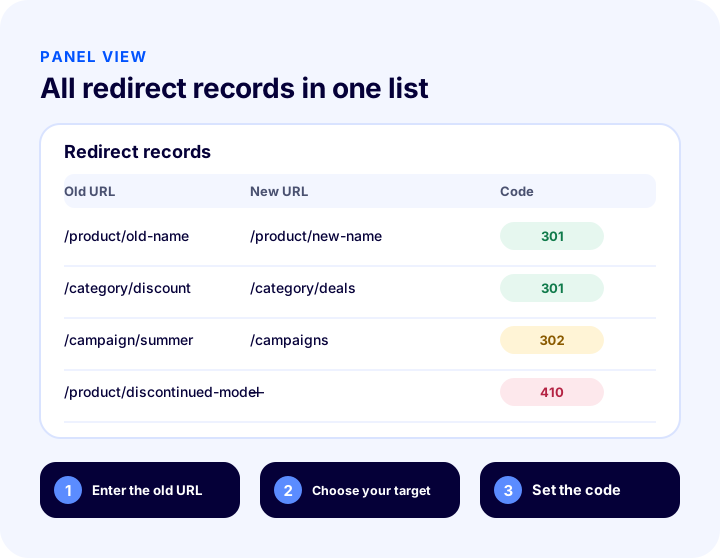
This panel varies by plan; you can see which plans include it in the e-commerce plan comparison.
Which Faprika SEO Settings Complete the Redirect Setup?
Two settings work together with redirects. The first is the "Canonical Url Active" option under the SEO heading in Configuration >> Settings >> General Settings in the control panel; by specifying unique page URLs, it prevents content from being duplicated under different URLs. The second is "Domain Name Check," which makes sure URLs that start with "www" and those that do not are reached consistently. For step-by-step use, see the SEO Settings training page.
What Are Common Mistakes with 301 Redirects?
- Redirecting everything to the home page: Irrelevant bulk redirects are treated as soft 404s and mislead the customer.
- Leaving chains: Adding a new rule at every move creates chains that go from A to B and from B to C.
- Using a 301 for a temporary change: For a short-term situation a 302 is more appropriate; a 301 leaves a permanent trace in the search engine.
- Not handling removed pages: A page with no equivalent should return a 410 or a meaningful 404 page.
- Not testing: If you do not verify that the redirect goes to the right target with the right code, the problem can go unnoticed for weeks.
- Forgetting parameters: If the query-parameter versions of the old URL are not redirected as well, traffic is lost.
- Not keeping the redirect list: If it is not written down why a URL was moved, it is harder to fix later.
301 Redirect Checklist
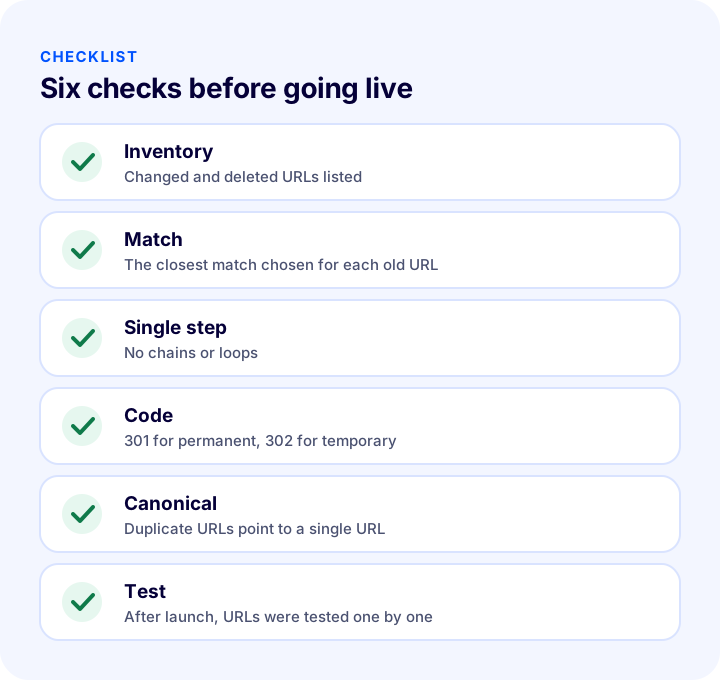
The list below summarizes the building blocks of your redirect plan.
| Stage | Check | Done? |
|---|---|---|
| Inventory | Changed, merged and deleted URLs were listed | Yes / No |
| Match | The closest match by topic was chosen for every old URL | Yes / No |
| Single step | No chains, loops or self-redirects | Yes / No |
| Code | 301 for permanent, 302 for temporary, 410 for removed | Yes / No |
| Canonical | Duplicate URLs point to a single URL, www and https are consistent | Yes / No |
| Test | After launch, sample URLs open with the right code and target | Yes / No |
| Monitoring | Missing pages are reviewed regularly | Yes / No |
How Do You Manage Redirects and SEO with Faprika?
Faprika treats redirects not as a standalone task but as part of the SEO settings. The main options are:
- 301 / 302 / 410 panel: You manage URL records and status codes from the same place.
- Canonical Url Active: Prevents content duplication by specifying unique page URLs.
- Domain Name Check: Ensures consistent access for URLs that start with www and those that do not.
- Canonical, H tag, robots and sitemap management: You manage each page's SEO setup from the panel.
- Bulk SEO and meta updates: You can change the titles and descriptions of many products in bulk.
You can review which features are in which plan in the e-commerce plan comparison.
Recommended readingE-Commerce Site Migration: A Guide to Changing Platforms Without Losing SEOFrequently Asked Questions
What is a 301 redirect?
A 301 redirect is a server response that tells browsers and search engines that a page's URL has changed permanently. A visitor who opens the old URL is taken to the new one automatically, and the search engine passes the old page's ranking signals to the new URL.
What is the difference between a 301 and a 302 redirect?
A 301 means a permanent move and a 302 a temporary one. Use a 301 when the URL has changed for good; choose a 302 only if the page will sit at another URL for a short time. Picking the wrong code affects whether the search engine keeps the old or the new URL in its index.
Should you use a 301 or a 404 for a deleted product?
If the product has a close equivalent, a 301 to that product or its category is appropriate. If there is no equivalent at all, a 410 or a meaningful 404 page is the better choice. Do not redirect a product that is only temporarily out of stock; keep the page.
What is a redirect chain and why is it a problem?
A redirect chain happens when a URL is redirected to a URL that itself redirects somewhere else. It slows page loading, wastes crawl budget and can cause ranking signals to be lost. The fix is to point every old URL directly to the final URL.
Is it right to redirect all old URLs to the home page?
No. Search engines usually treat bulk redirects to unrelated pages as soft 404s, and customers do not find what they were looking for. Redirect each old URL to the closest relevant page, and use a 410 if there is no equivalent.
How do you manage 301 redirects in Faprika?
In Faprika, you manage the old URL, new URL and status code as URL records in the 301 / 302 / 410 panel. The Canonical Url and Domain Name Check settings complete the redirect setup. You can see which plans include the panel in the e-commerce plan comparison.
You May Also Like
- E-Commerce Site Migration: A Guide to Changing Platforms Without Losing SEO
- How to Do Category Page SEO: 12 Steps to Move E-Commerce Category Pages Up the Rankings
- What Is Structured Data (Schema)? How to Add, Test and Validate Product Schema in E-Commerce? A Practical Guide
- What to Do with an Out-of-Stock Product Page: SEO, Customer Experience and Redirects for Sold-Out Products in E-Commerce, a Practical Guide