

Contents 11 sections
- What Is Search Intent?
- What Are the Types of Search Intent?
- Which Page Answers Which Intent in E-Commerce?
- How Is Search Intent Identified?
- How Do You Match a Keyword to a Page?
- How Do You Build a Page by Intent?
- What Is Intent Mismatch and Which Mistakes Are Made?
- How Is Intent Success Measured?
- Search Intent Checklist
- Building Intent-Fit Pages with Faprika
- Frequently Asked Questions
You prepared a good guide article for your store, but people searching for the same keyword leave without reading it. Or the other way around: you put a lot of effort into your category page, yet informational articles keep coming up first in search results for that keyword. In both cases the problem is less the quality of the content than the content not matching what is searched. The keyword typed into the search box carries a goal behind it, and search engines rank results according to the pages that answer that goal best.
In this guide we explain what search intent is, the four basic types of intent, which page type answers each intent in e-commerce, practical ways to identify intent, a keyword matching table and the most common intent mismatch mistakes. At the end you will find a checklist, notes about Faprika and an FAQ of six questions.
What Is Search Intent?
Search intent (user intent, or search intent in English) is the real goal a person wants to reach when typing a phrase into the search box. They may want to get information, go to a specific site, compare options or buy; even when the phrase is the same, the goal can differ.
Search engines rank results by evaluating how users interact with results and which page types work for which phrases. So whether a page ranks depends not only on containing the right words but also on offering the kind of answer the person searching for that phrase expects. “Search intent” is therefore the missing half of keyword research: knowing what the keyword is is not enough, you also need to know who it was written for and why.
What matters for an e-commerce owner is this: your store has different types of pages such as guide articles, category pages, product pages and brand pages. Each serves a different intent. Intent decides which page you should push for which keyword. For the basics of keyword research, see the article what is keyword analysis in e-commerce; this article adds the intent layer on top of it.
What Are the Types of Search Intent?
Search intent is usually divided into four types: informational, navigational, comparison (commercial research) and purchase (transaction) intent. This division does not draw strict boundaries; a query sometimes sits between two types, but it offers a useful framework when planning pages.
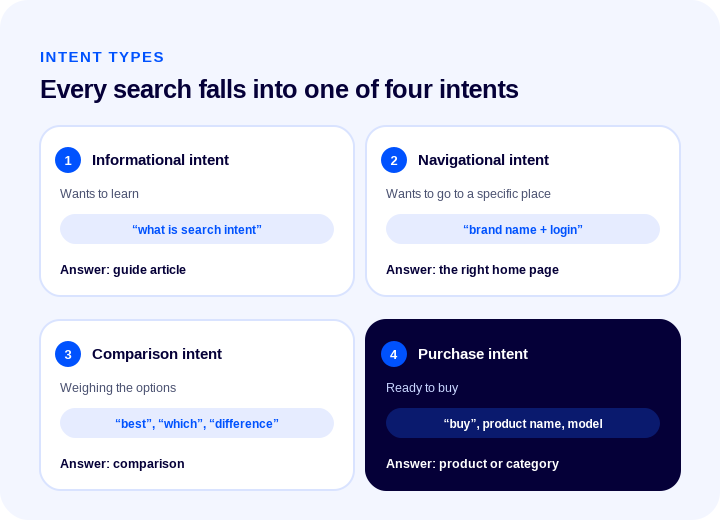
1. Informational intent
With informational intent the person wants to learn something: the answer to a definition, method, why or how question. Queries usually contain phrases like “what is”, “how to”, “why” and “what does it mean”. This person is not yet ready to buy; if you give a clear answer to their question, their first encounter with your brand takes place. Example: “what is shipping desi”, “how to take a product photo”.
2. Navigational intent
With navigational intent the person wants to go to a site or page they already know, and does so by using the search box as a shortcut. Example: typing a brand’s name together with a phrase like “login” or “order tracking”. The goal here is not to discover something new but to reach what they know quickly. For you this means: in searches made with your brand name, the right pages (home page, contact, order tracking) must be found clearly and quickly.
3. Comparison intent (commercial research)
With this intent the person is close to buying but has not yet decided; they are weighing options. Queries show phrases such as “best”, “which”, “difference”, “comparison”, “alternative” and “review”. Example: “how to choose running shoes”, “what is the difference between dry and wet care”. For this person the most valuable answer is content that explains the criteria and makes choosing easier.
4. Purchase intent (transaction)
With purchase intent the person is ready to buy. Queries contain phrases like “buy”, “order”, “price”, “discount” and “campaign”, or directly a product name, model and feature details. Example: “leather backpack”, “brown boot size 42”. For this person the best answer is a page that shows the product, gives price and stock information, and makes the add-to-cart step easy.
For a comparative summary of the four types, see the table below.
| Intent | What does the person want? | Typical query pattern | Pick or |
|---|---|---|---|
| Information | To learn | “what is”, “how”, “why” | Guide article |
| Navigation | To go to a known place | Brand name, “login”, “order tracking” | Home page or the relevant brand page |
| Comparison | To weigh the options | “best”, “which”, “difference”, “review” | Comparison or selection guide |
| Purchase | To buy | “buy”, product name, model, “price” | Product page or category page |
Which Page Answers Which Intent in E-commerce?
In e-commerce, informational intent is answered by a guide article, navigational intent by the home page and brand pages, comparison intent by a comparison or selection guide, and purchase intent by product and category pages. Building a different page type for each intent is more effective than trying to make one page serve everything.
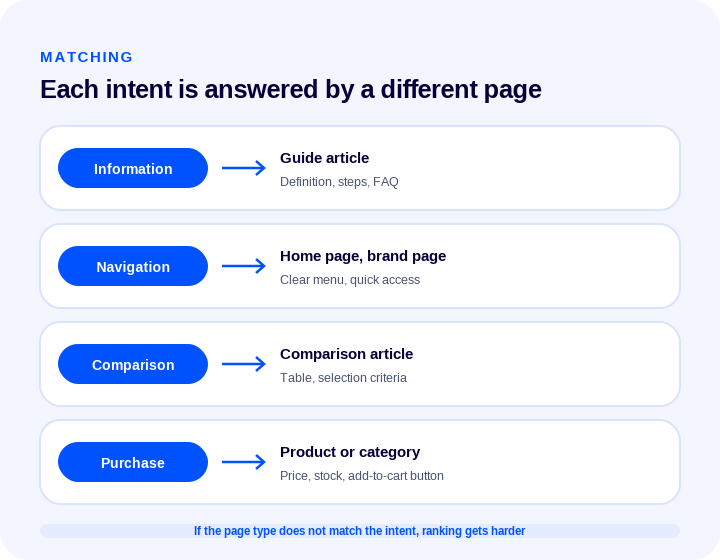
Guide article: for informational intent
For “what is” and “how to” queries, the best answer is a guide article that answers the question right away. The heading is phrased as a question, a short and clear definition sits beneath it, the detail unfolds step by step, and frequently asked questions close the page. The goal of this article is not to sell a product but to direct the visitor to the right product and category pages, and you do this with internal links. To see how to build those links, take a look at the what is an internal link article.
Category page: for people who want to see options
For queries that describe a product group, such as “men’s boots” or “bluetooth headphones”, people mostly want to browse options. The page that answers this intent best is the category page, which lists products in a filterable way. The category page’s heading, short description, filters and product order are built around this intent. For details, see the category page SEO and product filtering and search bar optimization articles.
Product page: for people ready to buy
When a specific product name, model or feature is typed, the person usually wants to see and buy that product. The best answer is the product page, which carries clear product information, images, price, stock status and an add-to-cart button. On this page, short and reassuring information that makes the decision easier stands out, rather than a long informational text. For the details of building a product page, see the how should an e-commerce product page be article.
Comparison or selection guide: for commercial research
For queries such as “best”, “which one” and “how to choose”, the best answer is content that compares options against criteria. A table, a pros-and-cons list and “who it suits” sentences are the backbone of this page. Such a page brings the person to the decision point and, at the end, directs them to the relevant category or product page.
Home page and brand pages: for navigational intent
In searches made with a brand name, the person wants to find you. Making the home page, the contact page and frequently searched pages such as order tracking easy to find meets this intent. A clear brand name in page titles and a simple menu structure are decisive here; the how should an e-commerce menu structure be article helps on this topic.
Recommended readingHow to Do Category Page SEOHow Is Search Intent Identified?
The most reliable way to identify the intent of a query is to look at which page types appear in the search results for it. If the results consist mainly of guide articles, the intent is informational; if product and category pages dominate, it is purchase.
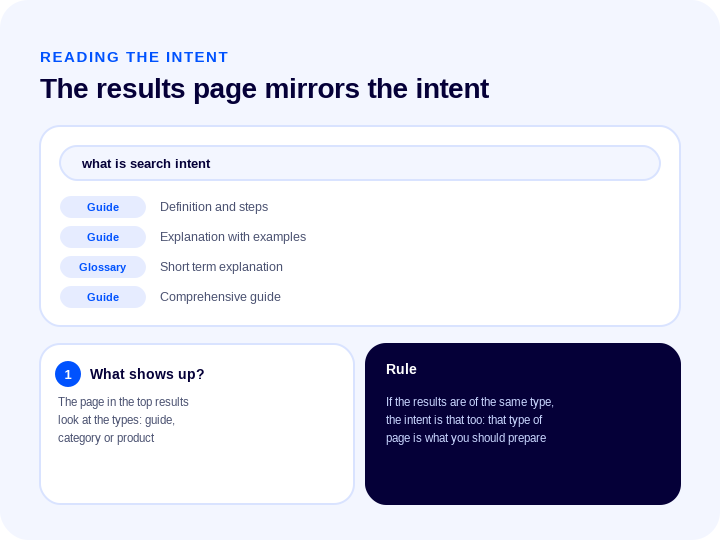
1. Observe the results page
Search for the phrase you are targeting in a search engine and look at the first results. What types of pages are there? Guide articles, glossary entries, category pages, product pages, comparison content? The prominence of one type is a direct clue as to which intent the search engine considers dominant for this query. If the results are mixed, the query carries more than one intent. To see how your page appears in search results, it helps to read the how to write a title tag and how to write a meta description articles.
2. Look at query patterns
The words inside the query give the first clue to intent. The table below shows common patterns and the intent they usually point to. This is not a rule but a starting point; the final decision comes from observing the results page.
| Pattern in the query | Intent it usually points to |
|---|---|
| what is, what does it mean, how, why, how to do | Information |
| brand name, login, contact, order tracking | Navigation |
| best, which, difference, comparison, alternative, review, how to choose | Comparison |
| buy, order, price, discount, campaign, product name and model | Purchase |
3. Look at your own data
Your site’s own search data also helps you understand intent. For which queries do your pages appear, which page gets clicks, and for which query do visitors leave the page quickly? If a visitor who arrives at a guide article with purchase intent leaves, or those who arrive at a product page with informational intent never move forward, there may be an intent mismatch. The phrases typed into the in-store search box are also a valuable source on what visitors are looking for.
4. Look at additional queries and similar phrases
The complementary phrases and related searches suggested by search engines show what other questions people ask on the same topic. These phrases reveal both the variety of intents and the sub-questions that should be answered in the article or on the page.
How Are Keywords Matched to Pages?
Each keyword is tied to a single intent and assigned to a single page that fits that intent. This mapping table shows clearly which page targets which keyword and prevents two pages from competing with each other for the same keyword.
The example below is a mapping table prepared for a fictional shoe store. You can build a table for your own store with the same logic.
| Keyword | Intent | Target page type | Element to stand out on the page |
|---|---|---|---|
| how to measure shoe size | Information | Guide article | Step-by-step measurement, table, FAQ |
| how to choose running shoes | Comparison | Buying guide | Criteria, type comparison table |
| running shoes | Purchase (category) | Category page | Filters, product list, short description |
| black running shoes size 42 | Purchase (product) | Product page | Images, size information, stock, add to cart |
| store name order tracking | Navigation | Order tracking page | Quick access, clear form |
Two points stand out in the table. First, “running shoes” and “how to choose running shoes” carry different intents, so they are assigned to different pages. Second, each page focuses on its own intent but links to the others: the selection guide can link to the category, the category to the products, and the product page to the related guide. This link network both carries the visitor to the next step of their intent and explains the relationship between pages to the search engine.
Recommended readingWhat Is Duplicate Content?How Is a Page Built by Intent?
Building a page by intent means choosing the heading, the first paragraph, the content structure and the call to action to suit that intent. With informational intent the answer comes first; with purchase intent the product and the action come first.
Heading and first paragraph
In an article with informational intent, the heading is in question form and the first paragraph answers the question directly. On a page with purchase intent, the heading clearly names the product or product group; the product, price and action button are visible at first glance. Having the keyword in the heading is necessary in both cases; you can find the details in the how to write a title tag article.
Content structure
On an informational page, a long structure with sections, tables and questions works well. On a category page, a short description, filters and a product list are enough; a long text makes it harder to reach the products. On a product page, the information that drives the decision stands out: image, features, size or options, and shipping and return information. On a comparison page, the table and criteria lists are the backbone.
Call to action
The next step of every page must match the intent. On an informational page, the next step is going to the relevant category or another guide; on a product page, it is adding to the cart. Pressuring a person who arrives with informational intent with a “buy now” push right at the top of the page is as ineffective as making a person who arrives with product intent read a long article.
Structured data and page markup
Structured data can be used to describe the type of a page more clearly to the search engine: product information on a product page, article and question-and-answer information in a guide article, and breadcrumbs for the navigation path. To look at the topic in detail, you can read the what is structured data and what is a breadcrumb articles.
What Is Intent Mismatch and What Mistakes Are Made?
Intent mismatch is when the type or content of a page does not match the purpose behind the searched phrase. The result is usually low engagement, quick exits from the page and difficulty ranking.
The most common mistakes can be listed as follows:
- Offering a product page for informational intent. Showing a product list to a person asking “what is” means not giving the answer. A guide article should be prepared for this keyword.
- Offering a long article for purchase intent. Showing a comprehensive blog article to a person searching for a product name does not lead them to buy. A product or category page should stand out for this keyword.
- Skipping comparison intent. For a person asking “which is better”, neither a guide nor a product page is enough; selection content that explains the criteria is needed.
- Loading the same keyword onto more than one page. If a guide article, a category page and a product page all target the same keyword, it becomes unclear which one will stand out.
- Filling a category page with long text. A person who wants to see options wants to reach the products; a long text at the top of the page delays that.
- Heading and content not matching. If the promise made in the heading is not kept in the content, the person leaves quickly. The heading should reflect the answer the page actually gives.
- Leaving no way out of an informational page. If there is no link that carries the reader to the relevant category or product, the person who has learned never reaches the store.
The table below puts these mistakes side by side with their symptoms and solutions.
| Mistake | Symptom | Solution |
|---|---|---|
| Product page for an informational query | The person arrives, can’t find the answer and leaves | Prepare a guide article that answers the question |
| Long article for a purchase query | There are visitors but no cart activity | Make the product or category page stand out |
| More than one page for the same keyword | Pages swap places in the rankings in turn | Assign a single target page to each keyword |
| Excessive text on a category page | Products end up far down the page | Use a short description, bring the products forward |
| Heading and content mismatch | Short stays and quick exits on the page | Rewrite the heading to match the real answer |
How Is Intent Success Measured?
Intent success is measured by checking whether the page really meets what was searched for; the metric changes with the page type. Reading and progression matter for an informational page, product clicks for a category page, add-to-cart and purchase for a product page, and quick access for navigation pages.
- Informational pages: Does the reader spend time on the page, and do they move on to related pages? A reader who can’t find the answer leaves quickly.
- Category pages: Does the visitor move on to product pages, and do they use the filters?
- Product pages: Are add-to-cart and purchase being completed? If the page is viewed but there is no add-to-cart, information or trust may be missing.
- Comparison pages: Is the reader heading to category and product pages?
Make these measurements by evaluating the pages together: the data of a single page can be misleading, and looking at how pages feed each other gives a more accurate result. Page speed is also part of the measurement; a page that opens slowly loses the person whatever their intent. For this topic, see the why is site speed important in e-commerce and what are Core Web Vitals articles.
Search Intent Checklist
The eight-item list below is a short check you can use when reviewing a page or a keyword in terms of intent. We also provide the same items as a table.
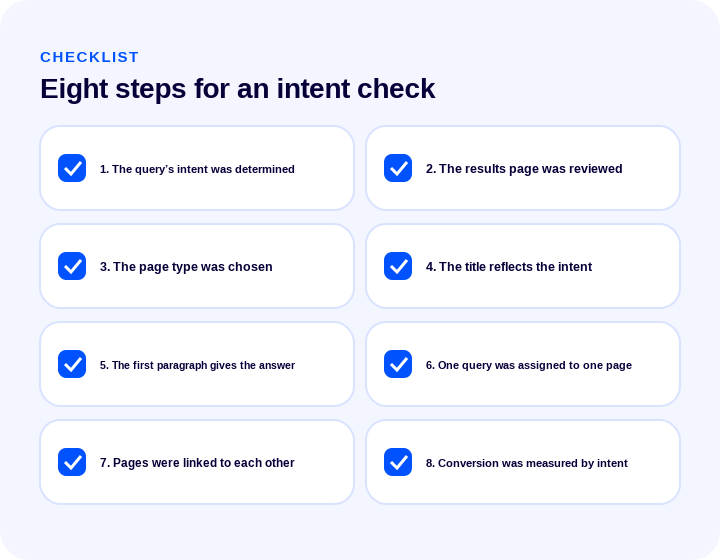
| Step | Question |
|---|---|
| 1. Intent identified | Is the purpose behind this query informational, navigational, comparison or purchase? |
| 2. The results page was reviewed | Which page types stand out in the first results? |
| 3. The page type was chosen | Guide, category, product or comparison: which one fits the intent? |
| 4. The title reflects the intent | Does the heading describe the page’s real answer correctly? |
| 5. The first paragraph gives the answer | Does the first section of the page immediately give the answer the intent expects? |
| 6. Single target page | Has each keyword been assigned to only one page? |
| 7. Pages linked | Is there a link from the guide to the category and from the category to the product? |
| 8. Measurement matches intent | Is the metric appropriate to the page type (reading, product clicks, add-to-cart) being tracked? |
Building Intent-Matched Pages with Faprika
The foundation of building pages by intent is, as much as writing the right content, being able to manage the technical settings of the pages in an orderly way. In the Faprika control panel, SEO information such as the title and description can be entered for product and category pages; the SEO settings tutorial in the Help Center explains these fields. This way you can write each page’s title and description separately, according to the intent it targets.
The plan feature comparison includes rows such as “Canonical / H Tag Management / Robots / Sitemap”, “Bulk Automatic SEO/Meta Information Update”, “301 / 302 / 410 Panel / Managing URL Records” and “SEO Reports”. These tools are used to manage the information of many pages in bulk, redirect address changes and monitor the status of pages. Which tools each plan includes may vary by plan; for the current scope, see the e-commerce plans page.
Besides management tools, page structure matters too. To set up your URL structure correctly from the start, see how a URL structure should be; to point duplicate addresses to a single address, what the canonical tag is; to tell search engines which pages to show, what a sitemap is and what robots.txt is. For how pages look when shared, what the Open Graph tag is, and for how pages are crawled and indexed, what crawl budget is are also helpful.
In multilingual stores, intent can vary by language and culture; the same product is searched for with different phrases in different countries. To make sure search engines understand your language versions correctly, take a look at what the hreflang tag is.
Frequently Asked Questions
What is search intent?
Search intent is the real goal a person wants to reach when typing a phrase into the search box. They may want to get information, go to a specific place, compare options or buy. Whether your page gives an answer that fits that goal is decisive for ranking and visitor satisfaction.
What are the types of search intent?
There are four basic types: informational intent (learning), navigational intent (going to a known place), comparison intent (weighing options) and purchase intent (being ready to buy). A query can sometimes carry more than one intent.
How do I understand a query’s intent?
The most reliable way is to search that query and see which page types appear in the top results. If guide articles dominate, the intent is informational; if product and category pages dominate, it is purchase. Phrases in the query such as “what is”, “best” and “buy” also give a first clue.
Which page suits which intent in e-commerce?
A guide article suits informational intent, the home page and brand pages suit navigational intent, a selection or comparison guide suits comparison intent, and product and category pages suit purchase intent. Each page should focus on its own intent and link to the others.
Why is intent mismatch a problem?
If the page does not answer the goal behind the searched phrase, the person cannot find what they are looking for and leaves. This can lead to low engagement and difficulty ranking. For example, offering a product list to a “what is” question or showing a long article to someone searching for a product name are typical mismatches.
Should I prepare multiple pages for one keyword?
Generally no. Tying each keyword to a single intent and a single target page gives clearer results. You can prepare pages that meet different intents on the same topic (guide, category, product), but each page should focus on its own intent and its own keyword.