
Contents 17 sections
- What Is a Product Title?
- Why Is the Product Title So Important?
- What Is the Formula for a Good Product Title?
- Which Rules Apply When Writing a Product Title?
- How Long Should a Product Title Be?
- Product Title Builder and Checker
- Product Title Examples by Category
- How Do You Write a Title for Products with Variants?
- Turning a Bad Title into a Good One: Before and After
- The Relationship Between the Product Title and Structured Data
- How Does a Marketplace Title Differ from the Title on Your Own Site?
- How Do You Measure the Effect of a Title Change?
- How Do You Fix the Titles of Hundreds of Products in Bulk?
- 8 Common Mistakes When Writing Product Titles
- Product Title Checklist
- Managing Product Titles and SEO Information with Faprika
- Frequently Asked Questions
On a product page, the product title is the first text the customer sees and often the only one they read. It is what represents your product in search results, marketplace listings, ads and shared links; if the title is unclear, the customer will not click, the search engine will misread the product, and AI assistants will confuse it with another one. The answer to how to write a product title lies not in "how many keywords can I fit?" but in "how clearly does this title describe the product the customer is looking for?"
This article is structured like a lesson. Step by step, you will learn the difference between the product name, the page title and the marketplace title, the formula of a good title, examples by category, the rules on length and keyword order, the most common mistakes, and how to fix the titles of many products in bulk. The tool in the article builds a title from your product details and checks for simple mistakes.
What Is a Product Title?
A product title is the text that describes a product's name and core identifying details (brand, product type, model or feature) in a single line. In e-commerce it appears in three different places, and each has a slightly different job: the product name on the product page, the page title shown in the browser tab and search results, and the product title on marketplaces.
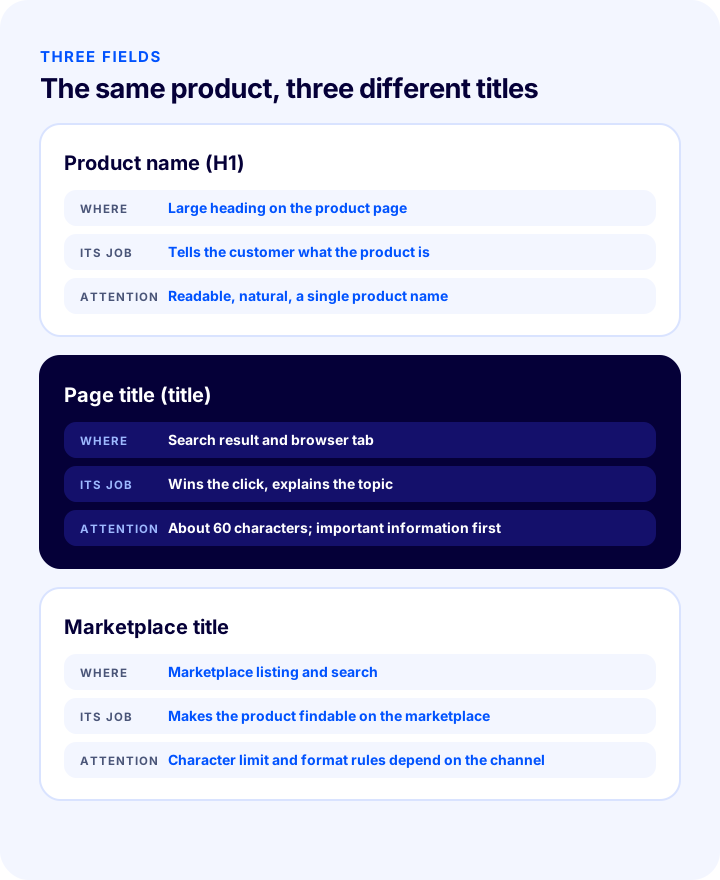
| Field | Where does it appear? | Its job | Point to watch |
|---|---|---|---|
| Product name | On the product page as the large heading (H1), and as the card title in listings | Tells the customer what the product is | Should be readable and natural; the page should contain only one product name |
| Page title (title) | In search results and the browser tab | Wins the click and tells the search engine what the page is about | Usually truncated after a certain length; brand and product should come first |
| Marketplace title | In marketplace listings and search results | Makes the product findable in the marketplace's own search | Every marketplace has its own title rules and character limit; check them |
All three describe the same product, but they do not have to be the same text. The product name speaks to the customer in natural language; the page title can add extra information such as the brand and the site name to the product name; the marketplace title is shaped by that marketplace's rules.
We recommend readingE-Commerce Product Page: What Should It Look Like?Why Is the Product Title So Important?
The product title determines both how findable and how clickable your product is. The same product reaches very different numbers of customers with a well-written and a poorly written title.
- Search visibility: The customer types the product into the search box in their own words; if the title contains those words, the product is found.
- Clicks: In search results and listings, customers often decide by reading the title alone.
- Matching the right product: Details such as brand, model and size help the product be matched correctly in catalogs and comparisons.
- AI visibility: AI assistants recognize a product from its title and product data; a clear and complete title makes it easier for your product to be understood correctly.
- Conversion: A title that sets the right expectation reduces wrong clicks and returns.
What Is the Formula for a Good Product Title?
A good product title is usually built in this order: brand, product type, model or distinguishing feature, color and, if needed, size or capacity. This order is close to the order in which customers picture the product and puts the most important information first.
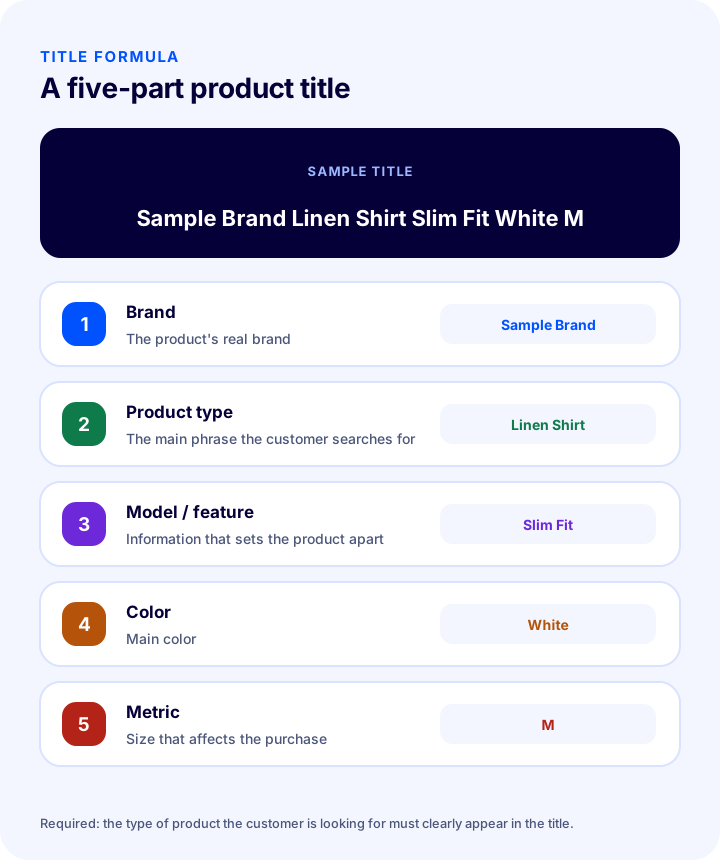
| Part | What to write? | Example |
|---|---|---|
| Brand | The product's real brand | Sample Brand |
| Product type | The main phrase the customer searches for | Linen Shirt |
| Model or feature | The information that sets the product apart from others | Slim Fit |
| Color | Main color | White |
| Size, volume or capacity | The size that influences the buying decision | M |
Sample title: Sample Brand Linen Shirt Slim Fit White M. Which parts go into the title varies by product type; what is essential is that the main phrase the customer searches for (the product type) is clearly present.
Which Rules Apply When Writing a Product Title?
The basic rules for writing a title are: put the searched phrase near the beginning, use real information, follow a natural order, avoid decoration and repetition, and apply the same format consistently across the whole store.
- Write the word the customer uses: Use the phrase the customer would type into the search box rather than industry jargon (such as "women's sneaker").
- Keep the main phrase near the start: Put the product type and brand in the first part of the title; that way the most important part stays visible when the title is truncated.
- Write only real, verifiable information: Do not put a feature in the title that is not on the page or in the product.
- Write in a natural order: The reader should be able to read the title like a sentence; it should not look like a list of keywords.
- Avoid decoration, exclamation marks and exaggeration: Words like "cheap", "bargain" and "don't miss out" and exclamation marks both damage trust and may violate marketplace rules.
- Do not repeat unnecessarily: Writing the same word or its synonym back to back lengthens the title and adds no value.
- Keep capitalization simple: Use either title case or sentence case, consistently; avoid titles written entirely in capital letters.
- Apply the same format across the whole store: If products in the same category are written with the same formula, the listing page looks orderly.
How Long Should a Product Title Be?
A title should be long enough to describe the product fully but short enough not to be truncated or hurt readability. For the page title, around 60 characters is generally used; for the product name and marketplace title, longer ranges that vary by product type and rules apply. These are practical thresholds, not hard limits.
- Page title (title): In search results it can generally be shortened after about 60 characters; the most important information should come first.
- Product name: Keep it short enough to stay readable; leave the details to the product description.
- Marketplace title: Every marketplace has its own character limit and format rule; check the current rules of the marketplace you will sell on.
- If the truncated part is unimportant, there is no problem: If the shortened part does not include the brand and product type, the loss is limited.
Product Title Builder and Checker
The tool below builds a formula-compliant title from your product details, measures its length and checks for the most common mistakes (exaggerated words, all capital letters, exclamation marks, repeated words). The tool only gives suggestions; compare the title with the product's real details and with marketplace rules.
Product Title Examples by Category
The title formula rests on the same logic in every category, but which parts stand out varies by product. In clothing, gender, fabric and color; in electronics, model and key feature; in cosmetics, volume; in home goods, material and size are what define the product.
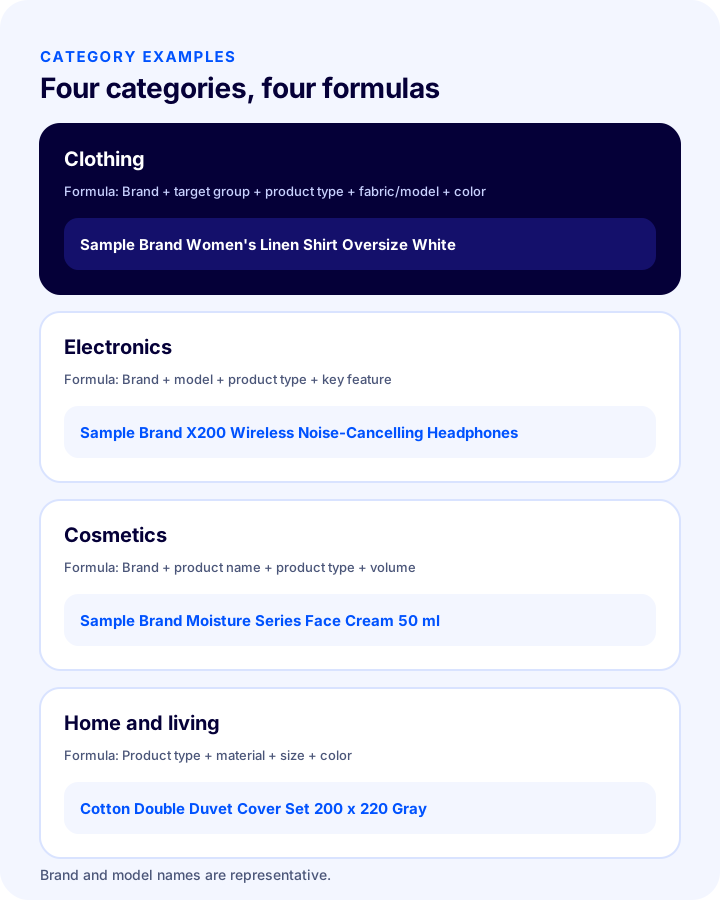
| Category | Formula | Example (illustrative) |
|---|---|---|
| Clothing | Brand + target group + product type + fabric/model + color | Sample Brand Women's Linen Shirt Oversize White |
| Electronics | Brand + model + product type + key feature | Sample Brand X200 Wireless Noise-Cancelling Headphones |
| Cosmetics | Brand + product name + product type + volume | Sample Brand Moisture Series Face Cream 50 ml |
| Home and living | Product type + material + size + color | Cotton Double Duvet Cover Set 200 x 220 Gray |
| Books and hobbies | Title + author/brand + type | Sample Work Title Sample Author Novel |
The brand and model names in the example titles are illustrative; fill them in with the real details of your own products.
How Do You Write a Title for Products with Variants?
Variants such as size and color are usually offered as options on the product page and are not written into the product name; the title contains only the shared information that defines the product. If each variant has its own page, that variant's distinguishing detail (such as color) goes into the title.
- If there are options on a single page: Write the shared information in the title (brand, product type, model); leave size and color in the selector.
- If each variant has its own page: Add that variant's color or size to the title and use a different title on every page.
- Do not list many sizes in the title: Lists such as "S M L XL XXL" lengthen the title and are hard to read.
- Follow the rule on the marketplace: A marketplace may require its own format for variants and titles.
Turning a Bad Title into a Good One: Before and After
The most instructive exercise is correcting a bad title step by step. In the examples below you can see typical problems and their fixes.
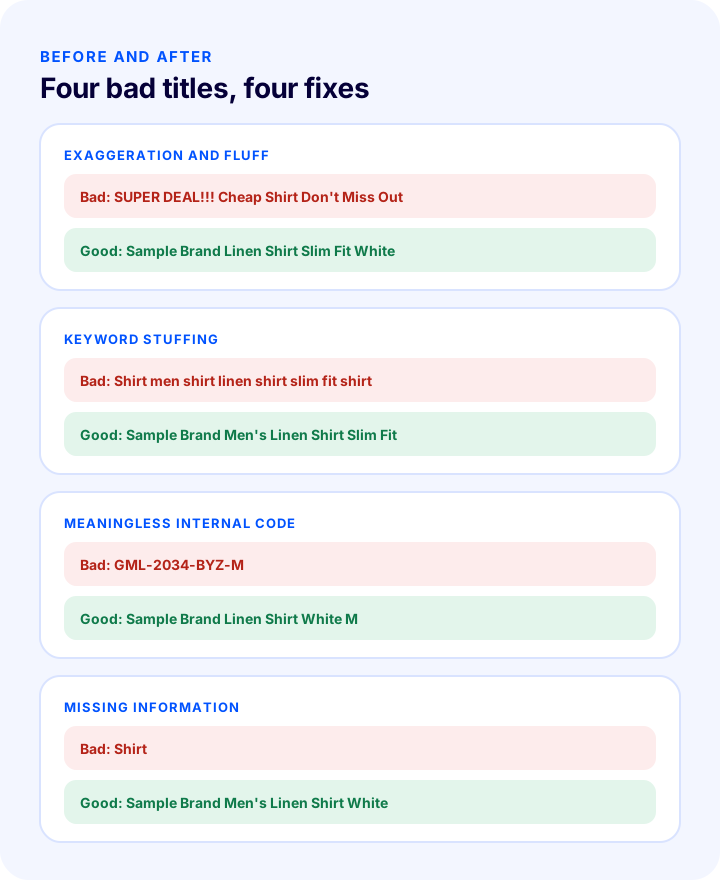
| Problem | Bad title | Corrected title |
|---|---|---|
| Exaggeration and decoration | SUPER DEAL!!! Cheap Shirt Don't Miss Out | Sample Brand Linen Shirt Slim Fit White |
| Keyword stuffing | Shirt men shirt linen shirt slim fit shirt | Sample Brand Men's Linen Shirt Slim Fit |
| Meaningless internal code | GML-2034-BYZ-M | Sample Brand Linen Shirt White M |
| Missing information | Shirt | Sample Brand Men's Linen Shirt White |
The Relationship Between the Product Title and Structured Data
The product title should be consistent with the product name field (name) of the structured data on the page. If the name shown on the page differs from the name in the schema, search engines and AI systems cannot be sure which one is correct.
- Use the same name: The product name on the page and the product name in the schema should be the same.
- Fill in the brand and barcode fields: The brand in the title and the brand field in the schema should match; the barcode and stock code strengthen identity.
- If you changed the title later, update the schema too: If it is generated from a template it comes through automatically; if it was written by hand it can be forgotten.
How Does a Marketplace Title Differ from the Title on Your Own Site?
Marketplaces run their own searches and listings, so the rules they impose on titles differ from those on your site. If you sell the same product both on your site and on marketplaces, you may need to prepare a separate title for each channel.
- The character limit is different: Each marketplace allows a different title length; if the limit is exceeded, the product may be rejected or the title truncated.
- There are format rules: Rules such as putting the brand name first and banning special characters and promotional phrases are common.
- It may require a category template: In some categories, the parts the title must consist of are set in advance.
- The searched phrase changes by channel: A customer on a marketplace may search with different words from a customer coming to your site; look at the marketplace's search suggestions.
- Stay consistent: Brand, model and product type should stay the same across channels; the difference should be in format only.
How Do You Measure the Effect of a Title Change?
Changing a title is an experiment; without measuring its effect, you cannot say it "got better". Measurement relies on comparing the period before and after the change under the same conditions.
- Record the baseline data: Note the product's views, clicks and sales before the change.
- Change a small number of products at a time: Proceed gradually so it is clear which change had an effect.
- Wait long enough: Search engines and listings do not reflect a change immediately; observe for a few weeks.
- Look at the click-through rate: If it gets more clicks for the same number of impressions, the title has worked.
- Look at sales and returns too: If clicks went up but sales or returns got worse, the title may have created the wrong expectation.
- Roll out the winner: Apply the successful formula to similar products.
How Do You Fix the Titles of Hundreds of Products in Bulk?
In a store with many products, you cannot fix titles one by one, so you need to define a formula and work in bulk, category by category. Start with the products that bring the most traffic and sales.
- Export the product list: Gather product name, category, brand and sales data in one spreadsheet.
- Set your priorities: Put the most viewed and best-selling products (class A in an ABC analysis) first.
- Write one formula per category: Define the order of the title parts for each category, as in the table above.
- Generate the new titles in the spreadsheet: Combine the brand, type, model and color columns to create titles in bulk.
- Check sample products by hand: Verify on a few products that the generated titles read well and are correct.
- Update in bulk: Use your platform's bulk product update feature.
- Monitor the result: Track changes in views, clicks and sales over a few weeks; roll out changes gradually so you can measure the impact.
8 Common Mistakes When Writing Product Titles
- Stringing keywords together: It produces an unnatural title that erodes trust.
- Adding exaggerated and promotional words: Words like "cheap" and "bargain" and exclamation marks both reduce trust and may violate marketplace rules.
- Leaving out the brand or product type: The title doesn't define the product and won't match searches.
- Putting internal codes and stock codes in the title: They mean nothing to the customer; codes belong in other fields.
- Writing everything in capital letters: It is hard to read and looks off-putting rather than attention-grabbing.
- Giving the same title to several products: The products can't be told apart and the pages compete with each other.
- Making the title too long: If the truncated part contains important information, it is lost.
- Mixing up the title and the product description: Details belong in the description; identifying information belongs in the title.
Product Title Checklist
Before publishing a product, check its title against the items below.
- Does the title include the brand and product type?
- Does the title contain the phrase the customer would type in the search box?
- Does the title accurately describe the product's real features?
- Is it free of exaggerated or promotional wording and exclamation marks?
- Is the title not all in capital letters, and does it read naturally?
- Has the same word been avoided from being repeated unnecessarily?
- Is the page title (title) within about 60 characters, with the most important information first?
- Does the marketplace title comply with that marketplace's rules?
- Were products in the same category written with the same formula?
- Does it avoid sharing the same title with another product?
- Is the product name on the page the same as the name in the structured data?
Product Title and SEO Management with Faprika
Once you have settled on the right formula, the fields you need to apply it quickly across your store are ready in the panel. The Faprika e-commerce platform offers the following for this stage (you can see which feature starts in which plan on the e-commerce plans page):
- Product-level SEO information: Under Catalog > Product Management, the page title, meta description and URL are edited for each product; SEO tags that automatically fill in the product name, stock code and price can be used.
- Page title template and separator: In the SEO section under General Settings, you set the format of all page titles and the separator between the product name and the site name; for a step-by-step guide, see the SEO Settings tutorial.
- Automatic generation of product meta descriptions: The description for each product can be generated automatically.
- Bulk SEO and meta updates: You can update the meta information of many products at once; this feature varies by plan.
- Bulk product update: To edit fields such as product name in bulk, see the Bulk Product Update tutorial.
- Adding a new product: Product information, SEO information and variations in one place; the steps are in the Adding a New Product tutorial.
Frequently Asked Questions
How to write a product title?
A product title is generally written in the order of brand, product type, model or distinguishing feature, color, and size if needed. The phrase the customer will type into the search box should be at the start of the title, only real and verifiable information should be used, and fluff and exaggeration should be avoided.
How many characters should a product title be?
There is no firm limit; roughly 60 characters is generally used for the page title, and longer ranges, depending on the product and the marketplace's rules, are used as practical thresholds for the product name and marketplace title. Important information should come first, and each marketplace's own character limit should be checked.
Are the product name and the page title the same?
No, but they should be consistent with each other. The product name is the large heading on the page and tells the customer what the product is; the page title appears in search results and the browser tab and can add extra information such as the brand or site name to the product name.
Is it right to stuff keywords into the product title?
No. Repeating the same word back to back makes a title unnatural, erodes trust and does not help search. It is more effective to state the product type and its distinguishing feature once, in a natural order.
Should size and color go in the title for products with variants?
If variants are offered as options on the same page, the title contains only the shared information. If each variant has its own page, that variant's color or size is added to the title, and every page carries a different title.
How do you fix the titles of hundreds of products in bulk?
Start with the products that bring the most traffic and sales, define one title formula for each category, export the product list and generate titles in bulk from the brand, type, model and color columns, check a few examples by hand, and upload them with your platform's bulk update feature.