Contents 18 sections
- What Is an Order Confirmation Email?
- What Is the Difference Between a Transactional Email and a Marketing Email?
- Which Transactional Emails Should Be Sent in the Customer Journey?
- Anatomy of a Good Order Confirmation Email
- How Do You Write an Order Confirmation Email Subject Line?
- Order Confirmation Email Template Generator Tool
- When Should Transactional Emails Be Sent?
- What Should a Shipping and Delivery Email Include?
- How Should Return and Cancellation Emails Be Written?
- What Technical Settings Are Needed for Emails to Reach the Customer?
- How Should Transactional Emails Look on Mobile?
- Should Marketing Content Be Added to Transactional Emails?
- Sample Texts for Shipped and Return Emails
- How Is the Performance of Transactional Emails Measured?
- 8 Common Mistakes in Transactional Emails
- Transactional Emails Checklist
- Transactional Emails and Notifications with Faprika
- Frequently Asked Questions
The moment a customer presses the "Complete Order" button, they ask a question: "Has my order really been received?" The answer to that question is the order confirmation email that arrives within a few seconds. The most opened emails on e-commerce sites are not marketing campaigns but the order confirmation email the customer is already expecting and the shipping, delivery and return notifications that follow it, because customers genuinely want to read them.
This article is structured like a lesson. Step by step, you will learn the difference between a transactional email and a marketing email, which emails should be sent when in a customer's journey, the content of a good order confirmation email, subject line examples, the technical settings that make emails arrive, and the most common mistakes. The tool within the article generates the subject line, preview text and body of the order confirmation email for your store.
What Is an Order Confirmation Email?
An order confirmation email is an automatic email that confirms the customer's order has been received successfully and contains the order number, products, amount, delivery address and next steps. It is sent right after the customer completes the order and is the first "proof" the customer holds.
This email is the result of a transaction: the customer has taken an action (placed an order) and you are expected to report the outcome of that action. That is why it is read with a very different expectation from a marketing campaign, and its open rate is generally much higher.
We recommend readingWhat Is E-Commerce Order Management?What Is the Difference Between a Transactional Email and a Marketing Email?
A transactional email is an email that gives information about an action the customer has taken (order confirmation, shipping notification, password reset); a marketing email is an email that encourages sales, such as campaigns, discounts and product promotion. The two differ in purpose, expectation and legal framework.
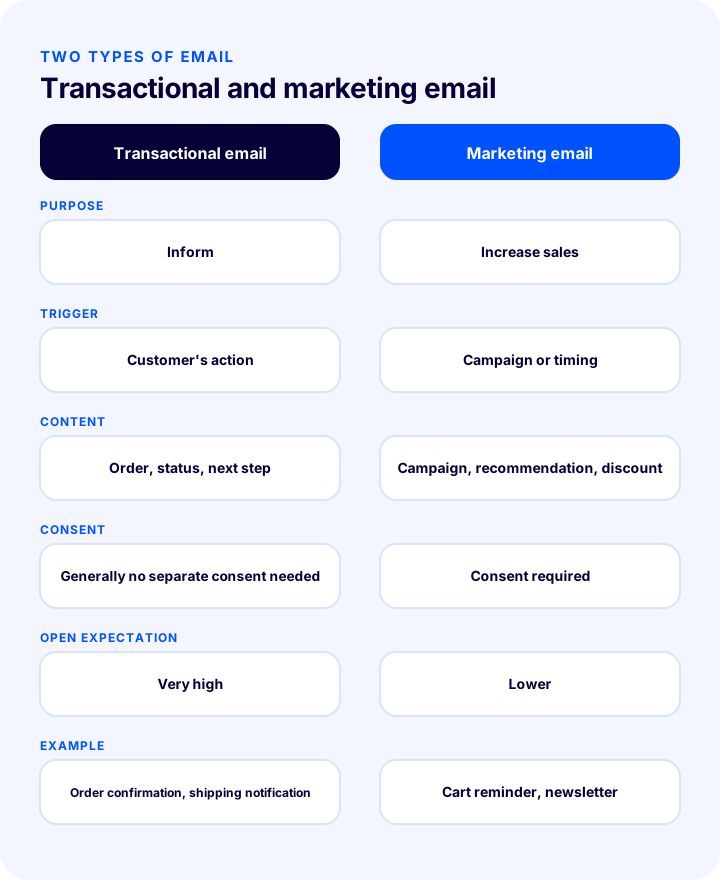
| Transactional email | Marketing email | |
|---|---|---|
| Purpose | Inform the customer about the action they took | Increase sales and engagement |
| Trigger | Customer's action (order, shipping, return) | Campaign or timing |
| Content | Order information, status, next step | Campaign, product recommendation, discount |
| Is consent required? | Generally no separate marketing consent is needed; it is part of the transaction | Consent is required for commercial messages sent to consumers |
| Open expectation | Very high; the customer is waiting for it | Lower |
| Example | Order confirmation, shipping notification, password reset | Cart reminder, campaign announcement, newsletter |
Adding a campaign or product recommendation to a transactional email may look tempting, but permission rules must be respected: marketing content can count as a commercial message, so avoid overdoing it in a transactional email sent to customers who have not given consent. Have the matter reviewed separately from a legal standpoint.
Okumanızı öneririzİleti Yönetim Sistemi (İYS) Hakkında Bilmeniz Gereken Her ŞeyWhich Transactional Emails Should Be Sent During the Customer Journey?
In an e-commerce store, eight core transactional emails are sent during the customer journey: membership welcome, order confirmation, payment confirmation or failure, order being prepared, shipped, delivered, cancellation and return notifications, and password reset. Each one answers the question the customer has at that moment.
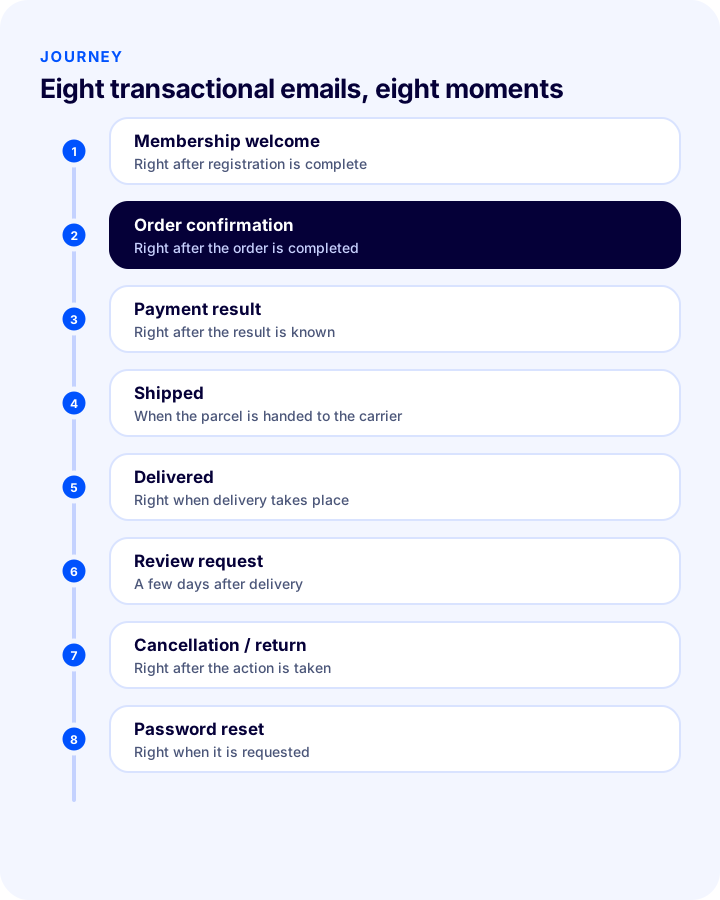
| When? | Question it answers | |
|---|---|---|
| Membership welcome | Right after registration is complete | Has my account been created, and how do I log in? |
| Order confirmation | Right after the order is completed | Has my order been received? |
| Payment confirmation / failure | Immediately once the payment result is known | Did my payment go through, or do I need to try again? |
| Shipped | When handed over to the shipping carrier | Is my order on its way, and what is my tracking number? |
| Delivered | Right when delivery takes place | Has my order been delivered? |
| Review request | A few days after delivery | How did you like the product? (gives time to try the product) |
| Cancellation / return notification | Right after the action is taken | Has my cancellation or return been received, and when will I get my money back? |
| Password reset | Right when it is requested | How do I reset my password? |
Which emails are sent varies by store, but order confirmation, shipped and delivery notifications are essential in almost every store. Delivering them not only by email but also by SMS or notification where needed reduces the chance that the customer misses the email.
Anatomy of a Good Order Confirmation Email
A good order confirmation email includes a clear subject line, a greeting with the customer's name, an order summary, delivery information, an explanation of the next step and a way to get in touch. When all of these are present, the customer does not have to question the email again.
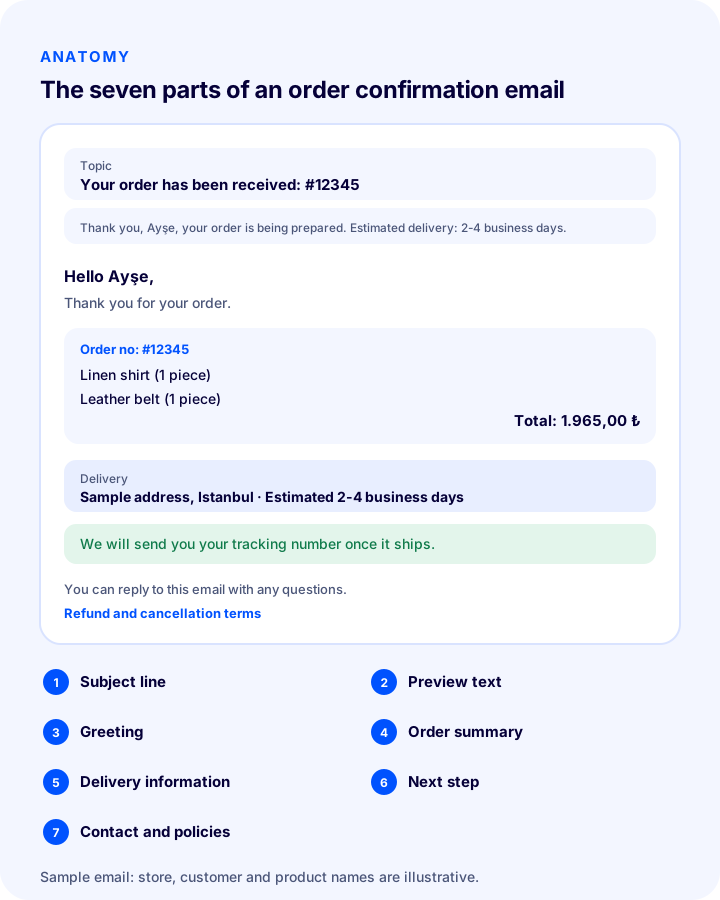
- Subject line: States that the order has been received and gives the order number.
- Preview text: The short text shown next to the subject line in the email inbox; it carries the most important piece of order information.
- Greeting: Starts with the customer's name and says thank you.
- Order summary: Products, quantities, prices, shipping and total amount.
- Delivery information: Delivery address, shipping method and estimated delivery time.
- Next step: When the order will be shipped and how the tracking information will arrive.
- Contact and policies: The support channel for the order and links to the return and cancellation terms.
How to Write the Subject Line of an Order Confirmation Email
The subject line should tell at a glance what the email is and why it matters; for an order confirmation, a simple phrase containing the order number and a thank-you is the safest choice. Decoration, exclamation marks and marketing language damage trust in a transactional email and raise the risk of being caught by spam filters.
| Poor subject line | Good subject line | |
|---|---|---|
| Order confirmation | Thanks!!! Great deals are waiting for you | Your order has been received: #12345 |
| Shipped | Notification | Your order has been shipped: #12345 |
| Delivered | You have a message | Your order has been delivered: #12345 |
| Return approval | About your request | Your return request has been received: #12345 |
| Password reset | URGENT!!! Click now | Link to reset your password |
The order number is only an example; replace it with your own number format. Keeping the subject line simple also helps customers find the email easily when they search for it later.
Order Confirmation Email Template Generator
The tool below generates the subject line, preview text and body of an order confirmation email from the store name, customer name, order number, products and estimated delivery time. The generated text is a starting template; edit it to match your brand's voice and your policies.
When Should Transactional Emails Be Sent?
Most transactional emails are sent right after the event; only some emails, such as review requests, are deliberately delayed. The customer should receive the email at the moment they expect it; an order confirmation that arrives late makes the customer doubt whether they placed the order.
- Send immediately: Order confirmation, payment result, password reset and cancellation notification should go out within seconds.
- Send when the status changes: Shipped and delivered emails should be sent the moment the status changes.
- Send with a delay: The review request should go out a few days after delivery to give the customer time to try the product.
- Do not repeat: Do not send more than one email for the same event; the customer will see it as an error.
- Think about night hours: Send only non-essential notifications (such as review requests) at reasonable hours.
What Should a Shipping and Delivery Email Include?
The shipped email should show the customer the tracking number, the carrier and the estimated delivery time at a glance. This email is the most effective way to prevent “where is my order?” calls.
- Tracking number and link: The customer should be able to track the shipment with one click.
- Carrier and estimated time: It should state which carrier is used and how long delivery will take.
- Order summary: This email too should make clear which order has been shipped (especially for split shipments).
- Delivery tip: For cash-on-delivery orders, remind the customer that the amount is paid at delivery.
- Contact if something goes wrong: It should be clear whom to contact about an undeliverable or damaged shipment.
How Should Return and Cancellation Emails Be Written?
Return and cancellation emails arrive at moments when the customer is most concerned, so they should be written in a clear, calm tone that states the next step plainly. The customer wants to know that the return has been received, and when and by which method the money will come back.
- Confirm that the request has been received: State the return or cancellation number and the date.
- Explain the next step: Describe how and with which carrier the customer should send the product back, or that the cancellation has been processed.
- Give refund information: State by which method and within what time the amount will be refunded, in line with legislation and the payment method.
- Link to the return terms: So the customer can read the details.
- Apologize and offer a solution: If the problem is on your side, give a short, sincere apology and explain how it will be resolved.
What Technical Settings Are Needed for Emails to Reach the Customer?
For a transactional email to work, it must reach the customer's inbox and not land in the spam folder. This requires that the sender address belong to your domain and that email authentication records be set up for the domain.
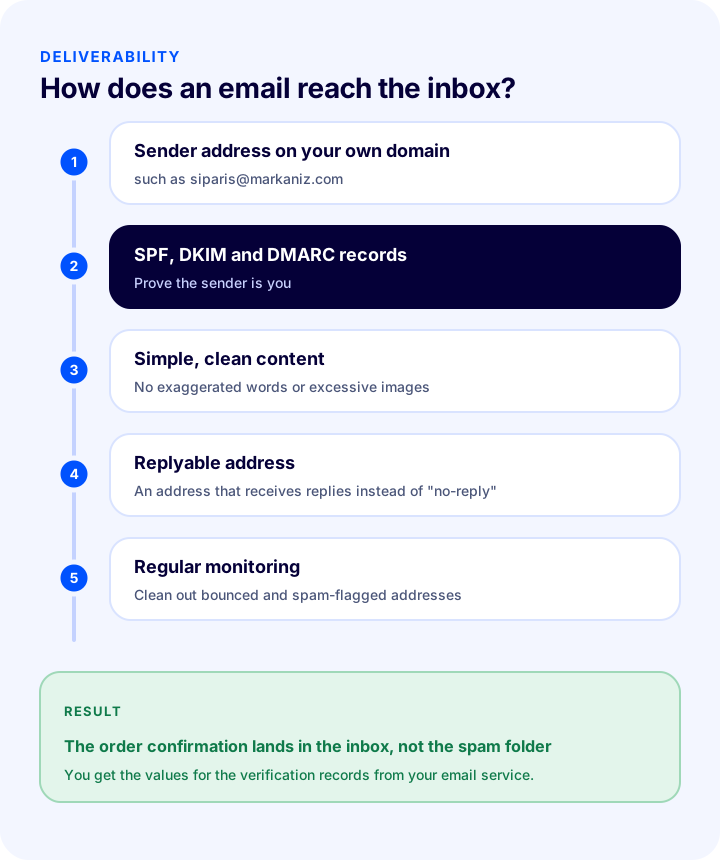
- Use a sender address that belongs to your domain: An address like orders@yourbrand.com looks far more trustworthy than a free email address.
- Set up email authentication records: SPF, DKIM and DMARC records prove to receiving servers that you really sent the email; you get the values from your email service.
- Keep the content simple and clean: Too many images, exaggerated wording and shortened links raise the risk of being caught by spam filters.
- Set a reply-capable address: An address the customer can reply to, instead of “no-reply”, builds trust and brings questions to you.
- Monitor delivery status: Regularly check emails that bounce or are marked as spam, and clean up problem addresses.
How Should Transactional Emails Look on Mobile?
Most customers open the email on their phone, so a transactional email should be designed with a single column, large text and buttons that are easy to tap. A complex layout that looks good on desktop can become unreadable on a phone.
- Use a single column: Side-by-side columns get cramped on a phone.
- Keep text a readable size: Body text should be large enough, with comfortable line spacing.
- Make buttons large: Links such as “Track my order” should be easy to tap with a finger.
- Do not rely on images: Some email apps block images by default; important information should be written as text, not inside an image.
- Provide a plain-text fallback: Include a text version for clients that do not support images.
Should Marketing Content Be Added to Transactional Emails?
It is possible to add a small complementary product suggestion to an order confirmation, but the main purpose of this email is to inform, and the suggestion should not overshadow that. In addition, marketing content falls under the permission rules.
- Information comes first: The order summary and next step should be at the top of the email and stand out.
- The suggestion should be small and relevant: A single suggestion related to the purchased product is enough; long campaign lists damage trust.
- Respect consent status: Do not send campaign content to customers who have not given marketing consent; set the exact limit with your legal advisor.
- Measure the effect: Track the suggestion's click rate and remove it if it does not work.
Sample Texts for Shipped and Return Emails
The two sample texts below show the plain, helpful tone of a transactional email. Fill in the fields in square brackets with your store's details and adapt the text to your brand's voice.
| Sample text | |
|---|---|
| Shipped | Hello [Customer Name], your order has been shipped. Order no: #[Number]. Carrier: [Carrier]. Your tracking number: [Tracking No]. Estimated delivery: [Time]. You can track your shipment using the link below. If you have any questions, you can reply to this email. |
| Return request received | Hello [Customer Name], we have received your return request for order #[Number]. You can send the product to us with [Carrier] using the attached return code. Once the product reaches us and is checked, your payment will be refunded by [Method] within [Time]. You can click the link for our return terms. |
Write the time and method statements in the return email in line with legislation and your own return terms; by which method and how soon the money will come back is what the customer most wants to know.
How Is the Performance of Transactional Emails Measured?
You can monitor the health of transactional emails with four indicators: delivery rate, open rate, link click rate and support requests opened because of these emails. A sudden change in these indicators is usually a sign of a technical or content problem.
- Delivery rate: Shows how many of the emails sent did not bounce back; a drop points to an authentication or list problem.
- Open rate: Should generally be high for transactional emails; a sudden drop may suggest they are landing in the spam folder.
- Tracking link clicks: If customers track their shipment from the email, support requests go down.
- Support requests: The number of “where is my order?” and “the confirmation email did not arrive” requests is a measure of the success of the email content and timing.
8 Common Mistakes in Transactional Emails
- Sending the order confirmation late: The customer doubts whether the order was received and opens a support request.
- Using marketing language in the subject line: It damages trust and raises the spam risk.
- Leaving out the order number: The customer cannot search for the email later, and the support team cannot find the order.
- Not stating the estimated delivery time: The most frequently asked question goes unanswered.
- Sending from a “no-reply” address: The customer's question reaches no one.
- Not setting up domain authentication: Emails land in the spam folder.
- Not testing mobile compatibility: An email that looks broken on a phone does not get read.
- Never testing: A faulty field in the template (such as an empty customer name) goes out to thousands of customers.
Transactional Emails Checklist
Check the items below before putting your templates live and at regular intervals.
- Are the order confirmation, shipped and delivered emails defined and active?
- Are there cancellation and return notification and password reset emails?
- Do the subject lines contain the order number and a clear statement?
- Are the order summary, amount and delivery information in the visible part of the email?
- Are the estimated delivery time and the next step stated?
- Does the sender address belong to your domain, and can it be replied to?
- Are SPF, DKIM and DMARC records set up?
- Have the emails been tested on mobile?
- Do the customer name and order details fall into the right places in the template (has it been tried with a test order)?
- Does the marketing content avoid overshadowing the information, and does it comply with the permission rules?
- Are undelivered emails and complaints being monitored?
Transactional Emails and Notifications with Faprika
Sending an email by hand for every event is not feasible; in Faprika these go out automatically with predefined templates. The following elements are part of this stage in the Faprika e-commerce infrastructure (you can see which feature starts in which plan on the e-commerce plans page):
- Message templates: Customers are notified automatically when they register, place an order and when their orders are shipped; administrators receive notifications in cases such as low stock. How to edit the templates is explained in the Message Templates Management training; email templates are included in all plans.
- Placeholders (parameters): The panel includes ready-made placeholders that insert store, user and order details into the message automatically, so the customer name and order number are filled in for you.
- Active/inactive and timing: Each template can be switched on or off individually and set to send immediately or after a specific delay.
- SMS and push notifications: A template can also be sent as an SMS and a push notification; for SMS, the SMS integration must be configured beforehand, and availability varies by plan. See the Push Notifications tutorial for details.
- Email accounts and configuration: Email accounts linked to your domain and sending settings are configured from the panel; the steps are in the E-commerce Email Settings Configuration tutorial.
- Sending queue monitoring: You can monitor email sends in the queue; this feature varies by plan.
- Shipping status automation and tracking module: Customers are notified as the shipping status is reflected on the order; varies by plan.
Frequently Asked Questions
What is an order confirmation email?
An order confirmation email is an automatic email that confirms the customer’s order was received successfully and includes the order number, products, total, delivery address and next steps. It is sent as soon as the order is completed and is the customer’s first proof of purchase.
What should an order confirmation email include?
It should include a clear subject line and order number, a greeting with the customer's name, an order summary with products and the total amount, the delivery address and estimated time, an explanation of the next step, support contact details and a link to the return terms.
Is a transactional email the same as a marketing email?
No. A transactional email provides information about an action the customer has taken (order confirmation, shipping notice, password reset) and usually does not require separate marketing consent. A marketing email promotes campaigns and products and requires consent before it is sent to a consumer.
Which transactional emails should be sent?
Membership welcome, order confirmation, payment result, shipped, delivered, cancellation and refund notices, and password reset are the core transactional emails. Some emails, such as a review request, are sent a few days after delivery.
What should you do if emails land in the spam folder?
Make sure the sender address belongs to your domain and that SPF, DKIM and DMARC verification records are set up for the domain. Keep the content simple, avoid exaggerated wording and excessive images, use an address that can receive replies, and regularly clean up bounced emails.
Can order notifications also be sent by SMS?
Yes. The same message template can be sent as an SMS and a push notification as well as an email; this reduces the chance of the customer missing an important notification. For SMS, the SMS integration must be configured beforehand.