Contents 17 sections
- What Is Order Verification?
- Why Is Order Verification Important?
- What Causes Wrong Shipments?
- How to Calculate the Monthly Cost of Wrong Shipments?
- What Are the Order Verification Methods?
- How to Do Order Verification Step by Step?
- How to Verify Products Without Barcodes?
- Which Actions Can Be Automated After Verification?
- How to Track Staff Performance with Verification?
- What to Do If a Wrong Product Reaches the Customer?
- Which Businesses Need Order Verification the Most?
- Order Verification Setup Steps
- Common Mistakes in Order Verification
- How to Audit Your Order Verification Setup?
- How to Measure the Success of Order Verification?
- How to Do Order Verification with Faprika?
- Frequently Asked Questions
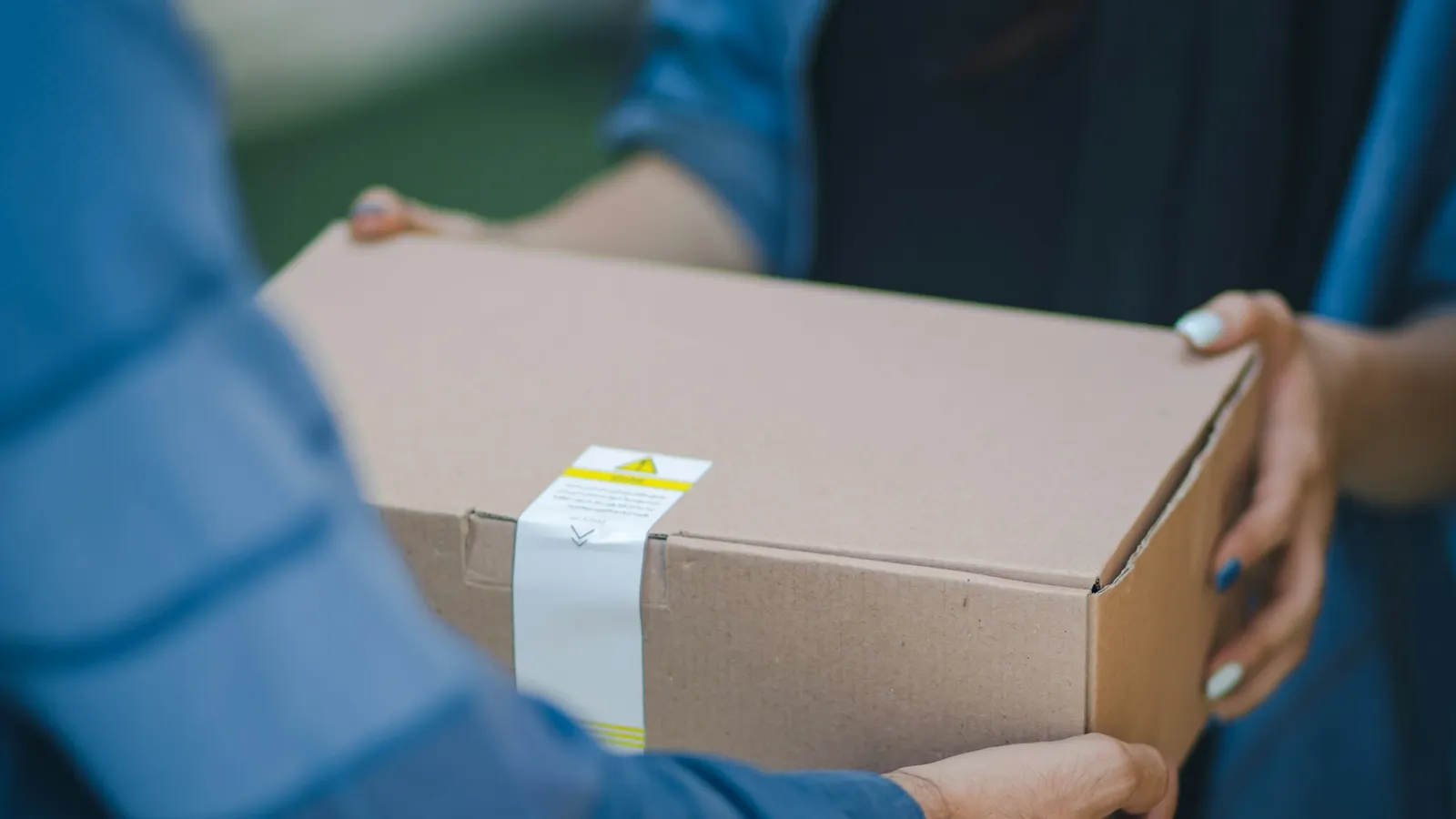
The moment an order is sealed in a box, it becomes the most expensive to fix. When a wrong product, a missing quantity or another order's product reaches the customer, return shipping, reshipment, support correspondence and often a negative review come into play. The short answer to the question what is order verification is this: before handing the order to the carrier, compare the products going into the package with those in the order one by one, to make sure the right product, the right quantity and the right box are being sent.
In this guide, we explain what order verification is, how it differs from order picking, the real cost of a wrong shipment, which verification methods are used, how you can set up the process step by step, common mistakes and how to measure the result. Of the two tools in the article, one is designed for calculating the monthly cost of wrong shipments and the savings you would gain through verification, and the other for auditing your current verification setup.
What Is Order Verification?
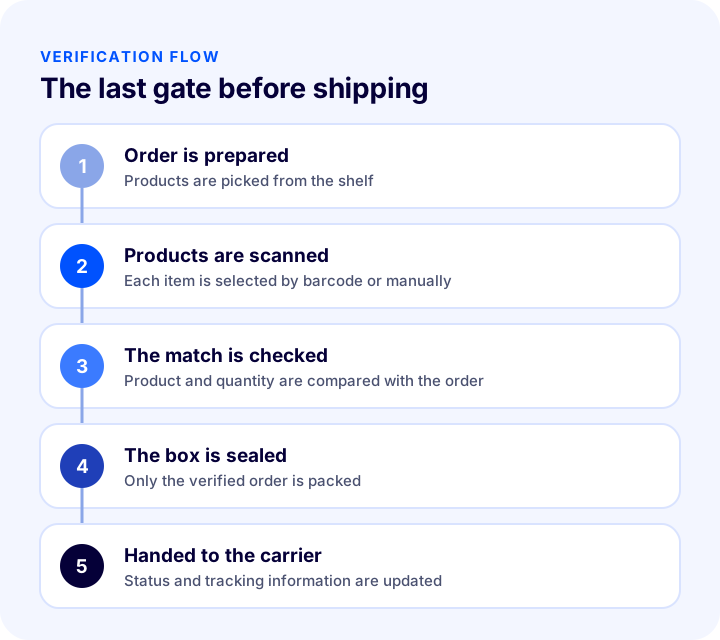
Order verification is the process of checking, before handing the order to the carrier, that the products in the prepared order match the order record exactly. The check covers the product being correct, the quantity being correct and the package belonging to the correct order. In most businesses, this is done at the packing table by scanning the barcodes of the products.
Are Order Verification and Order Picking the Same?
No, they are consecutive but separate processes. Picking is taking the products in the order from the shelves; verification is checking whether the picked products are really the products in the order. Mistakes can be made during picking; verification is the second gate that catches them before shipping.
| Process | What is done? | What happens if there is an error? |
|---|---|---|
| Order collection | Products are taken from the shelf | A wrong or missing product enters the package |
| Order verification | Picked products are compared with the order | If the error goes unnoticed, it reaches the customer |
| Packaging | Products are placed in the box with protection | Damage and insufficient protection problems occur |
| Handover to the carrier | The box is given to the carrier | Delays and tracking problems occur |
Why Is Order Verification Important?
In e-commerce, until the customer holds the product, they know the store only through promises. A correct package is the first concrete proof of that promise. A wrong package, on the other hand, is not just a single mistake; it creates a chain of costs.
- Reduces return and reshipment costs: When the error is caught before the box is sealed, neither return shipping nor a second shipment is paid.
- Protects customer trust: A customer who receives the right product the first time usually orders again; a customer who receives the wrong product may lose trust.
- Eases the support load: Correspondence like "I received the wrong product in my order" takes time and keeps the team constantly firefighting.
- Protects reviews and ratings: A wrong shipment is directly reflected in store reviews and marketplace ratings.
- Improves stock accuracy: On shelves where wrong products are sent out, the stock record is also corrupted; verification also keeps the stock record consistent with reality.
- Makes staff measurable: Who verified which order becomes visible; the process relies on records rather than on individuals.
What Causes Wrong Shipments?
Most wrong shipments come not from a single big mistake but from small, recurring slip-ups. Knowing the causes also shows where to concentrate verification.
- Similar products: Different color or size options of the same model sit side by side and get mixed up.
- Shelf layout: If product locations are unclear or the same product is spread across different shelves, the wrong product gets picked.
- Peak-season pressure: On campaign days, pressure for speed reduces attention and checks are skipped.
- Multi-item orders: As the number of items grows, so does the chance that one item gets left out.
- Code and barcode confusion: Assigning more than one code to the same product or printing a barcode on the wrong label breaks the match.
- Manual workflow: If the order is prepared by looking at a printed sheet of paper, a misreading goes unchecked.
- Order changes: An item the customer changed after ordering is overlooked once preparation has started.
How to Calculate the Monthly Cost of Wrong Shipments?
The extra cost of a wrong shipment consists of at least three items: the return shipping paid for the product to come back to you, the shipping paid to send the correct product a second time, and the labor and packaging spent on receiving, inspection and repacking. The sum of these items is the extra cost of one wrong shipment; the monthly cost is this amount multiplied by the number of wrong shipments per month.
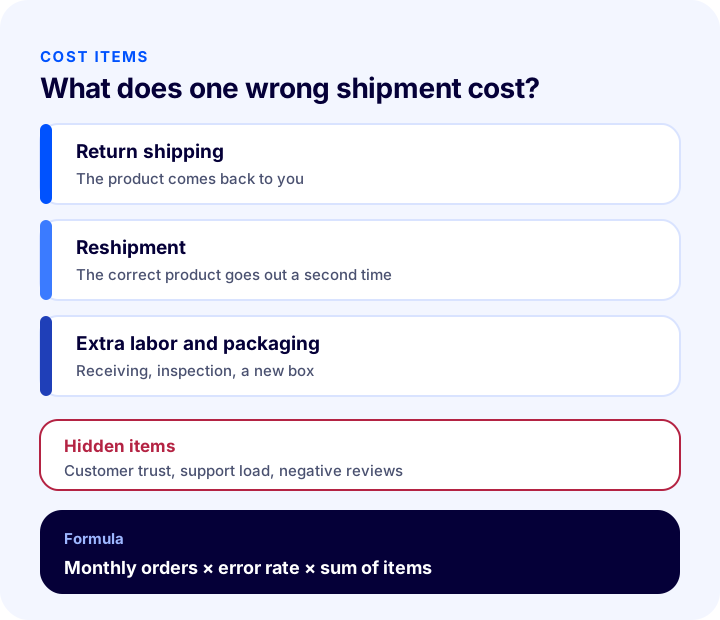
The tool below does this calculation with your own figures and shows how much you can save with verification. The values are examples; enter your own order count, wrong shipment rate and shipping fee.
The main lesson the tool shows is that cost grows not only with the rate but also with volume: even if the wrong shipment rate stays the same, the monthly bill grows as the number of orders increases. So a percentage that looks small quickly turns into a significant expense item in a growing store.
We recommend readingWhat Is Order Splitting? A Guide to Splitting Orders by Lead Time, Desi and Warehouse, with Tracking, Returns and Shipping Cost, a Cost Comparator and a Needs AuditWhat Are the Order Verification Methods?
There is no single way to do order verification; depending on the business's volume, product structure and budget, different methods can be used individually or together. The most common method is barcode scanning, because it is both fast and leaves a record.
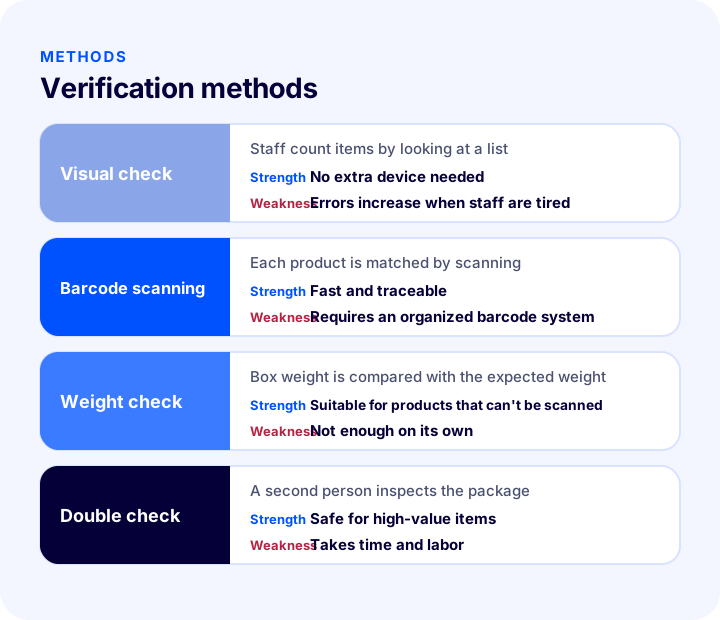
| Method | How does it work? | Strength | Weakness |
|---|---|---|---|
| Visual check | Staff count the products by looking at the order list | Requires no extra device | Errors increase with fatigue and busy periods, and no record is left |
| Barcode scanning | Each product is scanned, and the system matches it with the order | It is fast, shows errors instantly and keeps a record | Correct and unique barcodes are required on products |
| Weight check | Box weight is compared with the expected weight | Useful for products that cannot be scanned | Not sufficient on its own; it can't tell apart products of similar weight |
| Double check | A second person inspects the package | Safe for high-value products | Brings time and labor costs |
Which Method Should I Choose?
The rule is simple: as volume and product variety grow, move verification from the human eye to a system. With few orders and little product variety, a visual check may be enough; when the number of orders, variants and staff grows, barcode scanning becomes nearly essential. For high-value products, a double check can be added on top of barcode scanning.
We recommend readingWhat Is a Barcode? How Do You Get, Read and Use a Product Barcode (GTIN/EAN) in E-Commerce? A Practical GuideHow to Do Order Verification Step by Step?
A verification flow based on barcode scanning follows the same order in most businesses. The steps below are a general roadmap you can follow when setting up the process from scratch.
- 1. Open the order: At the packing table, select the order to be verified or scan the order barcode.
- 2. Scan the products one by one: Scan the barcode of each product going into the box with the reader; if there are several units of the same product, scan each unit.
- 3. Watch the match: The screen compares the scanned product with the item in the order; a product not in the order or an extra unit should trigger a warning.
- 4. Complete what is missing: If there is an unscanned item, have it completed from the shelf without advancing the order, or record the missing status.
- 5. Complete the verification: When all items match, the order is considered verified.
- 6. Trigger the next step: The verified order moves on to subsequent actions such as shipping, invoicing and status update.
What Should a Verification Screen Include?
A good verification screen clearly shows three things: the scan area, an item-based counter and the completion status. Staff should be able to see at a glance what is missing.
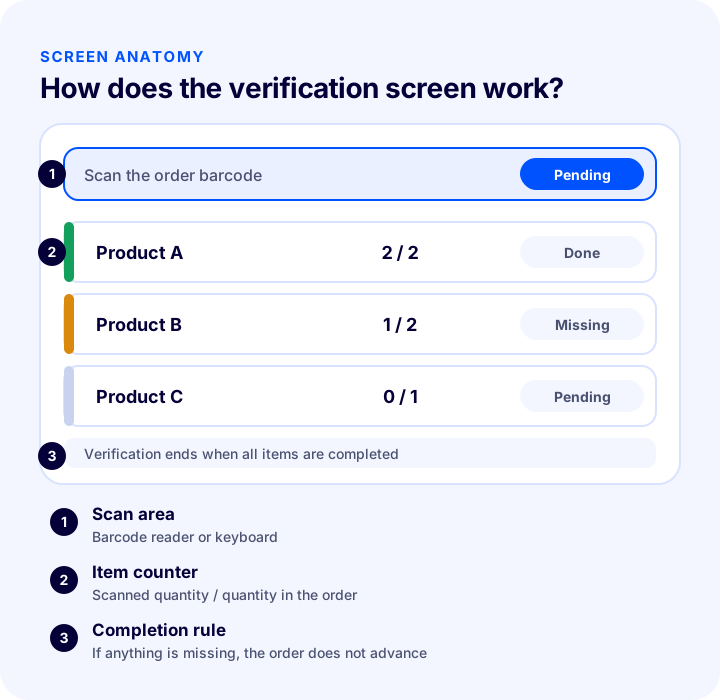
| Screen section | Its job |
|---|---|
| Scan area | Where the order and product barcodes are entered with a reader or keyboard |
| Item counter | Shows the scanned quantity and the quantity in the order for each item |
| Status indicator | Separates completed, missing and pending items by color and label |
| Completion rule | Does not let the order advance until all items match |
How to Verify Products Without Barcodes?
Not every product has a barcode; this is common with handmade, custom-made or later-labeled products. In this case, instead of skipping verification, you need to confirm the product by selecting it manually on the screen. What matters is that the product without a barcode is also verified on the record.
- Verification by manual selection: Staff confirm the product by selecting it from the list with the mouse or keyboard.
- Using a short internal code: Giving a product without a barcode your own internal code and labeling it increases both speed and accuracy.
- Weight support: For products that cannot be scanned, the box weight provides an additional safeguard.
Which Actions Can Be Automated After Verification?
Verification is not just a checking step; the moment it is completed successfully, it is a natural trigger point for the next actions. This way no unverified order moves on to shipping or invoicing.
- Updating the order status: A verified order can automatically be moved to the next status.
- Notifying the carrier: A verified order can be sent to the shipping integration.
- Informing the customer: A "shipped" notice can be sent to the customer; timing needs to be chosen carefully, because if an order is verified in the morning but the carrier collects it in the evening, the customer may ask about the tracking number.
- Invoicing: A verified order can be passed to the accounting software or the e-Invoice flow.
How to Track Staff Performance with Verification?
The verification record also shows who verified which order and when. This information should be used not as a tool for blame but as a tool for improving the process: it makes training needs, busy hours and frequently mistaken products visible.
- Authorized user group: Having only the warehouse team perform verification makes responsibility clear.
- Allowed statuses: Allowing only orders in certain statuses to be verified prevents a canceled or not-ready order from being shipped by mistake.
- Backward trace: When a problem package is complained about, the record makes it easier to find where the error occurred.
What to Do If a Wrong Product Reaches the Customer?
Even in the best verification setup, an error can occasionally slip through. In that case, speed and openness determine the cost of the error in the customer's eyes. When the customer reports the problem, first apologize, then present the solution clearly.
- Admit the error immediately: Own the problem without getting defensive.
- Send the correct product first: Dispatching the correct product before the return process is completed protects trust.
- Cover the return shipping yourself: Since the error is yours, the return cost should not be put on the customer.
- Review the record: Find out at which stage the error occurred; it may be a picking, verification or coding problem.
- Close the root cause: If the same error repeats, fix the shelf layout, the product code or the process.
Which Businesses Need Order Verification the Most?
It is useful for every business, but under some conditions it is close to a necessity. Multiple sales channels, many variants and high order volume increase the need for verification.
- Products with many variants: Color and size options look very similar to each other; they are the most frequently mixed-up products.
- Multichannel sales: Orders from the website and marketplaces are picked in the same warehouse; the risk of mix-ups grows.
- Multi-item orders: As the basket grows, the chance of a missing item increases.
- High-value products: A single wrong package is costly.
- Campaign periods: Under speed pressure the error rate rises; verification is most useful during these periods.
- Crowded warehouse teams: When many people do the same job, checking cannot be left to individual attention.
Order Verification Setup Steps
If you are setting up verification for the first time or moving from manual checks to a system, proceeding in order reduces the risk of errors. The path below is a suitable starting point for most businesses.
- 1. Fix the product codes: Give every variant a unique and correct barcode or internal code; clean up duplicate or missing codes.
- 2. Prepare the packing table: Keep the barcode reader, screen and packing materials in the same place.
- 3. Identify the authorized team: Make clear who will do the verification and give the team short training.
- 4. Decide in which status orders are verified: Define which order statuses can be verified.
- 5. Set the rule for products without barcodes: Put in writing how products without barcodes will be confirmed.
- 6. Connect the next steps: Decide on the shipping, status and invoicing actions after verification.
- 7. Try it with a small group: First run it with a limited number of orders to validate the flow, then extend it to all.
- 8. Measure and improve: Monitor the wrong shipment rate and update the settings based on the results.
Common Mistakes in Order Verification
- Verifying only on busy days: The day the check is skipped is the day most errors occur.
- Leaving picking and verification to the same person: The same person may find it hard to see their own mistake; if possible, the two are done by different people.
- Starting without cleaning product codes: A faulty or duplicate code flags the right product as wrong, or the other way around.
- Skipping products without barcodes: Products left outside the check become where most errors occur.
- Ignoring the warning: Forcing approval to get past a system warning defeats the purpose of verification.
- Changing the box after verification: Adding or removing products after a box has been checked invalidates the verification.
- Not reviewing the error record: Errors caught during verification are valuable data showing their source; if they aren't examined, the same error continues.
- Not measuring the result: If the wrong shipment rate isn't monitored, you can't know whether verification works.
How to Audit Your Order Verification Setup?
The tool below checks your current setup with eight questions. Tick the items that apply to you; the tool tells you how solid your verification setup is.
How to Measure the Success of Order Verification?
A few indicators tell whether verification works. The most important is the wrong shipment rate: it is found by dividing the number of wrongly shipped orders by the total number of orders. Indicators should be tracked by channel and product group; the overall figure hides the problem area.
| Indicator | What does it tell you? |
|---|---|
| Wrong shipment rate | The size of the error and its trend over time |
| Number of errors caught during verification | How many errors the system prevented before shipping |
| Return rate due to wrong products | Whether the error reached the customer |
| Verification time | Whether the check slows down operations |
| Products and shelf groups with errors | Which products have a code or shelf layout problem |
| Complaints and reviews about wrong products | How the error is seen by the customer |
For the measurement to be meaningful, record the baseline value before verification is set up. If the same indicators improve after setup, the setup is working; if not, the problem lies in the codes, the shelf layout or how the team applies the process.
Recommended readingE-Commerce Order Management: A Step-by-Step Guide from Order to DeliveryHow to Do Order Verification with Faprika?
Faprika's Order Verification feature confirms the products of each order and automatically starts the actions that follow verification. Whether the feature is included in your plan varies by plan; in some plans it comes included, in others it can be obtained separately. See the plans page for details.
- Barcode verification: You can scan the order barcode with a barcode reader or type it in from the keyboard; you complete verification quickly by scanning the barcodes of the products in the order.
- Verification without barcodes: When the barcode-free verification setting is turned on, you can verify products without barcodes by selecting them with the keyboard or mouse.
- Authorized warehouse user group: You can ensure that only the user group you select, for example the warehouse team, performs verification. By turning on the picking staff feature, you can measure staff performance.
- Allowed order statuses: You can choose which order statuses can be verified; for example, a canceled order is not taken into verification.
- Actions after verification: When verification succeeds, you can automatically change the order status, send the order to the shipping integration, transfer it to the ERP integration and invoice it, and, if the e-Invoice module is set up, automatically issue and send the e-Invoice.
- Shipping status timing: It is possible to tie the "shipped" status to the moment after verification; if the messaging system is on, the customer is notified. We recommend adjusting this by considering the gap between verification and carrier pickup time.
If you want to manage the whole warehouse operation, you can look at the Faprika Depo add-on; for detailed setup, see the Order Verification training page, and for the add-on summary, the Order Verification page.
Frequently Asked Questions
What is order verification?
It is the process of checking, before handing the order to the carrier, that the products in the prepared order match the order record. The right product, the right quantity and the right box are ensured, so a wrong shipment is caught before it reaches the customer.
What is the difference between order verification and order picking?
Picking is taking products from the shelves; verification is checking whether the picked products match the order. Verification catches an error made during picking before shipping.
What makes up the cost of a wrong shipment?
It mainly consists of return shipping, the shipping cost of resending the correct product, and extra labor and packaging. To these are added items that are not directly visible, such as support load, customer trust and negative reviews.
Which order verification method is best?
As volume and product variety grow, barcode scanning is the most common and effective method; it is fast and leaves a record. Weight checks and double checks can be used as additional safeguards on top of barcode scanning when the risk is high.
How are products without barcodes verified?
The product is confirmed by selecting it manually on the screen, or it is given an internal code and labeled. What matters is not leaving products without barcodes outside verification and keeping a record of them.
How does order verification work in Faprika?
The order is verified by scanning the order barcode and the product barcodes; products without barcodes can be selected with the keyboard or mouse. After verification, the order status can be changed, the order can be sent to the shipping and ERP integration, and an e-Invoice can be issued. Whether the feature is included in your plan varies by plan.
You May Also Like
- What Is WMS? How Does a Warehouse Management System Work? (A Guide for E-Commerce)
- What Is Order Splitting? A Guide to Splitting an Order by Lead Time, Desi and Warehouse, Tracking, Returns and Shipping Cost, Cost Comparison Tool and Needs Audit
- What Is a Barcode? How Do You Get, Read and Use a Product Barcode (GTIN/EAN) in E-Commerce? A Practical Guide
- What Is a Product Variant? How to Create and Manage Variants in E-Commerce? A Guide to Size, Color, Stock Code and Barcode, with a Variant Count Calculator and a Health Audit