
Contents 15 sections
- What Is Regional Shipping Management?
- Why Is Regional Shipping Management Important for E-Commerce?
- Which Criteria Can You Use to Set Restrictions in Regional Shipping Management?
- How to Set Up Regional Shipping Management
- How to Set the Shipping Rate by Desi and Flat Price
- How Does Country-Based Shipping Work for International Sales?
- Which Businesses Is Regional Shipping Management Suitable For?
- What Are Example Scenarios for Regional Shipping Management?
- Which Metrics Measure Regional Shipping Success?
- How to Compare Regional Shipping Costs
- Common Mistakes in Regional Shipping Management
- How to Audit Your Regional Shipping Setup
- Regional Shipping Checklist
- How to Manage Regional Shipping with Faprika
- Frequently Asked Questions
You ship the same product to two customers: one lives in a big city, the other in a remote village. If you work with a single carrier, one package may arrive on time while the other sits on the road for days. Every carrier has regions where it is strongest and distances where it offers a price advantage. The short answer to what is regional shipping management is this: setting rules in advance that decide which carrier and which rate are shown based on the customer's delivery region, group or the product in the order.
In this guide we explain what regional shipping management is, which criteria you can use to set restrictions, how to set it up at country, city and district level, how to differentiate by customer group, category, brand and supplier, how to use desi and flat rates together, and which mistakes are common. Of the two tools in this article, one compares your shipping cost with a regional distribution, and the other audits your current shipping setup with eight questions.
What Is Regional Shipping Management?
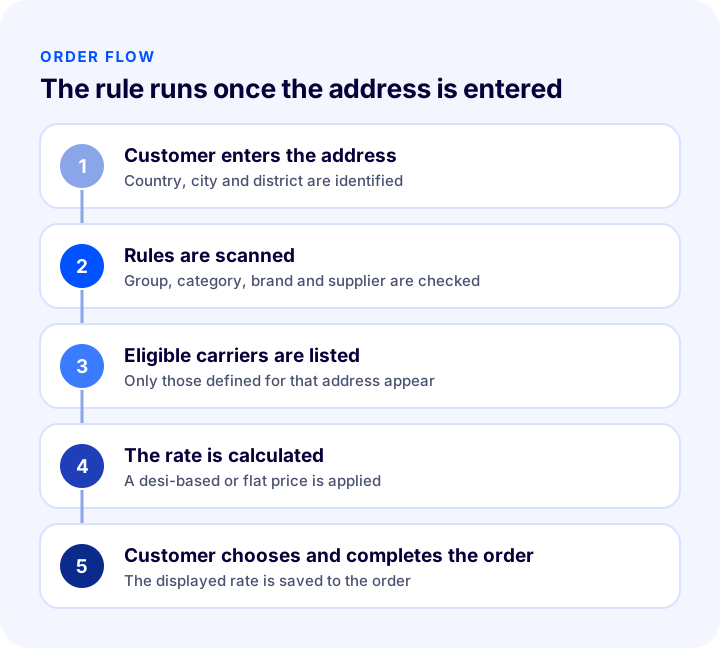
Regional shipping management is the rule-based assignment of carriers and shipping rates on an e-commerce site according to the customer's region and other criteria. Rules run at checkout: when the customer enters a delivery address, only the carriers and rates defined for that address appear.
In the classic setup, the business picks a carrier once and every order goes with the same one. In a regional setup, you define rules such as "this carrier in this city, another carrier in this district, a third carrier in this country." That way the most reliable or most economical option comes forward for each region.
Is Regional Shipping Management the Same as Automatic Carrier Assignment?
No. Regional shipping management determines which carrier is shown to the customer at checkout. Automatic carrier assignment, on the other hand, selects which carrier an order is shipped with after it is created, using criteria such as product or desi. The two complement each other: one works on the storefront, the other at the shipping stage.
| Concept | When does it run? | What does it determine? |
|---|---|---|
| Regional shipping management | While the customer completes the order | The carrier and rate to display |
| Automatic carrier assignment | After the order is created | The carrier that will move the shipment |
| Shipping settings | While the order total is calculated | Free shipping above a set amount |
Why Is Regional Shipping Management Important for E-Commerce?
Shipping is one of the biggest reasons a customer abandons the cart, and also one of the biggest reasons they wait eagerly for an order. When the right carrier goes to the right region, delivery gets faster, returns and complaints drop, and shipping costs stay under control.
- Delivery success improves: Every carrier is strong in different regions; a carrier suited to the region speeds up delivery.
- Costs go down: In some regions one carrier is cheaper, in others another is. The rule automates this.
- Customers see accurate information: The rate shown at checkout is close to the real rate, so later differences shrink.
- Special cases are handled: You can define separate solutions for fragile products, special customers or different suppliers.
- Expanding abroad gets easier: Country-based rules let you offer different carriers and rates in different countries.
Which Criteria Can You Use to Set Restrictions in Regional Shipping Management?
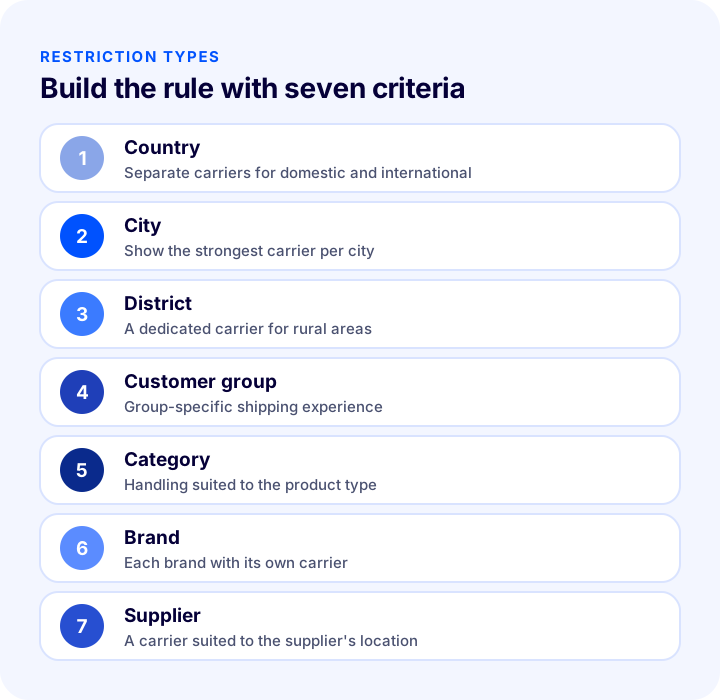
In Faprika, regional shipping management can be set up with seven criteria: country, city, district, customer group, category, brand and supplier. Restrictions are defined in the panel under Configuration, Shipping, Restrictions. A rule defines under which condition a given carrier is shown to the customer.
1. Country-Based Rule
One carrier can be active for your domestic customers and another for your international customers. You can enable a carrier only for deliveries within Turkey and show a carrier that handles international transport only to other countries. Based on the delivery country, the customer is automatically matched with the right carrier. Defining separate carriers for Europe and the Middle East is also done at this level.
2. City-Based Rule
Some carriers are strong in certain cities. With a city-based rule, you can restrict one carrier to a city and show another carrier in other cities. A customer whose delivery city is that city sees only that carrier, while a customer in another city sees the other carrier.
3. District-Based Rule
The district level is a finer version of the city rule. You can make a carrier active only in a specific district and keep it unused in other districts. A typical example is showing the carrier that reaches villages and rural areas only in that area.
4. Customer Group-Based Rule
The member groups on your site may want different shipping experiences. You can show one carrier to a special customer group and another to the standard member group. For groups such as dealers or wholesale customers, you can also define your own contracted carrier.
5. Category-Based Rule
Different products have different logistics needs: fragile items, bulky products and small accessories do not have to go with the same carrier. By setting a separate carrier for each category, you can offer handling suited to the product type.
6. Brand-Based Rule
If you have more than one brand, you can choose a different carrier for each brand. That way each brand's customers get a logistics strategy that suits them.
7. Supplier-Based Rule
If you ship products from different suppliers, you can define the carrier that suits each supplier's location and agreement.
How to Set Up Regional Shipping Management
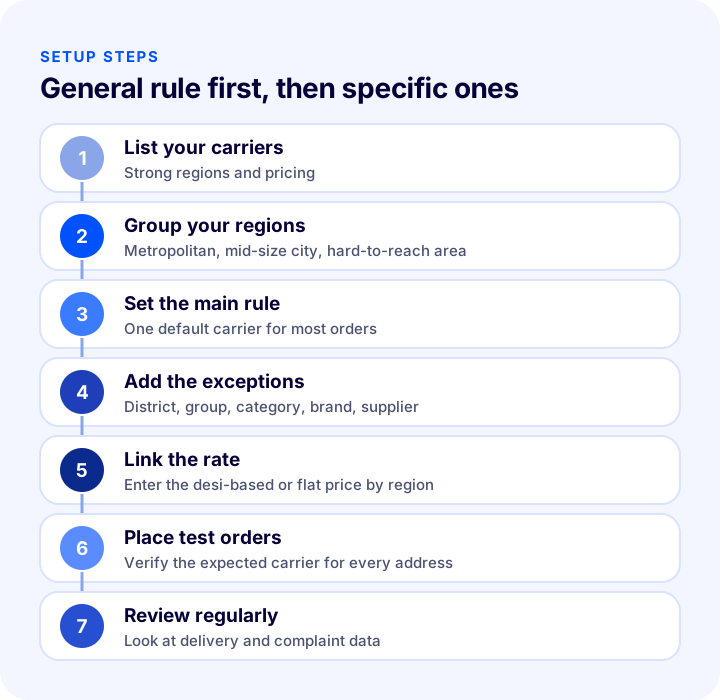
Setup means drawing the map on paper first and then transferring it to the panel. The sequence below keeps rules simple and free of conflicts.
- List your contracted carriers. Write down which carriers you work with and the regions where each is strongest.
- Group your regions. Separate metropolitan areas, mid-size cities and hard-to-reach areas.
- Set the main rule. Choose a single default carrier for the region where most orders go.
- Add the exceptions. Define special cases one by one based on district, customer group, category, brand and supplier.
- Link the pricing. For each carrier, enter the desi-based or flat rate rule by region.
- Test by placing orders. Place test orders with different addresses; verify that only the expected carrier appears for each address.
- Review regularly. Update the rules based on delivery time and complaint data.
How to Set the Shipping Rate by Desi and Flat Price
The shipping rate can be defined dynamically by the product's desi or as a fixed amount you set. Desi is a shipping unit derived from a product's volume and weight; large but light products are also priced by desi. In Faprika, carrier pricing is edited under Configuration, Shipping, Shipping Providers.
- Desi-based price: Product desi and weight are entered into the system; the correct shipping rate is shown to the customer at checkout. A separate desi price can be defined for each carrier.
- Flat price: A single amount is set for a specific region or carrier. It is easy to manage for a simple product range.
- Region-based price: The desi price can be customized by country, city and district, so far and near region rates differ.
- Free shipping threshold: In Configuration, Settings, Shipping Settings, you can make the shipping service fee free for orders above a certain amount.
| Method | When is it suitable? | Point to watch |
|---|---|---|
| Desi-based | A product range with widely varying size and weight | Desi and weight must be entered for every product |
| Fixed price | Simple products of similar size | For large products, it may fall below the real cost |
| Desi by region | When remote-region rates differ significantly | The number of rules grows and regular checks are needed |
| Free shipping threshold | When you want to raise the cart value | The threshold should be chosen to cover the shipping cost |
How Does Country-Based Shipping Work for International Sales?
If you sell abroad, a single carrier is not enough; the coverage areas and prices of international carriers vary by country. With country-based shipping management, you can assign one carrier to customers in Europe and another to customers in the Middle East. You can also define a separate price for each country, so the rate shown to a customer in one country is set independently of the rate in another.
You can find the other needs of international sales, namely currency, language and payment options, on our e-export page and in related articles.
We recommend readingWhat Is E-Export?Which Businesses Is Regional Shipping Management Suitable For?
Not every business needs dozens of rules from day one. If you work smoothly with a single carrier and receive orders from a single region, your need for rules is limited. If any of the situations below applies to you, regional shipping management will be beneficial.
- If you have contracts with more than one carrier: Rules are needed to use the regional advantage of those contracts.
- If orders come from a very wide geography: Delivery to a metropolitan area and to a remote area will not be of the same quality.
- If you sell abroad: Separating carriers and rates by country is unavoidable.
- If your product range needs different handling: Fragile, bulky or valuable products may need a separate carrier.
- If you have a special customer or dealer group: These groups may want shipments with their own contracted carriers.
- If you have more than one brand or supplier: Each may have its own logistics setup.
If none of these applies, it is healthier to settle the setup with a single carrier first and add rules as the need arises. Too many rules produce more errors than too few.
What Are Example Scenarios for Regional Shipping Management?
Rather than describing rules in the abstract, looking at example situations gives ideas when building your own setup. The scenarios below are for illustration only; you should choose carriers and regions according to your own contracts.
Metropolitan vs. Rural Areas
In metropolitan areas, a carrier with a fast and wide branch network is shown, while in rural areas another carrier that reaches that region is shown. This provides reliable delivery even to hard-to-reach addresses.
A Dedicated Carrier for a Special Customer Group
You offer your loyal customer group a carrier that stands out for speed or tracking quality. Standard members ship with the economical carrier. This carries group privileges over to the logistics experience as well.
Fragile Product Category
For fragile categories such as glass, ceramics or electronics, you link a carrier with a high standard of packaging and handling to the category. When a customer orders from this category, only that carrier is shown.
International Customer
Domestic orders go with the local carrier, and international orders go with a carrier that handles international transport. Because the rate is defined separately by country, the amount shown to a foreign customer is close to the real cost.
Direct Shipment from the Supplier
If a supplier ships some products directly to the customer, you link the carrier that suits the supplier's location and agreement to that supplier. That way, packages leaving the warehouse and those leaving the supplier are managed with different rules.
| Scenario | Criterion used | Purpose |
|---|---|---|
| Metropolitan vs. rural | City and district | Showing the carrier that reaches each region |
| Special customer group | Customer group | Group-specific logistics experience |
| Fragile product | Category | Choosing a carrier that handles with care |
| International customer | Country | International carrier and rate |
| Supplier shipment | Supplier | A carrier suited to the location |
Which Metrics Measure Regional Shipping Success?
Setting up rules is only half the job; the real question is whether the rules work. The metrics below show how well each carrier performs in each region.
- Delivery time: The time from handing the order to the carrier until delivery is tracked by region and carrier.
- Successful delivery rate: The share of shipments delivered on the first attempt shows the carrier's strength in the region.
- Damage and loss: The number of damaged or lost shipments matters especially in fragile product categories.
- Returns and complaints: Delivery-related returns and complaints reveal the rule's impact on the customer experience.
- Shipping cost per order: The average cost by region shows whether the rule delivers savings.
- Cart abandonment rate: The share of people who leave the cart at the shipping step shows whether the displayed rate and options are putting customers off.
Review these metrics at least monthly. Removing a carrier that keeps causing problems in a region is part of managing rules as a living system. Read the numbers with your own data; another business's values will not be your target.
How to Compare Regional Shipping Costs
The easiest way to see the value of a regional rule is to compare the distribution of your orders by region and the unit rate of the two carriers in each region. The tool below shows how much you would save by routing part of your orders to the cheaper carrier.
The main lesson of the tool is that savings depend on two things: the rate difference and the share of orders to which that difference applies. Even a small difference turns into a serious annual amount at high order volume; but if the cheaper carrier's delivery quality is poor, those savings are lost to returns and complaints.
We Recommend ReadingHow to Make a Shipping Agreement in E-Commerce? A Guide to Getting Quotes, Calculating Shipping Fees, and Passing Them On to Customers (2026)Common Mistakes in Regional Shipping Management
- Letting rules overlap: When several rules for the same address conflict, the customer sees an empty or wrong option.
- Looking only at price: The cheapest carrier gets expensive if its delivery time and damage rate are poor.
- Not entering desi and weight: If product data is missing, the desi-based rate is not calculated correctly and the difference falls on you.
- Going live without testing the rule: If no carrier is defined for a district, orders cannot be taken from that address.
- Setting up too much detail: More district and group rules than necessary make management harder.
- Not updating: Shipping contracts and rates change; an old rule shows the wrong rate.
- Giving the customer vague information: If it is unclear which carrier will deliver and how long it will take, trust declines.
- Setting a free shipping threshold without considering cost: If the threshold does not cover the regional shipping cost, every order loses money.
How to Audit Your Regional Shipping Setup
The tool below checks your current shipping setup with eight questions. Tick the items that apply to you; the tool tells you how solid your regional shipping setup is.
We recommend readingWhat Is Order Splitting? A Guide to Splitting Orders by Lead Time, Desi and Warehouse, with Tracking, Returns and Shipping Cost, a Cost Comparator and a Needs AuditRegional Shipping Checklist
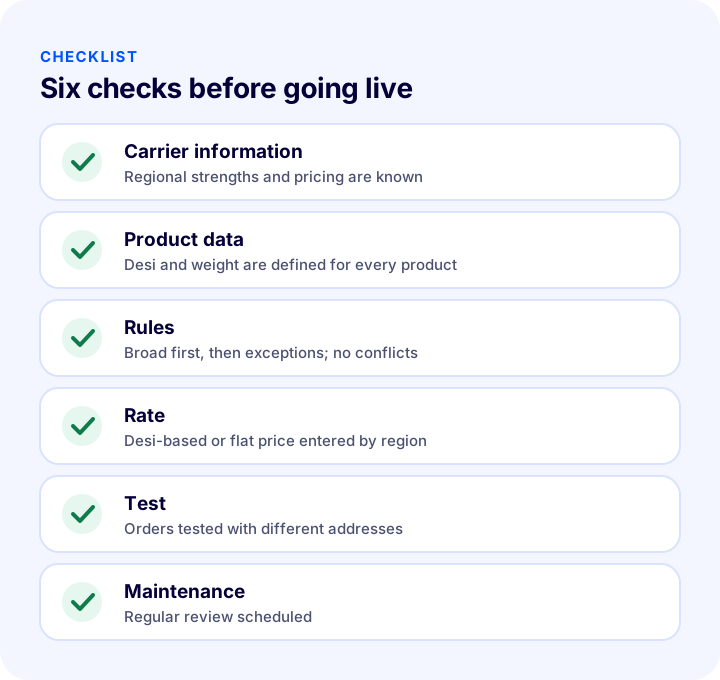
Before putting a rule live, look at the summary table below; the same items also appear in the audit tool above.
| Title | Check |
|---|---|
| Carrier information | The strong region and price of each carrier are known |
| Product data | Desi and weight are defined for every product |
| Rules | Broad rule first, then exceptions; no conflicts |
| Rate | Desi or flat price entered by region |
| Test | Orders placed with different addresses and results verified |
| Maintenance | Regular updates using delivery and complaint data |
How to Manage Regional Shipping with Faprika
In Faprika, regional shipping management is a feature that ties the carrier and rate shown to the customer at checkout to rules. The panel includes the following:
- Restrictions: In Configuration, Shipping, Restrictions, you can set up carriers by country, city, district, customer group, category, brand and supplier.
- Shipping providers: In Configuration, Shipping, Shipping Providers, you can set each carrier's pricing as desi-based or flat rate.
- Desi by region: Desi pricing can be customized by country, city and district.
- User-based shipping: By assigning a carrier to specific users or customer groups, you can have special requests met automatically.
- Country-based shipping: For international sales, you can define different carriers and different prices per country.
- Product desi and weight: Product desi and weight are defined in the system; the correct shipping rate is shown to the customer at checkout.
- Shipping settings: In Configuration, Settings, Shipping Settings, you can make the shipping service fee free for orders above a certain amount.
Which plan includes Regional Shipping Management varies by plan. For details, see the plans page; for an introduction to the module, the Regional Shipping Management add-on page; and for usage steps, the regional shipping management tutorial and the shipping settings tutorial.
Frequently Asked Questions
What is regional shipping management?
It means setting rules that decide which carrier and which rate are shown based on the customer's delivery region, group or the product in the order. Rules run during checkout and show the customer only the eligible options.
Which criteria are used in regional shipping management?
Rules can be built using country, city, district, customer group, category, brand and supplier criteria. A rule defines under which condition a given carrier is shown to the customer.
What is the difference between regional shipping and automatic carrier assignment?
Regional shipping management determines which carrier is shown to the customer at checkout. Automatic carrier assignment selects the carrier that will move the shipment after the order is created. The two can be used together.
How is the shipping rate determined?
It is defined either dynamically by the product's desi or as a fixed amount. The desi price can be customized by country, city and district. If you enter each product's desi and weight, the correct rate is shown at checkout.
Can a different carrier be used for international sales?
Yes. With country-based shipping management, you can define different carriers and rates for different countries. Customers in each country then see the option that suits that country.
Which Faprika plan includes regional shipping management?
Which plan includes Regional Shipping Management varies by plan. You can find the details on the plans page and on the module's add-on page.
You May Also Like
- What Is Automatic Carrier Assignment? How to Automate Carrier Selection by Order: Scenarios, Priority Order, Cost Calculator and Needs Check
- E-Ticarette Kargo Yönetimi Nasıl Yapılır?
- Desi Calculation: How Is Shipping Desi Calculated? (Calculator and Examples)
- E-Commerce How to Make a Shipping Agreement? A Guide to Getting Quotes, Calculating Shipping Rates and Passing Them On to Customers (2026)