
Contents 17 sections
- What Is a Stock Count?
- Why Is a Stock Count Important in E-Commerce?
- What Are the Stock Count Methods?
- Preparing for a Stock Count: What to Do Before You Start
- How to Count Stock Step by Step
- How to Handle Orders That Arrive During a Count
- What to Do When the Count Shows a Variance
- What Is Phantom Stock and How Do You Prevent It?
- How Often Should You Count Stock?
- How to Count Stock with Barcodes and a Phone
- Which Metrics Measure Stock Count Success?
- How to Calculate Count Variance and Stock Accuracy
- Common Stock Count Mistakes
- How to Audit Your Stock Count Process
- Stock Count Checklist
- How to Count Stock with Faprika
- Frequently Asked Questions
A product that shows ten units in the system turns up as three on the shelf. A customer places an order, the warehouse cannot find the product, the order is cancelled and the customer never comes back. This is the natural result of stock records and the reality on the shelf drifting apart over time. The short answer to how to count stock is this: define the area and time to count and scan the products by barcode, compare the counted quantities with the system quantities, verify the variances by recounting, and post the approved result to stock.
In this guide we explain what a stock count is, why it is indispensable in e-commerce, the full count, cycle count, partial count and blind count methods, preparation before the count, the eight-step procedure, what to do when a variance appears and common mistakes. Of the two tools in this post, one calculates stock accuracy and variance value, and the other audits your count process with eight questions. Before making any firm decision on the accounting and tax side of a count, consult your accountant; this post gives general information and is not financial advice.
What Is a Stock Count?
A stock count is the process of counting, one by one, the products physically sitting in the warehouse or store and comparing them with the stock records in your system. The goal is to find the difference between the recorded quantity and the actual quantity, understand its cause and correct the records to match reality.
A count is not only about counting products. A well-run count also reveals how much is on which shelf, which product's record was kept incorrectly and which process caused the variance. That is why a count is both a control step and a learning step in stock management.
Is a Stock Count the Same as Stock Tracking?
No. Stock tracking is the continuous monitoring of movements such as receipts, sales and returns through records. A stock count physically tests whether those records reflect reality. Tracking keeps the records; counting verifies them.
| Concept | What does it do? | When is it done? |
|---|---|---|
| Stock tracking | Records receipts, sales, returns and transfers | With every movement, continuously |
| Stock count | Counts the actual quantity on the shelf and compares it with the record | At planned intervals |
| Stock reconciliation | Posts the approved count result to the records | After the count and variance check are finished |
Why Is a Stock Count Important in E-Commerce?
In e-commerce, the customer does not see the product on the shelf; they trust the stock information on the website or marketplace. If that information is wrong, the consequences come in a chain:
- Overselling: A product that appears to be in stock but is not on the shelf gets sold, and the order cannot be fulfilled.
- Cancellations and lost customers: An order that cannot be prepared is cancelled, and a cancelled customer takes their trust with them.
- Missed sales: A product that is on the shelf but shows as sold out in the records cannot be sold.
- Wrong purchasing decisions: Orders placed without knowing the real stock bring in either too much or too little goods.
- Marketplace performance: On marketplaces, orders cancelled because of insufficient stock can hurt seller performance.
Stock that shows in the system but has no counterpart on the shelf is called phantom stock. Phantom stock moves quietly: nobody notices until a customer orders that product. Regular counts let you find phantom stock before your customers do.
We recommend readingWhat to Do with an Out-of-Stock Product Page? A Practical Guide to SEO, Customer Experience and Redirects for Sold-Out Products in E-CommerceWhat Are the Stock Count Methods?
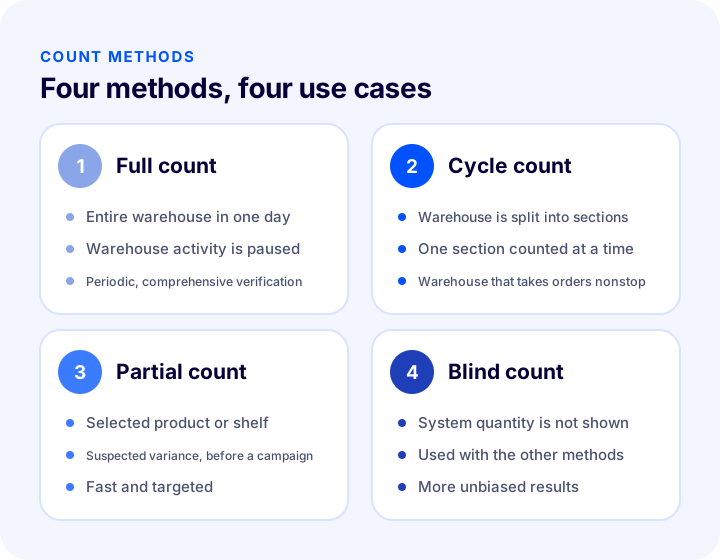
A stock count is done with four basic methods: a full count that counts the whole warehouse at once, a cycle count that splits the warehouse into sections and counts them in turn, a partial count that counts only selected products or shelves, and a blind count that does not show the person counting the quantity in the system. A blind count is less a type of count than an accuracy technique that can be combined with the other three.
1. Full Count
In a full count, the entire warehouse is counted on a set day. The advantage is that every product is verified in one go; the downside is that if warehouse activity is not halted during the count, the result goes stale quickly. For this reason, a full count is usually planned a limited number of times a year, during quiet sales periods.
2. Cycle Count
In a cycle count, the warehouse is divided into shelves, zones or product groups, and one is counted each day or week. The warehouse does not shut down; the count is spread across the work, and when one round is complete, the whole warehouse has been counted. This is the most practical method for e-commerce warehouses that take orders nonstop.
3. Partial (Spot) Count
A partial count covers products or shelves selected for a specific reason: a bin where a product could not be found during picking, a product with a suspected variance, critical products before a campaign, or shelves where returns were received. It is fast and targeted, but on its own it does not verify the whole warehouse.
4. Blind Count
In a blind count, the person counting does not see the quantity in the system; they enter only what they actually count. A person who knows the system figure may, without realizing it, count in a way that drifts toward that figure. A blind count removes this tendency and makes the count more unbiased.
| Method | Scope | Warehouse activity | Best suited for |
|---|---|---|---|
| Full count | Entire warehouse | Stopped or limited throughout the count | Periodic, comprehensive verification |
| Cycle count | One section at a time | Continues in the other sections | An e-commerce warehouse that takes orders nonstop |
| Partial count | Selected product or shelf | Stops only in the area concerned | Suspected variance and pre-campaign checks |
| Blind count | Used with the other methods | Depends on the method | Any situation that needs an unbiased, accurate count |
Preparing for a Stock Count: What to Do Before You Start
The quality of a count is largely determined by what is done before it. If preparation is lacking, it becomes hard to tell whether a variance in the result is a real loss or an error created by the count itself.
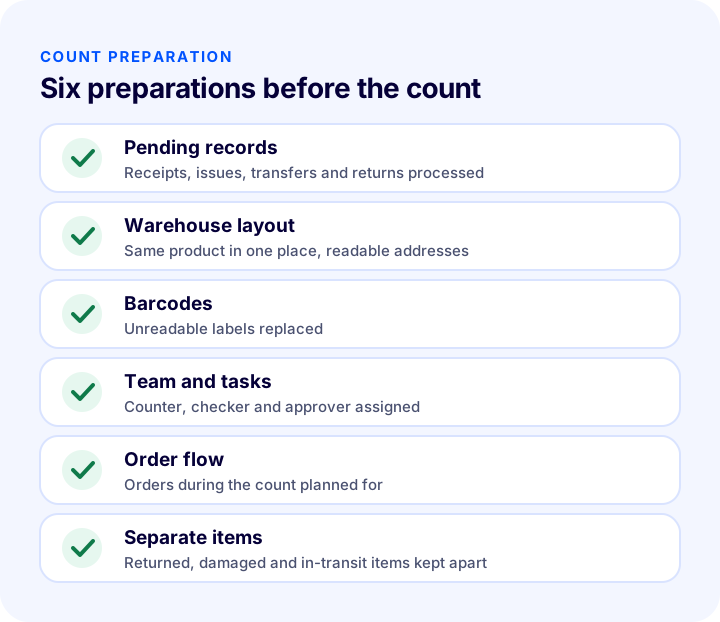
- Process pending records: There should be no open goods receipts, transfers or returns on count day. The more up to date the records, the more meaningful the variance.
- Tidy the warehouse: The same product should be in one place, different products should not be mixed, and shelf and bin addresses should be readable.
- Check the barcodes: Unreadable, torn or wrongly labelled products are the biggest time sink during a count; replace the labels beforehand.
- Assign the team and tasks: Write down in advance who counts which section, who checks and who approves.
- Plan the order flow: Decide before the count how orders that arrive during it will be handled.
- Identify the items kept apart: Items awaiting return, damaged items and items in transit are counted separately and not mixed with sellable stock.
How to Count Stock Step by Step
The eight steps below follow the same order whichever method you choose. The order matters: the recount comes before the variance list is approved; a variance posted to stock without a recount makes the error permanent.
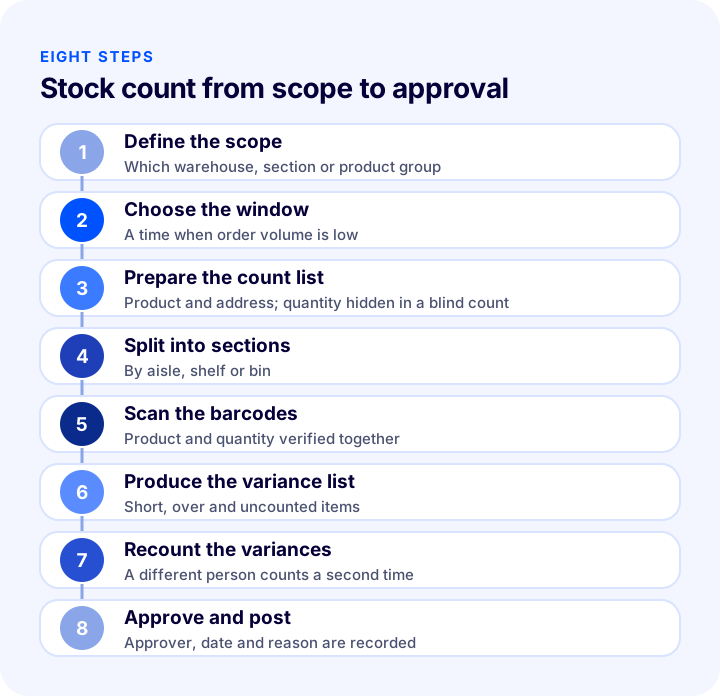
1. Define the Count Scope
State clearly which warehouse, section or product group will be counted. A count with an unclear scope makes it hard to tell which variance belongs to which area.
2. Choose the Count Window
Pick a time when order volume is low. During the count, no goods should be received, issued or moved in the area in scope, or anything that is must be noted separately.
3. Prepare the Count List
Produce a count list for every bin and product. If you are running a blind count, do not show the system quantity on the list; it should contain only the product and address information.
4. Split the Count into Sections
Divide the warehouse into sections by aisle, shelf or bin, and give each section to one person. Small sections both limit errors and make it easy to find where a variance came from.
5. Scan the Products by Barcode
A hand-typed quantity carries the risk of miscounting and mistyping. Counting by scanning barcodes verifies the product and the quantity together. Different variants of the same product (size, color) must be scanned with their own barcodes.
6. Produce the Variance List
When the count is finished, compare the counted quantities with the system quantities. Products with variances are collected in a separate list: short items, over items and items that were never counted.
7. Recount the Variances
Have every bin with a variance recounted by someone other than the person who did the first count. Most variances disappear on the second count; what remains is the real variance.
8. Approve and Post to Stock
Approve the verified variances and post them to the stock records. The approver, date and variance reason should stay on record; that way, if the same variance recurs, you can trace it to the root cause.
How to Handle Orders That Arrive During a Count
An e-commerce warehouse takes orders on count day too. There are three ways to manage these orders:
- Spread the count across sections: In a cycle count, only the section being counted is temporarily closed; orders are picked from the other sections.
- Pause order flow briefly: For a full count, order picking is held for a while during quiet sales hours.
- Note the movements: Orders received and products shipped out during the count are recorded separately and evaluated together with the count result.
Whichever route you choose, the rule is the same: the status of a counted product at the moment of counting must be clear. If a product is taken from a shelf that is being counted, the result for that product becomes unreliable.
What to Do When the Count Shows a Variance
A variance is normal; what matters is finding its cause. Every variance corrected without knowing its cause comes back in the same form at the next count.
| Likely cause | What the variance looks like | Measure |
|---|---|---|
| Misplaced on the wrong shelf | Short on one shelf, over on another | Put away by shelf address and barcode |
| Picking error | Mutual variance between similar products | Barcode verification at picking |
| Unrecorded return receipt | Physically present, missing from the records | Record the returned product and route it to a shelf |
| Goods receipt error | Quantity differs from the delivery note | Count and approve at goods receipt |
| Damage, loss or spoilage | Consistent shortage variance | Record damaged products separately |
| Variant mix-up | Over in one size, short in another | A separate barcode for every variant |
When reading the variance list, remember that positive and negative variances can cancel each other out. If one product is two over and another is two short, the total is zero but both are wrong. That is why results should be evaluated item by item, not only by total quantity.
We recommend readingWhat Is Warehouse Management? Warehouse Management and Inventory Management in E-CommerceWhat Is Phantom Stock and How Do You Prevent It?
Phantom stock is stock that shows a quantity in the system but has no counterpart on the shelf. It mostly comes from unrecorded damage, misplacement, unrecorded issues or old records that are never counted.
Prevention has three parts: movements get recorded, counts are done regularly, and areas that are never counted are zeroed out over time. If a product in a bin that was not scanned during the count is actually not there, there is no point in keeping it on record; however, this decision should be taken with the count lead's approval.
How Often Should You Count Stock?
There is no single right frequency; it varies with the product's sales velocity, value and error history. The general principle is to count products with a lot of movement and costly errors more often.
| Product group | Recommended count rhythm | Reason |
|---|---|---|
| Fast-selling products | Frequent, cycle count | Record errors build up quickly because of heavy movement |
| High-value products | Frequent, with blind counts | Even a small variance is costly |
| Slow-selling products | Infrequent | Little movement, low error buildup |
| Shelves with a variance history | Frequent, partial | Close monitoring until the root cause is found |
| Pre-campaign products | Partial count before the campaign | Wrong stock in a sales spike is the costliest mistake |
How to Count Stock with Barcodes and a Phone
A barcode count records both the product and the quantity by scanning the barcode on the product label. It eliminates typing errors and speeds up the count noticeably.
A handheld terminal is the best-known device for scanning barcodes, but it is not required. Today many warehouse software products let you count with a smartphone camera. This means you can run the count section by section without closing the warehouse and without investing in extra devices. If you already have a handheld terminal or barcode scanner, you can keep using them.
We recommend readingWhat Is an SKU? How to Create a Stock Keeping Unit (SKU) Code: Examples, Coding Rules and an SKU Generator ToolWhich Metrics Measure Stock Count Success?
Simply closing a count with “done” stops it from improving the next one. The metrics below show how healthy your count process is:
- Line accuracy: The share of counted lines where the record matched reality. It is expected to rise over time.
- Variance value: The cost equivalent of the short and over quantities. It shows which count produced the costlier variance.
- Repeat variance locations: If variances keep appearing on the same shelf, product or process, the root cause has not been solved yet.
- Variances that vanish on recount: The share of first-count variances that disappear on the second count shows the quality of count discipline.
- Count time: How long it takes to count a section; it helps you find changes that speed up counting.
How to Calculate Count Variance and Stock Accuracy
Line accuracy is the ratio of lines with no variance to the number of lines counted. Variance value is the short and over quantities multiplied by unit cost. The tool below lets you calculate both together using your own count results.
The real lesson of the tool is that accuracy cannot be described by a single number. If line accuracy is high but variance value is large, a small number of expensive products are wrong; if accuracy is low but the value is small, record discipline has loosened on cheap products. The two views call for two different actions.
We recommend readingHow to Synchronize Marketplace Stock? Preventing Overselling, Safety Stock, Warehouse and Store Stock, Stock on Returns and Cancellations, Safety Stock Calculator and Setup AuditCommon Stock Count Mistakes
- Counting while records are out of date: A count done before pending receipts and issues are processed produces variances that are not real.
- Leaving warehouse activity uncontrolled: If products are moved or picked during the count, the result becomes unreliable.
- Correcting a variance without recounting: It turns a counting error into a stock error.
- Looking only at total quantity: Positive and negative variances cancel each other out; if you don't look item by item, errors stay hidden.
- Not looking for the cause: Correcting the variance and moving on makes the same variance come back at the next count.
- Mixing returned and damaged products with sellable stock: Stock looks high, but there are few sellable products.
- Counting once a year and stopping there: Errors build up for months; regular small counts are more reliable than one big count.
- Showing the system quantity to the person counting: It creates a tendency to count toward the expected figure; a blind count prevents this.
How to Audit Your Stock Count Process
Tick the eight questions below according to your own warehouse. Based on the items you tick, the tool shows how well your count process is established.
Stock Count Checklist
| Stage | Check | Done? |
|---|---|---|
| Preparation | Pending receipt, issue, transfer and return records processed | Yes / No |
| Preparation | Shelf addresses and barcodes are readable | Yes / No |
| Preparation | Count team, sections and approver assigned | Yes / No |
| Counting | Count window and order flow planned | Yes / No |
| Counting | Products counted by scanning barcodes, preferably as a blind count | Yes / No |
| Difference | Variance list produced, items with variances recounted | Yes / No |
| Approval | Verified variance approved, approver and date recorded | Yes / No |
| Afterwards | Variance causes reviewed, preventive action taken for repeat locations | Yes / No |
How to Count Stock with Faprika
Faprika's warehouse management system, Faprika Depo, offers the count module inside your Faprika panel. There is no separate counting program or separate stock data; because orders, products and stock are in one place, the count result is reflected directly in stock.
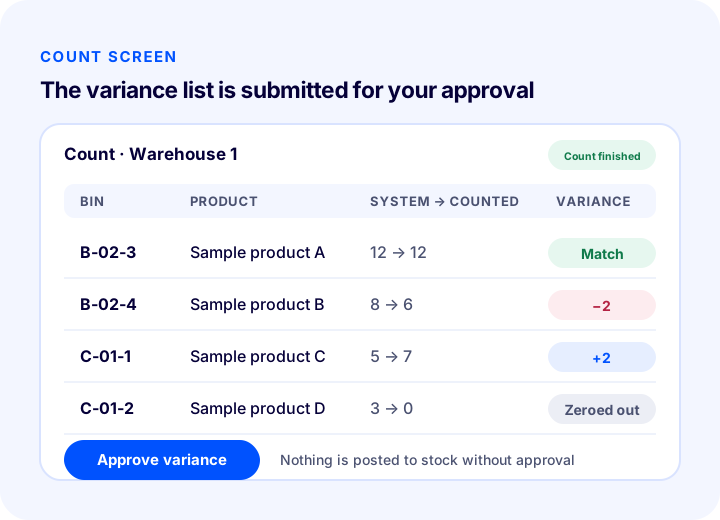
With Faprika Depo, a count goes like this:
- Bin-by-bin count: A count is opened for the warehouse and the products in each bin are scanned. The count can also be done on a phone; you move section by section without closing the warehouse.
- The variance list is shown to you first: The counted quantity is compared with the system quantity; the variance is not written to stock without your approval.
- Reconciling counted shelves: The count variance you approve is posted to actual product stock.
- Zeroing out uncounted items: Bins that were never counted can be zeroed out, so old records leave no phantom stock in the warehouse.
- Bins awaiting count: Bins where a product could not be found during picking (marked “Could not find”) go onto a separate list; they are counted first.
- Reconciling shelf stock to product stock: The stock that should exist is calculated from the quantities on the shelves minus orders not yet picked; the variance list is shown first, and it is applied only if you approve.
- Traceability: Putaway, transfer, picking and count appear in the transaction history with staff and date; you can trace where a stock variance came from.
You can see which plans include the warehouse module and which add it with an extra license on the Faprika Depo page and in the e-commerce plans comparison. For how stock information corrected by a count is reflected on marketplaces, see our post on stock synchronization.
We recommend readingWhat Is WMS? How Does a Warehouse Management System Work? (Guide for E-Commerce)Frequently Asked Questions
What Is a Stock Count?
A stock count is the process of counting the products physically sitting in the warehouse or store and comparing them with the stock records in your system. The goal is to find the difference between the recorded quantity and the actual quantity, and to correct the records to match reality.
How is stock counting done?
First, the scope and timing of the count are set. Then products are counted by scanning barcodes, the counted quantities are compared with the system, items with variances are recounted, and the verified variance is approved and posted to stock.
How Often Should You Count Stock?
There is no single right frequency. Fast-selling and high-value products are counted often, slow sellers less often. In e-commerce warehouses that take orders nonstop, cycle counting, which splits the warehouse into sections, is the most practical method.
What Is a Blind Count?
It is a type of count in which the person counting is not shown the quantity in the system. They enter only what they actually count, which removes the tendency to drift toward the system figure and makes the count more unbiased.
What Is Phantom Stock?
It is stock that shows a quantity in the system but has no matching product on the shelf. It comes from unrecorded damage, misplacement, unrecorded issues or old records that are never counted. Regular counts and zeroing out areas that are never counted prevent it.
Do You Need a Handheld Terminal for a Stock Count?
No. A handheld terminal is a familiar device, but it is not required. Many warehouse software products let you count by scanning barcodes with a smartphone camera; if you already have a handheld terminal or barcode scanner, you can use those too.
You May Also Like
- What Is Stock Tracking? How Is It Done?
- What Is WMS? How Does a Warehouse Management System Work? (A Guide for E-Commerce)
- How to Synchronize Marketplace Stock? Preventing Overselling, Safety Stock, Warehouse and Store Stock, Stock on Returns and Cancellations, Safety Stock Calculator and Setup Audit
- How to Calculate Safety Stock and Reorder Point: Inventory Planning, ABC Analysis and Inventory Turnover in E-Commerce, a Practical Guide