Contents 13 sections
- What Is Shipment Tracking?
- How Does the Shipment Tracking Process Work?
- At Which Moments Should Customers Be Notified?
- What Should a Shipment Tracking Link Look Like?
- How Do You Reduce "Where Is My Order?" Inquiries?
- How Do You Manage Undelivered Shipments?
- How Do You Monitor a Carrier's Performance?
- How Do You Track Shipments in the Faprika Panel?
- How Should Tracking Work for International Shipments?
- What Are Common Mistakes in Shipment Tracking?
- Shipment Tracking Checklist
- How Do You Manage Shipment Tracking with Faprika?
- Frequently Asked Questions
A customer placed an order, paid and started waiting. Three days later they do not know where the package is, so they send an email, make a phone call or ask a question on live chat. Every "Where is my order?" message both wears out your customer team and reduces the customer's trust. The solution is to get the information to the customer before they ask.
This guide explains step by step what shipment tracking is, how a tracking number is added to an order, which notification should go to the customer at which moment, how to manage undelivered shipments and how to monitor shipping status in the Faprika panel. It also includes a tool that calculates the cost of "Where is my order?" inquiries and a checklist.
What Is Shipment Tracking?
Shipment tracking is monitoring at which stage a shipped order is until it is delivered. The carrier gives the shipment a tracking number; the store adds this number to the order, and the customer sees the package's status by number or link.
Tracking has two sides. On the store side, you monitor which order is in transit, which has been delivered and which has run into problems. On the customer side, the package's journey is presented as information, notifications and a tracking link. Good shipment tracking feeds both sides from the same data.
What Is a Tracking Number?
A tracking number is a unique code the carrier assigns to identify a shipment. This number matches the movements in the carrier's system: shipment received, at the transfer center, out for delivery, delivered. Adding the number to the order correctly is the foundation of tracking; a wrong or missing number means sending the customer an empty link.
Why Is Shipment Tracking Important?
Shipment tracking matters for four reasons:
- It reduces support load: When the package's location is known, "Where is my order?" inquiries drop.
- It builds trust: The customer sees that the process is transparent and waits for the order with confidence.
- It catches problems early: Undelivered or stuck shipments are noticed before the customer complains.
- It lets you evaluate the carrier: Delivery times and problems can be compared by carrier.
How Does the Shipment Tracking Process Work?
Shipment tracking moves through five stages, from the moment the order is placed to the moment it is delivered. At each stage there is a task for the store and something the customer wants to know.
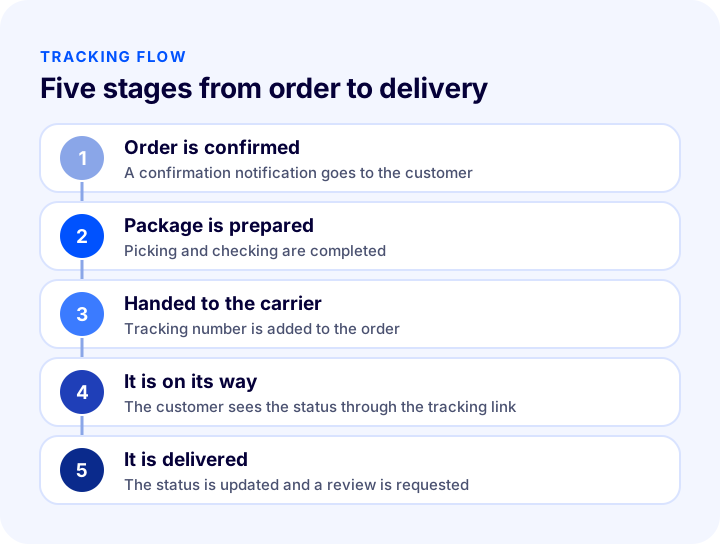
| Stage | What happens at the store? | What does the customer want to know? |
|---|---|---|
| Order is confirmed | Payment is received, the order is confirmed | That the order was received and when it will ship |
| Package is prepared | The product is picked, checked and packed | That the order is being prepared |
| Handed to the carrier | It is handed to the carrier, the tracking number is added | Which carrier and which number it is going with |
| It is on its way | The status is updated from the carrier | Where the package is |
| It is delivered | The order is marked as completed | That the delivery has taken place |
How Is a Tracking Number Added to an Order?
A tracking number is added to an order in two ways: entered by hand or received automatically through a carrier integration. Manual entry carries a high risk of error; the number can be mistyped or not entered at all. With an integration, the order is passed to the carrier, the carrier generates the tracking number and the number is added to the order automatically. As order volume grows, the second route is both fast and safe.
You can find how the order is passed to the carrier and how to set up a shipping agreement in the guide How to Make a Shipping Agreement in Ecommerce? Getting Quotes, Calculating Shipping Fees and Passing Them On to Customers (2026).
At Which Moments Should Customers Be Notified?
Shipping notifications go to the customer at the moments the package's status changes. Sending a message for every small movement is annoying, but missing the important moments leaves the customer uninformed. Six moments are enough for most stores.
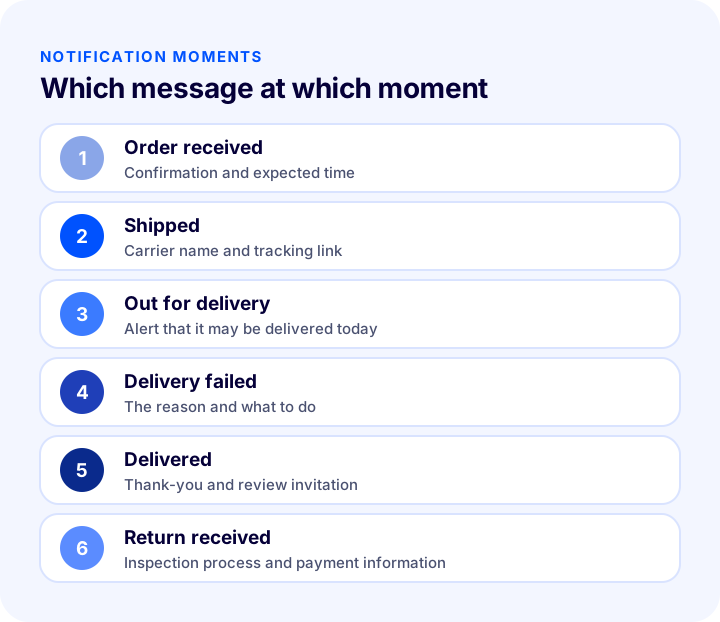
| Moment | What the message contains | Why does it matter? |
|---|---|---|
| Order received | Confirmation and expected time | The customer knows their order has arrived |
| Shipped | Carrier and tracking link | This is the information customers most want |
| Out for delivery | Alert that it may be delivered today | The customer gets ready to be home |
| Delivery failed | The reason and what to do | The customer can solve the problem quickly |
| Delivered | Thank-you and review invitation | A chance for satisfaction and a review |
| Return received | Inspection process and payment information | The customer who returns an item is not left in uncertainty |
How Do You Choose Between Email, SMS and Push Notifications?
Shipping notifications can be sent through three channels. Email can carry detailed information and links; SMS is short and urgent; push notifications arrive instantly through an app or browser. For most stores, the healthiest setup is to send important moments such as "shipped" by email and SMS, and detailed status changes by push notification.
| Channel | Strength | Point to watch |
|---|---|---|
| Carries details, a link and an order summary | May be noticed late in the inbox | |
| SMS | Short, urgent and read immediately | The text must be short and clear |
| Push notification | Arrives instantly and opens with a single tap | Permission is required |
Is a Shipping Message the Same as a Marketing Message?
No. A shipping status notification is an informational message about the order itself; a marketing message promotes a product or campaign. The legal status and permission requirements of the two can differ. Adding marketing content to shipping messages blurs the purpose of an informational message. For message writing and permission, see the post How to Do SMS Marketing in Ecommerce? Permission, Message Writing, Timing and Measurement Guide, and for the content of the order confirmation email, see the guide How to Write an Order Confirmation Email? Ecommerce Order, Shipping, Delivery and Return Transaction Emails: A Practical Guide with Examples and Templates.
What Should a Shipment Tracking Link Look Like?
The easier it is for the customer to reach tracking, the fewer questions you get. Tracking information should be where the customer already looks: in the notification message, on the order page in the member account and in the order details.
- The carrier name and tracking number should be written together: The customer needs to know which carrier's page to go to.
- The tracking link should open with one click: Copying the number and searching for it elsewhere is unnecessary effort.
- Order status should be visible in the member account: A customer who missed the message should be able to sign in and see the status.
- Guest customers should be able to track too: A customer who shops without an account should reach tracking through the link in the email.
- It should open smoothly on a phone: Most tracking messages are read on a phone.
So that customers who shop without an account can track their orders, see the guide What Is Guest Checkout? Account Requirement, Guest Payment and Encouraging Registration in Ecommerce: A Practical Guide.
How Do You Reduce "Where Is My Order?" Inquiries?
"Where is my order?" inquiries signal a lack of information, and most are preventable. If customers can see the package's location themselves and receive notifications on time, they do not write. Knowing what these inquiries cost your team shows why investing in tracking is worthwhile.
The amount the tool gives covers only the support team's direct time; the dissatisfaction of a customer waiting for a reply and a possible return or cancellation are not included. The real impact is usually larger than shown.
| Measure | How does it work? | Impact |
|---|---|---|
| Notification when handed to the carrier | The tracking link goes to the customer automatically | The customer knows without asking |
| Status in the member account | The customer signs in and looks at the order | Support load drops |
| Clear delivery time | The expected time is stated on the product page and in the cart | Expectations are set correctly |
| Delay notification | If there is a problem, you write to the customer first | Trust is protected |
| FAQ page | Shipping questions are answered on one page | Repeated questions decrease |
How Do You Manage Undelivered Shipments?
An undelivered shipment is a package the carrier could not reach the customer with or could not complete delivery of. If these shipments are left unattended, they return to the carrier, create return costs and leave the customer dissatisfied. A quick response saves most of them.
- Identify the reason: Reasons such as a missing address, the customer being unreachable or cash-on-delivery money not being ready call for different solutions.
- Write to the customer right away: If the problem and the way to solve it are communicated to the customer the same day, most shipments are delivered on the second attempt.
- Contact the carrier: Handle the address correction or redelivery request through the carrier.
- Set a time limit: A shipment that is not resolved after a set period is moved into the return process and the customer is informed.
- Record the reasons: If the same problem repeats, address verification or the choice of carrier should be reviewed.
The risk of undelivered shipments is higher for cash-on-delivery orders; the details are explained in the guide What Is Cash on Delivery? How to Manage Cash on Delivery in Ecommerce, How to Calculate Its Cost and How to Reduce Undelivered Orders: A Practical Guide. For how to manage the return process, see the post How to Manage the Returns Process in Ecommerce?.
How Do You Monitor a Carrier's Performance?
Shipment tracking is not only about following individual orders; once the data is collected, it also shows the carrier's performance. Knowing which carrier delivers faster and which has more problems affects your carrier choice and your bargaining power.
| Criterion | What does it show? | Action you can take |
|---|---|---|
| Average delivery time | Carrier speed | Try another carrier for the slow region |
| Undelivered rate | Delivery success | Review address verification and the carrier |
| Damaged delivery rate | Handling and packaging quality | Strengthen packaging, talk to the carrier |
| Location inquiry rate | Adequacy of information | Improve notifications and the tracking page |
If it is possible to use a different carrier by region or product, this data strengthens the decision. To automate carrier assignment, see What Is Automatic Carrier Assignment? How to Automate Carrier Selection by Order? Scenarios, Priority Order, Cost Calculator and Needs Audit, and for regional shipping rules, see What Is Regional Shipping Management? How to Choose a Carrier by Region in Ecommerce? Country, City, District, User Group, Category, Brand and Supplier Restrictions, Desi and Flat Rate, Savings Calculator and Setup Audit.
How Do You Track Shipments in the Faprika Panel?
In Faprika, you monitor shipping status from the Orders page. The list shows each order's order, payment and shipping status, carrier and total amount together.
How Do You See Shipping Status in the Orders List?
Go to the Orders tab in the control panel. Each order's "Shipping Status" and "Carrier" appear in the list. In advanced search you can filter by shipping status: Awaiting Shipment, Shipped, Delivered and Undelivered. You can also search by carrier, so you see the shipments with a specific carrier separately.
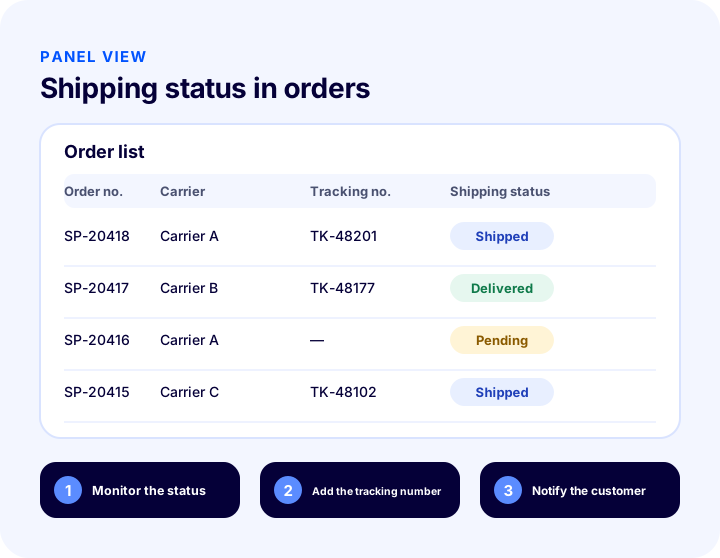
| Shipping status | Meaning | Action to take |
|---|---|---|
| Awaiting Shipment | The order has not yet been handed to the carrier | Follow up on preparation and dispatch |
| Shipped | The package has been handed to the carrier | Make sure tracking information goes to the customer |
| Delivered | The package has reached the customer | Send a satisfaction and review invitation |
| Delivery Failed | Delivery could not be completed | Find the reason, write to the customer |
How Does Shipping Information Reach the Customer?
In Faprika, carrier integrations pass the order to the carrier and add the tracking number to the order. Options are offered for notifying the customer of status: order status push notifications can be set up through Google Firebase free of charge, and text messages can be sent with the SMS integration. Additional modules and notification options for shipment tracking vary by plan; for details, see the e-commerce plan comparison.
For the step-by-step setup of push notifications, see the Push Notifications training page, and for using the orders list, see the Orders training page.
How Does Shipment Tracking Work for Marketplace Orders?
For marketplace orders as well, the shipping information must be passed to the marketplace; otherwise the marketplace counts the order as not shipped. In Faprika, marketplace order status automation makes this flow of information easier; you can see which plans include it in the plan comparison. For details on managing marketplace orders and questions in a single panel, see the post How to Manage Marketplace Customer Questions? A Guide to Quick Replies and Ready-Made Answers.
How Should Tracking Work for International Shipments?
For orders shipped abroad, the package passes through the hands of several carriers and countries; the time gets longer and updates become less frequent. Customers feel uncertainty most with these shipments. That is why tracking information matters even more for international orders.
- State the expected time up front: Do not let the customer expect domestic speed and end up disappointed.
- Send the tracking link in the customer's language: If the message is not understandable, tracking is useless.
- Explain the customs stage: Say in advance that it can be normal for a package to look stationary for a while.
- Choose the carrier by country: With country-based shipping management in Faprika, a suitable carrier can be defined for each country.
To see how price, payment and shipping decisions are made together when selling abroad, see the e-export page.
What Are Common Mistakes in Shipment Tracking?
- Not entering the tracking number or entering it wrong: An empty or faulty link goes to the customer.
- Not sending notifications: The customer does not learn the package has left and writes a question.
- Sending too many notifications: A message for every small movement is annoying and drowns out the important one.
- Mixing notifications with marketing: Adding a discount ad to an informational message damages trust.
- Not monitoring undelivered shipments: If it goes unnoticed until the shipment comes back, both cost and dissatisfaction result.
- Not measuring the carrier: If performance data is not kept, a poor carrier is never replaced.
- Forgetting the phone: If the tracking page and messages are broken on mobile, most customers cannot reach the information.
Shipment Tracking Checklist
The list below summarizes the building blocks of your shipment tracking setup.
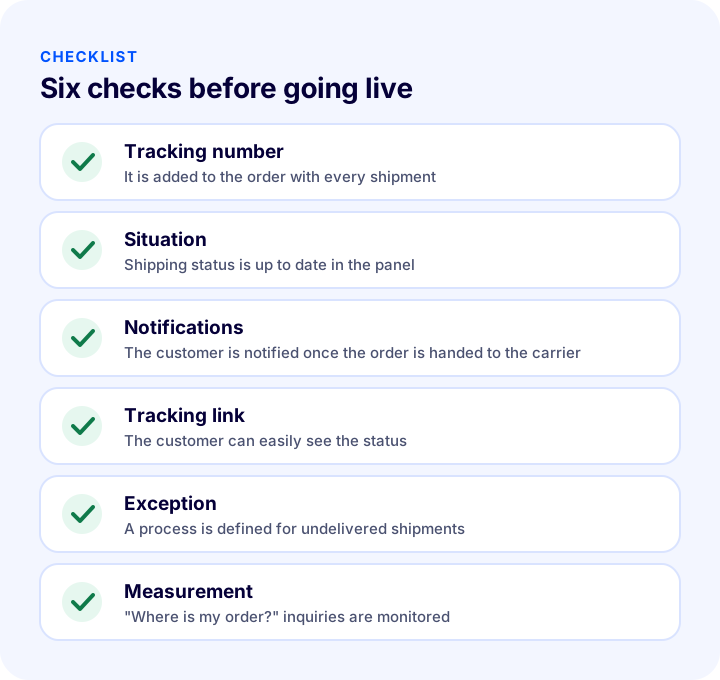
| Stage | Check | Done? |
|---|---|---|
| Tracking number | Added to the order correctly and completely for every shipment | Yes / No |
| Situation | Shipping status is up to date and filterable in the panel | Yes / No |
| Notifications | The customer is notified automatically when the order is handed to the carrier | Yes / No |
| Tracking link | The customer reaches the link from the message and from their account | Yes / No |
| Exception | A process is defined for undelivered and delayed shipments | Yes / No |
| Measurement | Location inquiries and carrier performance are monitored | Yes / No |
How Do You Manage Shipment Tracking with Faprika?
Faprika makes shipment tracking a natural part of order management. The order, shipping and customer notification move forward in the same panel. The main options are:
- Orders list: Shows order, payment and shipping status, carrier and total amount on one screen; it can be filtered by shipping status and carrier.
- Carrier integrations: The order is passed to the carrier and the tracking number is added to the order.
- Shipment tracking module: Offers additional features for shipment tracking; varies by plan.
- Push notifications: Order status notifications can be offered free of charge with Google Firebase.
- SMS integration: Lets you send information to the customer by text message.
- Order verification: Reduces wrong shipments by checking with a barcode before handing over to the carrier.
You can see which features are in which plan in the e-commerce plan comparison. You can reach carriers and related add-ons on the add-ons page.
We recommend readingWhat Is Order Verification? Guide to Verifying Orders with Barcodes Before Shipping, Cost of Wrong Shipments and Returns, Verification Methods, Cost Calculator and Setup AuditFrequently Asked Questions
What is shipment tracking?
Shipment tracking is monitoring at which stage a shipped order is until it is delivered. The carrier provides a tracking number; the store adds this number to the order, and the customer sees the package's status by number or link.
How is a tracking number added to an order?
The number can be entered by hand or arrive automatically through a carrier integration. With an integration, the order is passed to the carrier, the carrier generates the tracking number and the number is added to the order automatically. As order volume grows, the automatic route is faster and safer.
When should shipping notifications be sent to the customer?
When the order is received, handed to the carrier, out for delivery, undelivered, delivered and when a return is received. The most important moment is the "shipped" message that contains the tracking link.
How do you reduce "Where is my order?" inquiries?
You can reduce them by sending the tracking link automatically once the order is handed to the carrier, by showing order and shipping status in the member account, by stating a clear delivery time on the product page and by writing to the customer first when there is a delay.
Where can you see shipping status in Faprika?
In the Orders list in the control panel. Each order's shipping status and carrier are visible; you can search with the Awaiting Shipment, Shipped, Delivered and Undelivered filters based on shipping status.
What should be done with an undelivered shipment?
First identify the reason, inform the customer the same day, and work with the carrier on an address correction or a redelivery request. If a shipment is not resolved after a set period, start the return process and inform the customer.
You May Also Like
- E-Commerce How to Make a Shipping Agreement? A Guide to Getting Quotes, Calculating Shipping Rates and Passing Them On to Customers (2026)
- How to Write an Order Confirmation Email? A Practical Guide with Examples and Templates for Order, Shipping, Delivery and Return Transaction Emails in E-Commerce
- What Is Automatic Carrier Assignment? How to Automate Carrier Selection by Order: Scenarios, Priority Order, Cost Calculator and Needs Check
- E-Commerce Order Management: A Step-by-Step Guide from Order to Delivery