Contents 6 sections
N11, one of Turkey's most popular e-commerce platforms, offers attractive opportunities for both buyers and sellers. In this dynamic marketplace, one of the most effective tools for sellers is undoubtedly "Cart Discounts". Yet many sellers do not fully know how to use this powerful tool effectively. At Faprika, we explain in detail how you can successfully apply cart discounts on N11.
In this guide you will find all the information you need both to increase your sales and to maximize customer satisfaction. We explain the entire process step by step, from how to create a price discount and a percentage discount in the cart to campaign management. Let's discover the secrets of maximizing your sales potential on N11!
Benefits of Cart Discounts on N11 for Sellers and Buyers
Cart discounts on N11 are extra discounts offered by sellers that vary depending on the shopping amount. These discounts offer various advantages for both sellers and buyers:
Advantages for Sellers:
- Attracting Customers: Cart discounts are an effective way to attract customers with appealing offers.
- Increased Sales and Revenue: Discounts increase sales and raise your overall revenue.
- Brand Awareness: Discounts help your brand become better known and remembered.
- Competitive Advantage: By standing out from your competitors, you can get a step ahead in the market.
Advantages for Buyers:
- Affordable Prices: Thanks to cart discounts, buyers have the chance to shop more economically.
- Budget Protection: Lower costs help buyers protect their budgets.
- Product Variety: Discounts let buyers discover a variety of products.
- Earning N11 Points: There is also the opportunity to collect N11 points on purchases.
Cart Discount Types
On N11, you can define two types of cart discounts:
- Price Discount in the Cart
- Percentage Discount in the Cart
Both discount types can be customized to suit your store's sales strategy. We will detail the steps for defining cart discounts effectively in the next section.
Price Discount in the Cart
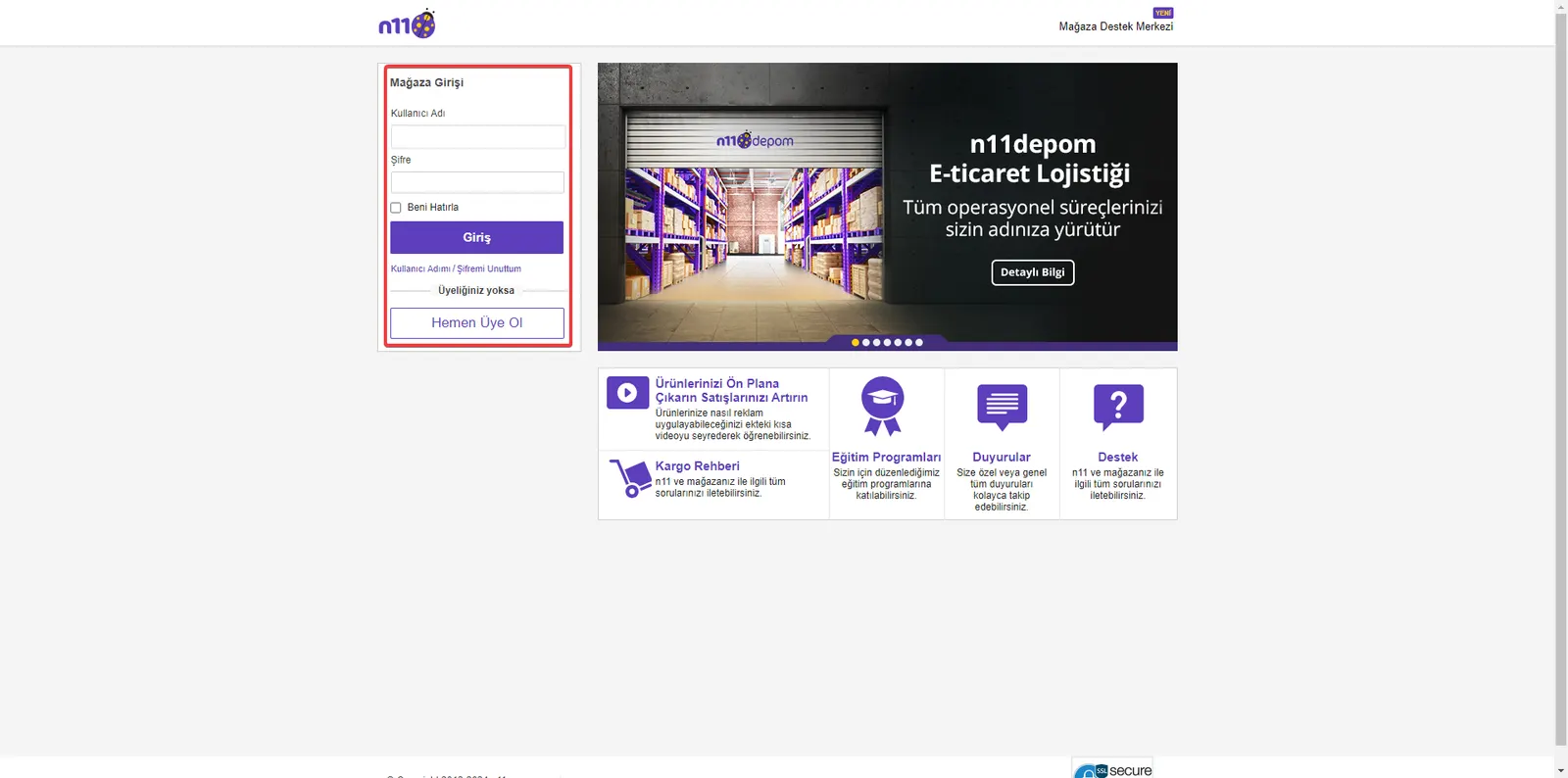
1. Log In to the Store Management Panel
As the first step, log in to your N11 store management panel with your username and password.
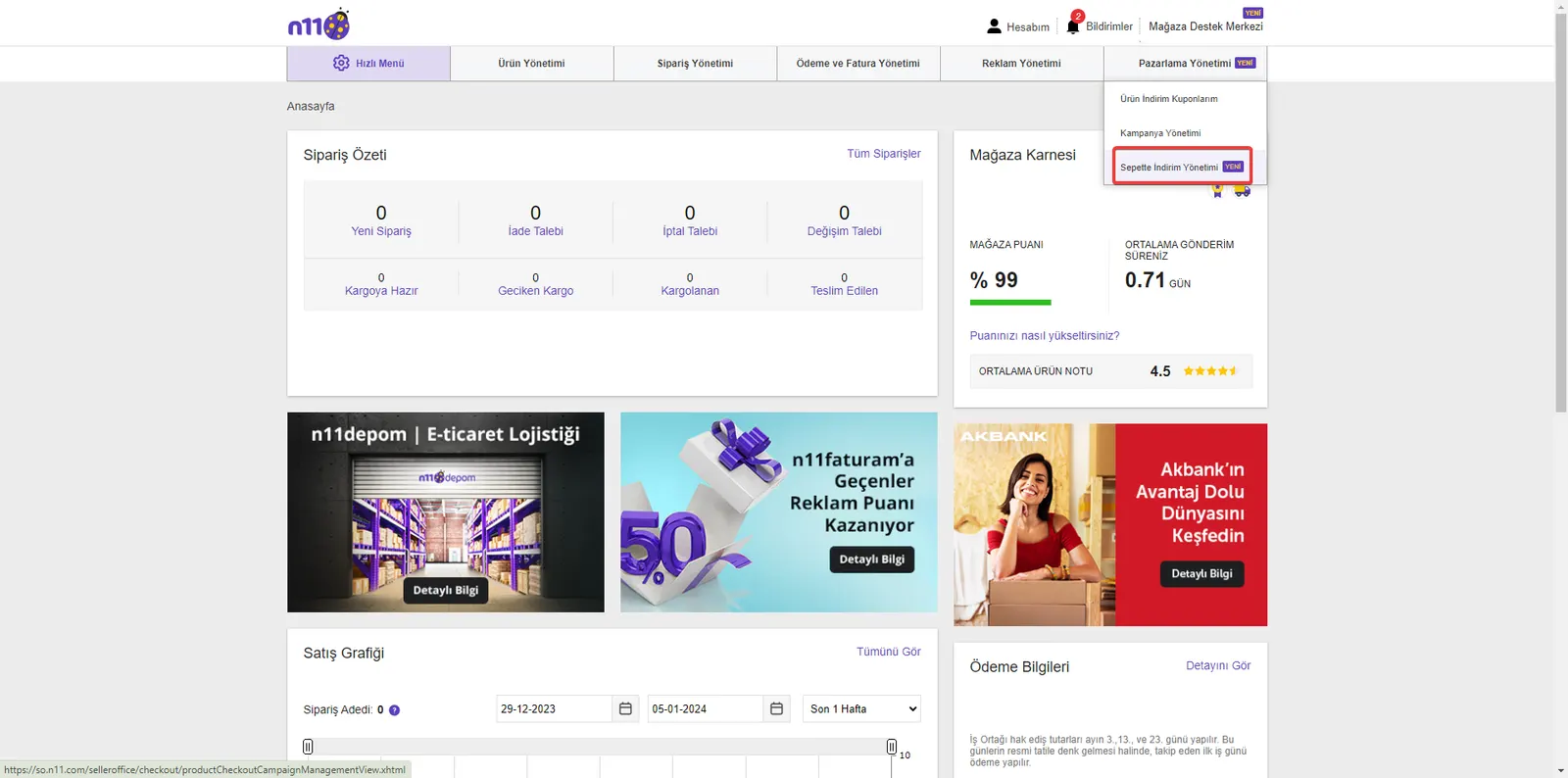
2. Marketing Management
From the "Marketing Management" menu in your store management panel, go to the "Cart Discount Management" page. From here, you can also access other marketing tools on N11.
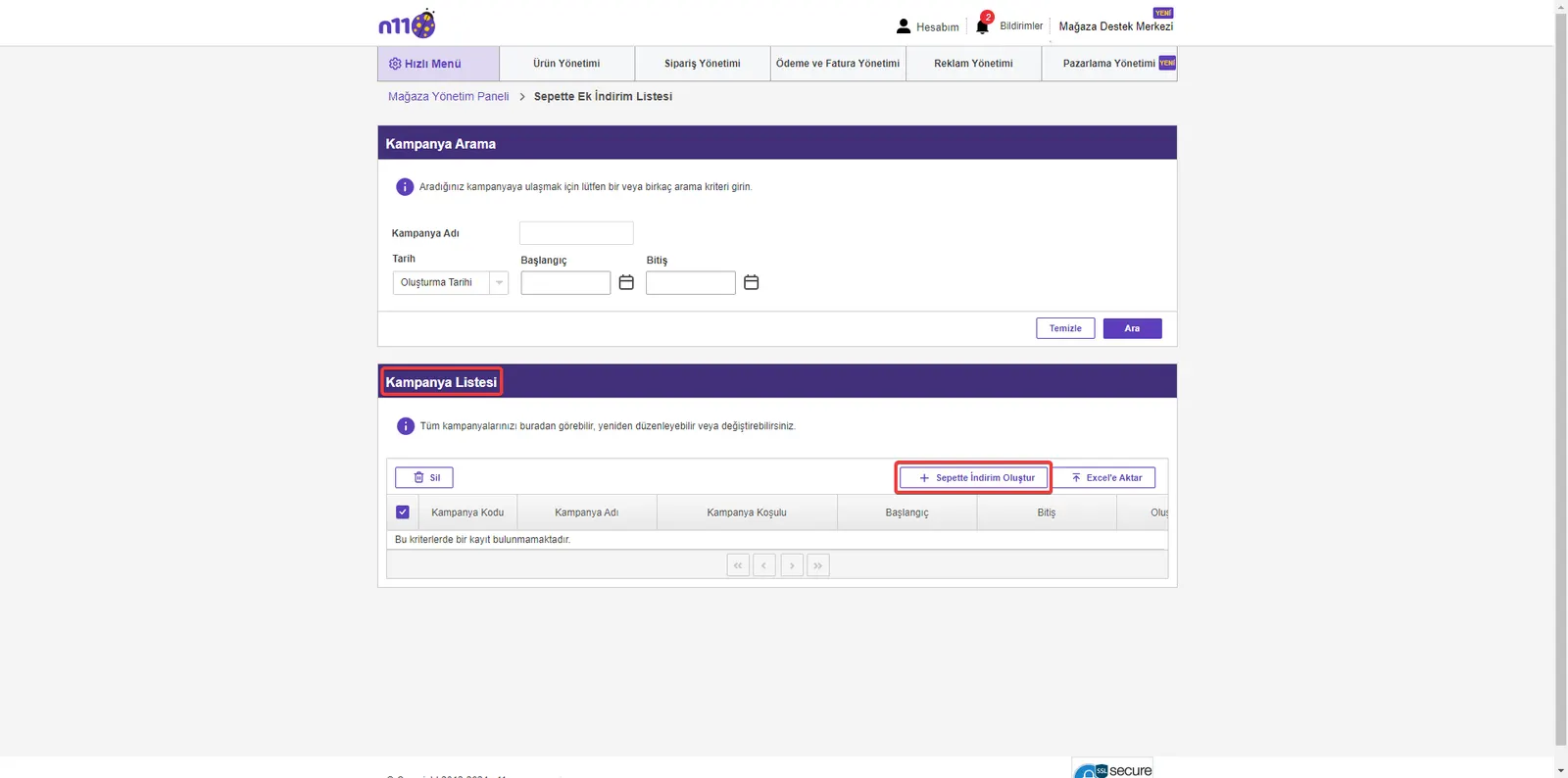
3. Create a Cart Discount
When you enter the "Cart Discount Management" page, you will see the "Create Cart Discount" button. Click this button to start the discount creation process.
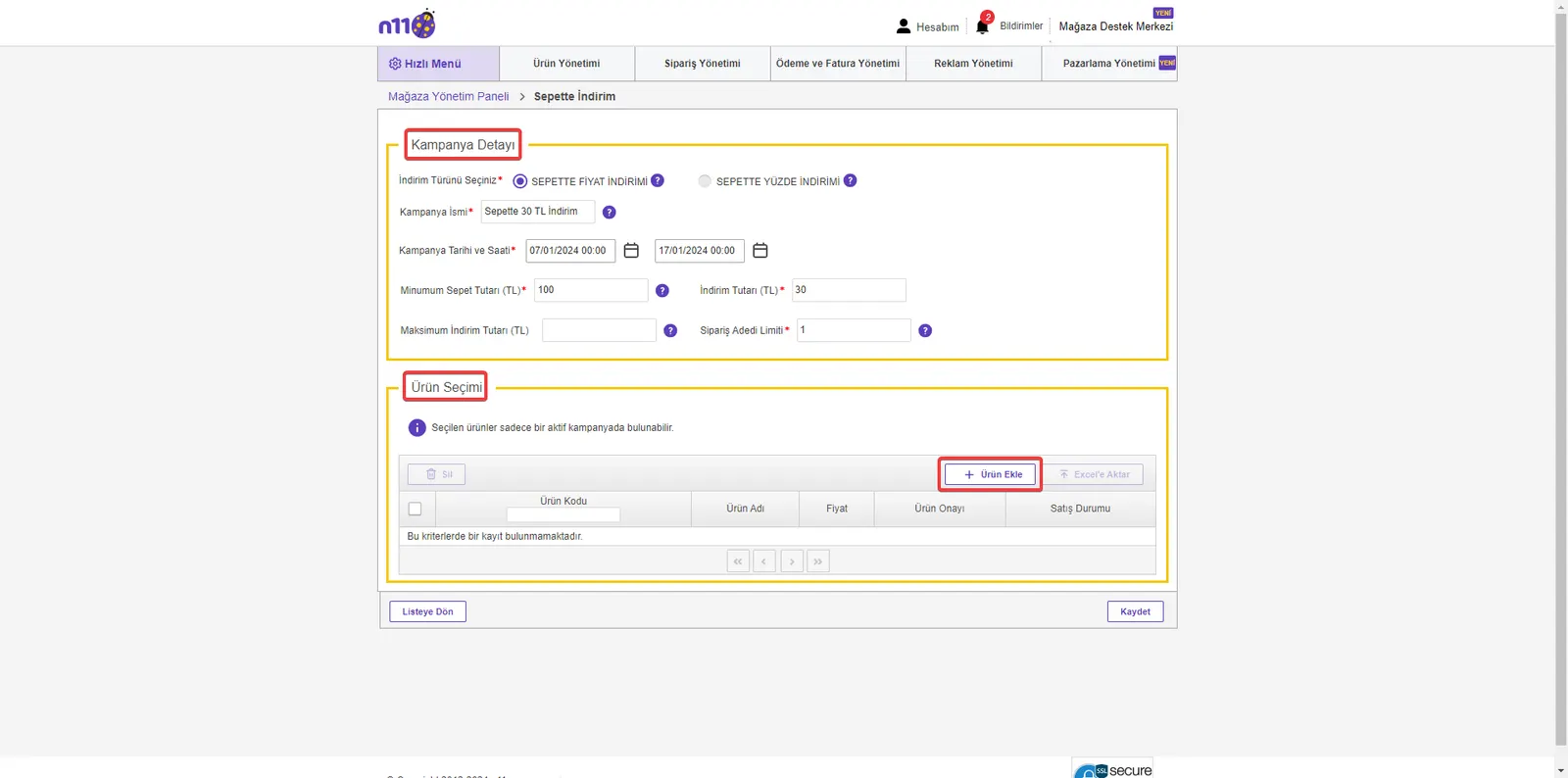
4. Entering the Campaign Details
Sample Scenario for a Price Discount in the Cart
Points to Watch When Creating a Campaign:
- Campaign Details Screen: After you move to the cart discount creation screen, carefully enter the details required for your campaign.
Sample Discount Scenario:
- Discount Type: PRICE DISCOUNT IN THE CART
- Campaign Name: 30 TL Off in the Cart
- Campaign Date and Time: 07/01/2024 00:00 – 17/01/2024 00:00
- Minimum Cart Amount (TL): 100
- Discount Amount (TL): 30
- Maximum Discount Amount (TL): EMPTY (You can leave this field empty)
- Order Quantity Limit: 1
In this example, you are creating a campaign in which your customers get a 30 TL discount when their cart amount is 100 TL or more. So if a customer's cart is 300 TL, the amount they will pay after the discount will be 270 TL.
- Adding Products: After entering the campaign details, use the "Add Product" button to select the products to be included in the campaign. This step is important for determining which products your campaign will cover.
5. Adding Products to the Campaign
Adding products to the campaign you created is a vital step for the effectiveness of the campaign.
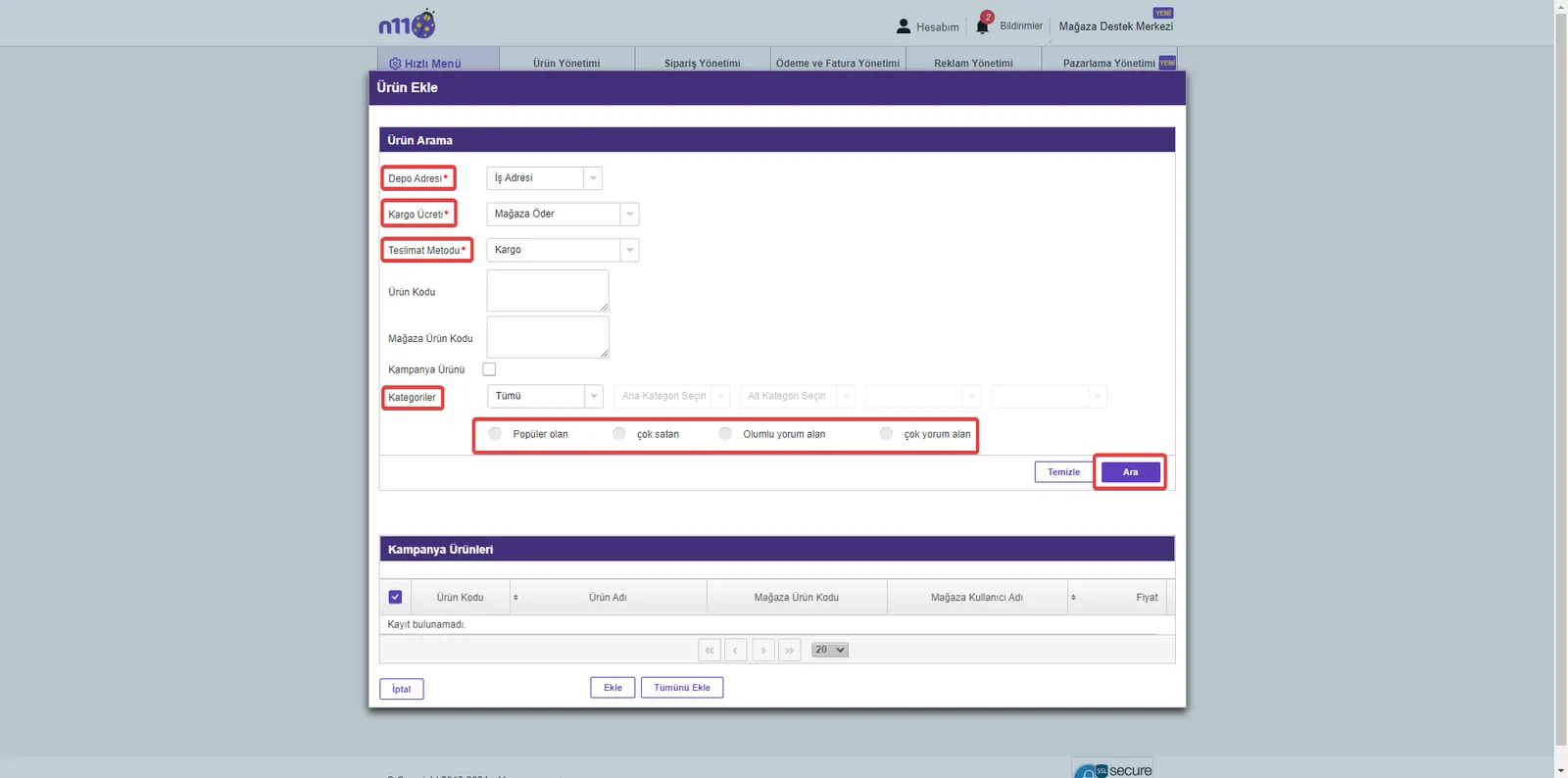
Finding and Selecting Products:
- Find the products you want to include in the campaign you created by using the filtering and search functions.
- After clicking the Search button, add these products to your campaign by selecting individually or in bulk from the listed products.
Saving:
- After you complete adding products, confirm all the changes by clicking the 'Save' button that appears on the screen. This step ensures that the products you added are successfully included in the campaign.
6. Searching and Managing Campaigns
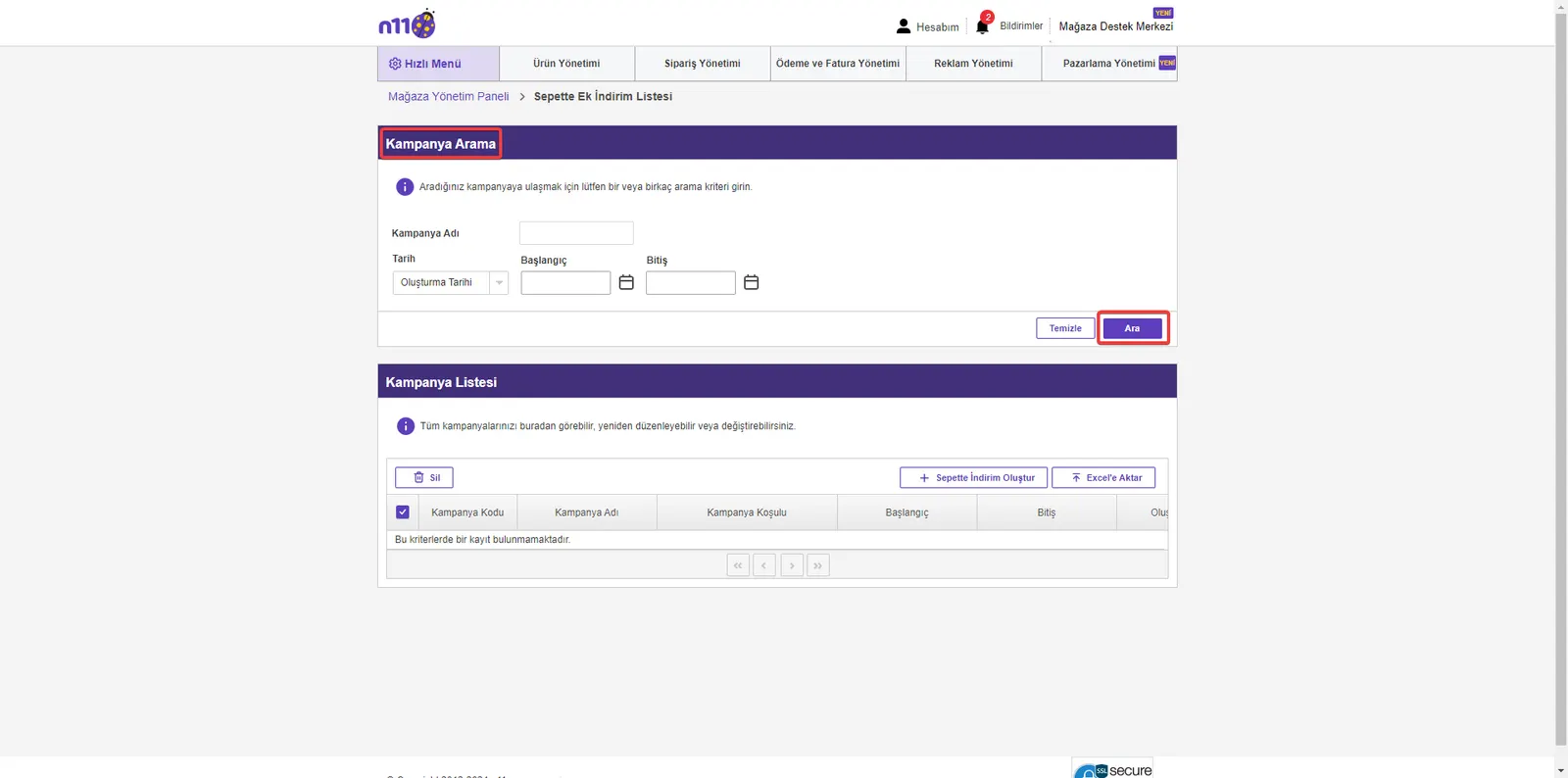
If you have created more than one campaign, you can use the Campaign Management section to manage and track these campaigns.
Finding and Managing Campaigns:
- Go to the 'Campaign Search' part of the Campaign Management area.
- From here, you can easily find and manage the campaign you want with the filtering and search functions.
Percentage Discount in the Cart
1. Log In to the Store Management Panel:
- Log in to your N11 store management panel with your username and password.
2. Accessing Marketing Management:
- In the management panel, go to the "Marketing Management" menu and select the "Cart Discount Management" page from there.
- Under this menu, you can also reach the various marketing tools on N11.
3. Creating a Cart Discount:
- On the "Cart Discount Management" page, start the process of creating a percentage-based discount by clicking the "Create Cart Discount" button.
4. Campaign Details and Adding Products
Moving to the Campaign Details Screen:
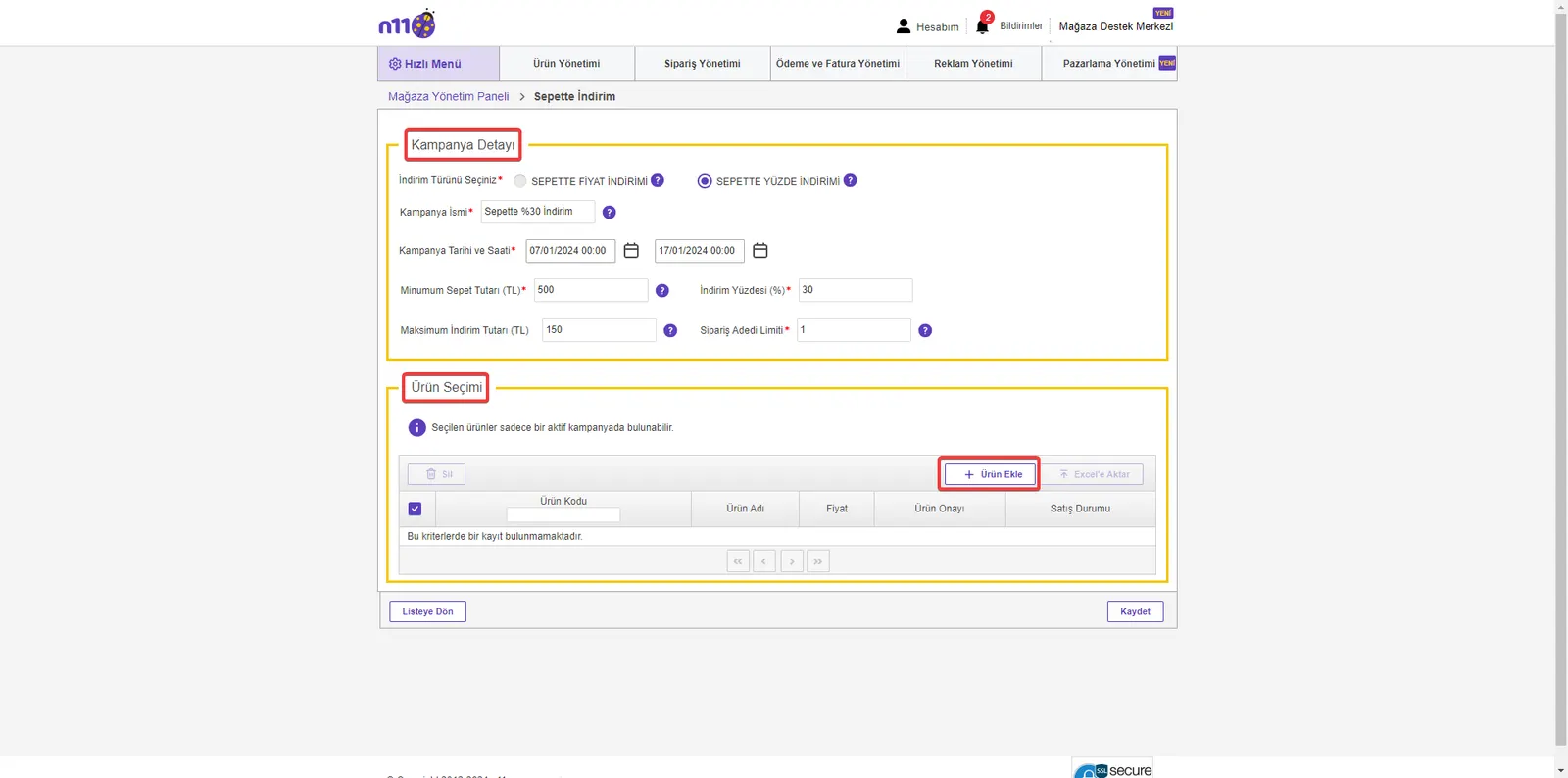
- After you move to the cart discount creation screen, carefully enter the details required for the campaign.
Sample Discount Scenario:
- Discount Type: PERCENTAGE DISCOUNT IN THE CART
- Campaign Name: 30% Off in the Cart
- Campaign Date and Time: 07/01/2024 00:00 – 17/01/2024 00:00
- Minimum Cart Amount (TL): 500
- Discount Percentage: 30%
- Maximum Discount Amount (TL): 150
- Order Quantity Limit: 1
In this scenario, you are creating a campaign in which your customers get a 30% discount on purchases of 500 TL or more. However, the maximum discount amount is limited to 150 TL. For example, a customer's cart of 600 TL, which should come to 420 TL with the discount, will instead come to 450 TL because of the maximum discount limit.
Adding Products:
- After entering the campaign details, use the "Add Product" button to select the products to be included in the campaign.
- Find the products by searching and filtering, and select them individually or in bulk.
- After you complete adding products, confirm all the changes by clicking the 'Save' button that appears on the screen.
5. Campaign Management and Tracking
Campaign Search Operations:
- If you have created more than one campaign, go to the "Campaign Management" area to manage and monitor these campaigns.
- By reaching the "Campaign Search" section, you can easily find the campaigns you want using the filtering tools here and the "Search" button.
- This section lets you view all the campaigns you have created and intervene quickly when necessary.
Increase Your Sales with Cart Discounts on N11
We have reached the end of this guide. We have explained step by step how you can use cart discounts effectively on N11. Remember, cart discounts encourage your customers to buy more and can help you both expand your sales volume and increase customer satisfaction. By applying this strategy, you can significantly improve the performance of your store on N11.
Using cart discounts effectively on N11 creates a win-win situation for sellers and buyers. Sellers increase brand awareness, while buyers enjoy shopping at attractive prices. This guide aims to show you how to set up cart discounts and how to manage your campaigns.
If you need more information on this topic or have other questions, do not hesitate to contact us. All the information you need to increase your sales with cart discounts on N11 is here. At Faprika, we are always ready to support you on your e-commerce journey. We wish you continued success!
Frequently Asked Questions (FAQ)
What Is a Cart Discount on N11 and How Does It Work?
A cart discount on N11 is an extra discount that sellers apply automatically once a certain shopping amount is reached. These discounts vary with the total amount in the customer's cart and make the shopping experience more attractive.
What Are the Advantages of Cart Discounts on N11 for Sellers?
Cart discounts help sellers attract customers, increase their sales, strengthen brand awareness, and gain a competitive advantage. They also contribute to long-term success by increasing customer loyalty.
Is There a Minimum Cart Amount for Applying a Cart Discount on N11?
Yes, you need to set a minimum cart amount in order to apply a cart discount. This amount may vary depending on the campaign type and the seller's own strategy.
How Do Customers See Cart Discounts?
When customers add products to their carts and reach a certain amount, they see cart discounts automatically in the cart summary. By making the shopping process more attractive, these discounts positively influence the customer's purchase decision.
Can I Set a Maximum Discount Amount for a Cart Discount on N11?
Yes, you can set a maximum discount amount when creating cart discounts. This lets you keep the cost of the campaign under control and manage your discount strategy more effectively.
Which Products Can Cart Discounts Be Applied To?
Cart discounts can be applied to the products the seller selects. Sellers can customize which products are included in the campaign, so they can highlight certain products or quickly sell off excess stock.
How Can I Track Cart Discount Campaigns on N11?
You can track all your campaigns and make the necessary adjustments from the 'Campaign Management' section of the N11 store management panel. This tool lets you measure your campaign performance and make adjustments if needed.