

Contents 15 sections
- What Is a Meta Description?
- What Is a Page Title (Title Tag) and How Does It Differ from the Meta Description?
- Does the Meta Description Affect Rankings?
- How Long Should a Meta Description Be?
- What Makes a Good Meta Description?
- In E-Commerce, How Do You Write a Meta Description by Page Type?
- What Are Examples of Good and Bad Meta Descriptions?
- Why Are Duplicate and Empty Meta Descriptions a Problem?
- Why Does the Search Engine Change My Meta Description?
- How Do You Generate Meta Descriptions in Bulk for Thousands of Products?
- How Do You Measure the Impact of a Meta Description?
- What Are Common Meta Description Mistakes?
- Meta Description Checklist
- Managing Titles and Meta Descriptions with Faprika
- Frequently Asked Questions
In search results, a small two-line text appears under your store’s address. Customers often read this text before opening the page and decide within a few seconds whether to click. In most cases, the source of that text is the meta description. A store with thousands of product pages that are empty, repetitive or filled with meaningless sentences like “Click for product details” wastes this small shop window every single day.
In this guide, we answer the question how to write a meta description from an e-commerce perspective: what the meta description and the page title (title tag) are, how they appear in search results, whether they affect rankings or clicks, which principles work for length and keywords, ready-made template formulas and examples for product, category and blog pages, duplicate and empty descriptions, bulk generation, measurement and common mistakes. At the end you will find how to manage titles and descriptions with Faprika, a checklist and a six-question FAQ.
What Is a Meta Description?
A meta description is an HTML tag that briefly summarizes a page’s content and is written in the head section of the page. Search engines may show this text as a description under the page title in the results list.
The simplest form of the tag looks like this:
<meta name="description" content="Erkek spor ayakkabı modellerini inceleyin; numara ve renk seçenekleri, ücretsiz iade ve hızlı kargo ile sipariş verin.">Visitors do not see this tag on the page; they only encounter it in search results and sometimes in share previews. One important detail to keep in mind: the search engine does not have to show the meta description as it is. If it finds another section of the page more relevant to the search term, it may extract a snippet from there instead. So the meta description is not a guarantee but a strong offer; yet not making the offer means leaving the choice entirely to someone else.
What Is a Page Title (Title Tag) and How Does It Differ from the Meta Description?
The page title is the text that names the page and is written with the title tag; it appears as the blue clickable line in search results and in the browser tab. The meta description, on the other hand, is the short summary text under that title.
The two sit side by side in the search result and are read together. The title answers “what is this page?” and the description answers “why should I click?”. The title carries the keyword and the topic of the page; the description adds the details of that topic, the benefit and the call to action. So the two fields should not repeat each other but complement each other.
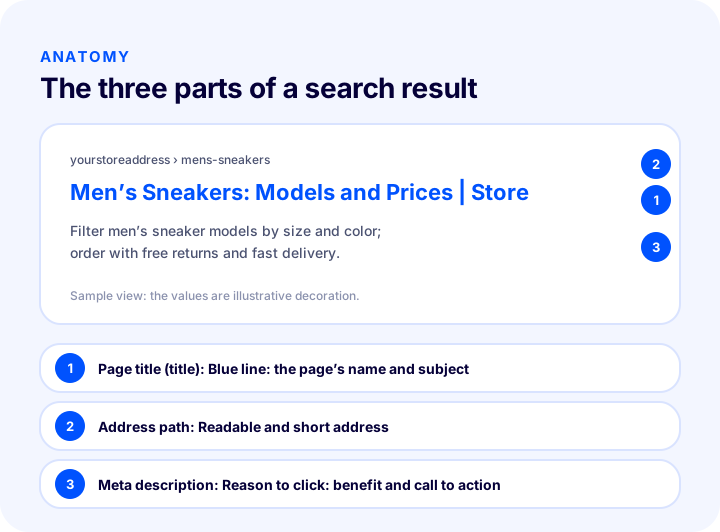
The diagram shows the search result of a product category. The first marker points to the page title, the second to the URL path and the third to the meta description. The table below summarizes what the three fields do and how to write them.
| Field | Role | How is it written? |
|---|---|---|
| Page title (title) | The name and topic of the page | Keyword first, short, brand name at the end |
| Address (URL) | The path of the page | Readable, short, meaningful words |
| Meta description | Reason to click | 1–2 sentences with a benefit, proof and call to action |
Does the Meta Description Affect Rankings?
According to the general consensus, the meta description is not a direct ranking factor; however, by explaining what the page offers in the search result, it influences the decision to click. In other words, it does not raise your ranking, but it increases your chance of turning the visibility you get into visits.
Think of it this way: two stores are listed side by side for the same search. One description clearly states the product range, the return policy and the delivery advantage; the other is empty or a sentence randomly cut from the top of the page. Even if their rankings are the same, the visitor is more likely to click the first. As the click-through rate rises, the same visibility brings more visitors, which is a gain that requires no additional ad budget.
A balance is also needed with keywords. When the searched word appears in the description, the search engine may show it in bold; this makes it easy to see at a glance that the result is relevant to the search. But turning the description into a keyword list makes it unreadable and reduces trust. Using the keyword once or twice within a natural sentence is enough.
How Long Should a Meta Description Be?
As a common industry rule of thumb, a meta description is kept at about 150–160 characters; the key principle is that it is “short, complete and not truncated”. There is no strict limit: the displayed length varies with the device, the screen width and the search engine’s current layout.
So instead of treating the character count as the only target, look at these principles:
- Put the most important information first. Even if the text is cut at the end of a sentence, the first half should make clear what the product is, what you offer and the call to action.
- Do not leave unfinished sentences. When the description is truncated, it should still read meaningfully; do not leave critical information at the end.
- Think of the phone screen. Less text is visible on narrow screens; keeping the first sentence strong is especially important.
- Do not pad. Adding unnecessary words just so the field is not empty is always weaker than a short, clear description.
A similar logic applies to the page title: as a general rule, aim for about 50–60 characters, put the keyword first and add the brand name at the end. When a title gets too long, its end is cut off and the brand name or an important word may not be visible.
| Field | General rule of thumb | Key principle |
|---|---|---|
| Page title | About 50–60 characters | Keyword first, brand at the end |
| Meta description | About 150–160 characters | The first sentence should carry the whole message |
These values are approximate measures commonly used in the industry; they are not a rule or a guarantee. When writing the text, use readability and completeness as your yardstick, not length.
What Makes a Good Meta Description?
A good meta description clearly states what the page offers, includes the searched word naturally, shows the visitor a benefit and ends with a call to action. It is unique for every page.
1. Describe the real content of the page
The description must not promise something that is not on the page. Instead of claims you cannot verify, such as “lowest price”, write the real information on the page (product range, options, delivery and return terms). A visitor who finds what was expected stays on the page.
2. Use the keyword naturally
The main keyword should appear once in the first half of the description, within a natural sentence. Repeating the same word hurts readability and gives an impression of spam.
3. Add a benefit and proof
The visitor looks for the answer to “why this store?”. A benefit that genuinely exists on the page (such as easy returns, fast delivery, size options or installment plans) and, if you have it, concrete proof make clicking easier. Write only information that is actually valid in your store.
4. End with a call to action
A short action word such as “explore”, “discover”, “compare” or “order” shows the visitor the next step. Choose a simple call instead of exaggerated or pushy language.
5. Be unique
Repeating the same description on hundreds of pages makes the pages indistinguishable from each other in search results. Every page should carry at least one distinguishing piece of information specific to its own product or topic.
In E-Commerce, How Do You Write a Meta Description by Page Type?
In e-commerce, product, category, blog and home pages each answer a different search intent; that is why a separate description formula is used for each type. A formula makes writing one by one easier and ensures consistency across thousands of pages.
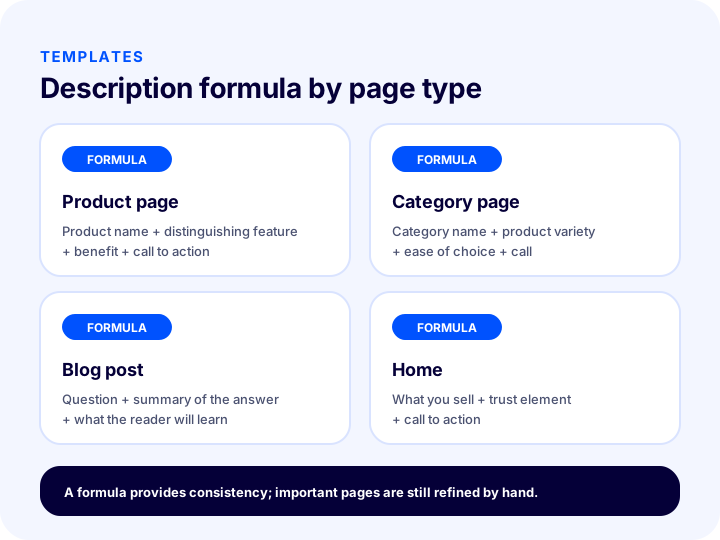
The table below also gives the formulas from the diagram as text:
| Page type | Description formula | Information to highlight |
|---|---|---|
| Product page | Product name + distinguishing feature + usage benefit + call to action | Material, options, delivery, returns |
| Category page | Category name + product range + ease of choice + call to action | Model variety, filters and comparison options |
| Blog post | Question + summary of the answer + what the reader will learn | The promise and scope of the article |
| Home | What the store sells + trust element + call to action | What sets the store apart |
Example for a product page
The product page is the page type that needs the most descriptions written, so the formula helps most here. Combine the product name, a feature that sets the product apart from others, and a benefit:
Deri Cüzdan, el yapımı dikiş ve 8 kartlık bölme ile günlük kullanıma uygun. Renk seçeneklerini inceleyin, hızlı kargoyla kapınıza gelsin.In this example the product name comes first, two distinguishing features are given, and the call to action is placed at the end. Numbers such as “8-card compartment” must match the real product information on the page exactly.
Example for a category page
Category pages answer a general search intent (“men’s sneakers”). The description should highlight the variety of models and the features that make choosing easier:
Erkek spor ayakkabı modellerini numara, renk ve kullanım amacına göre filtreleyin. Koşu, günlük ve yürüyüş seçeneklerini tek sayfada karşılaştırın.Example for a blog post
A blog description should repeat the question of the post and give a summary of the answer. If the reader sees what they will learn, there is a reason to click:
Kargo takip numarası nedir ve nereden bulunur? Sipariş sonrası takip adımlarını ve gecikme durumunda yapılacakları kısaca öğrenin.Example for the home page
The home page description says who the store is and what it stands out for:
Doğal cilt bakım ürünleri, içerik bilgisi açık ve iade koşulları net. Kataloğu inceleyin, ilk siparişinizi kolayca verin.What Are Examples of Good and Bad Meta Descriptions?
A bad meta description is empty, meaningless, repetitive or a pile of keywords; a good description gives the topic of the page, its benefit and the call to action in one short sentence. Seeing the difference side by side is the fastest way to learn.
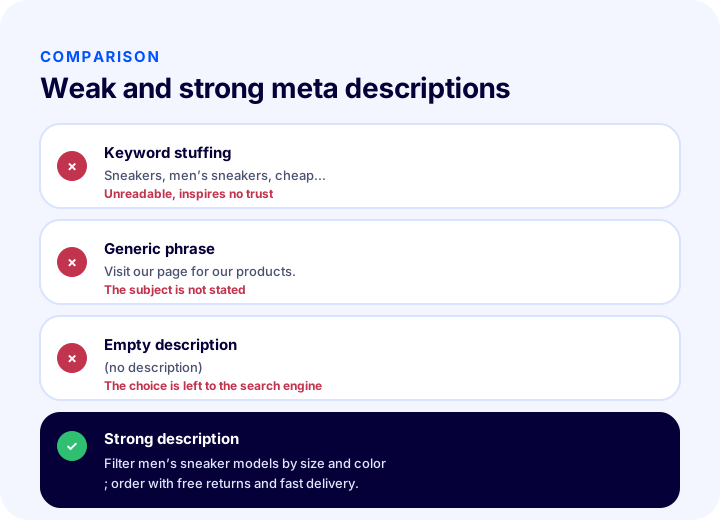
| Type | Example | Problem or strength |
|---|---|---|
| Bad: keyword stuffing | Sneakers, men’s sneakers, cheap sneakers, sneaker models | Unreadable, builds no trust, says nothing |
| Bad: generic phrase | Visit our page for our products. | Does not state the topic, stays the same on every page |
| Bad: empty | (no description) | The choice of text is left entirely to the search engine |
| Good | Filter men’s sneaker models by size and color; order with free returns and fast delivery. | Topic, benefit and call in one sentence |
Phrases such as “free returns” and “fast delivery” should only be written if they genuinely apply to your store; the examples are for illustration. A false promise may bring clicks, but it creates disappointment on the page.
Why Are Duplicate and Empty Meta Descriptions a Problem?
A duplicate description means the same text is used on several pages; a missing description means none was written at all. Both keep your pages from standing out from one another in search results and leave the choice of snippet to the search engine.
In e-commerce, the typical cause is template laziness. The same default sentence is applied to all products, or the field is left empty for newly added products. As a result, hundreds of product pages appear in search results with the same description, and visitors cannot tell which is which. Automatic snippets picked from the page, in turn, often turn out to be menu text or a sentence unrelated to the product.
| Problem | Result | Solution |
|---|---|---|
| The same description on all products | Results can’t be told apart | A template with the product name and feature |
| No description at all | The search engine picks a random snippet from the page | A default template for each page type |
| Category and product descriptions are identical | Search intents get mixed up | A separate formula for each type |
| The same text on pagination pages | Second and later pages can’t be told apart | A separate, short description or one that includes the page number |
To find duplicate descriptions, you can use an SEO tool that crawls your site or the title and description reports in your search engine management tool; these reports often list repeated, missing and overly long fields. Start with the pages that get the most traffic.
Why Is the Search Engine Changing My Meta Description?
Search engines may show a snippet from another part of the page instead of the meta description if that part seems more relevant to the search term. This is not a bug; it is normal behavior.
Common causes include: the description being empty or very short, the search term not appearing in the description, the description not matching the page content, or the same text being repeated across many pages. Bringing the description closer to the page topic and the search naturally increases the chance that your own text is shown, but it never gives a guarantee.
Don’t get stuck on a description that was replaced. First align the page’s title, first paragraph and description around the same topic; then check again after a few weeks. If even an unchanged description does its job, that is, the click-through rate is sufficient, there is no problem.
How to Bulk-Generate Meta Descriptions for Thousands of Products
In large catalogs, meta descriptions are generated in bulk with templates built from fields such as product name, category and key attributes; then the most important pages are refined by hand. The template ensures consistency; manual edits add distinctiveness.
- Separate page types. Write separate templates for product, category, brand, blog and static pages.
- Build the template with data. Insert fields such as product name and category name into the template: “Explore the features, options and delivery information for {product name}.” Rather than leaving the template on its own, use at least one distinguishing field for each type.
- Identify products with missing data. For products whose attributes or description are empty, the template produces meaningless output; fill in these fields first.
- Write priority pages by hand. Carefully write by hand the descriptions of the pages that get the most traffic or earn the most revenue.
- Report and update. Regularly check which pages have missing, repeated or overly long descriptions.
Be careful if you put campaign or price information in the description: when that information changes, the description goes stale and misleads the visitor. It is safer to highlight lasting benefits (variety, options, returns, delivery terms) rather than constantly changing information.
We recommend readingWhat Is Structured Data?How Do You Measure the Impact of a Meta Description?
The impact of a meta description is measured by looking at the click-through rate (clicks per impression) by page and query in the performance report of your search engine management tool. After changing a description, track the trend in that page’s click-through rate.
There are a few points to watch when measuring:
- Look at page groups, not a single page. Drawing conclusions from pages with only a few clicks is misleading; track the trend across groups of similar pages (e.g. all category pages).
- Allow time. Before the search engine recrawls the page and shows the new description, the old text may remain in the results. Compare after a few weeks.
- Make a single change. If you change the title, description and content at the same time, you can’t know which one had an effect.
- Track rankings too. Click-through rate varies with ranking position; if rankings are dropping, the change in click-through rate may not come from the description.
If the measured result isn’t moving in the direction you expected, compare the description with the page’s actual search queries: what words do people use to reach the page, and does the description answer that intent? Most of the time, the fix is to bring the description closer to the search intent.
What Are Common Meta Description Mistakes?
Common mistakes are leaving the description empty, using the same text on every page, stuffing keywords, making promises unrelated to the page, and making the title and description repeat each other.
- Not writing a description at all. Leaving the choice entirely to the search engine means missing the chance to tell visitors what you offer.
- Using the same text on all pages. The pages end up indistinguishable in the results.
- Stuffing keywords. It is unreadable, untrustworthy and often ineffective.
- Promising something that isn’t on the page. Even if you get the click, the visitor leaves right away because you didn’t meet their expectation.
- Repeating the title word for word. The description should add new information to the title.
- Writing too long. In a truncated description, the call to action can be lost.
- Struggling with quotation marks and special characters. Using double quotes inside the description can break the tag; prefer plain language.
- Leaving outdated information. An old campaign or an out-of-stock option misleads visitors for as long as it stays in the description.
Meta Description Checklist
Running a meta description through an eight-question checklist before publishing catches most mistakes from the start. The list below applies to product, category and blog pages alike.
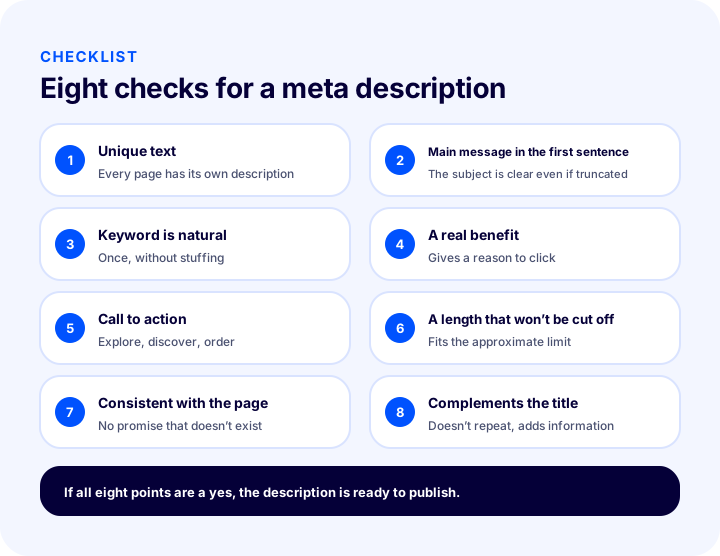
| # | Check | What happens if it’s wrong? |
|---|---|---|
| 1 | Every page’s description is unique | Results can’t be told apart |
| 2 | Main message in the first sentence | The topic isn’t clear in truncated text |
| 3 | The main keyword appears naturally | The result looks unrelated to the search |
| 4 | There is a real benefit | No reason to click is created |
| 5 | There is a call to action | The visitor isn’t shown a next step |
| 6 | Length is about right and won’t be truncated | The call or key information isn’t visible |
| 7 | Matches the page’s real content | The visitor leaves immediately |
| 8 | Complements the title instead of repeating it | The field’s value is wasted |
You can use the checklist the same way both when adding new pages and when auditing existing ones.
Title and Meta Description Management with Faprika
In the Faprika e-commerce platform, page title and meta description fields are managed in the store’s SEO settings. According to the SEO settings guide in the Help Center, in the control panel under Configuration, Settings, General Settings, the SEO section contains the default page title, page title template, page title separator and default meta description fields; the same section also includes an option that automatically generates meta descriptions for products.
The same guide also covers editing at product and category level: in the SEO Information field of a product under Catalog, Product Management, you can use automatic field tags such as product name, stock code, sales price and list price; in Category Management there is a tag for the category name. This lets you produce consistent titles and descriptions with a template approach, without writing each one individually. Having separate meta description and page title fields at product, category and brand level lets you apply this guide’s “formula by page type” approach directly.
The plan feature comparison also includes “Bulk Automatic SEO/Meta Information Update” and “SEO Reports” rows. Which plan includes these features can vary by plan; for the current scope, see the e-commerce plans page. To set up titles, descriptions and canonical settings together across the store, the how to configure e-commerce SEO settings guide, and for repeated URLs the what is the canonical tag article, will help you. To enrich search results with extras such as stars, price and stock, see the structured data guide.
We recommend readingE-Commerce Product Page: What Should It Look Like?Frequently Asked Questions
How to write a meta description?
A meta description is written as a short text that is unique to each page: it states clearly what the page offers, includes the main keyword naturally, shows a benefit and ends with a call to action. Put the most important information in the first sentence and avoid promising anything the page does not deliver.
Does the meta description affect rankings?
It is generally accepted that the meta description is not a direct ranking factor. However, because it explains what the page offers in the search result, it influences the decision to click; it can help you get more visitors from the same visibility.
How long should a meta description be?
The common rule of thumb in the industry is about 150–160 characters, but there is no strict limit; the displayed length varies with the device and the search engine’s layout. The key principle is that the description is short, complete and understandable from its first sentence even if it gets truncated.
Is it necessary to write a different meta description for every page?
Yes, wherever possible. Using the same description on every page makes the results impossible to tell apart. If you have thousands of products, you can set up a template that includes the product name and a distinguishing feature; important pages should be written by hand.
Why does my meta description look different in search results?
If another section of the page seems more relevant to the search term, the search engine may show a snippet from that section instead of your meta description. This happens more often when the description is empty, too short or inconsistent with the page content. Aligning the title, the first paragraph and the description around the same topic helps.
How do I measure the impact of a meta description?
You measure it by tracking the click-through rate by page and query in the performance report of the search engine’s webmaster tool. After a change, wait a few weeks, look at groups of similar pages rather than a single page, and take care not to make any other change at the same time.